

Custom CSS for Elementor
This plugin helps you push custom CSS in any native Elementor widget, solving style control limitations.

Escolha segura
Yes — Custom CSS for Elementor is a safe, well-maintained plugin to use in 2026. It runs on 5K+ sites, is rated 4.1/5 and was last updated 3 weeks ago, and scores 84/100 on our health check.
- Desenvolvido ativamente — última atualização 3 semanas atrás
- Testado com as últimas WordPress (7.1)
- Momentum — downloads up 629% vs the previous 30 days
- Precisa de PHP 8.2 ou mais recente
Como ele se acumula?
Lado a lado em instalações, atualizações, avaliações e suporte


Downloads diários
Os picos de download geralmente seguem uma nova versão — cada site que atualiza automaticamente é um download.
Rankings
Where Custom CSS for Elementor stands todayWordPress.org Classificações de pesquisa
Posição ao vivo na pesquisa de plugins, top 100| Palavra chave | Posição |
|---|---|
| css | #7 |
| custom css | #4 |
| Elementor | #50 |
| elementor addons | #56 |
| responsive css | #2 |
Adoção da versão
Compartilhamento de sites ativos por lançamento.
Divisão de classificação
★★★★★★★★★★ 4.1 from 10 reviews
About Custom CSS for Elementor
From the official readme · v2.2.1Descrição
Custom CSS for Elementor is a handy tool for writing CSS codes within different devices like Desktops, Tablets & Mobile for Elementor Widgets. It will help you to not bother with writing media queries several times. Custom CSS for Elementor plugin comes with the default media query system.
See the plugin’s GitHub repository Custom CSS for Elementor
📢 Big Announcement –
After getting several requests we have added live preview mode while styling with CSS. Now you can see the reflection instantly. No hassle of continual preview checks in the front end.
Enjoy styling with CSS without any hassle.
Required Tools
- Elementor Free Only
📘 How to Use Custom CSS for Elementor
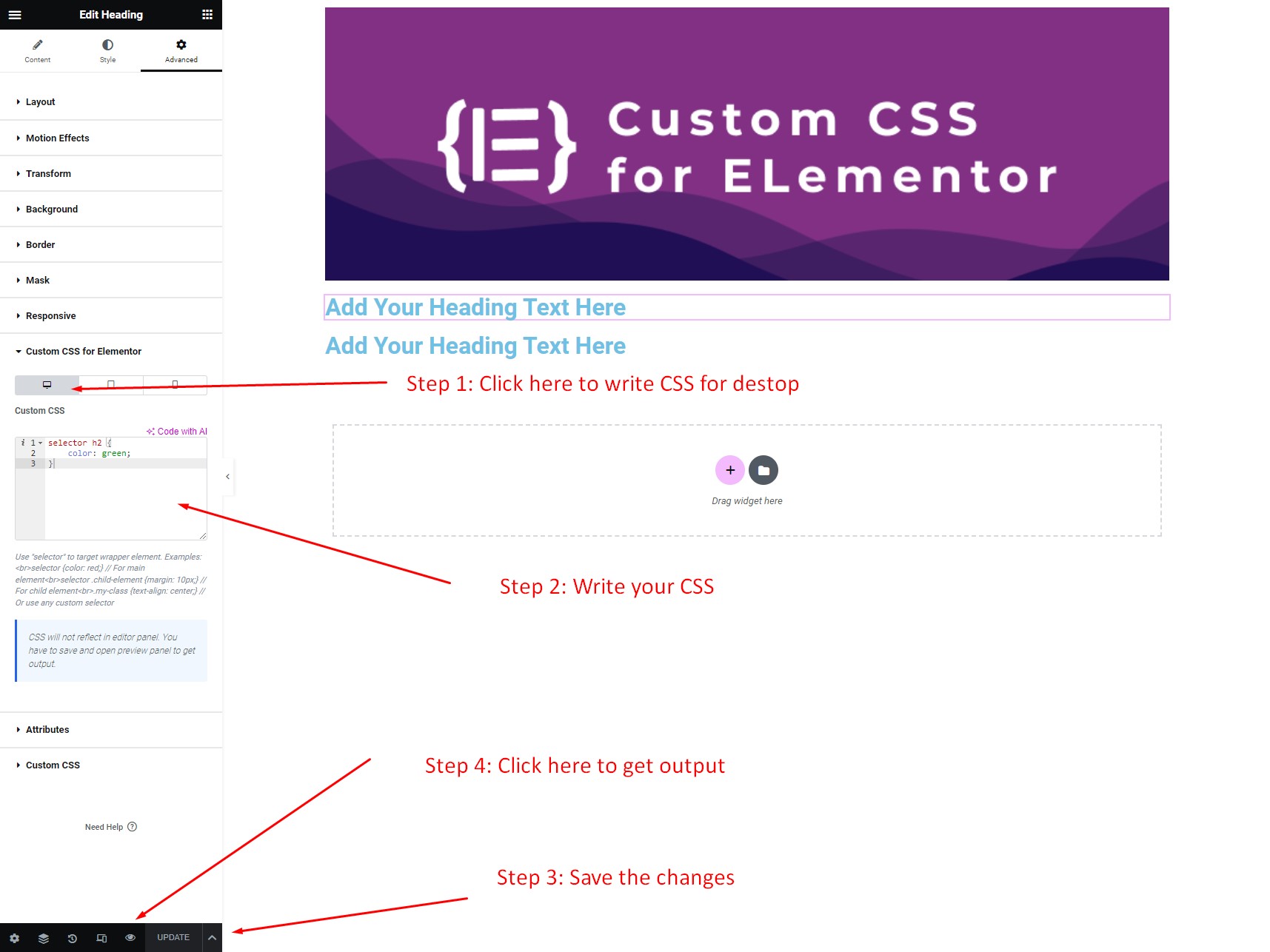
First of all, it’s a plug-and-play tool. You will not get any setting page. So, after installing the Custom CSS for Elementor tool, just navigate to any Elementor Widget editing panel, then jump on the Advanced tab section; you will get a new accordion of Custom CSS for Elementor. Unfold the accordion, and you will get three different fields to write CSS codes for your widgets. If you want to show different designs for different devices, choose the device panels according to your needs.
Direction: Edit any Elementor Widget > Advanced Tab > Custom Css for Elementor
Note: For Elementor Atomic Elements (the new atomic widgets/containers), the Custom CSS fields are located in the “Style” tab instead of the “Advanced” tab. On atomic elements, selector targets the element itself (for example, an atomic Heading renders as a single h2 tag), so use selector { ... } for the element itself or selector .child { ... } for elements inside it.
Note: According to general CSS logic, if you write CSS for a bigger screen (Desktop), it will be automatically implemented on smaller devices chronologically. If you want to change anything for a smaller screen, you have to write different CSS for smaller screens.
In our Custom CSS for Elementor addon, if you want to add global CSS, just write CSS code in the desktop/global panel, and the code will be automatically implied to the other screen. If you want to change the CSS for Tablets, you have to write different CSS in our Tablet CSS panel. And same goes for mobile devices. If you want to change the CSS for Mobile devices, write different CSS in the Mobile CSS panel of our tool.
Don’t forget to check the Screenshots below to get a clear overview of the tool.
❓ Why You Need This
If you know the Elementor’s plenty of Dom creation issues, you will know the pain. But you can reduce so many bloated codes if you use simple CSS. But writing CSS for various devices, you need to be an expert on CSS as you have to deal with the Media Query every time. But our Custom CSS for Elementor addon will be the savior for you. We are handling the pain part of yours. Moreover, to add custom CSS, you don’t need to go to the Additional CSS of the theme customizer if you are using Elementor Free to manage your site as we build this tool for you. It’s just an advanced version of the Elementor Pro’s Default Custom CSS panel.
🔥 What Are the Key Features of Elementor Custom CSS Plugin
As the essential tool, we have shared with you. But in short, here are the other features of the custom CSS addon for Elementor,
- It’s a lightweight plugin that will use Elementor CSS files to enqueue custom CSS. Won’t generate any new CSS to reduce server requests.
- You can face lacking options during change style through style control, but our Custom CSS for Elementor Addon will allow you to write CSS to overcome these lackings.
- We prepared this tool by maintaining a World-class safety methodology. Also, we have run the malicious test, and it passed all the tests.
- It works with any Elementor widget and other third-party Elementor addons widgets too.
- It also supports Elementor Atomic Elements, with Custom CSS available in the “Style” tab.
💻 How to Change Breakpoints in WordPress
To modify breakpoints for tablet and mobile devices in WordPress, you can add custom code to your theme’s functions.php file. Breakpoints determine when your website layout switches between different screen sizes, ensuring optimal display across devices.
Changing Tablet Breakpoint
To adjust the breakpoint for tablets, follow these steps:
- Open your WordPress theme’s
functions.phpfile. -
Add the following PHP code snippet:
add_filter( 'custom_css_for_elementor_breakpoints' , function( $default_breakpoints ) {

$default_breakpoints['tablet'] = 768; // change this value

return $default_breakpoints;

}, 20, 1); - Save the file.
Changing Mobile Breakpoint
To customize the breakpoint for mobile devices, use the following instructions:
- Navigate to your theme’s
functions.phpfile. -
Insert the following PHP code:
add_filter( 'custom_css_for_elementor_breakpoints' , function( $default_breakpoints ) {

$default_breakpoints['mobile'] = 425; // change this value

return $default_breakpoints;

}, 20, 1); - Save the changes.
By adjusting these breakpoints, you can fine-tune your website’s responsiveness and ensure a seamless viewing experience across various devices.
PRIVACY POLICY
We are not collecting any of your personal data or any kind of logs. So there will be no chance to violate your privacy through this plugin.
For Technical Support
We all know nothing is perfect. But we all make everything perfect for everyone by sharing and caring. If you find any bug before giving us a negative rating, please report us here. We will definitely try to resolve your issue asap. Without your support, we cannot run this project so longer smoothly.
ABOUT THE MAKER
I am Sayedul Sayem, a Bangladeshi full-stack WordPress developer and free and open source enthusiast. As Custom CSS for Elementor is an open-source project, you can encourage me by giving me a 5* rating. Nothing also, you can contact me on my LinkedIn for consultation or just to say hello. I love talking to new people. So don’t hesitate.
Instalação
- Upload the plugin folder after extracting it to the “/wp-content/plugins/custom-css-for-elementor” directory. Alternatively, install the plugin through the WordPress plugins screen directly.
- Ative o plugin através da tela 'Plugins' em WordPress
- Now drag and drop an Elementor widget and go to the “Advanced Tab” of that widget.
- There will show up a new section called “Custom CSS for Elementor”. Write your CSS to change your widget magically. Go to preview to see the changes.
For a more detailed explanation, check out the following documentation.
Log de Changes
2.2.1
- Fix: PHP 8.2 compatibility issues with the bundled CSS sanitizer library.
2.2.0
- New: Support for Elementor Atomic Elements. Custom CSS is now available in the “Style” tab of atomic widgets and containers (requires the Atomic Widgets experiment to be active).
- Fix:
aspect-ratioand other modern CSS properties are no longer stripped from the frontend output. - Fix: CSS using
var()references, such as Elementor global colors (var(--e-global-color-*)), now works correctly. - Fix: PHP 8.1+ deprecation warnings raised by the bundled CSS sanitizer library.
- Fix: “Undefined array key” warnings and
trim()deprecation notices on elements without saved Custom CSS values. - Fix: Compatible with Elementor 4.3.x and Elementor Pro 4.3.x
- Fix: Compatible with WordPress 7.1.x
2.1.1
- Fix: Compatible with Elementor 3.32.x and Elementor Pro 3.32.x
- Fix: Compatible with WordPress 6.8.x
2.1.0
- New: Filter added for changing breakpoints.
2.0.0
- New: Live CSS generate on editor panel while writing CSS.
1.3.1
- Fix: Compatible with Elementor 3.16.x and Elementor Pro 3.16.x
- Fix: Compatible with WordPress 6.3.1
Capturas de tela



Para desenvolvedores
Este é o seu plugin? Mostre os números.
Adicione um crachá ao vivo ao seu site, Documentos ou Readme do GitHub. Ele é atualizado por conta própria - nenhuma conta necessária.
Best Custom CSS for Elementor alternatives
All css plugins →





FAQ
Custom CSS for Elementor: quick answers
Respostas diretas, extraídas de dados ao vivo WordPress.org.
Fonte: WordPress.org
Is Custom CSS for Elementor free?
Yes. Custom CSS for Elementor is free to download and use from the official WordPress.org plugin directory.
Is Custom CSS for Elementor safe to use in 2026?
Yes — Custom CSS for Elementor is a safe, well-maintained plugin to use in 2026. It runs on 5K+ sites, is rated 4.1/5 and was last updated 3 weeks ago, and scores 84/100 on our health check.
How many websites use Custom CSS for Elementor?
Custom CSS for Elementor is active on 5K+ WordPress websites and has been downloaded 43,192 times since it launched in October 2021. It was downloaded 4,075 times in the last 30 days.
Does Custom CSS for Elementor work with WordPress 7.1?
Yes. The developer has tested Custom CSS for Elementor up to WordPress 7.1.5, the latest release. It requires WordPress 6.0 or newer.
What PHP version does Custom CSS for Elementor need?
Custom CSS for Elementor requires PHP 8.2 or higher. Most hosts run PHP 8.x today, so it works on any modern WordPress hosting.
When was Custom CSS for Elementor last updated?
The latest version, 2.2.1, was released on November 8, 2026 (3 weeks ago).
Who makes Custom CSS for Elementor?
Custom CSS for Elementor is developed and maintained by Sayedul Sayem.
What are the best alternatives to Custom CSS for Elementor?
The most popular alternatives to Custom CSS for Elementor are WPCode (3M+ installs), Simple Custom CSS Plugin (100K+ installs) and Blocks Animation: CSS Anima… (90K+ installs).
Alimentado por PageForge
Um modelo e uma planilha. Uma página real para cada pesquisa.
PageForge Transforma cada linha de um CSV em uma página WordPress com seu próprio título, URL, SEO campos e esquema, construído no layout que você já desenhou. Gratuito em WordPress.org.
- CSV e XLSX, mais Google Sheets em Profissional e Empresarial
- Seu próprio título, URL, SEO campos e esquema para cada página
- Funciona com o editor de blocos, Elementor, Divi e Avada
- Gratuito em WordPress.org, sem cartão de crédito