


Kit (anteriormente ConvertKit) – assinantes de e-mail, boletim informativo por e-mail, marketing por e-mail, páginas de destino e associação
Grow email subscribers, send email newsletters, run email marketing, build landing pages and membership sites with Kit (formerly ConvertKit).

Escolha segura
Yes — Kit (formerly ConvertKit) is a safe, well-maintained plugin to use in 2026. It runs on 40K+ sites, is rated 4.8/5 and was last updated 4 days ago, and scores 94/100 on our health check.
- Comprovado em escala em mais de 40 mil sites ativos
- Loved by users — 4.8/5 from 90 reviews
- Desenvolvido ativamente — última atualização 4 dias atrás
- Testado com as últimas WordPress (7.1)
- Momentum — downloads up 19.4% vs the previous 30 days
Como ele se acumula?
Lado a lado em instalações, atualizações, avaliações e suporte



Downloads diários
Os picos de download geralmente seguem uma nova versão — cada site que atualiza automaticamente é um download.
Rankings
Where Kit (formerly ConvertKit) stands todayWordPress.org Classificações de pesquisa
Posição ao vivo na pesquisa de plugins, top 100| Palavra chave | Posição |
|---|---|
| E-mail marketing | #10 |
| email newsletter | #4 |
| email subscribers | #3 |
| página de destino | #6 |
| qualidade de membros | #15 |
Adoção da versão
Compartilhamento de sites ativos por lançamento.
Divisão de classificação
★★★★★★★★★★ 4.8 from 90 reviews
About Kit (formerly ConvertKit)
From the official readme · v3.5.2Descrição
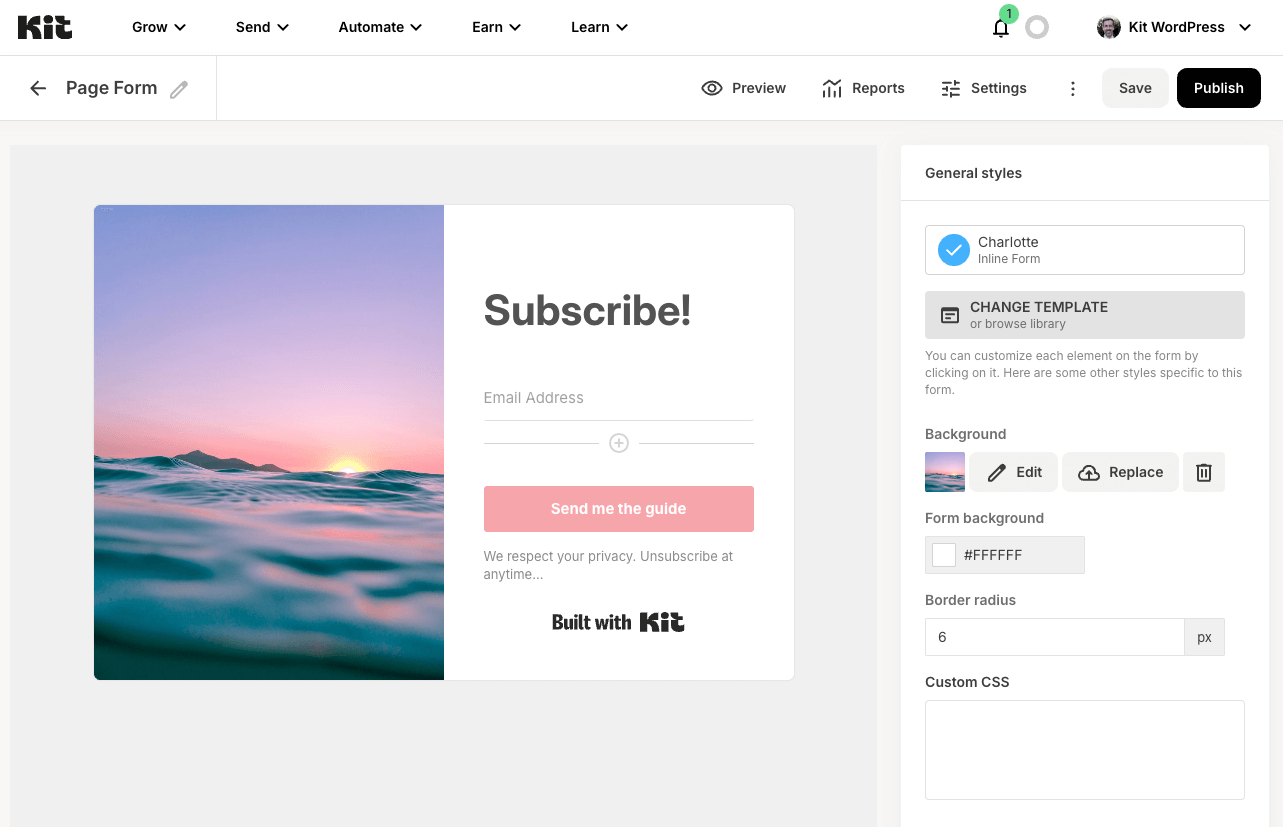
Kit makes it easy to create, send and manage your email marketing campaigns; grow your email subscriber lists; send targeted email newsletters; create landing pages; sell more products and build your membership site – all by easily embedding email marketing forms that capture email subscribers anywhere on your WordPress web site, either using pre-designed forms from Kit or building your own with the Form Builder block.
New to Kit? Creating an account is 100% free for your first 10,000 email subscribers, making Kit an email marketing solution for everyone – whether you’re new to email newsletter marketing or a seasoned professional email newsletter marketer.
Email Subscribers, Email Newsletter and Email Marketing Features
- Design email newsletter subscription forms in Kit, automatically appending them to any WordPress post or page, or displaying forms within your WordPress content using the supplied Gutenberg block, shortcode options and the Form Builder block. Perfect for building your email subscriber lists and growing your newsletter audience.
- Build landing pages in Kit, and display landing pages on a WordPress page to capture additional email subscribers for your newsletter
- List past email newsletters on your WordPress site to engage your newsletter subscribers
- Use forms, landing pages and broadcasts together to grow email subscribers and run email marketing campaigns, with tagging and segmentation
Email Subscription Forms and Newsletter Forms
Design forms in Kit, choosing from a variety of designs, customisable to your branding, to turn visitors into email subscribers and support your email newsletter strategy.
Email newsletter sign up forms can be configured to:
- Send free content, such as a PDF newsletter, to new subscribers
- Display when the user is about to leave the page
- Subscribe to an email newsletter, with powerful tagging and segmentation options for your newsletter subscribers
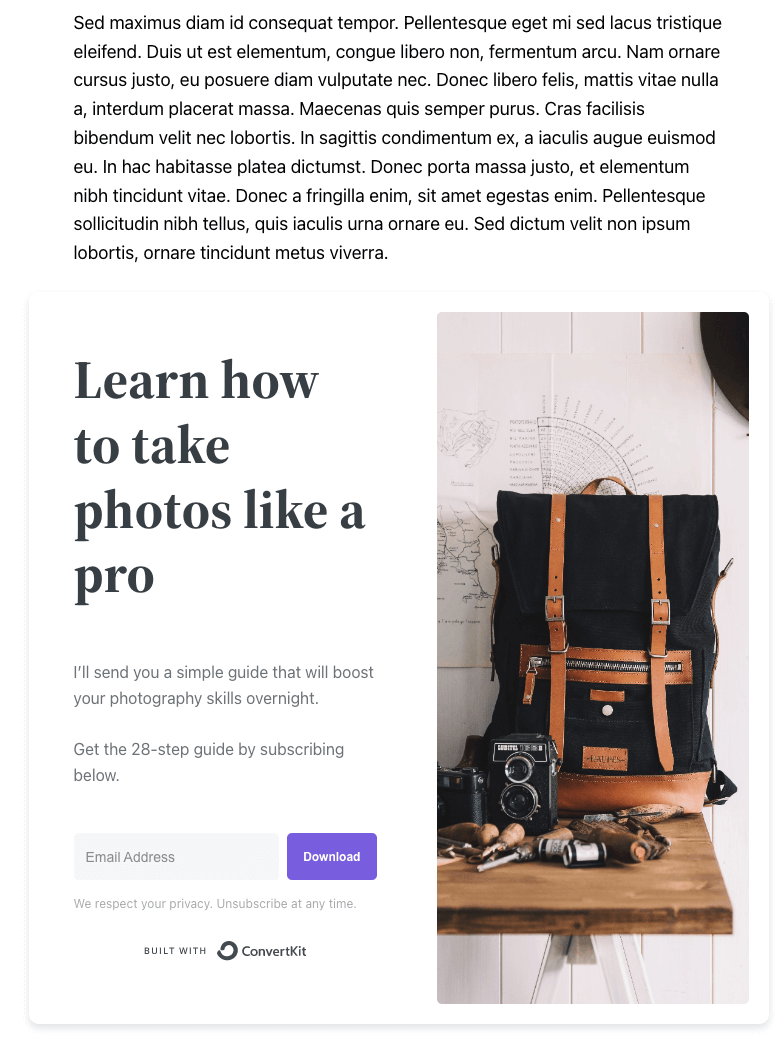
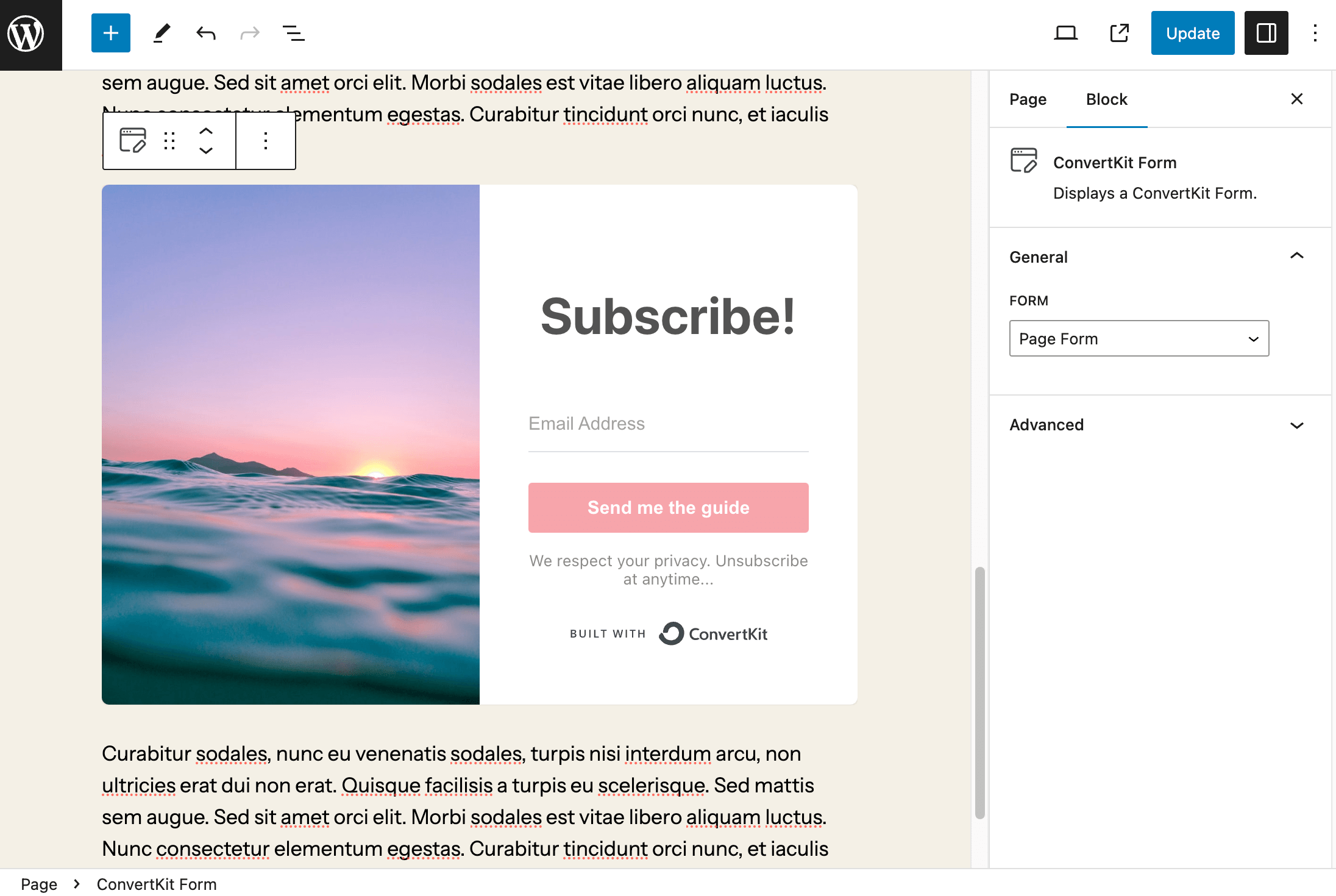
Embedding Kit email subscription forms on your WordPress web site with the Kit Plugin is quick and simple:
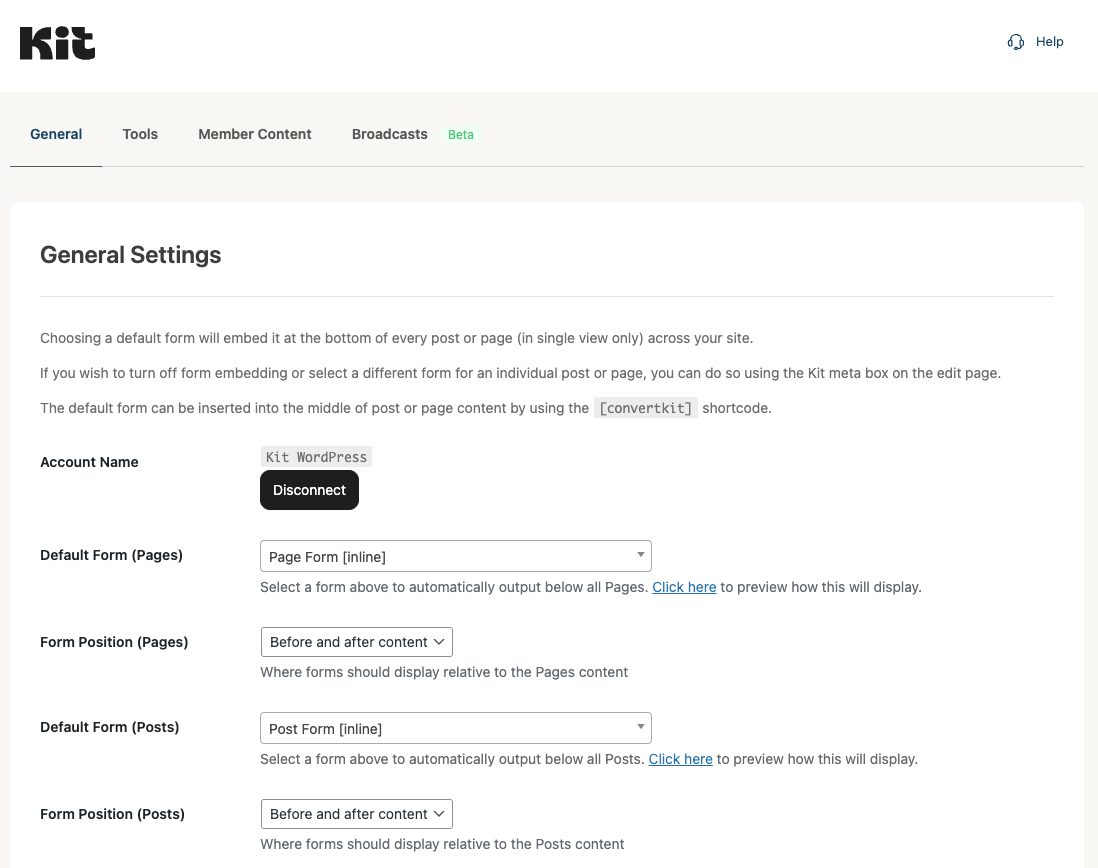
- Choose a default form to be displayed below each individual Post Type (Pages, Posts and other public Post Types, such as WooCommerce Products) to grow your email subscribers
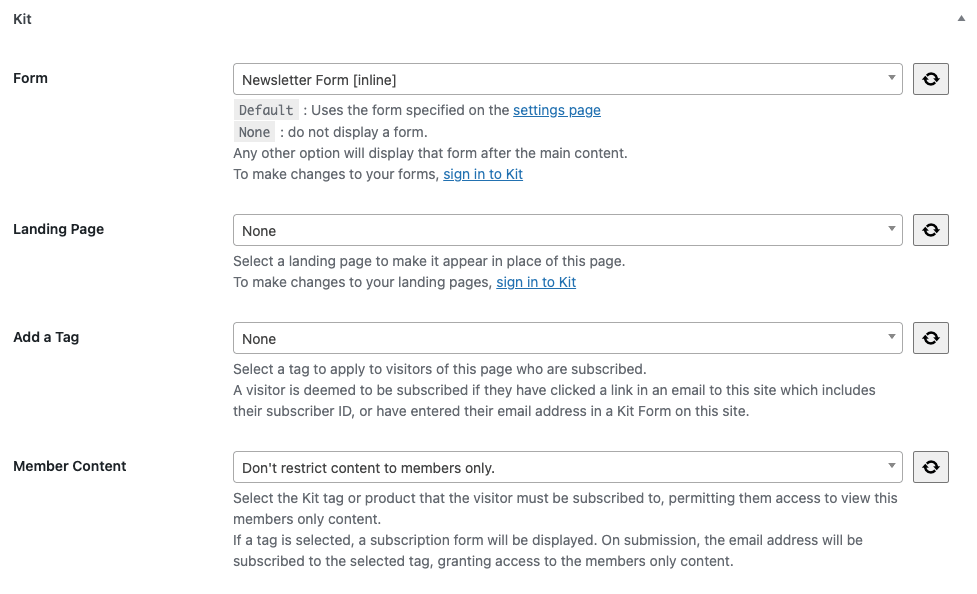
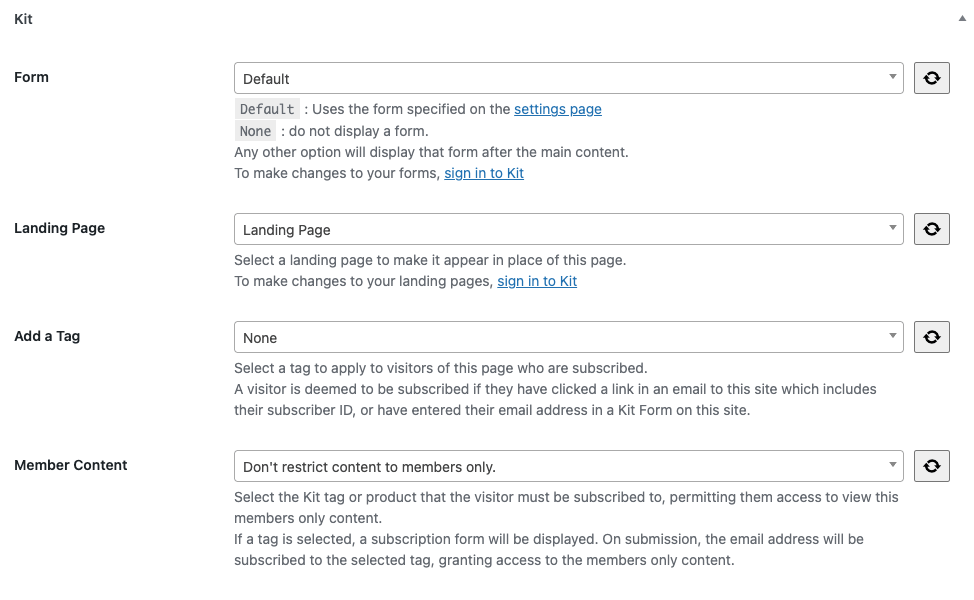
- Choose a specific email marketing form to be displayed below a specific Page, Post or custom post type
- Turn off form embedding at both site wide and/or individual Page/Post level to control your email newsletter strategy
For greater control, Kit’s email marketing subscription forms can be displayed in specific sections of your WordPress site’s content, sidebars and footers by:
- Using the Kit Forms block in Gutenberg
- Using the
[convertkit]shortcode in the Classic Editor - Using the Form Builder block in Gutenberg, to build fully custom subscription forms directly in WordPress – perfect for following your theme’s styles
Start collecting email subscribers today, building your newsletter audience and taking your email marketing to the next level.
Form Builder Block
Kit’s Form Builder block, for the WordPress block editor, gives complete control to design and customize your own newsletter subscription and email marketing forms – directly in WordPress.
With the Form Builder block, you can:
- Add fields such as first name, email address, and custom fields
- Apply tags and sequences to subscribers for powerful segmentation
- Enable reCAPTCHA protection (if configured in your Kit account)
- Style forms using block editor controls, with full support for your block theme’s CSS and styling
This makes the Form Builder block ideal for:
- Newsletter subscription forms to grow your email subscriber list
- Contact forms that connect directly to Kit
- Custom newsletter forms tailored to your email marketing strategy
- Membership signup forms for your membership site
Build forms exactly how you want them with the Form Builder block, without touching a line of code, and start collecting the right email subscribers from day one.
Membership Sites and Membership Content Protection
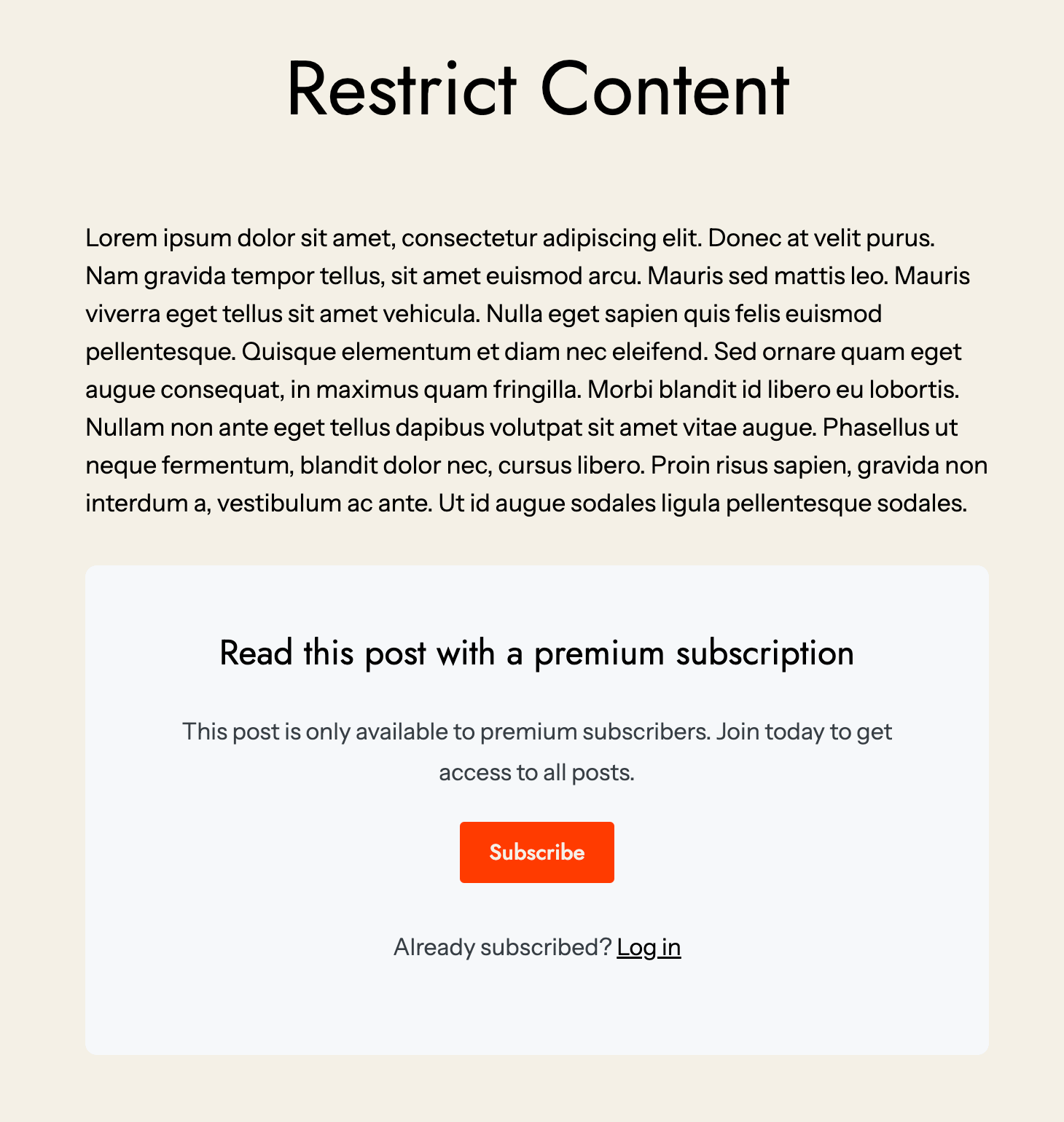
Create powerful membership sites with Kit’s Membership Content feature. Require email subscribers to either purchase a Kit Product, or subscribe for free, to access your membership content – whether that’s a course, ebook, digital download, album, presets, coaching and more.
This membership functionality transforms your WordPress site into a comprehensive membership platform. Subscribers access their membership by entering their email address, receiving a one time passcode by email and clicking the link in the email. That’s it – no complex membership plugins or payment gateways to configure for your membership site.
There’s no limit to the number of Kit Products you can create for your membership site, and each can be assigned to one or more WordPress Pages and Posts, instantly turning them into membership-only content for your paid subscribers. Build a thriving membership community with ease.
Whether you’re creating a paid membership site, or offering free membership access, Kit’s membership features provide the flexibility to monetize your content through membership subscriptions while growing your email subscriber list simultaneously.
Pair membership content with a custom signup experience built using the Form Builder block, so visitors can join your membership site directly from the same page that pitches it – no separate landing page required.
Send Email Newsletters and Email Marketing Campaigns
Use Kit’s email marketing feature to build and send email newsletters to your email subscribers and leads, with options to send email newsletters to segments of your email subscriber list.
Embed existing email newsletters on your WordPress web site, ensuring visitors never miss your email newsletter content, by:
- Using the Kit Broadcasts block in Gutenberg
- Using the
[convertkit_broadcasts]shortcode in the Classic Editor
Landing Pages for Email Newsletter Growth
Design landing pages in Kit’s intuitive editor, choosing from a variety of landing page designs, customisable to your branding and ideal for building your email subscriber list or selling a product.
Additional landing pages can then be embedded on your WordPress web site. Simply create or edit a WordPress Page, choose the Kit landing page from the Kit meta box settings to display, and you’re all set to begin growing your email subscriber list more effectively with targeted landing pages.
Landing pages are a quick way to turn visitors into email subscribers and to promote your email marketing.
Sell Products and Membership Access
Embed buttons (or link text) to sell your Kit Products and Tip Jars in seconds – whether that’s digital goods, paid email newsletters, membership access, membership-only content, music, coaching and more. Perfect for membership sites, monetization and email marketing to your paying customers.
List Email Newsletters
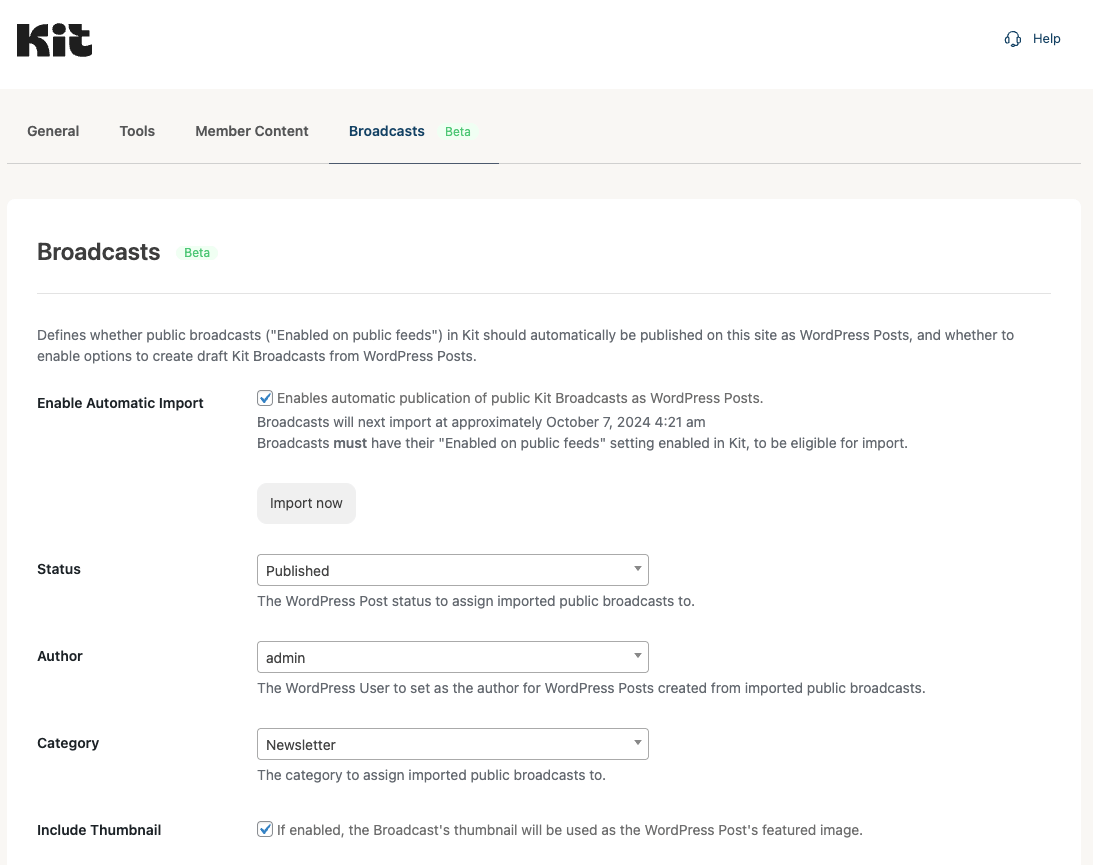
Continue your email marketing strategy by automatically publishing your past email newsletters to WordPress Posts, defining a WordPress author, category and cut-off date within the Plugin’s settings to keep your email subscribers informed.
Prefer to just list existing broadcasts, each linked to your Kit profile? Use the Broadcasts block or shortcode to embed your existing newsletters in any WordPress Page, Post or Custom Post Type, providing more touchpoints for your email newsletter content.
Plugin Integrations
With the Kit for WordPress Plugin, you also get integrations with:
- Elementor: Form and Broadcast widgets natively integrated with Elementor, to embed Kit forms and broadcast lists for your email newsletter strategy
- Contact Form 7: Automatically add email subscribers to Kit for email marketing when they submit a Contact Form 7 form
- WishList Member: Automatically subscribe, unsubscribe and tag users based on their membership level – perfect for membership site management
Our other WordPress Plugins provide further integrations between WordPress and Kit:
- Kit for WooCommerce: Subscribe, tag and assign sequences to customers at checkout for email marketing, and send order data to Kit
- Kit for Gravity Forms: Automatically add email subscribers to Kit when they submit a Gravity Form, with tagging options for email marketing
What is Kit?
Kit is the go-to email marketing hub for creators that helps you grow and monetize your audience with ease.
Grow your audience: Increase email subscribers with beautiful landing pages, sign up forms, and link pages that make your work stand out.
Automate your email marketing: Create lasting connections and promote like a pro with our intuitive email editor, powerful sales funnels and subscriber list segmentation using tags.
Sell your digital products: Market and sell your digital products and subscriptions with Kit to drive higher conversions and save big on fees.
Documentação
Full Plugin documentation can be found here.
Configuration
- Configure the plugin by navigating to
Settings > Kitin the WordPress Administration Menu, and clicking theConnectbutton - Once connected, define the default forms to display on Pages, Posts and/or Custom Post Types
- (Optional) choose a specific Form to display when editing a Page, Post or Custom Post Type in the Page/Post/Custom Post Type’s Kit settings
- (Optional) use the Kit Form Shortcode or Block to insert Forms into your Page, Post or Custom Post Type content to enhance your email newsletter reach and capture more email subscribers
- (Optional) choose a Kit landing page to display when editing a Page, to capture email subscribers for your email newsletter
Instalação
- Carregue a pasta
convertkitpara o diretório/wp-content/plugins/ - Active the Kit plugin through the ‘Plugins’ menu in WordPress
Log de Changes
3.5.2 2026-11-16
- Added: Broadcasts: Import Broadcasts when they’re published in Kit using a webhook, instead of hourly using WordPress’ Cron
- Added: Broadcasts: Display the webhook’s status, with a button to register or re-register the webhook
- Fix: Member Content: Don’t include restricted Pages and Posts in search results when the search only matches restricted content and the
includeorpparameters are used
3.5.1 2026-11-10
- Added: Member Content: Avada: Don’t restrict Header, Page Title Bar and Footer Layout Sections
- Fix: Member Content: REST API: Restrict the excerpt, which could include restricted content
- Fix: Member Content: Don’t display restricted content when the Plugin isn’t connected to Kit, or Kit can’t be reached
- Fix: Member Content: Restrict content output in AJAX requests e.g. a Theme’s “load more” button
- Fix: Member Content: Don’t disclose attachments of restricted Pages and Posts in the REST API and attachment pages
- Fix: Member Content: Don’t include restricted Pages and Posts in search results when the search only matches restricted content
- Fix: Don’t load QuickTags scripts and styles on the frontend site unless an editor is used
3.5.0 2026-11-05
- Fix: Settings: Non-inline Forms: Limit Display: Only display one non-inline form per session when multiple Default Forms (Site Wide) are specified
3.4.9 2026-11-03
- Added: Broadcasts: Export: Send To setting, to send draft Broadcasts to all subscribers, a Tag or a Segment
- Added: Broadcasts: Export: Make Public setting, to publish Broadcasts to your Kit Newsletter site, using the Post’s published date and featured image
- Added: Broadcasts: Export: Greeting, Sign-off and Read on the Web settings
- Added: Broadcasts: Export: Open in Kit row action for exported Posts
- Updated: Broadcasts: Export: Update the existing draft Broadcast when exporting a Post again, instead of creating a duplicate
- Updated: Broadcasts: Export: Use the Post’s excerpt as the Broadcast’s preview text
- Updated: WordPress Libraries to 2.8.1
3.4.8 2026-10-28
- Added: Settings: Broadcasts: Separate Import and Export settings panels
- Updated: Broadcasts: Export: Convert relative links and image URLs to absolute URLs
- Updated: Broadcasts: Export: Remove responsive image attributes, which email clients don’t support
- Fix: Member Content: Restrict content in REST API responses
- Fix: Member Content: Restrict content in RSS and Atom feeds
- Fix: Member Content: Restrict content in archives, such as the blog, categories and search results
- Fix: Member Content: WooCommerce: Restrict Product descriptions in the Store API and Product blocks
3.4.7 2026-10-15
- Added: Member Content: WooCommerce: Hide price, description and Add to Cart button on restricted Products, and prevent adding them to the cart
- Updated: MCP: Use the MCP Adapter Plugin, instead of bundling the MCP Adapter library
- Updated: Performance: Autoload Plugin classes, reducing memory usage
- Updated: Broadcasts: Use
v4/postsAPI endpoint - Updated: WordPress Libraries to 2.8.0
- Fix: Subscriber ID: Verify numeric subscriber IDs in URLs using the
sh_kitparameter, and sign the subscriber ID cookie. Use theconvertkit_subscriber_allow_unverified_idfilter to permit unverified subscriber IDs - Fix: Broadcasts: Importer: Retain dividers and H4 to H6 headings
3.4.6 2026-10-06
- Fix: Settings: OAuth: Verify the connection request originated from the Plugin before connecting to Kit, and require the
manage_optionscapability to connect or disconnect - Fix: Setup Wizard: Verify the connection request originated from the Plugin before connecting to Kit
- Fix: Form Builder: Subscribe as active when no Form is specified and a Tag or Sequence is set
- Fix: Form Builder: Tag and add to Sequence when adding the subscriber to a Form fails
- Fix: Form Builder: Subscribe and store entry when the Name field is removed
- Fix: Form Builder: Always require the Email field
- Fix: Form Builder: Display validation errors on the submitted form only, when a Page has multiple forms
- Fix: Form Builder: Submit form to the URL it was displayed on
- Fix: Form Builder: Unique field IDs when a Page has multiple forms
- Fix: Form Entries: Support WordPress 6.1 and older by not using the
%iplaceholder - Fix: Form Entries: Only permit sorting by known columns
- Fix: Form Entries: Export: Escape double quotes and prevent formula injection in CSV file
- Fix: Form Entries: Return the entry ID when updating an existing entry
- Fix: Form Entries: Search: Treat
%and_as literal characters - Fix: Form Entries: Don’t run a delete query when no entries are selected
- Fix: Form Entries: Check user permissions for bulk actions, and export CSV file with
text/csvcontent type - Fix: reCAPTCHA: Fail verification when the token’s action is missing or doesn’t match
- Fix: reCAPTCHA: Submit the clicked form when a Page has multiple forms
- Fix: reCAPTCHA, Cloudflare Turnstile: Handle invalid verification responses without PHP warnings
- Fix: Cloudflare Turnstile: Don’t submit forms on page load
- Fix: Cloudflare Turnstile: Submit the clicked form when a Page has multiple forms
- Fix: Member Content: Login Form: Load spam protection script, fixing logins failing when reCAPTCHA or Cloudflare Turnstile is enabled
- Fix: Forminator: Don’t subscribe spam, draft or abandoned form entries
- Fix: Forminator: Use the first name when the Name field has multiple fields
- Fix: Forminator: Don’t add to Form when creating the subscriber fails
- Fix: Forminator: Referrer URL includes the site’s subdirectory
- Fix: Importers: Only replace exact third party Form IDs in shortcodes and blocks e.g. Form ID 1 no longer matches 12
- Fix: Importers: AWeber: Match blocks by Form ID
- Fix: Importers: Preserve backslashes in Post content
- Fix: Settings: Tools: Import Configuration: Display error when the uploaded file isn’t a JSON object
- Fix: MCP: Preserve backslashes in Post content when inserting or updating Kit blocks and shortcodes
- Fix: MCP: Insert blocks and shortcodes at the correct position when content contains nested or void elements e.g.
<hr> - Fix: MCP: Report Ability read-only, idempotent and destructive annotations correctly
- Fix: MCP: Skip invalid Abilities, Resources and Prompts registered via filters
3.4.5 2026-09-30
- Fix: Post Settings: Prevent
rest_meta_database_errorwhen third party Plugins also save metadata by removing duplicate Kit post metadata - Fix: Member Content: Permit Search Engine Crawlers: Recognize DuckDuckBot as a crawler
- Fix: Member Content: Display dropdown filter in Posts and Pages tables when only Forms exist
- Fix: Member Content: Configure/display cache plugin notices when Member Content enabled via the Setup Wizard
- Fix: Member Content: Read 6 digit code when both Login Form Block/Shortcode and modal on the same Page/Post
- Fix: Member Content: Re-enable form inputs when an invalid JSON response or server error, instead of leaving them disabled
- Fix: Member Content: Setup Wizard: Remove “ConvertKit” wording
- Fix: MCP: Removed unused “require_tag_login” setting
- Fix: MCP: Claude Desktop: Updated instructions for connecting. See Docs: https://help.kit.com/en/articles/16729038-using-the-kit-plugin-s-mcp-server-on-your-wordpress-website#h_6ff6f06cdb
3.4.4 2026-09-23
- Added: Member Content: Divi: Login Widget
- Added: Member Content: Elementor: Login Widget
- Fix: Form Builder: Validate email address
- Fix: Form Builder: Display errors on submission
3.4.3 2026-09-17
- Added: Member Content: Login Form Block and Shortcode
3.4.2 2026-09-15
- Added: MCP: Prompts and Resources for common tasks
3.4.1 2026-09-09
- Added: Settings: MCP: Improve UI
- Added: MCP: Log errors when creating MCP server fails
- Fix: Settings: MCP: Documentation link
- Fix: Landing Pages: Exclude anchor links from URL conversion
- Updated: WordPress Libraries to 2.7.0
3.4.0 2026-08-27
- Added: MCP Server and Abilities/Tools
- Fix: Shortcodes: Custom Content: Support signed subscriber IDs, fixing
PHP Fatal error: Uncaught TypeError - Fix: Tools: Replace
WP_Filesystemwithfile_get_contents, fixingPHP Fatal error: Uncaught TypeError - Fix: Logs: Logs are now stored outside the Plugin folder at
wp-content/uploads/kit-logs, ensuring Plugin checksum verification passes - Updated: WordPress Libraries to 2.6.1
3.3.9 2026-08-19
- Added: Settings: Deprecation warning when using Legacy Form or Legacy Landing Page
- Added: Setup Wizards: Member Content: Check WordPress user can create and publish the chosen Post Type
- Added: Setup Wizards: Landing Page: Check WordPress user can create and publish Pages
- Added: Setup Wizards: Plugin:
manage_optionscapability is required to configure the Plugin via the Setup Wizard, replacingedit_postscapability - Added: Bulk Edit: Skip Posts user does not have
edit_postcapability for - Added: Caching: Only automatically configure caching plugins if the user has the
manage_optionscapability - Added: Post Settings: Check WordPress user has
edit_postcapability when saving - Added: Category Settings: Check WordPress user has
edit_termcapability when saving - Added: Broadcasts: Export: Check WordPress user has
edit_postcapability to export a Post to a Kit Broadcast - Updated: WordPress Libraries to 2.6.0
3.3.8 2026-08-10
- Added: Post Settings: Deprecation warning when using Legacy Form or Legacy Landing Page
- Removed: Legacy Forms from settings dropdowns. Existing Legacy Form settings will be honored, but deprecated in the future
- Removed: Legacy Landing Pages from settings dropdowns. Existing Legacy Form settings will be honored, but deprecated in the future
3.3.7 2026-07-31
- Added: Settings: Spam Protection: Cloudflare Turnstile option
- Updated: Settings: reCAPTCHA: Moved to Spam Protection section
- Fix: Form Builder: “This block has encountered an error” when Plugin disconnected from Kit
3.3.6 2026-07-20
- Fix: Member Content: Tags: Require Login is now always enabled, to ensure subscribers authenticate to access gated content
- Removed: Kit Forms: Store subscriber ID as cookie when submitting an embedded Kit form
3.3.5 2026-07-07
- Added: Settings: Tools: Kit Legacy Forms: Migrate from legacy forms to newer Kit forms
- Fix: Settings: Tools: Migrations: Use
forminstead ofidfor [convertkit_form] shortcode when migrating from third party form Plugins - Fix: Uninstall: Improve Access and Refresh Token revokation
- Updated: WordPress Libraries to 2.1.7
3.3.4 2026-06-19
- Fix: Pages: Add New: Dropdown menu alignment and mobile layout
- Fix: Block Editor: Refresh button icon alignment
- Fix: Block Editor: Settings Sidebar: Improve descriptions and links to match Classic Editor
- Fix: Settings: Broadcasts: Refresh settings on save
- Removed: Unused methods
restrict_content_enabledandrestrict_contentonConvertKit_Settings_Broadcastsclass
3.3.3 2026-05-20
- Fix: Settings: Button height in WordPress 7.0
3.3.2 2026-05-05
- Fix: Form Builder: Set
inactivesubscriber state when a Kit Form is specified - Fix: Form Builder: Support subscribing to a Legacy Form
- Fix: Block Editor: Settings Sidebar: Correct logo size in options menu
3.3.1 2026-04-27
- Added: Block Editor: Settings Sidebar: Refresh Resources
- Fix: Page/Post Settings: Member Content: Include Forms when Refresh Resources button clicked
- Fix: LiteSpeed Cache: Exclude Forms from LiteSpeed Cache’s
JS Combinesetting, ensuring Forms display
3.3.0 2026-04-22
- Added: Block Editor: Form, Landing Page, Tag and Member Content settings moved to block editor sidebar
- Fix: Resources: Delete cached resources when structure invalid e.g. when upgrading from < 1.6.0 to 1.9.6 or higher
- Updated: WordPress Libraries to 2.1.6
3.2.4 2026-04-13
- Added: Settings: Revoke Access and Refresh Tokens, and remove from settings, when
Disconnectbutton clicked - Added: Uninstall: Revoke Access and Refresh Tokens, and remove from settings, when the Plugin is deleted (Plugins > Kit > Delete)
- Added: Remove v3 API Secret if detected in settings
- Updated: WordPress Libraries to 2.1.5
3.2.3 2026-03-31
- Fix: Downgrade WordPress Libraries to 2.1.3, resolving issues in 3.2.2 and 3.2.2.1
3.2.2.1 2026-03-30
- Fix: Fatal error: Cannot redeclare trait ConvertKit_API\ConvertKit_API_Traits
3.2.2 2026-03-30
- Fix: Only run
get_subscriber_id_from_requestwhen viewing Pages with “Add a Tag” configured, to improve performance - Removed: Global
validate_and_store_subscriber_idmethod; Custom Content and Member Content functionality performs necessary subscriber ID validation - Updated: Use WordPress Libraries 2.1.4
3.2.1 2026-03-05
- Fix: Divi 5: Fatal error when activating Theme
- Fix: Removed errant
<html>and<head>tags when Settings > Kit > Form Position = After element
3.2.0 2026-02-26
- Added: Minify CSS into single frontend.css resource
- Added: Minify JS into single frontend.min.js resource
- Added: Settings: Advanced: Option to disable Add New button for Landing Pages and Member Content
- Updated: Blocks: Broadcasts: Improve REST API
- Updated: Classic Editor (TinyMCE/Quick Tags): Improve REST API
- Updated: Blocks: Use apiVersion 3 when WordPress version is 6.3 or higher
- Fix: Classic Editor (TinyMCE/Quick Tags): CLosing tag on
colorinput types was missing - Fix: Blocks: Specify apiVersion in registerBlockType, to honor loading apiVersion 2 or 3 blocks
3.1.9 2026-02-17
- Added: Settings: Tools: Campaign Monitor to Kit Form Importer: Support replacing shortcodes with single quotation marks
- Updated: Blocks: Broadcasts: Use REST API, replacing admin-ajax.php
- Updated: Classic Editor (TinyMCE/Quick Tags): Use REST API to fetch modal views, replacing admin-ajax.php
- Updated: Member Content: REST API improvements
3.1.8 2026-02-11
- Fix: Setup Wizard: Only register form importers when on Setup Wizard screen for performance
3.1.7 2026-02-09
- Added: Setup Wizard: Replace third party detected forms with Kit Forms
- Added: Settings: Tools: ActiveCampaign to Kit Form Importer
- Added: Settings: Tools: Campaign Monitor to Kit Form Importer
3.1.6.1 2026-01-26
- Added: Settings: Tools: MailPoet to Kit Form Importer
- Added: Settings: Tools: Newsletter Plugin to Kit Form Importer
- Added: Settings: Tools: Importers: Support migrating blocks from AWeber, MC4WP, MailPoet and Newsletter, as well as shortcodes
3.1.5 2026-01-19
- Added: Settings: Tools: AWeber for WordPress Plugin to Kit Form Importer
3.1.4 2026-01-12
- Added: Settings: Member Content: Container CSS Class setting
- Added: Member Content: Automatically add
grve-containerCSS class for Impeka Theme - Fix: Form Builder: Set email field type=email
- Fix: Blocks: Use Spinner when ProgressBar component unavailable in WordPress versions older than 6.3
- Updated: Blocks: Use apiVersion 2
3.1.3 2025-12-18
- Added: Blocks: Field controls: Use 40px default size
- Fix: Blocks: Static flag warning
- Fix: Blocks: Unique
keyprop warning - Fix: Setup Wizard: Replace
ConvertKitwithKitin browser tab/window title - Updated: Use WordPress Libraries 2.1.3
3.1.2 2025-12-03
- Fix: Settings: Improve logic to automatically delete invalid Access Tokens
- Fix: Settings: Disconnect: Immediately disconnect Plugin from Kit, instead of loading resources first
- Fix: Settings: Disconnect: Remove cached Custom Fields and Sequences
- Updated: Use WordPress Libraries 2.1.2
3.1.1 2025-11-26
- Fix: Block Registration: Improve Frontend Performance
- Fix: Settings: Move hooks to ensure invalid Access Tokens are automatically deleted
3.1.0 2025-11-20
- Added: Settings: Tools: Mailchimp for WordPress to Kit Form Importer
- Fix: Settings: Non-inline Forms: Correctly output
data-kit-limit-per-session - Fix: Settings: Automatically delete invalid Access Tokens
- Fix: Member Content: Courses: Next/Previous Links compatibility for WordPress 6.9
- Fix: Landing Pages: Prevent LazyLoad Plugin from lazy loading images on Landing Pages, which would result in missing images
- Updated: Blocks: Refresh Resources: Use REST API, replacing admin-ajax.php
- Updated: Refresh Resources: Use REST API, replacing admin-ajax.php
- Updated: Member Content: Use REST API, replacing admin-ajax.php
- Updated: Use WordPress Libraries 2.1.1
- Removed: Unused
convertkit_store_subscriber_id_in_cookieAJAX function
3.0.8 2025-11-05
- Fix: Member Content: Product: Display ‘no access’ notice when logged in and no access
3.0.7 2025-10-30
- Added: Settings: Improve override description wording to make clearer how it operates
- Fix: Settings: Handle
WP_Errorgracefully when attempting to fetch Kit account information
3.0.6 2025-10-23
- Added: Blocks: Form Builder: Settings: Display fields conditionally based on configuration
- Added: Blocks: Broadcasts: Settings: Display fields conditionally based on configuration
- Added: Classic Editor: Broadcasts: Settings: Display fields conditionally based on configuration
- Added: Divi: Broadcasts: Settings: Display fields conditionally based on configuration
- Added: Elementor: Broadcasts: Settings: Display fields conditionally based on configuration
- Fix: Settings: Don’t refresh resources via API when request is AJAX or CRON
3.0.5.1 2025-10-19
- Fix: Member Content: Use correct Post ID and include correct Post URL in subscriber verification email
3.0.4.1 2025-10-10
- Added: Blocks: Form Builder: Option to subscribe to Kit Form, to trigger incentive email
- Added: Settings: Advanced: Option to opt in to usage reports
- Fix: Member Content: Improve performance in admin UI by optimising query and only running query when Posts created/edited/deleted
3.0.3 2025-09-29
- Added: Refresh resources button: show loading indicator until refresh is complete
- Updated: WordPress Coding Standards for JS and CSS
- Updated: Use WordPress Libraries 2.1.0
3.0.2 2025-09-17
- Fix: Member Content: Improve login form layout on mobile
- Fix: Blocks: Form Builder: Typo on block description
3.0.1 2025-09-11
- Added: Blocks: Form Builder: Display asterisk for required fields
- Added: Settings: Form Entries: Filter by API result
- Fix: Landing Pages: Prevent Autoptimize lazy loading images on Landing Pages, which would result in missing images
- Updated: Improved HTML parsing for Broadcasts and Form Builder block
3.0.0 2025-09-08
- Added: Blocks: Form Builder. Create your own subscription forms with custom fields, tag and sequence support, within the block editor
- Added: Blocks: Form: Alignment option
- Added: Settings: Form Entries: View, search, delete and export entries submitted via Form Builder blocks
- Added: Settings: Non-inline Forms: Option to only display one non-inline form per session
- Fix: Settings: Improve Intercom help integration
- Updated: Settings: Renamed
Site Widesection toNon-inline Forms - Updated: Settings: Moved reCAPTCHA settings from Member Content to General settings, as reCAPTCHA is used for both the Form Builder and Member Content
- Updated: Settings: Documentation links
- Updated: Settings: Improved wording on
Disable ScriptsandDisable CSS, to make clearer what these settings do
2.8.7 2025-07-31
- Added: Blocks: Form: Margin, padding and background color options
- Added: Debug: Forms:
data-kit-source-post-idattribute to scripts when Debugging enabled - Added: JS: Emit
kit_subscriber_id_removed_from_urlevent when theck_subscriber_idis removed from a URL - Fix: Debloat Plugin: Exclude Forms from Debloat’s Defer and Delay JS
- Fix: Classic Widgets: Form: Uncaught error: Call to undefined method
ConvertKit_Resource_Forms::output_select_field_all - Fix: Blocks: Refactored and removed unnecessary duplicate render callback functions in the block editor
2.8.6.1 2025-07-23
- Fix: Form Trigger: Revert running
scripttags throughwp_kses, as WordPress.com strip the script tag
2.8.6 2025-07-23
- Fix: Form Block: Correctly style “No Content” message when selecting a modal form
- Fix: Member Content: Display all Posts if filter = All content
2.8.5 2025-07-17
- Fix: Broadcasts, Form Trigger and Product Blocks: Improve rendering accuracy between block editor and frontend site
- Fix: Sanitization and security enhancements
2.8.4 2025-07-10
- Added: Broadcasts Block: Display order option
- Added: Broadcasts, Form Trigger and Product Blocks: Use
get_block_wrapper_attributesfor blockclassandstyleattributes - Added: Broadcasts, Form Trigger and Product Blocks: Typography options
- Added: Broadcasts, Form Trigger and Product Blocks: Margin and padding options
2.8.3 2025-07-03
- Added: Member Content:
All member-only contentoption added to filter dropdown in Posts and Pages tables - Fix: Member Content: Replace
Members onlywithmember-only - Fix: Automatically refresh Access Token when expired
2.8.2 2025-05-28
- Fix: Broadcasts: Remove emoijs from Permalink whem importing Broadcasts to WordPress Posts
- Fix: Coding Standards: Use
wp_doing_cronfunction, instead ofDOING_CRONconstant
2.8.1 2025-05-07
- Added: Member Content: Permits Apple, DuckDuckGo, OpenAI Search, Perplexity and Yandex to crawl Member Content if the Permit Search Engine Crawlers option is enabled
- Fix: Classic Editor: Display refresh button icon
- Updated: Require PHP 7.1 or greater
- Updated: Use WordPress Libraries 2.0.9
2.8.0 2025-04-24
- Fix: Divi Theme: Register modules correctly (Broadcasts, Form, Form Trigger, Product)
2.7.9 2025-04-18
- Fix: Fatal error
Uncaught Error: Class "ConvertKit_Admin_Bulk_Edit" not foundwhen using Solid Central (previously iThemes Sync) - Fix: Use
add_filterforconvertkit_admin_settings_register_sectionshook
2.7.8 2025-04-10
- Fix: Divi Builder: Display Visual Editor / TinyMCE buttons when Divi Builder or Divi Theme active
- Fix: Member Content: Improved support for Uncode Theme
- Updated: Use WordPress Libraries 2.0.8
2.7.7 2025-04-01
- Added: Member Content: Support for Uncode Theme
- Fix: Member Content: Prevent fatal error when both
Add a TagandMember Contentsettings defined on a Page, and the visitor has entered the Member Content code / clicked the magic link via email - Fix: Default Forms (Site Wide): Don’t output non-inline site wide forms on 404 or search pages
- Fix: Gutenberg / Block Editor: Improved method for block editor detection to prevent loading JS when a page builder is active
2.7.6 2025-03-25
- Fix: Remove
load_plugin_textdomaincall, as it’s not needed since WordPress 4.6 - Fix: Issue client ID, site-specific v4 API Access and Refresh Token when upgrading from < 2.5.0
- Fix: Member Content: Only automatically configure caching Plugins if Member Content is used on a Page, Post or Custom Post
- Updated: Use WordPress Libraries 2.0.7
2.7.5 2025-03-07
- Fix: Member Content: Set
wordpress_ck_subscriber_idcookie to beat WP Engine’s server caching - Fix: Settings: Forms: Check Post Type of main Post, to ensure correct form is output when multiple Posts output on a singular Post, Page or CPT
2.7.4 2025-02-24
- Added: Broadcasts (Beta):
convertkit-broadcastbody CSS class to Posts imported from Kit Broadcasts, to allow targeted CSS styles - Fix: Broadcasts (Beta): Remove table borders and background colors added by Elementor on imported Kit Broadcasts
- Fix: Member Content: Support magic links in emails
- Fix: Tools: Import & Export: Include Broadcasts settings
2.7.3 2025-02-18
- Added: Member Content: Tags: Display login link when
Require loginoption enabled - Added: Member Content: Option to gate content by Kit Form
- Added: Default Forms (Site Wide): Option to honor
Nonesetting on Page, Post and Custom Post level - Updated: Use WordPress Libraries 2.0.6
2.7.2 2025-02-04
- Added: Member Content: Option to require login when gating content by Tag. Subscribers receive an email with a magic link / code to securely access member-only content
- Added: Broadcasts (Beta): Option to export WordPress Pages and Custom Post Types to draft Kit Broadcasts using
Create Broadcast in Kitoption in admin tables - Added: Settings: Intercom help integration
- Fix: Remove
ck_subscriber_idfrom URL usingreplaceState, ensuring current URL is only stored once in browser history
2.7.1 2025-01-23
- Added: Populate the
referrerproperty in Kit when Contact Form 7 or Forminator is configured to subscribe an email address to a Kit Form - Added: Settings: Group Settings in UI
- Added: Refresh resources button to update the list of Kit Forms / Products when using an applicable block or shortcode
- Added: Member Content: Support using a signed subscriber ID when viewing content gated by Kit Tag
- Fix: Settings: Uncaught TypeError when clicking Save Changes at Settings > Kit when a Kit account has no resources and no checkboxes are checked
- Updated: Kit WordPress Libraries to 2.0.6
2.7.0 2024-12-18
- Added: Member Content: Automatically configure WP Rocket to not cache when the
ck_subscriber_idcookie is present, to ensure Member Content correctly displays - Fix: Don’t strip hash from URL, ensuring anchor links work
2.6.9 2024-12-12
- Added: Settings: Default Forms (Site Wide): Option to specify more than one non-inline site wide Form
- Added: Settings: Member Content: Option to enable Google reCAPTCHA v3 when using Member Content by Tag functionality
2.6.8 2024-12-07
- Fix: Fatal error when a non-inline Form specified in Plugin, Post or Category settings and Form Position set to
After element
2.6.7 2024-12-04
- Removed:
convertkit_store_subscriber_id_in_cookieAJAX call, as logic exists server side
2.6.6 2024-11-27
- Added: Categories:
Noneoption added to specify no Form displays on Posts assigned to the Category - Added: Honor Block Visibility Plugin’s conditions when used on a Kit Form block set to output a non-inline Form
- Fix: Character encoding when a Form is set to display after a specific element at
Settings > Kit > Form Position - Fix: Settings: Broadcasts: Ensure
Import Nowdisplays - Fix: Broadcasts: Automatically reschedule cron event for importing Broadcasts to WordPress Posts, if removed
2.6.5 2024-11-13
- Added: OAuth: Issue site-specific Access and Refresh Token when using the same Kit account on multiple WordPress sites
- Fix: Exclude Forms from WP Rocket Minification and Combine
- Updated: ConvertKit WordPress Libraries to 2.0.5
2.6.4 2024-11-05
- Added: Settings: Broadcasts: Option to import images to the WordPress Media Library when importing Broadcasts to WordPress Posts
- Added: Broadcasts: Remove heading title from content when it matches the Broadcast’s title
- Fix: Broadcasts: Retain
figureandfigcaptionelements when importing Broadcasts to WordPress Posts
2.6.3 2024-10-28
- Added: Broadcasts: Exclude Polls when importing Broadcasts to WordPress Posts
- Added: Settings: Forms: Only display Form settings if Forms exist in Kit
- Fix: Add a Tag: Honor setting when defined on individual WordPress Pages and Posts, using the v4 API Access Token
2.6.2 2024-10-18
- Added: Settings: Option to output Default Forms after a given number of elements (paragraphs, headings, images)
2.6.1 2024-10-08
- Fix: Kit branding tweaks and secondary button colors
2.6.0 2024-10-01
- Fix: Landing Pages: Replace Cloudflare JS
typeprefixes, to ensure JS runs - Updated: Changed branding to Kit
- Updated: Kit WordPress Libraries to 2.0.4
2.5.9 2024-09-27
- Added: Settings: Option to output Default Forms above, below or above and below content
- Fix: Settings: Initialize Forms Resource class when no public Post Types (resolves PHP Uncaught Error:
Call to a member function non_inline_exist() on bool) - Fix: Landing Pages: Correctly parse HTML, honoring redirect if “Redirect to an external page” defined on Landing Page in Kit
- Fix: Query separator / question mark incorrectly appended to URLs when
ck_subscriber_idcookie set - Fix: JS Uncaught TypeError:
Cannot read properties of null (reading ‘matches’) - Fix: PHP Warning:
Attempt to read property “base” on null - Updated: Kit WordPress Libraries to 2.0.3
2.5.8 2024-09-18
- Added: Remove jQuery as a dependency from some backend JS
- Fix: Fatal error
Uncaught TypeError: Kit_API_V4::get_subscriber(): Argument #1 ($form_id) must be of type int, string givenwhen a blank or non-numericck_subscriber_idsupplied in the URL
2.5.7 2024-09-16
- Added: Divi: Kit Broadcasts Module
- Added: Divi: Kit Form Trigger Module
- Added: Divi: Kit Product Module
- Fix: Landing Pages: Honor redirect if “Redirect to an external page” defined on Landing Page in Kit
- Fix: Preserve other URL query parameters when removing
ck_subscriber_id
2.5.6 2024-08-15
- Added: Pages: Add New Landing Page Setup Wizard, to easily create a WordPress Page that displays a Kit Landing Page
- Added: Divi: Kit Form Module
- Updated: Pages: Landing Page + Member Content Wizards now display in a dropdown button
2.5.5 2024-08-15
- Fix: Contact Form 7: Set subscriber to
inactivewhen a Kit Form is specified, honoring the Form’s opt in setting. - Fix: Forminator: Set subscriber to
inactivewhen a Kit Form is specified, honoring the Form’s opt in setting. - Fix: WishList Member: Set subscriber to
inactivewhen a Kit Form is specified, honoring the Form’s opt in setting.
2.5.4 2024-08-08
- Added: WishList Member: Option to just subscribe email, subscribe to a Form, Tag or Sequence or unsubscribe
- Fix: Contact Form 7: Typo on description text
- Fix: Forminator: Typo on description text
2.5.3 2024-08-06
- Fix: Contact Form 7: Update description on settings screen to reflect new settings
- Fix: Forminator: Update description on settings screen to reflect new settings
- Fix: WishList Member: Fatal error
Uncaught TypeError: Kit_API_V4::add_subscriber_to_form(): Argument #1 ($form_id) must be of type int, string given
2.5.2 2024-07-25
- Added: Contact Form 7: Option to just subscribe email, or subscribe to a Form, Tag or Sequence
- Added: Forminator: Option to just subscribe email, or subscribe to a Form, Tag or Sequence
2.5.1 2024-07-17
- Fix: Landing Pages: Prevent Perfmatters lazy loading images on Landing Pages, which would result in missing images
- Updated: Kit WordPress Libraries to 2.0.1
2.5.0 2024-07-09
- Added: Use Kit v4 API and OAuth
- Updated: Kit WordPress Libraries to 2.0.0
2.4.9.1 2024-06-20
- Added: Categories: Option to display specified Kit Form on Category archives
- Fix: Move “Add a Tag” logic to backend when tagging a subscriber, instead of using AJAX
2.4.9 2024-05-13
- Fix: Settings: Don’t import Broadcasts to WordPress Posts when viewing Settings screen, for performance
- Fix: Broadcasts (Beta): Check
DOMDocumentavailable to parse Broadcasts, instead of producing a fatal error - Fix: Autoptimize: Don’t output duplicate Forms when Autoptimize’s
Defer JSoption is enabled - Updated: Removed upgrade path from Plugin versions below 1.4.1
2.4.8 2024-04-11
- Fix: Member Content: Display Content when using a frontend Page Builder, such as Beaver Builder
- Fix: Forms: Sticky Bar: Set
z-indexCSS property to ensure Sticky Bar Forms correctly display over some WordPress Theme headers and menus
2.4.7 2024-04-08
- Fix: WP-Rocket: Display Forms when WP-Rocket’s
Delay JavaScript Executionoption is enabled - Fix: Perfmatters: Display Forms when Perfmatters’
Delay JavaScriptoption is enabled - Fix: Broadcasts (Beta): Improve parsing of Broadcasts when removing unsubscribe and hidden sections
2.4.6 2024-03-08
- Fix: Debug Log: Change log file location to log subfolder, with .htaccess and index.html protection
- Fix: Debug Log: Mask email addresses, first names and signed subscriber IDs
2.4.5 2024-02-28
- Added: Products: Block and Shortcode: Option to immediately load checkout step when button clicked, instead of Product image and description
- Fix: Siteground Speed Optimizer: Display Forms when Siteground’s
Combine JavaScript Filesoption is enabled - Fix: LiteSpeed Cache: Don’t output duplicate non-inline Forms when LiteSpeed Cache’s
Load JS Deferredoption is enabled - Fix: Member Content: Improved UI on mobile devices
2.4.4 2024-02-19
- Added: Remove jQuery as a dependency from Setup Wizard, Modals and Refresh buttons
- Added: Forms: Automatically center inline forms on non-block Themes
- Fix: Forms: Remove bottom margin on non-inline forms
- Fix: Setup Wizard: Preview Form link for Pages would incorrectly display a Post
- Fix: Landing Pages: Prevent WP Rocket caching and lazy loading images on Landing Pages, which would result in missing background images
- Fix: Classic Editor: Modal window: Don’t display vertical scrollbar on Safari
- Fix: Member Content: Refresh button: Populate Tags and …
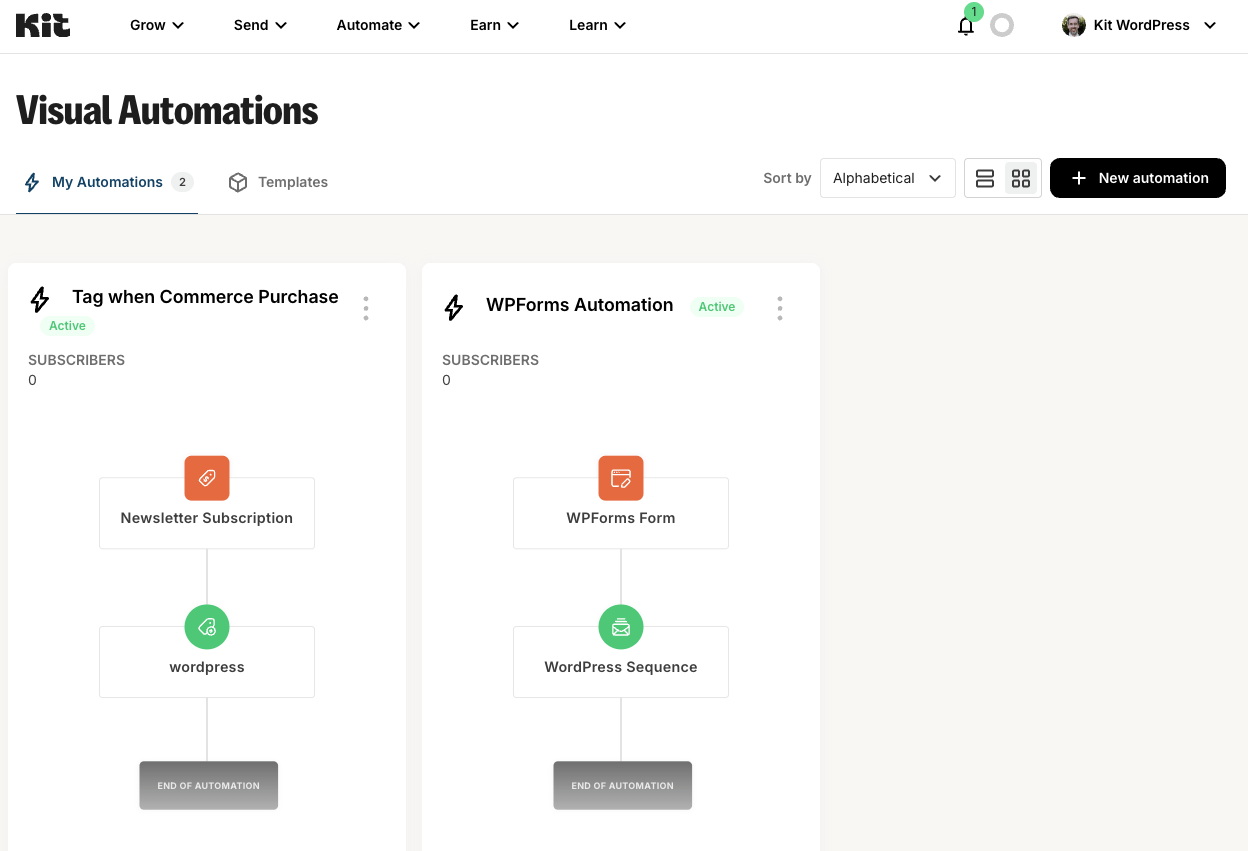
Capturas de tela
Para desenvolvedores
Este é o seu plugin? Mostre os números.
Adicione um crachá ao vivo ao seu site, Documentos ou Readme do GitHub. Ele é atualizado por conta própria - nenhuma conta necessária.
Best Kit (formerly ConvertKit) alternatives
Todos os plugins de marketing por e-mail →





FAQ
Kit (formerly ConvertKit): quick answers
Respostas diretas, extraídas de dados ao vivo WordPress.org.
Fonte: WordPress.org
Is Kit (formerly ConvertKit) free?
Yes. Kit (formerly ConvertKit) is free to download and use from the official WordPress.org plugin directory.
Is Kit (formerly ConvertKit) safe to use in 2026?
Yes — Kit (formerly ConvertKit) is a safe, well-maintained plugin to use in 2026. It runs on 40K+ sites, is rated 4.8/5 and was last updated 4 days ago, and scores 94/100 on our health check.
How many websites use Kit (formerly ConvertKit)?
Kit (formerly ConvertKit) is active on 40K+ WordPress websites and has been downloaded 4,944,190 times since it launched in March 2015. It was downloaded 140,420 times in the last 30 days.
Does Kit (formerly ConvertKit) work with WordPress 7.1?
Yes. The developer has tested Kit (formerly ConvertKit) up to WordPress 7.1.5, the latest release. It requires WordPress 5.6 or newer.
What PHP version does Kit (formerly ConvertKit) need?
Kit (formerly ConvertKit) requires PHP 7.1 or higher. Most hosts run PHP 8.x today, so it works on any modern WordPress hosting.
When was Kit (formerly ConvertKit) last updated?
The latest version, 3.5.2, was released on November 16, 2026 (4 days ago).
Who makes Kit (formerly ConvertKit)?
Kit (formerly ConvertKit) is developed and maintained by Kit.
What are the best alternatives to Kit (formerly ConvertKit)?
The most popular alternatives to Kit (formerly ConvertKit) are Hostinger Reach (1M+ installs), MailPoet (500K+ installs) and Newsletter (200K+ installs).
Alimentado por PageForge
Um modelo e uma planilha. Uma página real para cada pesquisa.
PageForge Transforma cada linha de um CSV em uma página WordPress com seu próprio título, URL, SEO campos e esquema, construído no layout que você já desenhou. Gratuito em WordPress.org.
- CSV e XLSX, mais Google Sheets em Profissional e Empresarial
- Seu próprio título, URL, SEO campos e esquema para cada página
- Funciona com o editor de blocos, Elementor, Divi e Avada
- Gratuito em WordPress.org, sem cartão de crédito