


Contasimple
This module allows you to export all WooCommerce orders as invoices in Contasimple.

Escolha sólida
Contasimple is a solid plugin choice in 2026, with a few things worth checking first. It runs on 200+ sites, is rated 4/5 and was last updated 2 months ago, and scores 73/100 on our health check.
- Testado com as últimas WordPress (7.1)
- Pequena base de usuários (mais de 200 instalações ativas)
Como ele se acumula?
Lado a lado em instalações, atualizações, avaliações e suporte


Downloads diários
Os picos de download geralmente seguem uma nova versão — cada site que atualiza automaticamente é um download.
Rankings
Where Contasimple stands todayWordPress.org Classificações de pesquisa
Posição ao vivo na pesquisa de plugins, top 100| Palavra chave | Posição |
|---|---|
| Contabilidade | #44 |
| Billing | #83 |
| contasimple | #1 |
| invoicing | #60 |
| taxes | #20 |
Adoção da versão
Compartilhamento de sites ativos por lançamento.
Divisão de classificação
★★★★★★★★★★ 4 from 6 reviews
About Contasimple
From the official readme · v1.32.0Descrição
This plugin is an extension for your WooCommerce online shop that synchronizes automatically all generated orders to your Contasimple account.
Gain more visibility regarding your business state in real time and keep your accounting and taxes up to date.
Key features
- Automatically syncs new completed orders to your Contasimple account.
- You can easily export previous orders generated before the plugin installation with only a few clicks.
- Configure automatic or manual email sending to your customers with attached PDF invoices from Contasimple.
- Clients will be automatically created in Contasimple using WooCommerce checkout customer address information.
- Configure the format for sequential numbering invoice generation, allowing to create series with custom prefixes and/or the current year in 2 or 4 digits format (ex: INV-2018-00001 or #F180000001).
- Configure different numbering series to separate regular invoices, negative rectification invoices (also known as amendments, credit slips or refunds) and simplified invoices (also known as purchase receipts or tickets) as many countries have law regulations in this regard.
To learn more about the key benefits of the Contasimple platform as a whole, please check the main Contasimple Website.
Technical specifications
- Requires at least WooCommerce 2.1 version. Upgrading to WooCommerce 3 or greater is strongly recommended.
- Initially developed for single-site installations. Multi-site support coming soon.
- Requires PHP cURL extension enabled to communicate with Contasimple’s API servers. This is common, but you might need to check it with your hosting provider.
Instalação
This section describes how to install the plugin and get it working. In case of doubt, please have a look at the Screenshots section for further clarification.
Instalação automática
Automatic installation is the easiest option as WordPress handles the file transfers itself and you don’t need to leave your web browser. To do an automatic install of Contasimple for WooCommerce, log in to your WordPress dashboard, navigate to the Plugins menu and click Add New.
In the search field type Contasimple and click Search Plugins. Once you’ve found our sync plugin you can view details about it such as the point release, rating and description. Most importantly of course, you can install it by simply clicking Install Now.
Instalação manual
The manual installation may be needed in certain circumstances, for example in case you have received from us a fresh new version of the plugin, not yet released on the official repository.
The traditional option is to decompress the .zip file provided by us and upload the contasimple folder to your WordPress /wp-content/plugins folder using an FTP client. The WordPress codex contains instructions on how to do this here.
Probably easier, you can also upload the zip file directly from the plugins section: navigate to the Plugins menu and click Add New, then Upload Plugin and locate the zip file on your PC (typically in your web browser download’s folder). In case of error due to either restrictive file permissions or WordPress complaining about the plugin already existing, you might need to resort to the previous described method.
Configuration
Once installed, the first thing to do is to configure the plugin to be able to connect with your Contasimple account. If you do not have a Contasimple account yet, you can register now by Clicking here.
Assuming you are already registered and have configured your fiscal region and company settings, you will be able to generate a Contasimple ‘APIKEY’. This key is unique to you and will grant your WooCommerce access to Contasimple’s servers so that the sync process can happen.
Passo 1
To generate the APIKEY, you must log first into your account at Contasimple Website and then click on the Settings icon wheel on the top bar, locate the sidebar menu and scroll down to the Other options section and click External Applications. When the new section is loaded, scroll down to the bottom and you will see a Authorization keys section. Click on “+ Add authorization keyand chooseWooCommerce`.
A new key will be generated, which will look like a long sequence of random characters, something like ‘fcc6360446b04f199b715c58a9116957’. Select the key (but not the quote marks) with the help of the mouse and copy/paste it. You will need it during the next step.
Passo 2
Now that we have generated the APIKEY, we need to configure the plugin to use it. All Contasimple’s plugin settings are handled by WooCommerce, since this is an integration for it. Therefore, you must navigate to WooCommerce > Settings and head to the Integration tab.
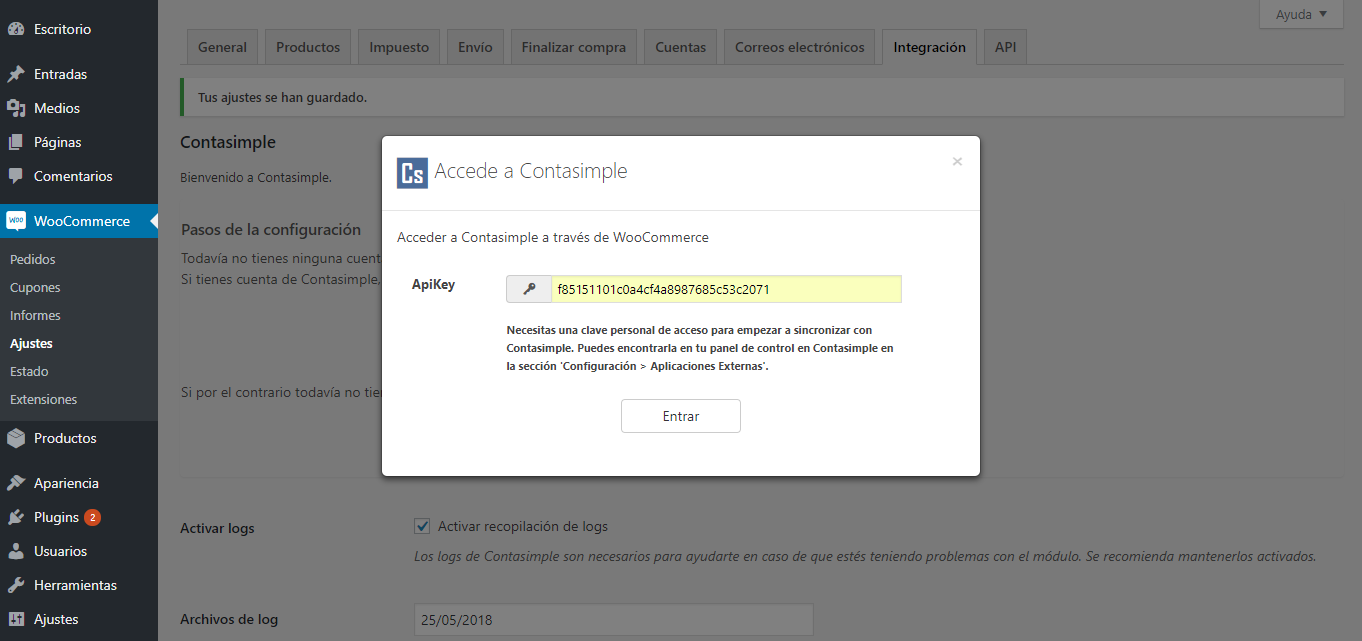
Since this is your first time using the plugin, you will be presented with the Configuration Wizard. Click on the Link account button. The first step will ask you for the previous generated APIKEY, paste the value on the text field and click Log In. You should see a success message and then you will be presented with a dialog to choose between your companies (just in case that you manage more than one) and you can also configure the correspondence between WooCommerce payment methods and Contasimple’s.
Congratulations! You have already configured the basics of the module. You can now start syncing your invoices. For more detailed info about additional configuration settings, please see the FAQ section.
Log de Changes
Just released to the WordPress repository.
1.32.0
- Some bug fixes and code improvements.
1.31.0
- New: You can now configure the default income type that will be used in Contasimple invoices when your orders are synced.
1.30.0
- Fixes not being able to create invoices from previous orders if HPOS is enabled.
1.29.0
- Some bug fixes and code improvements.
1.28.0
- New: Compatibility with HPOS.
- Some bug fixes and code improvements.
1.27.0
- Some bug fixes and code improvements.
Capturas de tela



Para desenvolvedores
Este é o seu plugin? Mostre os números.
Adicione um crachá ao vivo ao seu site, Documentos ou Readme do GitHub. Ele é atualizado por conta própria - nenhuma conta necessária.
Best Contasimple alternatives
All Accounting plugins →





FAQ
Contasimple: quick answers
Respostas diretas, extraídas de dados ao vivo WordPress.org.
Fonte: WordPress.org
Is Contasimple free?
Yes. Contasimple is free to download and use from the official WordPress.org plugin directory.
Is Contasimple safe to use in 2026?
Contasimple is a solid plugin choice in 2026, with a few things worth checking first. It runs on 200+ sites, is rated 4/5 and was last updated 2 months ago, and scores 73/100 on our health check.
How many websites use Contasimple?
Contasimple is active on 200+ WordPress websites and has been downloaded 21,210 times since it launched in November 2018. It was downloaded 468 times in the last 30 days.
Does Contasimple work with WordPress 7.1?
Yes. The developer has tested Contasimple up to WordPress 7.1.5, the latest release. It requires WordPress 3.8 or newer.
What PHP version does Contasimple need?
Contasimple requires PHP 5.5 or higher. Most hosts run PHP 8.x today, so it works on any modern WordPress hosting.
When was Contasimple last updated?
The latest version, 1.32.0, was released on October 1, 2026 (2 months ago).
Who makes Contasimple?
Contasimple is developed and maintained by Contasimple.
What are the best alternatives to Contasimple?
The most popular alternatives to Contasimple are ERP: Complete HR, Accountin… (4K+ installs), Ever Accounting (1K+ installs) and BjornTech Accounting Report… (900+ installs).
Alimentado por PageForge
Um modelo e uma planilha. Uma página real para cada pesquisa.
PageForge Transforma cada linha de um CSV em uma página WordPress com seu próprio título, URL, SEO campos e esquema, construído no layout que você já desenhou. Gratuito em WordPress.org.
- CSV e XLSX, mais Google Sheets em Profissional e Empresarial
- Seu próprio título, URL, SEO campos e esquema para cada página
- Funciona com o editor de blocos, Elementor, Divi e Avada
- Gratuito em WordPress.org, sem cartão de crédito