


Coldstash – Archive Old Orders for WooCommerce
Archive old WooCommerce orders out of the live order tables. Restore any order anytime, nothing deleted, Analytics reports unchanged.

Use com cautela
Coldstash works, but test it on a staging site before relying on it in 2026. Was last updated 1 month ago, and scores 60/100 on our health check.
- Testado com as últimas WordPress (7.1)
- Base de usuários pequenas (<10 instalações ativas)
- Muito poucos comentários até agora
- Precisa de PHP 8.1 ou mais recente
Como ele se acumula?
Lado a lado em instalações, atualizações, avaliações e suporte


Downloads diários
Os picos de download geralmente seguem uma nova versão — cada site que atualiza automaticamente é um download.
Rankings
Where Coldstash stands todayWordPress.org Classificações de pesquisa
Posição ao vivo na pesquisa de plugins, top 100| Palavra chave | Posição |
|---|---|
| archive orders | >100 |
| database cleanup | >100 |
| old orders | >100 |
| order cleanup | >100 |
| WooCommerce | >100 |
About Coldstash
Do Readme oficial · v1.0.0Descrição
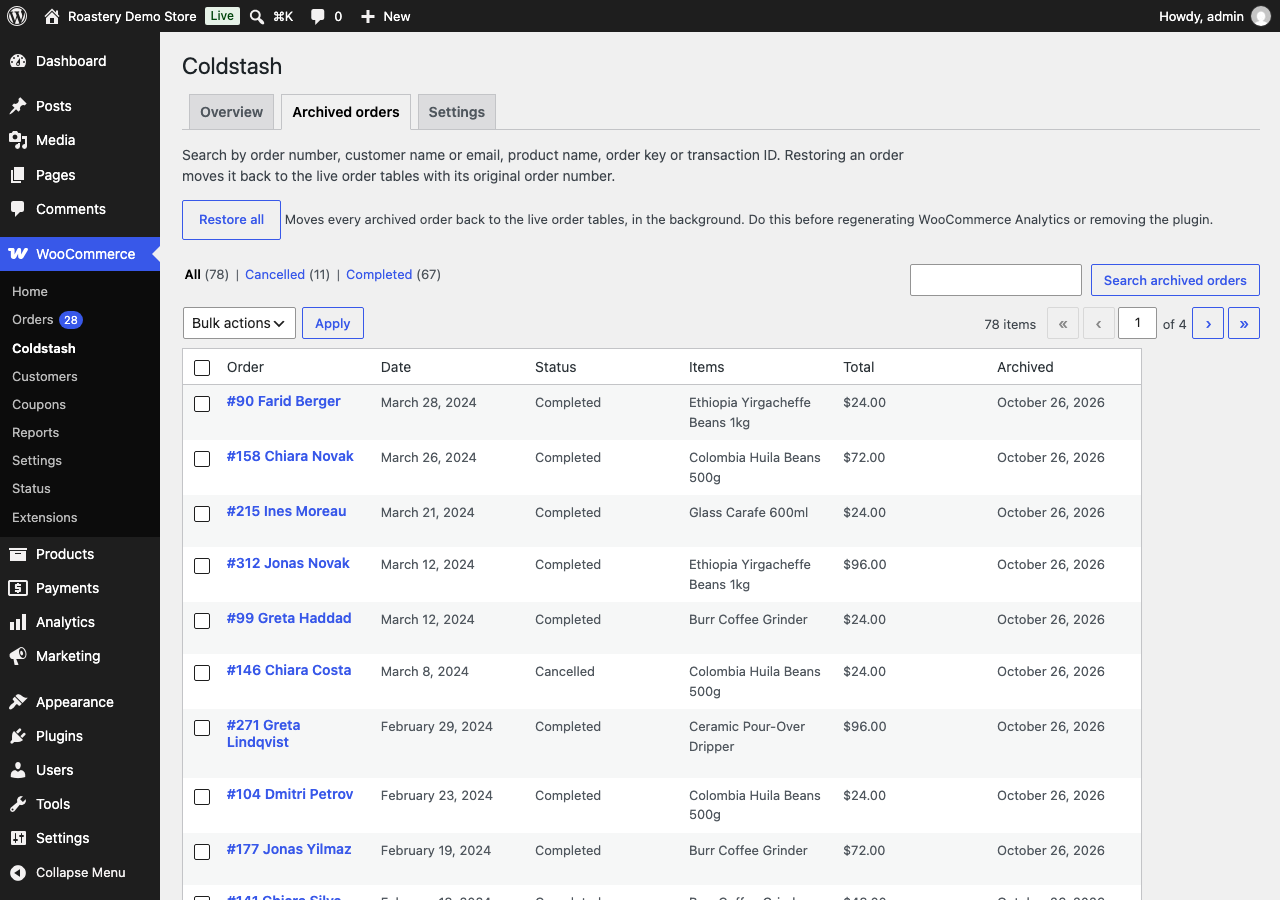
Coldstash archives old WooCommerce orders without deleting them. Completed orders from years ago move out of the live order tables into archive tables in the same database. You can still search them, open them read-only, and restore any of them with its original order number.
Orders are the fastest-growing data in a WooCommerce store. Every sale adds order rows, line items, item meta and order notes, and years of history make the live order tables large, which is what every order query, order screen and migration has to work through. Deleting old orders is the usual cleanup advice, but it loses history your accounting, customers and support may still need. Coldstash is the middle ground: a smaller set of live orders, and the old ones safely kept. If you came here looking for a way to bulk delete old WooCommerce orders, archiving gets you the cleanup without the risk.
Who it is for
- Established WooCommerce stores with years of order history and large order tables.
- Agencies and developers who look after those stores and want a reversible cleanup.
- Merchants who need to keep old orders for accounting or legal reasons, but not in the live tables.
What makes it safe
- Your reports do not change. WooCommerce Analytics reads its own lookup tables, and this plugin never touches them. Archive 2019 and your 2019 revenue is still there.
- Verify before delete. An order’s live rows are only removed after its archived copy has been read back out of MySQL and its checksum confirmed. A failed archive costs you nothing.
- Original order numbers. Restored orders come back with the same ID they had, because order numbers appear in your accounting and shipping history.
- Nothing is deleted, ever. Not on archive, not on deactivation, not on uninstall: the archive tables can only be removed once they are empty and you opt in.
What it skips, on purpose
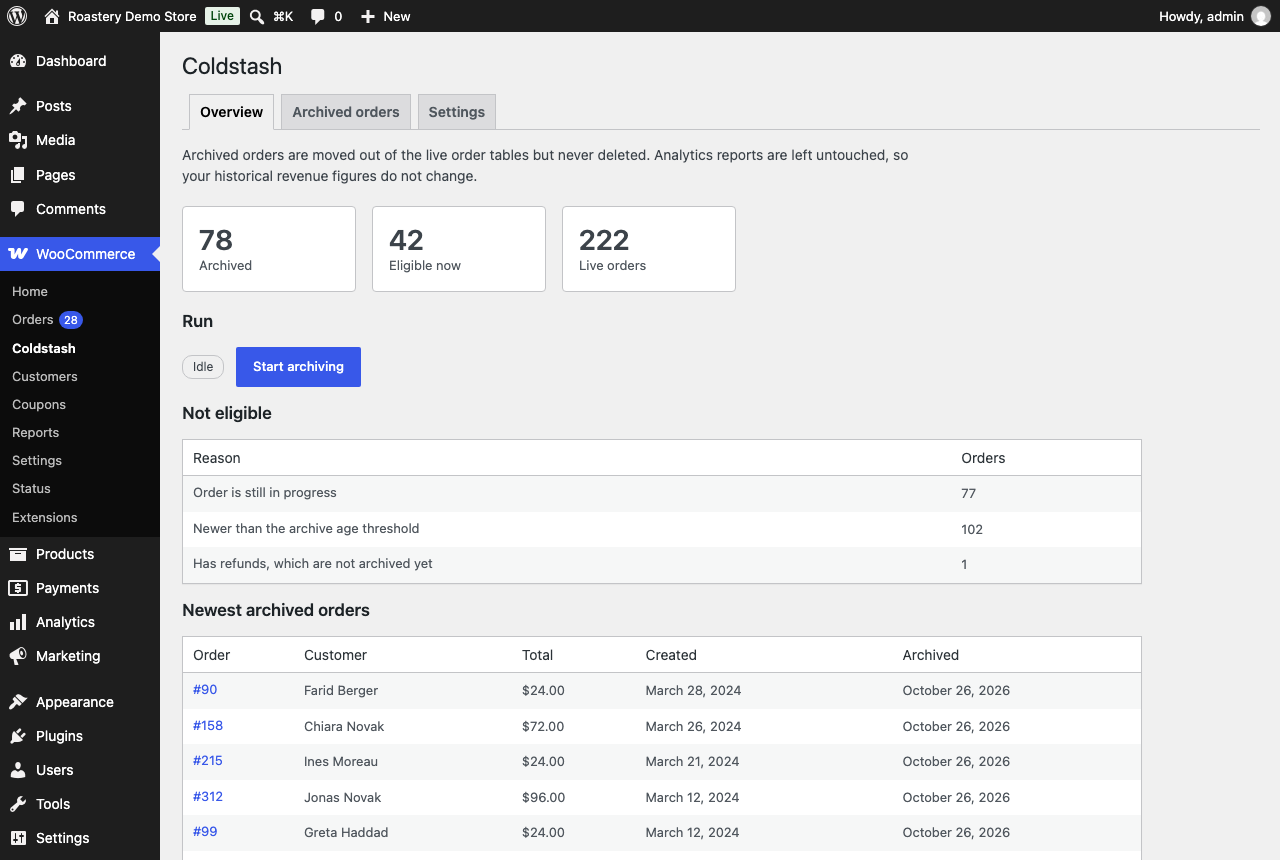
Orders that are still in progress, orders newer than your age threshold (24 months by default, at least 12), orders with refunds, orders with active download permissions, and anything attached to WooCommerce Subscriptions, Bookings or Memberships. Every exclusion is shown with its reason before you run anything.
Wp-cli
wp coldstash preview, `run`, `status`, `restore <id>` / `restore --all` and `verify` give you full control from the command line.
Requisitos
Requires High-Performance Order Storage (HPOS) with compatibility-mode sync turned off. Stores on legacy post-based order storage are not supported; the plugin stays idle and tells you why.
Privacidade
Coldstash stores archived orders, including the customer’s personal data in them (name, email, addresses, phone, IP address), in your site’s own database. It sends no data to any external service and contains no tracking or analytics.
Instalação
- Install and activate WooCommerce, and make sure High-Performance Order Storage is enabled under WooCommerce → Settings → Advanced → Features, with compatibility mode off.
- Install Coldstash – Archive Old Orders for WooCommerce from Plugins → Add New, or upload the zip, and activate it.
- Go to WooCommerce → Coldstash. Check the Settings tab (24 months, completed and cancelled orders by default), review which orders are eligible and why others are excluded, then click “Start archiving”.
Archiving runs in the background with Action Scheduler, in small batches, and can be stopped at any time.
Log de Changes
Lançamento inicial.
1.0.0
- Lançamento inicial.
Capturas de tela


Para desenvolvedores
Este é o seu plugin? Mostre os números.
Adicione um crachá ao vivo ao seu site, Documentos ou Readme do GitHub. Ele é atualizado por conta própria - nenhuma conta necessária.
Best Coldstash alternatives
All archive orders plugins →FAQ
Coldstash: quick answers
Respostas diretas, extraídas de dados ao vivo WordPress.org.
Fonte: WordPress.org
Is Coldstash free?
Yes. Coldstash is free to download and use from the official WordPress.org plugin directory.
Is Coldstash safe to use in 2026?
Coldstash works, but test it on a staging site before relying on it in 2026. Was last updated 1 month ago, and scores 60/100 on our health check.
How many websites use Coldstash?
Coldstash is active on <10 WordPress websites and has been downloaded 173 times since it launched in October 2026. It was downloaded 121 times in the last 30 days.
Does Coldstash work with WordPress 7.1?
Yes. The developer has tested Coldstash up to WordPress 7.1.5, the latest release. It requires WordPress 6.4 or newer.
What PHP version does Coldstash need?
Coldstash requires PHP 8.1 or higher. Most hosts run PHP 8.x today, so it works on any modern WordPress hosting.
When was Coldstash last updated?
The latest version, 1.0.0, was released on October 28, 2026 (1 month ago).
Who makes Coldstash?
Coldstash is developed and maintained by Narek.
What are the best alternatives to Coldstash?
The most popular alternatives to Coldstash are Clicks Order Archiver (<10 installs), Nextial Order Archive (<10 installs) and Orderloft (<10 installs).
Alimentado por PageForge
Um modelo e uma planilha. Uma página real para cada pesquisa.
PageForge Transforma cada linha de um CSV em uma página WordPress com seu próprio título, URL, SEO campos e esquema, construído no layout que você já desenhou. Gratuito em WordPress.org.
- CSV e XLSX, mais Google Sheets em Profissional e Empresarial
- Seu próprio título, URL, SEO campos e esquema para cada página
- Funciona com o editor de blocos, Elementor, Divi e Avada
- Gratuito em WordPress.org, sem cartão de crédito