


Code Snippet DM
Code Snippet DM enables you to display code snippets in a stylish way inside your content.

Use com cautela
Code Snippet DM works, but test it on a staging site before relying on it in 2026. It runs on 500+ sites, is rated 5/5 and was last updated 1 year ago, and scores 43/100 on our health check.
- Base de usuários pequenas (mais de 500 instalações ativas)
- Muito poucos comentários até agora
- Nenhuma atualização em mais de um ano
- Testado apenas até WordPress 6.8 (mais recente é 7.1)
Como ele se acumula?
Lado a lado em instalações, atualizações, avaliações e suporte


Downloads diários
Os picos de download geralmente seguem uma nova versão — cada site que atualiza automaticamente é um download.
Rankings
Where Code Snippet DM stands todayWordPress.org Classificações de pesquisa
Posição ao vivo na pesquisa de plugins, top 100| Palavra chave | Posição |
|---|---|
| code | #87 |
| code snippet | #19 |
| display code | #48 |
| embed | >100 |
| snippet | #25 |
Adoção da versão
Compartilhamento de sites ativos por lançamento.
Divisão de classificação
★★★★★ ★★★★★ 5 de 4 comentários
About Code Snippet DM
Do Readme oficial · v2.0.4Descrição
Supports: Gutenberg, Elementor, TinyMCE and shortcode
Display your code snippets in a stylish way inside your content. The plugin uses shortcodes and also very intuitive TinyMCE interface.
Starting with v2.0.3, the plugin offers support to be used via a custom Elementor Widget.
Starting with v2.0.1, the plugin offers support to be used via a custom Gutenberg block.
It will continue to support the default way of adding the code snippet via shotcodes.
Code Snippet DM was inspired by the Carbon project.
We created a simple way to display your code snippets but also have control over the way it appears, thus making it more stylish.
Also, on the front end in the top right you will find a Copy Code button that allows you to copy to clipboard the entired code snippet.
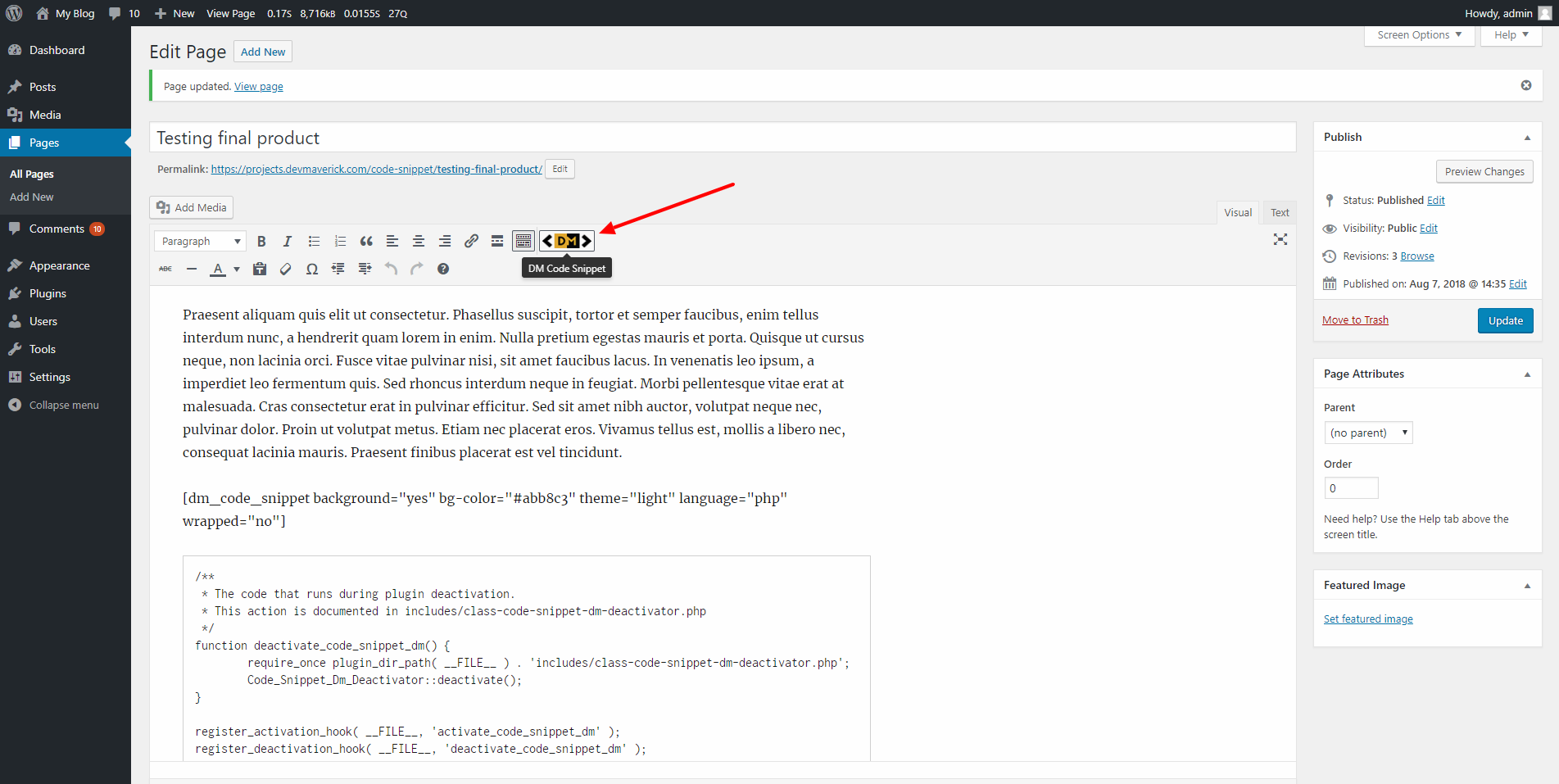
The plugin provides you with a TinyMCE button that will allow you to display the code or an option to use a shortcode.
You can open the shorcode [dm_code_snippet] and in the content inside and close it [/dm_code_snippet].
Elementor widget
The Widget is called “Code Snippet DM” and can be found on the Basic list of Elementor Widget after you activate the plugin. Keywords that can be used to find it: code, snippet, dm.
Once the widget is added in the Elementor editor, it can be customized via the sidebar settings that will appear for each widget. The sidebar will include all the settings that are available for the shortcode. Some of the settings will be applied in real time in your editor.
The code styling (syntax highlight) and line numbers are only available on the front-end, in the editor you will not be able to preview the correct colors for the code or the line numbers.
Gutenberg block
The block is called “Code Snippet DM” and can be found in the embed section of Gutenberg blocks. Keywords that can be used to find it: code, snippet, dm.
Once the block is added in the Gutenberg editor, it can be customized via the sidebar settings that will appear for each block. The sidebar will include all the settings that are available for the shortcode. Some of the settings will be applied in real time in your editor.
The code styling (syntax highlight) and line numbers are only available on the front-end, in the editor you will not be able to preview the correct colors for the code or the line numbers.
Shortcode Options
There are a number of options that you can use in the shortcode:
- background with options yes or no will enable/disable the color background (Default yes)
- background-mobile with options yes or no will enable/disable the color background for mobile devices (Default yes)
- bg-color accepts any HEX, RGB or RGBA value to change the background color (Default #abb8c3)
- theme with options light or dark that changes the code editor theme (Default dark)
- slim with options yes or no that changes the code editor from default to a slim version, ideal for one-line code (Default no)
- line-numbers with options yes or no that will enable a left side line number for columns (Default no)
- language with options clike, css, javascript, markup, perl, php, python, ruby, sql, typescript, shell will highlight the syntaxes based on what you select for your code (Default php)
- wrap with options yes or no will wrap the code or add a horizontal scroll bar to display it as it is (Default no)
- height allows you to input any value and will set the code snippet height to that value. Example: 500px. (Default is empty)
- copy-text this is used for the text shown on the copy button. If it’s not added it will use the default option. (Default Copy Code)
- copy-confirmed this is used for the text shown after you click the copy button. If it’s not added it will use the default option. (Default Copied)
Example of shortcode:
[dm_code_snippet background="yes" background-mobile="yes" slim="no" line-numbers="no" bg-color="#abb8c3" theme="light" language="css" wrapped="no" height="500px" copy-text="Get the Code!" copy-confirmed="You have it!"]<pre>
.dm-code-snippet.dark {
  background: $default-bg;
  padding: 40px 35px 45px 35px;
  margin: 30px 0;
}</pre>
[/dm_code_snippet]
Important:
* If you use the shortcode directly, make sure to wrap the code in <pre></pre> as in the example above.
* If you want to add HTML using the shortcode, you’ll need to escape the HTML before pasting it in the shortcode. (You can easily find an escape tool online to convert the code)
* If you have code (not HTML) that uses ‘</’ and you add it with the shortcode and not the and the TinyMCE button, you will need to escape ‘</’ from your code in order to properly display it.
Use the TinyMCE button if you don’t want to add the shortcode yourself. (see Screenshots)
Instalação
- Upload
code-snippet-dmfolder to the/wp-content/plugins/directory. - Ative o plugin através do menu 'Plugins' em WordPress.
- Start using the shortcode or TinyMCE button to display your code.
Log de Changes
1.1
- Added option to customize the Copy button text and also the confirmation text after you click it.
- Fixed small content alignment issue.
1.2
- Added support for shortcodes inside the
[dm_code_snippet][your-shortcode][\dm_code_snippet].
1.3
- Added support for Ruby and Python.
- Added slim option that can be user for one-line code examples
- Fixed overall spacing issue
1.3.1
- Added support for Perl, SQL and TypeScript.
- Fixed margin issue where it might break the page layout and align the code element to the left
1.3.2
- Added support for ‘height’, allowing to set a max-height for the code snippet element.
1.3.4
- Fixed bug where on copy it will insert an extra empty line at the top of the code
- Added support for Bash/Shell
Capturas de tela


Para desenvolvedores
Este é o seu plugin? Mostre os números.
Adicione um crachá ao vivo ao seu site, Documentos ou Readme do GitHub. Ele é atualizado por conta própria - nenhuma conta necessária.
Best Code Snippet DM alternatives
All code plugins →


FAQ
Code Snippet DM: quick answers
Respostas diretas, extraídas de dados ao vivo WordPress.org.
Fonte: WordPress.org
Is Code Snippet DM free?
Yes. Code Snippet DM is free to download and use from the official WordPress.org plugin directory.
Is Code Snippet DM safe to use in 2026?
Code Snippet DM works, but test it on a staging site before relying on it in 2026. It runs on 500+ sites, is rated 5/5 and was last updated 1 year ago, and scores 43/100 on our health check.
How many websites use Code Snippet DM?
Code Snippet DM is active on 500+ WordPress websites and has been downloaded 13,491 times since it launched in August 2018. It was downloaded 251 times in the last 30 days.
Does Code Snippet DM work with WordPress 7.1?
Code Snippet DM is officially tested up to WordPress 6.8.13, while the latest release is 7.1.5. It may still work, but try it on a staging site first.
What PHP version does Code Snippet DM need?
Code Snippet DM requires PHP 7.4 or higher. Most hosts run PHP 8.x today, so it works on any modern WordPress hosting.
When was Code Snippet DM last updated?
The latest version, 2.0.4, was released on August 22, 2025 (1 year ago).
Who makes Code Snippet DM?
Code Snippet DM is developed and maintained by George-Paul Crețu.
What are the best alternatives to Code Snippet DM?
The most popular alternatives to Code Snippet DM are WPCode (3M+ installs), Code Snippets (1M+ installs) and Head & Footer Code (100K+ installs).
Alimentado por PageForge
Um modelo e uma planilha. Uma página real para cada pesquisa.
PageForge Transforma cada linha de um CSV em uma página WordPress com seu próprio título, URL, SEO campos e esquema, construído no layout que você já desenhou. Gratuito em WordPress.org.
- CSV e XLSX, mais Google Sheets em Profissional e Empresarial
- Seu próprio título, URL, SEO campos e esquema para cada página
- Funciona com o editor de blocos, Elementor, Divi e Avada
- Gratuito em WordPress.org, sem cartão de crédito