


Button visually impaired
A version of your site for the visually impaired: a settings panel, Gutenberg blocks, a shortcode and a widget.

Escolha sólida
Button visually impaired is a solid plugin choice in 2026, with a few things worth checking first. It runs on 10K+ sites, is rated 4.9/5 and was last updated 2 months ago, and scores 75/100 on our health check.
- Comprovado em escala em sites ativos de mais de 10 mil
- Loved by users — 4.9/5 from 27 reviews
- Testado com as últimas WordPress (7.1)
- Precisa de PHP 8.3 ou mais recente
Como ele se acumula?
Lado a lado em instalações, atualizações, avaliações e suporte


Downloads diários
Os picos de download geralmente seguem uma nova versão — cada site que atualiza automaticamente é um download.
Rankings
Where Button visually impaired stands todayWordPress.org Classificações de pesquisa
Posição ao vivo na pesquisa de plugins, top 100| Palavra chave | Posição |
|---|---|
| accessibility | >100 |
| Gutenberg block | >100 |
| text to speech | #11 |
| visually impaired | #1 |
| wcag | #36 |
Adoção da versão
Compartilhamento de sites ativos por lançamento.
Divisão de classificação
★★★★★★★★★★ 4.9 from 27 reviews
About Button visually impaired
From the official readme · v2.4.0Descrição
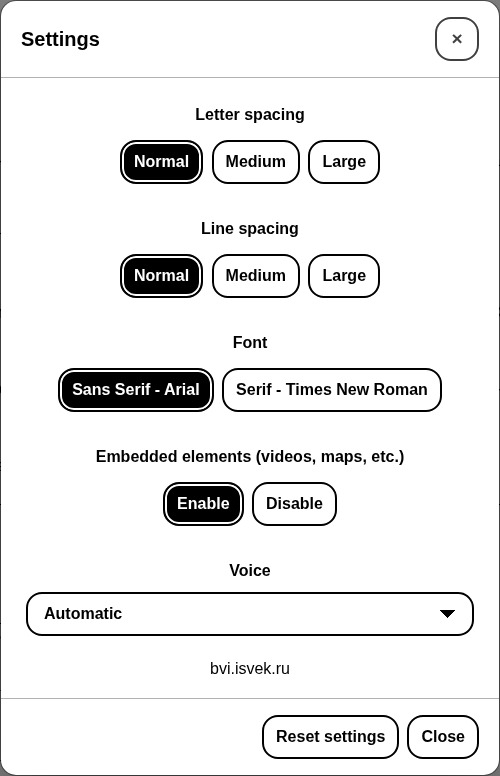
Button visually impaired automatically changes your site into a version for the visually impaired. The panel on the site lets visitors change the color scheme, the font size and family, spacing and images, and a speech synthesizer reads aloud the changes and the text you mark for it. Thanks to it, your site meets the needs of people with disabilities.
Recursos
- Change the font size (up to 200%);
- Change the color scheme of the site;
- Change the font of the site (serif or sans serif);
- Change the image (gray scale, hide the image with an alt caption);
- Change letter spacing (kerning);
- Change line spacing;
- Speech synthesizer reads aloud changes to display settings;
- Disable embedded elements (videos, maps, etc.);
- Play text to voice;
- Interface and speech in 11 languages;
- The panel follows the selected color scheme and collapses into a menu on phones and tablets;
- Keyboard control (Tab, arrow keys, Home, End, Space, Enter, Esc);
- Support for browsers Chrome, Firefox, Safari, Microsoft Edge, Opera.
Ways to add the button
- The Gutenberg block “Button for the visually impaired”: icon, text, colors (also on hover, gradient), font, spacing, borders, shadow, size;
- The Gutenberg block “Speech text”: a container whose content a visitor can listen to;
- The shortcode
[bvi]with the attributestext,icon,colorandbackground; - The “Button visually impaired” widget: title, text, colors, showing the icon and the text;
- Any element with the
bvi-openclass.
Detailed instructions and a FAQ are on the “BVI → Instructions” page in the admin.
HTML classes
bvi-speechadds text-to-speech buttons to the block;bvi-hidehides the element in the version for the visually impaired;bvi-showshows the element only in the version for the visually impaired;bvi-no-stylesdisables the plugin styles inside the block.
Instalação
- Upload the plugin to the
/wp-content/plugins/directory. - Activate the plugin: Plugins → Button visually impaired → Activate.
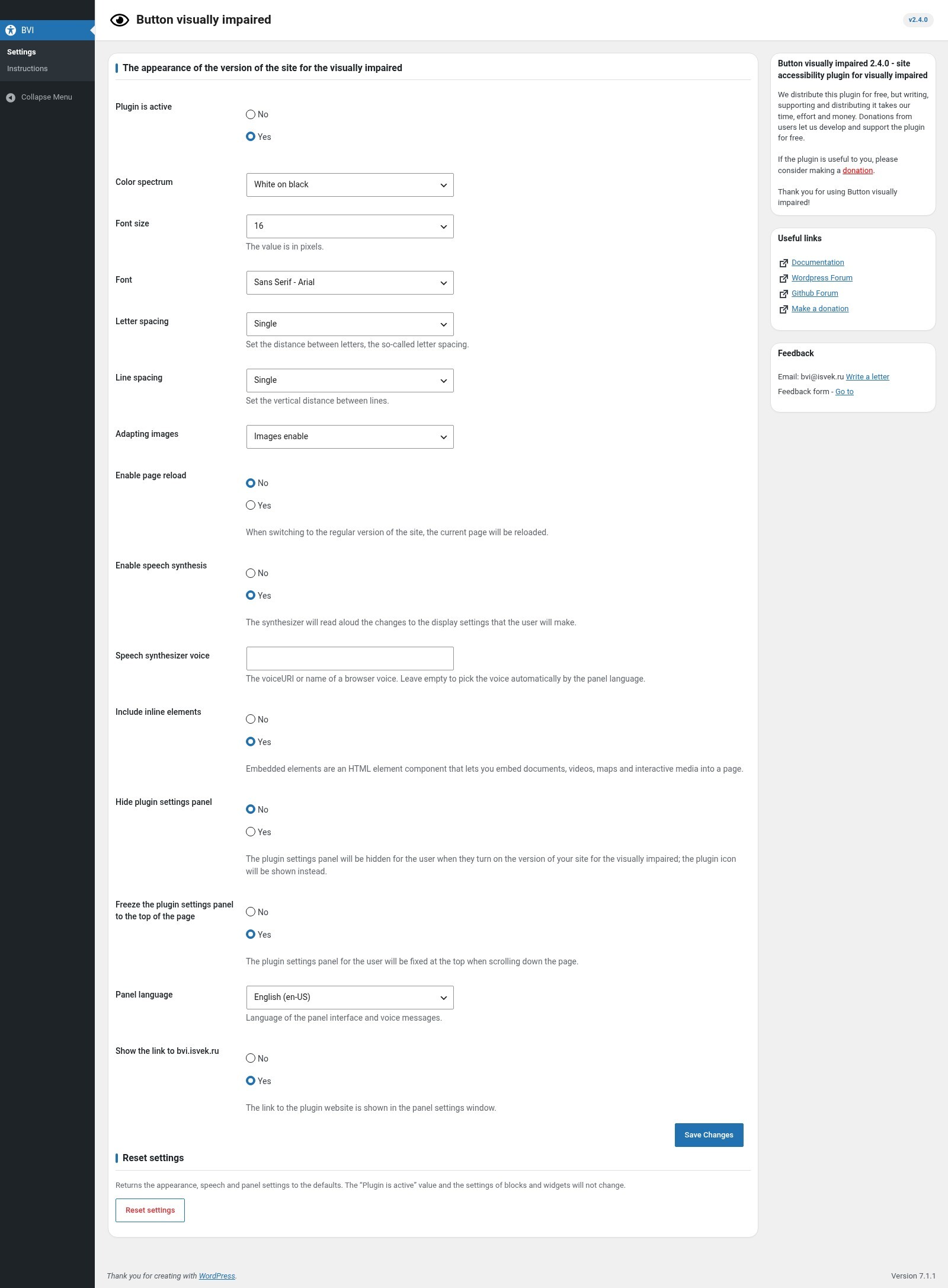
- Go to the BVI menu and choose “Plugin is active: Yes” in the settings.
- Add the button with the “Button for the visually impaired” block, a widget, or the shortcode
[bvi]or[bvi text="Version for the visually impaired" background="#1a237e" color="#ffffff" icon="true"].
Log de Changes
Requires PHP 8.3+ and WordPress 6.0+. The main plugin file is renamed: if the plugin is deactivated after the update, activate it again on the Plugins page. Settings are migrated automatically.
2.4.0
- The BVI JavaScript library is updated to 2.0.0 (new panel, accessibility, styles; Internet Explorer is no longer supported);
- Panel interface and speech in 11 languages: ru-RU, en-US, es-ES, de-DE, fr-FR, pt-BR, it-IT, tr-TR, pl-PL, zh-CN, ja-JP;
- Added the Gutenberg blocks “Button for the visually impaired” and “Speech text” with native color, font, spacing, border and size settings;
- Shortcode [bvi]: the attributes text, icon, color and background; it outputs a span, so the shortcode is valid inside a paragraph;
- Widget: text and background colors, showing the icon and the text;
- The button text, color and background are no longer plugin settings: they are set in the block, the widget and the shortcode (existing widget values are kept);
- The button is a button element instead of a link;
- Added the “BVI → Instructions” page: quick start, ways to add the button, blocks, markup classes, text to speech (bvi-speech), keyboard control and FAQ;
- Added the “Reset settings” button (the “Plugin is active” value is kept);
- Added settings: the speech synthesizer voice, the link to bvi.isvek.ru, 11 panel languages;
- Fixed: the “Font” setting was not passed to the library;
- Select and radio values of the settings are validated;
- Option keys no longer have the bvi prefix (data is migrated automatically on update);
- The text domain is now button-visually-impaired, as WordPress.org requires;
- Updated the English translation; the block editor is translated;
- Requires WordPress 6.0+ and PHP 8.3+.
2.3.0
- Bug fixes;
2.2.0
- Bug fixes;
2.1.0
- Panel interface update;
- Bug fixes;
- Added the English (United States) translation;
2.0
- Added the ability to change the CSS background-image (gray scale, hide the image);
- Added a responsive layout for all screen sizes;
- Panel interface update;
- Speech synthesizer update;
- Bug fixes;
1.0.8
- Bug fixes;
Capturas de tela

Para desenvolvedores
Este é o seu plugin? Mostre os números.
Adicione um crachá ao vivo ao seu site, Documentos ou Readme do GitHub. Ele é atualizado por conta própria - nenhuma conta necessária.
Best Button visually impaired alternatives
All accessibility plugins →





FAQ
Button visually impaired: quick answers
Respostas diretas, extraídas de dados ao vivo WordPress.org.
Fonte: WordPress.org
Is Button visually impaired free?
Yes. Button visually impaired is free to download and use from the official WordPress.org plugin directory.
Is Button visually impaired safe to use in 2026?
Button visually impaired is a solid plugin choice in 2026, with a few things worth checking first. It runs on 10K+ sites, is rated 4.9/5 and was last updated 2 months ago, and scores 75/100 on our health check.
How many websites use Button visually impaired?
Button visually impaired is active on 10K+ WordPress websites and has been downloaded 85,253 times since it launched in November 2015. It was downloaded 2,182 times in the last 30 days.
Does Button visually impaired work with WordPress 7.1?
Yes. The developer has tested Button visually impaired up to WordPress 7.1.5, the latest release. It requires WordPress 6.0 or newer.
What PHP version does Button visually impaired need?
Button visually impaired requires PHP 8.3 or higher. Most hosts run PHP 8.x today, so it works on any modern WordPress hosting.
When was Button visually impaired last updated?
The latest version, 2.4.0, was released on September 21, 2026 (2 months ago).
Who makes Button visually impaired?
Button visually impaired is developed and maintained by veks.
What are the best alternatives to Button visually impaired?
The most popular alternatives to Button visually impaired are Web Accessibility (formally… (500K+ installs), Auto Image Attributes From… (100K+ installs) and Accessibility by UserWay (80K+ installs).
Alimentado por PageForge
Um modelo e uma planilha. Uma página real para cada pesquisa.
PageForge Transforma cada linha de um CSV em uma página WordPress com seu próprio título, URL, SEO campos e esquema, construído no layout que você já desenhou. Gratuito em WordPress.org.
- CSV e XLSX, mais Google Sheets em Profissional e Empresarial
- Seu próprio título, URL, SEO campos e esquema para cada página
- Funciona com o editor de blocos, Elementor, Divi e Avada
- Gratuito em WordPress.org, sem cartão de crédito