


BreznFlow
Display n8n workflows as interactive SVG diagrams with zoom, pan, node details, and automatic secret masking.

Considere uma alternativa
BreznFlow shows warning signs in 2026 — compare the alternatives below before installing. Was last updated 7 months ago, and scores 36/100 on our health check.
- Base de usuários pequenas (<10 instalações ativas)
- Muito poucos comentários até agora
- Testado apenas até WordPress 6.9 (mais recente é 7.1)
Como ele se acumula?
Lado a lado em instalações, atualizações, avaliações e suporte



Downloads diários
Os picos de download geralmente seguem uma nova versão — cada site que atualiza automaticamente é um download.
Rankings
Where BreznFlow stands todayWordPress.org Classificações de pesquisa
Posição ao vivo na pesquisa de plugins, top 100| Palavra chave | Posição |
|---|---|
| automation | >100 |
| diagram | #68 |
| n8n | >100 |
| SVG | >100 |
| workflow | >100 |
About BreznFlow
Do Readme oficial · v1.0.4Descrição
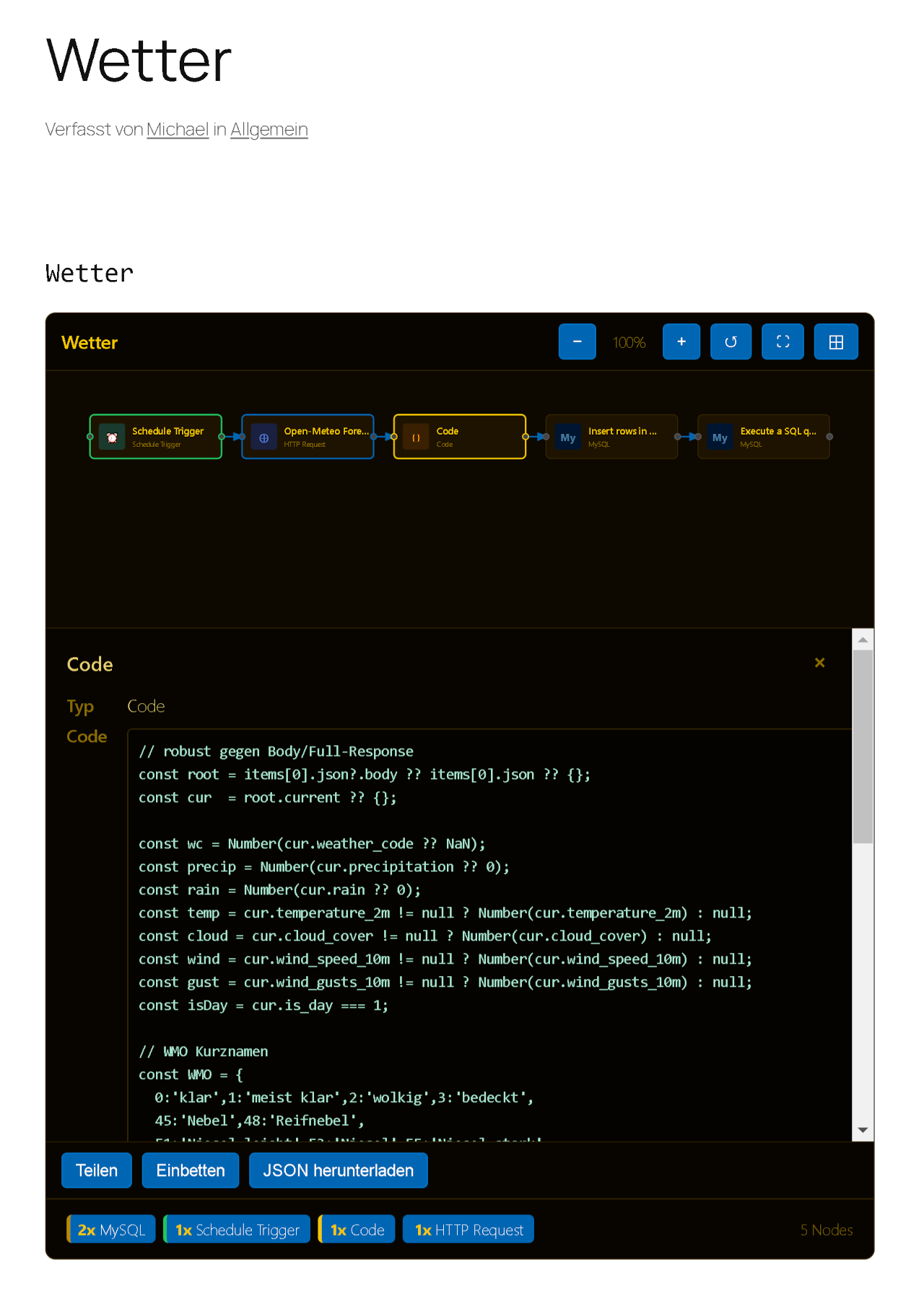
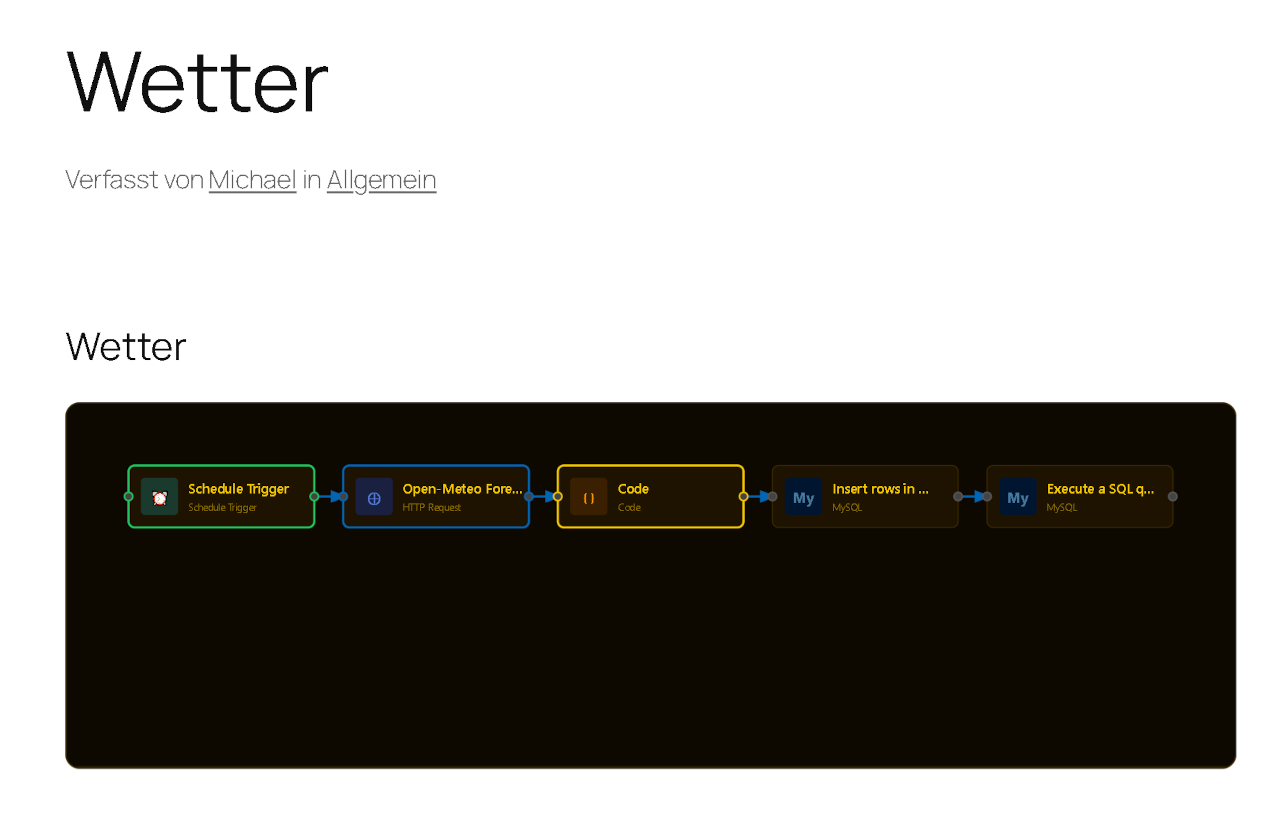
BreznFlow turns n8n workflow JSON exports into interactive, zoomable SVG diagrams inside WordPress. Paste your workflow, and the plugin renders every node with brand-accurate colors, connection lines, and clickable detail panels — directly in your posts and pages.
The plugin was built for mifupa.com, a personal blog where n8n automations are documented regularly. Screenshots get outdated. Embedding the n8n editor is impractical. BreznFlow solves this: one shortcode, one interactive diagram, zero external dependencies.
Aprender mais
- Website: breznflow.com
- FAQ: breznflow.com/faq
- Live demo: breznflow.com/demo
At a glance
- Renders n8n workflow JSON as interactive SVG diagrams with zoom, pan, and click
- 86 node types with brand-accurate colors and icons (OpenAI, Slack, GitHub, Telegram, and more)
- Click any node to inspect its parameters in a detail panel below the diagram
- Automatically masks API keys, tokens, and secrets before storage — the raw JSON is never saved
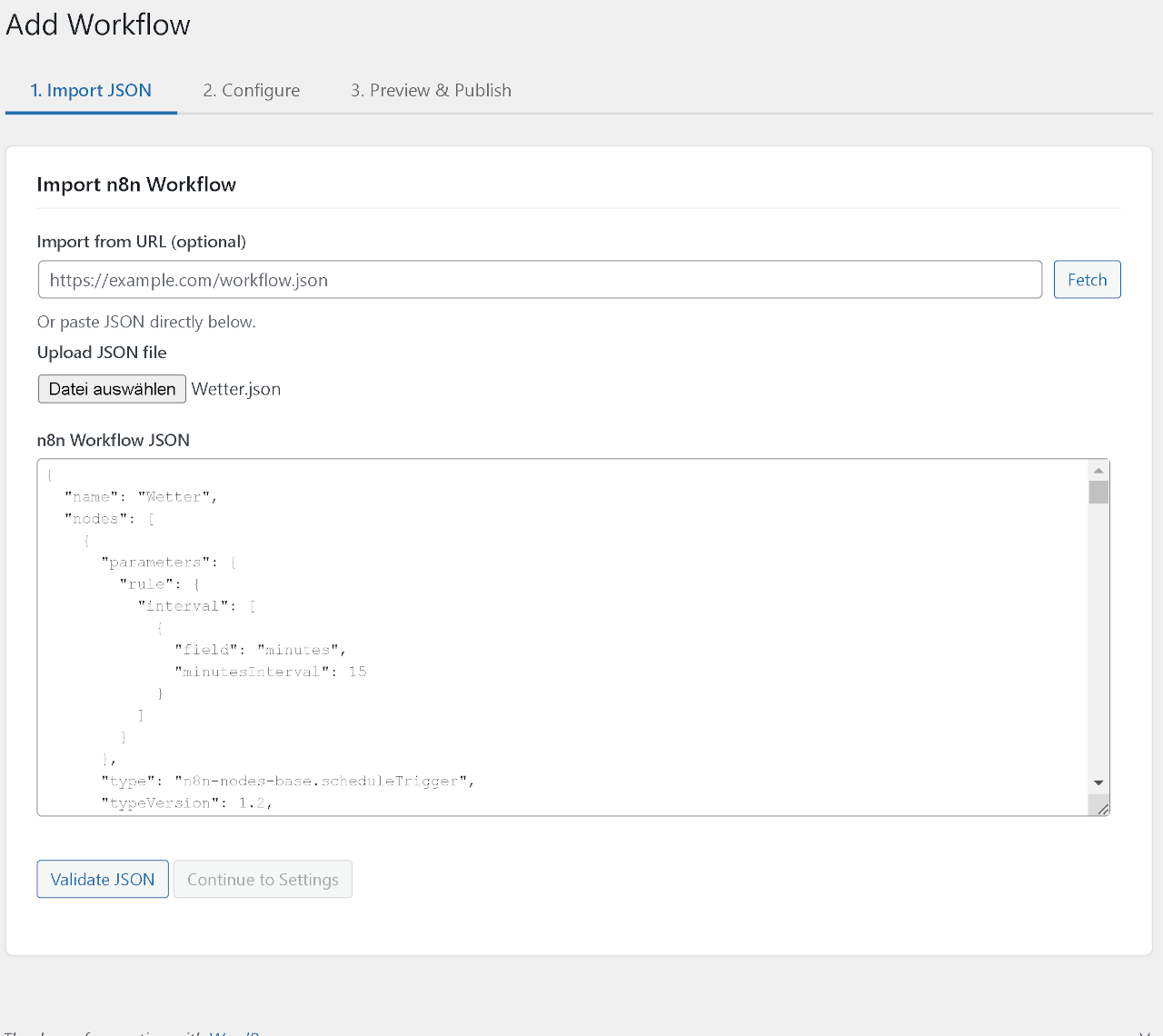
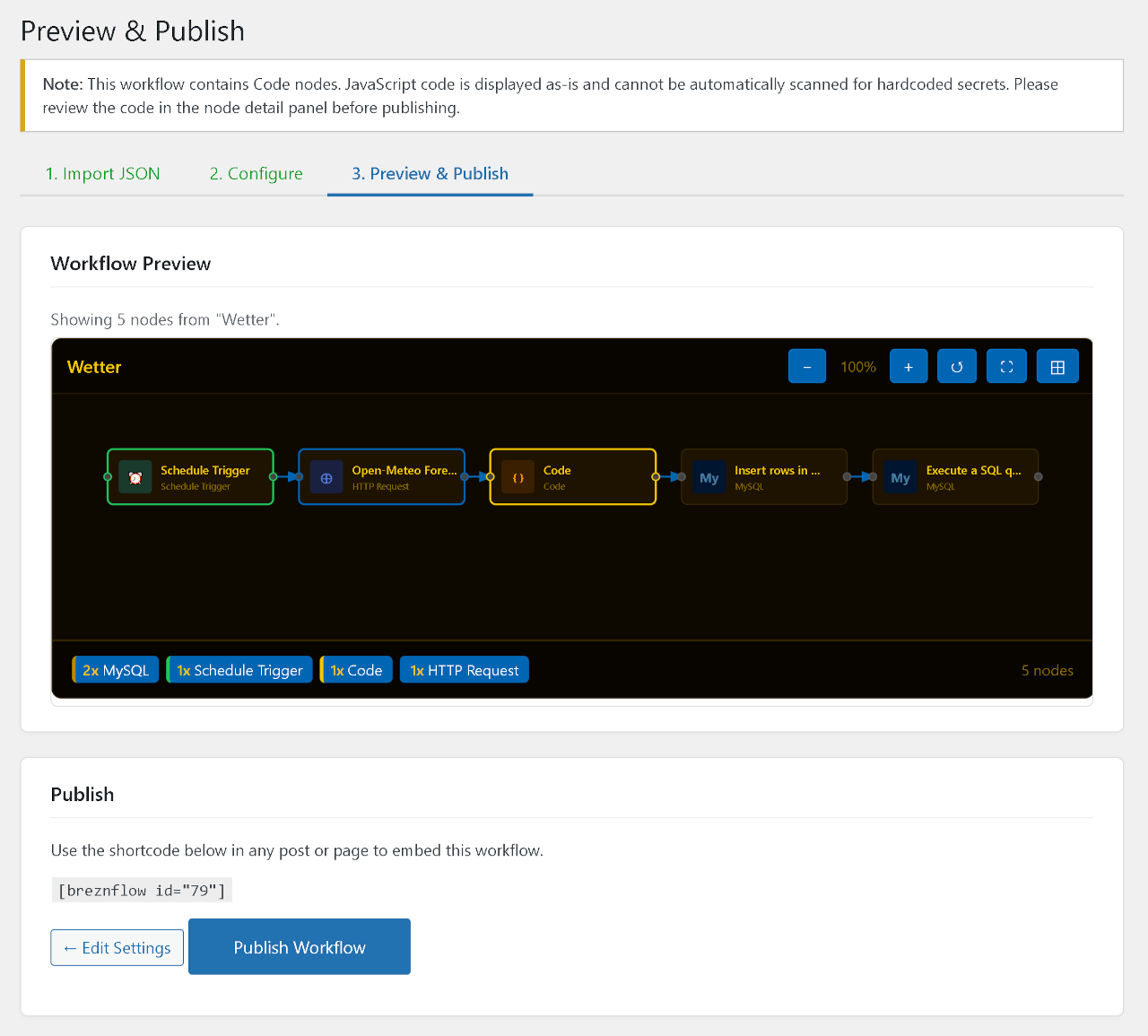
- 3-step import wizard: paste JSON, configure display, preview and publish
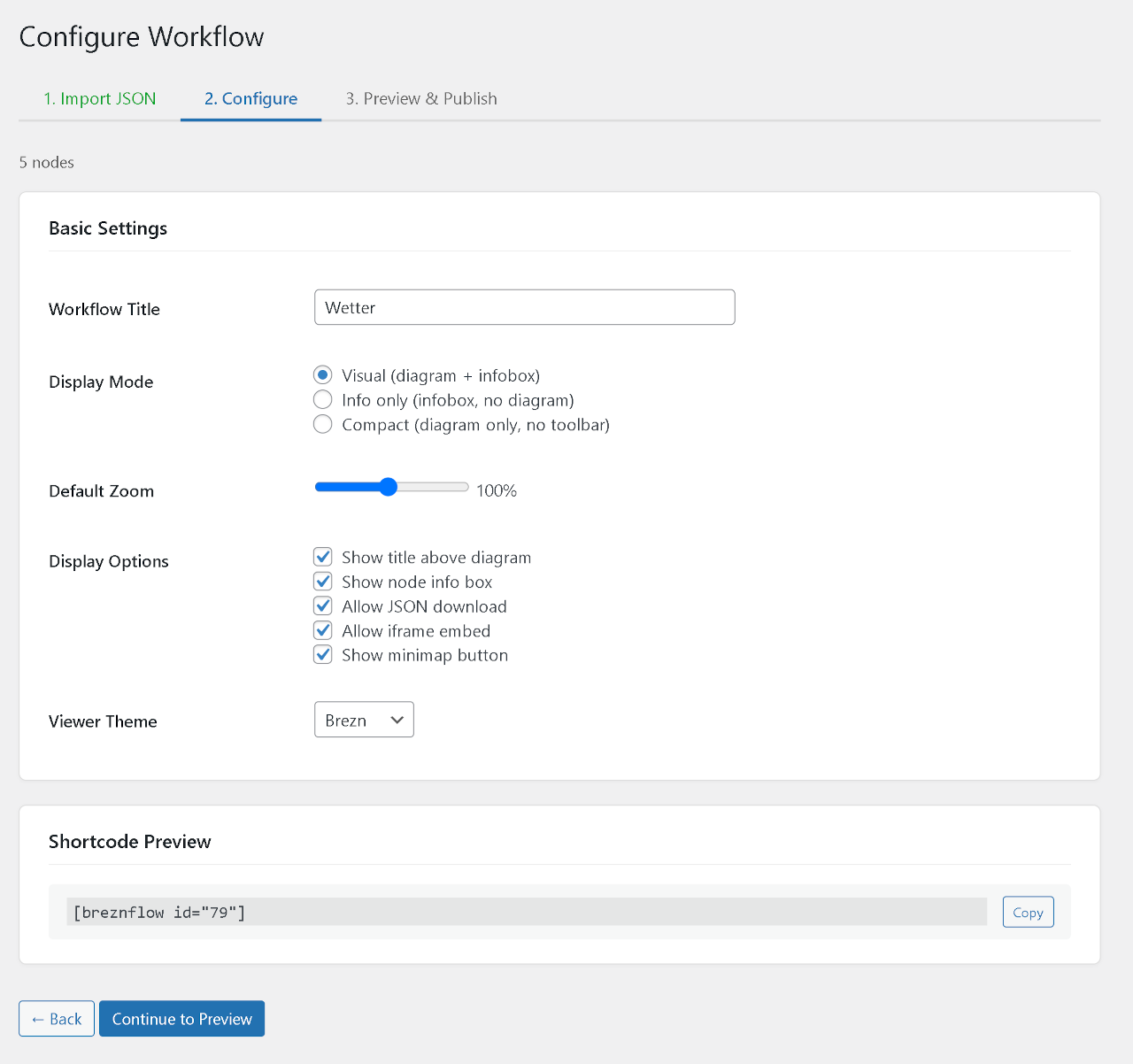
- 5 built-in themes (Dark, Light, Minimal, Tech, Brezn) plus custom theme import
- Shortcode
[breznflow id="X"]with 13 attributes for per-instance configuration - Action bar with share, embed, get JSON, and download actions
- Standalone embed page for iframe integration
- Related workflows by shared node types
- View counter and AI detection badges
- Zero dependencies — vanilla JavaScript, no external CDN, no tracking
What makes BreznFlow different
- No external services. Everything runs locally inside WordPress. No CDN, no SaaS, no API calls during page loads.
- Security first. Sensitive data (API keys, tokens, secrets) is automatically detected and replaced with
[REDACTED]before storage. The raw workflow JSON is never saved. - Real interactivity. Not a static image — visitors can zoom, pan, and click nodes to see their configuration.
- Vanilla JavaScript. No React, no jQuery, no build step. The renderer is a single JS file that generates SVG elements directly.
- Built for real sites. Running on the developer’s own production sites since version 1.0.
Display modes
- Visual — full diagram with toolbar, detail panel, and action bar
- Info — node counts only (InfoBox summary like “3× HTTP Request, 2× Code”) — no diagram
- Compact — diagram without toolbar or action bar
Theme system
5 built-in themes: Dark (default), Light, Minimal, Tech, and Brezn. Custom themes can be imported as .breznflow.json files containing 41 CSS color tokens. Themes are selectable globally, per workflow, or per shortcode.
Node type registry
86 predefined node types across 10 categories: Triggers, Core Logic, Data Transformation, Databases, Communication, Google, Dev Tools, AI, Storage, and CRM/Marketing. Unknown node types get a deterministic fallback with auto-generated colors — the same unknown type always looks the same.
Sensitive data masking
Before saving, BreznFlow runs a two-pass sanitization:
- All strings pass through WordPress sanitization
- Secret detection scans for API keys in URL parameters, sensitive header values (Authorization, Bearer, X-API-Key), and high-entropy condition values
A masking log records every redaction with reason and context — visible in the wizard preview.
Action bar
Below the diagram, the action bar provides four configurable actions:
- Share — article link and anchor link for hash navigation
- Embed — iframe embed code for standalone embedding
- Get JSON — formatted JSON display with file size
- Download — sanitized JSON file download
Each action can be enabled/disabled globally, per workflow, or per shortcode. Embed and Download use dual-gate security (global setting AND per-post permission).
Serviços externos
This plugin optionally connects to external services only when you explicitly use the “Import from URL” feature in the workflow import wizard.
Import from URL
If you choose to import a workflow by pasting a URL instead of uploading or pasting JSON directly, the plugin makes an HTTP request to that URL using WordPress’s built-in wp_remote_get() function.
- When: Only when you click the “Fetch” button in the Add Workflow wizard
- What is sent: Only the URL you provide — no WordPress data, no user data, no cookies
- To whom: Whatever server hosts the URL you provide
- Privacy policy: Depends on the server you connect to
No data is transmitted automatically. No data is sent during normal page loads or to visitors browsing your site.
For security, requests to private and internal network addresses are blocked: localhost, 127.0.0.0/8, 10.0.0.0/8, 172.16.0.0/12, 192.168.0.0/16, and cloud metadata endpoints (e.g. 169.254.169.254).
Instalação
- Download the plugin zip and go to Plugins → Add New → Upload Plugin in your WordPress admin.
- Upload the zip file and click Install Now, then Activate.
- Go to BreznFlow → Add Workflow.
- Paste your n8n workflow JSON, upload a
.jsonfile, or fetch from a URL. - Configure display settings (mode, theme, zoom) and preview the diagram.
- Publish — use
[breznflow id="X"]in any post or page.
The plugin has no build step. All assets are direct JS/CSS files without transpiling or bundling.
Log de Changes
Closes a secret-masking gap for n8n's generic key query-parameter pattern (Google API keys), redacts credential names and instance IDs, and rewrites mobile touch handling so pan / pinch / double-tap work on iOS and Android.
1.0.4
- Security: Detect generic
keyfields (n8n Google API patternqueryParameters.parameters[].name = "key") and redact them when the value looks secret-shaped. Closes a gap where API keys bypassed the name-based filter. - Security: Defense-in-depth entropy heuristic (
looks_like_secret()) with vendor regex for AIza / sk- / ghp_ / Bearer plus a length+char-class fallback — catches custom tokens the name allowlist can’t enumerate. - Security: Redact credential display names and
meta.instanceIdso workflow exports can no longer be correlated to the originating n8n instance or team. - Security: Optional tag removal at publish time (opt-in checkbox in wizard step 3). Workflow tags are often harmless but occasionally identifying — publisher decides per workflow.
- Security: Wizard step 3 now shows a collapsible Reason / Key / Note table listing exactly what was masked, so publishers can verify before clicking Publish.
- Mobile: Rewrote the SVG touch handling. Single-finger pan is now smooth; pinch-to-zoom and double-tap-to-zoom work on iOS and Android.
touch-action: noneon the diagram SVG ends the browser-vs-plugin gesture tug-of-war that caused the “finger loses tracking” stutter. - Mobile: Minimap now responds to touch — tap or drag to navigate.
- Note: Starting a touch on the diagram SVG blocks page scroll until the finger lifts. This is intentional so gestures are unambiguous; scroll around the diagram still works.
1.0.3
- Fixed double rendering when “Easy Table of Contents” (or any plugin that re-runs
the_contentfilters) is active. The shortcode now silently deduplicates re-entrant invocations via a fingerprint of post id + resolved render settings. - Wrapper
idis now unique per instance (breznflow-wrap-<POSTID>-<COUNTER>), enabling multiple embeds of the same workflow with different attributes in one post. - Anchor span
id="breznflow-<POSTID>"is emitted only for the first instance per post to keep the DOM valid and preserve existing share links. - Renderer now guards against mounting twice onto the same container.
1.0.2
- Fixed WordPress.org plugin review issues.
- Embed page now uses wp_enqueue_style/wp_enqueue_script with wp_head/wp_footer instead of direct HTML tags.
- Added nonce verification to wizard step navigation (steps 2 and 3).
- Improved input sanitization for $_FILES handling in theme import.
- Improved JSON input handling with explicit type validation.
- Added wp_strip_all_tags() escaping for inline CSS in wp_add_inline_style() calls.
- Added late escaping (sanitize_key, esc_attr) in custom theme CSS output.
- Improved phpcs:ignore documentation for public read-only endpoints.
1.0.1
- Fixed WordPress Plugin Check warnings for WordPress.org compliance.
- Removed deprecated
load_plugin_textdomain()call — translations are now loaded automatically by WordPress (since WP 4.6). - Prefixed all global template variables in themes.php with
breznflow_for WPCS naming conventions compliance.
1.0.0
- Interactive SVG renderer with zoom, pan, and node detail panel.
- 3-step import wizard with JSON validation, URL fetch, and sensitive data masking.
- 86 node type registry with brand colors and icons.
- Shortcode
[breznflow]with 13 attributes for mode, zoom, theme, and display toggles. - Auto-fit zoom for large workflows (configurable threshold, default: 30 nodes).
- Minimap toggle per workflow and via shortcode attribute.
- 5 built-in themes (Dark, Light, Minimal, Tech, Brezn) plus custom theme import via
.breznflow.jsonfiles. - Action bar with share, embed, get JSON, and download buttons.
- Embed handler for standalone iframe embedding with dual-gate security.
- Download handler for sanitized JSON export with dual-gate security.
- Two-pass sensitive data masking: URL parameters, header values, and entropy-based condition detection.
- View counter and related workflows by shared node types.
- AI detection badges for workflows containing AI nodes.
- InfoBox node summary (e.g. “3× HTTP Request, 2× Code”).
- Schema.org HowTo structured data support.
- Anchor navigation with
#breznflow-{id}hash links and 60px scroll offset. - Custom post type
breznflow_workflowwith hierarchicalbreznflow_categorytaxonomy. - Complete German translation.
- Zero dependencies — vanilla JavaScript, no external CDN, no tracking.
Capturas de tela
Para desenvolvedores
Este é o seu plugin? Mostre os números.
Adicione um crachá ao vivo ao seu site, Documentos ou Readme do GitHub. Ele é atualizado por conta própria - nenhuma conta necessária.
Best BreznFlow alternatives
All automation plugins →





FAQ
BreznFlow: quick answers
Respostas diretas, extraídas de dados ao vivo WordPress.org.
Fonte: WordPress.org
Is BreznFlow free?
Yes. BreznFlow is free to download and use from the official WordPress.org plugin directory.
Is BreznFlow safe to use in 2026?
BreznFlow shows warning signs in 2026 — compare the alternatives below before installing. Was last updated 7 months ago, and scores 36/100 on our health check.
How many websites use BreznFlow?
BreznFlow is active on <10 WordPress websites and has been downloaded 526 times since it launched in April 2026. It was downloaded 90 times in the last 30 days.
Does BreznFlow work with WordPress 7.1?
BreznFlow is officially tested up to WordPress 6.9.12, while the latest release is 7.1.5. It may still work, but try it on a staging site first.
What PHP version does BreznFlow need?
BreznFlow requires PHP 8.0 or higher. Most hosts run PHP 8.x today, so it works on any modern WordPress hosting.
When was BreznFlow last updated?
The latest version, 1.0.4, was released on April 24, 2026 (7 months ago).
Who makes BreznFlow?
BreznFlow is developed and maintained by mifupa.
What are the best alternatives to BreznFlow?
The most popular alternatives to BreznFlow are Schedule Post Changes With… (100K+ installs), OttoKit: All-in-One Automat… (80K+ installs) and Zapier for WordPress (40K+ installs).
Alimentado por PageForge
Um modelo e uma planilha. Uma página real para cada pesquisa.
PageForge Transforma cada linha de um CSV em uma página WordPress com seu próprio título, URL, SEO campos e esquema, construído no layout que você já desenhou. Gratuito em WordPress.org.
- CSV e XLSX, mais Google Sheets em Profissional e Empresarial
- Seu próprio título, URL, SEO campos e esquema para cada página
- Funciona com o editor de blocos, Elementor, Divi e Avada
- Gratuito em WordPress.org, sem cartão de crédito