


Breadcrumb Block
A lightweight breadcrumb block with multiple separators, primary taxonomy and terms, short titles, SEO-friendly, and WooCommerce support.

Escolha segura
Yes — Breadcrumb Block is a safe, well-maintained plugin to use in 2026. It runs on 2K+ sites, is rated 5/5 and was last updated 4 days ago, and scores 87/100 on our health check.
- Desenvolvido ativamente — última atualização 4 dias atrás
- Testado com as últimas WordPress (7.1)
- Momentum — downloads up 257.5% vs the previous 30 days
Como ele se acumula?
Lado a lado em instalações, atualizações, avaliações e suporte



Downloads diários
Os picos de download geralmente seguem uma nova versão — cada site que atualiza automaticamente é um download.
Rankings
Where Breadcrumb Block stands todayWordPress.org Classificações de pesquisa
Posição ao vivo na pesquisa de plugins, top 100| Palavra chave | Posição |
|---|---|
| quadra | #25 |
| breadcrumb | #4 |
| navigation | #88 |
| SEO | >100 |
| WooCommerce | >100 |
Adoção da versão
Compartilhamento de sites ativos por lançamento.
Divisão de classificação
★★★★★★★★★★ 5 from 14 reviews
About Breadcrumb Block
From the official readme · v1.2.1Descrição
Add a breadcrumb trail to your WordPress site with more control and useful features than the default Breadcrumb block, while keeping things simple and lightweight.
Breadcrumb Block is a single-block plugin designed to do one thing well: display flexible, SEO-friendly breadcrumb navigation without unnecessary complexity or overhead.
Why choose Breadcrumb Block?
- Multiple separator icons: Choose from a collection of built-in separator icons to match your site’s design.
- Primary taxonomy selection: Choose which taxonomy appears in breadcrumb trails for each post type, instead of relying on the default taxonomy.
- Primary term selection: Set a primary term for individual posts to control which term and parent hierarchy appear in the breadcrumb trail.
- Short titles: Use shorter labels for posts and taxonomy terms without changing their actual titles.
- SEO-friendly: Automatically generates JSON-LD structured data for search engines.
- WooCommerce compatible: Supports breadcrumb trails for WooCommerce products and product categories.
- Easy customization: Customize labels, separators, markup, and breadcrumb items through block settings and developer-friendly hooks.
- Works everywhere: Use it in the Block Editor, Site Editor, and template files.
No complicated setup, no bloated features. Just a lightweight breadcrumb block with the extra controls you actually need.
How to customize the breadcrumb
-
How to change/remove an item?
add_filter( 'breadcrumb_block_get_item', function ( $item_args, $context, $breadcrumbs_instance ) {
  // Ignore items without context.
  if ( ! $context || ! ( $context['object'] ?? false ) ) {
    return $item_args;
  }

  // Eg: remove a term.
  if ( 'term' === ( $context['type'] ?? '' ) && 'term-slug' === $context['object']->slug ) {
    return false;
  }

  // Eg: Change the title of a page.
  if ( 'page' === ( $context['type'] ?? '' ) && page_id_to_change === $context['object']->ID ) {
    $item_args[0] = 'Make it shorter';
  }

  return $item_args;
}, 10, 3 );
$item_args is a 3-item array:
[$item_label, $item_link, $item_attrs]
$context is an associative array:['type' => 'item type', 'object' => 'item object'].typecan be one of the following values:front_page,home,shop,page,post,single,term,taxonomy,post_type_archive,search,404,paged,author,date_year,date_month,date_day,attachment. -
How to change the markup of the block?
add_filter( 'breadcrumb_block_get_breadcrumb_trail', function ( $markup, $args, $breadcrumbs_instance ) { return $markup; }, 10, 3 ); -
How to add or remove the items from the breadcrumb trail?
add_filter( 'breadcrumb_block_get_items', function ( $items, $breadcrumbs_instance ) { return $items; }, 10, 2 ); -
How to use a custom separator for the breadcrumb trail?
add_filter( 'breadcrumb_block_get_args', function ( $args ) {
  // For example, change separator.
  $args['separator'] = '<svg xmlns="http://www.w3.org/2000/svg" fill="currentColor" width="1em" height="1em" viewBox="0 0 16 16"><path fill-rule="evenodd" d="M3.646 1.646a.5.5 0 0 1 .708 0l6 6a.5.5 0 0 1 0 .708l-6 6a.5.5 0 0 1-.708-.708L9.293 8 3.646 2.354a.5.5 0 0 1 0-.708z"/><path fill-rule="evenodd" d="M7.646 1.646a.5.5 0 0 1 .708 0l6 6a.5.5 0 0 1 0 .708l-6 6a.5.5 0 0 1-.708-.708L13.293 8 7.646 2.354a.5.5 0 0 1 0-.708z"/></svg>';
  return $args;
} );
The custom separator should be an inline SVG. To make sure it displays properly, it should have three attributes: width, height, and fill. The values of these attributes should be as follows:
fill="currentColor" width="1em" height="1em".
Using this hook, you can customize other attributes such as container, before, after, list_tag, item_tag, item_before, item_after, separator. -
How to prepend the blog page to all single posts?
add_action( 'breadcrumb_block_single_prepend', function ( $post, $breadcrumbs_instance ) { if ( 'post' === $post->post_type ) { $blog_id = get_option( 'page_for_posts'); if ( $blog_id ) { $breadcrumbs_instance->add_item( get_the_title( $blog_id ), get_permalink( $blog_id ) ); } } }, 10, 2 ); -
How to show a shorter title for an item?
Each public post type and taxonomy has a
Breadcrumb short titlefield: a panel in the block editor sidebar for posts, and a field on the term edit screens. When it is set, the trail and the JSON-LD structured data show the short title, while the item keeps its real title everywhere else.To migrate short titles from other SEO plugins, or to override the value per item, use the
breadcrumb_block_get_short_titlefilter. For example, to fall back to the Yoast SEO breadcrumb title:add_filter( 'breadcrumb_block_get_short_title', function ( $short_title, $object ) { if ( '' === $short_title && $object instanceof WP_Post ) { return get_post_meta( $object->ID, '_yoast_wpseo_bctitle', true ); } return $short_title; }, 10, 2 ); -
How to show a different taxonomy or term for a single item?
Settings > Breadcrumb Block maps each post type to the taxonomy shown in its single-item trails (Auto by default –
categoryfor posts,product_catfor products). Pick a public taxonomy – flat ones like tags work too; their terms simply show without a parent path.To pin a specific term per post, use the
Primary termdropdown in theBreadcrumbsidebar panel: it lists the terms assigned to the post from the taxonomy selected in the block settings, and the selected term (with its parent terms) replaces the default one in the trail and the JSON-LD. When nothing is selected, the default applies.To migrate primary terms from Yoast SEO, or to override the value per item, use the
breadcrumb_block_get_primary_termfilter. For example, to fall back to the Yoast primary category:add_filter( 'breadcrumb_block_get_primary_term', function ( $primary_term, $post ) { if ( ! $primary_term && class_exists( 'WPSEO_Primary_Term' ) ) { $yoast_primary = new WPSEO_Primary_Term( 'category', $post->ID ); $term_id = $yoast_primary->get_primary_term(); if ( $term_id ) { return get_term( $term_id ); } } return $primary_term; }, 10, 2 );
If this plugin is useful for you, please do a quick review and rate it on WordPress.org to help us spread the word. I would very much appreciate it.
Please check out my other plugins if you’re interested:
- Content Blocks Builder – Build custom layouts and blocks visually in the Block Editor without needing a code editor, using only core blocks and native Gutenberg features.
- Meta Field Block – A single block to display custom fields in the Block Editor without coding. It supports ACF, MetaBox, WooCommerce, meta, rest field, shortcode and more. Works everywhere: in the Site Editor (FSE), the Block Editor, inside Query Loop, WooCommerce Product Collection, Term Query blocks, and even in template files.
- SVG Block – A block to display SVG images as blocks. Useful for images, icons, dividers, and buttons. It allows you to upload SVG images and load them into the icon library.
- Icon separator – A tiny block just like the core/separator block but with the ability to add an icon.
- Block Enhancements – Adds practical features to blocks like icons, box shadows, transforms, etc.
- Counting Number Block – A block to display numbers with a counting effect
- Better YouTube Embed Block – A block to solve the performance issue with embedded YouTube videos. It can also embed multiple videos and playlists.
The plugin is developed using @wordpress/create-block.
Instalação
- Carregue os arquivos do plugin no diretório
/wp-content/pluginsou instale o plugin por meio da tela de plugins WordPress diretamente. - Ative o plugin através da tela 'Plugins' em WordPress
Log de Changes
1.2.1
Release Date – 25 November 2026
- Added – Primary term selection: choose the taxonomy shown for single-item trails in the block settings, and a per-post primary term in the Breadcrumb sidebar panel
- Added – Breadcrumb short title: a per-post and per-term field to show a shorter label in the trail and the JSON-LD structured data
- Fixed – JSON-LD
nameshowed raw HTML entities (e.g.“) instead of the text the visitor sees
1.1.1
Release Date – 07 May 2026
- Improved – Updated instpector control style
1.1.0
Release Date – 24 November 2025
- Improved – Revamped inspector settings and added more sepaprator icons
- Added – UI for inputting labels
- Added – Support for shadow
1.0.16
Release Date – 16 January 2025
- Changed – Updated placeholder texts to be more meaningful (props rafaelvolpi).
1.0.15
Release Date – 28 October 2024
- Added – Support clientNavigation interactivity
- Updated – Replace classnames with clsx
- Updated – Tested up to WP 6.7
1.0.14
Release Date – 07 May 2024
- Added – Add the breadcrumbs instance to the
breadcrumb_block_get_itemhook - Added – Add the new hook
breadcrumb_block_single_prepend - Improved – Add the commented text to remove the output not escaped warning
Capturas de tela
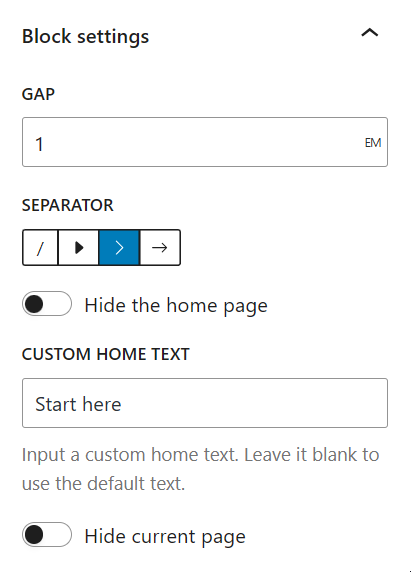
Para desenvolvedores
Este é o seu plugin? Mostre os números.
Adicione um crachá ao vivo ao seu site, Documentos ou Readme do GitHub. Ele é atualizado por conta própria - nenhuma conta necessária.
Best Breadcrumb Block alternatives
Todos os plugins de bloco →





FAQ
Breadcrumb Block: quick answers
Respostas diretas, extraídas de dados ao vivo WordPress.org.
Fonte: WordPress.org
Is Breadcrumb Block free?
Yes. Breadcrumb Block is free to download and use from the official WordPress.org plugin directory.
Is Breadcrumb Block safe to use in 2026?
Yes — Breadcrumb Block is a safe, well-maintained plugin to use in 2026. It runs on 2K+ sites, is rated 5/5 and was last updated 4 days ago, and scores 87/100 on our health check.
How many websites use Breadcrumb Block?
Breadcrumb Block is active on 2K+ WordPress websites and has been downloaded 38,185 times since it launched in October 2022. It was downloaded 2,617 times in the last 30 days.
Does Breadcrumb Block work with WordPress 7.1?
Yes. The developer has tested Breadcrumb Block up to WordPress 7.2, the latest release. It requires WordPress 7.1 or newer.
What PHP version does Breadcrumb Block need?
Breadcrumb Block requires PHP 8.0 or higher. Most hosts run PHP 8.x today, so it works on any modern WordPress hosting.
When was Breadcrumb Block last updated?
The latest version, 1.2.1, was released on November 25, 2026 (4 days ago).
Who makes Breadcrumb Block?
Breadcrumb Block is developed and maintained by Phi Phan.
What are the best alternatives to Breadcrumb Block?
The most popular alternatives to Breadcrumb Block are Spectra Legacy (1M+ installs), Breadcrumb NavXT (700K+ installs) and PDF Embedder (300K+ installs).
Alimentado por PageForge
Um modelo e uma planilha. Uma página real para cada pesquisa.
PageForge Transforma cada linha de um CSV em uma página WordPress com seu próprio título, URL, SEO campos e esquema, construído no layout que você já desenhou. Gratuito em WordPress.org.
- CSV e XLSX, mais Google Sheets em Profissional e Empresarial
- Seu próprio título, URL, SEO campos e esquema para cada página
- Funciona com o editor de blocos, Elementor, Divi e Avada
- Gratuito em WordPress.org, sem cartão de crédito