


Bolt CTA Button – Floating Call Button for WordPress
WhatsApp click-to-chat, click-to-call & floating contact button. Sticky bar on mobile, FAB on desktop, click analytics, WooCommerce ready.

Use com cautela
Bolt CTA Button works, but test it on a staging site before relying on it in 2026. It runs on 2K+ sites, is rated 5/5 and was last updated 6 months ago, and scores 61/100 on our health check.
- Momentum — downloads up 30.2% vs the previous 30 days
- Muito poucos comentários até agora
Como ele se acumula?
Lado a lado em instalações, atualizações, avaliações e suporte


Downloads diários
Os picos de download geralmente seguem uma nova versão — cada site que atualiza automaticamente é um download.
Rankings
Where Bolt CTA Button stands todayWordPress.org Classificações de pesquisa
Posição ao vivo na pesquisa de plugins, top 100| Palavra chave | Posição |
|---|---|
| click to call | #11 |
| contact button | #12 |
| floating button | #7 |
| sticky bar | #31 |
| #49 |
Adoção da versão
Compartilhamento de sites ativos por lançamento.
Divisão de classificação
★★★★★ ★★★★★ 5 de 4 comentários
About Bolt CTA Button
From the official readme · v2.0.9Descrição
Bolt CTA Button is a lightweight WordPress plugin for adding WhatsApp click-to-chat, click-to-call, and floating contact buttons to your site in seconds. Boost conversions with a sticky bar on mobile and a floating action button (FAB) on desktop — or pick either layout for both. Built-in click analytics let you see which contact channel actually drives leads.
Perfect for restaurants, service businesses, e-commerce stores, and anyone who wants to make it effortless for visitors to reach out by WhatsApp, phone, Telegram, Messenger, email, or any custom link.
Why Bolt CTA Button?
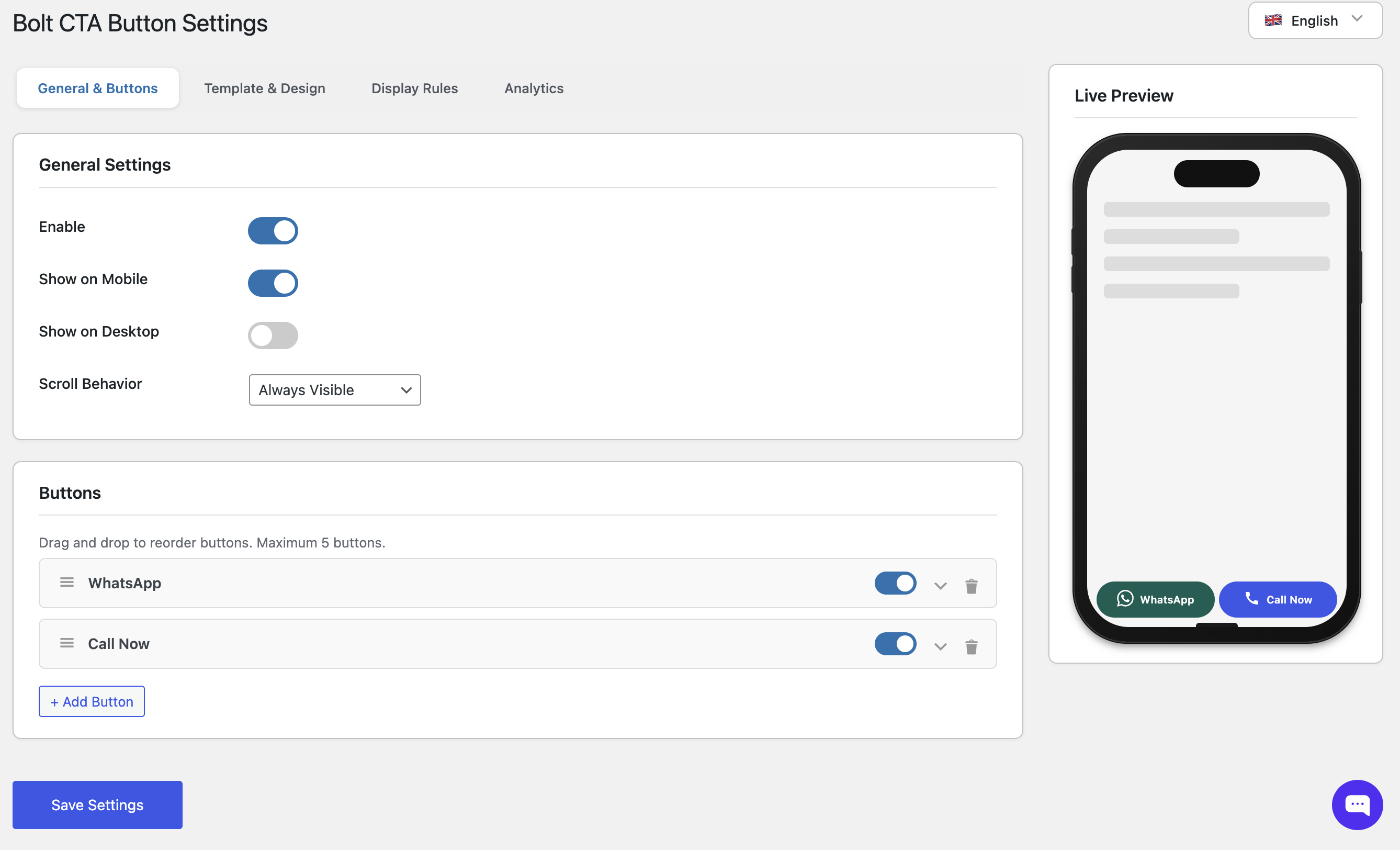
- Two layouts in one plugin — Sticky call now bar + Floating Action Button (FAB). No need to choose; use both, one per device.
- Mobile-first conversion — Always-visible call button on mobile dramatically improves call/chat conversion rates.
- WhatsApp + Click-to-Call built in — Pre-configured WhatsApp chat button and
tel:click-to-call link, no setup needed. - Click analytics included — Track which contact button gets clicked, daily and over time. No third-party plugin required.
- Lightweight & fast — Vanilla JS frontend (no jQuery), conditionally loaded assets, no impact on Core Web Vitals.
- Works with any theme — Defensive CSS isolation keeps the button consistent across Astra, OceanWP, Divi, GeneratePress, Hello Elementor, Twenty Twenty-Four, and more.
- No premium upsell wall — Every feature is free. Forever.
Two Templates
- Sticky Bar — Full-width bar at the top or bottom of the screen. 1-2 buttons: icon + text side by side. 3-5 buttons: icon on top, text below.
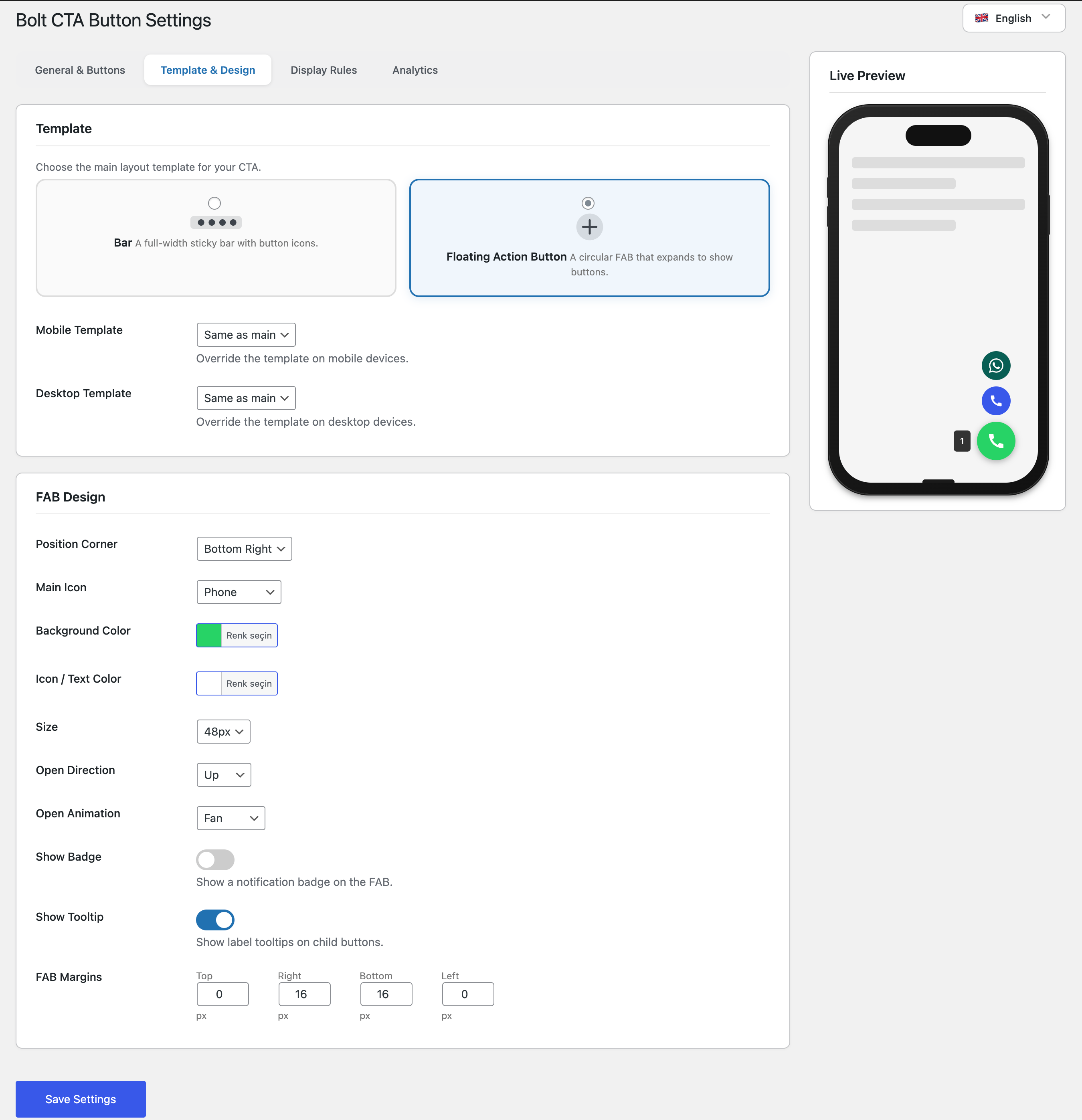
- Floating Action Button (FAB) — Round button at any corner of the screen. Click to reveal stacked sub-buttons with smooth animations.
Key Features
- Up to 5 buttons — WhatsApp, Phone, Telegram, Instagram, Email, Messenger, SMS, Location, Viber, or any custom link
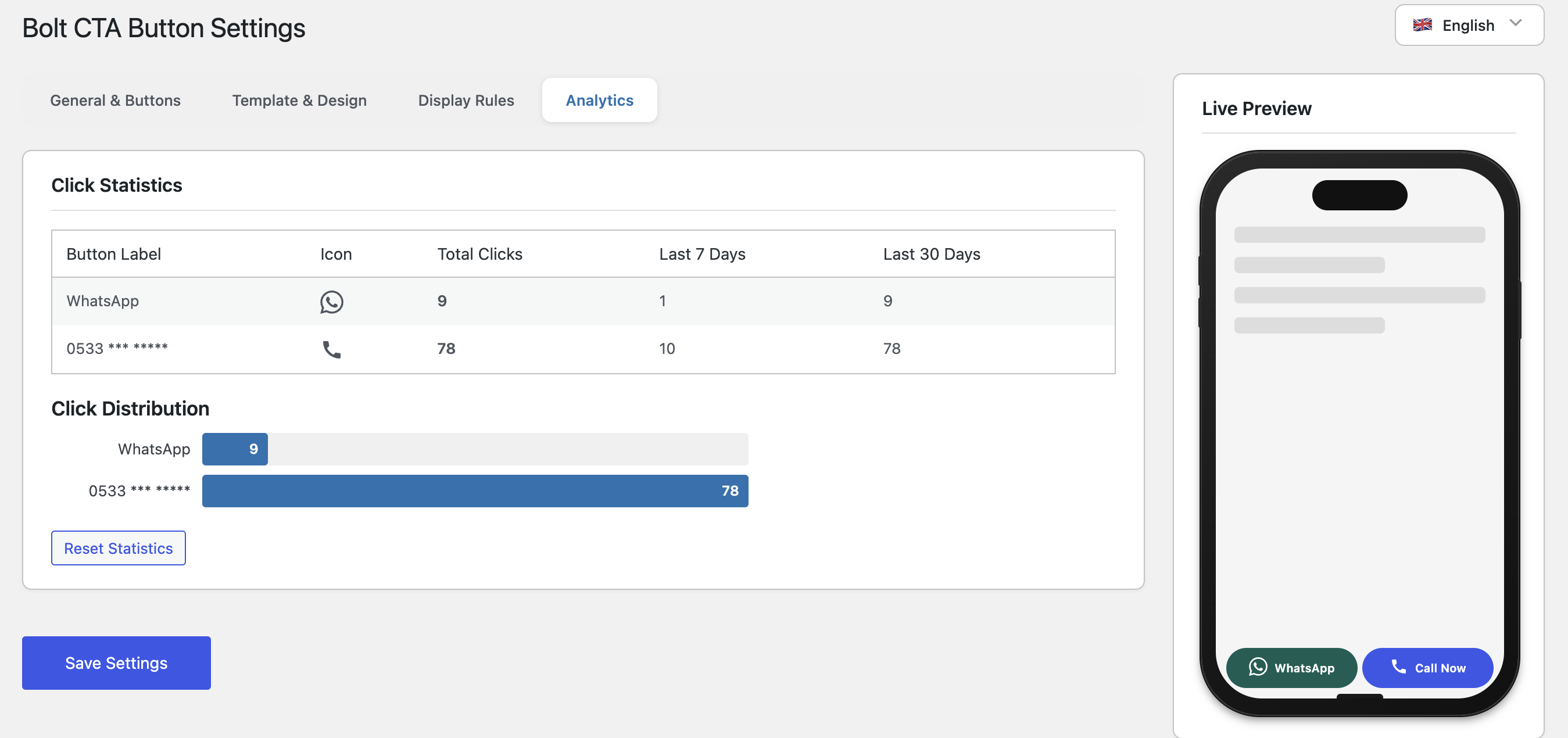
- Template selector — Bar or FAB, with live preview in an iPhone mockup
- Device-specific templates — Use Bar on mobile and FAB on desktop, or vice versa
- Drag & drop sorting — Reorder buttons easily
- Mobile & Desktop toggle — Show/hide independently
- Scroll behavior — Always visible or hide when scrolling down
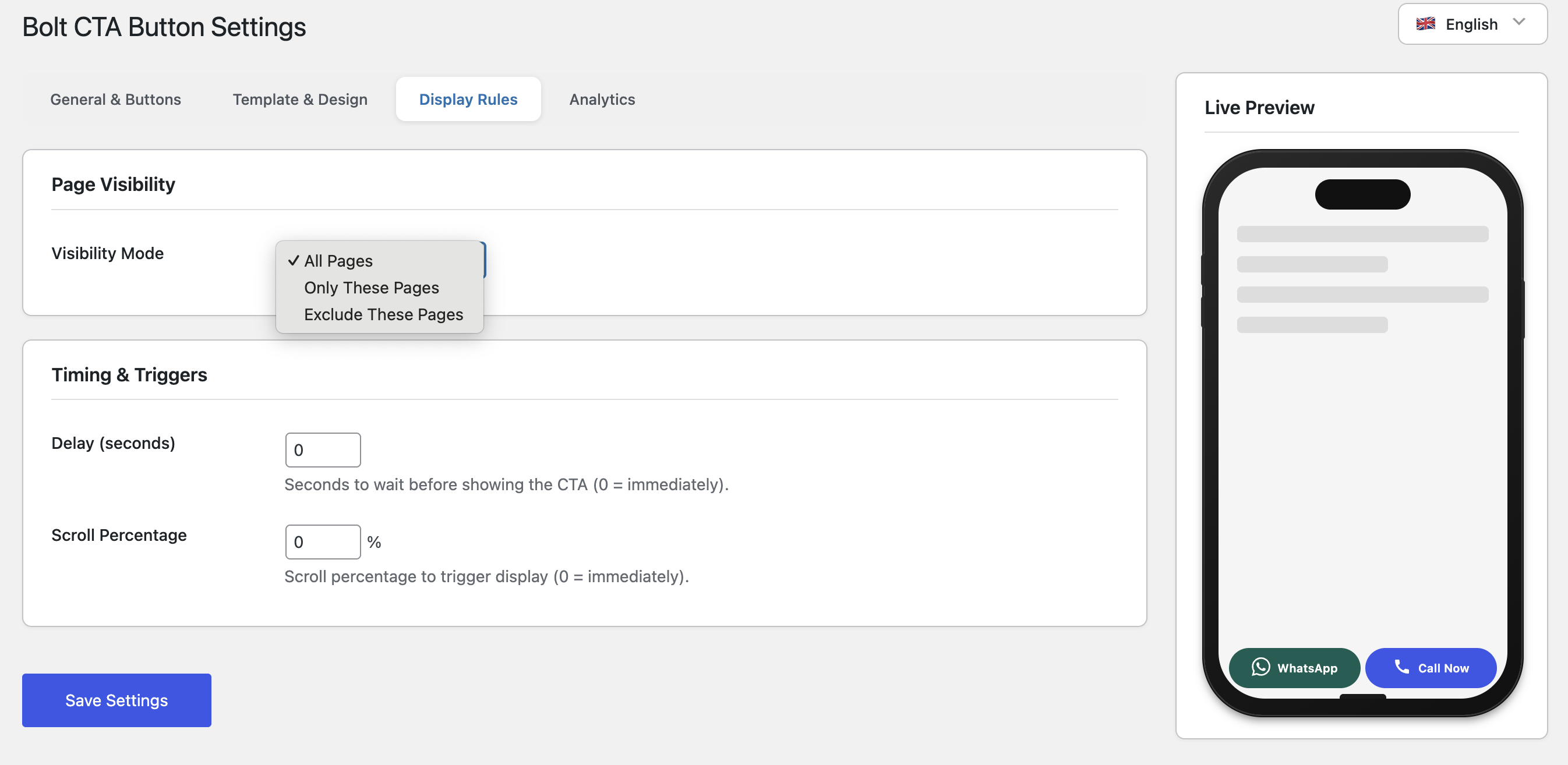
- Timing triggers — Show after X seconds delay and/or after scrolling X% of the page
- 6 bar animations — Pulse, Glow, Bounce, Shake, Slide Up, or None
- 4 FAB animations — Fan, Slide, Scale, Stagger
- FAB customization — Corner position, button size (48/56/64px), open direction (up/left/right), badge dot, tooltips
- Full color control — Background, text color, opacity, border radius, padding per button
- Margin controls — Custom margin/offset for both templates (top/right/bottom/left px)
- Built-in SVG icons — No external dependencies, lightweight
- Click analytics — Track total clicks, last 7 days, last 30 days per button with CSS bar chart
- Page visibility rules — All pages, only specific pages, or exclude specific pages
- WooCommerce support — Show different buttons on Shop, Product, Cart, and Checkout pages
- Live preview — Real-time iPhone 16 Pro mockup in admin panel
- Lightweight — Minimal CSS/JS, no jQuery on the frontend
- Accessible — ARIA labels, keyboard navigation, focus indicators, Escape to close FAB
- Safe area support — Works on notched devices (iPhone, etc.)
- Translation ready — Multiple languages included, admin language switcher
Casos de uso
- Restaurant: WhatsApp ordering + phone reservations
- Service business: Click-to-call + Google Maps directions
- E-commerce: Customer support + WooCommerce-specific buttons
- Any business wanting easy mobile contact options
How It Works
- Install and activate the plugin
- Go to Settings > Bolt CTA Button
- Choose your template (Bar or FAB)
- Configure your buttons
- Customize design, timing, and visibility
- Save — done!
Instalação
- Upload the
bolt-cta-buttonfolder to/wp-content/plugins/ - Activate via Plugins menu
- Navigate to Settings > Bolt CTA Button
Log de Changes
Plugin renamed to "Bolt CTA Button". Existing settings are preserved. Custom CSS field removed.
2.0.9
- FIX: Button icons now display correctly on sites that have aggressive global CSS rules (e.g. “path { display: none }”) in their custom styles. Defensive CSS now forces our SVG icon elements visible within the plugin’s scope only.
2.0.8
- NEW: Bolt CTA Button settings page now hides unrelated admin notices from other plugins (update prompts, promos, review nags) for a cleaner configuration experience. Other admin pages are unaffected.
- IMPROVED: Default WhatsApp button color changed from bright green (#25D366) to WhatsApp’s darker official color (#075e54). This significantly improves text/icon contrast on the button and resolves Google PageSpeed Insights warnings about low color contrast.
- IMPROVED: Plugin display name updated for clarity — now shows as “Bolt CTA Button – Floating Call Button for WordPress” in the WordPress admin plugins list.
2.0.7
- FIX: “Show on Mobile” and “Show on Desktop” toggles now work correctly when mobile and desktop use different templates. Previously the toggle was ignored unless both devices used the same template, causing the FAB to remain visible on desktop even when desktop visibility was disabled.
2.0.6
- NEW: “Reset to Defaults” button to instantly restore all plugin settings to factory defaults.
- NEW: Sticky Bar now has two independent shadow controls — Bar Shadow (background) and Button Shadow (per-button), each with None / Small / Medium / Large levels.
- NEW: Floating Action Button shadow control with the same four levels, applied consistently to the main button and its sub-buttons.
- NEW: Idle animation for the main FAB button (Pulse, Glow, Bounce, Shake) — independent from the sub-button open animation.
- IMPROVED: New install defaults tuned for a cleaner first impression — desktop uses FAB, mobile uses Sticky Bar, all shadows off, transparent bar background, FAB margins set to 0/20/70/0.
- IMPROVED: Live preview now reflects every setting in real time, including margins, shadows, animations, opacity and trigger rules.
- FIX: Defensive CSS reset prevents themes (Astra, OceanWP, Divi, GeneratePress, Hello Elementor, etc.) from overriding plugin button styles, padding, fonts, gradients or appearance.
- FIX: FAB main button icon now stays centered and properly sized regardless of theme button defaults.
- FIX: Background and icon colors set in admin now override theme button colors via increased CSS specificity.
- FIX: FAB sub-button shadow is no longer hardcoded — setting “None” now truly removes all shadow from sub-buttons too.
- FIX: Glow animation is now visible across all themes (replaced clipped drop-shadow filter with brightness/saturate).
2.0.5
- NEW: “Help us improve” sidebar card with quick links to leave a review or request a feature in the support forum.
2.0.4
- CHANGE: Plugin renamed from “Bolt CTA Bar” to “Bolt CTA Button” to better reflect its floating button use case.
- REMOVED: Custom CSS field removed per WordPress.org plugin guidelines (no arbitrary code insertion).
Capturas de tela
Para desenvolvedores
Este é o seu plugin? Mostre os números.
Adicione um crachá ao vivo ao seu site, Documentos ou Readme do GitHub. Ele é atualizado por conta própria - nenhuma conta necessária.
Best Bolt CTA Button alternatives
All click to call plugins →




FAQ
Bolt CTA Button: quick answers
Respostas diretas, extraídas de dados ao vivo WordPress.org.
Fonte: WordPress.org
Is Bolt CTA Button free?
Yes. Bolt CTA Button is free to download and use from the official WordPress.org plugin directory.
Is Bolt CTA Button safe to use in 2026?
Bolt CTA Button works, but test it on a staging site before relying on it in 2026. It runs on 2K+ sites, is rated 5/5 and was last updated 6 months ago, and scores 61/100 on our health check.
How many websites use Bolt CTA Button?
Bolt CTA Button is active on 2K+ WordPress websites and has been downloaded 12,012 times since it launched in April 2026. It was downloaded 901 times in the last 30 days.
Does Bolt CTA Button work with WordPress 7.1?
Bolt CTA Button is officially tested up to WordPress 7.0.9, while the latest release is 7.1.5. It may still work, but try it on a staging site first.
What PHP version does Bolt CTA Button need?
Bolt CTA Button requires PHP 7.4 or higher. Most hosts run PHP 8.x today, so it works on any modern WordPress hosting.
When was Bolt CTA Button last updated?
The latest version, 2.0.9, was released on May 29, 2026 (6 months ago).
Who makes Bolt CTA Button?
Bolt CTA Button is developed and maintained by ismeteroglu.
What are the best alternatives to Bolt CTA Button?
The most popular alternatives to Bolt CTA Button are Call Now Button (200K+ installs), Really Simple Click To Call… (7K+ installs) and Mobile Call Now & Map Butto… (4K+ installs).
Alimentado por PageForge
Um modelo e uma planilha. Uma página real para cada pesquisa.
PageForge Transforma cada linha de um CSV em uma página WordPress com seu próprio título, URL, SEO campos e esquema, construído no layout que você já desenhou. Gratuito em WordPress.org.
- CSV e XLSX, mais Google Sheets em Profissional e Empresarial
- Seu próprio título, URL, SEO campos e esquema para cada página
- Funciona com o editor de blocos, Elementor, Divi e Avada
- Gratuito em WordPress.org, sem cartão de crédito