


BeepMate – Forms to your messaging app
Automatically send WordPress form submissions to WhatsApp instead of or alongside emails. Get instant notifications and respond to inquiries quickly.

Escolha sólida
BeepMate is a solid plugin choice in 2026, with a few things worth checking first. It runs on 100+ sites, is rated 5/5 and was last updated 3 months ago, and scores 71/100 on our health check.
- Testado com as últimas WordPress (7.1)
- Base de usuários pequenas (mais de 100 instalações ativas)
- Muito poucos comentários até agora
Como ele se acumula?
Lado a lado em instalações, atualizações, avaliações e suporte



Downloads diários
Os picos de download geralmente seguem uma nova versão — cada site que atualiza automaticamente é um download.
Rankings
Where BeepMate stands todayWordPress.org Classificações de pesquisa
Posição ao vivo na pesquisa de plugins, top 100| Palavra chave | Posição |
|---|---|
| formulário de contato | >100 |
| formulários | >100 |
| messaging | #9 |
| Notificações | >100 |
| >100 |
Adoção da versão
Compartilhamento de sites ativos por lançamento.
Divisão de classificação
★★★★★ ★★★★★ 5 de 1 comentários
About BeepMate – Forms to your messaging app
From the official readme · v1.1.6Descrição
BeepMate connects your WordPress site’s forms directly to WhatsApp. Whenever a visitor submits a form on your website, you’ll receive an instant WhatsApp message with their information.
Key Benefits
- Instant Notifications: Get form submissions delivered to your WhatsApp in real-time
- Better Response Times: Reply to inquiries directly from your phone, wherever you are
- Works With Any Form: Compatible with all WordPress form plugins that use the mail system
- No Complex Setup: Works automatically with your existing forms
- Attachment Support: Receives files submitted through forms
How It Works
The plugin integrates with WordPress’s email system to capture form submissions and redirect them to WhatsApp using the BeepMate API. It works alongside your existing email notifications, ensuring you never miss an important message.
You do not need to configure SMTP or any mailer settings (unless you want to) – it works even without a mailer.
Recursos
- Works with all WordPress form plugins (Contact Form 7, Gravity Forms, WPForms, Ninja Forms, Forminator etc.)
- Simple configuration with your BeepMate API key
- Multiple API connection methods for compatibility with all hosting environments
- Preserves special characters and emoji
- Debug mode for troubleshooting
- Maintains your existing email workflow
Serviços externos
This plugin connects to BeepMate API (beepmate.io) to send form submission data to WhatsApp.
It sends form submissions including text content and any attachments to the BeepMate service whenever a form is submitted on your site.
This service is provided by BeepMate: Privacy Policy.
Requisitos
- WordPress 6.5 or higher
- PHP 7.4 or higher
- A BeepMate account (get your FREE account and FREE API key at beepmate.io)
- A WhatsApp account
Serviços externos
This plugin connects to BeepMate API (beepmate.io) to send form submission data to WhatsApp.
It sends form submissions including text content and any attachments to the BeepMate service whenever a form is submitted on your site.
This service is provided by BeepMate: Privacy Policy.
Technical Details
How It Works Technically
BeepMate intercepts WordPress emails at the PHPMailer level, right before they’re sent. When a form is submitted:
- The plugin hooks into
phpmailer_initto capture the email content - It extracts the recipient, subject, message body, and any attachments
- The information is formatted for WhatsApp
- The plugin connects to the BeepMate API using one of two methods (wp_remote or file_get_contents)
- The message is delivered to your configured WhatsApp number
All of this happens without modifying your existing forms or email system.
Configuration Options
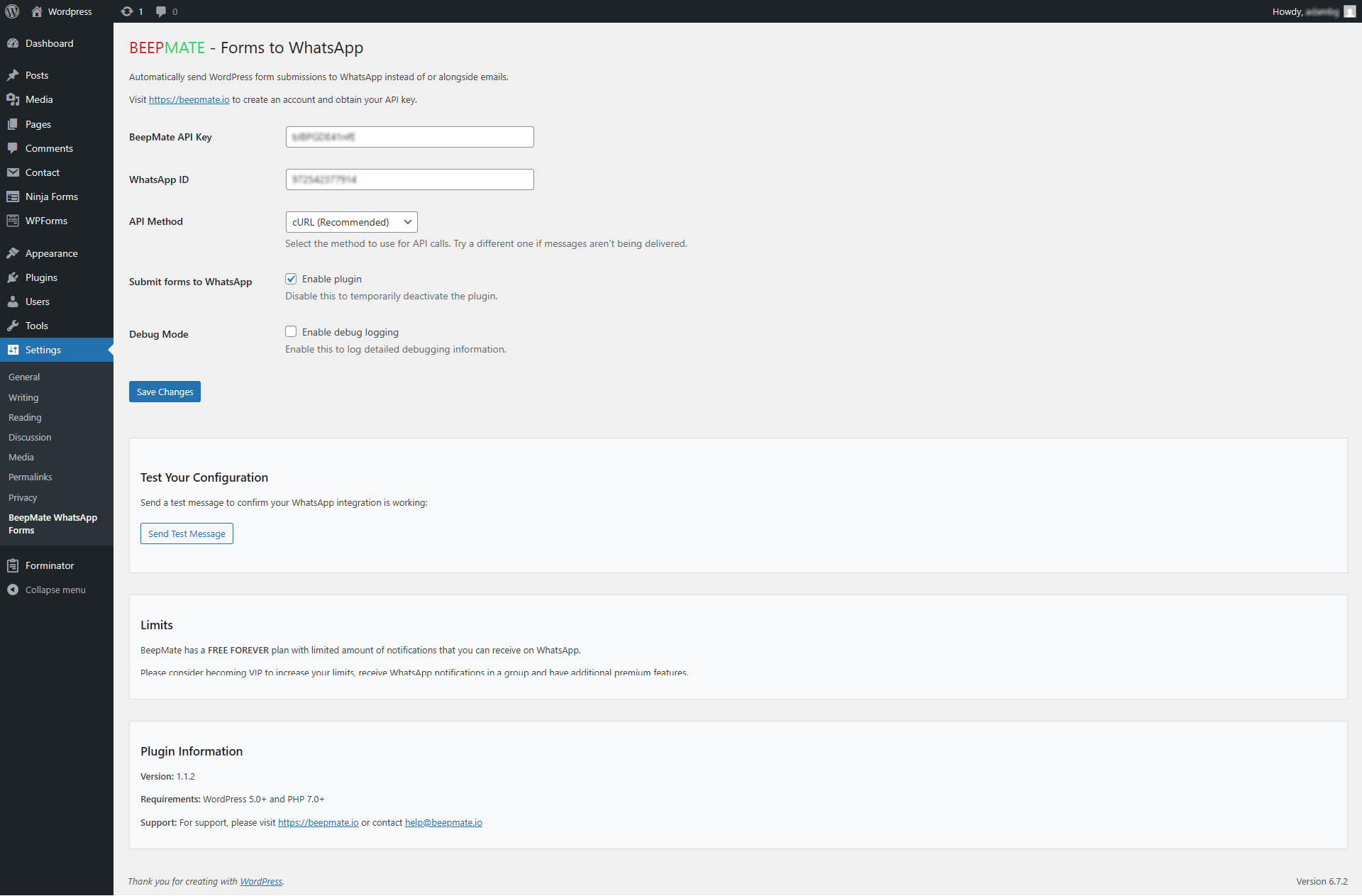
BeepMate API Key: Your unique API key from BeepMate that authorizes the connection.
User ID: The phone number (with country code, no spaces or symbols) that will receive the WhatsApp messages.
Redirect All Forms: When set to “Yes,” all form submissions will be sent to WhatsApp. When “No,” the plugin remains inactive.
API Method: The technical approach used to connect to the BeepMate API:
– wp_remote: The recommended method, works on most servers.
– file_get_contents: An alternative if wp_remote is disabled on your server.
Debug Mode: Enables detailed logging for troubleshooting.
Debugging
If you’re experiencing issues with the plugin, you can enable Debug Mode in the settings. This will log detailed information about:
– Form interceptions
– Message preparation
– API calls
– Response codes and errors
Logs can be found in your WordPress debug log (if WP_DEBUG is enabled) or in your server’s PHP error log.
API Structure
The plugin uses BeepMate’s API with the following structure:
– For text-only messages: https://beepmate.io/send?key=YOUR_KEY&id=YOUR_ID&msg=MESSAGE
– For messages with attachments: A POST request to https://beepmate.io/send with multipart/form-data
Security Considerations
The plugin:
– Sanitizes all user input
– Uses WordPress nonces for form submissions
– Checks user capabilities before allowing settings changes
– Hides the API key in logs
– Properly escapes all output
Extending the Plugin
Developers can hook into the plugin’s functionality using these functions:
– beepmate_whatsapp_forms_prepare_message: Formats message content for WhatsApp
– beepmate_whatsapp_forms_send_to_beepmate: Handles the API connection
– beepmate_whatsapp_forms_debug: Controls debug logging
Known Limitations
- Currently supports sending to a single WhatsApp number
- Depends on the standard WordPress email system being used by forms
- Some form plugins that implement custom email sending may not be compatible
Instalação
- Upload the plugin files to the
/wp-content/plugins/beepmatedirectory, or install the plugin through the WordPress plugins screen. - Ative o plugin através da tela 'Plugins' em WordPress.
- Navigate to Settings → BeepMate Forms to WhatsApp to configure the plugin.
- Enter your BeepMate API key and WhatsApp User ID that you received from BeepMate when creating the account.
- Select “Enable” for “Submit forms to WhatsApp” to enable the plugin.
- Use the “Test Your Configuration” section to send a test message.
Log de Changes
1.1.6
- Form file uploads are now forwarded to WhatsApp as attachments (works with any form plugin that attaches the file to its notification email, e.g. Forminator, Contact Form 7, Ninja Forms, WPForms)
- Large attachments above 25 MB are skipped (the text of the submission is still delivered)
1.1.5
- Testado com WordPress 7.1
- Raised minimum requirements to WordPress 6.5 and PHP 7.4
- PHP 8.x compatibility hardening (null-safety, missing-option handling)
- API calls now verify SSL certificates
1.1.4
- Tested with WordPress 6.9
- Confirmed compatibility with latest WordPress version
1.1.3
- Removed unsupported external calls
1.1.2
- Improved WhatsApp notifications
- Added support for file attachments on forms
- Fixed links inside forms
1.1.1
- Added multiple API connection methods
- Improved compatibility with different hosting environments
- Added debug mode option
Capturas de tela


Para desenvolvedores
Este é o seu plugin? Mostre os números.
Adicione um crachá ao vivo ao seu site, Documentos ou Readme do GitHub. Ele é atualizado por conta própria - nenhuma conta necessária.
Best BeepMate alternatives
Todos os plugins de formulários de contato →





FAQ
BeepMate: quick answers
Respostas diretas, extraídas de dados ao vivo WordPress.org.
Fonte: WordPress.org
Is BeepMate free?
Yes. BeepMate is free to download and use from the official WordPress.org plugin directory.
Is BeepMate safe to use in 2026?
BeepMate is a solid plugin choice in 2026, with a few things worth checking first. It runs on 100+ sites, is rated 5/5 and was last updated 3 months ago, and scores 71/100 on our health check.
How many websites use BeepMate?
BeepMate is active on 100+ WordPress websites and has been downloaded 1,907 times since it launched in April 2025. It was downloaded 246 times in the last 30 days.
Does BeepMate work with WordPress 7.1?
Yes. The developer has tested BeepMate up to WordPress 7.1.5, the latest release. It requires WordPress 6.5 or newer.
What PHP version does BeepMate need?
BeepMate requires PHP 7.4 or higher. Most hosts run PHP 8.x today, so it works on any modern WordPress hosting.
When was BeepMate last updated?
The latest version, 1.1.6, was released on September 8, 2026 (3 months ago).
Who makes BeepMate?
BeepMate is developed and maintained by beepmateio.
What are the best alternatives to BeepMate?
The most popular alternatives to BeepMate are Contact Form 7 (10M+ installs), Akismet Anti-spam: Spam Pro… (5M+ installs) and WPForms (5M+ installs).
Alimentado por PageForge
Um modelo e uma planilha. Uma página real para cada pesquisa.
PageForge Transforma cada linha de um CSV em uma página WordPress com seu próprio título, URL, SEO campos e esquema, construído no layout que você já desenhou. Gratuito em WordPress.org.
- CSV e XLSX, mais Google Sheets em Profissional e Empresarial
- Seu próprio título, URL, SEO campos e esquema para cada página
- Funciona com o editor de blocos, Elementor, Divi e Avada
- Gratuito em WordPress.org, sem cartão de crédito