


BaraTables
Create searchable, sortable WordPress tables and charts from files, public snapshots, posts or databases.

Escolha sólida
BaraTables is a solid plugin choice in 2026, with a few things worth checking first. Was last updated 1 week ago, and scores 64/100 on our health check.
- Desenvolvido ativamente — última atualização 1 semana atrás
- Testado com as últimas WordPress (7.1)
- Base de usuários pequenas (<10 instalações ativas)
- Muito poucos comentários até agora
Como ele se acumula?
Lado a lado em instalações, atualizações, avaliações e suporte


Downloads diários
Os picos de download geralmente seguem uma nova versão — cada site que atualiza automaticamente é um download.
Rankings
Where BaraTables stands todayWordPress.org Classificações de pesquisa
Posição ao vivo na pesquisa de plugins, top 100| Palavra chave | Posição |
|---|---|
| charts | >100 |
| CSV | >100 |
| datatables | #67 |
| Shortcode | >100 |
| tables | >100 |
About BaraTables
From the official readme · v2.1.2Descrição
BaraTables builds interactive tables and charts from manual rows, CSV uploads, snapshots, WordPress content or an external database.
Import a JSON, XML, HTML, CSV, TXT, XLSX, ODS or ZIP export from another plugin.
Recursos:
- Search, sorting, pagination and dropdown, multi-select, checkbox or radio filters, with category and tag filtering
- Export to CSV, Excel or PDF, copy or print
- Reorder columns, control visibility, keep headers visible, freeze leading columns on scroll
- Strict numeric sorting, conditional colors and filtered sum, average, min or max footers
- Fetch a bounded snapshot from a public CSV, JSON or Google Sheet; pages never contact it
- Page large external MySQL/MariaDB tables on demand
- Collapse wide tables into stacked rows on small screens
- Match your theme automatically, or set one design for every table and chart
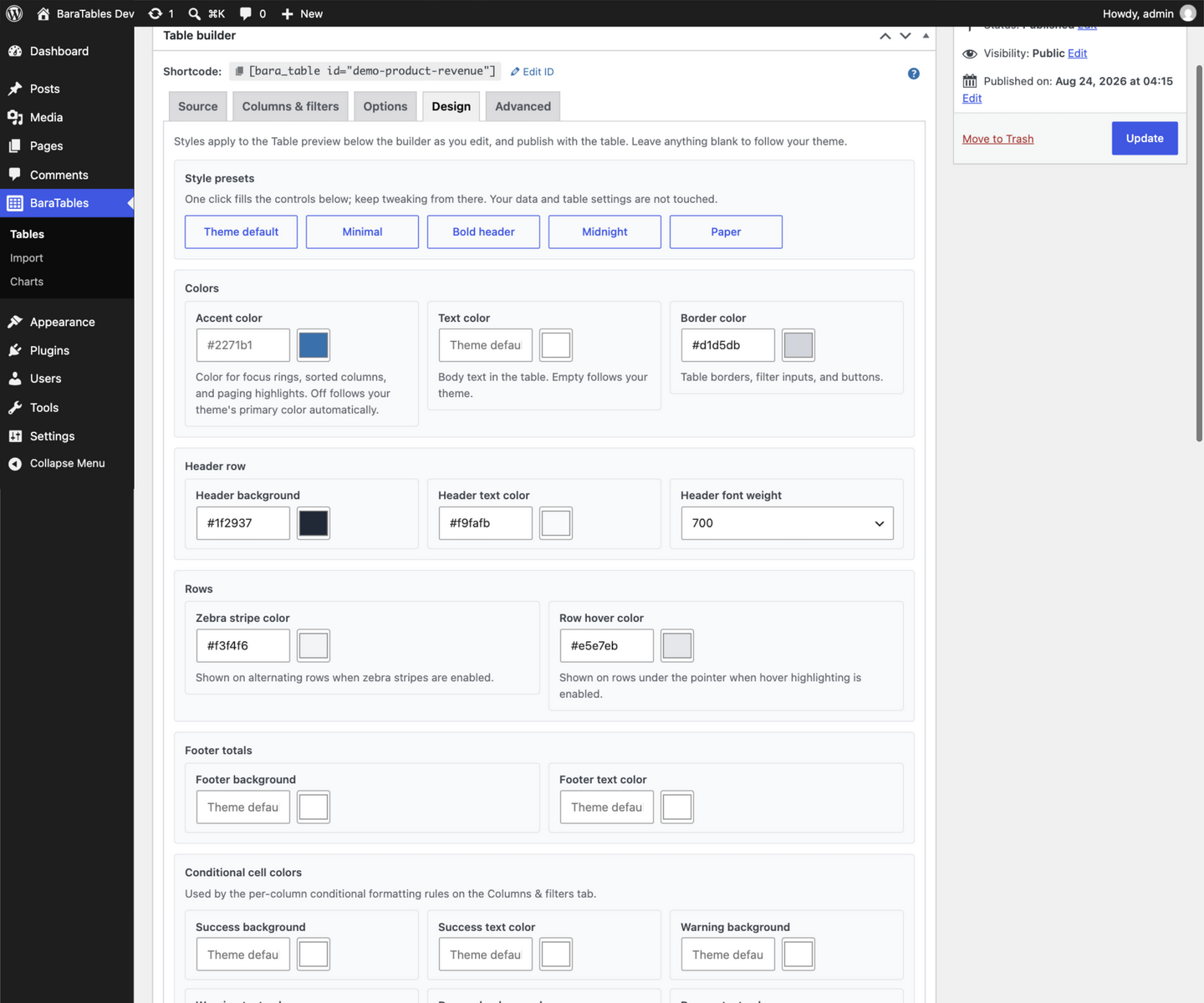
- Style tables and charts without code in the Design tab, with a live preview
- Restrict rows by role or user metadata
- Remember table state between visits; control scrolling, column sizing and row limits
- Create bar, horizontal bar, line, area, radar, pie, donut, treemap, scatter, bubble, heatmap, funnel and Gantt charts
Third-Party Libraries
Bundled libraries, under GPL-compatible licenses; full notices ship in assets/vendor/THIRD-PARTY-LICENSES.txt.
- DataTables v3.1.5 – MIT License – https://github.com/DataTables/DataTablesSrc/tree/3.1.5
- DataTables Buttons v4.1.3 – MIT License – https://github.com/DataTables/Buttons/tree/4.1.3 (bundles FileSaver.js – MIT License – https://github.com/eligrey/FileSaver.js/tree/1.3.3)
- DataTables ColReorder v3.1.2 – MIT License – https://github.com/DataTables/ColReorder/tree/3.1.2
- DataTables Responsive v4.1.1 – MIT License – https://github.com/DataTables/Responsive/tree/4.1.1
- DataTables FixedHeader v5.1.2 – MIT License – https://github.com/DataTables/FixedHeader/tree/5.1.2
- DataTables FixedColumns v6.1.2 – MIT License – https://github.com/DataTables/FixedColumns/tree/6.1.2
- Tom Select v2.6.2 – Apache License 2.0 – https://github.com/orchidjs/tom-select/tree/v2.6.2
- JSZip v3.10.2 – MIT License – https://github.com/Stuk/jszip/tree/v3.10.2 (bundles pako – MIT License – https://github.com/nodeca/pako)
- pdfmake v0.3.13 – MIT License – https://github.com/bpampuch/pdfmake/tree/0.3.13 (bundles the Roboto fonts – Apache License 2.0)
- ECharts v6.1.0 – Apache License 2.0 – https://github.com/apache/echarts/tree/6.1.0
- Chart-type gallery thumbnails from the Apache ECharts examples, Apache License 2.0 – https://github.com/apache/echarts-examples
- BaraTables’ custom ECharts bundle – https://github.com/trinadin/baratables/blob/main/tools/echarts-entry.js
Instalação
- Upload the
baratablesfolder to/wp-content/plugins/. - Ative o plugin através do menu Plugins em WordPress.
- Create a table under Tables, then embed it with
[bara_table id="your-table-slug"].
Log de Changes
Fixes an external database that drops mid-request, Additional CSS with a quoted attribute selector, and the Design tab's preview.
2.1.2
Corrigido:
- A table that reads from an external database says the source could not be read, instead of showing no rows or ending the page with a database error.
- A dead external database is dialled once per request, not again for every row the table reads.
- Additional CSS with a quoted attribute selector, such as td[data-x=”y”], is published correctly; the browser used to drop the whole rule.
- The Design tab’s preview now scopes a rule that names the table wrapper the way the published CSS does, so it shows what will publish.
- The FAQ now says how many rows a table that stores its own rows holds.
2.1.1
Corrigido:
- On right-to-left sites, filter spacing and the search dropdown scrollbar sit on the correct side; the admin’s actions column, help toggle and arrow keys follow the text direction.
- Export-button pages are much lighter: the Excel and PDF libraries load on first click.
- A table’s search box, filters and buttons now use the same corner radius.
- A table’s custom CSS is applied in full: rules after a media query or keyframes block are kept, and a rule naming the table wrapper reaches it.
- The chart type gallery no longer lets the page scroll behind it.
- A table save that fails part-way restores the previous data instead of leaving the table half-written.
- Saving a table or chart that changed while you had it open is refused, instead of overwriting the newer version.
- Chart colors are now readable against the page; the default palette and the presets were recolored.
- On a multisite network, the hide-help-text preference is now per site.
Accessibility:
- The column visibility menu and the Table options menu work with the keyboard alone: every entry can be reached, and the menu can be closed.
- A chart-only page now offers its data to screen readers.
- The search column picker closes on Escape, and a table without a caption still has a name.
- The chart editor’s table and chart-type selects carry a name again, so a screen reader announces what they are.
Security:
- The plugin’s upgrade of saved table data now waits for an administrator.
- A failed external database connection no longer prints the server’s file path.
Developer:
- Sixteen published PHP methods and constants are deprecated and will be removed in 2.2.0; each names its replacement.
2.1.0
New:
- Set one design for the whole site. BaraTables > Design holds the colors and typography every table and chart starts from. One with its own value keeps it; one that switches the site design off follows your theme.
- The chart Design tab now offers the same presets and Copy CSS as the table Design tab.
Corrigido:
- A colour or size the plugin cannot use no longer erases your value: it is kept and the field named.
- The chart Design tab’s controls reach every chart type: the palette colors heatmap cells and Gantt groups, and the text and grid colors reach radar, treemap and tooltips.
- A chart font size is now in pixels. A size of 2em used to render as 2px.
- Charts with no palette now use ECharts’ current colors, led by the accent, instead of a stale copy of an older release.
- The Grid color control is no longer offered on charts that have no grid.
- The series palette is reordered from the keyboard, and each color’s remove button names it.
- The “Theme CSS” output mode hands over completely: the plugin no longer prints the chart container’s background, padding and radius.
- The “Theme default” preset is now “Clear overrides”: a blank value inherits the site default first.
- A table or chart whose name contains “&” or “>” saves again, and Additional CSS keeps the characters you typed.
- A ZIP holding a readme next to your table imports the table, not the readme.
- An uploaded file named DATA.CSV is accepted.
- An imported column of numbers sorts as numbers, so 10 no longer comes before 9.
- On a right-to-left site the data grid’s row buttons stay in place.
- The rows-per-page control now shows the page length you set, not an empty list.
- A hidden column no longer keeps a filter that narrows by a column the visitor cannot see.
- An empty table now says it has no rows, not that filters match nothing.
- A table that recovers from a failed request stops showing the failure.
- A table that ran out of requests says so, not that its data source failed.
2.0.1
New:
- External database sources can encrypt their connection with TLS. Give the source the path of the CA certificate that signed it: PHP’s MySQL driver cannot use the system trust store.
Corrigido:
- Tables with a hidden column load again instead of showing an error and losing paging, sorting, and search.
- Additional CSS keeps a “<” that cannot break out of the style element, so a content string with markup in it is no longer altered.
- Styles for one table no longer reach a sibling table whose ID starts with the same characters.
- A merged cell value used in a regex replacement is no longer destroyed when it contains “$1”.
- The Design tab shows the color a save will keep, and no longer marks a short “#fff” as invalid.
- The Copy CSS message is translated like the rest of the interface.
Security:
- A remote snapshot URL that resolves to a link-local, carrier-grade NAT, or benchmarking address is refused instead of being fetched.
2.0.0
New:
- A Design tab for tables and charts: presets, colors, typography, spacing and a per-chart series palette, with a live preview as you type.
- The table preview now renders the real table visitors see, so what you style is what you publish.
- Copy CSS hands the styles to your theme, and the “Theme CSS” output mode lets that copy take over.
- Per-table Additional CSS, auto-scoped to the table, plus a documented
--btbl-*token API for themes. - Accent color and the style toggles moved into the Design tab.
1.4.0
New:
- Import XLSX and ODS workbooks, including stored formula results without executing them.
- Fetch a stored table snapshot from a public CSV, JSON-record or Google Sheets URL.
- Keep headers visible and freeze leading columns while a wide table scrolls.
- Add strict numeric sorting, conditional color rules and filtered footer calculations.
- Page, sort and search large external MySQL/MariaDB tables on demand with bounded queries.
- Table summaries and the per-page selector say “rows” instead of “entries”.
- Charts follow the table’s accent color.
Corrigido:
- Filter labels containing an ampersand render correctly.
- Table and chart block pickers list every item instead of the first 20.
Security:
- Exported and copied table content neutralizes spreadsheet formulas, so cells from imported or remotely sourced tables no longer execute when the file is opened.
Capturas de tela




Para desenvolvedores
Este é o seu plugin? Mostre os números.
Adicione um crachá ao vivo ao seu site, Documentos ou Readme do GitHub. Ele é atualizado por conta própria - nenhuma conta necessária.
Best BaraTables alternatives
All charts plugins →





FAQ
BaraTables: quick answers
Respostas diretas, extraídas de dados ao vivo WordPress.org.
Fonte: WordPress.org
Is BaraTables free?
Yes. BaraTables is free to download and use from the official WordPress.org plugin directory.
Is BaraTables safe to use in 2026?
BaraTables is a solid plugin choice in 2026, with a few things worth checking first. Was last updated 1 week ago, and scores 64/100 on our health check.
How many websites use BaraTables?
BaraTables is active on <10 WordPress websites and has been downloaded 1,376 times since it launched in June 2026. It was downloaded 441 times in the last 30 days.
Does BaraTables work with WordPress 7.1?
Yes. The developer has tested BaraTables up to WordPress 7.1.5, the latest release. It requires WordPress 6.4 or newer.
What PHP version does BaraTables need?
BaraTables requires PHP 7.4 or higher. Most hosts run PHP 8.x today, so it works on any modern WordPress hosting.
When was BaraTables last updated?
The latest version, 2.1.2, was released on November 22, 2026 (1 week ago).
Who makes BaraTables?
BaraTables is developed and maintained by Nathan Noom.
What are the best alternatives to BaraTables?
The most popular alternatives to BaraTables are Visualizer (20K+ installs), Chartify (3K+ installs) and M Chart (3K+ installs).
Alimentado por PageForge
Um modelo e uma planilha. Uma página real para cada pesquisa.
PageForge Transforma cada linha de um CSV em uma página WordPress com seu próprio título, URL, SEO campos e esquema, construído no layout que você já desenhou. Gratuito em WordPress.org.
- CSV e XLSX, mais Google Sheets em Profissional e Empresarial
- Seu próprio título, URL, SEO campos e esquema para cada página
- Funciona com o editor de blocos, Elementor, Divi e Avada
- Gratuito em WordPress.org, sem cartão de crédito