


AxiaChat AI – Free AI Chatbot (Answers Customers Automatically)
The best AI Chatbot for WordPress. Like having ChatGPT trained on your content — turn your site into a 24/7 sales & support machine.

Escolha segura
Yes — AxiaChat AI is a safe, well-maintained plugin to use in 2026. It runs on 500+ sites, is rated 5/5 and was last updated 1 month ago, and scores 82/100 on our health check.
- Testado com as últimas WordPress (7.1)
- Base de usuários pequenas (mais de 500 instalações ativas)
Como ele se acumula?
Lado a lado em instalações, atualizações, avaliações e suporte



Downloads diários
Os picos de download geralmente seguem uma nova versão — cada site que atualiza automaticamente é um download.
Rankings
Where AxiaChat AI stands todayWordPress.org Classificações de pesquisa
Posição ao vivo na pesquisa de plugins, top 100| Palavra chave | Posição |
|---|---|
| AI Chatbot | #18 |
| ChatGPT | >100 |
| customer support | #40 |
| Google Gemini | #30 |
| WooCommerce | >100 |
Adoção da versão
Compartilhamento de sites ativos por lançamento.
Divisão de classificação
★★★★★★★★★★ 5 from 12 reviews
About AxiaChat AI
From the official readme · v4.3.5Descrição
The best AI Chatbot for WordPress. Like having ChatGPT trained on your content — turn your site into a 24/7 sales & support machine.
🤖 The best free AI Chatbot for WordPress
If you want more leads, more sales, and less repetitive support work, you need a powerful chatbot on your website.
AxiaChat AI is the best AI chatbot for WordPress designed to help you automate conversations, capture opportunities, and assist visitors instantly — 24 hours a day.
This is not just another basic chatbot.
This is a smart, business-ready chatbot built for real results — like having a private ChatGPT that knows your business inside out.
⚡ Why This Chatbot Is Different
Most WordPress chatbot plugins only provide simple scripted replies.
AxiaChat AI gives you a real AI-powered chatbot — backed by the same technology as ChatGPT — that understands context, learns from your content, and responds like a human assistant.
Your chatbot can:
✅ Answer product questions automatically, 24/7
✅ Guide customers to the right service or product
✅ Capture leads automatically — even when you’re offline
✅ Book appointments directly from the chat
✅ Analyze images & documents — visitors send photos or PDFs, the AI sees and responds
✅ Reduce support workload by handling repetitive questions
✅ Work 24/7 without breaks, staff costs, or delays
This chatbot becomes part of your team. That’s what real AI chat for WordPress looks like.
⭐ What Users Say
⭐⭐⭐⭐⭐ “The only WooCommerce chatbot plugin that actually works”
“Congratulations to the developer for an excellent job. The plugin is well built, reliable, and delivers exactly what it promises.” — gabricp100, February 2026
⭐⭐⭐⭐⭐ “My conversion rate went up thanks to this chatbot!”
“Perfect for small businesses. My conversion rate went up thanks to this chatbot!” — david25k, February 2026
⭐⭐⭐⭐⭐ “Customizable and powerful”
“I love how customizable it is, you can train your own AI agent and make it fit your brand.” — queroamilys, March 2026
⭐⭐⭐⭐⭐ “It works great!”
“We implemented it in the store and it works great.” — Antonio Aponte, February 2026
12 reviews on WordPress.org · 100% five-star ratings.
Read all reviews →
📈 Built for Growth
Whether you run an eCommerce store, agency, SaaS, or local business, this chatbot helps you scale without hiring more staff.
Instead of answering the same questions every day, let your chatbot handle them.
Instead of missing leads after hours, let your chatbot capture them.
Instead of losing visitors, let your chatbot engage them instantly.
A smart chatbot increases conversions.
A fast chatbot improves user experience.
A trained chatbot builds trust.
🎓 Train Your Chatbot on Your Own Content
What makes this chatbot powerful is its ability to learn from your website.
You can train your chatbot using:
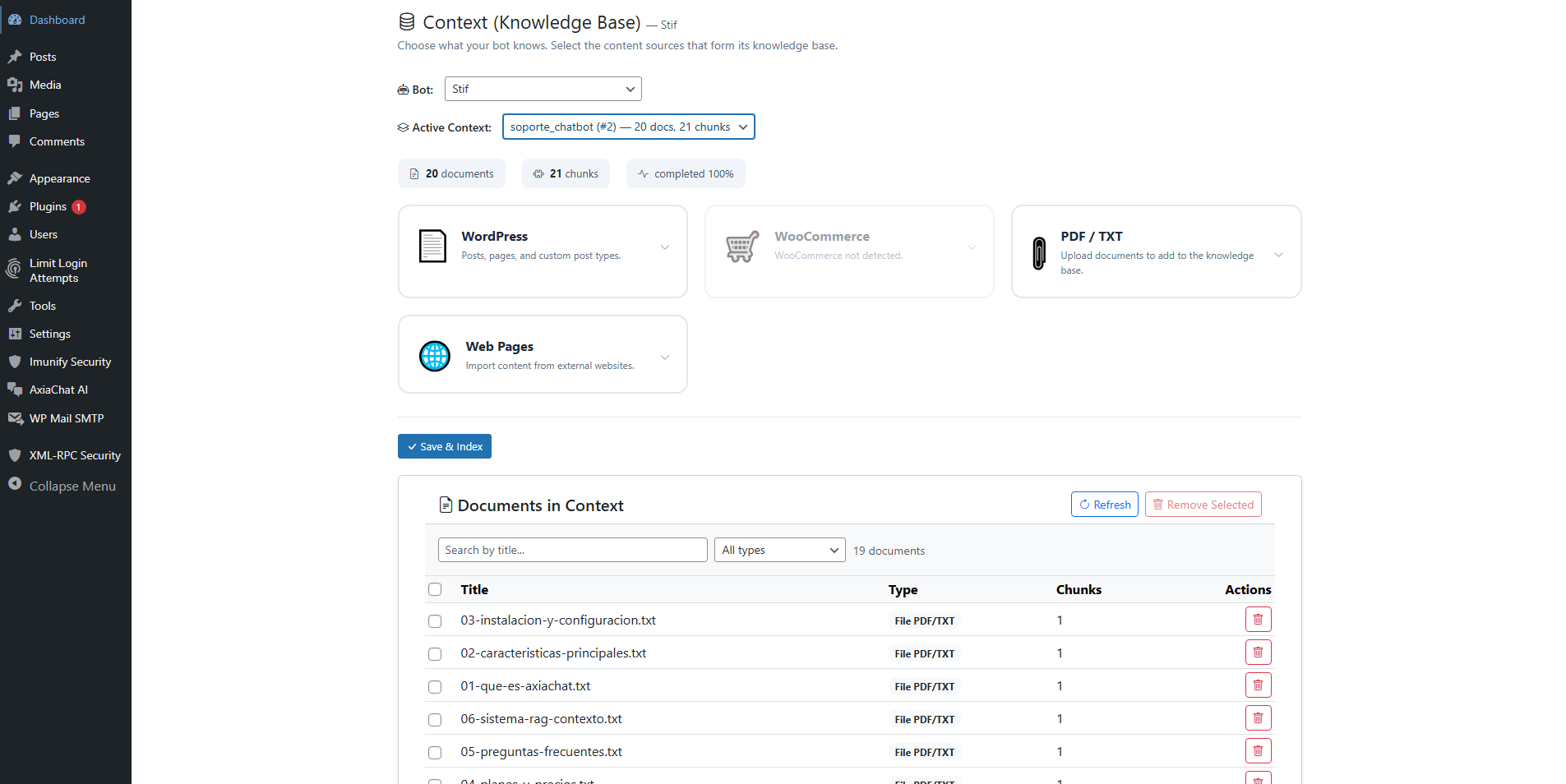
📘 Pages and posts
🛒 WooCommerce products (prices, stock, SKU — always up to date)
❓ FAQs
📄 PDFs
🧠 Custom knowledge bases
🌐 External web pages
And your visitors can send files directly in the chat:
📸 Photos & screenshots — the AI literally sees the image using vision AI
📄 PDF documents — text is extracted automatically and analyzed in context
Imagine a customer sending a photo of their broken appliance, or uploading a contract for the AI to summarize. That’s not future tech — it works today.
This means your chatbot gives accurate answers based on YOUR business — not generic internet responses.
Your visitors talk to a specialized chatbot, not a random AI. Genuine AI chat powered by your own knowledge base.
🎯 Designed for Conversions
This is not just a support chatbot.
It is also a sales chatbot.
Your chatbot can:
🎯 Collect names and emails
📧 Send notifications to your team
📅 Book appointments
👤 Escalate to a human agent
� Receive photos & documents from visitors and act on them
🔗 Trigger custom workflows including forwarding uploaded images securely
Every AI chat conversation with your chatbot becomes an opportunity.
⚡ Easy Setup in Minutes
You don’t need technical skills to launch your chatbot.
- Instale o plugin
- Add your API key
- Run the setup wizard
- Activate your chatbot
In less than 5 minutes, your AI chatbot is live and your AI chat channel is open for visitors.
🎨 Fully Customizable Chatbot
Match your brand perfectly.
Your chatbot supports:
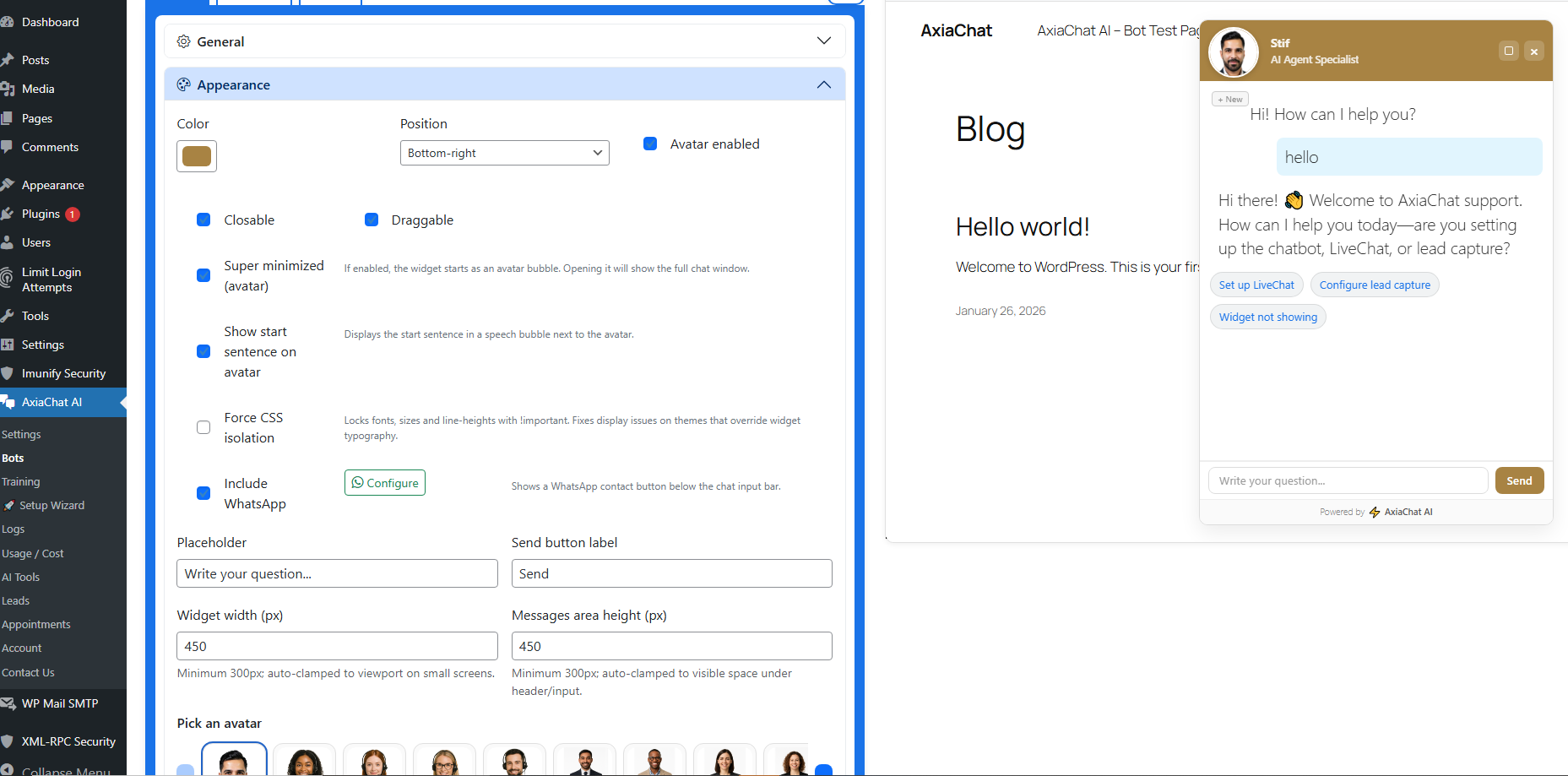
🎨 Custom colors and footer
🤖 Avatars (9 included + custom upload)
� File upload button (images & PDFs) with in-chat preview
�📱 Floating widget or inline embed via shortcode
✍️ Draggable, minimizable, and closable window
📲 Fully mobile responsive design
Make your chatbot look like it was built specifically for your site.
💰 Control Costs & Usage
Worried about AI costs?
Your chatbot includes:
🔢 Daily usage limits (global and per-user)
🚫 Per-IP and per-user restrictions
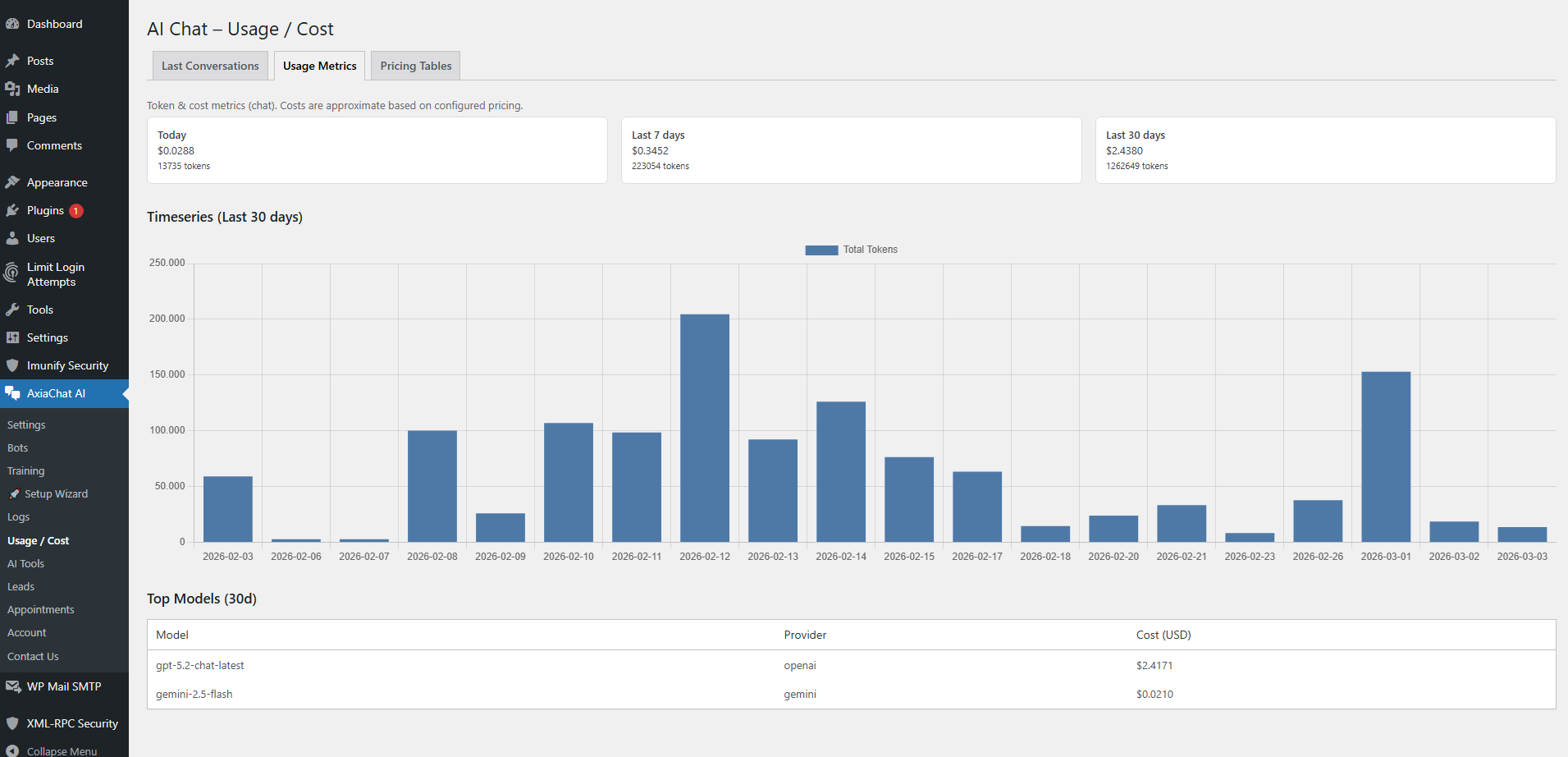
📊 Real-time cost tracking and token usage
📝 Optional conversation logging (on/off anytime)
You stay in control while your chatbot works for you.
🧠 Powerful AI Behind Your Chatbot
Your chatbot can connect to:
🟢 OpenAI — GPT-5.6 Luna (default efficient chat), GPT-5.6 Terra/Sol, GPT-5.5, GPT-5.4 and legacy-compatible aliases
🟢 Anthropic Claude — Haiku 4.5 (default fast/cheap), Sonnet 5 (balanced), Opus 4.8 (premium), Fable 5 (flagship) and more
🟢 Google Gemini — 3.5 Flash (default fast chat), 3.1 Flash-Lite (lowest cost), 3.1 Pro and legacy-compatible 2.5 redirects
You choose the AI engine for your chatbot.
You control how your chatbot behaves.
You decide what your chatbot knows.
Unlike SaaS platforms or using ChatGPT directly, this chatbot runs directly on your WordPress site.
Your data stays on your server. Your brand stays front and center. Your AI chat, your rules.
🔐 GDPR & Privacy Friendly
This chatbot includes built-in consent tools and privacy controls.
You can enable or disable conversation logging anytime.
Your chatbot respects your users and your compliance requirements.
✅ Perfect For
🛒 WooCommerce stores
🏢 Agencies
🚀 SaaS businesses
🏤 Corporate websites
🔧 Service companies
✍️ Bloggers
🎓 Online educators
If you want more engagement and automation, you need a professional chatbot and a reliable AI chat solution.
📚 Documentation & Technical Resources
Official website:
axiachat.org
Full documentation, tutorials and advanced configuration guides:
axiachat.org/help
Community support forum:
wordpress.org/support/plugin/axiachat-ai
🆓 Getting Started
The free version of this chatbot is fully functional and covers most business needs.
Start for free, explore all the core features, and grow at your own pace.
🚀 Stop Losing Opportunities
Every visitor that leaves your site without interacting is a missed opportunity.
A smart chatbot greets them.
A helpful chatbot answers them.
A proactive chatbot converts them.
Install the best AI chatbot for WordPress today — your own ChatGPT working exclusively for your business — and transform your website into a 24/7 growth engine.
Technical Features
Supported AI Models
OpenAI (GPT)
GPT-5.6 Luna (default efficient chat)
GPT-5.6 Terra
GPT-5.6 Sol
GPT-5.5
GPT-5.5 Pro
GPT-5.4
GPT-5.4 Pro
GPT-5.4 Mini
GPT-5.4 Nano
ChatGPT chat-latest
GPT-5.2 Thinking
Legacy aliases GPT-5.1/5.2/5.3 Chat Latest are auto-migrated to GPT-5.6 Luna
GPT-5
GPT-5 Mini
GPT-5 Nano
GPT-4.1 / 4.1 Mini / 4.1 Nano
GPT-4o / 4o Mini
GPT-4 Turbo
GPT-3.5 Turbo
Anthropic (Claude)
Claude Haiku 4.5 (default fast, lower cost)
Claude Sonnet 5 (balanced chat and reasoning)
Claude Sonnet 4.6 / 4.5
Claude Opus 4.8 (premium)
Claude Fable 5 (flagship reasoning model)
Claude Opus 4.7 / 4.6
Claude Opus 4.5 / 4.1
Claude Sonnet 4 and Claude Opus 4 — legacy (deprecated, retirement scheduled Jun 2026)
Claude Sonnet 3.7 / Haiku 3.5 / 3 — legacy (retired)
Google Gemini
Gemini 3.5 Flash (stable, default fast chat)
Gemini 3.1 Flash-Lite (stable, lowest cost fallback)
Gemini 3.1 Pro Preview
Gemini 3 Flash Preview — legacy (deprecated, use 3.5 Flash)
Gemini 3.1 Flash-Lite Preview / Gemini 3 Pro Preview — legacy (shut down)
Gemini 2.5 Pro / Flash / Flash-Lite — legacy (deprecated, retirement scheduled Oct 2026)
Gemini 2.0 Flash / Flash-Lite — legacy (shut down Jun 2026)
Automation & Integrations
- REST API ready — every bot interaction is driven by a WordPress AJAX endpoint, making it straightforward to integrate from external systems
- Outbound webhook parameters — configure method (GET/POST), headers, body template with dynamic placeholders, and response mapping
Add-ons
- AI Tools — native function-calling tools (web search, calculations, date/time, etc.)
- File & Image Uploads — visitors can send photos (JPG, PNG, WebP) and PDF documents directly in the chat. Images are analyzed via AI vision; PDFs have text extracted automatically. Configurable per bot with file type and size controls
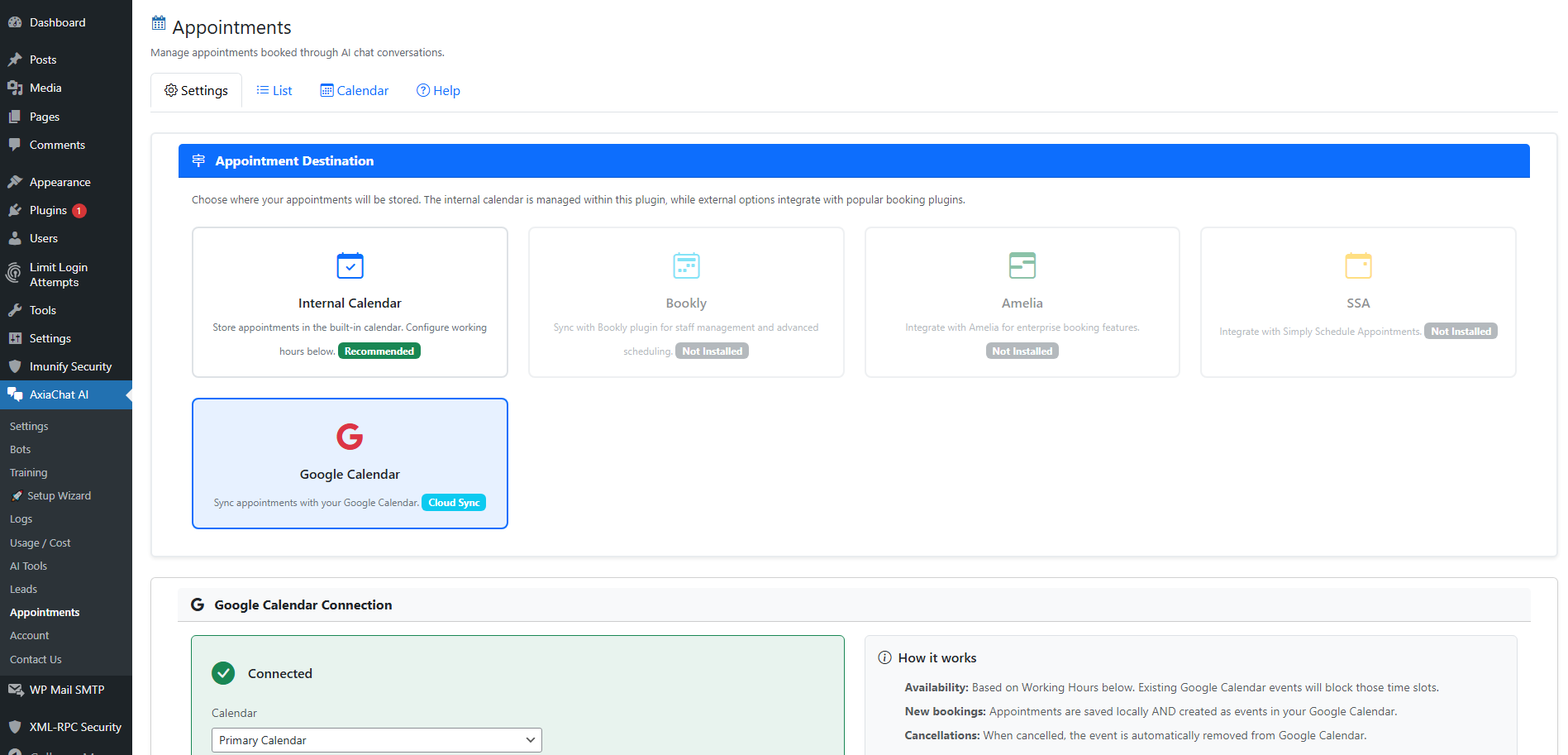
- Appointments — let the bot schedule appointments directly from the chat
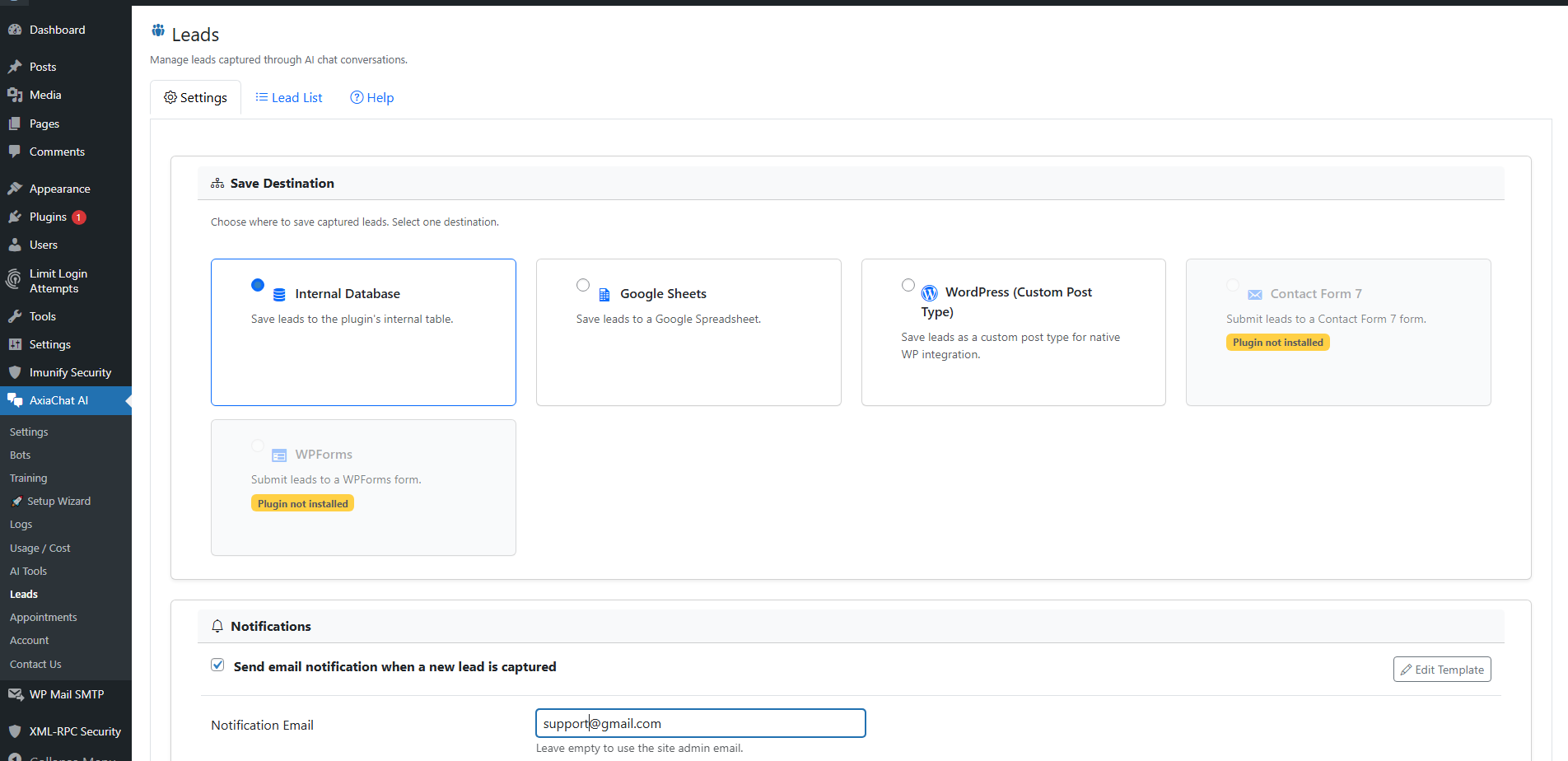
- Lead Capture — collect and store visitor data (name, email, phone) inside the chat flow
- Web Scraper — fetch and summarise live web content as part of a bot response
RAG — Retrieval-Augmented Generation
- Local vector search (cosine similarity)
- Pinecone support
- OpenAI embeddings
- Advanced indexing
- WooCommerce enrichment
- Featured images in chat
Security & Validation
- WordPress nonce
- Honeypot protection
- CAPTCHA support
- Moderation API
- Rate limiting
- Usage limits
- Hidden system prompt
- Endpoint allowlist
Frontend & UI
- Floating widget (configurable position: bottom-right, bottom-left, etc.) or inline layout via shortcode
- Fully draggable, minimizable and closable chat window
- Voice chat mode (
type="voice_text") with browser Web Speech API - File upload button (📎) with drag-and-drop support, in-chat thumbnail preview, and admin log attachment indicators
- Automatic image optimization (resize + compress) to minimize API costs while preserving visual quality
- Markdown rendering including images, bold, lists, and code blocks
- Suggestion chips / quick-reply buttons
- WhatsApp CTA button inside the chat window (configurable per bot)
Admin & Developer Tools
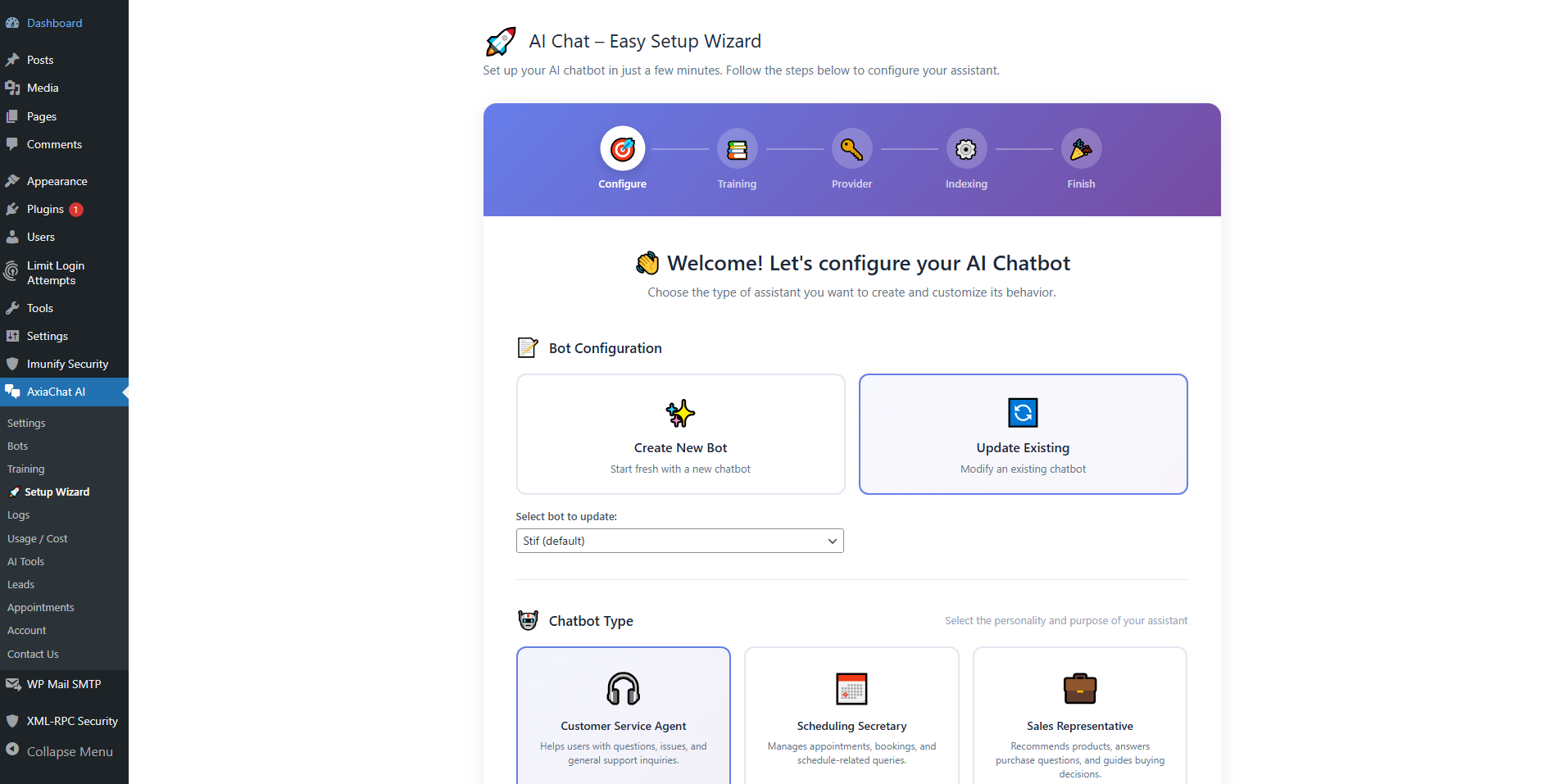
- Guided Easy Setup Wizard — fully working bot in under 2 minutes
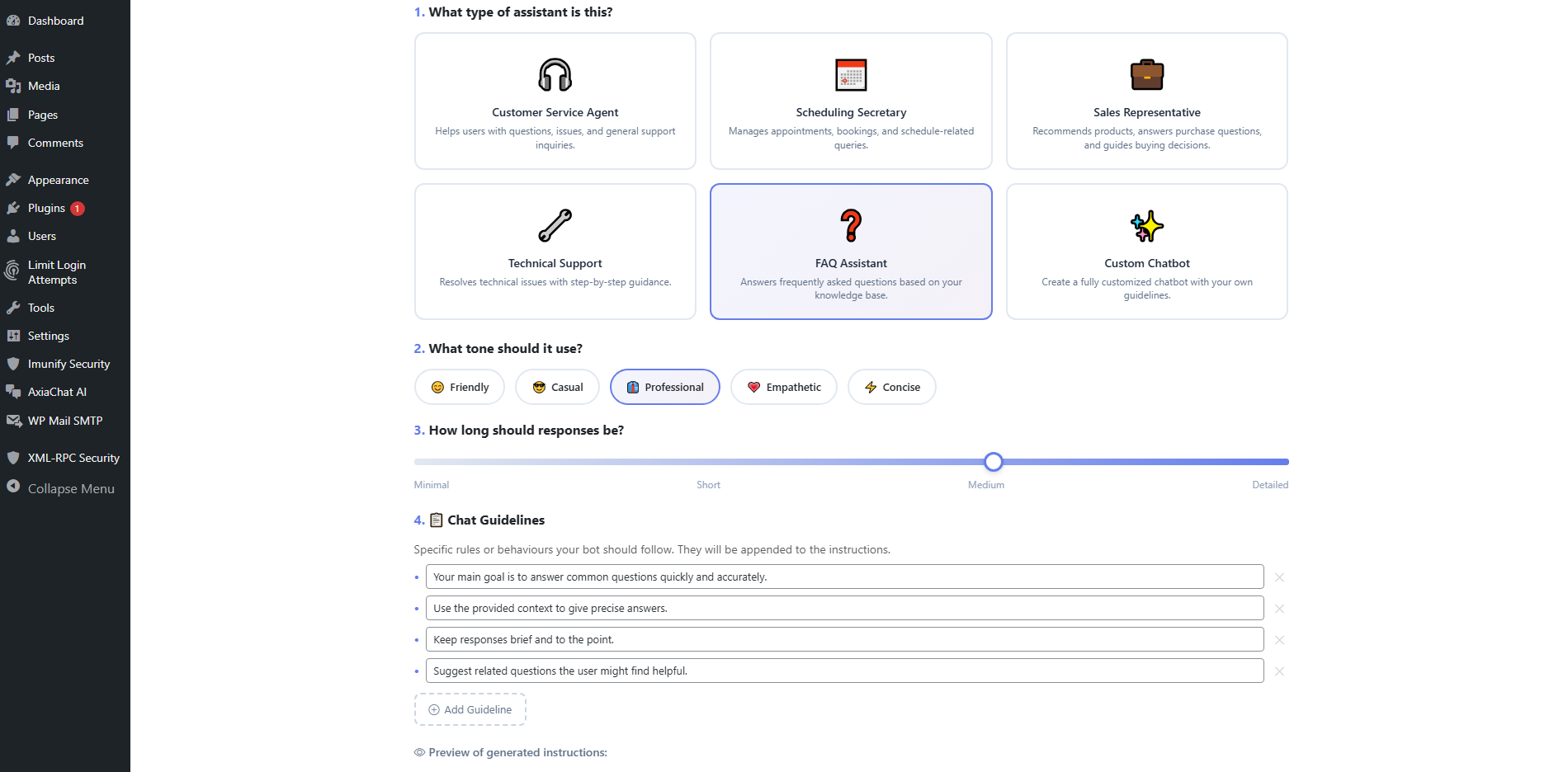
- One-click AI-generated bot instructions — describe your use case, AI writes the system prompt
- Built-in prompt templates (Customer Support, Lead Generation, E-commerce, FAQ, etc.)
- Chat conversation logs with full transcript, token usage, and cost breakdown
- Email alerts on new conversations — full transcript or summary, per-conversation or digest mode
[aichat id="slug"]shortcode with 20+ data-attribute parameters (layout, position, colours, avatar, voice, maximized, etc.)
Bundled Libraries
- Bootstrap (local)
- Bootstrap Icons (local)
- smalot/pdfparser (LGPLv3) for PDF extraction
External Services / Data Disclosure
This plugin can connect to the following third‑party APIs depending on which features you enable. You (the site owner) must supply the API keys. No keys are bundled and no traffic is proxied through a vendor server controlled by this plugin author.
1. OpenAI
Used for: chat completions / responses, embeddings (context indexing), moderation (safety checks).
Endpoints used (HTTPS):
* https://api.openai.com/v1/chat/completions (legacy Chat Completions)
* https://api.openai.com/v1/responses (Responses API – new unified endpoint if configured)
* https://api.openai.com/v1/embeddings (document/post/PDF embedding + wizard indexing)
* https://api.openai.com/v1/moderations (content moderation)
Data Sent:
* User prompt text (per message) and limited conversation history (trimmed for token control)
* System / policy instructions (security + privacy policy + bot instructions)
* Optional retrieved context snippets (only the selected top‑N chunks or page excerpt – never the full original document)
* Embedding requests: raw chunk text produced from your site’s content or uploaded PDFs
* Moderation: only the user prompt text (not the entire history)
Data Retention (Your Server):
* Conversation log rows (if logging enabled) including user prompt, model reply, timestamps, bot slug, session id, optional user id. IP (binary) only stored when per‑IP limits are turned on. Disable logging to stop storing new rows.
* Embeddings table stores numeric vectors generated from your content (not reversible plaintext) plus the original chunk text for retrieval.
Recommendations:
* Update your privacy policy to disclose sending user prompts and limited site content to OpenAI for processing.
* Disable logging or periodically purge if you process personal data.
Legal / Docs:
* Terms: https://openai.com/policies/terms-of-use
* Privacy: https://openai.com/policies/privacy-policy
* Usage Policies: https://openai.com/policies/usage-policies
Opt‑Out / Control:
* Remove the OpenAI API key in Settings to stop all OpenAI calls (bots will refuse to answer).
* Disable conversation logging.
* Limit context ingestion to non‑sensitive pages.
2. Anthropic (Claude)
Used for: alternative chat completions via Claude models (messages API) when a bot provider is set to Anthropic/Claude.
Endpoint used (HTTPS):
* https://api.anthropic.com/v1/messages
Data Sent:
* A rewritten message array: system instructions + user prompt + condensed prior turns (trimmed) + optional retrieved context snippets.
* Model identifier, max tokens / temperature style parameters.
Headers:
* x-api-key (your key) and anthropic-version (currently 2023-06-01 set in code).
Retention (Your Server):
* Same as OpenAI notes for conversation logging (the provider choice does not change local storage schema).
Legal / Docs:
* Terms: https://www.anthropic.com/legal/terms-of-service
* Privacy: https://www.anthropic.com/legal/privacy
* Usage Policy: https://www.anthropic.com/legal/aup
Opt‑Out / Control:
* Leave the Claude API key blank; those bots will fallback/refuse if provider requires it.
* Switch provider per bot back to OpenAI.
3. Pinecone (Optional Remote Vector Store)
Only used if you explicitly create a Context with remote type “Pinecone”. Local context mode (default) never contacts Pinecone.
Endpoint Pattern:
* Region/index specific HTTPS endpoints you enter (example placeholder: https://controller.pinecone.io and index query/upsert endpoints under *.pinecone.io). The plugin validates host against an allowlist containing pinecone.io (filter extendable).
Used For:
* Upserting embeddings (during context indexing / syncing)
* Querying similar vectors when answering a question in that context.
Data Sent:
* Vectors (embedding arrays) and associated metadata (post/page IDs, titles, short chunk text) for upsert.
* Query: the embedding vector of the user question + top‑K request.
Retention:
* Stored inside your Pinecone project (not on this plugin server). Local DB still keeps minimal reference metadata if you mix modes.
Legal / Docs:
* Terms: https://www.pinecone.io/terms/
* Privacy: https://www.pinecone.io/privacy/
* Security: https://www.pinecone.io/security/
Opt‑Out / Control:
* Do not configure a remote Pinecone context; use local mode or page mode instead.
* Delete the remote context to stop future upserts/queries.
4. Google Gemini (Optional AI Provider)
Used for: alternative chat completions via Google Gemini models when a bot provider is set to Google/Gemini.
Endpoint used (HTTPS):
* https://generativelanguage.googleapis.com/v1beta/models/{model}:generateContent
Data Sent:
* System instructions + user prompt + condensed prior turns (trimmed) + optional retrieved context snippets.
* Model identifier and generation configuration parameters.
Headers:
* API key passed as URL parameter (key=).
Retention (Your Server):
* Same as OpenAI notes for conversation logging.
Legal / Docs:
* Terms: https://ai.google.dev/gemini-api/terms
* Privacy: https://policies.google.com/privacy
* Usage Policy: https://ai.google.dev/gemini-api/terms
Opt‑Out / Control:
* Leave the Gemini API key blank; those bots will fallback/refuse if provider requires it.
* Switch provider per bot to OpenAI or Claude.
5. Freemius SDK (Licensing & Analytics)
This plugin uses the Freemius SDK for license activation, update delivery, and anonymous usage analytics (opt-in).
Endpoints used (HTTPS):
* https://api.freemius.com (license checks, updates, analytics)
Data Sent (if opted in):
* Site URL, WordPress version, PHP version, plugin version, and admin email.
* No visitor/chat data is ever sent to Freemius.
Legal / Docs:
* Terms: https://freemius.com/terms/
* Privacy: https://freemius.com/privacy/
Opt‑Out / Control:
* During activation, choose “Skip” to opt out of anonymous analytics.
* License-related API calls are required only for premium features.
6. Google Sheets (Optional Lead Export)
Only used if you enable the Google Sheets lead destination in the Leads add‑on. The plugin connects to Google APIs via OAuth 2.0 …
Instalação
- Upload the plugin files to the
/wp-content/plugins/axiachat-aidirectory, or install through the WordPress plugin screen. - Ative o plugin através da tela 'Plugins' em WordPress.
- Run the Easy Setup Wizard.
- Add your AI provider API key.
- Test your chatbot using the built-in preview — click “Preview Bot” in the bot settings to see it live before deploying globally.
Log de Changes
4.3.5
- Fixed: Gemini requests now use thinking levels where supported and omit deprecated thinking budgets and custom sampling parameters.
- Updated: Freemius SDK to the latest version.
Capturas de tela
Para desenvolvedores
Este é o seu plugin? Mostre os números.
Adicione um crachá ao vivo ao seu site, Documentos ou Readme do GitHub. Ele é atualizado por conta própria - nenhuma conta necessária.
Best AxiaChat AI alternatives
All AI Chatbot plugins →





FAQ
AxiaChat AI: quick answers
Respostas diretas, extraídas de dados ao vivo WordPress.org.
Fonte: WordPress.org
Is AxiaChat AI free?
Yes. AxiaChat AI is free to download and use from the official WordPress.org plugin directory.
Is AxiaChat AI safe to use in 2026?
Yes — AxiaChat AI is a safe, well-maintained plugin to use in 2026. It runs on 500+ sites, is rated 5/5 and was last updated 1 month ago, and scores 82/100 on our health check.
How many websites use AxiaChat AI?
AxiaChat AI is active on 500+ WordPress websites and has been downloaded 62,855 times since it launched in October 2025. It was downloaded 8,556 times in the last 30 days.
Does AxiaChat AI work with WordPress 7.1?
Yes. The developer has tested AxiaChat AI up to WordPress 7.1.5, the latest release. It requires WordPress 5.9 or newer.
What PHP version does AxiaChat AI need?
AxiaChat AI requires PHP 7.4 or higher. Most hosts run PHP 8.x today, so it works on any modern WordPress hosting.
When was AxiaChat AI last updated?
The latest version, 4.3.5, was released on October 10, 2026 (1 month ago).
Who makes AxiaChat AI?
AxiaChat AI is developed and maintained by Esteban.
What are the best alternatives to AxiaChat AI?
The most popular alternatives to AxiaChat AI are Lead Generation Contact Wid… (10K+ installs), Hyve Lite (7K+ installs) and Geeky Bot (6K+ installs).
Alimentado por PageForge
Um modelo e uma planilha. Uma página real para cada pesquisa.
PageForge Transforma cada linha de um CSV em uma página WordPress com seu próprio título, URL, SEO campos e esquema, construído no layout que você já desenhou. Gratuito em WordPress.org.
- CSV e XLSX, mais Google Sheets em Profissional e Empresarial
- Seu próprio título, URL, SEO campos e esquema para cada página
- Funciona com o editor de blocos, Elementor, Divi e Avada
- Gratuito em WordPress.org, sem cartão de crédito