


Ai
Opt-in AI for WordPress: one stable feature plus experiments that may change or be removed. Needs an AI provider plugin and your own API key.

Escolha segura
Yes — AI is a safe, well-maintained plugin to use in 2026. It runs on 70K+ sites, is rated 4.2/5 and was last updated 1 month ago, and scores 87/100 on our health check.
- Comprovado em escala em mais de 70 mil sites ativos
- Desenvolvido ativamente — última atualização 1 mês atrás
- Testado com as últimas WordPress (7.1)
Como ele se acumula?
Lado a lado em instalações, atualizações, avaliações e suporte


Downloads diários
Os picos de download geralmente seguem uma nova versão — cada site que atualiza automaticamente é um download.
Rankings
Where AI stands todayWordPress.org Classificações de pesquisa
Posição ao vivo na pesquisa de plugins, top 100| Palavra chave | Posição |
|---|---|
| abilities | #8 |
| Ai | #10 |
| artificial intelligence | #1 |
| experiments | #1 |
| MCP | #40 |
Adoção da versão
Compartilhamento de sites ativos por lançamento.
Divisão de classificação
★★★★★★★★★★ 4.2 from 10 reviews
About AI
From the official readme · v1.5.0Descrição
The AI plugin adds opt-in AI tools to the WordPress admin and Block Editor. It’s built by the WordPress Core AI team for site owners, content creators, and developers who want to try AI in WordPress early and help shape what comes next.
Features and Experiments
Nothing is turned on when you activate the plugin. You choose what to enable in Settings -> AI, and each item there is one of two kinds:
- Feature – Stable and supported. Changes avoid breaking existing behavior. Image Generation and Editing is currently the only Feature.
- Experiment – Early-stage and actively being developed. Experiments may change significantly or be removed in any release, so we recommend trying them on a staging site before using them on a live site.
Once enabled, most Experiments only send a request to your AI provider when you click a button, but some run on their own. Comment Moderation, for example, checks every new comment, including comments from site visitors. In Settings -> AI, Experiments that run on their own are marked “Runs automatically”, and the info icon next to each item’s name shows when it runs, what it sends to your AI provider, and how many requests it makes.
Read the Feature and Experiment Lifecycle to learn how Experiments are evaluated and how they can become Features.
Before You Start
- This plugin is not part of WordPress core. It does nothing until you install and activate it, and each Feature or Experiment stays off until you enable it.
- You need an AI Connector plugin and an account with an AI provider. The AI plugin doesn’t include provider credentials. Install a connector plugin such as Anthropic, Google, or OpenAI (more connectors), then add your API key in
Settings -> Connectors. - Your AI provider bills you for usage. The plugin is free; each AI request is billed by your provider under your account.
- The Block Editor is required. The Classic Editor and other editing experiences are not supported.
New to WordPress AI? Take the AI-Powered WordPress course to learn how to configure the plugin, use its features, and understand the building blocks behind them. The Getting Started guide covers setup and troubleshooting.
Funcionalidade
- Image Generation and Editing – Create and edit images from post content in the editor, and from the Media Library.
Experiments
Experiments marked “runs automatically” do their work without you clicking anything once they’re enabled. Most of them send requests to your AI provider when they run.
- Abilities Explorer – Browse and test registered AI abilities from a dedicated admin screen.
- AI Request Logging – Logs AI requests, including short previews of prompts and responses, for observability and debugging.
- Alt Text Generation – Generate descriptive alt text for images to improve accessibility.
- Block Container Label Generation – Generates short List View labels for Group, Columns, and other container blocks.
- Comment Moderation (runs automatically) – Checks each new comment for toxicity and sentiment, gives it a value score, and can hold comments for moderation. Includes comments from site visitors by default.
- Connector Approval – Require administrator approval before other plugins or themes can use the AI connectors configured on this site.
- Content Classification – Suggests relevant tags and categories to organize content.
- Content Resizing – Shorten, expand, or rephrase selected block content.
- Content Summarization – Summarizes long-form content into digestible overviews.
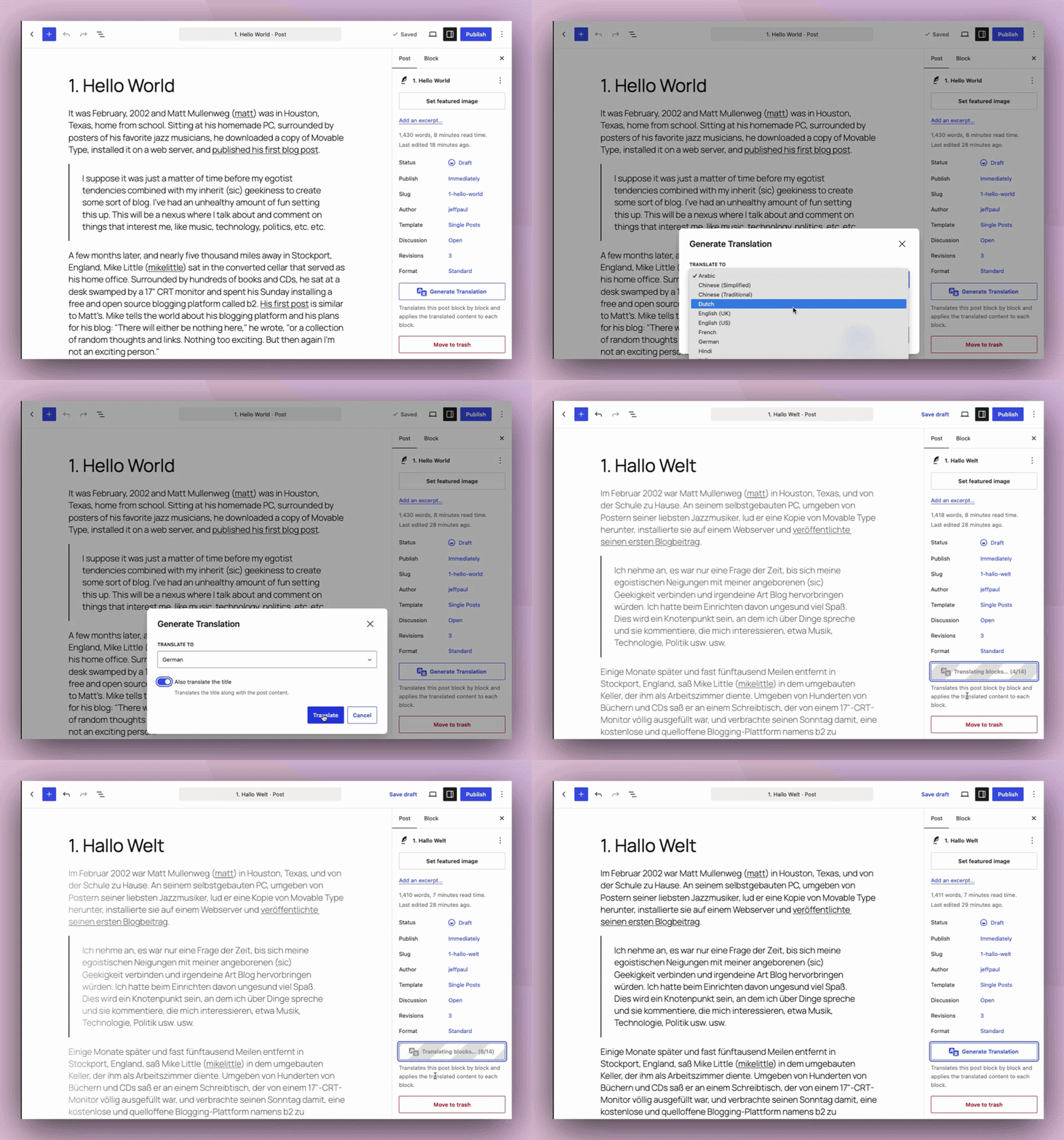
- Content Translation – Translates paragraph and heading blocks, and optionally the post title, into a selected language from the post editor.
- Content Verification (runs automatically) – Detects C2PA Content Credentials in uploaded images and stores them alongside the attachment.
- Custom Abilities – Makes the plugin’s general-purpose WordPress Abilities available through the Abilities API and MCP.
- Editorial Notes – Reviews post content block-by-block and adds Notes with suggestions for Accessibility, Readability, Grammar, and SEO.
- Editorial Updates – Applies pending editorial Notes to your content and saves the post, without a preview.
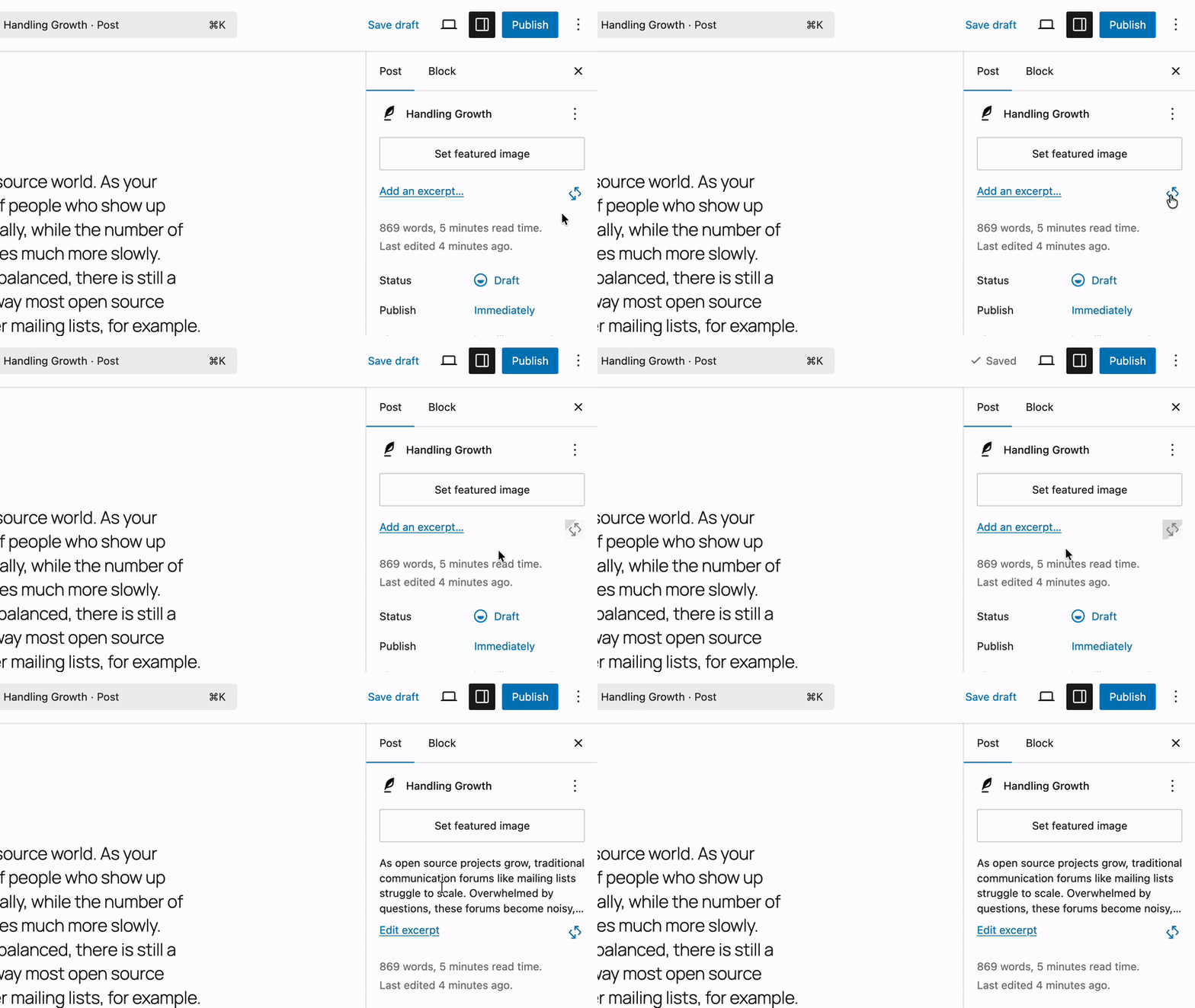
- Excerpt Generation – Generates excerpt suggestions for your posts.
- Key Encryption – Encrypts AI provider API keys stored in your database. Disabling the experiment or deactivating the plugin restores plaintext keys.
- Markdown Feeds – Publishes a Markdown feed and Markdown versions of your public posts and pages for AI agents and other machine readers.
- MCP Access – Controls which abilities AI agents can use over the Model Context Protocol (MCP). Installs and activates the MCP Adapter plugin when enabled.
- Meta Description Generation – Generates meta description suggestions and integrates them with several SEO plugins.
- Revision Change Summary – Summarizes what changed between two revisions of a post in plain language, on the visual and classic revisions screens.
- Slug Generation – Suggests SEO-friendly permalink slugs from the permalink popover or the pre-publish panel.
- Suggest Reply – Adds a “Suggest Reply” action to the Comments screen and Activity widget to draft replies to comments.
- Text to Speech – Generates an audio version of a post that visitors can listen to instead of reading.
- Title Generation – Generates title suggestions for your posts.
- Type-ahead Text (runs automatically) – Suggests text as you type in the Block Editor.
- WebMCP – Lets an agent browser work in the Block Editor through WebMCP, with every change visible on the page as it happens.
Coming Soon
We’re actively developing new features to enhance your WordPress workflow:
- AI Playground – Experiment with different AI models and providers.
- Content Assistant – AI-powered writing and editing in Gutenberg.
- Site Agent – Natural language WordPress administration.
- Workflow Automation – AI-driven task automation.
Roadmap
You can view the active plugin roadmap in a filtered view in the WordPress AI GitHub Project Board.
Para desenvolvedores
The AI plugin is designed to be studied, extended, and built upon. Whether you’re a plugin developer, agency, or hosting provider, here’s what you can do:
Under the Hood:
These building blocks power the Features and Experiments above. They aren’t settings you turn on or off.
- AI Building Blocks – Combines the PHP AI Client and Abilities API into one plugin, as a reference implementation for developers.
- Dashboard Widgets – AI Status and AI Capabilities widgets, plus a framework for registering new ones.
- Experiment Framework – The opt-in system that registers each Feature and Experiment and its toggle.
- Guidelines – Lets abilities respect site-wide editorial standards.
- Multi-Provider Support – Works with AI Connector plugins for providers such as OpenAI, Google, and Anthropic.
Extend the Plugin:
- Build Custom Experiments – Use the
Abstract_Featurebase class to create your own AI-powered features. - Pre-configure Providers – Hosts and agencies can set up AI Connector plugins so users don’t need their own API keys.
- Register Custom Abilities – Hook into the Abilities API to add new AI capabilities.
- Override Default Behavior – Use filters to customize prompts, responses, and UI elements.
- Comprehensive Hooks – Filters and actions throughout the codebase for customization.
Developer Tools Coming Soon:
- AI Playground – Experiment with different AI models and prompts.
- MCP (Model Context Protocol) – Integrate and test Model Context Protocol capabilities in WordPress workflows.
- Extended Providers – Support for experimenting with additional or alternate AI providers.
Get Started:
- Read the Contributing Guide for development setup
- Join the conversation in #core-ai on WordPress Slack
- Browse the GitHub repository to see how experiments are built
- Participate in discussions on how best the plugin should iterate.
We welcome contributions! Whether you want to build new experiments, improve existing features, or help with documentation, check out our GitHub repository to get involved.
Instalação
- Install the plugin through the
Plugins -> Add Pluginscreen, or upload the plugin files to the/wp-content/plugins/aidirectory. We recommend trying the plugin on a staging site first. - Activate the plugin through the
Pluginsscreen in WordPress. - Install and activate at least one AI Connector plugin, then go to
Settings -> Connectorsand add your API key. - Go to
Settings -> AIand enable the Features or Experiments you want to use. Select the info icon next to each Experiment’s name to see when it runs and what it sends to your AI provider. - Try it out. For Title Generation, edit a post and click into the title field. Click the
Generatebutton above the field, then choose a suggestion and clickSelectto insert it.
Log de Changes
This version includes Breaking Changes.
1.5.0 – 2026-10-29
Adicionado
- New Experiment: Content Verification, that adds read-only detection of C2PA Content Credentials in uploaded JPEG/PNG/WebP images (#459).
- New Experiment: Text to Speech, that allows you to generate audio for a specific post and then render audio controls on the frontend (#888).
- New Experiment: MCP Access, that installs and activates the MCP Adapter plugin from WordPress.org when enabled, and adds a
Tools → MCP Accessscreen to control which abilities are exposed to AI agents over MCP (#992). - New Experiment: WebMCP, that lets an agent browser work in the block editor through
document.modelContext, with tools that set the title, insert and edit blocks, save and publish, with every change visible on the page as it happens (#1081). - New Experiment: Revision Change Summary, that summarizes what changed between two revisions of a post on the visual and classic revisions screens (#1159).
- New Experiment: Block Container Label Generation, that generates concise block container labels in List View and the block Rename modal (#1175, (#1218).
- A post’s Markdown document (
?output_format=markdown) has approved comments appended (#1121). - New background sync processing to handle generating embeddings for posts and terms (#1135).
- “Generate title” button in the post Rename modal (#1140).
- Learn WordPress AI course links to the plugin readmes and the AI settings header for easier access to course resources (#1154).
- A neutral badge icon to thumbnails of images with C2PA data detected in the Media Library grid view (#1164).
- An
ai.abilitiesExplorer.fieldsJavaScript filter for adding read-only table columns to the Abilities Explorer page (#1181). - Clarified which parts of the plugin are stable Features vs Experiments, flag Experiments that run automatically in
Settings > AI, and show when each runs, what it sends to your AI provider, and how many requests it makes from an info icon, the readme, and docs (#1190). - Featured Connector plugins (Mistral and Vercel AI Gateway) on
Settings > Connectors, sorted by name, plus awpai_featured_connectorsfilter to change the list (#1212).
Changed
- Update the wording in our capability check notice and change that from an error to a warning (#935).
- Content Translation now translates any block that has rich text instead of just paragraphs and headings (#1009).
- Move the Key Encryption experiment onto the new Secrets API feature plugin with backward-compatible fallback and migration (#1107).
- The
/<post>/feed/markdown/no longer works and serves a 404 (#1121). - The
core/content-query,core/settings-get, andcore/users-queryabilities now set thepublicmeta flag added in WordPress 7.1 (#1122). - Summarize enabled and disabled experiments in the AI Status dashboard widget to keep it compact as more experiments are added (#1155).
- Rebuilt the Abilities Explorer on DataViews and added three
ai/v1REST routes to retrieve and run abilities (#1181). - Replace the “Purge All Logs” button in the AI Request Logs screen with a control to delete logs older than 30 days, 90 days or 1 year, or all logs, and add a
before_daysargument toDELETE /ai/v1/logs(#1182). - The
core/settings-getability now matches WordPress core. Settings use their REST API names (for example,titleinstead ofblogname), and a value that does not match its schema is left out. Breaking changes: Some schema fields have changed so ensure you are using the correct field names in your ability calls; thecore/read-settingsalias was also removed (#1206). - The
core/users-queryability now matches WordPress core. The input is nowwhere,fields, andpagination, and the output is alwaysitemsandpagination. Users are looked up through theids,slugs, orusernameslists inwhere, and lookup by email is no longer supported. Results are ordered by username, a filter that cannot be used is rejected, and a page after the last one returns an error. Breaking changes: Some schema fields have changed so ensure you are using the correct field names in your ability calls; thecore/read-usersalias was also removed (#1207). - The
core/content-queryability now matches WordPress core. The input is nowwhere,fields, andpagination, and the output is alwaysitemsandpagination. Posts are looked up through theidsorslugslists inwhere, which also requires the post type intype. Posts are filtered by author throughwhere.author, with the authoridorslug. Fields are nested, such astitle.rendered. A filter that cannot be used is rejected, and a page after the last one returns an error. The author name and slug are only returned to users who may see the author. Only ashow_in_abilitiesvalue oftrueexposes a post type. Breaking changes: Some schema fields have changed so ensure you are using the correct field names in your ability calls; thecore/read-contentalias was also removed (#1208). - The
dateandmodifiedfields ofcore/content-queryreturnsiteandgmtdates instead oflocalandgmt. Breaking change: Ensure you are using the correct field names in your ability calls (#1235). - The
registered_datefield ofcore/users-queryis replaced by aregisteredobject withsiteandgmtdates. Note that all 3 core abilities have now identical shape like these shipping in WordPress 7.2. Breaking change: Ensure you are using the correct field names in your ability calls (#1237).
Removed
- The deprecated
core/read-settingsability alias. Usecore/settings-getwith REST API field names (for example,titleinstead ofblogname). The alias could not keep the old field names or response shape after the sync with WordPress core (#1206). - The deprecated
core/read-usersability alias. Usecore/users-querywith the newwhere,fields, andpaginationinput. The alias could not keep the old input and response shape after the sync with WordPress core (#1207). - The deprecated
core/read-contentability alias. Usecore/content-querywith the newwhere,fields, andpaginationinput. The alias could not keep the old input and response shape after the sync with WordPress core (#1208).
Fixed
- AI Request Logging now captures successful generations from providers that use a custom transport, not only those routed through the SDK HTTP transporter (#757).
- Display a clear, context-aware error notice during Ability execution when the configured AI connector is pending approval (#759).
- Remove the text generation capability check from the alt text generation WP-CLI command (#935).
- Feature toggles are loaded with one database query instead of one per feature on sites without a persistent object cache (#1113).
- Content Translation: Translate the blocks inside Post Content when “Show template” is enabled (#1116).
- On multisite, network deactivation restores API keys on every site, and uninstall no longer deletes keys that were still encrypted (#1118).
- The Markdown Feeds and Key Encryption flags are loaded together with the feature toggles instead of with one query each on every request (#1119).
- The site-wide comment markdown feed lists comments instead of the post list (#1121).
- Feed requests are no longer served the post’s Markdown by Accept negotiation or
?output_format=markdown(#1121). - Accept-header negotiation now follows the header’s quality values and order, so a request that prefers HTML gets HTML and one that prefers Markdown gets Markdown (#1125).
- Ensure canceling meta description generation stops the loading state. Note the actual request won’t be cancelled but the result from that will be discarded (#1128).
- Show an error when a Note fails to save, in place of a “suggestions added” message, and keep reviewing the other blocks when one fails (#1131).
- Skip blocks that are removed, replaced or edited mid-translation (#1137).
- Ensure all strings can be translated in the Abilities Explorer pages (#1146).
- Ensure all strings can be translated in the Content Classification experiment (#1147).
- A comment reply suggestion is no longer inserted into the reply form of a different comment (#1158).
- Match existing terms whose names contain “&” or non-ASCII letters, and add them from suggestions (#1168).
- A non-string term or parent in the AI response no longer fails the whole request when running content classification (#1171).
- Add missing title attribute to singular alternate Markdown discovery link (#1177).
- Show “Regenerate Reply” after a reply suggestion has been generated (#1179).
- Checkbox icon color on the AI settings page (#1183).
- Ensure success and error notices show on the AI Request Logs screen (#1184).
- Key Encryption no longer causes a fatal error when stored API keys can’t be decrypted (#1186).
- Suggest Reply no longer sends the title or excerpt of private or password-protected posts to the AI provider (#1192).
- Comment Moderation no longer automatically analyzes pingbacks, trackbacks or block editor notes (#1192).
- Uninstalling the plugin now removes Comment Moderation analysis data (#1192).
- Omit Author meta line in Markdown feeds when a post has no assigned author (#1210).
- Preserve line-level diff granularity for multi-line blocks like tables and quotes in Revision Change Summary (#1216).
- Markdown Feeds now apply the core
the_content_feedandthe_excerpt_rssfilters, matching RSS and Atom feed output (#1224). - Ensure the “Serve Markdown via the Accept header” setting can now be saved (#1229).
- The Guidelines prompt no longer contains the HTML entity
'(#1230). - The permission error for a post now mentions image prompts instead of excerpts when running image prompt generation (#1234).
Segurança
- Resolved GHSA-7mwf-4ppp-cxmp (GHSA-7mwf-4ppp-cxmp).
- Resolved GHSA-g94j-h78j-rr2j (GHSA-g94j-h78j-rr2j).
1.4.0 – 2026-10-05
Adicionado
- When comment moderation is run, calculate a value score, providing a relevance signal (0–1) for each comment based on how substantive and on-topic it is relative to the post it was left on. Show this score in a new column on the comment screen (#681).
- New experiment, Markdown Feeds, that creates markdown feeds at
/feed/markdown/(available in every feed context) and of individual posts and pages via?output_format=markdown(#855). - User-triggered retry for Content Translation if it fails (#941).
- Limit comment moderation bulk analysis queue size (#972).
- Storage and CRUD layer for embedding vectors (new
wpai_embeddingstable) that can be used to recording the provider and model alongside every vector (#976). - 9 new default target languages to the Content Translation experiment (#986).
- Guideline categories support to the Content Translation Ability (#987).
- New
Vector_MathandVector_Rankerclasses, allowing users to run similarity and ranking queries against vectors (#993). - Loading indicator for type-ahead suggestion requests (#1029).
- Integrate Alt Text Generation with the Image block’s decorative setting (#1031).
Changed
- Bump minimum supported WordPress version to 7.0.3 (#1001).
- Display specific taxonomy labels in Content Classification notice error messages instead of generic terminology (#916).
- Show a notice and disable title translation when the post title is too short (#967).
- Update to the latest version of the embedding code from the
PHP AI Client (#975). - Our
generate_embeddingshelper function now requires a
specific embedding model. Passmodel(a model ID or aModelInterface
instance) and, for a model ID, theproviderthat offers it. This is a
breaking change for anyone that happened to start using this function (#975). - Update Settings vertical ellipsis icon to tool icon (#1001).
- The
core/read-contentandcore/read-usersabilities are renamed tocore/content-queryandcore/users-query. The old names keep working as deprecated aliases for now (#1002). - Use
gpt-image-2.5-flareas our default OpenAI image generation model (#1023). - The
core/read-settingsability has been renamed tocore/settings-get. The old name keeps working as a deprecated alias for now (#1087).
Deprecated
- The
ai/get-post-detailsability. Use the single-post mode ofcore/content-queryinstead (#1002).
Removed
- Unnecessary URL validation that is now handled by WordPress core (#1011).
- The
Enable AIheader toggle from the AI settings page (#985).
Fixed
- Ensure focus moves to the Accept button when content generation completes in the Content Resizing modal (#917).
- Increase the default request timeout from 5 seconds to 30 seconds when Core revalidates API keys. If this validation request times out, Core will delete the API key so this is an attempt to fix that (#947).
- Cached the active SEO plugin detection – with a TTL and immediate invalidation on any plugin activation/deactivation – so meta description meta-key lookups no longer re-scan active plugins on every request (#973).
- Improves the Content Translation loading animation to preserve existing text and background colors (#977).
- Settings page failing to render on Gutenberg 23.9+ after
@wordpress/dataviewswas removed from the private-apis allowlist (#989). - Ensure our guidelines integration reads published guideline rows from the
wp_knowledgepost type instead of the removedwp_guidelineso those work with the latest version of Gutenberg. We don’t migrate data from the old post type and taxonomy to the new so anyone that had previously set guidelines in an older version of Gutenberg will need to re-add those (#988). - Import core’s prefixed PSR
EventDispatcherin the vendoredEmbeddingBuilder(#1005). - Reserve space for type-ahead text generation when caret is at the end (#1008).
- Updated the settings page container
min-heightso that it spans the full viewport height (#1013). - Fix focus style on collapsible card by updating the
@wordpress/dataviewspackage to latest version (#1035). - AI Request Logs now records HTTP error responses (4xx/5xx) from providers as
errorwith the status code and message, instead ofsuccess; Gemini text generation requests are no longer mislabeled asMetadata(#1040). - Hide the “Suggest Reply” button when the inline comment form is in Quick Edit mode (#1049).
- Editorial Notes only reviewing template blocks when “Show template” mode is enabled in the block editor (#1053).
- Insert the generated summary into the post content when Show template is enabled (#1055).
- Aligned the focus styles of Content Classification suggestion pills with the core Button component (#1060).
- Connector Approvals no longer blocks core’s connector key check by attributing it to the provider plugin or to Gutenberg (#1070).
- Abilities Explorer no longer crashes when an ability’s input property lists several types (#1073).
- Preserve HTML entities and text between shortcodes when normalizing content, while still encoding entity-encoded tags (#1077).
- Prevent
options.phpvalidation error when saving general settings with abilities active (#1080). - Ensure post titles, the site tagline and excerpts no longer contain HTML entities in the markdown feeds (#1086).
- Ensure markdown feeds don’t 404 when the rewrite rules were rebuilt without the feed in place (#1110).
Segurança
- Ensure we check for the
moderate_commentscapability before we allow bulk comment moderation and then check for theedit_commentcapability for each individual comment that is being moderated (GHSA-pjw7-q94g-4q34). - Harden the Playground preview publishing workflow to derive pull request and commit metadata from the triggering workflow run (#978).
- Harden JSON data parsing on admin screen (#991).
Older changelog entries can be found in the CHANGELOG.md file.
Capturas de tela


Para desenvolvedores
Este é o seu plugin? Mostre os números.
Adicione um crachá ao vivo ao seu site, Documentos ou Readme do GitHub. Ele é atualizado por conta própria - nenhuma conta necessária.
Best AI alternatives
All abilities plugins →





FAQ
AI: quick answers
Respostas diretas, extraídas de dados ao vivo WordPress.org.
Fonte: WordPress.org
Is AI free?
Yes. AI is free to download and use from the official WordPress.org plugin directory.
Is AI safe to use in 2026?
Yes — AI is a safe, well-maintained plugin to use in 2026. It runs on 70K+ sites, is rated 4.2/5 and was last updated 1 month ago, and scores 87/100 on our health check.
How many websites use AI?
AI is active on 70K+ WordPress websites and has been downloaded 401,824 times since it launched in December 2025. It was downloaded 72,164 times in the last 30 days.
Does AI work with WordPress 7.1?
Yes. The developer has tested AI up to WordPress 7.1.5, the latest release. It requires WordPress 7.0.3 or newer.
What PHP version does AI need?
AI requires PHP 7.4 or higher. Most hosts run PHP 8.x today, so it works on any modern WordPress hosting.
When was AI last updated?
The latest version, 1.5.0, was released on October 30, 2026 (1 month ago).
Who makes AI?
AI is developed and maintained by WordPress.org.
What are the best alternatives to AI?
The most popular alternatives to AI are Flex MCP (1K+ installs), AcrossAI Abilities Manager (100+ installs) and Inhale: MCP Abilities Manag… (100+ installs).
Alimentado por PageForge
Um modelo e uma planilha. Uma página real para cada pesquisa.
PageForge Transforma cada linha de um CSV em uma página WordPress com seu próprio título, URL, SEO campos e esquema, construído no layout que você já desenhou. Gratuito em WordPress.org.
- CSV e XLSX, mais Google Sheets em Profissional e Empresarial
- Seu próprio título, URL, SEO campos e esquema para cada página
- Funciona com o editor de blocos, Elementor, Divi e Avada
- Gratuito em WordPress.org, sem cartão de crédito