


Text Prompter – Unlimited chatgpt text prompts for openai tasks
Text Prompter is a powerful openai plugin that allows you to use chatgpt text prompts effortlessly within Gutenberg editor.

Use com cautela
Text Prompter works, but test it on a staging site before relying on it in 2026. It runs on 60+ sites, is rated 5/5 and was last updated 6 months ago, and scores 54/100 on our health check.
- Base de usuários pequenas (mais de 60 instalações ativas)
- Muito poucos comentários até agora
Como ele se acumula?
Lado a lado em instalações, atualizações, avaliações e suporte


Downloads diários
Os picos de download geralmente seguem uma nova versão — cada site que atualiza automaticamente é um download.
Rankings
Where Text Prompter stands todayWordPress.org Classificações de pesquisa
Posição ao vivo na pesquisa de plugins, top 100| Palavra chave | Posição |
|---|---|
| Ai | >100 |
| ChatGPT | #70 |
| conteúdo | >100 |
| gpt | #57 |
| open | #19 |
Adoção da versão
Compartilhamento de sites ativos por lançamento.
Divisão de classificação
★★★★★ ★★★★★ 5 de 2 comentários
About Text Prompter
From the official readme · v1.0.9Descrição
Text Prompter is a powerful openai plugin that allows you to use chatgpt text prompts effortlessly within Gutenberg editor.
The plugin allows them to create chatgpt text prompts and test them to see which one perform best. By having the ability to create their own prompts, content creators can tailor the generated content to their specific needs and preferences with help of openai api.
Features List
- Create new openai prompt
- Manage existing text prompts
- Import bulk text prompts
- Export bulk text prompts
- Test prompts
- Use chatgpt prompts in Gutenberg
- Add a new block in Gutenberg using openai
- Upate an existing block in Gutenberg using openai
- Use [text_prompter] shortcode to generate dynamic contents.
One of the most notable features of this plugin is its ready-to-use text prompts, which are pre-written and optimized for readability.
- Write a paragraph: Write a paragraph on the given topic.
- Add content: Add 2-3 more sentences to the given content without changing anything else.
- Generate ideas: Generate 3-5 ideas in bullet points based on the given topic.
- Write a blog post: Write a blog post with 3-5 headings and 3-5 paragraphs on the given topic.
- Generate a TL;DR: Summarize the given content in 1-2 sentences.
- Write a summary: Write a summary of the given content in 1-2 paragraphs.
- Paraphrase: Paraphrase the given content without changing the meaning.
- Generate a tagline: Generate a catchy tagline for the given content.
- Explain to a 2-year-old: Explain the given content in simple language suitable for a 2-year-old child.
- Write a quote: Generate a relevant quote based on the given content.
- Correct grammar: Correct any grammatical errors in the given content.
- Generate a topic outline for blog: Create a topic outline for a blog post on the given topic.
- Change tone: Change the tone of the given content to be more formal.
- Make it conversational: Rewrite the given content to make it more conversational and friendly.
- Adjust voice: Adjust the voice of the given content to be more authoritative and confident.
- Proofread: Proofread the given content and correct any spelling or grammatical errors.
- Fix spelling errors: Fix all spelling errors in the given content without making any other changes.
- Add two lines: Add two more lines to the given content without making any other changes.
- Add one line: Add one more line to the given content without making any other changes.
- Add a heading and a paragraph: Add one heading and one paragraph to the given content without making any other changes.
- Generate a Call-to-Action: Create a compelling call-to-action for this content.
- Add Bullet Points: Add a list of bullet points to summarize this content.
- Expand on an Idea: Take one of the ideas in this content and expand on it.
- Improve Readability: Rewrite this content to improve its readability and flow.
- Add Examples: Add some examples to illustrate the points made in this content.
- Add a Subheading: Add a subheading to break up this content and make it easier to read.
- Create a Product Description: Write a description for this product that will entice users to buy it.
Shortcode [text_prompter]
We have introduced a new shortcode [text_prompter] that allows you to easily generate AI-generated content based on a specified prompt.
Inside the post editor, add the shortcode with the following format:
[text_prompter model="MODEL_NAME" temperature="TEMPERATURE_VALUE" max_tokens="MAX_TOKENS_VALUE" transist="TRANSIST_VALUE" attributes="ATTRIBUTE_VALUE"]PROMPT_CONTENT[/text_prompter]
Where:
- MODEL_NAME (optional, default: text-davinci-002) is the name of the OpenAI language model to use for generating the prompt response.
- TEMPERATURE_VALUE (optional, default: 0.5) is the temperature value to use for generating the response. The higher the value, the more unpredictable the response.
- MAX_TOKENS_VALUE (optional, default: 50) is the maximum number of tokens to generate in the response.
- TRANSIST_VALUE (optional, default: 86400) is the time in seconds for which the generated response will be cached. This is to prevent unnecessary API requests to OpenAI.
- ATTRIBUTE_VALUE (optional) is a string containing any additional attributes you want to add to the generated HTML output.
- PROMPT_CONTENT (required) is the text prompt to use for generating the response.
Note: You can use any valid HTML attributes in ATTRIBUTE_VALUE. For example, to add a class to the output, you can use attributes=”class=’my-class'”.
Instalação
Esta seção descreve como instalar o plugin e fazê-lo funcionar.
-
Upload the text-prompter directory to the /wp-content/plugins/ folder
-
Once the plugin is uploaded, log into WordPress and go to Plugins
-
Find the text-prompter plugin and click Activate
Como usar
-
Go to the Settings page of the plugin and insert your OpenAI API key. See full instructions on How to create OpenAI API key
-
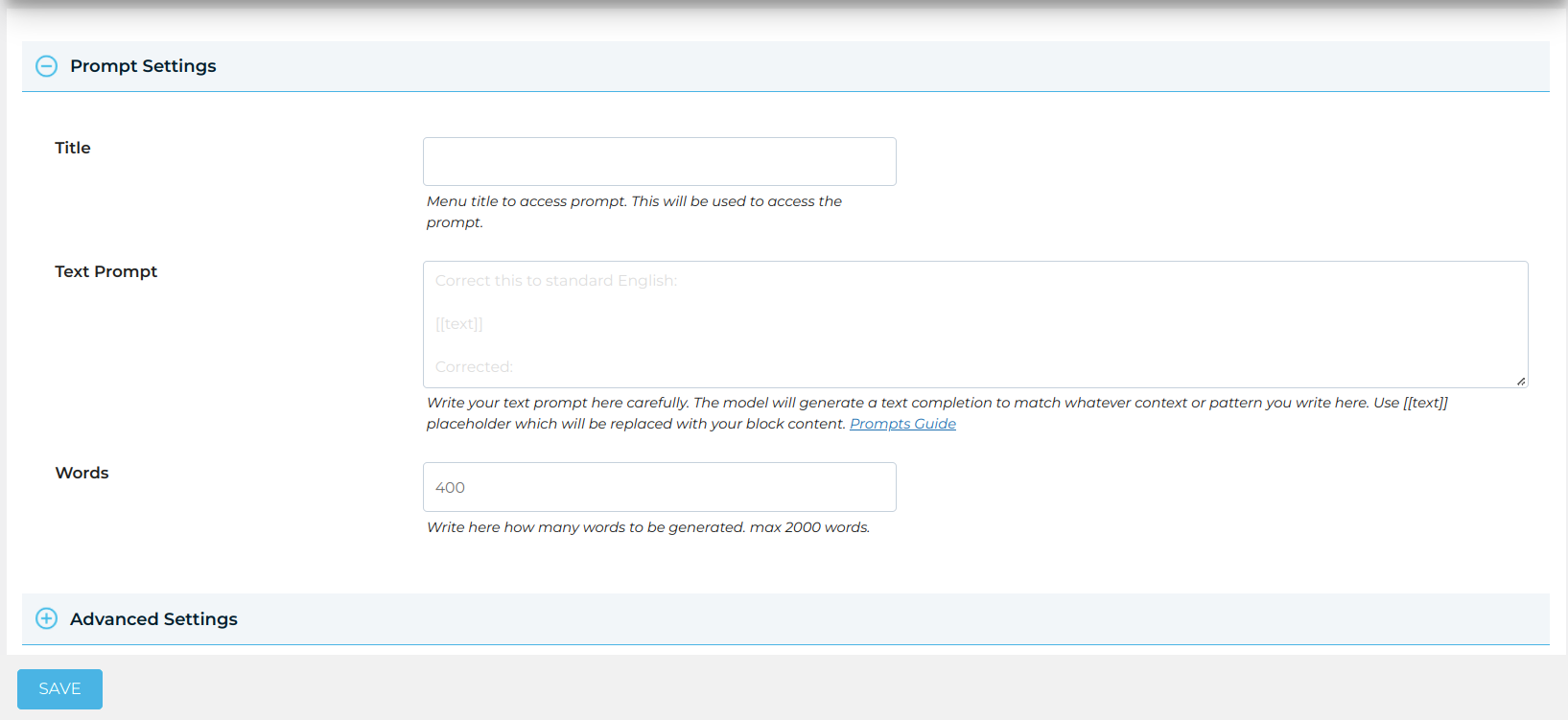
Create your own text prompt or import pre-built text prompts using the ‘Add Prompt’ or ‘Import Prompts’ page.
-
Test prompts using the ‘Testing’ page.
Now you are ready to use text prompts in the Gutenberg editor.
Log de Changes
1.0.8
- Fix : Security issue in shortcode render function fixed.
1.0.7
- Fix : Max Token error is resolved.
1.0.3
- New : Add new block.
- New : Update existing block.
- New : Add heading type block.
- New : Add paragraph type block.
1.0.2
- Fix : Plugin details updated.
1.0.1
- Fix : Code Improvements
1.0.0
- New : Add new text prompt
- New : Manage text prompts for editing or removing.
- New : Import text prompts for bulk editing.
- New : Export text prompts to move to another installation.
- New : OpenAI API Setting page.
Capturas de tela


Para desenvolvedores
Este é o seu plugin? Mostre os números.
Adicione um crachá ao vivo ao seu site, Documentos ou Readme do GitHub. Ele é atualizado por conta própria - nenhuma conta necessária.
Best Text Prompter alternatives
Todos os plugins de IA →





FAQ
Text Prompter: quick answers
Respostas diretas, extraídas de dados ao vivo WordPress.org.
Fonte: WordPress.org
Is Text Prompter free?
Yes. Text Prompter is free to download and use from the official WordPress.org plugin directory.
Is Text Prompter safe to use in 2026?
Text Prompter works, but test it on a staging site before relying on it in 2026. It runs on 60+ sites, is rated 5/5 and was last updated 6 months ago, and scores 54/100 on our health check.
How many websites use Text Prompter?
Text Prompter is active on 60+ WordPress websites and has been downloaded 7,214 times since it launched in January 2023. It was downloaded 587 times in the last 30 days.
Does Text Prompter work with WordPress 7.1?
Text Prompter is officially tested up to WordPress 7.0.9, while the latest release is 7.1.5. It may still work, but try it on a staging site first.
What PHP version does Text Prompter need?
Text Prompter requires PHP 5.0 or higher. Most hosts run PHP 8.x today, so it works on any modern WordPress hosting.
When was Text Prompter last updated?
The latest version, 1.0.9, was released on May 28, 2026 (6 months ago).
Who makes Text Prompter?
Text Prompter is developed and maintained by Flipper Code - WordPress Development Company.
What are the best alternatives to Text Prompter?
The most popular alternatives to Text Prompter are Elementor Agent Ready Websi… (10M+ installs), Jetpack (3M+ installs) and All in One SEO (2M+ installs).
Alimentado por PageForge
Um modelo e uma planilha. Uma página real para cada pesquisa.
PageForge Transforma cada linha de um CSV em uma página WordPress com seu próprio título, URL, SEO campos e esquema, construído no layout que você já desenhou. Gratuito em WordPress.org.
- CSV e XLSX, mais Google Sheets em Profissional e Empresarial
- Seu próprio título, URL, SEO campos e esquema para cada página
- Funciona com o editor de blocos, Elementor, Divi e Avada
- Gratuito em WordPress.org, sem cartão de crédito