


Affiliate Amazon Shortcode
Display Amazon affiliate products in WordPress with Creators API v3, responsive product boxes, comparison layouts, caching, and global marketplaces.

Use com cautela
Affiliate Amazon Shortcode works, but test it on a staging site before relying on it in 2026. It runs on 300+ sites, is rated 5/5 and was last updated 3 months ago, and scores 50/100 on our health check.
- Base de usuários pequenas (mais de 300 instalações ativas)
- Muito poucos comentários até agora
Como ele se acumula?
Lado a lado em instalações, atualizações, avaliações e suporte



Downloads diários
Os picos de download geralmente seguem uma nova versão — cada site que atualiza automaticamente é um download.
Rankings
Where Affiliate Amazon Shortcode stands todayWordPress.org Classificações de pesquisa
Posição ao vivo na pesquisa de plugins, top 100| Palavra chave | Posição |
|---|---|
| affiliate marketing | #20 |
| amazon affiliate | #4 |
| Amazon Associates | #4 |
| amazon products | #8 |
| product comparison | #71 |
Adoção da versão
Compartilhamento de sites ativos por lançamento.
Divisão de classificação
★★★★★ ★★★★★ 5 de 2 comentários
About Affiliate Amazon Shortcode
From the official readme · v3.8Descrição
Affiliate Amazon Shortcode is an Amazon affiliate plugin for WordPress that displays Amazon products in posts and pages using simple shortcodes.
It supports Amazon Creators API v3, automatically detects the appropriate v3.1 / v3.2 / v3.3 OAuth endpoint, supports Amazon marketplaces worldwide, and helps diagnose common Credential, Partner Tag and Marketplace configuration errors.
Existing installations can keep saved legacy API profiles for backward compatibility. New configurations should use Amazon Creators API v3.
Product page, screenshots, documentation and PRO purchase:
https://www.softwareapp.it/affiliate-amazon-shortcode/
Principais características
- Amazon Creators API v3 with automatic OAuth region detection
- Separate API profiles so existing legacy configurations can remain available during migration
- Amazon marketplaces worldwide with independent Marketplace and Partner Tag configuration
- Guided API connection test with clear fixes for InvalidAssociate, InvalidPartnerTag, eligibility and OAuth errors
- API Test automatically saves the values currently entered before testing
- Smart caching and retry/backoff protection to reduce API calls
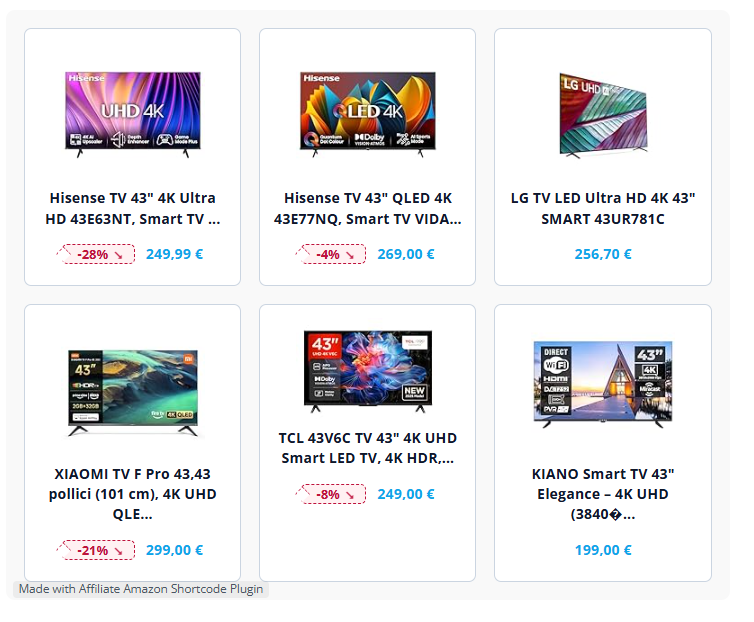
- Product title, image, price and savings data when returned by Amazon
- Automatic product-box language based on the WordPress site language
- Manual language override globally or per shortcode
- Responsive product grids with a configurable global number of columns
- Existing Card/List layout and custom-style compatibility
- FREE version supports up to 3 products and up to 3 global grid columns
PRO features
- Up to 9 products per shortcode and up to 4 grid columns
- Premium templates: Compact, Modern Card, Editorial Minimal, Recommended Highlight, Deal Box and Comparison Table
- Dedicated product comparison shortcode
- Product feature highlights when available from Amazon
- Configurable Product Highlights word limit to keep boxes compact
- Theme presets and fully custom colors
- Custom CTA button text and optional badge
- Per-shortcode overrides for product count, template, theme, columns, CTA, badge, language and highlights length
- No FREE watermark
Learn more or purchase PRO:
https://www.softwareapp.it/affiliate-amazon-shortcode/
Códigos de acesso
Basic usage
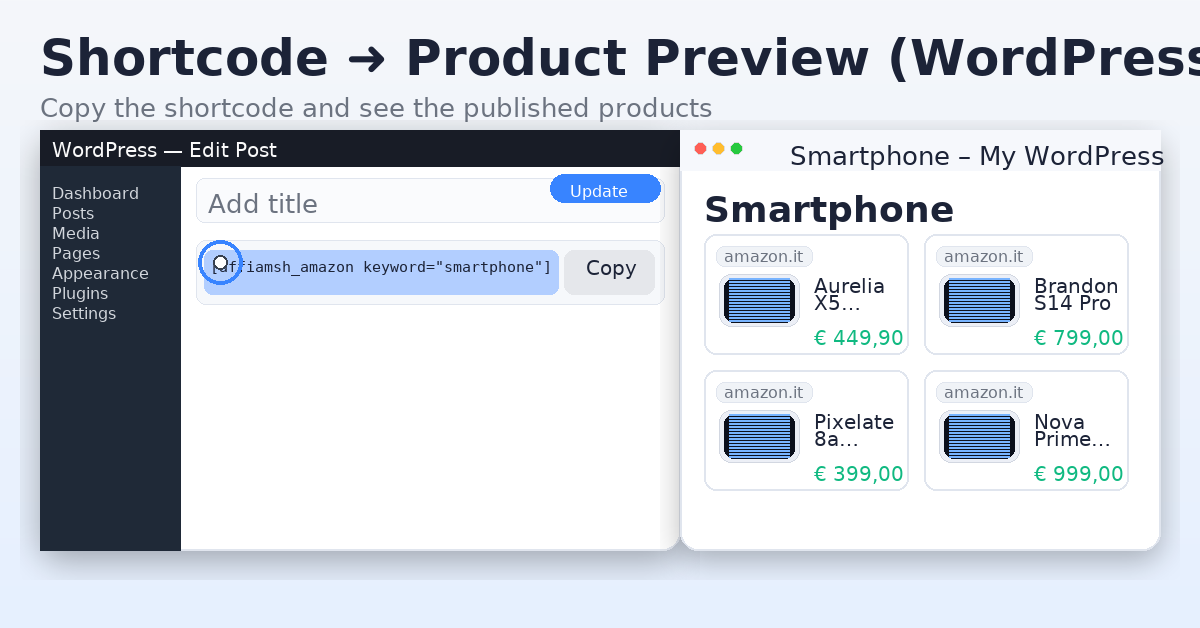
[affiamsh_amazon keyword="wireless headphones"]
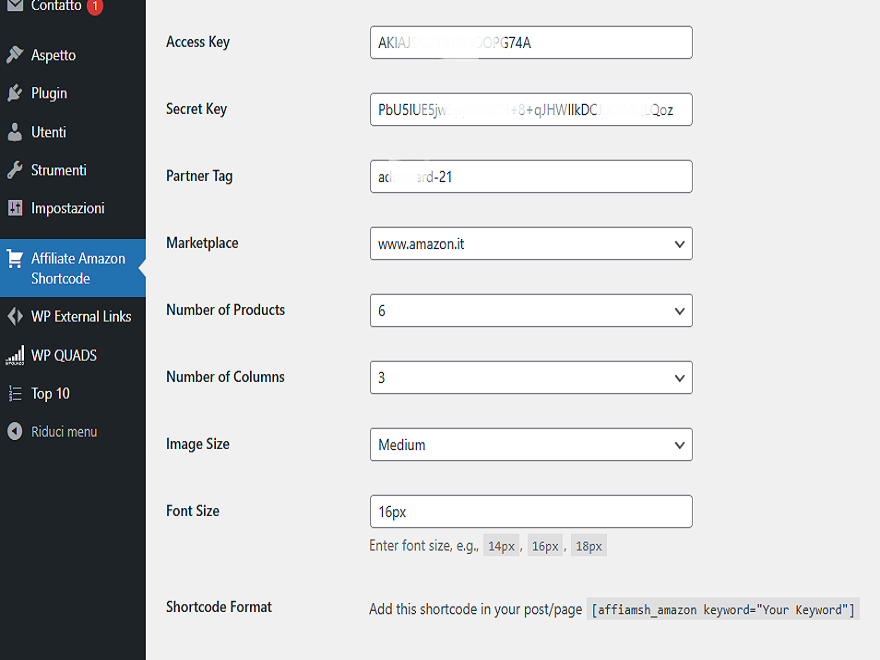
The base shortcode automatically uses the global display settings saved in the plugin admin, including Number of Products, Number of Columns, image size, font size, Box Language and the selected PRO display options when PRO is active.
For example, if the global settings are Number of Products = 3 and Number of Columns = 3, this shortcode:
[affiamsh_amazon keyword="robot vacuum"]
shows 3 products in a 3-column grid on normal desktop widths when using a grid-based layout.
The layout is responsive: multi-column grids automatically reduce the number of columns on narrower screens.
Important: the legacy list layout intentionally displays products as a vertical list, and the comparison layout uses its own responsive comparison table. The global Number of Columns setting and columns="x" override do not apply to those two layouts.
Language override
Force the frontend product-box language:
[affiamsh_amazon keyword="wireless headphones" language="it"]
Supported values:
autoenitesfrdeptnlpltrsvja-
arlanguage=”auto” follows the WordPress site language.
Complete shortcode attribute reference
Available in FREE and PRO
keyword="..."— Amazon product search keyword.language="..."— Overrides the product-box language for this shortcode. Supported values are listed above.
PRO only
number="1-9"— Number of products to display. Overrides the global Number of Products setting for this shortcode.template="..."— Overrides the global template for this shortcode.theme="..."— Overrides the global color theme for this shortcode.columns="1-4"— Overrides the global Number of Columns setting for grid-based layouts.button="..."— Custom CTA button text in layouts that display a CTA button.badge="..."— Optional custom badge text on product-box layouts.-
highlight_words="0-200"— Maximum total number of words displayed in Product Highlights for each product. Use0for no word limit.item_count is not a shortcode attribute. To control the number of products use
number="x"in PRO or the global Number of Products setting.
Template values
Available template values:
card— standard card gridlist— legacy vertical list; column settings do not applycompact— compact product cardsmodern— modern card layoutminimal— editorial minimal layouthighlight— recommended/highlight layoutdeal— deal-focused layoutcomparison— comparison table; column settings do not apply
Theme values
Available theme values:
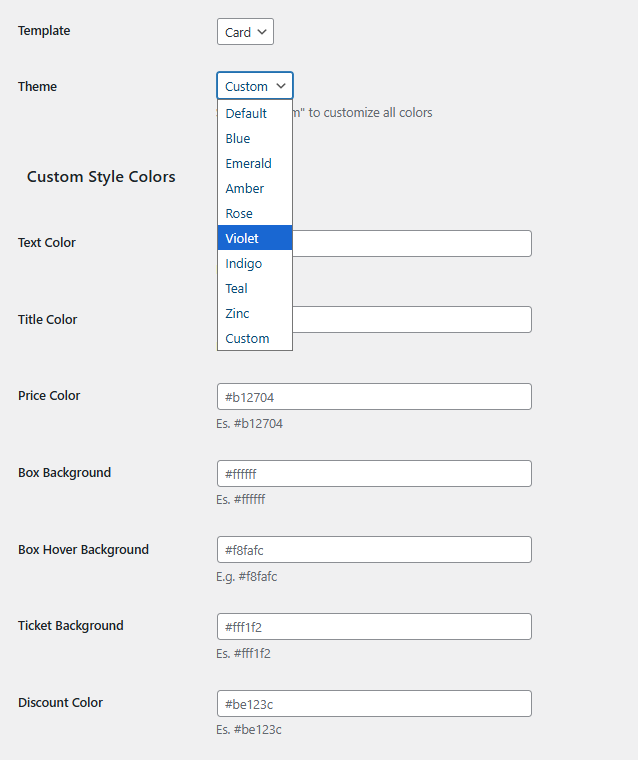
slateblueemeraldamberrosevioletindigotealzinccustom
The custom theme uses the custom colors configured in the PRO display settings.
PRO shortcode examples
Display 3 products in 3 columns:
[affiamsh_amazon keyword="robot vacuum" number="3" columns="3"]
Use the Modern template and Blue theme:
[affiamsh_amazon keyword="robot vacuum" number="3" template="modern" theme="blue" columns="3"]
Customize the CTA and badge:
[affiamsh_amazon keyword="robot vacuum" number="3" template="highlight" button="Check price" badge="Our pick"]
Limit Product Highlights to 25 words:
[affiamsh_amazon keyword="robot vacuum" number="3" template="modern" highlight_words="25"]
Full example:
[affiamsh_amazon keyword="robot vacuum" number="6" template="modern" theme="blue" columns="3" button="Check price" badge="Our pick" language="en" highlight_words="25"]
Product Highlights
highlight_words controls only the length of Product Highlights. Product Highlights must first be enabled in the **Display (PRO)** settings.
When Amazon returns feature data, highlights are displayed in these layouts:
modernhighlightdealcomparison
The highlight_words value is a total word budget per product. Use highlight_words="0" for no word limit.
CTA button and badge
The button attribute customizes the CTA label in layouts that display a CTA button, including Modern, Editorial Minimal, Recommended Highlight, Deal and Comparison.
The badge attribute adds custom badge text to product-box layouts. The Comparison layout uses its own comparison/top-pick presentation.
Comparison shortcode
PRO also provides a dedicated comparison shortcode:
[affiamsh_amazon_compare keyword="wireless headphones" number="3"]
This automatically selects the Comparison Table layout. If number is omitted, the comparison shortcode requests 3 products.
Global settings and per-shortcode overrides
Shortcode attributes override the corresponding global display settings only for that shortcode.
For example, if the global grid uses 3 columns, one specific PRO shortcode can use 2 columns with:
[affiamsh_amazon keyword="smartwatch" columns="2"]
Shortcodes without override attributes continue using the global settings.
Amazon Creators API setup
New Creators API v3 credentials normally look like:
- Credential ID:
amzn1.application-oa2-client... - Credential Secret:
amzn1.oa2-cs.v1...
You do not need to select v3.1, v3.2 or v3.3 manually. The plugin tries the appropriate Amazon OAuth endpoints, detects the credential region and caches the working endpoint.
The credential region and product marketplace are separate concepts. A valid credential can authenticate globally, but the Partner Tag must be valid for the selected Marketplace.
Serviços externos
This plugin connects directly to Amazon services in order to retrieve product data.
Amazon Creators API / Login with Amazon
https://affiliate-program.amazon.com/creatorsapi
For Creators API, the Credential ID and Credential Secret are sent to the appropriate Amazon OAuth endpoint to obtain an access token. Product requests send the access token, selected Marketplace, Partner Tag and requested product/search information to Amazon.
Legacy Amazon Product Advertising service (existing installations only)
https://webservices.amazon.com/paapi5/documentation/
Legacy credentials and product request information are sent directly to Amazon only when an existing installation explicitly selects that legacy profile.
All API communications use HTTPS. The plugin does not send Amazon credentials or product-request data to SoftwareApp.it.
Instalação
- Upload and activate the plugin.
- Open Affiliate Amazon Shortcode in the WordPress admin.
- Select Creators API v3 (Recommended).
- Paste your Amazon Credential ID and Credential Secret.
- Select the target Amazon Marketplace and enter the Partner Tag / Tracking ID registered for that marketplace.
- Click Test API Connection. The current values are saved automatically before the test.
- Configure the default Number of Products, Number of Columns and other display settings.
- Add
[affiamsh_amazon keyword="your keyword"]to a post or page.
Log de Changes
Fixes multi-column grid inheritance for basic shortcodes, strengthens compatibility with WordPress theme CSS and expands shortcode documentation.
3.6
- Fixed global Number of Columns inheritance for the basic
[affiamsh_amazon]shortcode by using explicit responsive column classes. - Strengthened grid CSS so WordPress theme styles cannot easily collapse a configured multi-column product grid to one column.
- Added automatic shortcode-cache invalidation when the plugin version changes.
- Added defensive validation for saved product and column counts.
- Prevented FREE output from accidentally inheriting premium templates left in old PRO settings.
- Expanded shortcode documentation with every supported attribute, accepted values and layout-specific notes.
- Clarified that
item_countis not a shortcode parameter; usenumberinstead. - Added official product-page and PRO purchase links to the documentation.
3.5
- Refocused public plugin copy on Amazon Creators API v3.
- Removed legacy API naming from the main description, feature list and promotional admin copy.
- Kept the legacy integration available for backward compatibility and disclosed it only where technically or legally relevant.
- No change to API behavior, saved settings, shortcodes or existing product boxes.
3.4
- Refreshed WordPress.org readme, plugin metadata and search tags.
- Updated documentation for Creators API v3, premium layouts, comparison shortcode, localization and Product Highlights word limits.
- Corrected outdated feature descriptions and moved older release history to
changelog.txt.
3.3
- Added exact
template="..."value below the Template selector. - Added configurable Product Highlights word limit and
highlight_words="25"shortcode override. - Preserved existing Card/List layouts, shortcodes and custom styling.
Capturas de tela
Para desenvolvedores
Este é o seu plugin? Mostre os números.
Adicione um crachá ao vivo ao seu site, Documentos ou Readme do GitHub. Ele é atualizado por conta própria - nenhuma conta necessária.



Best Affiliate Amazon Shortcode alternatives
All affiliate marketing plugins →





FAQ
Affiliate Amazon Shortcode: quick answers
Respostas diretas, extraídas de dados ao vivo WordPress.org.
Fonte: WordPress.org
Is Affiliate Amazon Shortcode free?
Yes. Affiliate Amazon Shortcode is free to download and use from the official WordPress.org plugin directory.
Is Affiliate Amazon Shortcode safe to use in 2026?
Affiliate Amazon Shortcode works, but test it on a staging site before relying on it in 2026. It runs on 300+ sites, is rated 5/5 and was last updated 3 months ago, and scores 50/100 on our health check.
How many websites use Affiliate Amazon Shortcode?
Affiliate Amazon Shortcode is active on 300+ WordPress websites and has been downloaded 5,122 times since it launched in January 2025. It was downloaded 352 times in the last 30 days.
Does Affiliate Amazon Shortcode work with WordPress 7.1?
Affiliate Amazon Shortcode is officially tested up to WordPress 7.0.9, while the latest release is 7.1.5. It may still work, but try it on a staging site first.
What PHP version does Affiliate Amazon Shortcode need?
Affiliate Amazon Shortcode requires PHP 7.2 or higher. Most hosts run PHP 8.x today, so it works on any modern WordPress hosting.
When was Affiliate Amazon Shortcode last updated?
The latest version, 3.8, was released on August 17, 2026 (3 months ago).
Who makes Affiliate Amazon Shortcode?
Affiliate Amazon Shortcode is developed and maintained by onodev77.
What are the best alternatives to Affiliate Amazon Shortcode?
The most popular alternatives to Affiliate Amazon Shortcode are Content Egg (10K+ installs), AffiliateX (9K+ installs) and Affiliates Manager (8K+ installs).
Alimentado por PageForge
Um modelo e uma planilha. Uma página real para cada pesquisa.
PageForge Transforma cada linha de um CSV em uma página WordPress com seu próprio título, URL, SEO campos e esquema, construído no layout que você já desenhou. Gratuito em WordPress.org.
- CSV e XLSX, mais Google Sheets em Profissional e Empresarial
- Seu próprio título, URL, SEO campos e esquema para cada página
- Funciona com o editor de blocos, Elementor, Divi e Avada
- Gratuito em WordPress.org, sem cartão de crédito