


Advanced Database Cleaner – Optimize & Clean Database to Speed Up Site Performance
Advanced Database Cleaner is a complete WordPress optimization plugin that helps you clean up database clutter and optimize database performance by removing unused data such as old revisions, auto drafts, spam comments…

Escolha segura
Yes — Advanced Database Cleaner is a safe, well-maintained plugin to use in 2026. It runs on 100K+ sites, is rated 4.9/5 and was last updated 3 months ago, and scores 86/100 on our health check.
- Comprovado em escala em mais de 100 mil sites ativos
- Loved by users — 4.9/5 from 1,964 reviews
- Testado com as últimas WordPress (7.1)
Como ele se acumula?
Lado a lado em instalações, atualizações, avaliações e suporte



Downloads diários
Os picos de download geralmente seguem uma nova versão — cada site que atualiza automaticamente é um download.
Rankings
Where Advanced Database Cleaner stands todayWordPress.org Classificações de pesquisa
Posição ao vivo na pesquisa de plugins, top 100| Palavra chave | Posição |
|---|---|
| clean | #3 |
| banco de dados | #3 |
| Ser otimista | #19 |
| execução | #14 |
| postmeta | #2 |
Adoção da versão
Compartilhamento de sites ativos por lançamento.
Divisão de classificação
★★★★★★★★★★ 4.9 from 1,964 reviews
About Advanced Database Cleaner
From the official readme · v4.2.0Descrição
Advanced Database Cleaner is a complete WordPress optimization plugin that helps you clean up database clutter and optimize database performance by removing unused data such as old revisions, auto drafts, spam comments, expired transients, unused post meta, duplicated post meta, unused user meta, etc.
It is designed to help you improve website speed by reducing database bloat and ensuring a lean, efficient WordPress installation. It also provides detailed previews, powerful filters, and automation tools to safely control what gets cleaned.
With the ✨Premium version✨, you can unlock even more advanced features, such as detecting and cleaning orphaned options, orphaned tables, orphaned post meta, orphaned user meta, orphaned transients, and orphaned cron jobs. It also gives you clear insights into how your database evolves over time through built-in analytics, lets you monitor plugin and theme activity to better understand when new data is created or when leftovers appear, and much more.
Why use Advanced Database Cleaner❓
👉 Get a clear overview: see how many tables, options, transients, cron jobs, metadata… records you have, and identify which are unused or orphaned.
👉 Save time: configure what to clean, how far back to keep data, and how often to run automations. The plugin will then handle recurring cleanups for you.
👉 Save space and improve performance: removing unnecessary data reduces database size, makes backups faster, and can improve query performance, especially on busy or older sites.
✅ Main Features
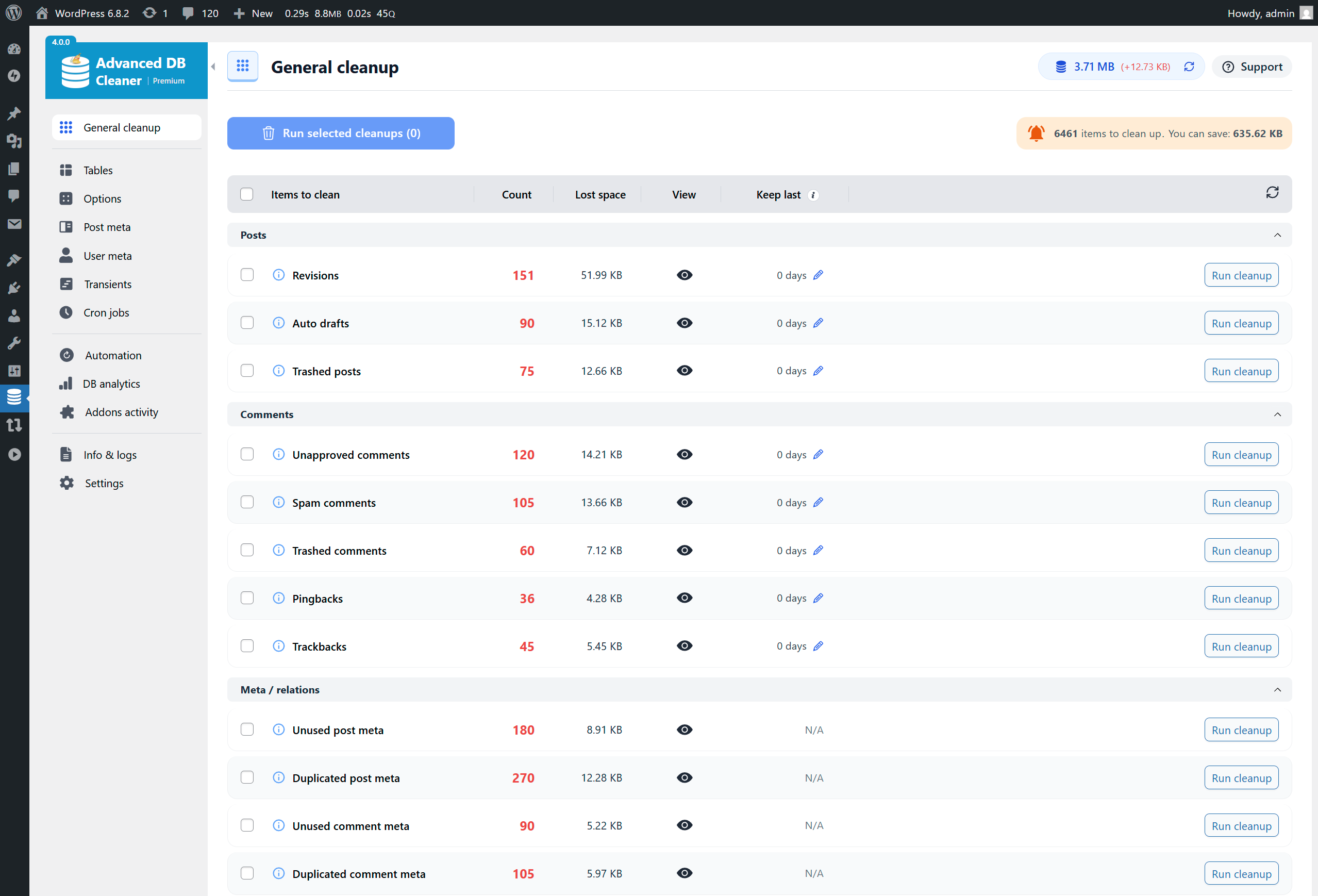
- Delete old revisions of posts and pages
- Delete old auto-drafts
- Delete trashed posts
- Delete pending comments
- Delete spam comments
- Delete trashed comments
- Delete pingbacks
- Delete trackbacks
- Delete unused post meta
- Delete unused comment meta
- Delete unused user meta
- Delete unused term meta
- Delete unused relationships
- Delete expired transients
- Delete duplicated post meta
- Delete duplicated user meta
- Delete duplicated comment meta
- Delete duplicated term meta
- Delete oEmbed caches
- Display the database size that will be freed before cleaning for each item type, and the total size to be freed
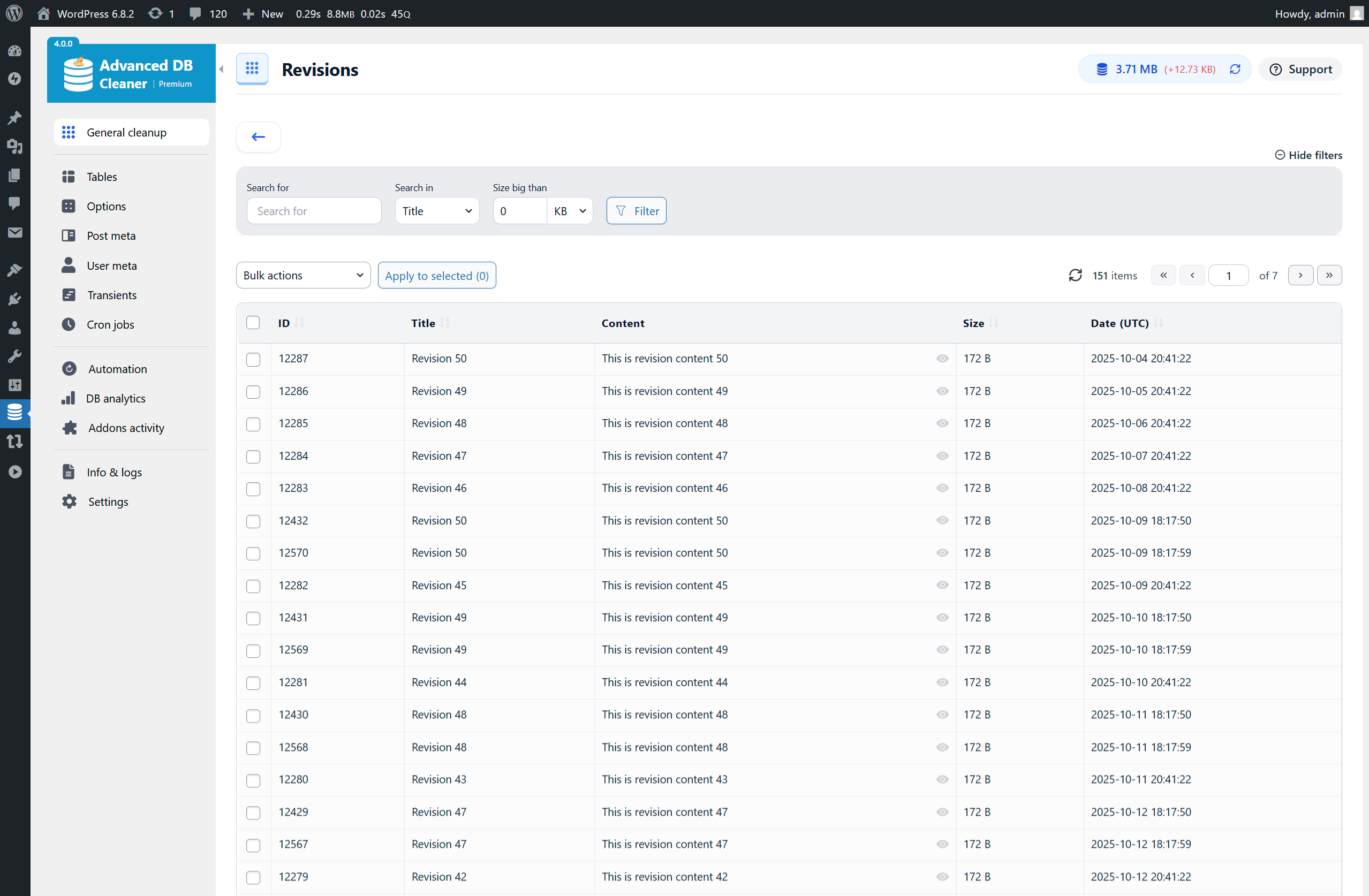
- Display and preview items to clean before performing a database cleanup to ensure safety
- Sorting capability in cleanup preview tables (by name, date, size, site id, etc.)
- View options value content in original or formatted mode for serialized or JSON structures (and other items types as well).
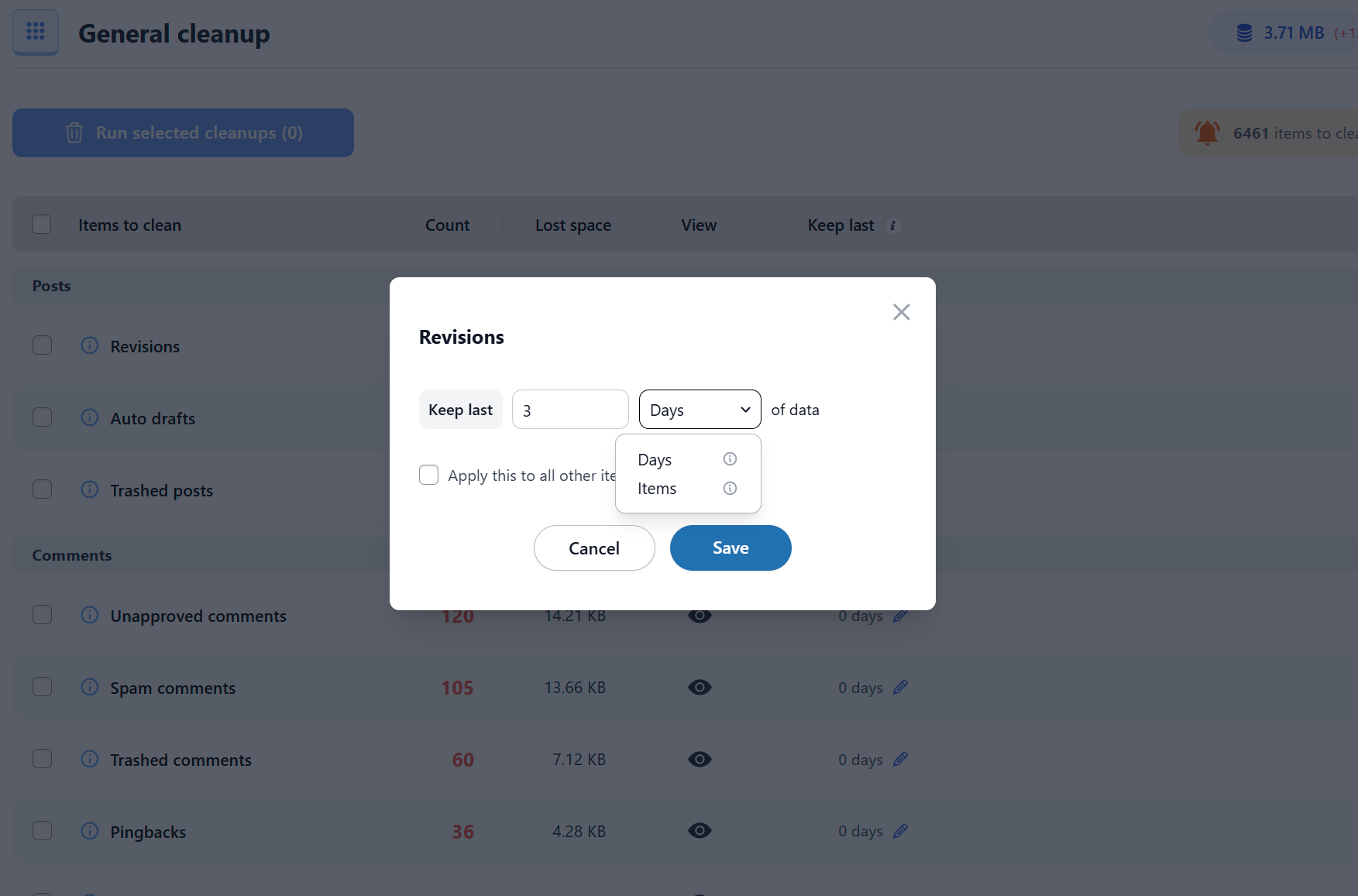
- Keep last X days of data: clean only data older than the number of days you specify
✅ Automation
- Schedule database cleanup to run automatically
- Create scheduled cleanup tasks and specify which items each task should clean
- Schedule database optimization and/or repair to run automatically
- Execute scheduled tasks based on several frequencies: once, hourly, twice a day, daily, weekly, or monthly
- Specify the “keep last X days” rule for each item type in a scheduled task
- Pause/Resume scheduled tasks whenever needed
- Create as many scheduled cleanup tasks as needed and specify what each task should clean
✅ Tables
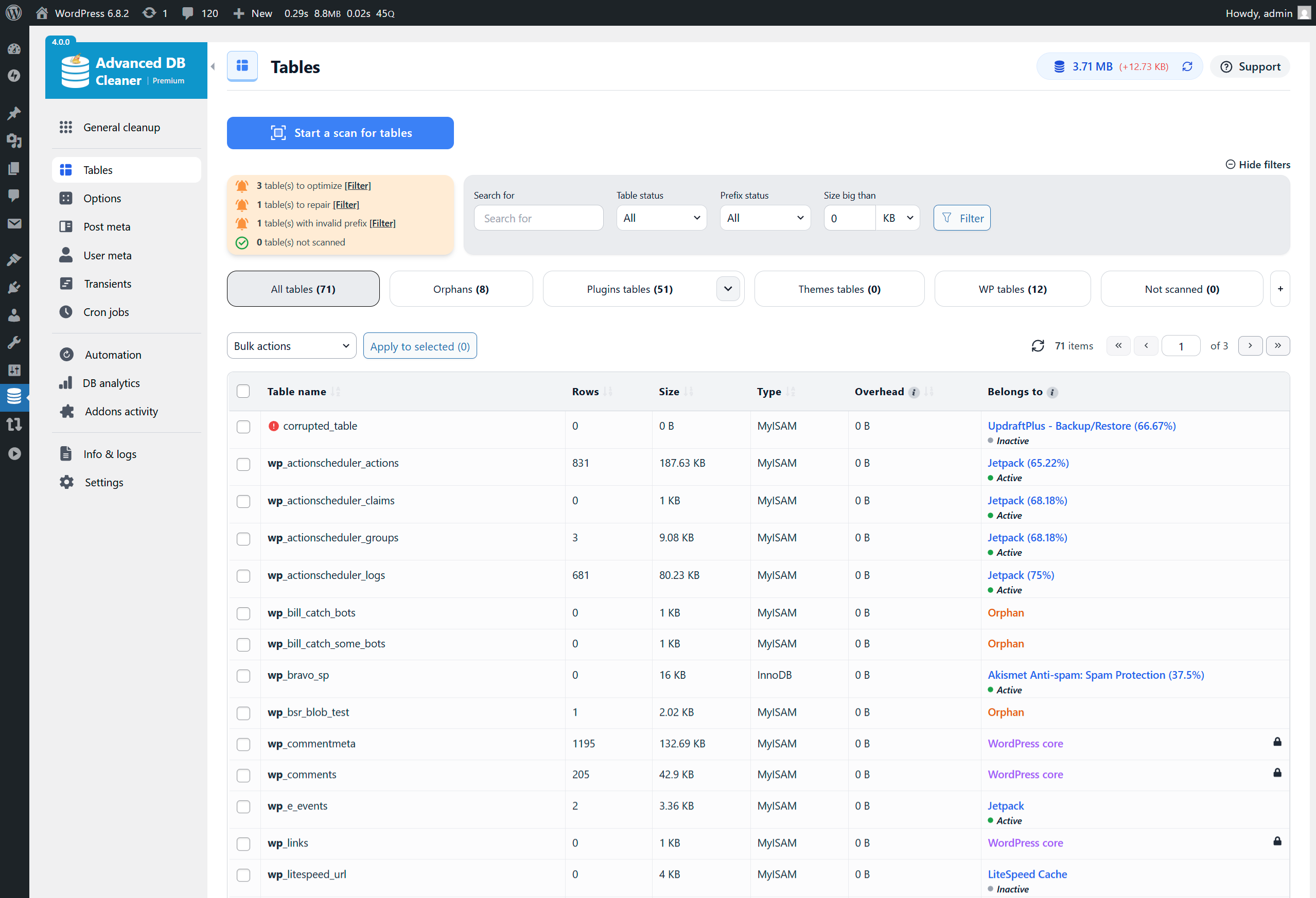
- Display the list of database tables with information such as number of rows, table size, engine, etc.
- Sort tables by any column such as table name or table size
- Display table contents along with their column structure, indexes, status, and more
- Detect and filter tables with invalid prefixes (tables that do not belong to the current WordPress installation), this can be enabled or disabled from the settings page
- Optimize database tables (the plugin notifies you when tables require optimization)
- Repair corrupted or damaged database tables (the plugin notifies you when tables are corrupted)
- Convert tables to InnoDB for better performance
- Empty rows of database tables
- Clean and delete database tables
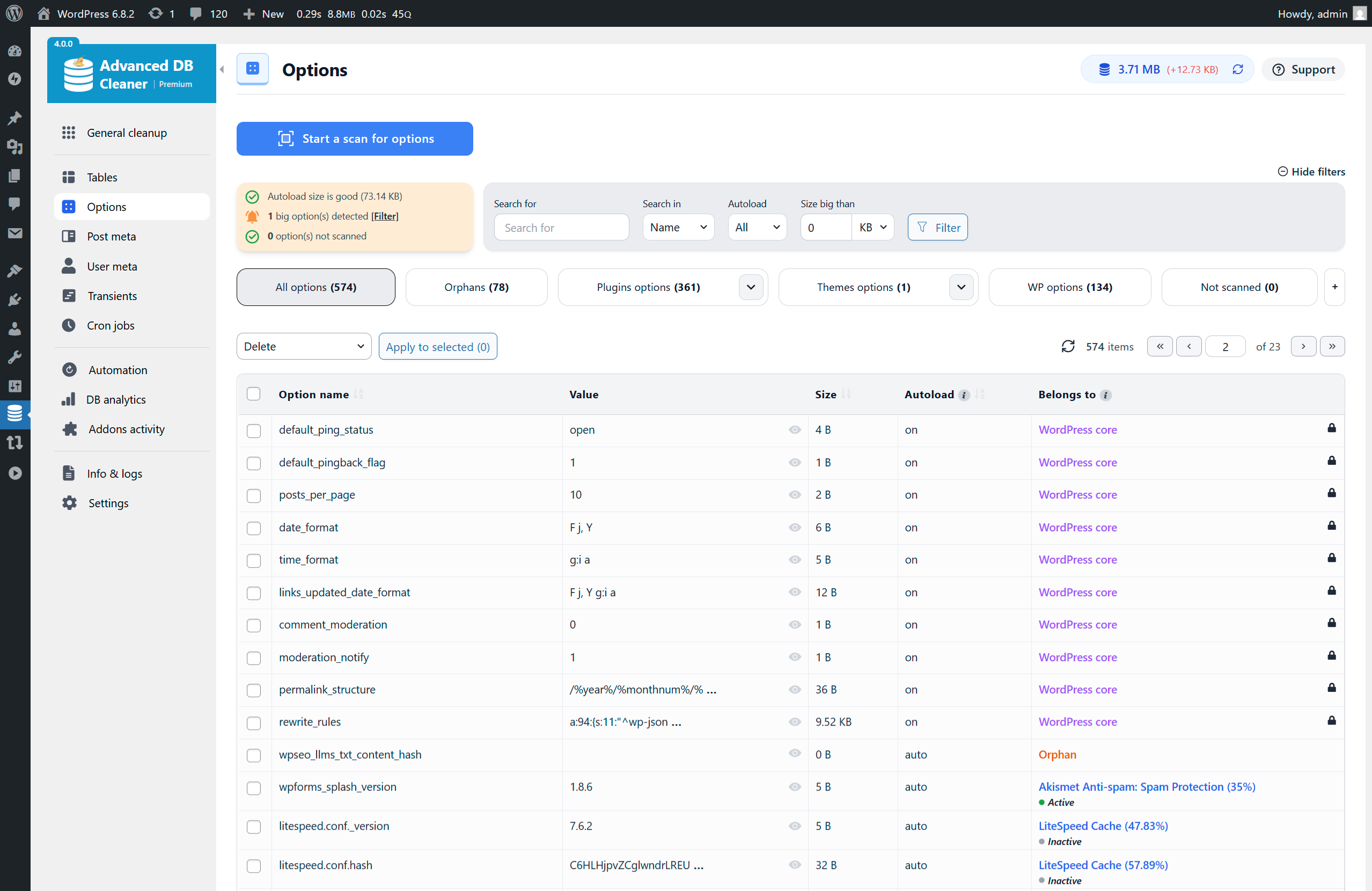
✅ Options
- Display the options list with information such as option name, option value, option size, and autoload status
- Sort options by any column such as option name or option size
- View option value content in original or formatted mode for serialized or JSON structures.
- Notify you if autoloaded options are large and help reduce autoload size for better performance
- Detect large options that may slow down your website
- Set option autoload to yes/no
- Clean and delete options
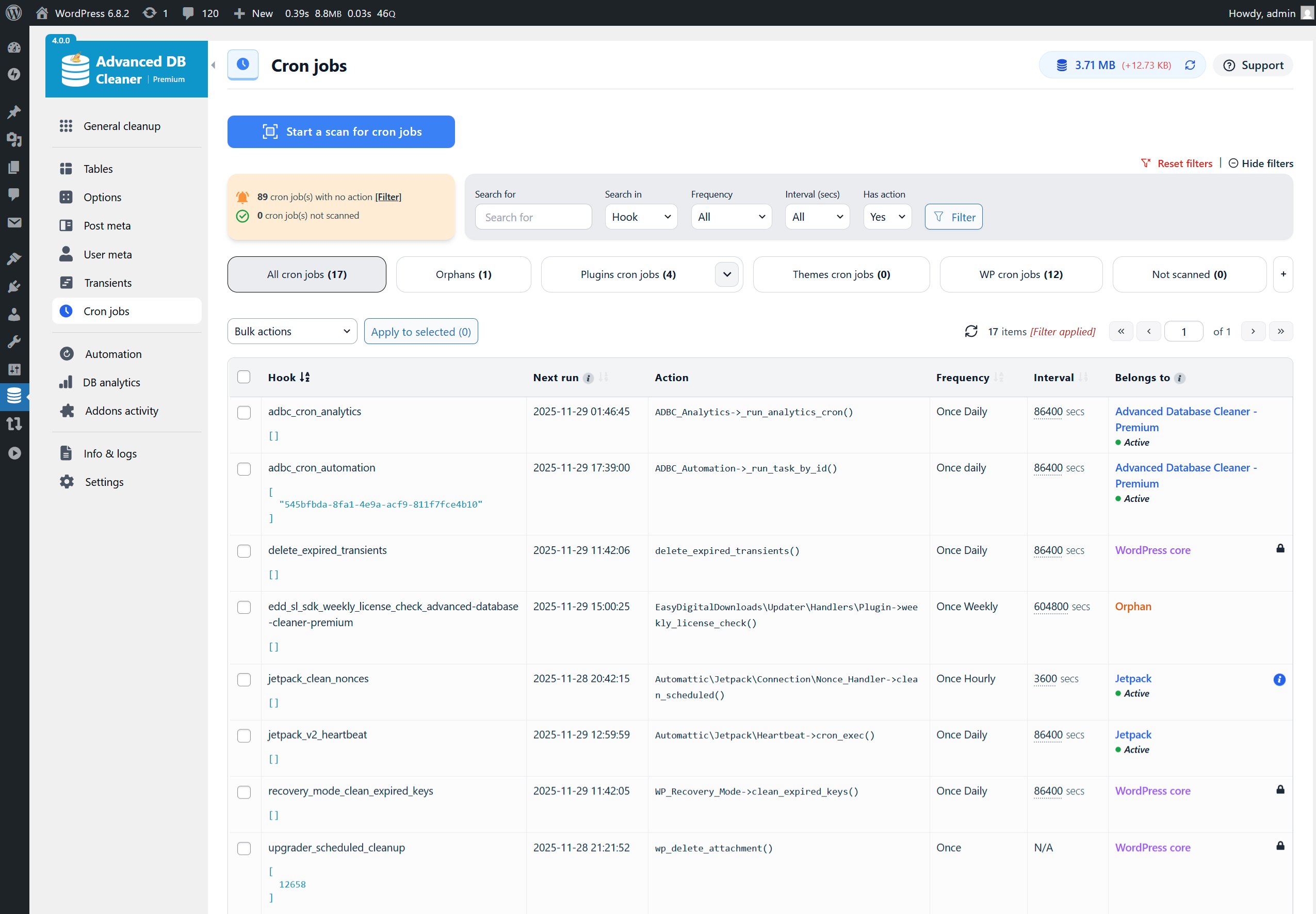
✅ Cron Jobs
- Display the list of active cron jobs (scheduled tasks) with information such as arguments, action, next run, schedule, etc.
- Sort cron jobs by any column such as action name or next run time
- Detect cron jobs with no valid actions
- Clean and delete scheduled tasks
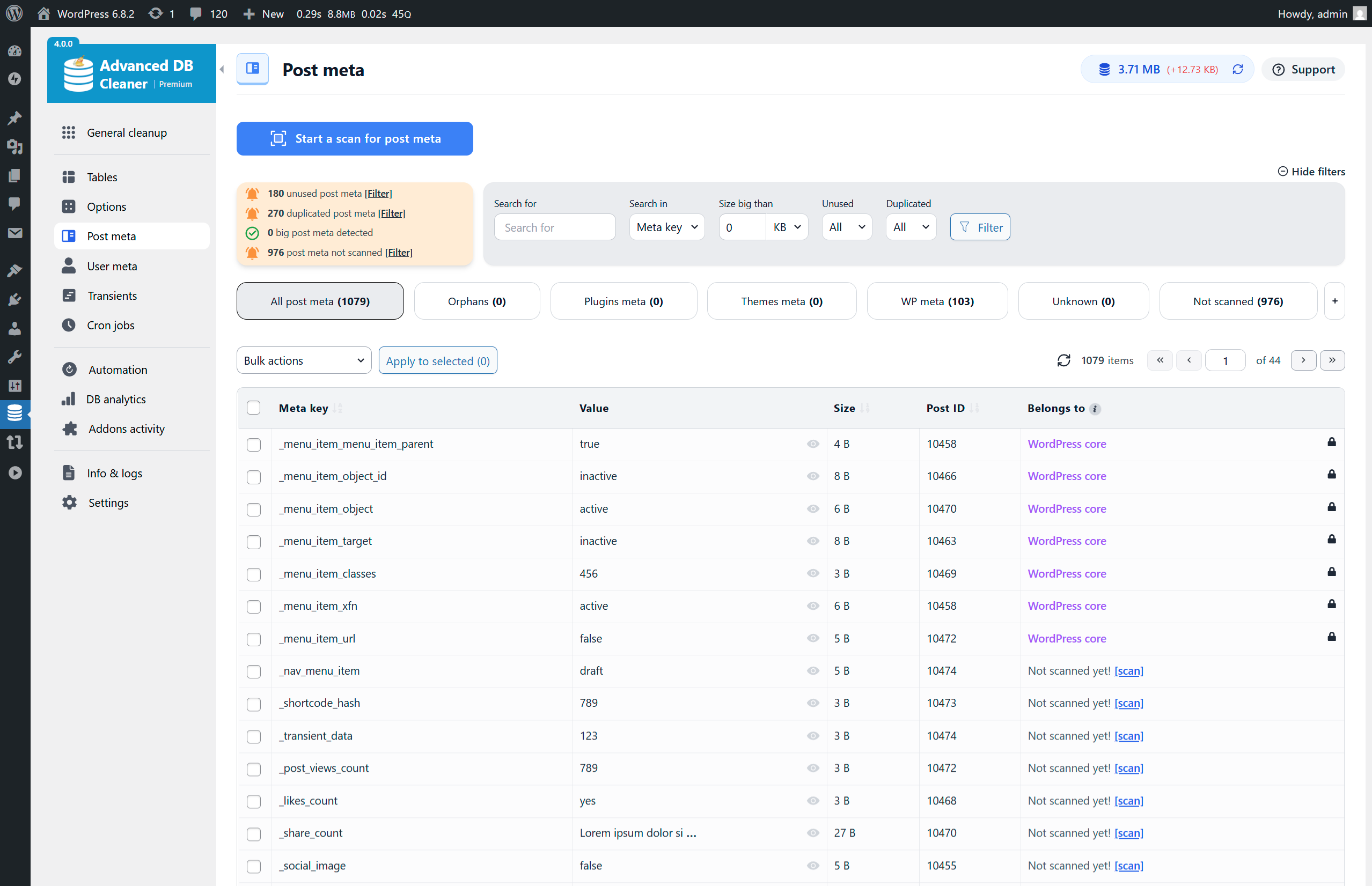
✅ Post Meta
- Display the post meta list with information such as meta key, value, size, associated post ID, etc.
- Sort post meta by any column such as meta key, meta size, or post ID
- View post meta value content in original or formatted mode for serialized or JSON structures.
- Detect unused post meta (meta not associated with any existing posts)
- Detect duplicated post meta (same meta key/value for the same post ID)
- Clean and delete post meta
✅ Post types
- Display post types with information such as name, post count, visibility (public or non-public), etc.
- Sort post types by columns such as name, post count, visibility, etc.
- View posts corresponding to each post type, along with their details
- Detect unused or orphaned post types
- Clean orphaned post types
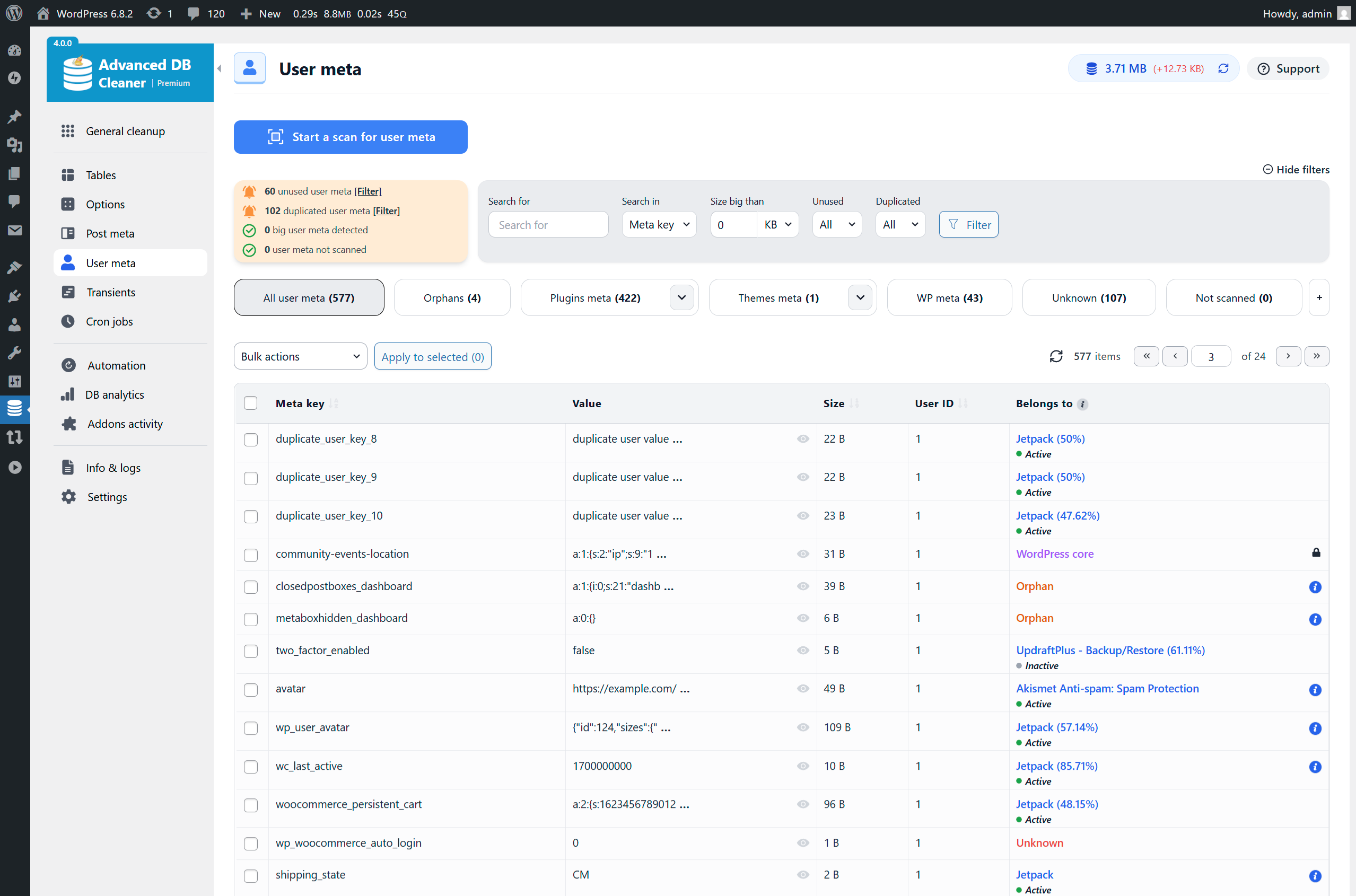
✅ User Meta
- Display the user meta list with information such as meta key, value, size, associated user ID, etc.
- Sort user meta by any column such as meta key, meta size, or user ID
- View user meta value content in original or formatted mode for serialized or JSON structures.
- Detect unused user meta (meta not associated with any existing users)
- Detect duplicated user meta (same meta key/value for the same user ID)
- Clean and delete user meta
✅ Transients
- Display the list of transients with information such as name, value, size, and expiration time
- Sort transients by any column such as transient name, size, or expiration time
- View transient value content in original or formatted mode for serialized or JSON structures.
- Clean expired transients
- Detect large transients that may slow down your website
- Clean and delete transients
- Set transient autoload to yes/no
✅ WooCommerce
- Clean orphaned product variations
- Clean orphaned customer analytics
- Clean expired customer sessions
✅ Other Tools
- Display current database size
- Logging system for easy troubleshooting
- Access the WordPress debug log directly from the plugin interface
- Multisite support (network-wide database cleanup and optimization from the main site)
- Modern, responsive interface powered by React for a smooth experience without page reloads
- Show/hide plugin tabs for better usability
⚡ Premium Features ⚡ Official website
Unlock the full power of database cleanup and optimization with Advanced Database Cleaner Premium – packed with smart features that take accuracy, speed, and cleanup control to the next level.
✅ Remote SmartScan
- Local scan + Remote SmartScan technology to accurately detect the true owners of tables, options, post meta, user meta, transients, and cron jobs
- Cloud-enhanced ownership detection using a large and continuously improving remote database
- Improved accuracy for identifying orphaned items left by deleted plugins and themes
- Ability to edit ownership of any item and correct misidentified owners
- Ability to send ownership corrections to improve the global detection database
- Enhanced “Belongs to” ownership column everywhere using cloud data + local data
- Display multiple possible owners for each item when applicable
- Display owner status (active, inactive, not installed) to simplify cleanup decisions
- Check your remote scan credits to monitor usage
✅ Action Scheduler Cleanup
- Clean Action Scheduler Completed actions
- Clean Action Scheduler Failed actions
- Clean Action Scheduler Canceled actions
- Clean Action Scheduler Completed logs
- Clean Action Scheduler Failed logs
- Clean Action Scheduler Canceled logs
- Clean Action Scheduler Orphan logs
✅ General Cleanup Enhancements
- Keep last X items feature in General Cleanup
- Keep last X items per parent (e.g., per post)
- Keep last X items globally (e.g., keep the last 10 pingbacks)
- Combine Keep Last X Days with Keep Last X Items for advanced cleanup safety
✅ Advanced Filters
- Advanced filters in all modules (Tables, Options, Post Meta, User Meta, Transients, Cron Jobs)
- Filter by size, value content, autoload, expiration, metadata type, and more
- Filter by plugin owner, theme owner, WordPress core, orphan, or unknown
- Filter by multisite site ID with full per-site visibility
- Filter by action frequency and interval in cron jobs
- Filter by duplicated, unused, large, not-yet-scanned, or expired items
✅ Advanced Automation
- Unlimited automation tasks (Free version is limited to 5 tasks)
- Create any number of scheduled cleanup tasks with different configurations
- Create scheduled optimization and repair tasks
- Use Keep Last X Items and Keep Last X Days inside scheduled tasks
- Run automation tasks hourly, twice daily, daily, weekly, monthly, or at any supported frequency
- Pause/resume/delete automation tasks without losing settings
- Per-task automation event logging showing executed actions, number of items cleaned, execution timestamps, and detailed logs
✅ Database Analytics
- Daily tracking of total database size and number of tables
- Daily and monthly charts showing database growth trends
- Raw data tab with all recorded measurements
- Table-level analytics showing size growth, rows growth, and daily changes
- Ability to detect abnormal table growth caused by logs, caches, or runaway actions
- Multi-table selection and search for analyzing multiple tables at once
✅ Addons Activity
- Automatically track plugin activations, deactivations, and uninstalls
- Automatically track theme switches and uninstalls
- Display activity in a color-coded timeline for better readability
- All timestamps shown in your local timezone
- Multisite support (activity recorded on the main site)
✅ Full Multisite Support
- Clean any site or all sites
- Filter items by site ID in every module (Tables, Options, Post Meta, User Meta, Transients, Cron Jobs)
- Display which site each item belongs to
- Run automation tasks across the entire network
🛒 WOptimize – The Cleaner & Optimizer for WooCommerce
If you run a WooCommerce store and want to go further, try our dedicated plugin WOptimize – the ultimate solution to clean and speed up your WooCommerce store.
Learn more: https://sigmaplugin.com/downloads/woptimize
Instalação
This section describes how to install the plugin. In general, there are 3 ways to install this plugin like any other WordPress plugin.
1. Via WordPress dashboard
- Click on “Add New” in the Plugins dashboard.
- Search for “advanced-database-cleaner”.
- Click the “Install Now” button.
- Activate the plugin from the same page or from the Plugins dashboard.
2. Via uploading the plugin to WordPress dashboard
- Download the plugin to your computer from: https://wordpress.org/plugins/advanced-database-cleaner/
- Click on “Add New” in the Plugins dashboard.
- Click on the “Upload Plugin” button.
- Select the zip file of the plugin that you downloaded.
- Click “Install Now”.
- Activate the plugin from the Plugins dashboard.
3. Via FTP
- Download the plugin to your computer from: https://wordpress.org/plugins/advanced-database-cleaner/
- Unzip the zip file, which will extract the “advanced-database-cleaner” directory.
- Upload the “advanced-database-cleaner” directory (included inside the extracted folder) to the /wp-content/plugins/ directory in your web space.
- Activate the plugin from the Plugins dashboard.
For Multisite installation
- Log in to your primary site and go to “My Sites” » “Network Admin” » “Plugins”.
- Install the plugin following one of the above ways.
- Network-activate the plugin. (Only the main site can access the full network-wide cleanup tools.)
Where is the plugin menu?
- The plugin can be accessed via “Dashboard” » “DB Cleaner” or “Dashboard” » “Tools” » “DB Cleaner” (depending on your settings).
Log de Changes
Version 4.0.0 marks the biggest evolution of Advanced Database Cleaner since its creation. Everything has been rebuilt for speed, accuracy, and reliability. Please review the changelog for full details.
4.2.0 – 13/07/2026
- New: 3 WooCommerce cleanup tools: Orphaned product variations, orphaned customer analytics, and expired customer sessions
- New: Users can now assign items (belongs-to data) to themes/plugins that are not installed
- Fix: Prevent concurrency issues when creating “adbc_uploads_F…” folder by using a locking mechanism
- Fix: 502 Bad Gateway error at the end of a scan triggered by unlink()
- Fix: REST permission errors returning HTTP 500 instead of 403 for unauthenticated requests
- Fix: Don’t display normal warnings when a critical warning exists
- Tweak: [Premium] New relations added to the Remote Scan database
- Tweak: Set “Keep last” to 30 days by default for completed actions in Action Scheduler to comply with the standard
- Tweak: Remember the “Items per page” value even after refreshing the page
- Tweak: The plugin menu is now called “DB Cleaner” instead of “WP DB Cleaner”
- Tweak: Refactored several parts of the codebase for better performance and maintainability
- Info: We created WOptimize, a new plugin for cleaning WooCommerce stores. Use coupon code WOPT30 to get 30% off now.
4.1.1 – 05/05/2026
- Security: [Premium + Pro-Lifetime] Patched a security vulnerability in the EDD SDK package
- Fix: Resolved an issue where the “No route was found matching the URL” error occurred when the default REST API URL was modified
- Fix: Fixed ReflectionFunction::__construct() error requiring a Closure or string as the first argument
- Fix: Corrected “Invalid setting key” error when hiding the post types menu item
- Fix: [Premium + Pro-Lifetime] Addressed undefined array key DOCUMENT_ROOT on sites running WP-Cron via system cron and WP-CLI in the Easy Digital Downloads (EDD) SDK package
- Tweak: Refactored several parts of the codebase to improve performance and maintainability
4.1.0 – 08/04/2026
- New: Added “Post Types” cleanup module
- New: In the General Cleanup tab, added a toggle for each item: Auto Count or Manual Count
- New: Added an action to convert table engines to InnoDB
- New: Added quick actions per row (available on the right side) for faster processing
- New: Added the ability to view table data, including rows content, column structure, indexes, and more
- Fix: Resolved an issue where RecursiveIteratorIterator could trigger excessive server load in certain environments
- Fix: Corrected the refresh icon behavior in the Addons Activity module to ensure consistent updates
- Fix: Fixed an issue where multiple folders were unintentionally created when deleting plugin settings
- Fix: Resolved a multisite issue where update notifications were displayed even when the latest version was already installed
- Fix: Fixed a “_load_textdomain_just_in_time was called incorrectly” warning caused by premature calls to wp_get_schedules() before the init hook
- Fix: Prevented scan crash caused by natsort() receiving a boolean instead of an array
- Fix: Adjust display properties for img/svg in WP admin menu to prevent layout shifts
- Tweak: Each table now displays the percentage of total database size it occupies, providing a clearer view of database distribution
- Tweak: Added an action to refresh table statistics and information
- Tweak: Prevent actions (such as delete) on WordPress core items by default (can be disabled in settings)
- Tweak: Add file path for cron jobs actions
- Tweak: Added direct links in notifications to help users quickly access logs or settings
- Tweak: Reduced (or eliminated) unnecessary frontend and backend requests/queries, executing them only when needed
- Tweak: Added a setting to bypass the confirmation modal for actions such as delete
- Tweak: In the settings page, invalid values are now handled locally with error messages, without sending REST requests
- Tweak: Refactored several parts of the codebase for better performance and maintainability
4.0.7 – 07/03/2026
- New: Added support for both SQL and native deletion methods in the Options, Transients, Postmeta, and Usermeta modules
- New: [Pro-Lifetime] Implemented a scan credits system in the new Pro plugin version
- Fix: Resolved conflict issues when different plugin versions are activated at the same time
- Fix: General Cleanup data now refreshes correctly when clicking the eye icon after changing the “Keep last” value
- Fix: Resolved “Invalid setting key” error when saving settings (Nginx edge case)
- Fix: Fixed issue where the plugin menu could disappear in some cases when version conflicts occur
- Tweak: [Pro-Lifetime] Implement data migration between the new Pro version and the old Pro version
- Tweak: Added links to notification popups for easier navigation
- Tweak: Added Remote Scan balance to the top bar of the plugin interface
- Tweak: Improved license activation/deactivation handling by refreshing balances and preventing unauthorized actions
- Tweak: Added several known usermeta and postmeta entries to the internal dictionaries
- Tweak: General code improvements and CSS enhancements
4.0.6 – 28/01/2026
- Fix: Some SQL queries did not run when database tables had different collations in Multisite setups.
- Fix: The “Show value” modal did not appear for expired transients.
- Fix: Deleted items could reappear as “ghost” entries after switching tabs and coming back.
- Fix: Some UI elements were incorrectly hidden on frontend pages.
- Fix: Extra characters in some translations within the UK ‘.po’ file.
- Fix: [Premium] After a scan completed, correct counts were shown but disappeared when switching tabs and returning.
- Tweak: In Trashed Posts, only WordPress core post types are now displayed to prevent accidental deletion of unexpected data.
- Tweak: Allow selecting items by groups under the “General Cleanup” tab.
- Tweak: Increase the maximum number of selectable items per page from 200 to 1000.
- Tweak: General improvements to code quality and styling.
4.0.5 – 17/01/2026
- Fix: The plugin left menu was unstable in some environments.
- Fix: Some filters did not correctly reflect the displayed data.
- Fix: Certain strings were not translated in Multisite REST responses.
- Fix: Some special usermeta entries in Multisite and custom table prefix setups were not correctly assigned to WordPress core.
- Tweak: Improved the General Cleanup page to reduce the number of REST requests for better performance.
- Tweak: Take into account the site_status_autoloaded_options_size_limit filter when displaying the autoload size warning.
- Tweak: Added bulk actions to the bottom of tables as well.
- Tweak: Added the ability to select multiple items using the Shift key.
- Tweak: Optimized loading of scan results from files for improved performance.
- Tweak: Optimized the calculation of non-scanned items for better performance.
- Tweak: Added plugin settings to the System Info page.
- Tweak: Unified the structure of installed add-ons data sent during Remote Scan.
- Tweak: Various improvements to code quality, security, and styling.
Capturas de tela

Para desenvolvedores
Este é o seu plugin? Mostre os números.
Adicione um crachá ao vivo ao seu site, Documentos ou Readme do GitHub. Ele é atualizado por conta própria - nenhuma conta necessária.
Best Advanced Database Cleaner alternatives
All clean plugins →





FAQ
Advanced Database Cleaner: quick answers
Respostas diretas, extraídas de dados ao vivo WordPress.org.
Fonte: WordPress.org
Is Advanced Database Cleaner free?
Yes. Advanced Database Cleaner is free to download and use from the official WordPress.org plugin directory. The developer also sells premium add-ons or a Pro version with extra features.
Is Advanced Database Cleaner safe to use in 2026?
Yes — Advanced Database Cleaner is a safe, well-maintained plugin to use in 2026. It runs on 100K+ sites, is rated 4.9/5 and was last updated 3 months ago, and scores 86/100 on our health check.
How many websites use Advanced Database Cleaner?
Advanced Database Cleaner is active on 100K+ WordPress websites and has been downloaded 3,026,133 times since it launched in September 2015. It was downloaded 19,467 times in the last 30 days.
Does Advanced Database Cleaner work with WordPress 7.1?
Yes. The developer has tested Advanced Database Cleaner up to WordPress 7.1.5, the latest release. It requires WordPress 5.0.0 or newer.
What PHP version does Advanced Database Cleaner need?
Advanced Database Cleaner requires PHP 7.0 or higher. Most hosts run PHP 8.x today, so it works on any modern WordPress hosting.
When was Advanced Database Cleaner last updated?
The latest version, 4.2.0, was released on August 20, 2026 (3 months ago).
Who makes Advanced Database Cleaner?
Advanced Database Cleaner is developed and maintained by Younes JFR..
What are the best alternatives to Advanced Database Cleaner?
The most popular alternatives to Advanced Database Cleaner are Media Cleaner: Delete Unuse… (90K+ installs), Advanced WordPress Reset (10K+ installs) and Unbloater (5K+ installs).
Alimentado por PageForge
Um modelo e uma planilha. Uma página real para cada pesquisa.
PageForge Transforma cada linha de um CSV em uma página WordPress com seu próprio título, URL, SEO campos e esquema, construído no layout que você já desenhou. Gratuito em WordPress.org.
- CSV e XLSX, mais Google Sheets em Profissional e Empresarial
- Seu próprio título, URL, SEO campos e esquema para cada página
- Funciona com o editor de blocos, Elementor, Divi e Avada
- Gratuito em WordPress.org, sem cartão de crédito