


Campos personalizados avançados (ACF®)
ACF helps customize WordPress with powerful, professional and intuitive fields. Proudly powering over 2 million sites, WordPress developers love ACF.

Escolha segura
Yes — Advanced Custom Fields (ACF®) is a safe, well-maintained plugin to use in 2026. It runs on 2M+ sites, is rated 4.5/5 and was last updated 8 hours ago, and scores 97/100 on our health check.
- Um dos plugins mais usados na web: 2 milhões de sites ativos
- Amado pelos usuários — 4,5/5 de 1.440 avaliações
- Actively developed — last update 8 hours ago
- Testado com as últimas WordPress (7.1)
- Suporte responsivo — 100% dos tópicos recentes resolvidos
Como ele se acumula?
Lado a lado em instalações, atualizações, avaliações e suporte



Downloads diários
Os picos de download geralmente seguem uma nova versão — cada site que atualiza automaticamente é um download.
Rankings
Where Advanced Custom Fields (ACF… stands todayWordPress.org Classificações de pesquisa
Posição ao vivo na pesquisa de plugins, top 100| Palavra chave | Posição |
|---|---|
| acf | #1 |
| Campos personalizados | #1 |
| fields | #1 |
| meta | #11 |
| repeater | #1 |
Adoção da versão
Compartilhamento de sites ativos por lançamento.
Divisão de classificação
★★★★★★★★★★ 4.5 from 1,440 reviews
About Advanced Custom Fields (ACF®)
From the official readme · v6.8.12Descrição
Advanced Custom Fields (ACF®) turns WordPress sites into a fully-fledged content management system by giving you all the tools to do more with your data.
Use the ACF plugin to take full control of your WordPress edit screens, custom field data, and more.
Add fields on demand.
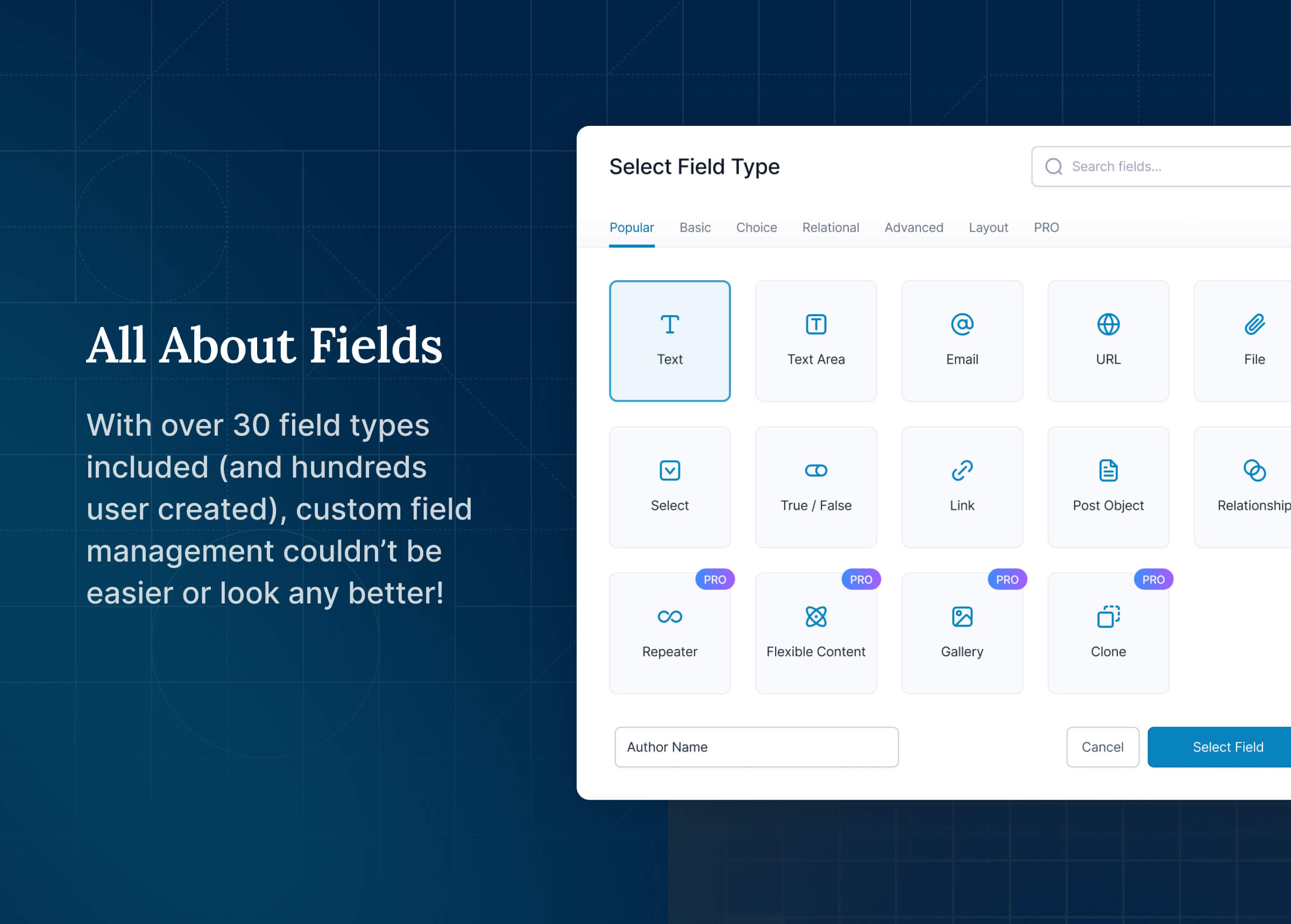
The ACF field builder allows you to quickly and easily add fields to WP edit screens with only the click of a few buttons! Whether it’s something simple like adding an “author” field to a book review post, or something more complex like the structured data needs of an ecommerce site or marketplace, ACF makes adding fields to your content model easy.
Add them anywhere.
Fields can be added all over WordPress including posts, pages, users, taxonomy terms, media, comments and even custom options pages! It couldn’t be simpler to bring structure to the WordPress content creation experience.
Show them everywhere.
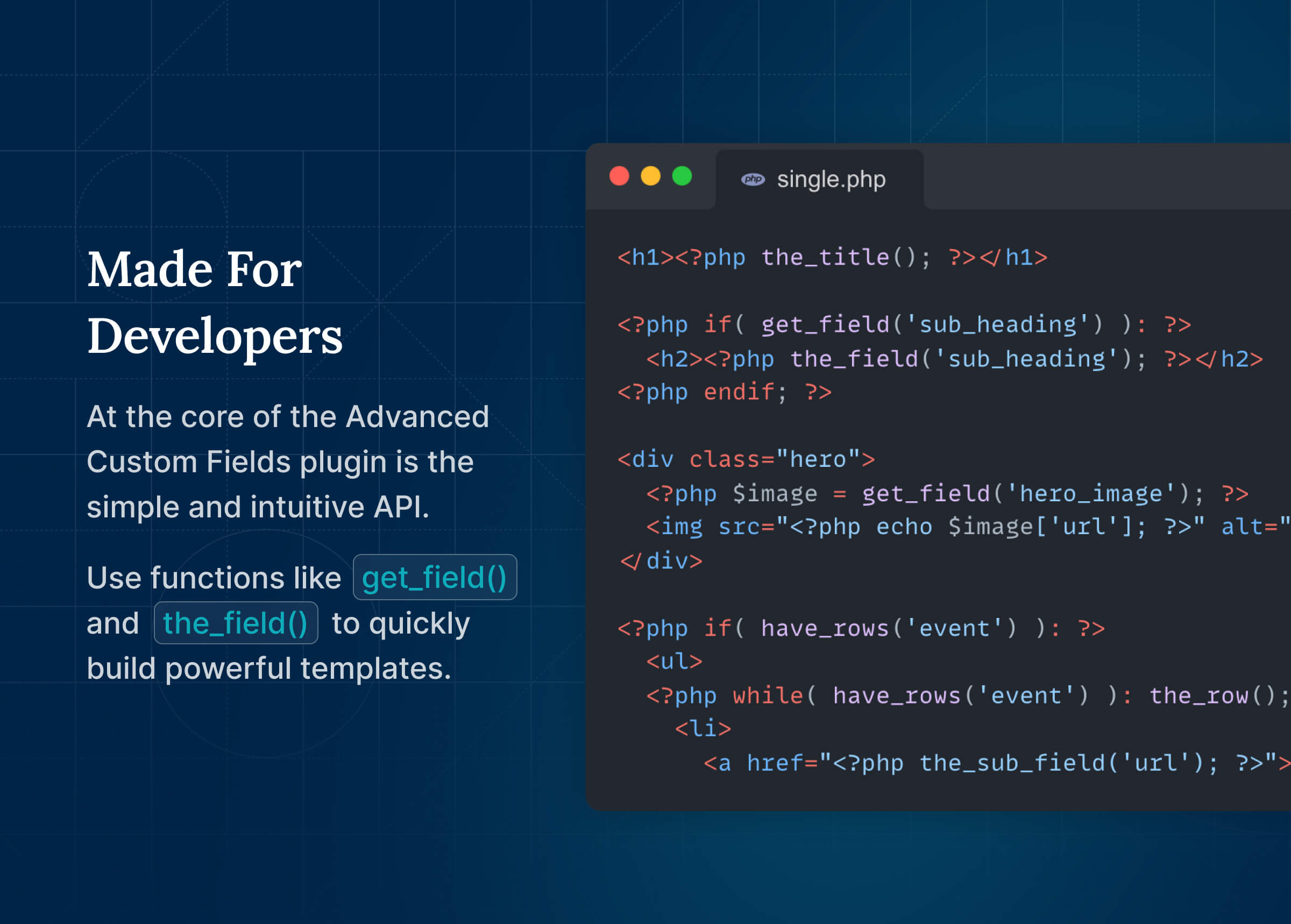
Load and display your custom field values in any theme template file with our hassle-free, developer friendly functions! Whether you need to display a single value or generate content based on a more complex query, the out-of-the-box functions of ACF make templating a dream for developers of all levels of experience.
Any Content, Fast.
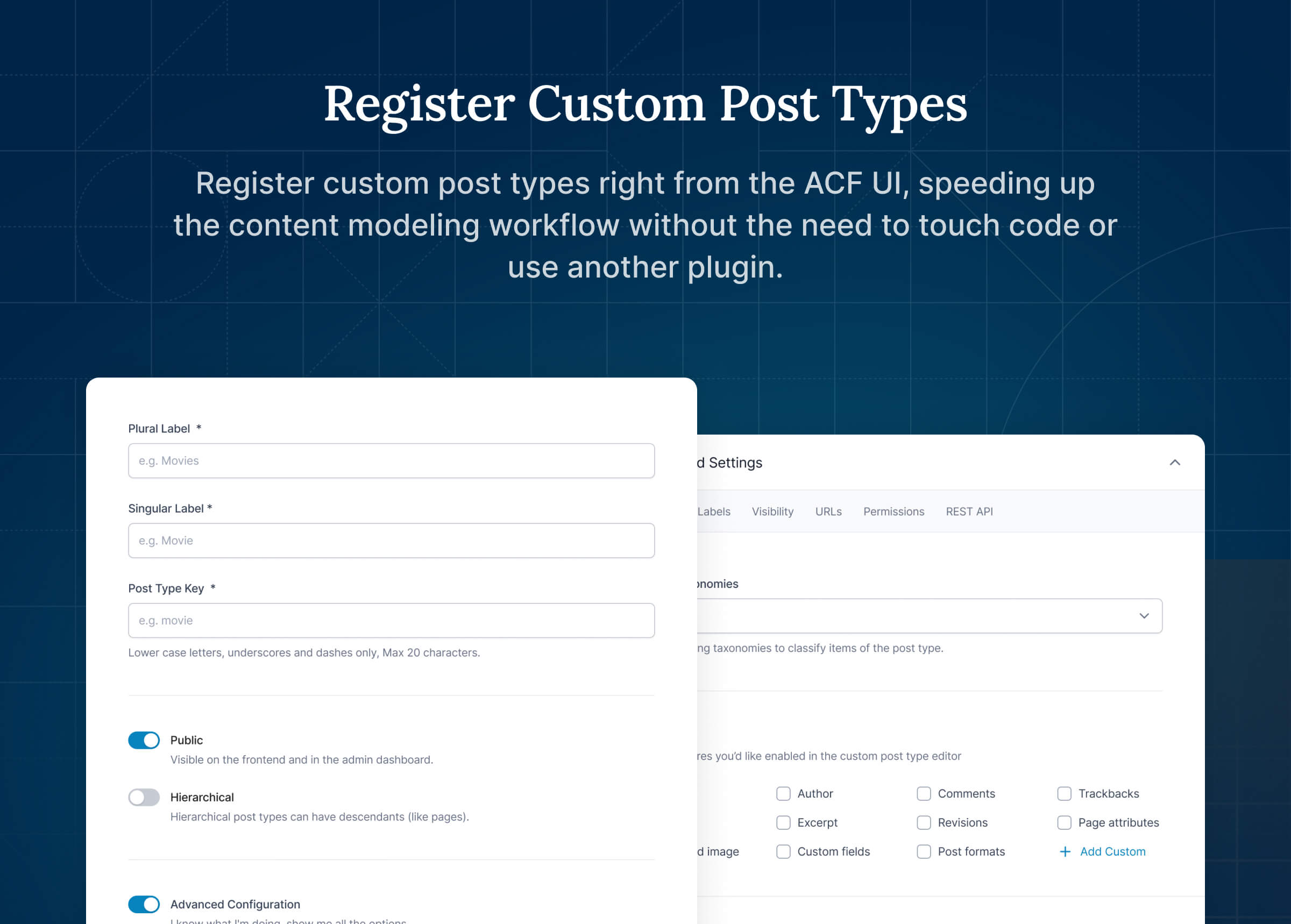
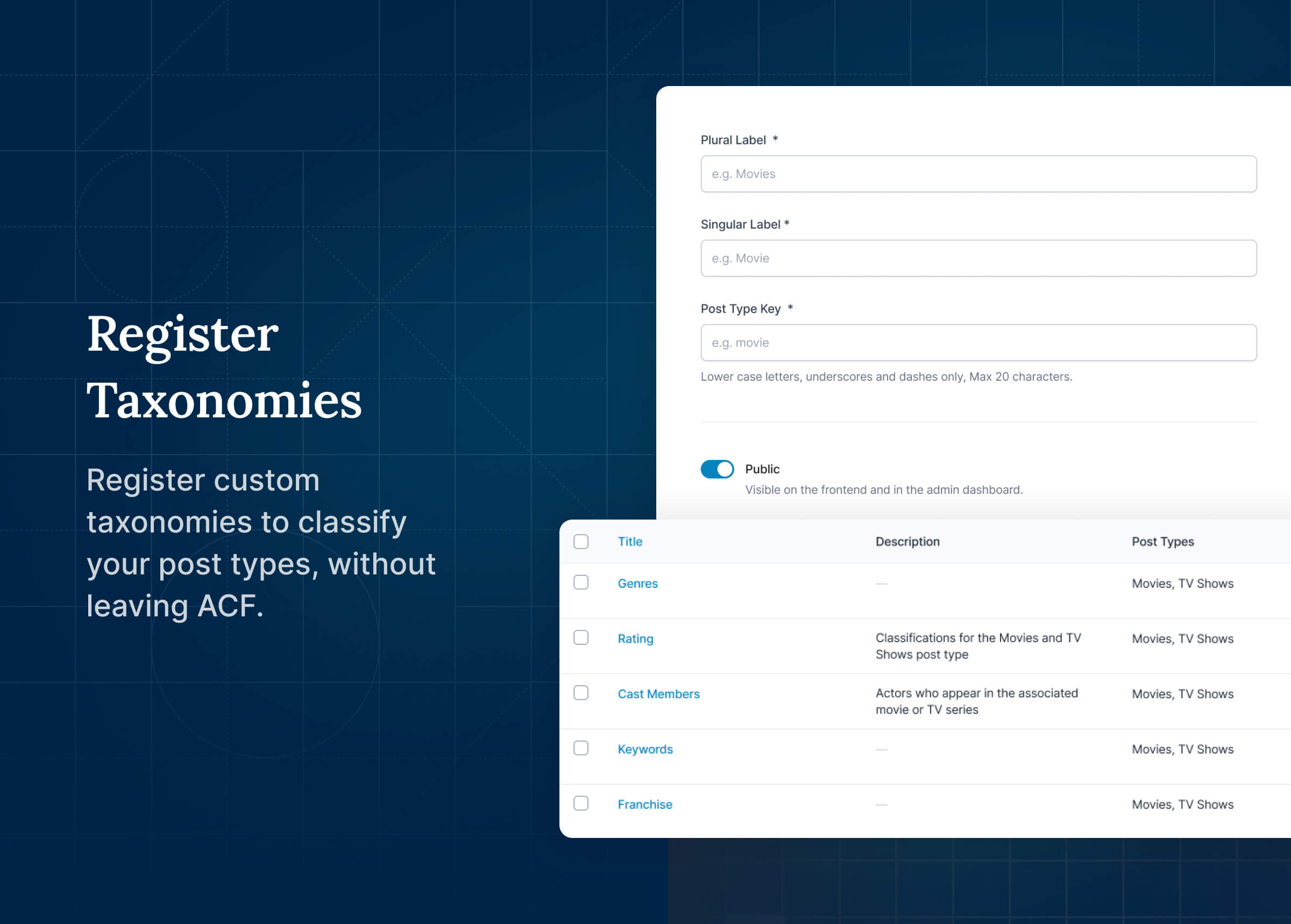
Turning WordPress into a true content management system is not just about custom fields. Creating new custom post types and taxonomies is an essential part of building custom WordPress sites. Registering post types and taxonomies is now possible right in the ACF UI, speeding up the content modeling workflow without the need to touch code or use another plugin.
Simply beautiful and intentionally accessible.
For content creators and those tasked with data entry, the field user experience is as intuitive as they could desire while fitting neatly into the native WordPress experience. Accessibility standards are regularly reviewed and applied, ensuring ACF is able to empower as close to anyone as possible.
Documentation and developer guides.
Over 10 plus years of vibrant community contribution alongside an ongoing commitment to clear documentation means that you’ll be able to find the guidance you need to build what you want.
Recursos
- Simple & Intuitive
- Powerful Functions
- Over 30 Field Types
- Extensive Documentation
- Millions of Users
Links
PRO
The Advanced Custom Fields plugin is also available in a professional version which includes more fields, more functionality, and more flexibility. The ACF PRO plugin features:
- The Repeater Field allows you to create a set of sub fields which can be repeated again, and again, and again.
- ACF Blocks, a powerful PHP-based framework for developing custom block types for the WordPress Block Editor (aka Gutenberg).
- Define, create, and manage content with the Flexible Content Field, which provides for multiple layout and sub field options.
- Use the Options Page feature to add custom admin pages to edit ACF fields.
- Build fully customisable image galleries with the Gallery Field.
- Unlock a more efficient workflow for managing field settings by reusing existing fields and field groups on demand with the Clone Field.
Instalação
From your WordPress dashboard
- Visit Plugins > Add New
- Search for “Advanced Custom Fields” or “ACF”
- Install and Activate Advanced Custom Fields from your Plugins page
- Click on the new menu item “ACF” and create your first custom field group, or register a custom post type or taxonomy.
- Read the documentation to get started
Log de Changes
6.8.12
Release Date 19th November 2026
- Security –
scripttags in ACF Block preview HTML, including ones that load an external file, no longer run in the block editor unless the block opts in withallowDangerousPreviewScriptsinblock.json(orallow_dangerous_preview_scriptsinacf_register_block_type()), or the site opts in with the newacf/blocks/allow_dangerous_preview_scriptsfilter - Security – The
[acf]shortcode no longer shows fields from draft or private posts referenced by a prefixed ID such aspost_123when used inside an ACF Block, or outside the loop such as in a widget on a 404 or search page - Security – Icon Picker fields set to return an icon string no longer reveal the URLs of private Media Library images in the REST API
- New – ACF now has a new Settings page with a Features tab for turning ACF features on and off without code. In ACF PRO, the License and Updates screens are now tabs on this page. Settings defined in code are shown as “Managed via code” and can’t be changed in the UI
- New – Developers can add their own tabs, sections and fields to the Settings page with the new
acf/settings_page/tabs,acf/settings_page/general/sectionsandacf/settings_page/general/{$section}/fieldsfilters. The Features tab can be hidden with the newacf/settings/show_settingsfilter - New – ACF Abilities are now enabled by default for all field groups, post types and taxonomies on WordPress 6.9 and later. They can be turned off for each object, or for the whole site from the Settings page. The
enable_acf_aisetting has been renamed toenable_abilities, and existingallow_ai_accessvalues are not carried over - Enhancement – The “Edit Block” button text on ACF Blocks V3 that turn off the preview with “renderPreview”: false can now be changed with acf.placeholderButtonText in block.json or the new
acf/blocks/default_placeholder_button_textfilter - New – ACF Blocks registered with
acf_register_block_type()can now set the InnerBlocksdefault_blockanddirect_insertoptions - Enhancement – ACF Abilities now publish valid JSON Schema, so MCP clients such as ChatGPT can discover and use them. Schemas now describe conditional logic, Repeater and Group sub fields, and Flexible Content layouts
- Enhancement – Breaking change: generated post type and taxonomy ability names now include the object type, so they no longer collide. For example,
acf/create-bookis nowacf/create-book-postandacf/booksis nowacf/list-book-posts. Agent prompts and MCP configurations that use the old names need updating - Enhancement – The
acf/field-groupsAbility now includes the list of fields within each field group - Enhancement – The Date Picker field’s bundled jQuery UI stylesheet has been updated to version 1.14.2
- Enhancement – New
acf/blocks/auto_inline_editing/field_return_type_supports_auto_inline_editingfilter allows customizing which fields support auto inline editing in ACF Blocks - Enhancement – Child options pages now appear in their parent’s menu in Menu Position order, whether they were registered in the UI or in PHP. A parent page that redirects to its first child now opens the child with the lowest Menu Position
- Enhancement – Google Map fields now find the city for more addresses, such as those that only have a neighborhood or sublocality
- Fix – ACF Blocks no longer crash in the block editor when WordPress or Gutenberg loads React 19
- Fix – ACF Blocks V3 now save default field values when a block is inserted and left unedited
- Fix – Auto inline editing in ACF Blocks now works with field values that contain
&, and saves inline edits as plain text instead of HTML-encoded text - Fix – Auto inline editing in ACF Blocks no longer replaces empty array or object field values with a placeholder string
- Fix – Passing a post object to
wp_insert_post()no longer causes a fatal error, a regression in 6.8.11 - Fix – Saving relational fields no longer causes a fatal error when another plugin stores an array in meta whose name starts with
_, a regression in 6.8.11 - Fix – Reading a field before the main query is set up no longer triggers an
is_preview()notice, a regression in 6.8.10 - Fix – Viewing a draft, pending or scheduled post without a preview link no longer loads field values from its latest revision, and front-end forms on those views no longer save into the revision, a regression in 6.8.10
- Fix – Image fields no longer fail validation with “File must be a valid image.” on hosts that use stream-wrapped file systems
- Fix – Image and Gallery fields now respect the
acf/is_image_fieldfilter when validating values - Fix – Disabled Flexible Content layouts no longer appear in post previews
- Fix – Number and Range field validation messages now show decimal minimum and maximum values correctly
- Fix – The ACF media modal no longer stops showing new uploads after a search returns no results
- Fix – Field group metaboxes that appear without a page reload can now be collapsed and expanded
- Fix – True/False fields using the stylized UI now show the switch correctly in right-to-left languages
- Fix – Field group settings no longer show an incorrect top border on small screens
- Fix – The Icon Picker field no longer attempts to load an attachment preview when the selected icon is not from the Media Library
- Fix – Options pages no longer trigger a “Using null as an array offset” deprecation notice on PHP 8.5
- Fix – Field groups and other ACF internal post types no longer trigger PHP warnings when an
acf/load_{$post_type}filter returns an invalid value - Fix – The license status no longer shows as Active after a license is deactivated
6.8.11
Release Date 2nd November 2026
- Security – Custom values submitted to Checkbox, Radio, and Select fields with “Save Custom Values” enabled can no longer corrupt the field’s settings or add HTML attributes to the field’s wrapper. The new
acf/fields/allow_append_choicesfilter can be used to restrict who can add new choices to a field. Thanks to Jakub Herman via WPScan for the responsible disclosure - Security – ACF now sanitizes field, field group, post type, taxonomy, and options page settings saved by users without the
unfiltered_htmlcapability. For those users, a field’s wrapper settings are limited to width, class, and id. Event handler (on*) attributes in a field’s wrapper setting are no longer output for any field, including fields registered in PHP or local JSON - Security – Field values of password-protected posts are no longer shown by the
[acf]shortcode, block bindings, JSON-LD output, or the REST API until the password is entered. REST responses also no longer expand a referenced password-protected post into a full post object - Security – The
[acf]shortcode and ACF block bindings now output only user IDs for User fields, rather than personal data such as names and email addresses. The previous output can be restored with the newacf/bindings/allow_user_datafilter - Security – Files uploaded through the basic uploader by users without the
upload_filescapability no longer generate PDF preview images or save embedded audio and video cover art. This can be changed with the newacf/upload/generate_previewsfilter - Security – ACF now discards submitted field values unless the field was rendered for the content being saved or its field group’s location rules match it.
Inputs outside these rules, such as fields added with JavaScript, can be allowed with theacf/form/{context}/allowed_field_keysandacf/options_page/allowed_field_keysfilters. Registration forms no longer save fields from field groups set to “User Form is Add / Edit”. Thanks to vuxvinh via WPScan for the responsible disclosure - Security – WordPress’s Custom Fields meta box, its AJAX handler, and XML-RPC can no longer change meta that belongs to ACF fields
- Security – Basic uploader nonces are now tied to the content being edited
- Security – The AJAX request that loads field groups while editing a post no longer returns field groups assigned to other content
- Security – The Relationship, Post Object, and Page Link fields no longer reveal the titles or statuses of posts the current user cannot read, and no longer save newly selected posts the user cannot read. Existing selections the user cannot read are shown as “(Restricted item)” and are kept when the user saves. Thanks to vuxvinh via WPScan for the responsible disclosure
- Security – Relationship, Post Object, and Page Link values rendered in ACF Blocks now leave out posts the author of the post cannot read, such as another user’s unpublished drafts. This can be disabled with the new acf/fields/relational/hide_unreadable_posts filter
- Security – Bidirectional fields now only add references to posts the current user can edit, terms they can assign, and users they can edit or set as a post’s author. Saves made with update_field(), WP-CLI, or cron are not checked, and the new acf/bidirectional/can_update_target and acf/is_trusted_save_context filters can adjust this. Thanks to vuxvinh via WPScan for the responsible disclosure
- Fix – The [acf] shortcode and ACF block bindings no longer cause a fatal error on PHP 8 when a field returns objects, such as a Relationship field set to return post objects. These values, and arrays containing nested values such as an Image field set to return an array, now output nothing, except for User fields, which output user IDs
- Fix – Field settings containing
&,<, or certain HTML entities no longer cause the field to revert to its default settings after saving - Fix – Saving a custom choice no longer removes backslashes from the field’s other settings
6.8.10
Release Date 10th September 2026
- Security – ACF now validates that uploaded PDF files begin with the standard
%PDF-header before further processing, rejecting files that do not match the expected format - Security – The Relationship, Post Object, Image, Gallery, and File fields now enforce WordPress read permissions on referenced posts and attachments when returned in REST API responses
- Security – ACF now verifies both preview context and the caller’s edit capability before substituting revision data when field values are retrieved for a post
- Security – The
_acf_formtoken used by frontend forms now expires and is bound to its issuing render, andacf_encrypt()/acf_decrypt()gain an optional$contextargument for domain separation between token uses - Security – ACF now consistently runs field validation on frontend form submissions containing field data, ensuring required-field checks and custom
acf/validate_valuefilters cannot be circumvented - Security – ACF’s REST API schema no longer discloses per-object field-group configuration in OPTIONS requests to callers who lack read permission on the target object
- Security – The User field AJAX endpoint now validates that the request nonce was created for a User field
6.8.9
Release Date 27th August 2026
- View Release Post
- Enhancement – ACF Blocks registered via
acf_register_block_type()orblock.jsonwithout an explicit version now default to v3 on WordPress 7.1 or later. Blocks that specify a version continue to use the version they declare, and the default can be customized via theacf/blocks/default_block_versionfilter - Enhancement – ACF Blocks v3 now supports a
renderPreviewoption inblock.json. Setting"renderPreview": falseshows a placeholder with the block’s icon, title, and an “Edit Block” button in the editor instead of rendering the block’s template as a live preview. The block continues to render normally on the front-end, and legacy v2 blocks combining"mode": "edit"with"supports": { "mode": false }are automatically migrated when upgraded to v3 - Fix – Inline editable fields in ACF Blocks V3 no longer require a second click before they can be edited
- Fix – Radio buttons now appear correctly in ACF admin screens
- Fix – Image and Gallery fields no longer reject SVG uploads when the Safe SVG plugin is active
6.8.8
Release Date 19th August 2026
- Fix – Image and Gallery fields no longer reject SVG files
6.8.7
Release Date 4th August 2026
- Security – ACF Image and Gallery fields now enforce server-side validation to accept only image files
- Security – The
pathattribute of registered ACF Blocks is now protected from being overridden by client-supplied block data - Security – ACF’s
acf_encrypt()andacf_decrypt()helpers now authenticate encrypted values with an HMAC and no longer fall back to base64 encoding when OpenSSL is unavailable - Security – ACF’s comment, user, and options page form save handlers now only save values for fields whose field groups are assigned to the current save context
- Security – The Post Object, Page Link, and Relationship field AJAX search queries now enforce WordPress read permissions, preventing unauthenticated visitors from seeing non-public post statuses or post types
- Security – The User field now returns only user IDs in REST API responses to requesters without the
list_userscapability, preventing unauthenticated visitors from seeing user email addresses
Capturas de tela

Para desenvolvedores
Este é o seu plugin? Mostre os números.
Adicione um crachá ao vivo ao seu site, Documentos ou Readme do GitHub. Ele é atualizado por conta própria - nenhuma conta necessária.
Best Advanced Custom Fields (ACF®) alternatives
All acf plugins →





FAQ
Advanced Custom Fields (ACF®): quick answers
Respostas diretas, extraídas de dados ao vivo WordPress.org.
Fonte: WordPress.org
Is Advanced Custom Fields (ACF®) free?
Yes. Advanced Custom Fields (ACF®) is free to download and use from the official WordPress.org plugin directory.
Is Advanced Custom Fields (ACF®) safe to use in 2026?
Yes — Advanced Custom Fields (ACF®) is a safe, well-maintained plugin to use in 2026. It runs on 2M+ sites, is rated 4.5/5 and was last updated 8 hours ago, and scores 97/100 on our health check.
How many websites use Advanced Custom Fields (ACF®)?
Advanced Custom Fields (ACF®) is active on 2M+ WordPress websites and has been downloaded 78,411,662 times since it launched in March 2011. It was downloaded 1,130,842 times in the last 30 days.
Does Advanced Custom Fields (ACF®) work with WordPress 7.1?
Yes. The developer has tested Advanced Custom Fields (ACF®) up to WordPress 7.1.5, the latest release. It requires WordPress 6.2 or newer.
What PHP version does Advanced Custom Fields (ACF®) need?
Advanced Custom Fields (ACF®) requires PHP 7.4 or higher. Most hosts run PHP 8.x today, so it works on any modern WordPress hosting.
When was Advanced Custom Fields (ACF®) last updated?
The latest version, 6.8.12, was released on November 19, 2026 (8 hours ago).
Who makes Advanced Custom Fields (ACF®)?
Advanced Custom Fields (ACF®) is developed and maintained by WP Engine.
What are the best alternatives to Advanced Custom Fields (ACF®)?
The most popular alternatives to Advanced Custom Fields (ACF®) are ACF Content Analysis for Yo… (100K+ installs), Advanced Custom Fields: Ext… (100K+ installs) and Advanced Custom Fields: Fon… (90K+ installs).
Alimentado por PageForge
Um modelo e uma planilha. Uma página real para cada pesquisa.
PageForge Transforma cada linha de um CSV em uma página WordPress com seu próprio título, URL, SEO campos e esquema, construído no layout que você já desenhou. Gratuito em WordPress.org.
- CSV e XLSX, mais Google Sheets em Profissional e Empresarial
- Seu próprio título, URL, SEO campos e esquema para cada página
- Funciona com o editor de blocos, Elementor, Divi e Avada
- Gratuito em WordPress.org, sem cartão de crédito