


Address Autocomplete Anything – Google Address Autocomplete for Any Form
Google address autocomplete for any WordPress form. Pick a suggested address and the street, city, state, ZIP and country fields fill themselves.

Escolha sólida
Address Autocomplete Anything is a solid plugin choice in 2026, with a few things worth checking first. It runs on 900+ sites, is rated 5/5 and was last updated 1 month ago, and scores 67/100 on our health check.
- Testado com as últimas WordPress (7.1)
- Pequena base de usuários (900+ instalações ativas)
Como ele se acumula?
Lado a lado em instalações, atualizações, avaliações e suporte


Downloads diários
Os picos de download geralmente seguem uma nova versão — cada site que atualiza automaticamente é um download.
Rankings
Where Address Autocomplete Anythi… stands todayWordPress.org Classificações de pesquisa
Posição ao vivo na pesquisa de plugins, top 100| Palavra chave | Posição |
|---|---|
| address | #6 |
| Address AutoComplete | #1 |
| autocomplete | #4 |
| checkout | >100 |
| google places | #41 |
Adoção da versão
Compartilhamento de sites ativos por lançamento.
Divisão de classificação
★★★★★★★★★★ 5 from 16 reviews
About Address Autocomplete Anything
From the official readme · v2.0.2Descrição
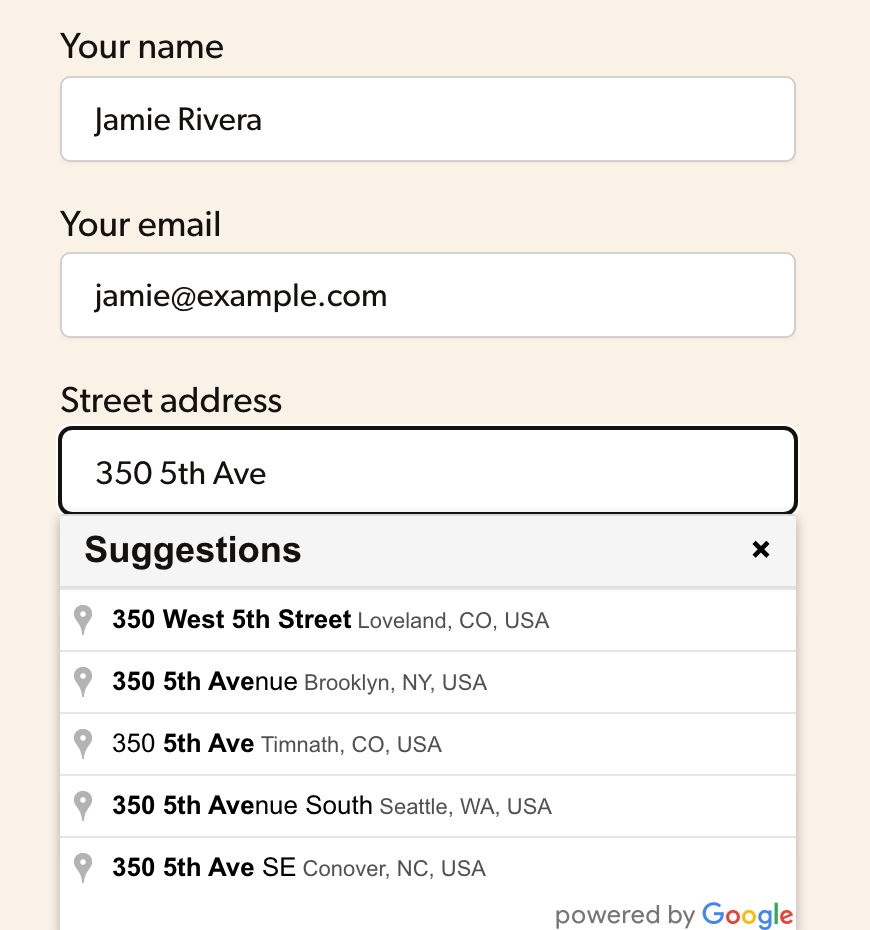
Address Autocomplete Anything adds Google’s address suggestions to any form on your WordPress site. Someone starts typing their street address, picks the right one from the list, and the rest of the address fills itself in: city, state, ZIP or postal code, and country. Your customers type less, and you get addresses spelled the way the post office spells them.
I first built it for my photography plugin, Sunshine Photo Cart, then realized it could work with anything that has an address field (hence the name). Checkout pages, donation forms, membership sign ups, booking forms and contact forms all work, because it isn’t tied to any one plugin.
See how it works on the Address Autocomplete website
Set it up by clicking your form’s fields
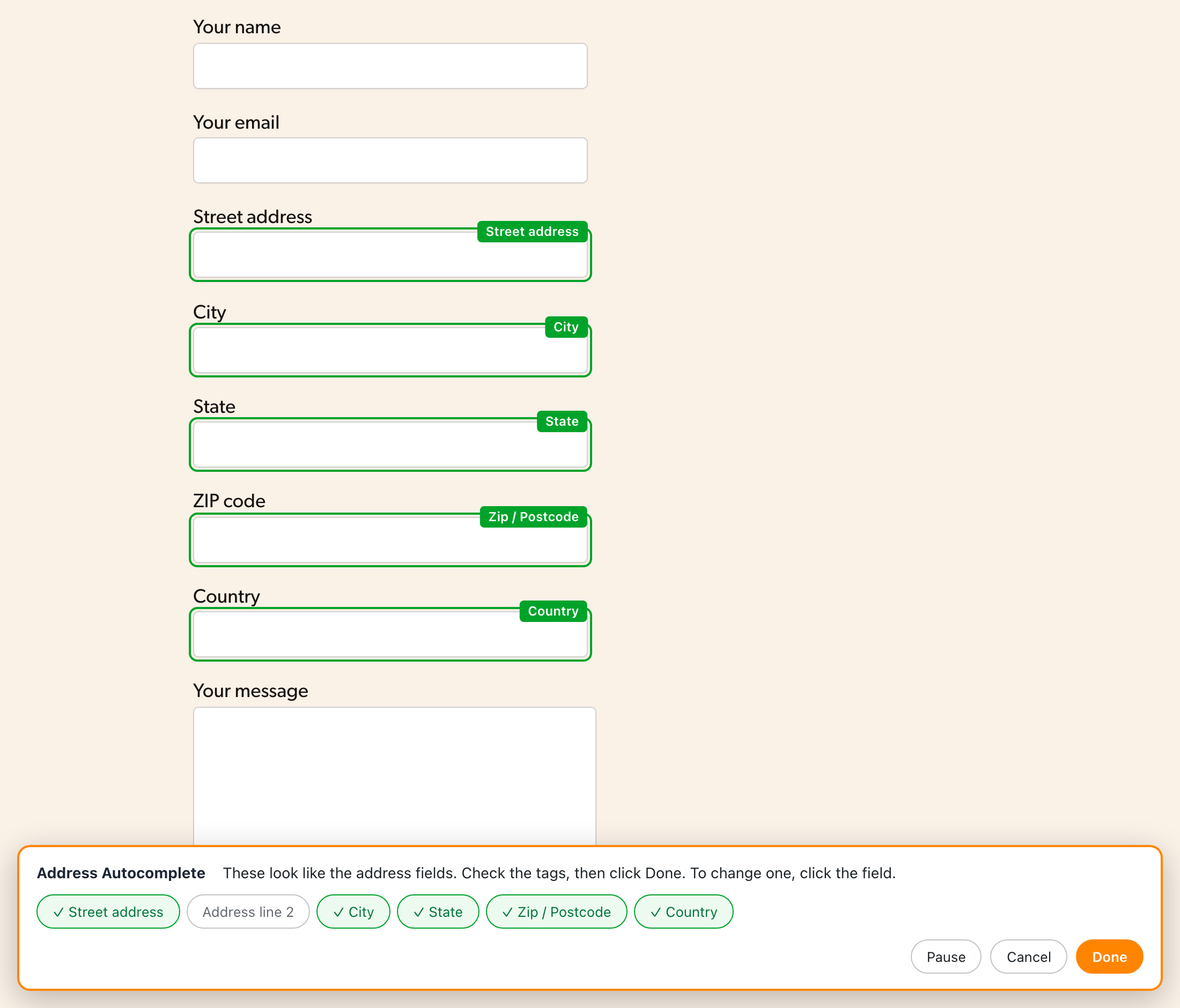
In the settings, choose the page with your form and click “Pick fields”. The plugin opens your form in a new tab, finds the address fields and tags each one as the street address, city, state, ZIP or country. Check the tags, click Done, and the fields show up on the settings page, ready to save. You don’t need to write any code or dig through your page’s HTML.
If your form is in a popup or on the second step of a multi-step form, pause the picker, open the popup or go to that step, then carry on picking. If you’re comfortable with CSS selectors, you can still type them in yourself. How to find your CSS selectors
Addresses that fit your form
- Only the countries you want. Limit suggestions to the countries you ship to or serve. If your form has a country dropdown, the suggestions follow whichever country the customer picks.
- Street format that matches the country. A US address fills in as “2510 Sunny Ridge Ln” and a German one as “Hauptstraße 12”, with nothing for you to set up.
- Full names or short codes. Fill a state field with “California” or “CA”, and a country field with “United States” or “US”, whichever your form expects.
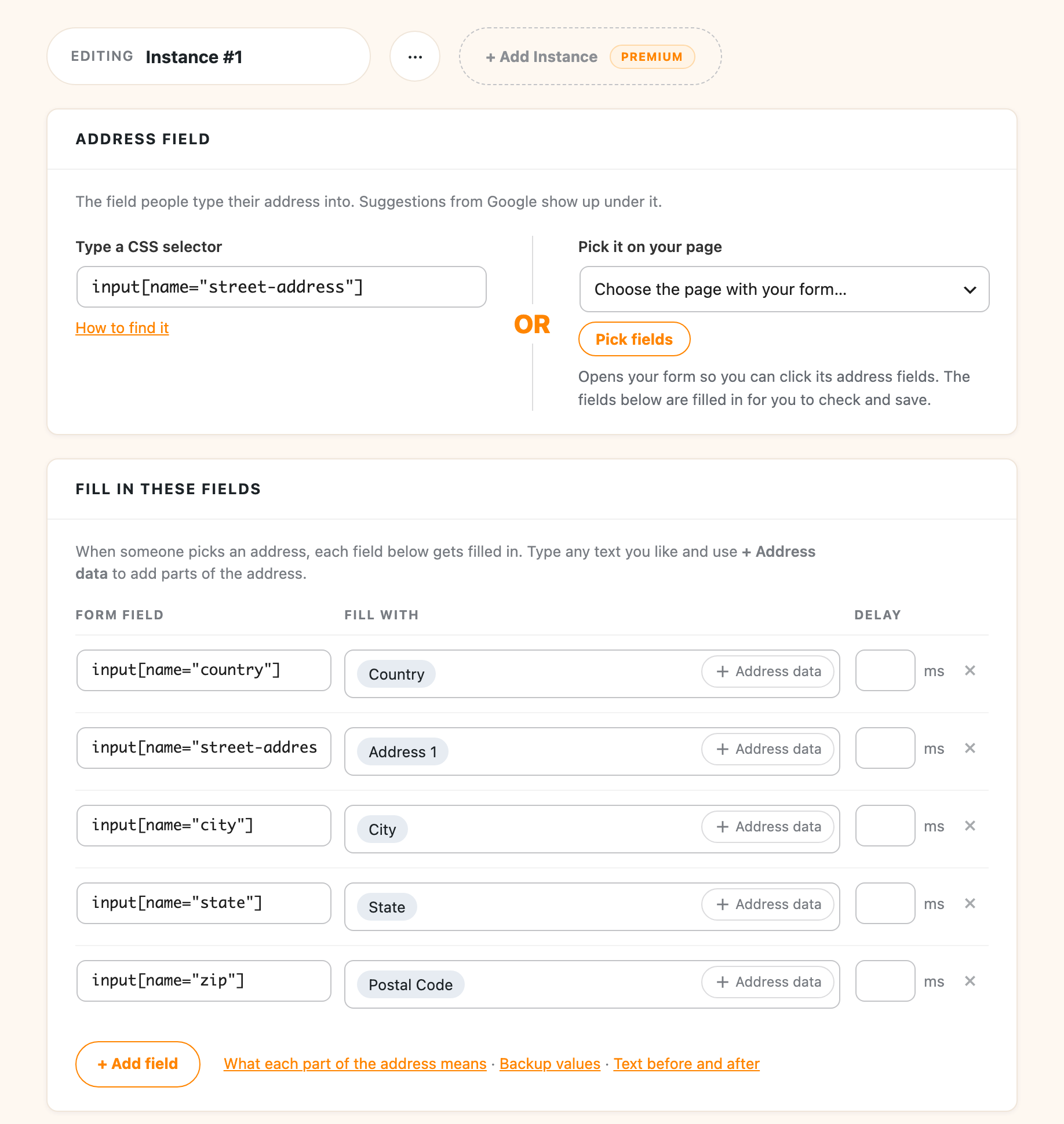
- Several parts in one field. Add text before or after a value, or combine parts of the address into one field, like a single “City, State ZIP” line.
- Backups for missing data. When Google doesn’t return part of an address, choose what to use instead, like the postal town when there’s no city.
- Your language. Show suggestions in the language you choose, or match each visitor’s browser.
- Only where it’s needed. Load it only on the pages with your form, so the rest of your site doesn’t load Google’s script.
O que você precisa
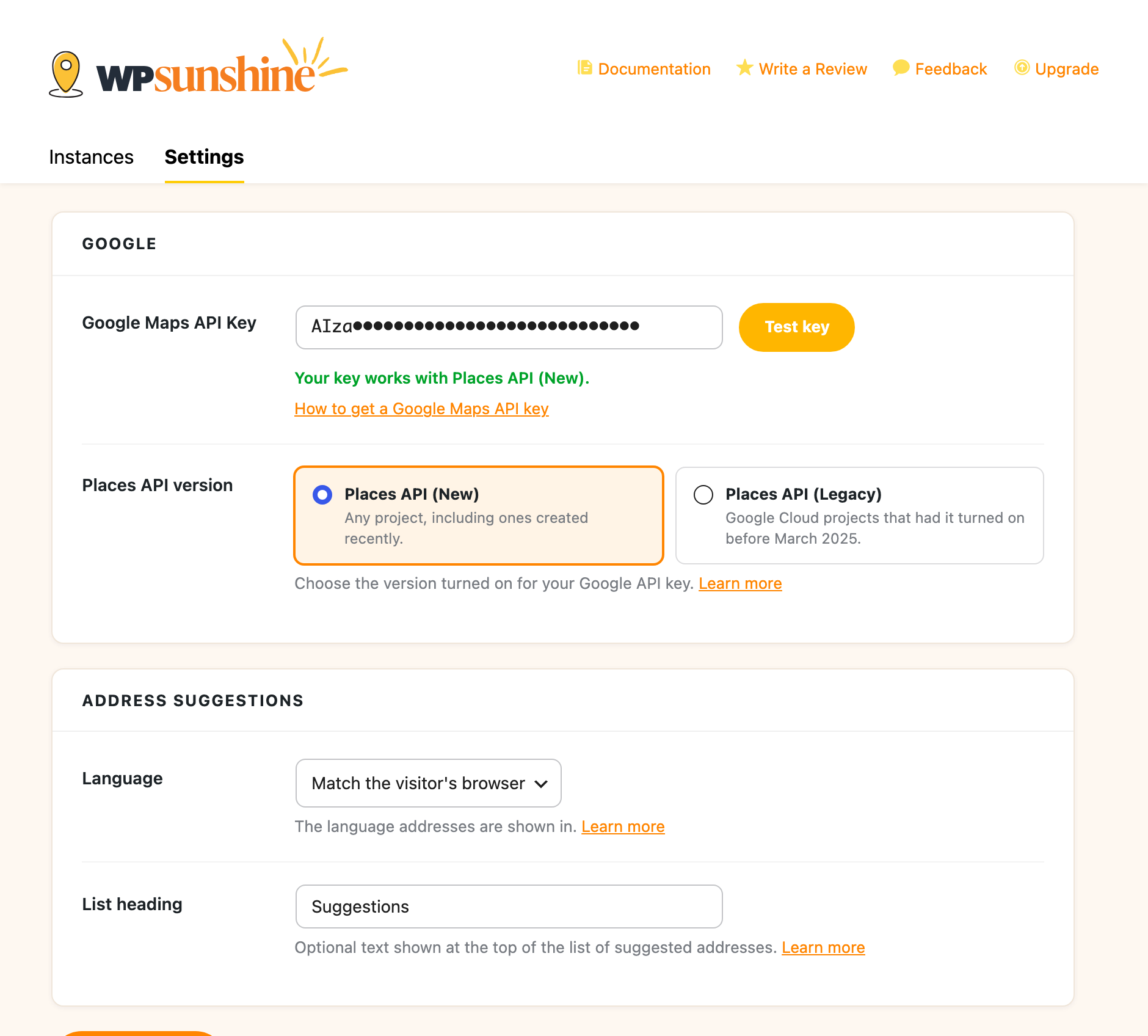
You need a Google Maps API key with the Maps JavaScript API and Places API (New) turned on. A setup wizard walks you through it the first time you turn on the plugin, and the Test key button checks your key with Google. If something is wrong, like billing that isn’t set up or an API that isn’t turned on, it tells you in plain words what to fix.
Google asks for billing details, but every account gets 10,000 free autocomplete requests a month, which is more than most sites will ever use. More on what Google charges
Address Autocomplete Premium
The free version sets up autocomplete on one form. Address Autocomplete Premium adds:
- One-click setup for 11 plugins. Turn it on for WooCommerce (classic and block checkout, billing and shipping), Gravity Forms (the Address field), Easy Digital Downloads (checkout and account page), LifterLMS, Paid Memberships Pro (billing and shipping), MemberPress, GiveWP, Charitable, Paymattic, Tutor LMS and FluentCart, with no fields to pick.
- As many forms as you need. Set it up on your checkout, your donation form and your contact form, each with its own fields and countries.
- More of Google’s data. Fill fields with the street number and street name separately, the business or place name, apartment or unit, neighborhood, sub locality, county, and latitude and longitude for maps.
Learn more about Address Autocomplete Premium
Serviços externos
Google Maps Platform. The address suggestions come from Google. On the pages you choose, the plugin loads Google’s Maps JavaScript API with your API key. As a visitor types into the address field, what they type goes to Google, which sends back matching addresses. The Test key button also sends your API key to Google to check it. Google’s terms of service and privacy policy apply.
WP Sunshine email list. The setup wizard offers to sign you up for emails about the plugin. When you click “Sign up and continue”, the plugin sends the first name and email you entered, plus your site’s time zone, to wpsunshine.com. Nothing is sent if you skip that step. See the WP Sunshine privacy policy.
Instalação
- Install the plugin from Plugins > Add New by searching for “Address Autocomplete Anything”, or upload the zip file, then activate it.
- The setup wizard opens on its own. Add your Google Maps API key and click Test key to check it.
- Go to Settings > Address Autocomplete, open the Instances tab, choose the page with your form and click “Pick fields”.
- Check the tags on your form, click Done, then save the settings.
- Type the start of an address into your form to see the suggestions.
The setup guide covers each step in more detail.
Log de Changes
2.0.2
- Fix: More state and region dropdowns get filled in when Google names the state differently, like “Wilayah Persekutuan Kuala Lumpur” for Kuala Lumpur or “Pulau Pinang” for Penang in Malaysia, and “County Dublin” for Dublin. When the name could fit more than one state, the field is left for the customer instead of guessing.
- Fix: “Vientiane” in Laos and “Maputo” in Mozambique no longer pick the province of the same name.
2.0.1
- Fix: State and region dropdowns now get filled in when Google’s name is slightly different from the dropdown’s, like “Canterbury Region” for Canterbury.
- Fix: The field picker no longer tags hidden fields inside a closed section.
2.0
- New: Works with Google’s Places API (New). Google no longer lets new Cloud projects turn on the older Places API, so new setups use Places API (New). Sites that already work stay on the older API until you switch.
- New: Field picker. Choose the page with your form, click “Pick fields”, and the plugin finds and tags the address fields for you, with no CSS selectors needed.
- New: A setup wizard opens the first time you turn on the plugin and walks you through adding your Google key.
- New: The Test key button checks your Google Maps API key with Google and tells you in plain words what to fix.
- New: A redesigned settings screen. The fields your form gets now show as easy-to-read tags, and your saved setup stays the same.
- New: The setup wizard offers to sign you up for update emails. Nothing is sent unless you choose to sign up.
1.2.9
- Fix: Address suggestions could not be selected with a mouse click after a recent Google Maps update
1.2.8
- Fix: Address suggestions now update right away when the country field changes on WooCommerce classic checkout and other forms with enhanced (select2) country dropdowns
- Fix: Country changes are still detected after WooCommerce rebuilds the country dropdown when switching countries
- Fix: A saved address is no longer cleared when the page first loads
- Atualização: testado até WordPress 7.1
1.2.7
- Fix: Address suggestions could not be selected with a mouse click on desktop in some setups
- Fix: Prevent duplicate autocomplete initialization on dynamically re-rendered fields
- Fix: UK addresses now fill the city field using postal_town when Google does not return a locality
- Update: Load Google Maps API from the stable weekly channel instead of beta
Capturas de tela
Para desenvolvedores
Este é o seu plugin? Mostre os números.
Adicione um crachá ao vivo ao seu site, Documentos ou Readme do GitHub. Ele é atualizado por conta própria - nenhuma conta necessária.
Best Address Autocomplete Anything alternatives
All address plugins →





FAQ
Address Autocomplete Anything: quick answers
Respostas diretas, extraídas de dados ao vivo WordPress.org.
Fonte: WordPress.org
Is Address Autocomplete Anything free?
Yes. Address Autocomplete Anything is free to download and use from the official WordPress.org plugin directory. The developer also sells premium add-ons or a Pro version with extra features.
Is Address Autocomplete Anything safe to use in 2026?
Address Autocomplete Anything is a solid plugin choice in 2026, with a few things worth checking first. It runs on 900+ sites, is rated 5/5 and was last updated 1 month ago, and scores 67/100 on our health check.
How many websites use Address Autocomplete Anything?
Address Autocomplete Anything is active on 900+ WordPress websites and has been downloaded 17,095 times since it launched in February 2022. It was downloaded 811 times in the last 30 days.
Does Address Autocomplete Anything work with WordPress 7.1?
Yes. The developer has tested Address Autocomplete Anything up to WordPress 7.1.5, the latest release. It requires WordPress 5.3 or newer.
What PHP version does Address Autocomplete Anything need?
Address Autocomplete Anything requires PHP 7.4 or higher. Most hosts run PHP 8.x today, so it works on any modern WordPress hosting.
When was Address Autocomplete Anything last updated?
The latest version, 2.0.2, was released on October 23, 2026 (1 month ago).
Who makes Address Autocomplete Anything?
Address Autocomplete Anything is developed and maintained by WP Sunshine.
What are the best alternatives to Address Autocomplete Anything?
The most popular alternatives to Address Autocomplete Anything are Custom Post Type Permalinks (200K+ installs), zipaddr-jp (50K+ installs) and Simple Map (10K+ installs).
Alimentado por PageForge
Um modelo e uma planilha. Uma página real para cada pesquisa.
PageForge Transforma cada linha de um CSV em uma página WordPress com seu próprio título, URL, SEO campos e esquema, construído no layout que você já desenhou. Gratuito em WordPress.org.
- CSV e XLSX, mais Google Sheets em Profissional e Empresarial
- Seu próprio título, URL, SEO campos e esquema para cada página
- Funciona com o editor de blocos, Elementor, Divi e Avada
- Gratuito em WordPress.org, sem cartão de crédito