

3task Doorman: REST API & MCP Access Control
REST API and MCP access control: disable REST API routes for guests, limit AI agents and application passwords, see which plugin opened each door.

Use com cautela
3task Doorman: REST API & MCP A… works, but test it on a staging site before relying on it in 2026. Was last updated 1 month ago, and scores 60/100 on our health check.
- Testado com as últimas WordPress (7.1)
- Base de usuários pequenas (<10 instalações ativas)
- Muito poucos comentários até agora
Como ele se acumula?
Lado a lado em instalações, atualizações, avaliações e suporte



Downloads diários
Os picos de download geralmente seguem uma nova versão — cada site que atualiza automaticamente é um download.
Rankings
Where 3task Doorman: REST API & M… stands todayWordPress.org Classificações de pesquisa
Posição ao vivo na pesquisa de plugins, top 100| Palavra chave | Posição |
|---|---|
| application-passwords | >100 |
| disable REST API | >100 |
| MCP | >100 |
| rest-api | >100 |
| segurança | >100 |
About 3task Doorman: REST API & MCP Access Co…
Do Readme oficial · v1.0.2Descrição
3task Doorman decides who may use the REST API of your site: guests, roles, application passwords and AI agents. It shows every open door with the plugin, theme or core part that opened it, counts for two weeks what visitors really use, and then suggests rules that keep your contact forms and shops working.
Everything runs on your own WordPress. No external service, no account, no tracking.
Languages: English, German (formal and informal), Spanish, French and Italian are maintained on translate.wordpress.org and arrive as language packs through the normal WordPress update system.
Porque
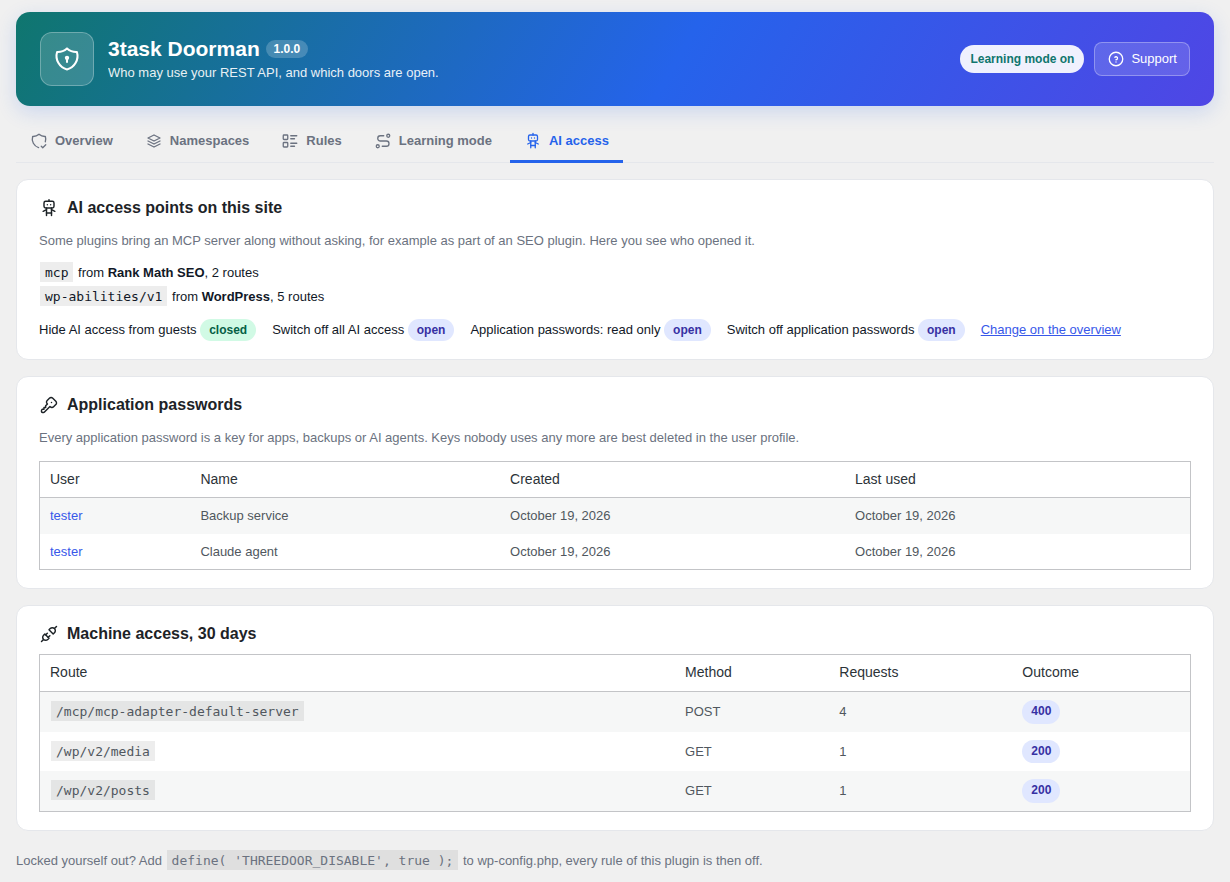
The REST API is public by default. Without any login, /wp-json/wp/v2/users lists the login names of your authors, and /wp-json/ lists every route, and with it most of your plugins. Newer WordPress versions also bring the Abilities API, and some plugins bring an MCP server along that lets AI agents work on your site. Many site owners do not know that these doors exist.
Doors
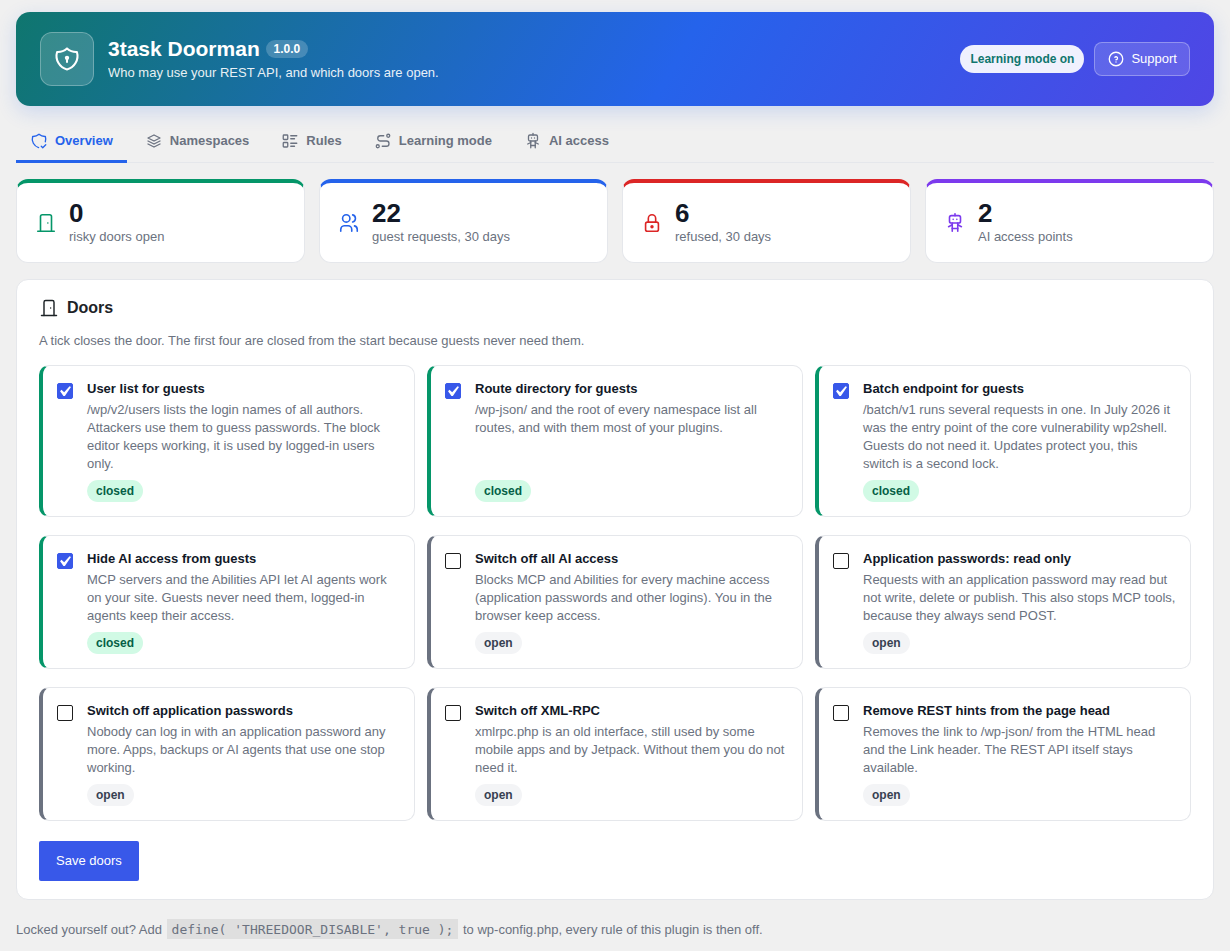
One click closes a door. The first four are closed after activation, because guests never need them:
- User list for guests:
/wp/v2/usersno longer reveals login names. The block editor keeps working. - Route directory for guests: the REST index and the root of every namespace stay closed for guests.
- Batch endpoint for guests:
/batch/v1runs several requests in one. Guests do not need it. Every request inside a batch is checked on its own as well. - Hide AI access from guests: MCP servers and the Abilities API are invisible to guests.
- Switch off all AI access: blocks MCP and Abilities for every machine login, you in the browser keep access.
- Application passwords: read only: apps and agents may read, but not write, delete or publish.
- Switch off application passwords, switch off XML-RPC, remove REST hints from the page head.
Who opened which door
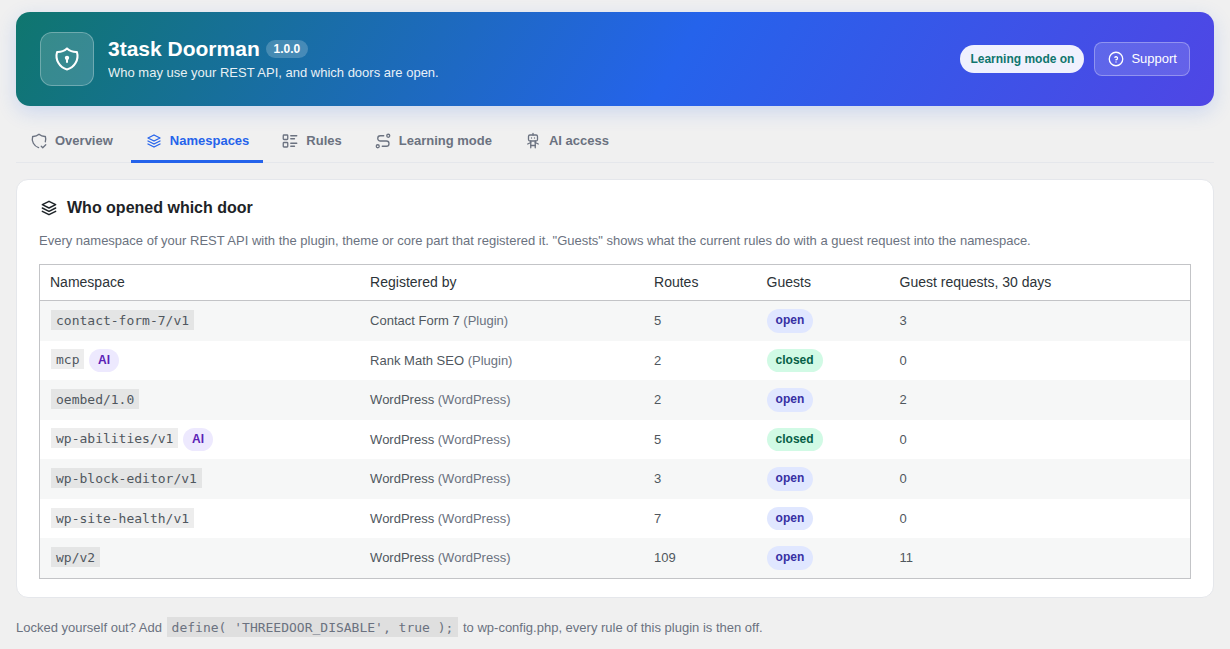
The namespace overview lists every REST namespace with the plugin, theme or core part that registered it, the number of routes, what the current rules do with a guest request, and how often guests used it in the last 30 days.
Learning mode
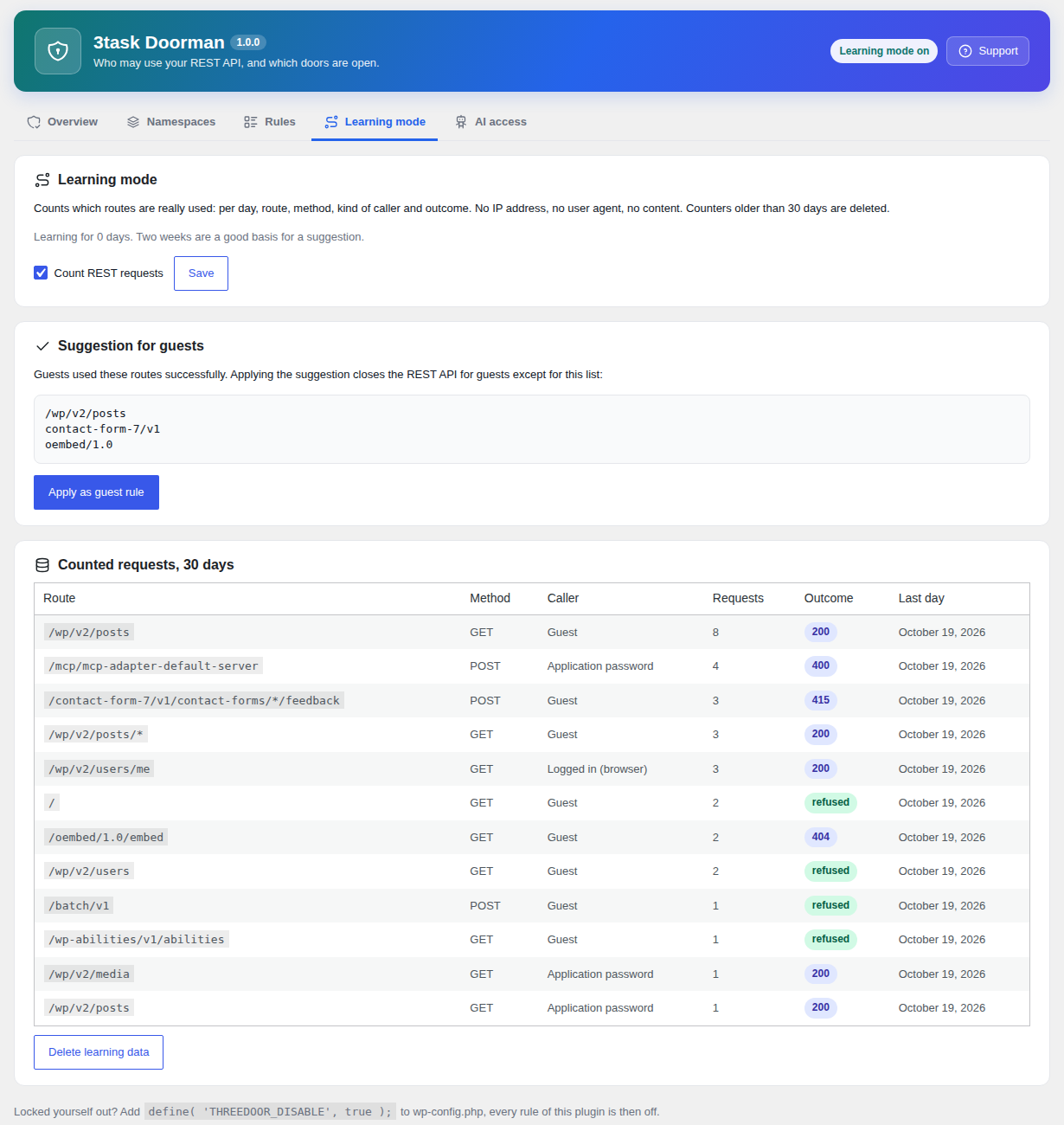
Before you close the REST API for guests, the plugin counts which routes are really used: per day, route, method, kind of caller (guest, browser login, application password, other login) and outcome. No IP address, no user agent, no content. Counters older than 30 days are deleted. After two weeks the plugin suggests an allow list for guests that you can apply with one click.
Rules for guests and roles
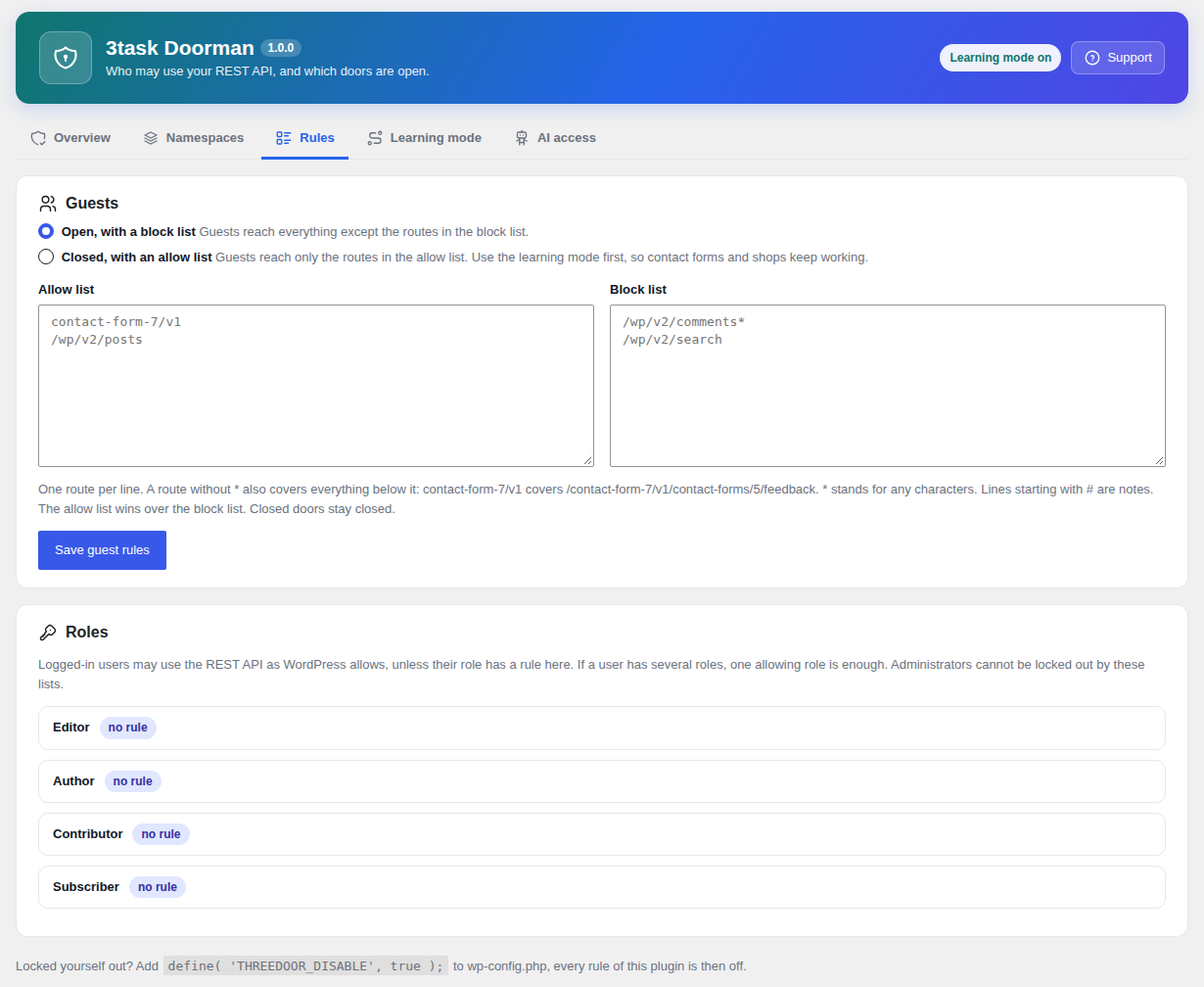
- Open with a block list or closed with an allow list, for guests and for every role.
- One route per line. A route without
*also covers everything below it:contact-form-7/v1covers/contact-form-7/v1/contact-forms/5/feedback.*stands for any characters. - Administrators cannot be locked out by the role lists.
- Refusals answer with 401 or 403 and
Cache-Control: no-store. A closed route does not reveal parameter names, even when the request is invalid.
Caches
LiteSpeed Cache caches REST responses by default, WP REST Cache delivers them before plugins load, and W3 Total Cache can do it when switched on. A cached answer reaches the visitor before any rule runs. The plugin detects these caches, says so on the overview, empties them after every change and keeps refusals out of the LiteSpeed cache. In learning mode it warns that routes answered from the cache are not counted.
Moving from Disable REST API
When the settings of the plugin “Disable REST API” are found, the overview offers to take over its rules for guests and roles in one step.
Créditos
Icons: Tabler Icons (https://tabler.io/icons), MIT license, embedded as inline SVG.
Instalação
- Instale e ative o plugin.
- Open Doorman in the admin menu. Four doors are already closed.
- Leave the learning mode on for about two weeks, then look at the suggestion under Learning mode.
Log de Changes
A new thank-you card on the plugin page. No change to your rules.
1.0.2
- New: a thank-you card asks once for an honest review on WordPress.org, at the earliest 14 days after the plugin page was first opened and once Doorman turned away 250 requests in the last 30 days, on the Overview and Learning mode tabs only. Review and help sit side by side. “Maybe later” asks one more time after 90 days, “I already did” and the × close it for good.
1.0.1
- Plugin name, short description and tags now say more clearly what the plugin does. No code change.
1.0.0
- Primeiro lançamento.
- Translations: German (formal and informal), Spanish, French, Italian.
Capturas de tela
Para desenvolvedores
Este é o seu plugin? Mostre os números.
Adicione um crachá ao vivo ao seu site, Documentos ou Readme do GitHub. Ele é atualizado por conta própria - nenhuma conta necessária.
Best 3task Doorman: REST API & MCP… alternatives
All application-passwords plugins →





FAQ
3task Doorman: REST API & MCP Acces…: quick answers
Respostas diretas, extraídas de dados ao vivo WordPress.org.
Fonte: WordPress.org
Is 3task Doorman: REST API & MCP A… free?
Yes. 3task Doorman: REST API & MCP A… is free to download and use from the official WordPress.org plugin directory.
Is 3task Doorman: REST API & MCP A… safe to use in 2026?
3task Doorman: REST API & MCP A… works, but test it on a staging site before relying on it in 2026. Was last updated 1 month ago, and scores 60/100 on our health check.
How many websites use 3task Doorman: REST API & MCP A…?
3task Doorman: REST API & MCP A… is active on <10 WordPress websites and has been downloaded 268 times since it launched in October 2026. It was downloaded 127 times in the last 30 days.
Does 3task Doorman: REST API & MCP A… work with WordPress 7.1?
Yes. The developer has tested 3task Doorman: REST API & MCP A… up to WordPress 7.1.5, the latest release. It requires WordPress 6.5 or newer.
What PHP version does 3task Doorman: REST API & MCP A… need?
3task Doorman: REST API & MCP A… requires PHP 7.4 or higher. Most hosts run PHP 8.x today, so it works on any modern WordPress hosting.
When was 3task Doorman: REST API & MCP A… last updated?
The latest version, 1.0.2, was released on October 26, 2026 (1 month ago).
Who makes 3task Doorman: REST API & MCP A…?
3task Doorman: REST API & MCP A… is developed and maintained by 3task.
What are the best alternatives to 3task Doorman: REST API & MCP A…?
The most popular alternatives to 3task Doorman: REST API & MCP A… are Application Passwords Manag… (100+ installs), Destino Access Audit (100+ installs) and Novellaire Connect (40+ installs).
Alimentado por PageForge
Um modelo e uma planilha. Uma página real para cada pesquisa.
PageForge Transforma cada linha de um CSV em uma página WordPress com seu próprio título, URL, SEO campos e esquema, construído no layout que você já desenhou. Gratuito em WordPress.org.
- CSV e XLSX, mais Google Sheets em Profissional e Empresarial
- Seu próprio título, URL, SEO campos e esquema para cada página
- Funciona com o editor de blocos, Elementor, Divi e Avada
- Gratuito em WordPress.org, sem cartão de crédito