

360 Orbit Staging Guard
Keeps a staging copy from doing anything real: blocks outgoing calls, catches emails, pauses scheduled tasks, keeps search engines away.

Escolha sólida
360 Orbit Staging Guard is a solid plugin choice in 2026, with a few things worth checking first. Was last updated 4 days ago, and scores 64/100 on our health check.
- Desenvolvido ativamente — última atualização 4 dias atrás
- Testado com as últimas WordPress (7.1)
- Base de usuários pequenas (<10 instalações ativas)
- Muito poucos comentários até agora
- Precisa de PHP 8.1 ou mais recente
Como ele se acumula?
Lado a lado em instalações, atualizações, avaliações e suporte



Downloads diários
Os picos de download geralmente seguem uma nova versão — cada site que atualiza automaticamente é um download.
Rankings
Where 360 Orbit Staging Guard stands todayWordPress.org Classificações de pesquisa
Posição ao vivo na pesquisa de plugins, top 100| Palavra chave | Posição |
|---|---|
| development | >100 |
| o email | >100 |
| noindex | >100 |
| staging | >100 |
| wp cron | >100 |
About 360 Orbit Staging Guard
From the official readme · v1.2.14Descrição
A copy of a live website contains real customers, real orders and real service credentials. One cron run can send reminder emails to customers, renew subscriptions or call a payment service, silently and without warning. Staging Guard stops that on the copy.
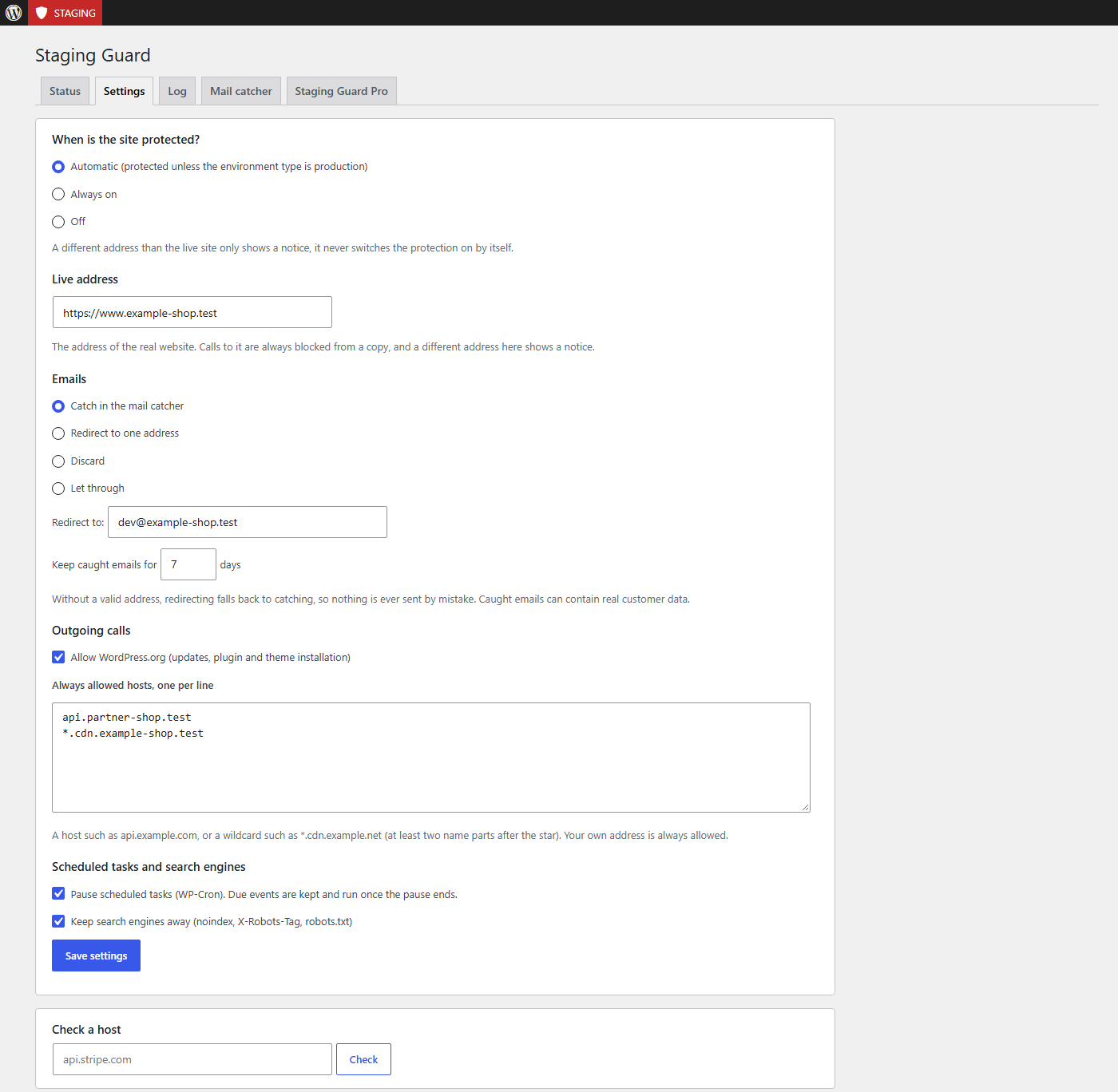
- Outgoing calls are blocked. Every call that goes through the WordPress HTTP API is refused immediately, except your own address, hosts on your allow list and, by default, WordPress.org (so updates and plugin installation keep working). The log shows which hosts were called and lets you allow one with a click.
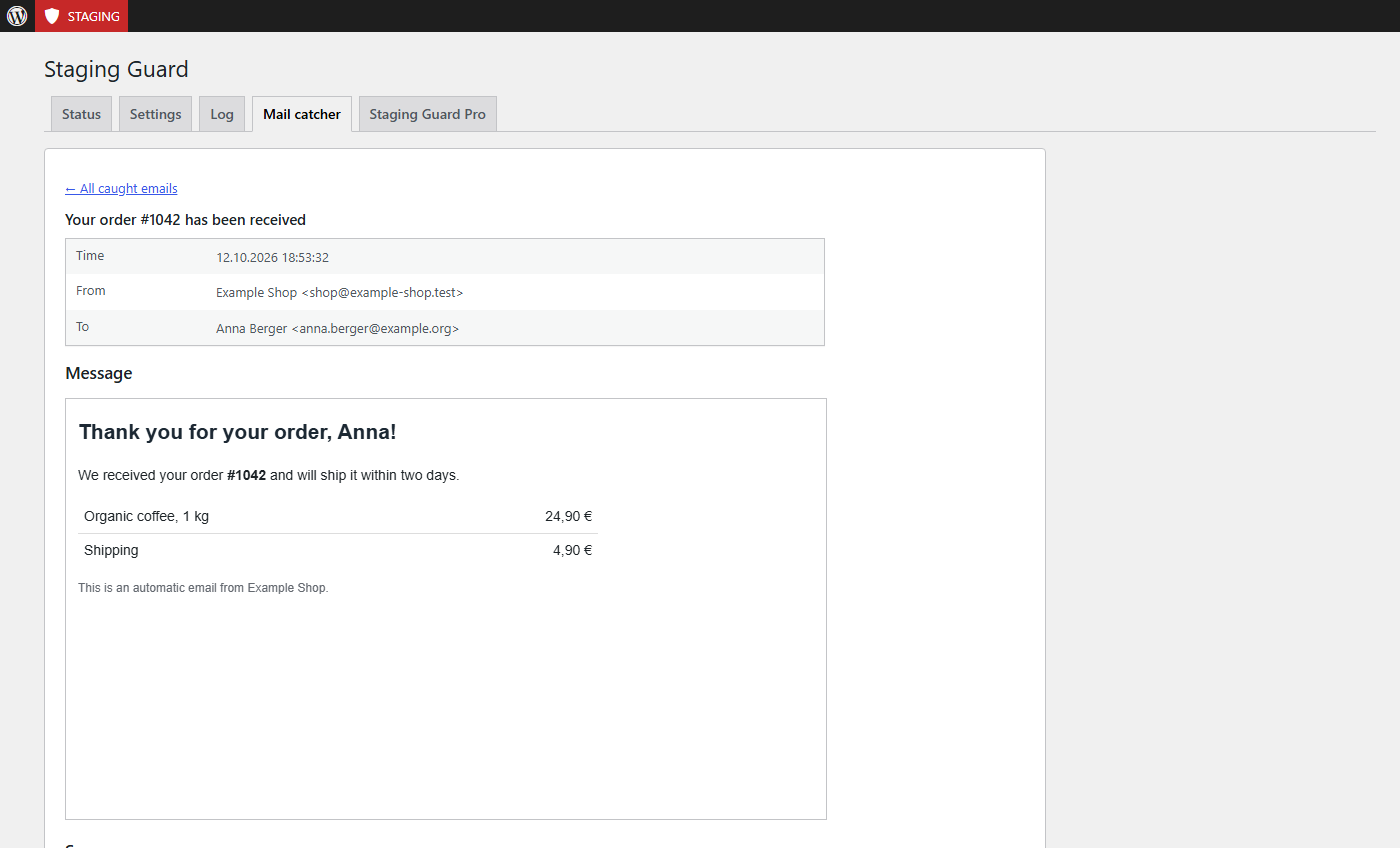
- Emails are caught, not sent. By default nothing leaves the site: each email lands in the Mail catcher tab with its recipients, headers and a safe preview. Alternatively redirect everything to one address, discard it, or let it through.
- Scheduled tasks are paused. Due WP-Cron events are kept and run once you switch the protection off.
- Search engines stay away.
noindex, anX-Robots-Tagheader and arobots.txtthat disallows everything. Your Discourage search engines setting is never changed. - Visitors can be locked out (optional). Switch it on and everybody except administrators sees a short notice (HTTP 403, noindex) instead of the copy. Let in single IP addresses or ranges (IPv4 and IPv6), or share a secret access link that sets a 7-day cookie, for example for a client who reviews the copy. The page cache is kept out, REST requests and feeds are locked as well. It is off by default.
- You always know where you are. A red marker in the admin bar shows on every page that the protection is on, and the Status tab says why.
- A different address only shows a notice. If a copy still has the live settings but runs under another address, the plugin tells you and offers to switch the protection on. It never switches it on by itself, so a domain move of your live site can never silently block its emails.
- Emergency switch.
define( 'WP360_SG_DISABLE', true );inwp-config.phpswitches everything off at once. - WP-CLI:
wp 360-staging status|on|off|auto|hosts|allow <host>|mails.
What this protects, and what it does not
Staging Guard is a safeguard against accidents, not an isolation.
- It stops what goes through the WordPress HTTP API and
wp_mail(). Code that calls curl,file_get_contents()or its own library directly (many payment and cloud SDKs) is not caught. - Plugins that talk to a mail service or SMTP directly, or replace
wp_mail(), bypass the email protection. - The visitor lock covers pages, feeds, sitemaps and the REST API. The login page, the dashboard, scheduled tasks and AJAX requests stay reachable, so nobody gets locked out. Behind a proxy or CDN the IP list sees the proxy, use the access link there.
- For real isolation, block outgoing traffic in the firewall or remove the service credentials from the copy.
Privacidade
Caught emails can contain real customer data. They are stored in your database only, are visible only to administrators (on a multisite network only to super admins), are limited in number and age (50 emails, 7 days by default), never include attachments (only their names) and are removed when you delete the plugin. The log stores host names and counters only, never paths, parameters or content. The plugin itself makes no requests to other servers.
Free vs. Pro
The free version covers everything above.
Staging Guard Pro adds:
- Service presets for common payment, newsletter, CRM, shipping, backup and AI services, each set to allow or block.
- Single scheduled tasks can keep running while the rest stays paused.
- Rules per path and method for allowed hosts (for example only
GETon/v1/read). - Longer log and mail catcher (up to 500 entries), search, CSV export of the log,
.emlexport of an email and send as a test to one address. - Export and import of the settings for agencies that set up several websites the same way.
- Automatic update notifications directly in the WordPress admin area.
Instalação
- Install the plugin under Plugins → Add New (search for “360 Orbit Staging Guard”), or upload the ZIP under Plugins → Add New → Upload Plugin.
- Activate the plugin on the staging or development copy. The live address is remembered when you activate it.
- Open Staging Guard in the 360 WP Orbit menu and check the status.
- Tip: set
WP_ENVIRONMENT_TYPEtostagingin thewp-config.phpof the copy (define( 'WP_ENVIRONMENT_TYPE', 'staging' );). WordPress assumesproductionwhen nothing is set.
Log de Changes
Adds a Pro preset for plugin license servers.
1.2.14
- Fixed: switching between the free and the Pro version. Activating one now deactivates the other, without an error.
1.2.13
- New: a “Staging protection” box on the 360 WP Orbit overview, optionally also on the WordPress dashboard.
1.2.12
- Changed: the 360 WP Orbit overview shows the important boxes of the active plugins at the top, optionally also on the WordPress dashboard; all boxes and tables now use one width.
1.2.11
- Changed: calls to api.pwnedpasswords.com are always allowed, so the leaked password check of 360 Orbit Login Guard also works on a protected copy. Only the first five characters of a password hash are sent.
- Pro: service presets for large plugins (WPML, WooCommerce.com, Yoast SEO, Rank Math, Elementor, WP Rocket, Gravity Forms, ACF PRO, Jetpack, Complianz, WPForms, UpdraftPlus); the “Plugin license servers” preset now contains the real WP Rocket license host.
1.2.10
- Maintenance release for the free version; the Pro version gains a setup assistant.
1.2.9
- Changed: calls to download.db-ip.com and www.spamhaus.org are always allowed, so the country and block-list data of 360 Orbit Security Digest can also be loaded on a protected copy. The calls only download public data.
Capturas de tela

Para desenvolvedores
Este é o seu plugin? Mostre os números.
Adicione um crachá ao vivo ao seu site, Documentos ou Readme do GitHub. Ele é atualizado por conta própria - nenhuma conta necessária.
Best 360 Orbit Staging Guard alternatives
All development plugins →




FAQ
360 Orbit Staging Guard: quick answers
Respostas diretas, extraídas de dados ao vivo WordPress.org.
Fonte: WordPress.org
Is 360 Orbit Staging Guard free?
Yes. 360 Orbit Staging Guard is free to download and use from the official WordPress.org plugin directory.
Is 360 Orbit Staging Guard safe to use in 2026?
360 Orbit Staging Guard is a solid plugin choice in 2026, with a few things worth checking first. Was last updated 4 days ago, and scores 64/100 on our health check.
How many websites use 360 Orbit Staging Guard?
360 Orbit Staging Guard is active on <10 WordPress websites and has been downloaded 648 times since it launched in October 2026. It was downloaded 648 times in the last 30 days.
Does 360 Orbit Staging Guard work with WordPress 7.1?
Yes. The developer has tested 360 Orbit Staging Guard up to WordPress 7.1.5, the latest release. It requires WordPress 6.4 or newer.
What PHP version does 360 Orbit Staging Guard need?
360 Orbit Staging Guard requires PHP 8.1 or higher. Most hosts run PHP 8.x today, so it works on any modern WordPress hosting.
When was 360 Orbit Staging Guard last updated?
The latest version, 1.2.14, was released on November 20, 2026 (4 days ago).
Who makes 360 Orbit Staging Guard?
360 Orbit Staging Guard is developed and maintained by Jörg Liwa.
What are the best alternatives to 360 Orbit Staging Guard?
The most popular alternatives to 360 Orbit Staging Guard are Query Monitor (200K+ installs), Yoast Test Helper (50K+ installs) and What The File (40K+ installs).
Alimentado por PageForge
Um modelo e uma planilha. Uma página real para cada pesquisa.
PageForge Transforma cada linha de um CSV em uma página WordPress com seu próprio título, URL, SEO campos e esquema, construído no layout que você já desenhou. Gratuito em WordPress.org.
- CSV e XLSX, mais Google Sheets em Profissional e Empresarial
- Seu próprio título, URL, SEO campos e esquema para cada página
- Funciona com o editor de blocos, Elementor, Divi e Avada
- Gratuito em WordPress.org, sem cartão de crédito