


WPiko AI Chatbot – ChatGPT Assistant & Customer Support
AI chatbot powered by your own OpenAI account. Learns your pages in minutes and answers visitors 24/7. No monthly subscription.

Choix solide
WPiko AI Chatbot is a solid plugin choice in 2026, with a few things worth checking first. It runs on 30+ sites, is rated 5/5 and was last updated 3 days ago, and scores 74/100 on our health check.
- Développé activement — Dernière mise à jour il y a 3 jours
- Testé avec le dernier WordPress (7.1)
- Petite base d'utilisateurs (30+ installations actives)
- Très peu de critiques jusqu'à présent
Comment s'accumule-t-il ?
Côte à côte sur les installations, les mises à jour, les évaluations et le support


Téléchargements quotidiens
Les pics de téléchargement suivent généralement une nouvelle version - chaque site qui met à jour automatiquement compte comme un téléchargement.
Classements
Where WPiko AI Chatbot stands todayWordPress.org Classements de recherche
Position en direct dans la recherche de plugins, Top 100| Mot-clé | Position |
|---|---|
| chatbot | #58 |
| ChatGPT | #87 |
| Service à la clientèle | #59 |
| openai | >100 |
| WooCommerce | >100 |
Adoption de version
Part de sites actifs par version.
Répartition des notes
★★★★★ ★★★★★ 5 sur 1 avis
About WPiko AI Chatbot
From the official readme · v2.1.7Description
WPiko AI Chatbot adds an AI assistant to your WordPress site that answers visitor questions using OpenAI’s latest models. It runs on your own OpenAI account, so you pay OpenAI directly for what you use (usually a few dollars a month for a small site) and there is no WPiko subscription.
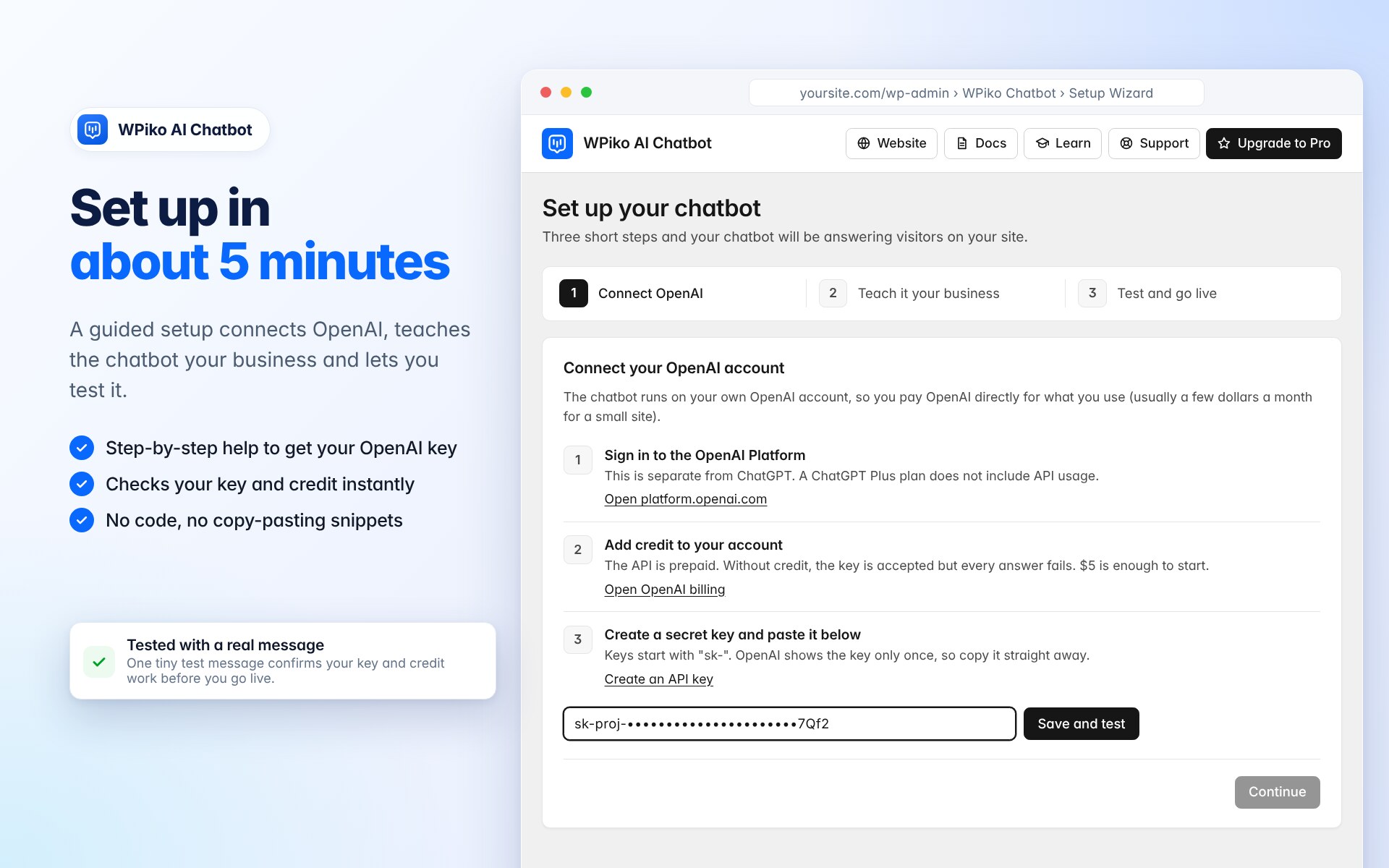
A 3-step setup wizard connects your OpenAI account, teaches the chatbot about your business from your own pages, and lets you test it before it goes live.
💬 What you can do
- Answer visitor questions 24/7 with on-brand replies
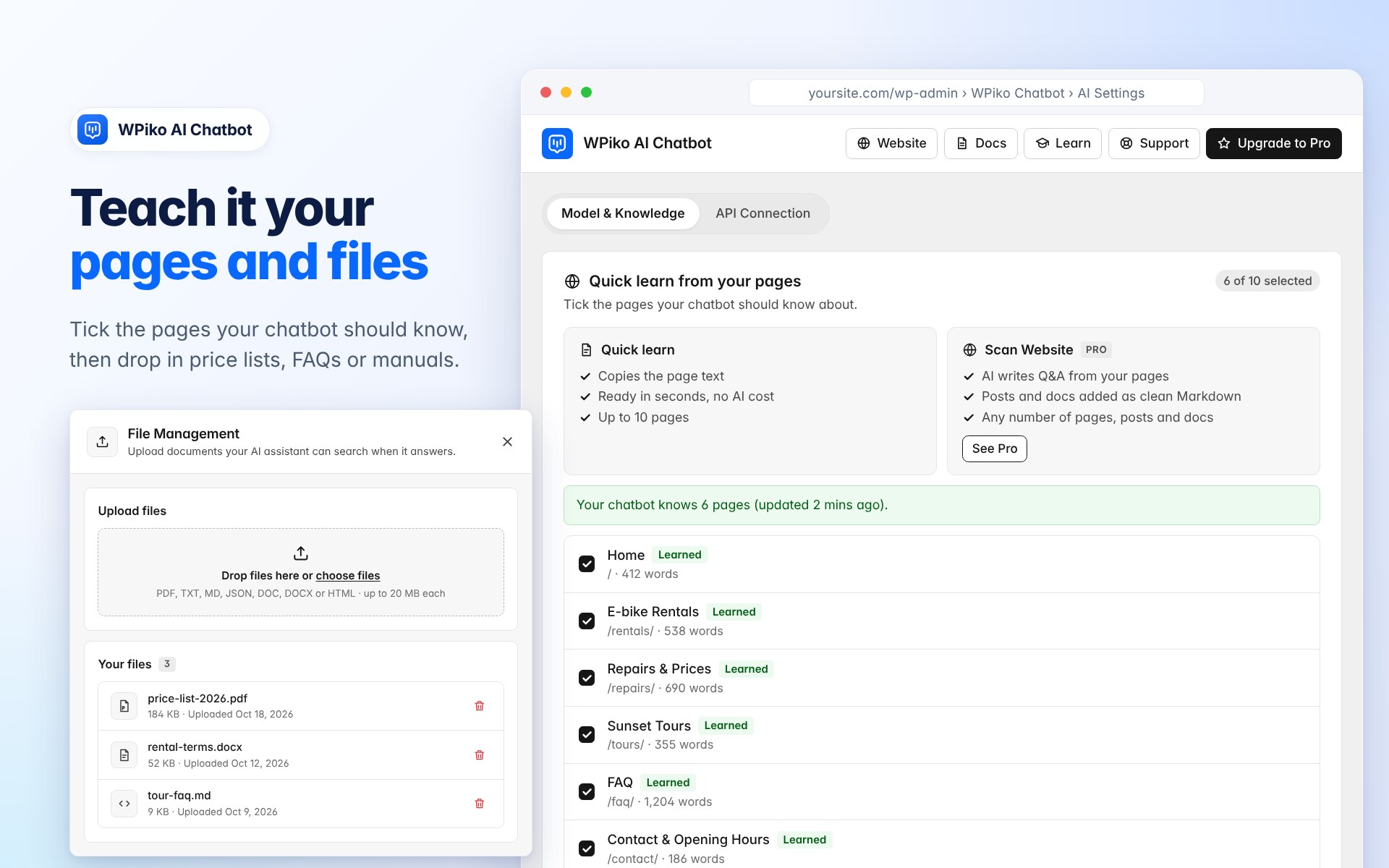
- Teach the chatbot about your business from your website pages and your own documents (PDF, Word, text, Markdown)
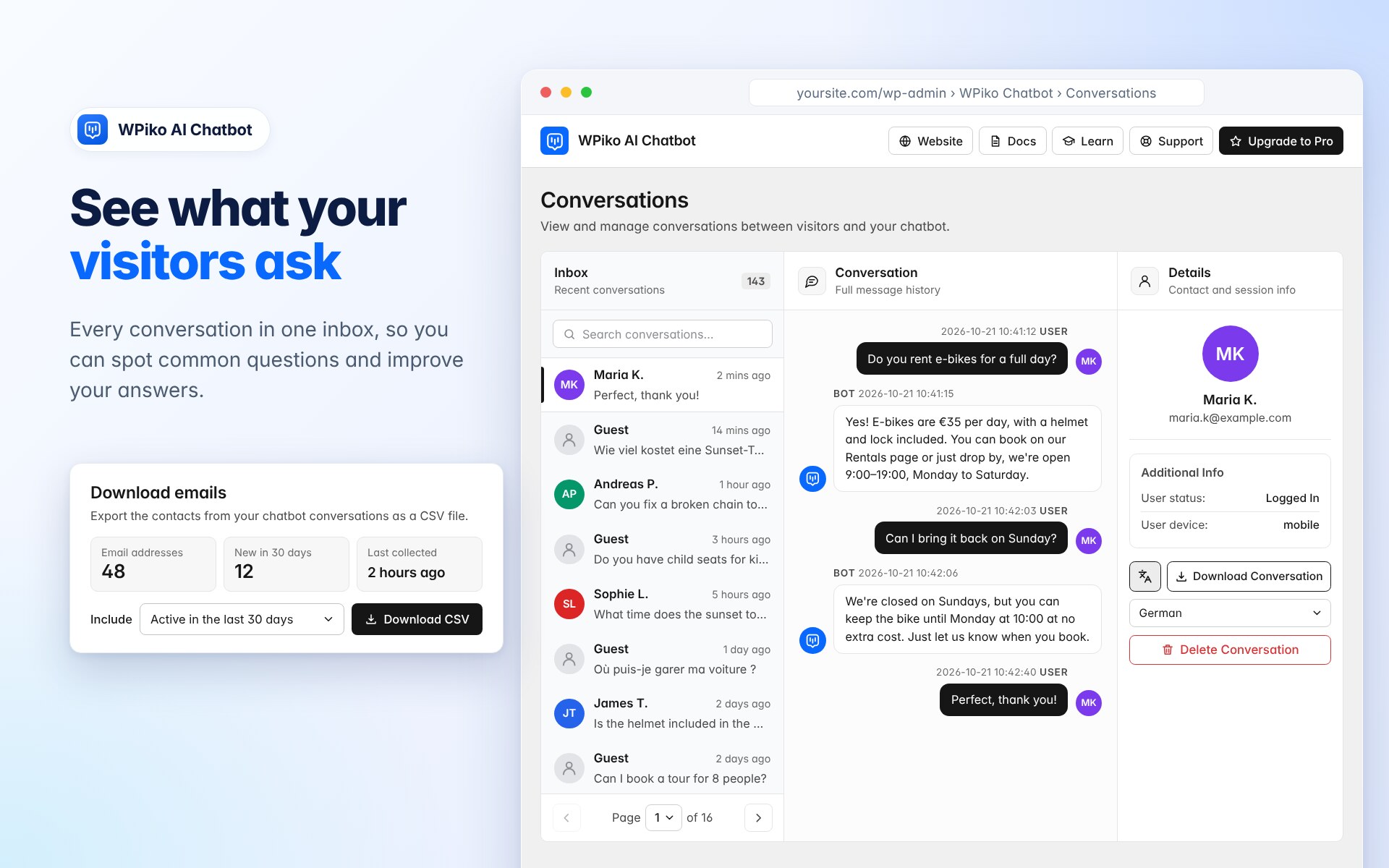
- Review conversations to see what visitors ask
- Show the chatbot on every page with a floating button, or embed it with the
[wpiko_chatbot]shortcode
🆓 Free features
- Setup wizard: connect OpenAI, teach your business and test the chatbot in about 5 minutes
- Quick learn from your pages: pick up to 10 pages and the chatbot answers from their content
- Knowledge files: upload PDFs and documents to the chatbot’s knowledge base
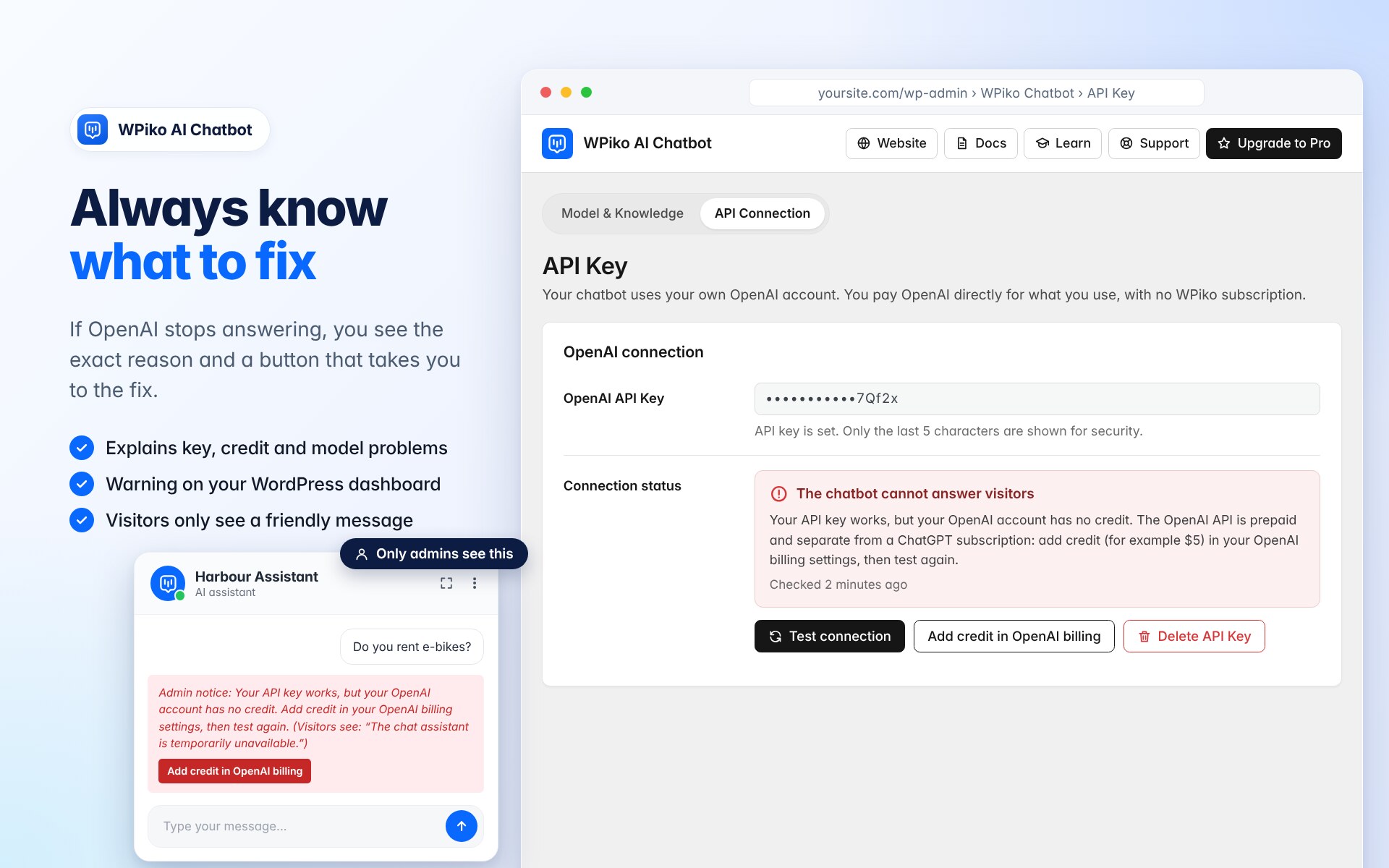
- Clear OpenAI diagnostics: the plugin tests your key with a real message and tells you exactly what to fix (for example “your OpenAI account has no credit”) instead of a generic error
- Works with OpenAI’s latest models through the Responses API, with streaming replies
- Floating chatbot and shortcode embed, with page, device and position rules
- Proactive greeting card that invites visitors to chat
- Appearance presets, colors, avatar and a live preview
- Pre-made questions and conversation starters
- Customize every interface text and error message in any language
- Conversation history with export and translation
- AI usage & cost on the Dashboard: an estimate of what the chatbot costs per day, month, conversation and feature
- Per-IP hourly and daily limits to protect your OpenAI budget
- Loads its scripts only on pages where the chatbot appears
- Encrypted API key storage
🚀 WPiko AI Chatbot Pro adds
- Live chat: take over any conversation from the AI and reply to visitors yourself (Admin Takeover)
- Mobile app (PWA) with push notifications to reply from your phone
- Website scan with no page limit: your pages, posts and documentation plugin articles added as clean Markdown with their exact wording. Scan many at once, rescan what changed, and optionally keep everything updated automatically
- Q&A Builder to control exact answers (up to 50 Q&A pairs)
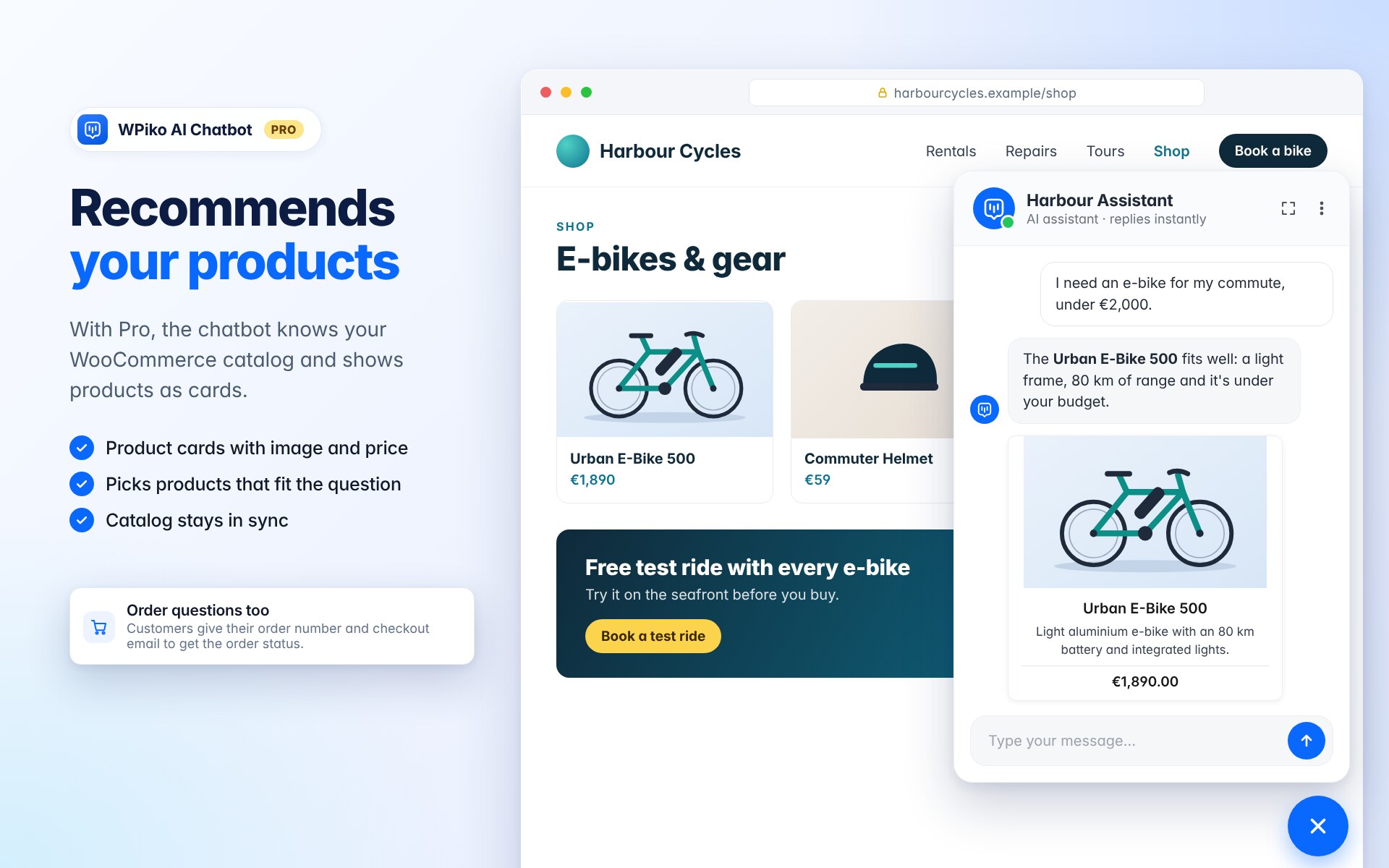
- WooCommerce integration: product cards, product recommendations and order questions
- Lead capture: email capture and a contact form with file attachments and reCAPTCHA
- Analytics: conversations, devices, locations and usage trends
- AI-assisted replies for operators and advanced conversation tools
🔑 What you need
- An OpenAI Platform account (platform.openai.com). This is separate from ChatGPT: a ChatGPT Plus plan does not include API usage.
- Prepaid credit on that account. The OpenAI API is prepaid, and $5 is enough to start. Without credit the key is accepted but the chatbot cannot answer, WPiko detects this and shows you how to fix it.
- An API key (“secret key”) from your OpenAI dashboard.
🌍 Any Language & Localization Support
You can customize every text element your visitors see, from the chatbot name and welcome message to input placeholders and error notifications. The AI replies in the language your visitor writes in, and your knowledge files can be in any language.
🔐 Fast and Secure
The chatbot’s scripts and styles only load on pages where it is shown. Your API key is stored encrypted, admin actions are permission-checked, and visitors never see technical error details.
📱 Mobile-Friendly
The chatbot adapts to phones, tablets and desktops, with touch-friendly controls, adjustable dimensions and per-device visibility.
Learn more: WPiko AI Chatbot
Services externes
This plugin relies on third-party external services to provide its functionality. Below is detailed information about each service used:
OpenAI API
* What it is: OpenAI’s API service that provides access to advanced AI language models and assistants.
* What it’s used for: This service powers the core chatbot functionality, including generating responses, managing conversations, creating and updating AI assistants, handling file uploads for knowledge base, and managing vector stores for file search capabilities.
* What data is sent: User messages/questions, chatbot configuration settings (name, instructions, model selection), uploaded files for the knowledge base, conversation context, and API authentication tokens.
* When data is sent: Every time a user interacts with the chatbot, when configuring the AI assistant, when uploading files to the knowledge base, and when administrators test the API connection.
* Service provider: OpenAI
* Terms of Service: https://openai.com/terms/
* Privacy Policy: https://openai.com/privacy/
WPiko feedback service (wpiko.com)
* What it is: WPiko’s own server, which receives optional feedback about the plugin.
* What it’s used for: Understanding why people stop using the plugin, so it can be improved.
* What data is sent: Only when you deactivate the plugin, choose a reason in the feedback form and click “Submit & deactivate”: the reason, your optional comment, the plugin, WordPress and PHP versions, site language, how far setup got (API key present, connection status, wizard finished, number of learned pages, number of conversations, Pro/WooCommerce active) and days since installation. Your email address (which you can edit in the form) and your site address are sent only if you tick “You can email me about this”. Nothing is sent if you click “Skip & deactivate”.
* When data is sent: Only when you submit the deactivation feedback form.
* Service provider: WPiko
* Terms of Service: https://wpiko.com/terms-and-conditions/
* Privacy Policy: https://wpiko.com/privacy-policy/
IP-API.com Location Service
* What it is: A geolocation service that provides location information based on IP addresses.
* What it’s used for: To determine the approximate geographical location of website visitors for analytics and conversation tracking purposes (available in Pro version).
* What data is sent: The visitor’s IP address only.
* When data is sent: When a user starts a conversation with the chatbot (only if analytics features are enabled).
* Service provider: IP-API.com
* Terms of Service: https://ip-api.com/docs/legal
* Privacy Policy: https://ip-api.com/docs/legal
Installation
- Install the plugin from the WordPress plugins screen (or upload it to
/wp-content/plugins/wpiko-chatbot) and activate it. - The setup wizard opens automatically. You can also open it any time from WPiko AI Chatbot → Setup Wizard.
- Connect OpenAI: add credit to your OpenAI Platform account, create a secret key and paste it. WPiko sends a tiny test message to confirm everything works.
- Teach it your business: describe what you do and pick the pages the chatbot should learn from.
- Test it in the wizard, then switch on the floating chatbot. Done.
Journal de modifications
Keeps the Debug Log small when debug logging is on.
2.1.7
- Compatibility: Tested with WordPress 7.2.
- Fix: Streamed chatbot replies no longer log a PHP deprecation notice on PHP 8.5 and later.
- Fix: The emoji picker in the Contact user form opens on top of the form instead of behind it, opens above the button when there is no room below, and closes with Escape or when the form closes. Picking an emoji inserts it again: when WordPress shows emojis as images, as it does in WordPress 7.2, the picker inserted nothing.
- Fix: Opening a plugin screen from the WordPress admin menu, an “Activate Pro” button or an email link no longer adds a “Tab switching without nonce verification” warning to the Debug Log.
- Fix: In Conversations, the AI cost Models line no longer runs out of the Details panel when a conversation used more than one model. Each model name stays on one line, and the list wraps between them.
- Improve: The plugin’s admin screens no longer use jQuery features that are deprecated ahead of jQuery 4, so WordPress 7.2’s jQuery Migrate 3.6 reports no warnings for them.
- Improve: Debug Log entries are limited to 2,000 characters, and OpenAI requests are logged as a short summary instead of the full request. The log stays small even when debug logging is left on, and existing large logs shrink automatically.
- Improve: Quick learn adds your pages as clean Markdown, the same way as Pro’s Scan Website. Tables keep their header row, so the chatbot knows which column a price or ✓ belongs to. Menus, buttons, forms and hidden text are left out, headings keep their levels, and text that a theme separates only with CSS no longer runs together (“Lifetime Pay once” instead of “LifetimePay once”).
- Improve: Each page in Quick learn now has a short header with its link, its section (parent pages) and a summary (the page’s SEO description from WPiko SEO, Yoast SEO, Rank Math, SEOPress or All in One SEO, or its excerpt).
- Improve: Quick learn adds short context lines such as “(Services › Delivery › Returns)” through each page. OpenAI’s knowledge search returns pieces of the file, not the whole file, and one Quick learn file holds up to 10 pages; with these lines every piece says which page and section it comes from, so prices or opening hours from different pages are not mixed up. Quick learn and Scan Website files are uploaded with a fixed piece size (800 tokens, 400 overlap) that the lines are spaced for.
- Improve: Quick learn keeps up to 30,000 characters per page (was 20,000) and cuts a longer page at a paragraph break. It now tells you which pages were cut, so you can upload the rest as a document.
- Fix: Quick learn reads pages built with the classic editor with their paragraphs, and leaves the chatbot’s own
[wpiko_chatbot]shortcode out of the file. - Improve: AI Configuration, Quick learn and the scanned pages list describe the updated Pro Scan Website: pages, posts and docs are all added as clean Markdown.
- Developer: New
wpiko_chatbot_log_message_max_lengthfilter to change the longest Debug Log message (at least 200 characters). - Developer: New
wpiko_chatbot_vector_file_attachmentfilter for the request that adds an uploaded file to the knowledge base (the file ID and its privacy label cannot be changed). - Developer: New shared functions for knowledge files in
includes/knowledge-markdown.php(wpiko_chatbot_html_to_markdown(),wpiko_chatbot_markdown_add_context()and others), used by Quick learn and by WPiko AI Chatbot Pro 2.1.8’s Scan Website. New filterswpiko_chatbot_knowledge_section,wpiko_chatbot_knowledge_summary,wpiko_chatbot_knowledge_context_partsandwpiko_chatbot_knowledge_chunking.
Older releases: changelog.txt.
Captures d'écran




Pour les développeurs
Est-ce votre plugin ? Montrez les chiffres.
Ajoutez un badge en direct à votre site, docs ou github readme. Il se met à jour par lui-même - aucun compte n'est nécessaire.
Best WPiko AI Chatbot alternatives
All chatbot plugins →





FAQ
WPiko AI Chatbot: quick answers
Réponses directes, extraites des données en direct WordPress.org.
Source : WordPress.org
Is WPiko AI Chatbot free?
Yes. WPiko AI Chatbot is free to download and use from the official WordPress.org plugin directory.
Is WPiko AI Chatbot safe to use in 2026?
WPiko AI Chatbot is a solid plugin choice in 2026, with a few things worth checking first. It runs on 30+ sites, is rated 5/5 and was last updated 3 days ago, and scores 74/100 on our health check.
How many websites use WPiko AI Chatbot?
WPiko AI Chatbot is active on 30+ WordPress websites and has been downloaded 6,024 times since it launched in July 2025. It was downloaded 1,168 times in the last 30 days.
Does WPiko AI Chatbot work with WordPress 7.1?
Yes. The developer has tested WPiko AI Chatbot up to WordPress 7.2, the latest release. It requires WordPress 6.0 or newer.
What PHP version does WPiko AI Chatbot need?
WPiko AI Chatbot requires PHP 7.0 or higher. Most hosts run PHP 8.x today, so it works on any modern WordPress hosting.
When was WPiko AI Chatbot last updated?
The latest version, 2.1.7, was released on November 27, 2026 (3 days ago).
Who makes WPiko AI Chatbot?
WPiko AI Chatbot is developed and maintained by wpiko.
What are the best alternatives to WPiko AI Chatbot?
The most popular alternatives to WPiko AI Chatbot are AI Agent by SiteGround (1M+ installs), AI Engine (90K+ installs) and Tidio (70K+ installs).
Propulsé par PageForge
Un modèle et une feuille de calcul. Une vraie page pour chaque recherche.
PageForge transforme chaque ligne d'un CSV en une page WordPress avec son propre titre, URL, SEO et schéma, construit sur la mise en page que vous Déjà conçu. Gratuit sur WordPress.org.
- CSV et XLSX, plus Google Sheets sur les professionnels et les entreprises
- Son propre titre, URL, SEO champs et schéma pour chaque page
- Fonctionne avec l'éditeur de blocs, Elementor, Divi et Avada
- Gratuit sur WordPress.org, pas de carte de crédit