


WP Super Edit
WP Super Edit is designed to get control of the WordPress wysiwyg visual editor and add some functionality with more buttons and customized TinyMCE plugins. WP Super edit acts as framework for TinyMCE visual editor…

Envisager une alternative
WP Super Edit shows warning signs in 2026 — compare the alternatives below before installing. It runs on 2K+ sites, is rated 3.7/5 and was last updated 7 years ago, and scores 35/100 on our health check.
- Pas de mise à jour dans 6 ans
- Uniquement testé jusqu'à WordPress 5,4 (le dernier est de 7,1)
Comment s'accumule-t-il ?
Côte à côte sur les installations, les mises à jour, les évaluations et le support



Téléchargements quotidiens
Les pics de téléchargement suivent généralement une nouvelle version - chaque site qui met à jour automatiquement compte comme un téléchargement.
Classements
Where WP Super Edit stands todayWordPress.org Classements de recherche
Position en direct dans la recherche de plugins, Top 100| Mot-clé | Position |
|---|---|
| administrateur | >100 |
| éditeur | >100 |
| mise en forme | >100 |
| TinyMce | >100 |
| wysiwyg | >100 |
Adoption de version
Part de sites actifs par version.
Répartition des notes
★★★★★★★★★★ 3.7 from 18 reviews
About WP Super Edit
From the official readme · v2.5.4Description
Major Update Due Soon!
This plugin is getting a major update soon.
WP Super Edit is designed to get control of the WordPress wysiwyg visual editor and add some functionality with more buttons and customized TinyMCE plugins. WP Super edit acts as framework for TinyMCE visual editor plugins and buttons allowing administrators (or users) to arrange buttons and add TinyMCE plugins to the visual editor.
Your feedback is always welcome!
Traits
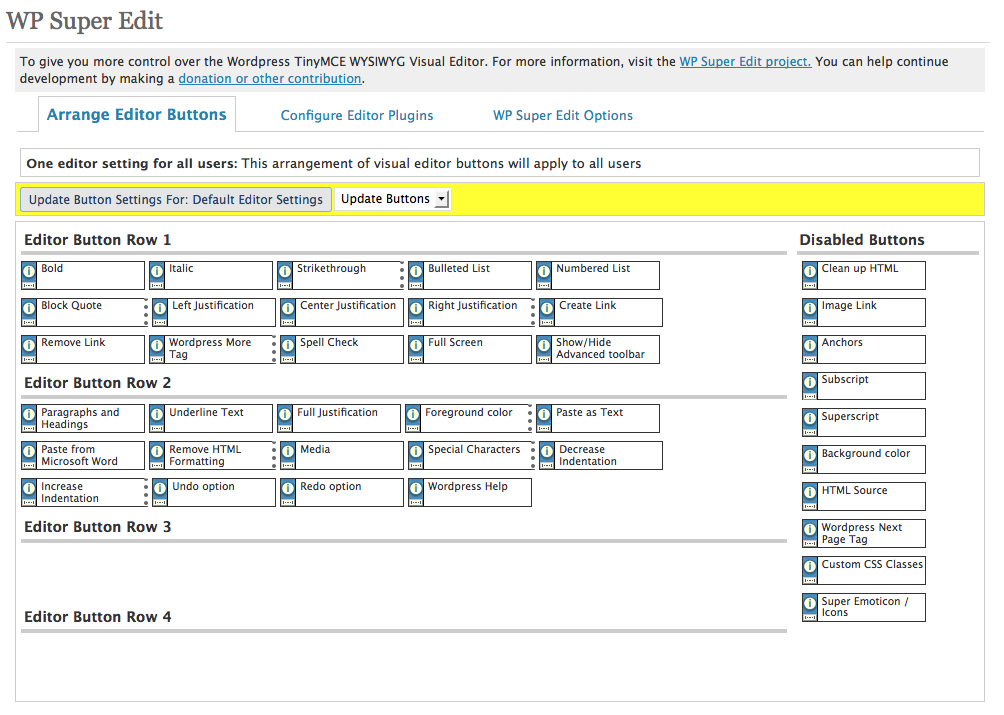
- Drag and Drop interface for arranging the WordPress visual editor buttons.
- Access to built-in WordPress visual editor buttons and functions.
- Additional TinyMCE plugins to add buttons and features like tables, layers (div tag), advanced XHTML properties, advanced image and link properties, WordPress emoticons, style attributes, css classes for themes, search / replace, and more.
- Options for allowing users to configure visual editor settings; One editor setting for all users, role based editor settings, and individual user editor settings. Only WordPress administrators can activate or deactivate TinyMCE wysiwyg visual editor plugins. In single or role based modes, only administrators can arrange editor buttons.
- Easy to install and remove. WP Super Edit uses separate database tables for settings and to support multi-site configurations. Currently only the Super Emoticon / Icon Plugin will leave short tags in your posts or pages.
Version Notice
This version has been tested for use with the versions of WordPress indicated. I attempt to keep WP Super Edit up to date with changes to WordPress and the visual editor, but the complex changes can make it unproductive to maintain compatiblity with some older versions of WordPress. This is a list of recent versions available for older WordPress sites.
- Use WP Super Edit 2.1 for WordPress 2.6 to 2.7.1
- Use WP Super Edit 2.3.x for WordPress 2.8 to 3.1.x
- Use WP Super Edit 2.4.x for WordPress 3.1 to 3.8.x
Installation
- Take the whole wp-super-edit folder and put it in the WordPress Plugin directory for your Web site.
- Activate the plugin on the WordPress Plugins administration panel
- Click on the Settings option and you will see WP Super Edit in the sub menu.
- WP Super Edit should lead you through the final installation steps. Please be patient! WP Super Edit will attempt to scan and save your original wysiwyg visual editor settings while installing. WP Super Edit will not work until the installation has been completed!
Journal de modifications
2.5.3
- Merged in TinyMCS plugins from version 4.3.10
- Tested with WordPress 4.5
2.5
- The following plugins have been removed by the TinyMCE development team: advhr, advimg, advlink, style, xhtmlxtras.
- Developmental plugins for WP Super Edit Emotions, WP Super Edit Classes, WP Super Edit Upgrade removed.
2.4.7
- Migrate from depreciated functions.
- Update TinyMCE Plugins to 3.5.8
- Start testing for JSON data migration.
2.4.6
- Fix $wpdb->prepare() errors.
2.4.5
- Remove “default ”” from MySQL for dbDelta since text and defaults don’t play well everywhere.
2.4.4
- Bring back wp_tiny_mce() for WordPress 3.2 compatibility.
Captures d'écran


Pour les développeurs
Est-ce votre plugin ? Montrez les chiffres.
Ajoutez un badge en direct à votre site, docs ou github readme. Il se met à jour par lui-même - aucun compte n'est nécessaire.
Best WP Super Edit alternatives
Tous les plugins d'administrateur →




FAQ
WP Super Edit: quick answers
Réponses directes, extraites des données en direct WordPress.org.
Source : WordPress.org
Is WP Super Edit free?
Yes. WP Super Edit is free to download and use from the official WordPress.org plugin directory.
Is WP Super Edit safe to use in 2026?
WP Super Edit shows warning signs in 2026 — compare the alternatives below before installing. It runs on 2K+ sites, is rated 3.7/5 and was last updated 7 years ago, and scores 35/100 on our health check.
How many websites use WP Super Edit?
WP Super Edit is active on 2K+ WordPress websites and has been downloaded 368,307 times since it launched in July 2007. It was downloaded 437 times in the last 30 days.
Does WP Super Edit work with WordPress 7.1?
WP Super Edit is officially tested up to WordPress 5.4.0, while the latest release is 7.1.5. It may still work, but try it on a staging site first.
When was WP Super Edit last updated?
The latest version, 2.5.4, was released on March 7, 2020 (7 years ago).
Who makes WP Super Edit?
WP Super Edit is developed and maintained by Ahmad Awais.
What are the best alternatives to WP Super Edit?
The most popular alternatives to WP Super Edit are Loginizer (1M+ installs), Redux Framework (900K+ installs) and Admin Menu Editor (300K+ installs).
Propulsé par PageForge
Un modèle et une feuille de calcul. Une vraie page pour chaque recherche.
PageForge transforme chaque ligne d'un CSV en une page WordPress avec son propre titre, URL, SEO et schéma, construit sur la mise en page que vous Déjà conçu. Gratuit sur WordPress.org.
- CSV et XLSX, plus Google Sheets sur les professionnels et les entreprises
- Son propre titre, URL, SEO champs et schéma pour chaque page
- Fonctionne avec l'éditeur de blocs, Elementor, Divi et Avada
- Gratuit sur WordPress.org, pas de carte de crédit