


WP File-Tree
WP File-Tree is something I have been working on to help in my own development.

Envisager une alternative
WP File-Tree shows warning signs in 2026 — compare the alternatives below before installing. It runs on 10+ sites and was last updated 18 years ago, and scores 23/100 on our health check.
- Petite base d'utilisateurs (plus de 10 installations actives)
- Très peu de critiques jusqu'à présent
- No update in 18 years
- Only tested up to WordPress 2.6 (latest is 7.1)
Comment s'accumule-t-il ?
Côte à côte sur les installations, les mises à jour, les évaluations et le support



Téléchargements quotidiens
Les pics de téléchargement suivent généralement une nouvelle version - chaque site qui met à jour automatiquement compte comme un téléchargement.
Classements
Where WP File-Tree stands todayWordPress.org Classements de recherche
Position en direct dans la recherche de plugins, Top 100| Mot-clé | Position |
|---|---|
| download | >100 |
| file | >100 |
| mod_rewrite | #93 |
| des postes | >100 |
| shortcode | >100 |
Adoption de version
Part de sites actifs par version.
About WP File-Tree
À partir du Lisezmoi officiel · v1.1.2Description
WP File-Tree is something I have been working on to help in my own development.
There are tons of code-snippet, formatting, and coloring plugins out there. There are even a few for file management. What there is not, is one that combines them into one useful tool. I am talking about something of a script library manager, but also something that can be used to post ANY file. With this major goal in mind I started from the basics to build something on top of. What would be very useful from a developer standpoint, is getting my scripts out of their multiple locations and backups into one centralized location. Then post them to the world, all while using WordPress. The shortcode that WP File-Tree uses is the basis of how it streamlines this process.
So far, there are 4 plugin options:
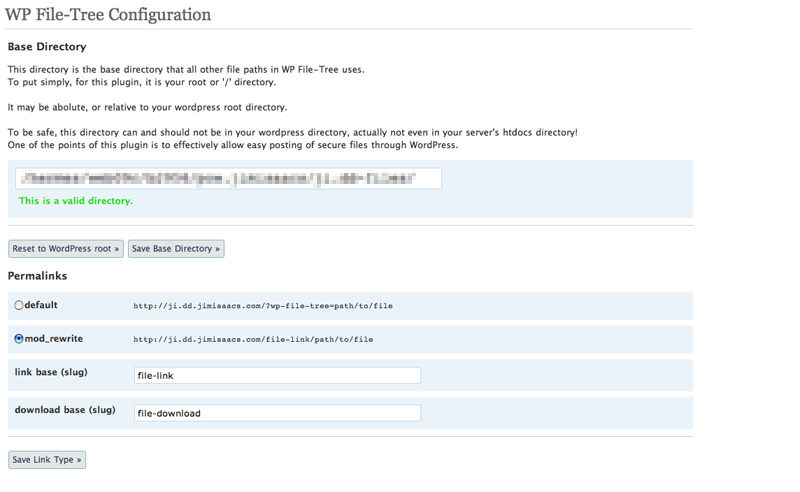
Base Directory is the most important, and is exactly what it says, the root directory for WP File-Tree. It can be an absolute server path, or a relative path from your WordPress root directory. The important thing to note is that it can, and actually should be, outside of your web accessable htdocs directory on your web space. That is one of the points of this plugin, to be able to post files from a secure location on your web server.
There are 2 links to files the plugin uses. One is a URL to the file itself which loads it as your browser supports the mimetype. The second is a forced download link, which is almost the same as the first with additional headers.
The remaining 3 options control how these links work, similar to how WordPress sets permalinks. There are 2 choices for the option of link type, default, and mod_rewrite. Default simply uses query variables, while mod_rewrite actually modifies your .htaccess file independantly of WordPress rewrite rules which may have already been added.
Important note: For the rewrite rules, I found it was best to keep things separate from WordPress, because there is not much documentation on controlling the rewrite rules as far as .htaccess level, and there are still of view bugs on the WordPress side of this functionality. For the future releases, my plugin’s mod_rewrite rules will most likely change by becoming completely integrated with WordPress hooks, actions, and filters. For now, just for safety, make sure you activate your WordPress permalinks before activating the plugin’s.
Finally, the last two options are the link slugs, which are the base of the URL’s if the mod_rewrite type is active.
That about covers the options, now onto the shortcode.
shortcode:
It is all based around only 2 tags:
[file path=”filename” /]
[vfile path=”filename”]content[/vfile]
attributes:
path – required
If there is no shortcode content this is expected to be the real file path relative to the base directory set by the user. If shortcode content exists, this is treated like an arbitrary filename to a virtual file with the content that is provided within the shortcode itself.
tpl – optional
Although this attribute is optional it is still very flexible and powerful. It is the comma delimited list of templates that will be used to display the file. If this attribute is not specified a template by the name of the file extension is attempted to be used. If still no template is found the default template is used. Using it as a comma delimented list means that multiple templates can be stringed together as short-cut to display the same file in multiple ways. Since each shortcode must be parsed separately, using a template list will save on processing speed.
mimetype – optional
The mimetpye of the file. Valid only if the type exists in the JIMimetype class. Optional becuase if no mimetype is provided or if it is not valid, one is attempted to be acquired by the file extension. If still valid no mimetype the default mimetype of the JIMimetype class is used, this is usually ‘text/plain’
There will be more functionality with attributes such as supporting any and all custom attributes to send to templates as optional parameters.
But for now, this is it.
The ‘file’ tag is a simple file link which uses only attributes for the functionality.
An example would be something like this:
[file path=”php/wordpress/plugins/wp-file-tree/example.txt” tpl=”text” /]
What is going on is:
First the plugin uses the file path relative to my base directory to read the contents of the file example.txt into a variable, and then those contents are sent to the chosen display template named ‘text’. Templates are how all files are displayed within posts. There is no limit to how many you can have, and there is virtually no limit as to what you can do with them. Their format is similar to how WordPress themes are dealt with and edited.
The ‘vfile’ tag is how you may use inline content:
[vfile path=”inline_example.txt” tpl=”text”]This is example inline content typed directly into the post.
Hello World!!![/vfile]
In this example, the exact same attributes and template are used as in the first example, but instead of the plugin using the file path as a reference to read the contents of the file, instead this path is an arbitrary value to name a virtual file, and the content of the tag is substituted as the content of the virtual file. So in the end, the content is displayed in the exact same way the content of the previous real file was displayed in ‘text’ template.
Yes you can even link to, and force download virtual files, but this requires special inline templates to safely post the contents of virtual files.
The ‘tpl’ attribute may actually be a list of template names as a shortcut within the shortcode to string multiple templates together for the same content. An example would be something like this:
[file path=”php/wordpress/plugins/wp-file-tree/example.txt” tpl=”link,text,download” /]
Notice that first a link will be generated by the ‘link’ template, then the content displayed in the ‘text’ template, then a download link generated by the ‘download’ template. Stringing together templates like this not only saves time, but most importantly resources. It allows the plugin to reuse the data already gathered in first parsing the shortcode and simply inserts that data into multiple template objects.
There is much more you can do with the attributes of these tags, and the possibilities go on and on. I don’t want to post everything here, but I will instead insist that you download the plugin and try it yourself.
IMPORTANT NOTE about mod_rewrite:
WP File-Tree is designed to use it’s own mod_rewrite rules and does not interfere with your WordPress mod_rewrite rules. It behaves the same way as WordPress meaning it adds the rules to your .htaccess file within a comment block. When the plugin’s link type is set to default or if the plugin is deactivated then these rules are removed from your .htaccess file. WP File-Tree rules are always added to the top of the .htaccess file unless you have not yet activated your WordPress permalinks. These rules may be added after WordPress rules if WordPress rules are activated for the first time after you have already activated WP File-Tree mod_rewrite. If this happens then WP File-Tree mod_rewrite rules may work in-properly.
If you need help viewing your .htaccess file you may try installing this very helpful plugin.
AskApache RewriteRules Viewer
http://www.askapache.com/htaccess/rewriterule-viewer-plugin.html
TODO – Yes there is more, but for now…
fin
Here’s a link on my blog regarding WP File-Tree.
There you may find even more information about working with the plugin.
Please feel free to leave any comments or suggestions for this plugin on that post.
I would actually appreciate it.
Installation
- Téléchargez le dossier
wp-file-treedans le répertoire/wp-content/plugins/ - Activez le plugin via le menu « Plugins » dans WordPress
- Navigate to the settings menu in the admin, and configure the settings of WP File-Tree
- Make sure you have at least a test file in your base directory before testing the shortcode.
Captures d'écran
Pour les développeurs
Est-ce votre plugin ? Montrez les chiffres.
Ajoutez un badge en direct à votre site, docs ou github readme. Il se met à jour par lui-même - aucun compte n'est nécessaire.
Best WP File-Tree alternatives
All download plugins →





FAQ
WP File-Tree: quick answers
Réponses directes, extraites des données en direct WordPress.org.
Source : WordPress.org
Is WP File-Tree free?
Yes. WP File-Tree is free to download and use from the official WordPress.org plugin directory.
Is WP File-Tree safe to use in 2026?
WP File-Tree shows warning signs in 2026 — compare the alternatives below before installing. It runs on 10+ sites and was last updated 18 years ago, and scores 23/100 on our health check.
How many websites use WP File-Tree?
WP File-Tree is active on 10+ WordPress websites and has been downloaded 7,685 times since it launched in August 2008. It was downloaded 54 times in the last 30 days.
Does WP File-Tree work with WordPress 7.1?
WP File-Tree is officially tested up to WordPress 2.6, while the latest release is 7.1.5. It may still work, but try it on a staging site first.
When was WP File-Tree last updated?
The latest version, 1.1.2, was released on August 10, 2008 (18 years ago).
Who makes WP File-Tree?
WP File-Tree is developed and maintained by jimisaacs.
What are the best alternatives to WP File-Tree?
The most popular alternatives to WP File-Tree are Download Plugin (60K+ installs), Export Media Library (30K+ installs) and Download Plugins and Themes… (30K+ installs).
Propulsé par PageForge
Un modèle et une feuille de calcul. Une vraie page pour chaque recherche.
PageForge transforme chaque ligne d'un CSV en une page WordPress avec son propre titre, URL, SEO et schéma, construit sur la mise en page que vous Déjà conçu. Gratuit sur WordPress.org.
- CSV et XLSX, plus Google Sheets sur les professionnels et les entreprises
- Son propre titre, URL, SEO champs et schéma pour chaque page
- Fonctionne avec l'éditeur de blocs, Elementor, Divi et Avada
- Gratuit sur WordPress.org, pas de carte de crédit