


WP EXtra – One Click Optimize
Optimize your site instantly with one-click activation. WP Extra offers easy fixes and features for WordPress.

Choix solide
WP EXtra – One Click Optimize is a solid plugin choice in 2026, with a few things worth checking first. It runs on 6K+ sites, is rated 4.9/5 and was last updated 3 months ago, and scores 74/100 on our health check.
- Loved by users — 4.9/5 from 41 reviews
- Testé avec le dernier WordPress (7.1)
- Momentum — downloads up 36.6% vs the previous 30 days
Comment s'accumule-t-il ?
Côte à côte sur les installations, les mises à jour, les évaluations et le support



Téléchargements quotidiens
Les pics de téléchargement suivent généralement une nouvelle version - chaque site qui met à jour automatiquement compte comme un téléchargement.
Classements
Where WP EXtra stands todayWordPress.org Classements de recherche
Position en direct dans la recherche de plugins, Top 100| Mot-clé | Position |
|---|---|
| extra | #6 |
| functions | #18 |
| optimizations | #38 |
| la sécurité | >100 |
| tweaks | #12 |
Adoption de version
Part de sites actifs par version.
Répartition des notes
★★★★★★★★★★ 4.9 from 41 reviews
About WP EXtra – One Click Optimize
From the official readme · v8.7.1Description
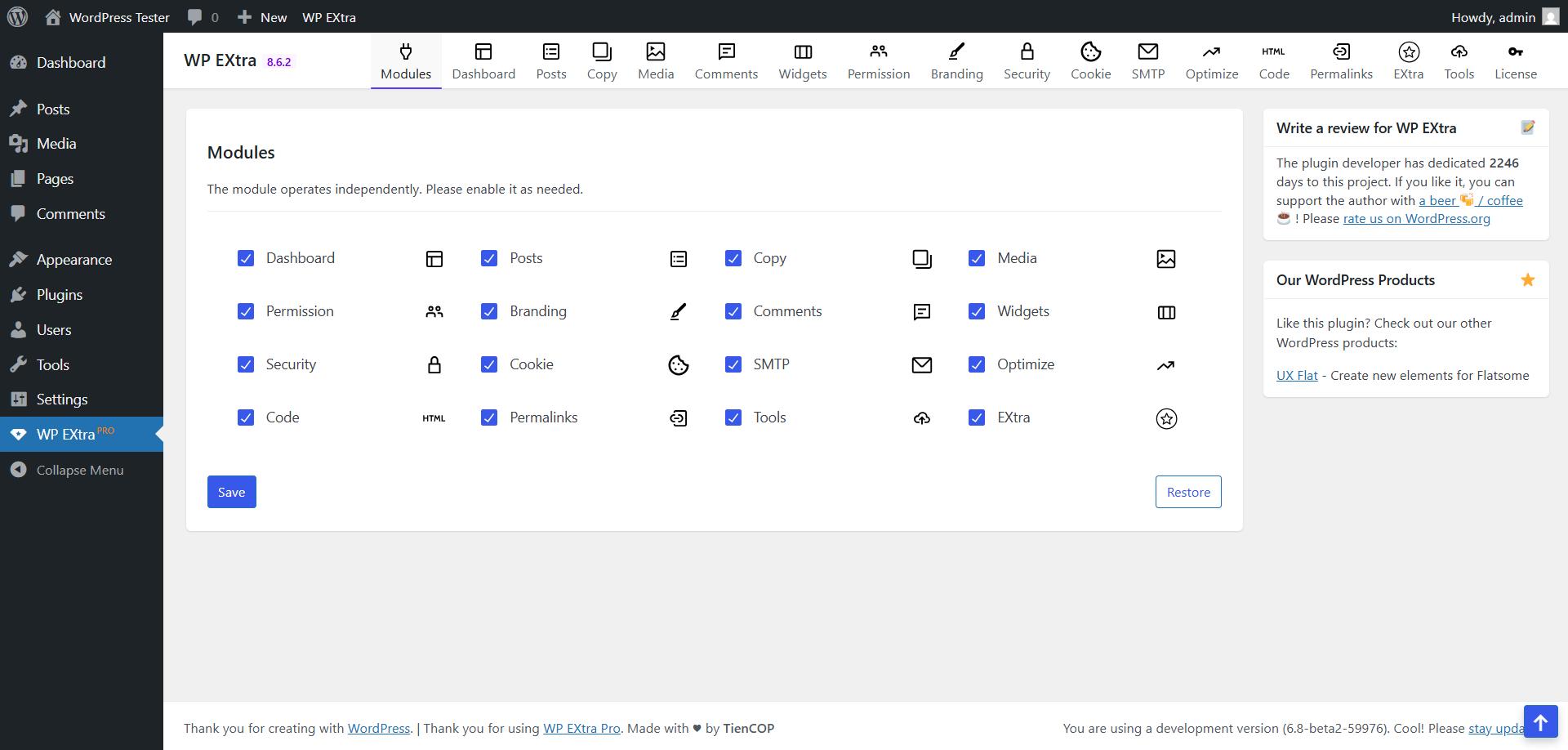
🚀 Boost your website’s performance, security, SEO and user experience with WP EXtra – the ultimate lightweight all-in-one toolkit for WordPress!
WP EXtra is built from the ground up with a modular architecture: features run with zero frontend overhead via smart lazy-loading, and every option is centralized in a single autoloaded database setting.
🌟 14 CORE MODULES & POWER TOOLS
1. 📊 Dashboard
- Widgets Cleanup: Disable unnecessary WordPress core and third-party dashboard widgets with one click.
- System Info Cards: Real-time server diagnostics (PHP version, memory limits, MySQL, server software) rendered cleanly without external assets.
- Custom Admin Notice: Broadcast personalized announcements or instructions to specific user roles with custom alert styles.
2. ✍️ Posts & Writing
- Classic Editor Integration: Seamlessly switch between Gutenberg and the Classic Editor for posts and pages.
- Featured Image Column: View, set, or replace post featured thumbnails directly inside the admin post list.
- Extended TinyMCE Toolbar: Enhanced editor buttons including Table generator, Checklist, Visual Blocks, Letter-spacing, Text Case, Underline, and Clean HTML formatting.
- Category Description Editor: Rich WYSIWYG editor for category and taxonomy descriptions.
- Global Post Tags Control: Manage post tags with 3 modes: Default, Disable Tag Links on frontend (converts tag links to text badges and blocks tag archives to prevent thin-content indexing), or completely Disable Post Tags.
- Writing Aids: Post word counter, post ID columns in admin, and automatic revision cleanup.
3. 📑 Table of Contents
- Auto-Insertion: Automatically generate a structured Table of Contents for posts, pages, or custom post types.
- Headings Numbering: Customizable multi-level numbering hierarchy (1, 1.1, 1.1.1…) for H1-H6 tags.
- Sticky Floating Badge & Drawer: Off-canvas sliding TOC drawer triggered by a modern floating action button (FAB).
- SEO Schema: Native
SiteNavigationElementJSON-LD structured data for Google rich snippets.
4. 📋 Clone Content (Duplicate)
- 1-Click Duplication: Duplicate posts, pages, and custom post types with all meta fields, taxonomies, and featured images.
- Taxonomy Duplication: Clone categories, tags, and custom taxonomy terms in bulk with chunked processing to prevent memory issues.
5. 🖼️ Media & SVG
- Secure SVG Uploads: Full support for SVG media files with built-in sanitization against malicious XML and XSS scripts.
- Auto Image Conversion: Automatically convert uploaded images to modern WebP or optimized JPG with customizable quality.
- SEO Image Renaming: Automatically clean and sanitize image filenames on upload (removes accents, spaces, and special characters).
- Auto Remote Image Downloader: Automatically save external images to the WordPress media library upon publishing.
6. 💬 Comments & Anti-Spam
- Global Comment Control: Disable comments site-wide or selectively by post type.
- Close Attachment Comments: Automatically prevent spam on image and media attachment URLs.
- Spam Link Filter: Block automated spam comments containing excessive links without requiring third-party captcha.
7. 🔐 Branding & Login
- Custom Login URL: Protect
/wp-login.phpby setting a custom login slug (e.g./loginor/member-login). - Modern Login Presets: 5 curated visual themes (Classic Dark, Clean White, Gradient Blue, Glassmorphism, Warm Peach) with custom logo and background support.
- Cloudflare Turnstile Captcha: Seamless, privacy-friendly bot protection for login, registration, and lost password forms.
- Limit Login Attempts: IP-based temporary lockout to prevent brute-force attacks.
- Content Protection: Disable text selection, right-click context menu, and image dragging.
8. 🛡️ Permission & Roles
- Role-based Backend Lockdown: Restrict
/wp-adminaccess by user role and redirect unauthorized users to the homepage. - Hide Admin Bar: Automatically hide the WordPress admin toolbar on frontend for non-admin user roles.
- Menu Restrictions: Restrict access to specific admin sidebar menu items by user role.
- Hide Plugins: Hide sensitive plugins from the
/wp-admin/plugins.phplist table for non-super admins. - Chunked Nav Menu Saver: Optimize saving large navigation menus with hundreds of items via sequential AJAX chunks to bypass PHP
max_input_varslimits, with group collapse/expand controls. - Disable Default Core Widgets: Unregister all default WordPress core widgets (Archives, Calendar, Categories, Meta, Recent Posts/Comments, RSS, Search, Tag Cloud, etc.) while keeping custom and theme widgets intact.
9. 🔒 Security & Core Hardening
- Disable XML-RPC & REST API: Block pingback spam, DDoS vectors, and lock down REST API endpoints for non-logged-in visitors.
- Hide WordPress Version: Remove generator meta tags and version query strings from HTML source.
- Block Author Enumeration: Stop bot scanners from discovering admin usernames via
?author=Nand REST API user routes. - HTTP Security Headers: Send modern security headers (
X-Frame-Options,X-Content-Type-Options,Referrer-Policy,Permissions-Policy). - Disable File Editors: Lock theme and plugin code editors in the admin area (
DISALLOW_FILE_EDIT). - Disable Core Auto-Updates: Maintain full control over WordPress core version upgrades.
- Block Outgoing HTTP Calls: Block external API calls to specific external domains to prevent timeouts.
10. ⚡ Speed & Optimize
- Asset Cleanups: Dequeue WordPress emojis, guest Dashicons, and default Gutenberg block CSS (~50KB).
- Remove Global Styles: Eliminate inline
global-styles-inline-cssand SVG duotone filters from page footers. - Strip Query Strings: Remove
?ver=parameters from static CSS/JS files to maximize browser and CDN caching. - Preconnect CDNs: Add preconnect resource hints for Google Fonts CDN to accelerate asset loading.
11. 🔗 Permalinks & SEO
- Remove Category Slugs: Strip
/category/or custom taxonomy base prefixes from URLs. - Single Post Auto-Redirect: Automatically redirect category archives containing only 1 post directly to the article.
- Attachment Redirect: Redirect media attachment pages to the parent post or homepage to prevent thin-content SEO issues.
- External Link Optimization: Automatically append
rel="nofollow noopener noreferrer"andtarget="_blank"to outbound links with domain whitelisting (using fast nativeWP_HTML_Tag_Processor). - Virtual Robots.txt Manager: Customize dynamic robots.txt rules directly within WordPress.
12. 💻 Custom Code & CSS
- Script Injection: Insert custom HTML, tracking tags, and JavaScript into
<head>, opening<body>, and page footer. - Responsive CSS: Add custom CSS rules with dedicated code editors for Desktop, Tablet, and Mobile devices with automatic minification.
13. 🍪 Cookie Consent
- GDPR/CCPA Compliance: Lightweight, customizable cookie consent banner for compliance with international privacy laws.
- Modern Design Presets: Choose between Classic Light, Dark Modern, Soft Warm, or custom color palettes.
- 100% Cache Compatible: Fully client-side JavaScript execution ensuring compatibility with WP Rocket, LiteSpeed, and full-page CDN caching.
14. ✉️ SMTP Mailer
- Multi-Account SMTP Rotation: Configure multiple SMTP accounts with daily quotas; automatically rotates when daily limits are reached.
- 1-Click Provider Presets: Pre-configured settings for Gmail, Mailgun, Outlook / Office 365, Yahoo Mail, Amazon SES, Zoho Mail, SendGrid, and Sendinblue (Brevo).
- Live AJAX Test Email: Interactive test sender with real-time response latency measurement and intelligent diagnostic troubleshooting.
- Email Delivery Logs: Searchable database log tracking recipients, subjects, sending mailer, status, and error traces.
🛠️ Directory & Server Tools
- .htaccess Directory Protection: Block direct PHP script execution inside
wp-includes,wp-content/uploads,.env,.git, and sensitive configuration files. - Encrypted JSON Backup & Restore: Export and import full plugin configuration safely with encrypted JSON files.
Service Disclosures
This plugin can optionally connect to the following third-party services:
- Cloudflare Turnstile:
- Service URL: https://challenges.cloudflare.com/turnstile/v0/api.js
- Service Provider: Cloudflare, Inc.
- Terms of Service: https://www.cloudflare.com/website-terms/
- Privacy Policy: https://www.cloudflare.com/privacypolicy/
- Purpose: Provides privacy-preserving CAPTCHA protection against automated bots on login, registration, and password recovery forms. This service is strictly optional and is only loaded when Cloudflare Turnstile keys are configured by the administrator in plugin settings.
Installation
You can install the WP EXtra from your WordPress Dashboard or manually via FTP.
From WordPress Dashboard
- Navigate to ‘Plugins -> Add New’ from your WordPress dashboard.
- Search for
WP EXtraand install it. - Activate the plugin from Plugins menu.
- Configure the plugin’s settings
Installation manuelle
- Download the plugin file:
wp-extra.zip - Unzip the file
- Upload the
wp-extra.zipfolder to your/wp-content/pluginsdirectory (do not rename the folder) - Activate the plugin from Plugins menu.
- Configure the plugin’s settings
Journal de modifications
8.7.1
- [NEW] Chunked Nav Menu Saver: Split large menu saves into small sequential AJAX chunks to bypass PHP max_input_vars server limits, with Collapse/Expand group toggles.
- [NEW] Global Post Tags: Added 3-mode selector (Default, Disable Tag Links on frontend, or Disable Post Tags completely).
- [NEW] Disable Default Widgets: Added option to unregister all default WordPress core widgets.
- [FIX] Resolved early current_user_can() execution during plugin bootstrap causing fatal errors in WP-Cron and CLI environments.
- [IMPROVE] MCE Clean HTML: Upgraded clean logic to remove AI copy-paste artifacts (Google Gemini, ChatGPT, Claude), zero-width characters, tracking data attributes, redundant wrapper tags, citation spans, and excessive
tags between block elements. - [IMPROVE] Classic Editor Integration: Added quick switcher buttons between Block Editor (Gutenberg) and Classic Editor matching Flatsome UX Builder toolbar and tab layouts.
- [IMPROVE] Remove Slug: Optimized rewrite rules and URL parsing logic for custom post types, taxonomies, and category bases to improve resolution speed and prevent 404 conflicts.
8.7.0
- [PERFORMANCE] Removed legacy bottleneck features (quicklink, turbo, minify_html, sslfix) to eliminate server request queueing and output buffer delays.
- [MODERNIZE] Converted auto nofollow external links to use WP Core WP_HTML_Tag_Processor for 10x faster DOM handling without regex backtracking.
- [OPTIMIZE] Upgraded image conversion and auto-upload resize to standard wp_get_image_editor() with Imagick priority and restricted auto remote image downloader to publish status only.
- [FIX] Prevented GitHub comment blacklist remote fetch from blocking frontend requests via admin-only execution and transient locking.
- [IMPROVE] Centralized Helper utility and decoupled Settings for multi-project compatibility.
- [IMPROVE] Fully refactored and streamlined all 15 core module groups for enhanced performance.
- [OPTIMIZE] Optimized Term cloning SQL and batch object assignment (chunks of 200) to prevent memory exhaustion.
- [OPTIMIZE] Added 2-hour Transient caching for Dashboard RSS feeds.
- [OPTIMIZE] Added execution limit (20 images max) and safe timeout on auto remote image downloader.
- [FIX] Fixed post type and taxonomy slug removal namespace issue on Pro edition.
- [FIX] Fixed blank comments template file path resolution.
- [FIX] Fixed PHP 8+ compatibility warnings across all modules.
- [SECURITY] Hardened redirects with wp_safe_redirect and remote requests with wp_safe_remote_post/wp_safe_remote_get.
- [SECURITY] Added domain validation on traffic spam redirection.
8.6.9
- [NEW] Cloudflare Turnstile
8.6.8
- [NEW] Last Modified
8.6.7
- [NEW] TinyMCE Plugins
8.6.6
- [NEW] UL to Table Switcher
Captures d'écran

Pour les développeurs
Est-ce votre plugin ? Montrez les chiffres.
Ajoutez un badge en direct à votre site, docs ou github readme. Il se met à jour par lui-même - aucun compte n'est nécessaire.
Best WP EXtra – One Click Optimize alternatives
All extra plugins →





FAQ
WP EXtra – One Click Optimize: quick answers
Réponses directes, extraites des données en direct WordPress.org.
Source : WordPress.org
Is WP EXtra – One Click Optimize free?
Yes. WP EXtra – One Click Optimize is free to download and use from the official WordPress.org plugin directory.
Is WP EXtra – One Click Optimize safe to use in 2026?
WP EXtra – One Click Optimize is a solid plugin choice in 2026, with a few things worth checking first. It runs on 6K+ sites, is rated 4.9/5 and was last updated 3 months ago, and scores 74/100 on our health check.
How many websites use WP EXtra – One Click Optimize?
WP EXtra – One Click Optimize is active on 6K+ WordPress websites and has been downloaded 115,803 times since it launched in January 2019. It was downloaded 1,385 times in the last 30 days.
Does WP EXtra – One Click Optimize work with WordPress 7.1?
Yes. The developer has tested WP EXtra – One Click Optimize up to WordPress 7.1.5, the latest release. It requires WordPress 6.8 or newer.
What PHP version does WP EXtra – One Click Optimize need?
WP EXtra – One Click Optimize requires PHP 8.0 or higher. Most hosts run PHP 8.x today, so it works on any modern WordPress hosting.
When was WP EXtra – One Click Optimize last updated?
The latest version, 8.7.1, was released on August 28, 2026 (3 months ago).
Who makes WP EXtra – One Click Optimize?
WP EXtra – One Click Optimize is developed and maintained by COP.
What are the best alternatives to WP EXtra – One Click Optimize?
The most popular alternatives to WP EXtra – One Click Optimize are WP and Divi Icons (2K+ installs), PRyC WP: Languages remover… (80+ installs) and Extra Settings for WooComme… (70+ installs).
Propulsé par PageForge
Un modèle et une feuille de calcul. Une vraie page pour chaque recherche.
PageForge transforme chaque ligne d'un CSV en une page WordPress avec son propre titre, URL, SEO et schéma, construit sur la mise en page que vous Déjà conçu. Gratuit sur WordPress.org.
- CSV et XLSX, plus Google Sheets sur les professionnels et les entreprises
- Son propre titre, URL, SEO champs et schéma pour chaque page
- Fonctionne avec l'éditeur de blocs, Elementor, Divi et Avada
- Gratuit sur WordPress.org, pas de carte de crédit