


WP All Export – Faites glisser et déposer l'exportation vers n'importe quel CSV, XML et Excel personnalisés
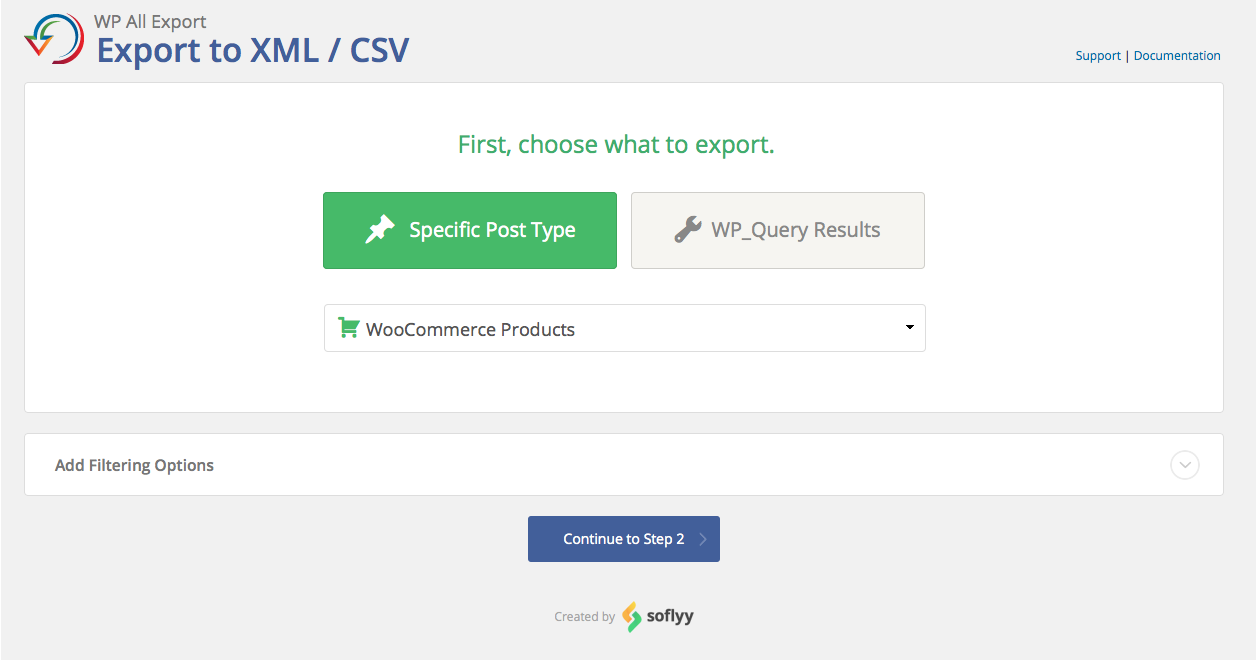
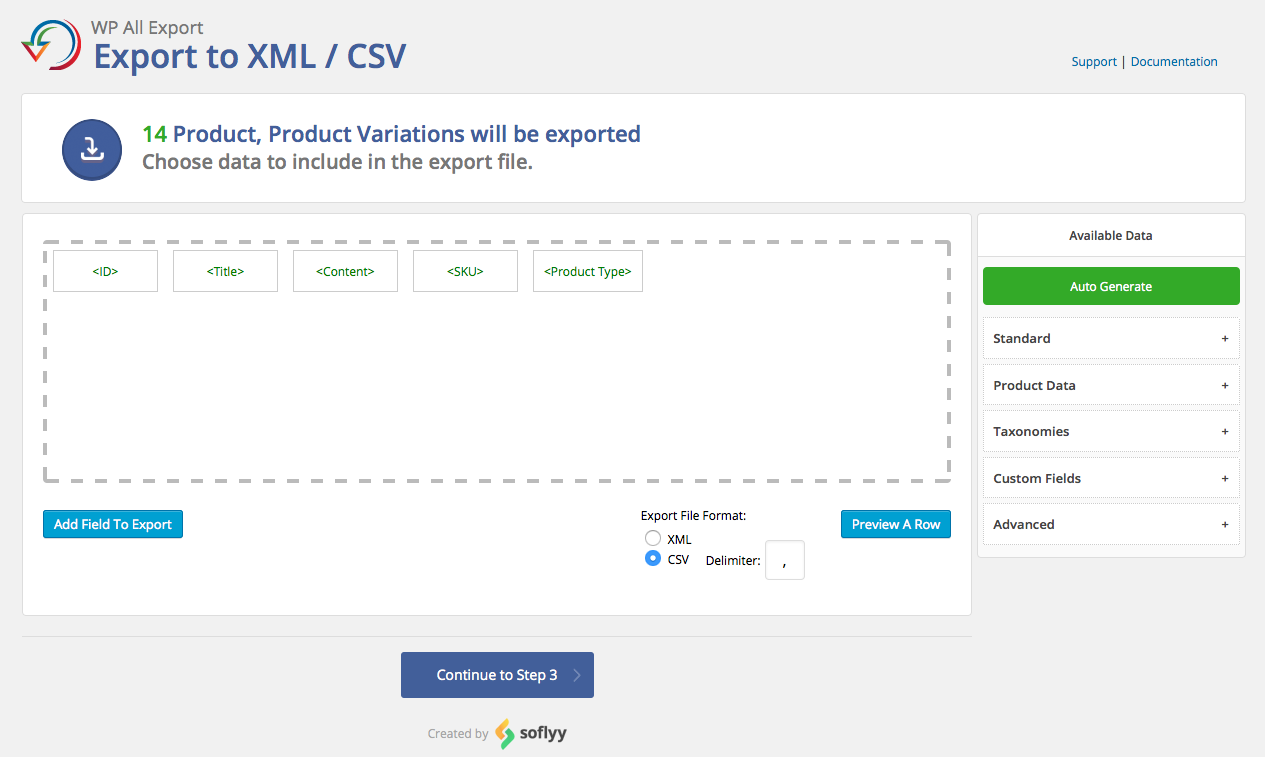
WP All Export features a three-step export process and an intuitive drag-and-drop interface that makes complicated export tasks simple and fast.

Choix
Yes — WP All Export is a safe, well-maintained plugin to use in 2026. It runs on 100K+ sites, is rated 4.5/5 and was last updated 2 months ago, and scores 90/100 on our health check.
- Prouvé à grande échelle sur plus de 100 000 sites actifs
- Loved by users — 4.5/5 from 416 reviews
- Testé avec le dernier WordPress (7.1)
Comment s'accumule-t-il ?
Côte à côte sur les installations, les mises à jour, les évaluations et le support


Téléchargements quotidiens
Les pics de téléchargement suivent généralement une nouvelle version - chaque site qui met à jour automatiquement compte comme un téléchargement.
Classements
Where WP All Export stands todayWordPress.org Classements de recherche
Position en direct dans la recherche de plugins, Top 100| Mot-clé | Position |
|---|---|
| exporter | #3 |
| export woocommerce | #9 |
| émigrer | #38 |
| wordpress csv export | #2 |
| wordpress xml export | #2 |
Adoption de version
Part de sites actifs par version.
Répartition des notes
★★★★★★★★★★ 4.5 from 416 reviews
About WP All Export
From the official readme · v1.6.0Description
WP All Export – Simple & Powerful XML / CSV Export Plugin
WP All Export features a three-step export process and an intuitive drag-and-drop interface that makes complicated export tasks simple and fast.
With WP All Export you can: export data for easy editing, migrate content from WordPress to another site, create a WooCommerce affiliate feed, generate filtered lists of WooCommerce orders, export the email addresses of new customers, create and publish customized WordPress RSS feeds – and much more.
Click here to try WP All Export right now.
-
Turn your WordPress data into a customized CSV or XML Perfect for using your WordPress data in Google Sheets or Excel.
-
Choose which data to export: WP All Export’s drag-and-drop interface makes it easy to select exactly which data you’d like to export.
-
Structure your export file however you like: Rename CSV columns and XML elements, rearrange them, or do whatever you want to do.
-
Export any custom post type, any custom field: Lots of plugins and themes store custom data in WordPress. You can export all of it with WP All Export.
-
Easy integration with WP All Import: WP All Export will generate your WP All Import settings for you so importing your data back into WordPress is easy, simple, and fast.
Wish you could edit your WordPress data in Excel or Google Sheets? Now you can – export it with WP All Export, edit it, and then import it again with WP All Import.
For technical support from the developers, please consider purchasing WP All Export Pro.
WP All Export Pro Version
WP All Export Pro is a paid upgrade that includes premium support and adds the following features:
-
Send your data to 500+ apps: Full integration with Zapier allows you to send your exported WordPress data to services like Dropbox and Google Drive, to create and update reports in Google Sheets, send email updates, or anything else you can think of. This is especially useful when you export WooCommerce orders to CSV.
-
WordPress Excel Export: Have a third-party service that only accepts Excel format? WP All Export has you covered. In addition to CSV and XML, you can easily export your WordPress data in true Excel formats (both .XLS and .XLSX)
-
Schedule exports to run automatically: Exports can be configured to run on any schedule you like. You can export new sales every week, recent user sign ups, new affiliate products added to your site, daily product stock reports, etc. Scheduled exports are very powerful when combined with Zapier.
-
Add rules to filter data: WP All Export Pro makes it easy to export the exact posts/products/orders you need. Want to export all WooCommerce orders over $100? Want to export all of the green shirts from your WooCommerce store? Want to export all new posts from 2014, except the ones added by Steve?
You can with a simple to use interface on the ‘New Export’ page in WP All Export Pro.
-
Export WordPress users: WP All Export Pro adds the ability to export WordPress users and all custom data associated with them. Available data is organized and cleaned up so you don’t need to know anything about how WordPress stores users in order to export them.
-
Export WooCommerce orders: Export WooCommerce Order item data with WP All Export Pro. Just as with any other custom post type, you can export WooCommerce orders with the free version of WP All Export. However, the order item data is stored by WooCommerce in several custom database tables and this custom data is only accessible with WP All Export Pro.
-
Pass data through custom PHP functions: With WP All Export Pro you can pass your data through a custom function before it is added to your export file. This will allow you to manipulate your data any way you see fit.
-
Guaranteed technical support via e-mail.
Upgrade to the Pro edition of WP All Export.
Automatic Scheduling
A new service from Soflyy, Automatic Scheduling provides a simple interface for setting exports to run on a schedule. The service will make sure that your exports start on time and that they successfully complete without the need to set up individual cron jobs.
It can be used with WP All Export and WP All Import Pro. You can set up as many exports and imports as you like.
What information is shared with Soflyy? If you set an export to run on a schedule, WP All Export will open an encrypted connection to Soflyy servers. It will send the license key, site URL, ID of the export you want to run, export security key, and times that you want the export to run.
WordPress CSV Exports
A CSV is a very simple type of spreadsheet file where each column is separated by a comma. With WP All Export, you can very easily set up a WordPress CSV export and control the order and title of the columns.
Very often you’ll want to edit your data with Microsoft Excel, Google Sheets, Numbers, or maybe something else. This is why a CSV export is so powerful – all spreadsheet software can read, edit, and save CSV files. WP All Export allows you to edit your WordPress data using whatever spreadsheet software you are most comfortable with.
WordPress CSV Exports
A CSV is a very simple type of spreadsheet file where each column is separated by a comma. With WP All Export, you can very easily set up a WordPress CSV export and control the order and title of the columns.
Very often you’ll want to edit your data with Microsoft Excel, Google Sheets, Numbers, or maybe something else. This is why a CSV export is so powerful – all spreadsheet software can read, edit, and save CSV files. WP All Export allows you to edit your WordPress data using whatever spreadsheet software you are most comfortable with.
WordPress XML Exports
Sometimes you’ll want to export your data so that some other tool, software, or service can use it. Very often they will require your data to be formatted as an XML file. XML is very similar to HTML, but you don’t need to know anything about that in order to set up an XML export with WP All Export.
If you want to set up a WordPress XML export all you need to do is select ‘XML’ when configuring your export template. And just like a CSV export, an XML export will allow you to customize the element names and put them in any order you wish.
Related Plugins
Import any XML or CSV File to WordPress
Import Products from any XML or CSV to WooCommerce
Export Products to CSV/XML for WooCommerce
Custom Product Tabs for WooCommerce WP All Import Add-on
Export Orders to CSV/XML for WooCommerce
Export WordPress Users to CSV/XML
Related Tutorials
How to Export WooCommerce Products to Google Merchant Center (Google Shopping)
How to Export Gravity Forms Entries
Export Toolset Types to CSV, XML, or Excel
How to Export WooCommerce Variable Products
How to Export Blogs, Articles, Posts, Standard Post Data, Permalinks, Excerpts, Captions, Menus, Subscriptions, and Other Details From Your Websites
How To Export WordPress Comments
How To Export WooCommerce Coupons
How To Export WooCommerce Reviews
How to Schedule Your Exports to Run Automatically
How to Migrate WooCommerce and WordPress From One Host to Another
Premium Support
You can submit the support form on our website or email us at support@wpallimport.com. While we try to assist users of our free version, please note that support is not guaranteed and will depend on our capacity. For premium support, purchase WP All Export Pro.
Installation
Either: –
- Upload the plugin from the Plugins page in WordPress
- Unzip wp-all-export.zip and upload the contents to /wp-content/plugins/, and then activate the plugin from the Plugins page in WordPress
Journal de modifications
1.6.0
- improvement: UI updates
- bug fix: restore the drag & drop editor when exporting users with the free User Export Add-On
- bug fix: plugins screen fatal on multisite subsites
- bug fix: resolve various PHP notices
1.5.0
- security improvement: require nonce verification for the export cancel and process actions to prevent CSRF
- maintenance: add addon-api framework to support field-level export add-ons
1.4.15
- security improvement: fixes CVE-2026-1582
1.4.14
- improvement: UI updates
1.4.13
- improvement: better handling of unexpected database values
1.4.12
- improvement: UI updates
Captures d'écran
Pour les développeurs
Est-ce votre plugin ? Montrez les chiffres.
Ajoutez un badge en direct à votre site, docs ou github readme. Il se met à jour par lui-même - aucun compte n'est nécessaire.
Best WP All Export alternatives
Tous les plugins d'exportation →




FAQ
WP All Export: quick answers
Réponses directes, extraites des données en direct WordPress.org.
Source : WordPress.org
Is WP All Export free?
Yes. WP All Export is free to download and use from the official WordPress.org plugin directory.
Is WP All Export safe to use in 2026?
Yes — WP All Export is a safe, well-maintained plugin to use in 2026. It runs on 100K+ sites, is rated 4.5/5 and was last updated 2 months ago, and scores 90/100 on our health check.
How many websites use WP All Export?
WP All Export is active on 100K+ WordPress websites and has been downloaded 3,354,787 times since it launched in January 2014. It was downloaded 30,515 times in the last 30 days.
Does WP All Export work with WordPress 7.1?
Yes. The developer has tested WP All Export up to WordPress 7.1.5, the latest release. It requires WordPress 5.0 or newer.
What PHP version does WP All Export need?
WP All Export requires PHP 7.4 or higher. Most hosts run PHP 8.x today, so it works on any modern WordPress hosting.
When was WP All Export last updated?
The latest version, 1.6.0, was released on October 1, 2026 (2 months ago).
Who makes WP All Export?
WP All Export is developed and maintained by Soflyy.
What are the best alternatives to WP All Export?
The most popular alternatives to WP All Export are Widget Importer & Exporter (200K+ installs), Customizer Export/Import (100K+ installs) and Advanced Order Export For W… (100K+ installs).
Propulsé par PageForge
Un modèle et une feuille de calcul. Une vraie page pour chaque recherche.
PageForge transforme chaque ligne d'un CSV en une page WordPress avec son propre titre, URL, SEO et schéma, construit sur la mise en page que vous Déjà conçu. Gratuit sur WordPress.org.
- CSV et XLSX, plus Google Sheets sur les professionnels et les entreprises
- Son propre titre, URL, SEO champs et schéma pour chaque page
- Fonctionne avec l'éditeur de blocs, Elementor, Divi et Avada
- Gratuit sur WordPress.org, pas de carte de crédit