


WorkMore Media Folders – Media Library Folders & Drag-and-Drop Organizer
Organize the WordPress Media Library with drag-and-drop folders. Virtual folders never move files or break URLs, and stay fast with 50,000+ files.

Choix solide
WorkMore Media Folders is a solid plugin choice in 2026, with a few things worth checking first. It runs on 200+ sites and was last updated 1 month ago, and scores 65/100 on our health check.
- Testé avec le dernier WordPress (7.1)
- Petite base d'utilisateurs (plus de 200 installations actives)
- Très peu de critiques jusqu'à présent
Comment s'accumule-t-il ?
Côte à côte sur les installations, les mises à jour, les évaluations et le support



Téléchargements quotidiens
Les pics de téléchargement suivent généralement une nouvelle version - chaque site qui met à jour automatiquement compte comme un téléchargement.
Classements
Where WorkMore Media Folders stands todayWordPress.org Classements de recherche
Position en direct dans la recherche de plugins, Top 100| Mot-clé | Position |
|---|---|
| drag-and-drop | >100 |
| folders | #45 |
| media folders | #44 |
| media library | >100 |
| organize media | #47 |
Adoption de version
Part de sites actifs par version.
About WorkMore Media Folders
From the official readme · v2.3.0Description
WorkMore Media Folders turns the WordPress Media Library into a file browser you already know how to use: create folders and subfolders, drag images, videos and documents into them, and find any file in seconds — in the Media Library, in the block editor, in WooCommerce and in your page builder.
The folders are virtual. Your files stay exactly where WordPress uploaded them, so organizing thousands of files changes no image URL, breaks no link in your posts and does nothing to your SEO. Deactivate the plugin and your site is exactly as it was.
Unlimited folders, subfolders and files, drag and drop, folder colors, importers and every setting are free. Nothing in this plugin is locked, limited or time-boxed.
Why WorkMore Media Folders?
- Your files never move. Folders are a lightweight taxonomy on top of the library. No file is copied, renamed or relocated, and no URL in your content is rewritten — every image keeps working, including in image optimizers and thumbnail tools.
- Zero frontend footprint. No CSS, no JavaScript and no hooks on your public site, so your visitors’ page speed and Core Web Vitals are untouched. An automated test checks this on every release.
- Fast with big libraries. Benchmarked with 50,000 attachments and 500 folders: the folder tree, folder filtering, search and sorting each answer in under 300 ms on the server.
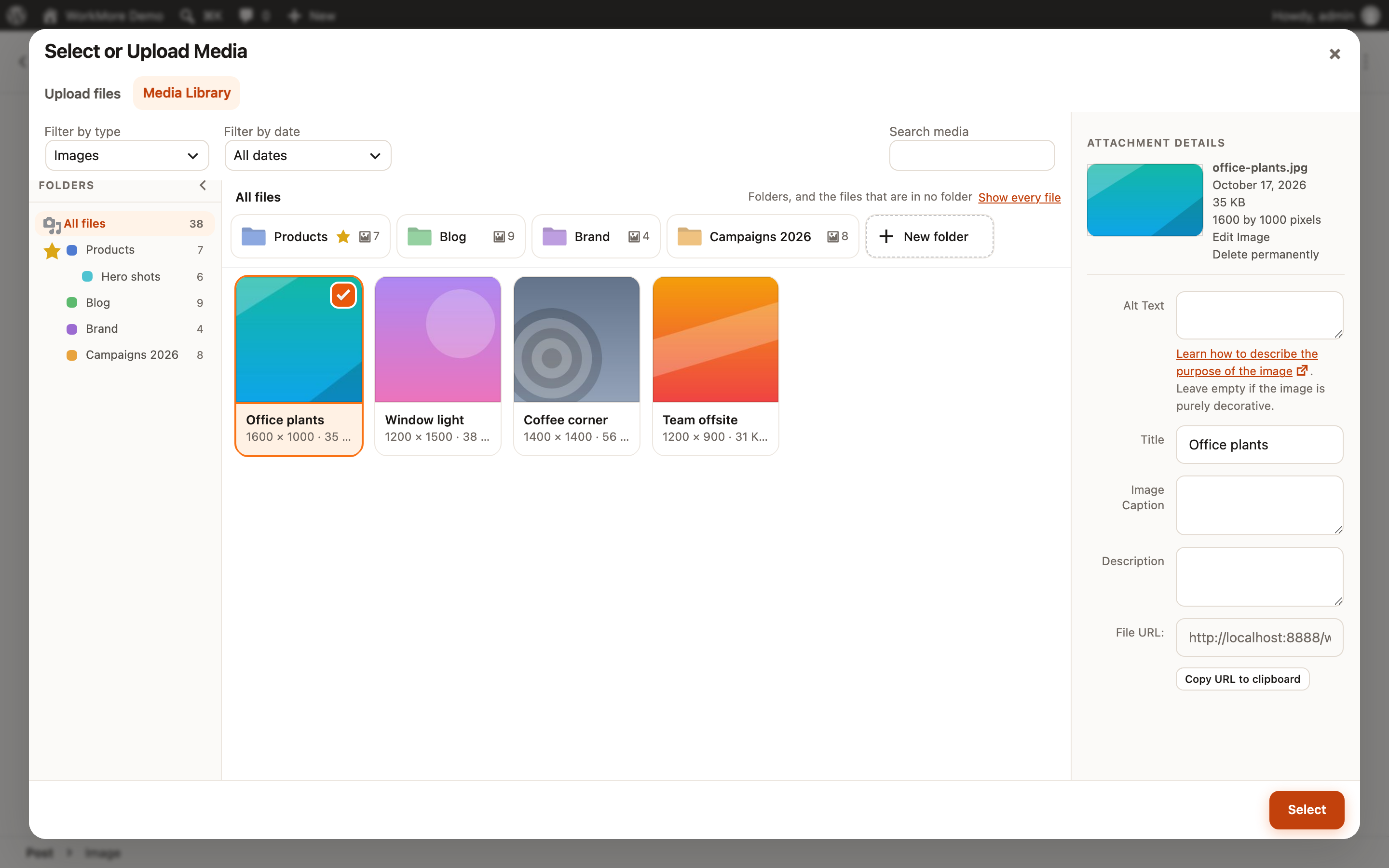
- One integration, everywhere you pick media. The folders live in the WordPress media layer itself, so the same folders appear in the Media Library and in every media window that WordPress opens — without separate code for each editor or builder.
- Easy to switch, easy to leave. Import your folders from another plugin in one click, and your old plugin’s data is never modified. An opt-in cleanup removes every trace on uninstall.
Organize the Media Library like a real file manager
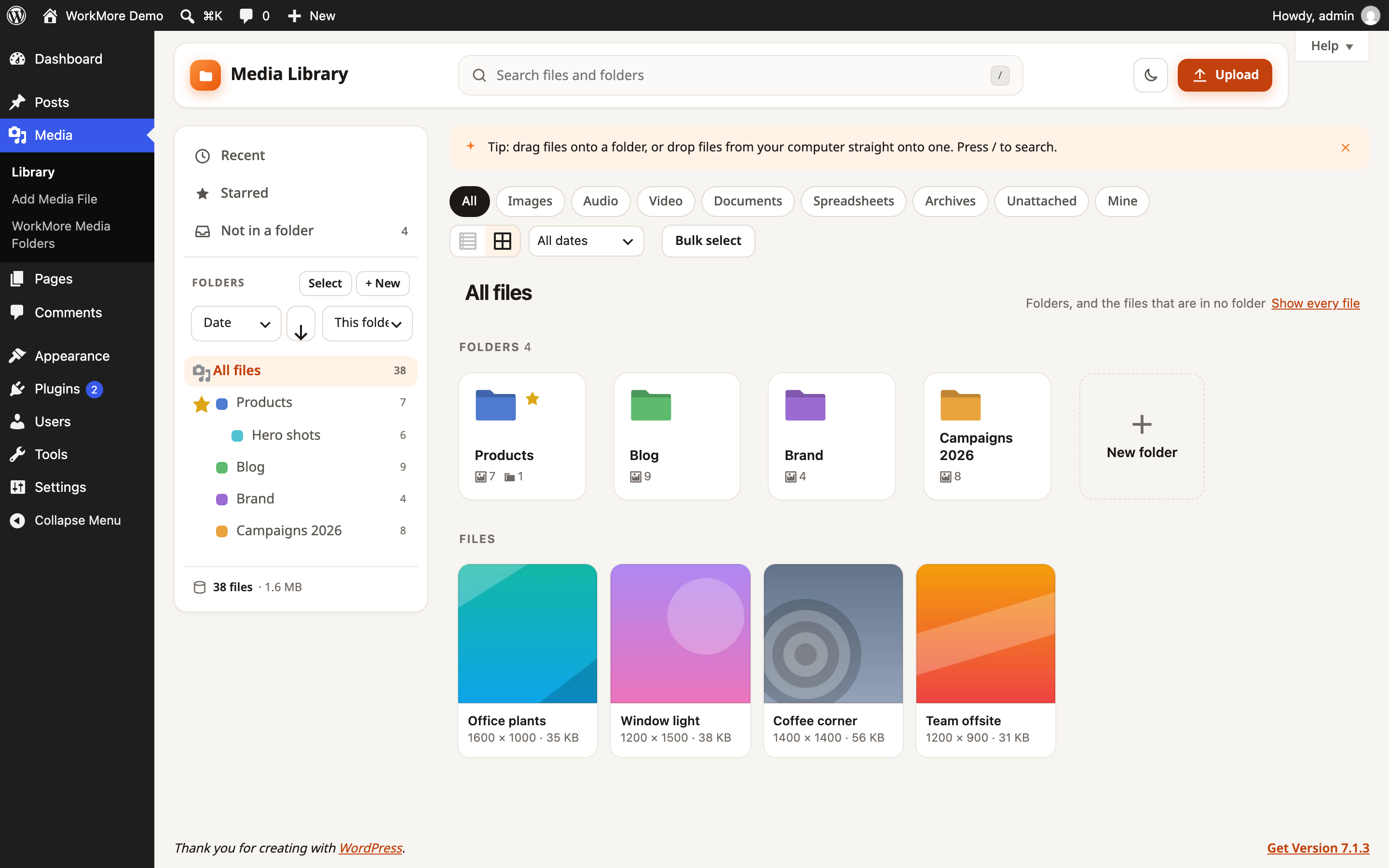
- Folder tiles, Finder-style. The top level of the Media Library shows your folders as tiles next to the files that are not in a folder yet. Open a folder in place and follow the breadcrumb back.
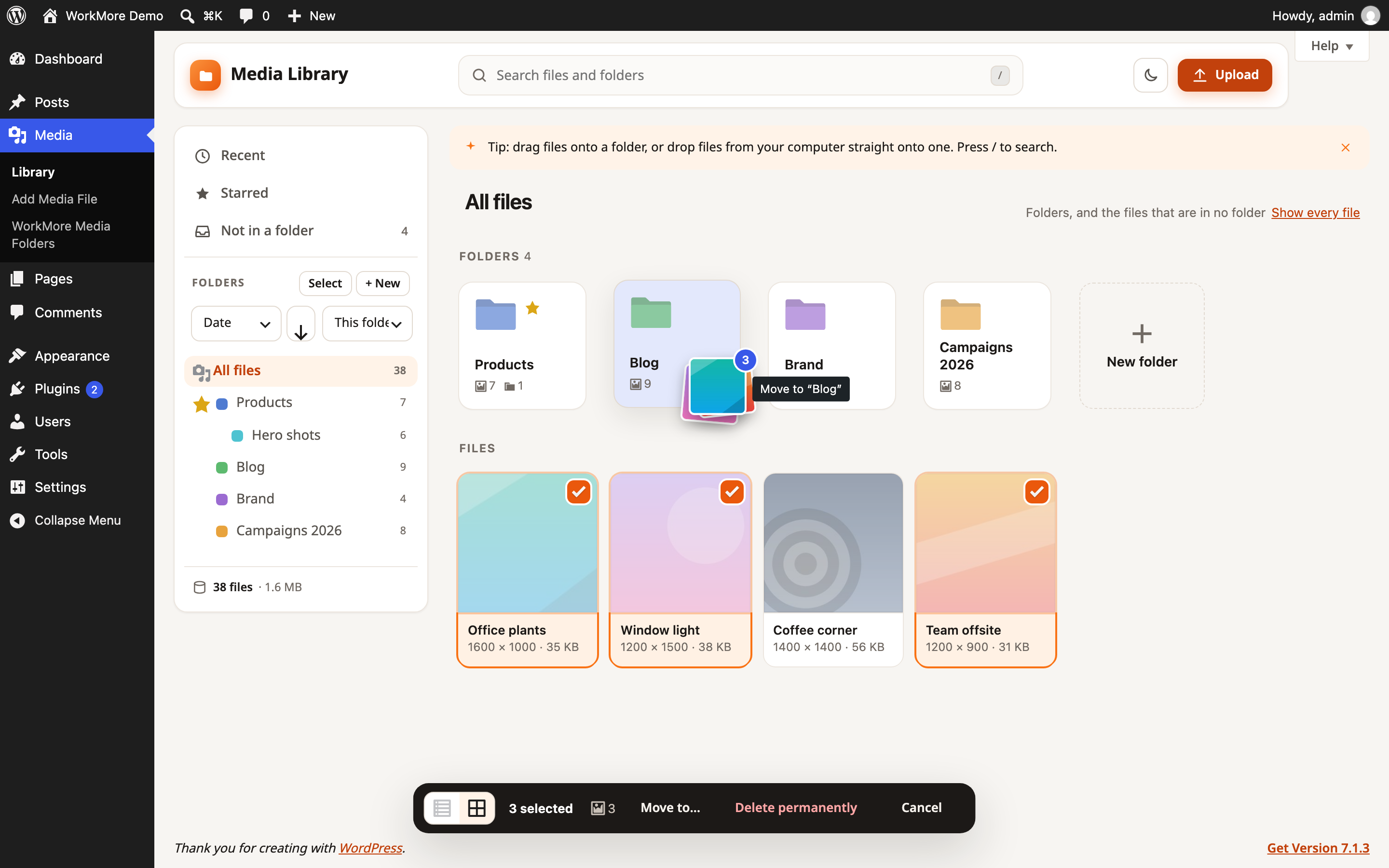
- Drag and drop. Drag files and folders onto any folder. A selection travels as one stack with a count, holding it over a folder opens that folder, and anything dropped elsewhere flies back.
- Upload straight into a folder. Drop files from your computer onto a folder tile, a breadcrumb step or a sidebar folder; uploads made while you view a folder land in that folder.
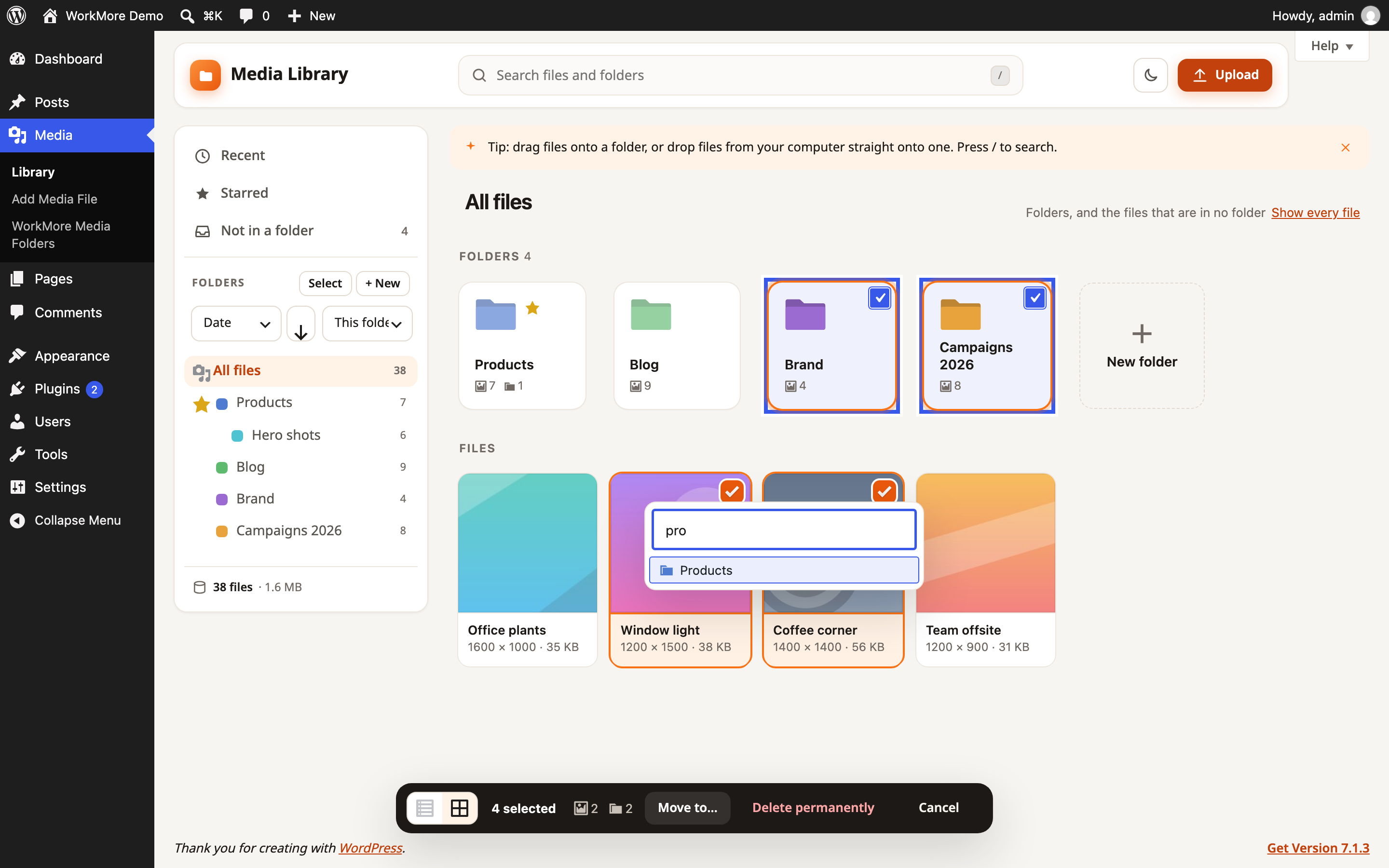
- Select folders and files together. Drag a selection box, Ctrl/⌘-click, Shift-click or press Ctrl/⌘+A, then “Move to…” any folder in one step.
- Undo. Ctrl/⌘+Z undoes moves and folder deletions.
- Unlimited nested folders. Create subfolders at any depth, reorder them by dragging and move them under another parent.
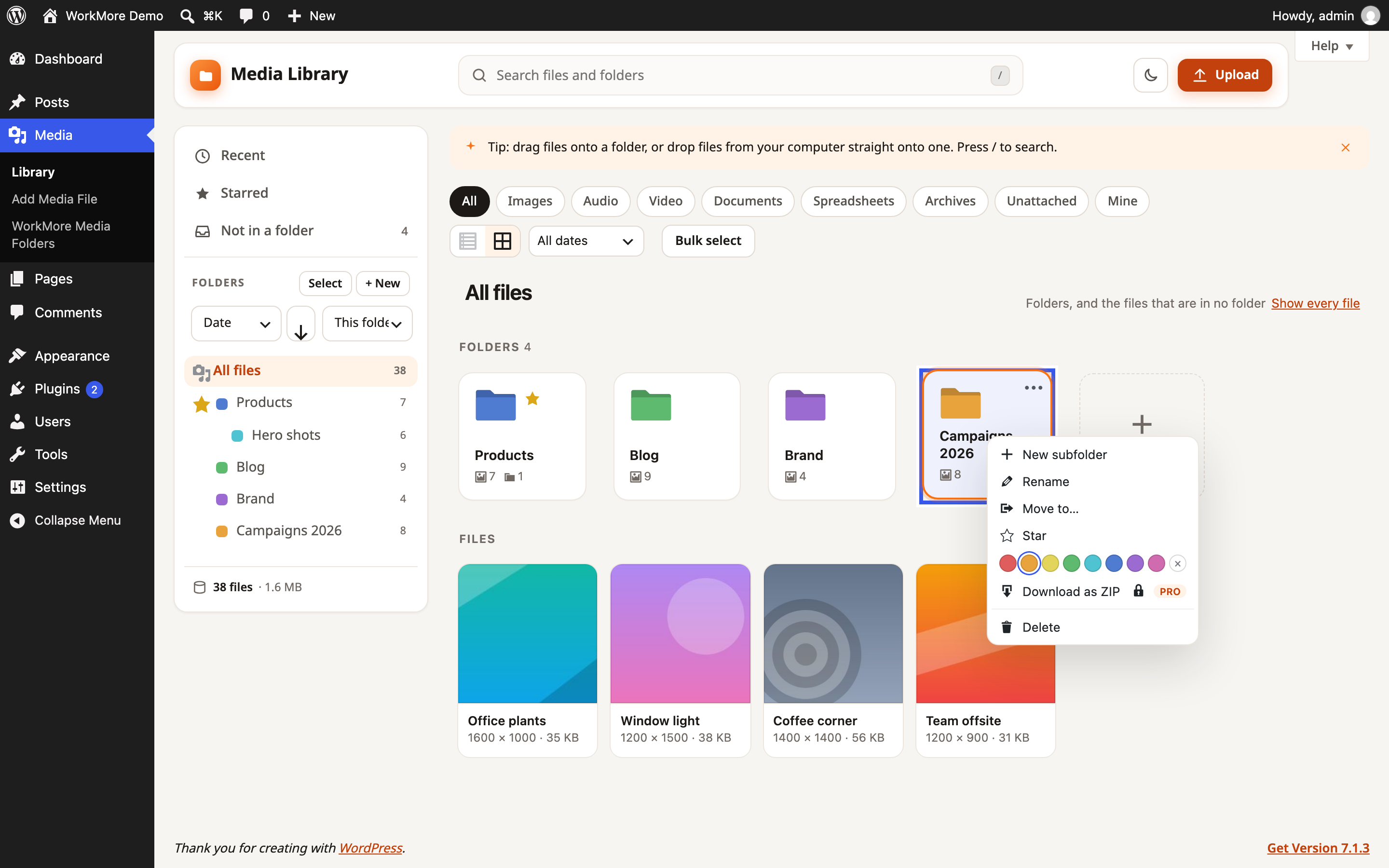
- Colors and stars. Color-code folders and star the ones you use most so they stand out in the tree and on the tiles.
- Right-click menu, inline rename and bulk actions. Move many files at once, or delete a folder with or without its files (the destructive path asks you to type a confirmation).
- Search inside folders. Search the current folder, the folder and its subfolders, or the whole library; matching folder names show up too, and search also looks at file names.
- Sort the way you think. Sort by name, date, date modified, file size, file type or author. File size sorting uses its own index, built from the settings screen in resumable batches.
- Grid and list view. The folder sidebar works in both Media Library views; in the list view, drag rows onto folders by their thumbnail.
- Accessible and mobile friendly. Full keyboard support, screen reader announcements, “reduce motion” respected, long-press dragging on touch screens, and on phones the folder panel folds above the files.
Two interfaces: Standard and Classic
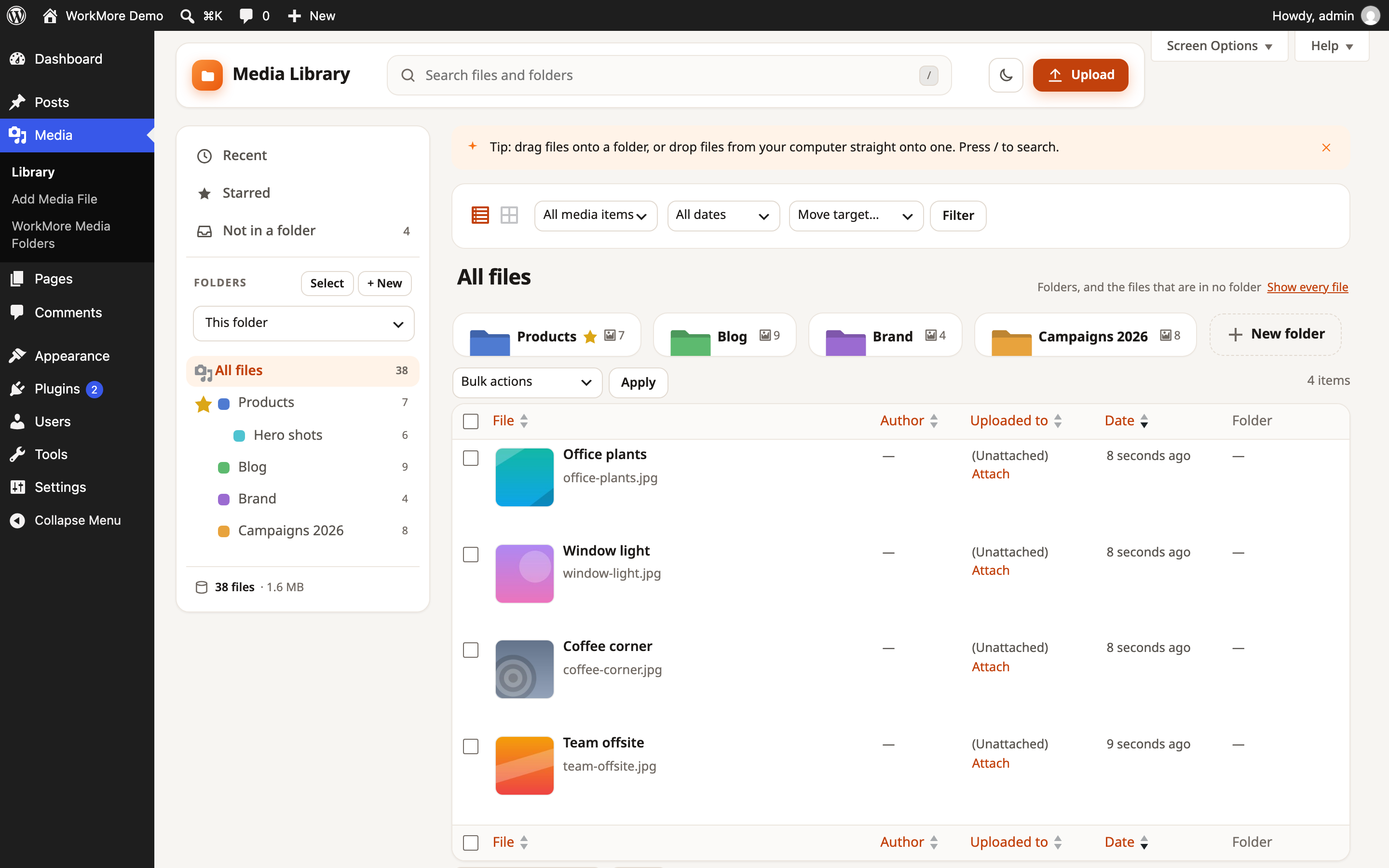
- Standard, the default for new sites. A modern, app-like Media Library: one search field, quick type filters, smart views (Recent, Starred, Not in a folder), a details panel for any file, a storage meter, file cards with names and sizes, a floating selection bar and dark mode — in the Media Library, the media window of every editor and the settings screen.
- Classic. The lightest interface, looking like the rest of WordPress admin. It loads only the plugin’s own core files, nothing for the Standard look.
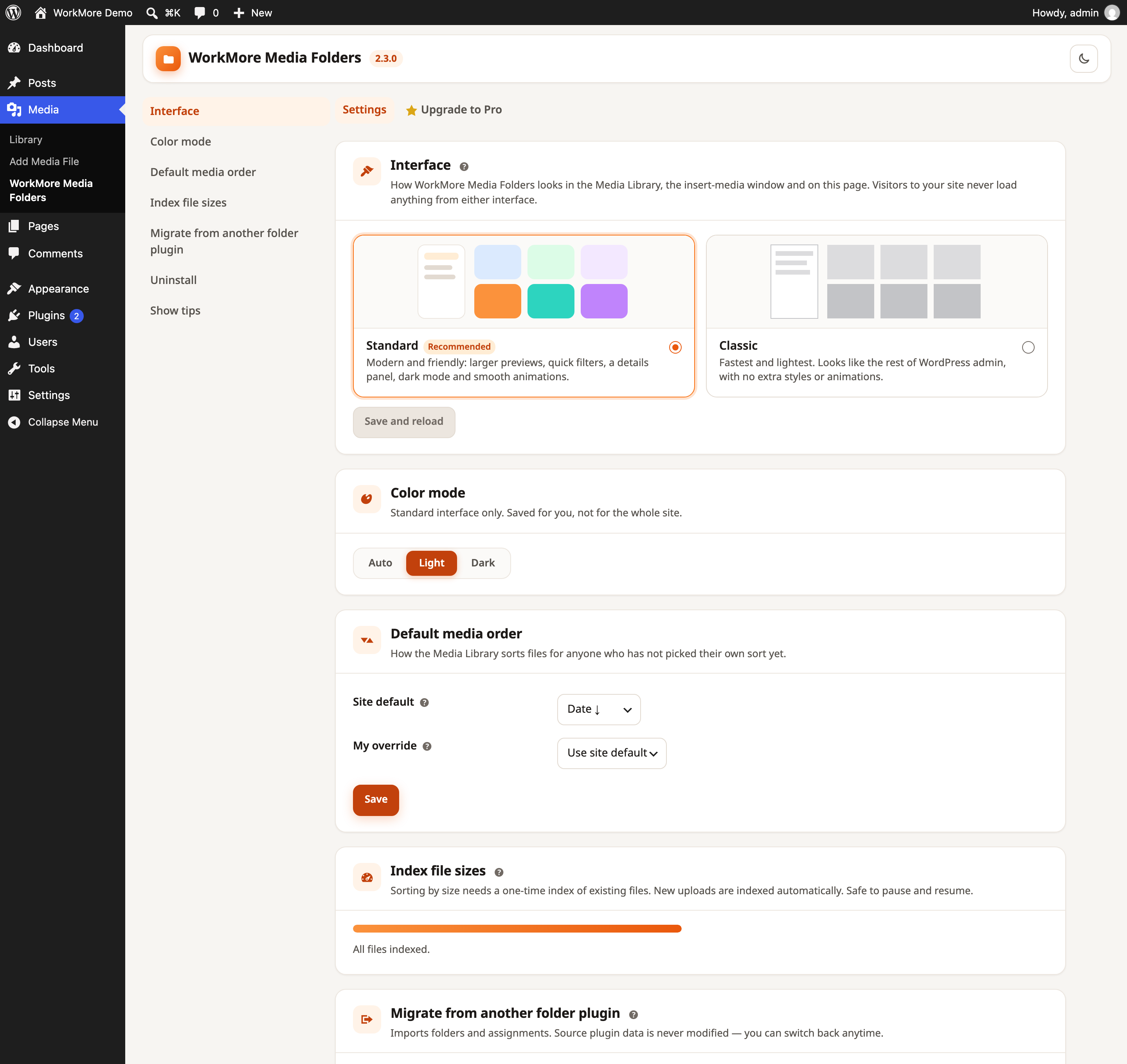
- Same features, your choice. Both interfaces do everything this plugin does; switch any time under Media → WorkMore Media Folders → Interface. Sites that used the plugin before version 2.3.0 keep Classic until they switch. Visitors to your site never load anything from either one.
Works with your editor, store and page builder
Because WorkMore Media Folders extends the standard WordPress media window, your folders appear wherever that window opens:
- Block editor (Gutenberg) — Image, Gallery, Cover and Featured Image
- Classic Editor — the “Add Media” window
- WooCommerce — product images and product galleries
- Elementor — the media picker of its widgets
- Other page builders and themes that use the standard WordPress media window
Image optimization and thumbnail plugins keep working as before: folder operations never touch the files, the file paths or the attachment metadata.
Switching from another media folder plugin
Built-in importers bring your existing folder structure over from:
- Archives
- Real Media Library
- Happyfiles
- Folders by Premio
- Dossiers méchants
- Enhanced Media Library (media categories)
Imports run in resumable batches and can be run again safely — nothing is duplicated. The other plugin’s data is only read, never changed, so you can compare both side by side or switch back at any time. Find the importers under Media → WorkMore Media Folders.
Intimité
The free plugin makes no network requests of its own, sends no data anywhere and does not track you or your visitors. The only outbound links are the “Upgrade to Pro” buttons, which open our website in a new tab when you click them.
Traduction
Ships in English plus ten languages: Thai, Japanese, German, French, Spanish, Italian, Dutch, Brazilian Portuguese, Indonesian and Simplified Chinese. More are welcome on translate.wordpress.org.
Pour les développeurs
- Folders are a standard hierarchical taxonomy (
wmmf_folder) on attachments, so your data stays readable by WordPress and by other tools. - REST API under
workmore-media-folders/v1, with a capability check on every route; the required capability is filterable (wmmf_capability). - PHP actions and filters such as
wmmf_folder_created,wmmf_attachments_assignedandwmmf_folder_tree_payload, plus JavaScript filters for the folder tiles and selection actions. - The JavaScript ships minified; the human-readable source is included in the plugin’s
src/directory together with the build configuration (vite.config.js).
Pro add-on (optional)
Everything above is free and complete. A separate, optional add-on — WorkMore Media Folders Pro, sold on workmore.connextsystem.com — adds:
- Cloud storage offload to Cloudflare R2, Amazon S3, DigitalOcean Spaces, Backblaze B2, Wasabi or MinIO, with every move checked and fully reversible
- ZIP downloads of folders and selections
- Folder sizes on the folder tiles
- Auto-organize rules for new uploads
- Per-folder permissions by user role
- A library insights dashboard
Inside this plugin the add-on is only mentioned on the “Upgrade to Pro” settings tab and on clearly labeled menu entries that link to that tab. There are no admin-wide notices.
Installation
- In your WordPress admin, go to Plugins → Add New Plugin and search for “WorkMore Media Folders”.
- Click Install Now, then Activate.
- Open Media → Library. The folder panel appears beside your files; click “New folder” to create your first folder and drag files onto it.
- Optional: to pick the Standard or Classic interface, bring over folders from another plugin, or build the file size index for sorting, open Media → WorkMore Media Folders.
To install manually, upload the workmore-media-folders folder to /wp-content/plugins/ and activate the plugin on the Plugins screen.
Journal de modifications
New Standard interface: a modern look with smart views, a details panel and dark mode. Your site stays on Classic until you switch under Media → WorkMore Media Folders.
2.3.0
- New: two interfaces, chosen under Media → WorkMore Media Folders → Interface. Standard — the default for new sites — gives the Media Library, the media window of every editor and the settings screen a modern look: one search field (press /), type chips, file cards with names and sizes, a floating selection bar and dark mode (auto, light or dark, saved per user). Classic is the interface you know, unchanged and the lightest. Sites updating from an earlier version stay on Classic and see a one-time suggestion in the Media Library.
- New in Standard: smart views — Recent (uploaded in the last 30 days), Starred (files in starred folders) and Not in a folder.
- New in Standard: a details panel for any file — title, size, dimensions, folder, where it is stored and Copy URL; Edit opens the WordPress details window as before.
- New in Standard: a storage meter (how many files, how much space) and a short tips line you can turn off.
- For developers: add-on hooks
wmmf.library.mounted,wmmf.library.view,wmmf.library.navigateandwmmf.modal.mounted(JavaScript), thewmmf_statsfilter and GET/statsin the REST API.
2.2.1
- Fix: the folder menu stays on screen. Opened low on the screen, a long menu (with the Pro add-on’s storage entries, for example) ran off the bottom and its last entries — Bring files back, Delete — could not be reached. It now places itself by its real size and scrolls inside when the window is shorter than the menu.
2.2.0
- New: folders in the Media Library grid, Finder-style. The top level shows your folders as tiles and only the files that are in no folder; open a folder in place, follow the breadcrumb back, create a folder from the last tile. “Show every file” lists the whole library.
- New: select folders and files together — a selection box, Ctrl/⌘-click, Shift-click or Ctrl/⌘+A — and “Move to…” any folder in one step, with undo.
- New: dragging redone. A selection travels as one stack with a count, a tip says what a drop will do, holding over a folder opens it, and anything dropped elsewhere flies back. Touch screens pick up with a long press, Ctrl/⌘+Z undoes, “reduce motion” is respected and screen readers hear what happens.
- New: drop files from your desktop onto a folder tile, a breadcrumb step or a sidebar folder to upload them straight into it.
- New: the media modal (Gutenberg, Classic Editor, WooCommerce, page builders) opens on the same top level, with the folders as chips above the files.
- New: the list view gets the folder sidebar and chips; drag rows onto folders.
- New: on narrow screens the folder panel folds above the files.
- Changed: “Uncategorized” is gone from the sidebar and the media modal — the top level holds the files that are in no folder, and dropping files on “All files” takes them out of their folder.
- Changed: files you are not allowed to edit are refused while you drag them, with the reason.
- Fix: a file size that changes when an image is edited reaches the folder totals at once.
- For developers: new hooks for add-ons —
wmmf_folder_tree_payload(PHP) and the JavaScript filterswmmf.tile.meta,wmmf.tile.badgesandwmmf.selection.actions.
2.1.2
- Fix: creating a folder from the sidebar no longer shows “A folder with this name already exists here.” after the folder was created. The name was saved twice; it is now saved once, and a name that is refused stays in the field so you can change it.
2.1.1
- Fix: the Media Library grid no longer repeats files and stops loading (“Load more”) when many files share the same upload time, the name, or another sort value — common after an import. Every sort now has a stable order.
2.1.0
- Smaller download: the styles and translations of the separately sold Pro add-on now ship with the add-on itself, not with this plugin.
- The “Upgrade to Pro” links open the Media Folders pricing page directly.
Captures d'écran


Pour les développeurs
Est-ce votre plugin ? Montrez les chiffres.
Ajoutez un badge en direct à votre site, docs ou github readme. Il se met à jour par lui-même - aucun compte n'est nécessaire.
Best WorkMore Media Folders alternatives
All drag-and-drop plugins →





FAQ
WorkMore Media Folders: quick answers
Réponses directes, extraites des données en direct WordPress.org.
Source : WordPress.org
Is WorkMore Media Folders free?
Yes. WorkMore Media Folders is free to download and use from the official WordPress.org plugin directory.
Is WorkMore Media Folders safe to use in 2026?
WorkMore Media Folders is a solid plugin choice in 2026, with a few things worth checking first. It runs on 200+ sites and was last updated 1 month ago, and scores 65/100 on our health check.
How many websites use WorkMore Media Folders?
WorkMore Media Folders is active on 200+ WordPress websites and has been downloaded 2,509 times since it launched in September 2026. It was downloaded 427 times in the last 30 days.
Does WorkMore Media Folders work with WordPress 7.1?
Yes. The developer has tested WorkMore Media Folders up to WordPress 7.1.5, the latest release. It requires WordPress 6.0 or newer.
What PHP version does WorkMore Media Folders need?
WorkMore Media Folders requires PHP 7.4 or higher. Most hosts run PHP 8.x today, so it works on any modern WordPress hosting.
When was WorkMore Media Folders last updated?
The latest version, 2.3.0, was released on October 17, 2026 (1 month ago).
Who makes WorkMore Media Folders?
WorkMore Media Folders is developed and maintained by Work More.
What are the best alternatives to WorkMore Media Folders?
The most popular alternatives to WorkMore Media Folders are Elementor Agent Ready Websi… (10M+ installs), Kirki (400K+ installs) and Page Builder by SiteOrigin (400K+ installs).
Propulsé par PageForge
Un modèle et une feuille de calcul. Une vraie page pour chaque recherche.
PageForge transforme chaque ligne d'un CSV en une page WordPress avec son propre titre, URL, SEO et schéma, construit sur la mise en page que vous Déjà conçu. Gratuit sur WordPress.org.
- CSV et XLSX, plus Google Sheets sur les professionnels et les entreprises
- Son propre titre, URL, SEO champs et schéma pour chaque page
- Fonctionne avec l'éditeur de blocs, Elementor, Divi et Avada
- Gratuit sur WordPress.org, pas de carte de crédit