


WishSuite – Wishlist for WooCommerce
WishSuite integrates wishlist functionality into your WooCommerce store, so customers can easily add products to their wishlists for later purchases.

Choix solide
WishSuite is a solid plugin choice in 2026, with a few things worth checking first. It runs on 1K+ sites, is rated 5/5 and was last updated 3 months ago, and scores 67/100 on our health check.
- Testé avec le dernier WordPress (7.1)
Comment s'accumule-t-il ?
Côte à côte sur les installations, les mises à jour, les évaluations et le support


Téléchargements quotidiens
Les pics de téléchargement suivent généralement une nouvelle version - chaque site qui met à jour automatiquement compte comme un téléchargement.
Classements
Where WishSuite stands todayWordPress.org Classements de recherche
Position en direct dans la recherche de plugins, Top 100| Mot-clé | Position |
|---|---|
| product wishlist | #16 |
| Wishlist | #15 |
| wishsuite | #1 |
| WooCommerce | >100 |
| woocommerce wishlist | #16 |
Adoption de version
Part de sites actifs par version.
Répartition des notes
★★★★★★★★★★ 5 from 11 reviews
About WishSuite – Wishlist for WooCommerce
From the official readme · v1.5.10Description
WishSuite is an ultimate and exclusive WooCommerce plugin that allows you to create stunning Wishlists for your WooCommerce store. By using this handy Wishlist plugin, adding a Wishlist will be super easy and straightforward.
The Wishlist is an indispensable part of e-commerce sites nowadays that enables customers to create customized collections of items that they desire to purchase and save those items in their user account for further use in the future.
Adding an excellent Wishlist is essential and vital since it plays a significant role in improving the overall user experience. It benefits both you and your customers in multiple ways as in reality, it is used as a middle ground between purchasing and forgetting items. So, even though a customer doesn’t buy a product instantly, the Wishlist helps him/her remember the product or store for future reference. Therefore, it increases the possibility of your shoppers’ return visits to your site and boosts your revenue. By integrating a Wishlist with such a modern WooCommerce plugin like WishSuite, you can also reduce the number of users who get lost on their way to checkout and therefore expand your customer base.
WishSuite comes packed with various useful settings that modern and standard Wishlist plugins have. You will get options to modify the button, table, or style. All the nifty features available in this plugin will help you deploy an impressive Wishlist on your WooCommerce site that can bring forth a positive outcome by increasing the amount of your traffic, conversion, and sales.
Traits
- Select the Wishlist Page
- Add custom Name for Wishlist Page.
- Remove the products from the Wishlist after adding them to the cart.
- Show the Wishlist Table on any page of your website.
- Set the Position of the “wishlist” button on the product page and catalog (after/before Cart button/Price etc.)
- Add the Wishlist button anywhere on a page using Shortcode.
- Show/Hide Columns in the Wishlist Table.
- Wishlist Share on Social Media (Facebook, Twitter, Pinterest, Linkedin, WhatsApp, email, Reddit, Telegram, Odnoklassniki, VK)
- Option to remove the product from the wishlist on the second click.
- Option to show notification when a client adds or removes a product from the wishlist.
- Display wishlist products based on wishlist count and users.
General Settings:
- Enable you to Limit use for the logged-in users only.
- The options to customize the Wishlist Button Text for logged-in users only.
- Enable you to show a notification when a client adds or removes a product from the wishlist successfully.
- The options to customize the “Product added to Wishlist” and “Product removed from Wishlist” Text is also available.
- The options to customize “remove notification automatically after” given “seconds”.
Button Settings:
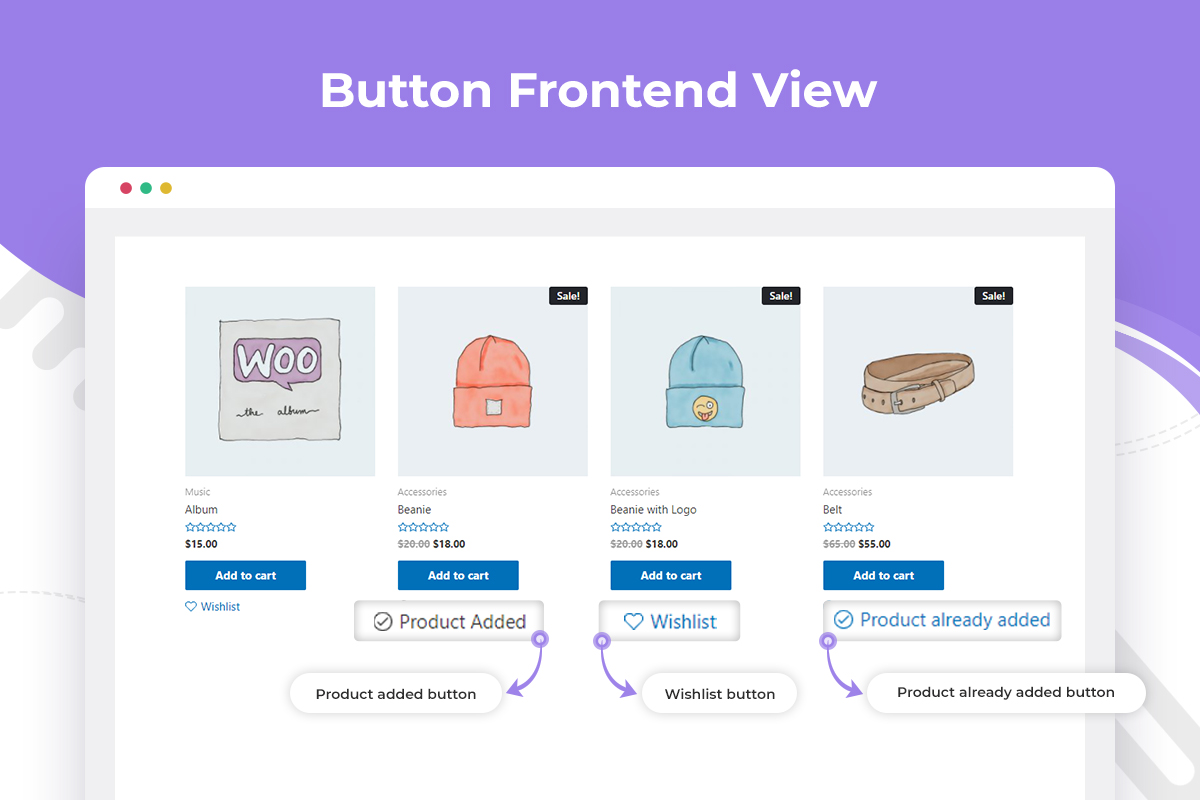
- Enables you to show the button in the Product List and Product Page.
- Enable you to remove a product from the wishlist on a second click.
- You can set the Shop Page Button Position and the Product Page Button Position.
- The options to customize Wishlist button text, Wishlist Added Button Text, Wishlist Existing Button Text, and Wishlist Remove Button Text are also available.
Table Settings:
- Enables you to select a Wishlist page for the Wishlist table. You can place the Wishlist Product table on any page you want, such as Homepage, My Account Page, Checkout Page, Cart Page, and Shop Page.
- You can add the functionality so that shoppers can easily remove the products from the Wishlist after adding them to the cart.
- You can also show various fields in the table such as Remove, Image, Title, Price, Quantity, etc.
- The options to set Fields Heading Text, Empty Table Text, and Image Size are available.
Style Settings:
- From the style settings, you can set the Button style, Button Icon Type, Added Button Icon Type, Table Style, etc.
If you are a WordPress theme or plugin developer, you can watch this video on “How to integrate WishSuite WooCommerce Wishlist Plugin in your WordPress WooCommerce theme.”
Available Shortcodes
Display Number of item(s) in wishlist using
[wishsuite_counter]
Showcase wishlist item(s) in a table using
[wishsuite_table]
Other Projects
We have a lot of plugins and extensions that might interest you. Try out other projects by following this link:
Woolentor Addons
Woolentor is a WooCommerce page builder plugin that extends the functionality of the WooCommerce store. These Elementor Addons provide additional features and options for WooCommerce stores. Woolentor is the best alternative for ShopReady, Kadence, JetWidgets, ShopEngine, and CoDesigner. The Woolentor add-ons come with 50+ free Elementor widgets like Wishlist Extension Addon, Product Compare, Product Filters, Product Variation Swatches, Shopify Style Checkout, Product Slider, and 50+ pro Elementor Widgets like Checkout Fields Editor, Partial Payment, Email Customizer for WooCommerce with ready Email Templates, WooCommerce Email Automation, Multi-Step Checkout, and many much more. Also, it provides 90+ WooCommerce Elementor templates, 22+ WooCommerce Modules, and Gutenberg Blocks.
HT Mega For Elementor
HT Mega is an Elementor Add-on that comes with a custom page builder, header builder, footer builder, mega menus, and more for your Elementor based website. The HT Mega plugin also includes a comprehensive set of Elementor widgets, readymade Elementor templates, and Elementor Blocks. HT Mega plugin works like ElementsKit, Essential Addons for Elementor, Royal Elementor Addons, Premium Addons, Happy Addons, PowerPack Addons, Unlimited Elements, Qi Addons, etc. The HT Mega plugin provides 84+ free Elementor widgets like Post Grid widget, Slider widget, Accordion widget, Elementor Forms widget, Contact Form Widget, Elementor tables, and other related items. It also provides 18+ pro widgets like Filterable Gallery Widget, Event Box Widget, Breadcrumbs Widget, Elementor Facebook Review Widget, Elementor Category List Widget, etc.
Hashbar Wp Notification Bar
HashBar is a WordPress Notification Bar Plugin that enables you to create unlimited notification bars on your WordPress website. You can create as many notification bars as you want and customize their content to meet your needs.
WP Plugin Manager – Deactivate plugins per page
WP Plugin Manager is the perfect solution for those who want to disable certain plugins on specific pages or posts. With this plugin, you can easily activate or deactivate plugins on a per-page or per-post basis. Whichever plugin you don’t need you can deactivate or disable that plugin with the help of WP Plugin Manager.
Extensions For Cf7
Contact Form 7 is an excellent plugin for organizing your contact page. The CF7 extensions plugin includes the Contact Form 7 Database, enabling Conditional Fields for Contact Form 7, etc. It allows fields to be set up as either visible or hidden depending on the input from visitors. In addition, integrating seamlessly with Mailchimp brings leads generated every time someone fills out one form into an associated email list immediately.
Whols
Whols is an outstanding plugin for WooCommerce that allows store owners to set wholesale prices for the products of their online stores. With Whols, you can easily add custom fields to your registration form, set minimum product requirements, and control how wholesale prices are displayed on both the shop and product detail pages. Whols work like Wholesale Suite, B2Bking, and B2B plugins.
Just Tables
JustTables is a WooCommerce product table plugin that helps you easily create and manage tables for your products. It includes 28 pre-built columns with options to enable/disable, and you can add custom columns with custom fields/taxonomies. Just Tables also allows you to order table columns using drag and drop and set the number of products per page.
Swatchly
Swatchly is a WooCommerce product variation swatches plugin that allows you to add color swatches to your product pages. With Swatchly, you can enable swatches for the shop, product list, and product details pages. There are three swatch types (label swatche, color swatche, image swatche), and the plugin supports multi-colored swatches.
HT Slider For Elementor
HT Slider For Elementor is a powerful and user-friendly slider addon for Elementor. You can customize the look and feel of your slider with HT Slider’s custom styling options. You also have the option to display your slides by id and category. Plus, HT Slider For Elementor comes with custom design options for slider navigation and pagination, so you can easily control the look and feel of your slider.
HT Contact form
HT Contact Form 7 Widget is an Elementor addon that allows you to easily drag and drop Contact Form 7 forms into your web pages. With the help of this plugin, you can choose your form from the drop-down list, Custom Styling Options, and add it to any page or place on your website. The HT Contact Form 7 Widget is an essential tool for anyone using Contact Form 7 on their website.
Need Help?
Is there any feature that you want to get in this plugin?
Needs assistance to use this plugin?
Feel free to Contact us
Installation
This section describes how to install the Wishsuite plugin and get it working.
1) Install
- Go to the WordPress Dashboard “Add New Plugin” section.
- Search For “Wishsuite”.
- Install, then Activate it.
OR:
- Unzip (if it is zipped) and Upload the
wishsuitefolder to the/wp-content/plugins/directory - Activez le plugin via le menu « Plugins » dans WordPress
2) Configure
- After installing and activating the plugin you will get a notice to install WooCommerce Plugin ( If already installed then do not show the notice. ).
- To install the plugin click on the “Button” Install WooCommerce.
- Now you can use our Wishsuite.
Journal de modifications
Version: 1.5.10 – Date: 2026-08-27
- Fixed: Recommended Plugins page grid collapsed to a single column on newer WordPress versions.
- Fixed: A few minor issues.
- Tested: Compatibility with the latest version of WordPress.
Version: 1.5.9 – Date: 2026-08-23
- Fixed: Share and copy links now reflect the latest item quantity immediately, without needing a page refresh.
- Fixed: Quantity changes stopped saving after removing an item from the wishlist table.
- Fixed: Quantity plus/minus buttons added by themes now update the saved quantity and share links.
Version: 1.5.8 – Date: 2026-08-06
- Added: Persistent wishlist item quantity updates across page refreshes for both registered users and guests.
- Fixed: Guest wishlist items expiration issue by calculating proper cookie expiration times and providing default fallback days for cron cleanup.
- Fixed: Removed the “X” remove icon on shared wishlist pages to prevent visitors from accidentally removing items from their own wishlist.
- Fixed: Added z-index to wishlist button styling to prevent overlapping issues with site headers.
Version: 1.5.7 – Date: 2026-08-04
- Added: Selected quantity is now carried over in wishlist share links.
- Added: “Hide Button Text” option to show the wishlist button as icon-only.
- Fixed: Wishlist button now keeps a discernible accessible name (aria-label) even when the button text is hidden.
Version: 1.5.6 – Date: 2026-07-02
- Added: Optional “Solid heart when added” icon style for the wishlist button.
- Added: Separate color pickers for the wishlist heart icon in default and added states.
- Fixed: Custom button icon now outputs explicit width and height, resolving the PageSpeed “Image elements do not have explicit width and height” warning.
- Fixed: Wishlist table thumbnails now register the configured image size so width and height are always present.
- Fixed: Leaving the button text or remove text fields blank now falls back to the default text instead of showing nothing.
Version: 1.5.5 – Date: 2026-06-28
- Added: Copy link button in the share section for one-click copying of the shareable wishlist URL.
- Added: Setting to enable or disable the copy link button.
- Fixed: Share links pointed to admin-ajax.php after removing a wishlist item via AJAX.
Captures d'écran


Pour les développeurs
Est-ce votre plugin ? Montrez les chiffres.
Ajoutez un badge en direct à votre site, docs ou github readme. Il se met à jour par lui-même - aucun compte n'est nécessaire.
Best WishSuite alternatives
All product wishlist plugins →





FAQ
WishSuite – Wishlist for WooCommerce: quick answers
Réponses directes, extraites des données en direct WordPress.org.
Source : WordPress.org
Is WishSuite free?
Yes. WishSuite is free to download and use from the official WordPress.org plugin directory.
Is WishSuite safe to use in 2026?
WishSuite is a solid plugin choice in 2026, with a few things worth checking first. It runs on 1K+ sites, is rated 5/5 and was last updated 3 months ago, and scores 67/100 on our health check.
How many websites use WishSuite?
WishSuite is active on 1K+ WordPress websites and has been downloaded 54,097 times since it launched in February 2021. It was downloaded 695 times in the last 30 days.
Does WishSuite work with WordPress 7.1?
Yes. The developer has tested WishSuite up to WordPress 7.1.5, the latest release. It requires WordPress 5.0 or newer.
When was WishSuite last updated?
The latest version, 1.5.10, was released on August 27, 2026 (3 months ago).
Who makes WishSuite?
WishSuite is developed and maintained by HT Plugins.
What are the best alternatives to WishSuite?
The most popular alternatives to WishSuite are QODE Wishlist for WooCommer… (10K+ installs), Wishlist for WooCommerce: M… (2K+ installs) and Addonify (900+ installs).
Propulsé par PageForge
Un modèle et une feuille de calcul. Une vraie page pour chaque recherche.
PageForge transforme chaque ligne d'un CSV en une page WordPress avec son propre titre, URL, SEO et schéma, construit sur la mise en page que vous Déjà conçu. Gratuit sur WordPress.org.
- CSV et XLSX, plus Google Sheets sur les professionnels et les entreprises
- Son propre titre, URL, SEO champs et schéma pour chaque page
- Fonctionne avec l'éditeur de blocs, Elementor, Divi et Avada
- Gratuit sur WordPress.org, pas de carte de crédit