


Webp Express
Servez des images WebP générées automatiquement au lieu de JPEG/PNG aux navigateurs prenant en charge WebP.

Choix solide
WebP Express is a solid plugin choice in 2026, with a few things worth checking first. It runs on 300K+ sites, is rated 4.4/5 and was last updated 1 month ago, and scores 63/100 on our health check.
- Prouvé à grande échelle sur plus de 300 000 sites actifs
- Uniquement testé jusqu'à WordPress 6,9 (le dernier est de 7,1)
Comment s'accumule-t-il ?
Côte à côte sur les installations, les mises à jour, les évaluations et le support



Téléchargements quotidiens
Les pics de téléchargement suivent généralement une nouvelle version - chaque site qui met à jour automatiquement compte comme un téléchargement.
Classements
Where WebP Express stands todayWordPress.org Classements de recherche
Position en direct dans la recherche de plugins, Top 100| Mot-clé | Position |
|---|---|
| images | >100 |
| performance | #91 |
| webp | #3 |
Adoption de version
Part de sites actifs par version.
Répartition des notes
★★★★★★★★★★ 4.4 from 163 reviews
About WebP Express
From the official readme · v0.25.16Description
More than 9 out of 10 users are using a browser that is able to display webp images. Yet, on most websites, they are served jpeg images, which are typically double the size of webp images for a given quality. What a waste of bandwidth! This plugin was created to help remedy that situation. With little effort, WordPress admins can have their site serving autogenerated webp images to browsers that supports it, while still serving jpeg and png files to browsers that does not support webp.
The image converter
The plugin uses the WebP Convert library to convert images to webp. WebP Convert is able to convert images using multiple methods. There are the “local” conversion methods: imagick, cwebp, vips, gd. If none of these works on your host, there are the cloud alternatives: ewww (paid) or connecting to a WordPress site where you got WebP Express installed and you enabled the “web service” functionality.
The “Serving webp to browsers that supports it” part.
The plugin supports different ways of delivering webps to browsers that supports it:
- By routing jpeg/png images to the corresponding webp – or to the image converter if the image hasn’t been converted yet.
- By altering the HTML, replacing image tags with picture tags. Missing webps are auto generated upon visit.
- By altering the HTML, replacing image URLs so all points to webp. The replacements only being made for browsers that supports webp. Again, missing webps are auto generated upon visit.
- In combination with Cache Enabler, the same as above can be achieved, but with page caching.
- You can also deliver webp to all browsers and add the webpjs javascript, which provides webp support for browsers that doesn’t support webp natively. However, beware that the javascript doesn’t support srcset attributes, which is why I haven’t added that method to the plugin (yet).
The plugin implements the “WebP On Demand” solution described here and builds on a bunch of open source libraries (all maintained by me):
– WebP Convert: For converting images to webp
– WebP Convert Cloud Service: For the Web Service functionality
– DOM Util for WebP: For the Alter HTML functionality
– Image MimeType Guesser: For detecting mime types of images.
– HTAccess Capability Tester: For testing .htaccess capabilities in a given directory, using live tests
– WebP Convert File Manager: For browsing conversions and triggering conversions.
– Exec With Fallback: For emulating exec() on systems where it is disabled (using proc_open(), passthru() or similar alternatives).
Avantages
- Much faster load time for images in browsers that supports webp. The converted images are typically less than half the size (for jpeg), while maintaining the same quality. Bear in mind that for most web sites, images are responsible for the largest part of the waiting time.
- Better user experience (whether performance goes from terrible to bad, or from good to impressive, it is a benefit).
- Better ranking in Google searches (performance is taken into account by Google).
- Less bandwidth consumption – makes a huge difference in the parts of the world where the internet is slow and costly (you know, ~80% of the world population lives under these circumstances).
- Currently ~97% of all traffic are done with browsers supporting webp.
- It’s great for the environment too! Reducing network traffic reduces electricity consumption which reduces CO2 emissions.
Limitations
- The plugin should now work on Microsoft IIS server, but it has not been tested thoroughly.
Supporting WebP Express
Bread on the table don’t come for free, even though this plugin does, and always will. I enjoy developing this, and supporting you guys, but I kind of need the bread too. Please make it possible for me to continue wasting time on this plugin:
- Buy me a Coffee
- Buy me coffee on a regular basis and help ensuring my coffee supplies doesn’t run dry.
Supporters of WebP Express
Persons who recently contributed with ko-fi – Thanks!
- 20 Sep: Greg
- 5 Aug: Abilio Varjao
- 23 Mar: hung minh dang
- 5 Jan: Joel
- 24 Dec 2025: Patrick Müller
Persons who recently contributed on github sponsors – Thanks!
* 16 Dec: kcrlost
* 16 Dec: Yakovos Frountas (Greece)
Persons who contributed with extra generously amounts of coffee / lifetime backing (>80$) – thanks!:
- Patrick Müller ($250)
- Max Kreminsky ($115)
- Justin – BigScoots ($105)
- Bill Vallance ($102)
- Joel ($100)
- Label Vier ($100)
- Sebastian ($99)
- Tammy Lee ($90)
Installation
- Téléchargez les fichiers du plug-in dans le répertoire
/wp-content/plugins/webp-expressou installez directement le plugin via l'écran des plugins WordPress. - Activez le plugin via l'écran "Plugins" dans WordPress
- Configure it (the plugin doesn’t do anything until configured)
- Verify that it works
- (Optional) Bulk convert all images, either in the admin ui or using WP CLI (command: “webp-express”)
Configuring
You configure the plugin in Settings > WebP Express.
Operation modes
As sort of a main switch, you can choose between the following modes of operation:
Varied image responses:
WebP Express creates redirection rules for images, such that a request for a jpeg will result in a webp – but only if the request comes from a webp-enabled browser. If a webp already exists, it is served immediately. Otherwise it is converted and then served. Note that not all CDN’s handles varied responses well.
CDN friendly:
In “CDN friendly” mode, a jpeg is always served as a jpeg. Instead of varying the image response, WebP Express alters the HTML for webp usage.
Just redirect:
In “just redirect” mode, WebP Express is used just for redirecting jpeg and pngs to existing webp images in the same folder. So in this mode, WebP express will not do any converting. It may be that you use another plugin for that, or that you converted the images off-line and uploaded them manually.
Tweaked:
Here you have all options available.
Conversion methods
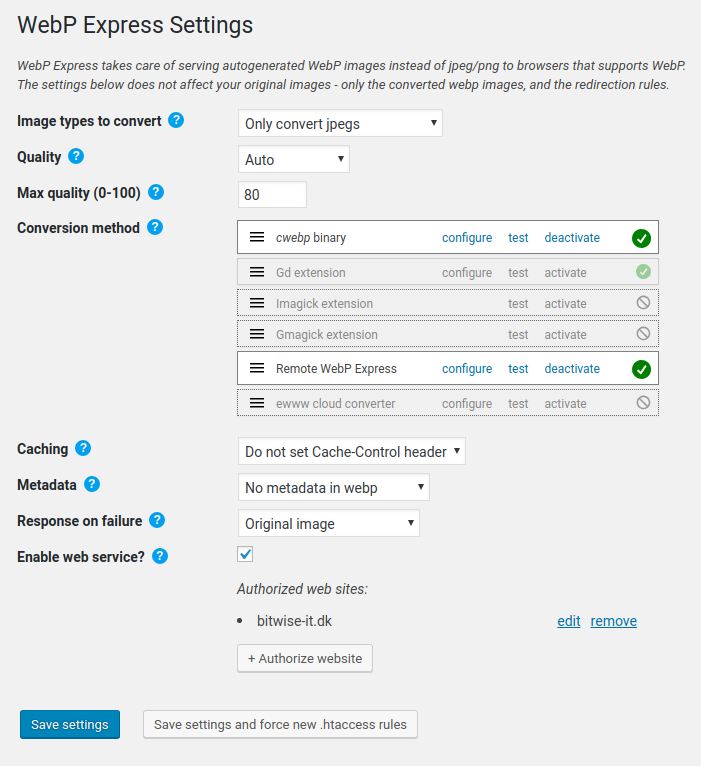
WebP Express has a bunch of methods available for converting images: Executing cwebp binary, Gd extension, Imagick extension, ewww cloud converter and remote WebP express. Each requires something. In many cases, one of the conversion methods will be available. You can quickly identify which converters are working – there is a green icon next to them. Hovering conversion methods that are not working will show you what is wrong.
In case no conversion methods are working out of the box, you have several options:
– You can install this plugin on another website, which supports a local conversion method and connect to that using the “Remote WebP Express” conversion method
– You can purchase a key for the ewww cloud converter. They do not charge credits for webp conversions, so all you ever have to pay is the one dollar start-up fee 🙂
– You can set up webp-convert-cloud-service on another server and connect to that. Its open source.
– You can try to meet the server requirements of cwebp, gd, imagick or gmagick. Check out this wiki page on how to do that
Quality detection of jpegs
If your server has Imagick extension or is able to execute imagemagick binary, the plugin will be able to detect the quality of a jpeg, and use that quality for the converted webp. You can tell if the quality detection is available by hovering the help icon in Conversion > Jpeg options > Quality for lossy. The last line in that help text tells you.
This auto quality has benefits over fixed quality as it ensures that each conversion are converted with an appropriate quality. Encoding low quality jpegs to high quality webps does not magically increase the visual quality so that your webp looks better than the original. But it does result in a much larger filesize than if the jpeg where converting to a webp with the same quality setting as the original.
If you do not have quality detection working, you can try one of the following:
– Install Imagick on the server (for this purpose, it is not required that it is compiled with WebP support)
– Install imagemagick on the server and grant permission for PHP to use the “exec” function.
– Use “Remote WebP Express” converter to connect to a site, that does have quality detection working
– If you have cwebp converter available, you can configure it to aim for a certain reduction, rather than using the quality parameter. Set this to for example 50%, or even 45%.
Verifying that it works (in “Varied image responses” mode)
- Make sure at least one of the conversion methods are working. It should have a green checkmark next to it.
- If you haven’t saved yet, click “Save settings”. This will put redirection rules into .htaccess files in the relevant directories (typically in uploads, themes and wp-content/webp-express/webp-images, depending on the “Scope” setting)
- I assume that you checked at least one of the two first checkboxes in the .htaccess rules section. Otherwise you aren’t using “varied responses”, and then the “CDN friendly” mode will be more appropriate.
- Click the “Live test” buttons to see that the enabled rules actually are working. If they are not, it could be that the server needs a little time to recognize the changed rules.
The live tests are quite thorough and I recommend them over a manual test. However, it doesn’t hurt to do a manual inspection too.
Doing a manual inspection
Note that when WebP Express is serving varied image responses, the image URLs still points to the jpg/png. If the URL is visited using a browser that supports webp, however, the response will be a webp image. So there is a mismatch between the file extension (the filename ends with “jpg” or “png”) and the file type. But luckily, the browser does not rely on the extension to determine the file type, it only looks at the Content-Type response header.
To verify that the plugin is working (without clicking the test button), do the following:
- Open the page in a browser that supports webp, ie Google Chrome
- Right-click the page and choose “Inspect”
- Click the “Network” tab
- Reload the page
- Find a jpeg or png image in the list. In the “type” column, it should say “webp”
You can also look at the headers. When WebP Express has redirected to an existing webp, there will be a “X-WebP-Express” header with the following value: “Redirected directly to existing webp”. If there isn’t (and you have checked “Enable redirection to converter”), you should see a “WebP-Convert-Log” header (WebP-Express uses the WebP Convert for conversions).
Notes
Note:
The redirect rules created in .htaccess are pointing to a PHP script. If you happen to change the url path of your plugins, the rules will have to be updated. The .htaccess also passes the path to wp-content (relative to document root) to the script, so the script knows where to find its configuration and where to store converted images. So again, if you move the wp-content folder, or perhaps moves WordPress to a subfolder, the rules will have to be updated. As moving these things around is a rare situation, WebP Express are not using any resources monitoring this. However, it will do the check when you visit the settings page.
Note:
Do not simply remove the plugin without deactivating it first. Deactivation takes care of removing the rules in the .htaccess file. With the rules there, but converter gone, your Google Chrome visitors will not see any jpeg images.
Bulk convert
You can start a bulk conversion two ways:
1. In the admin UI. On the settings screen, there is a “Bulk Convert” button
2. By using WP CLI (command: “webp-express”).
I’m currently working on a file manager interface, which will become a third way.
Making sure new images becomes converted
There are several ways:
1. Enable redirection to converter in the .htaccess rules section.
2. Enable “Convert on upload”. Note that this may impact upload experience in themes which defines many formats.
3. Set up a cron job, which executes wp webp-express convert regularily
WP CLI command
WebP Express currently supports commands for converting and flushing webp images throug the CLI. You can use the –help option to learn about the options:
wp webp-express –help. Displays the available commands
wp webp-express convert –help. Displays the available options for the “convert” command.
A few examples:
wp webp-express convert: Creates webp images for all unconverted images
wp webp-express convert –reconvert: Also convert images that are already converted
wp webp-express convert themes: Only images in the themes folder
wp webp-express convert uploads/2021: Only images in the “2021” folder inside the uploads folder
wp webp-express convert –only-png: Only the PNG images
wp webp-express convert –quality=50: Use quality 50 (instead of what was entered in settings screen)
wp webp-express convert –converter=cwebp: Specifically use cwebp converter.
wp webp-express flushwebp: Remove all webp images
wp webp-express flushwebp –only-png: Remove all webp images that are conversions of PNG images
Synopsises:
wp webp-express convert [<location>] [--reconvert] [--only-png] [--only-jpeg] [--quality=<number>] [--near-lossless=<number>] [--alpha-quality=<number>] [--encoding=<auto|lossy|lossless>] [--converter=<converter>]
wp webp-express flushwebp [--only-png]
I’m considering adding commands for viewing status, viewing conversion stats, generating the .htaccess files and modifying the settings. Please let me know if you need any of these or perhaps something else.
Journal de modifications
Fixed vulnerability in dom parser library used for altering html. Credit goes to Jakub Herman for discovering the problem. Also fixed a loophole that made it possible to use the web service (if activated) with carefully crafted inputs, even without an api key. Thanks to the third party that found and reported this to the Wordpress security team - and thanks to the security team for bringing the issue to my attention
0.25.16
(released 18 Oct 2026)
* Fixed vulnerability in dom parser library used for altering html. Credit goes to Jakub Herman for discovering the problem. Also fixed a loophole that made it possible to use the web service (if activated) with carefully crafted inputs, even without an api key. Thanks to the third party that found and reported this to the WordPress security team – and thanks to the security team for bringing the issue to my attention
0.25.15
(released 19 May 2026)
* Fixed medium security problem with the WPC converter and got rid of some deprecated warnings on newer PHP versions (thanks to hostep from Belgium, dmitryuk from Kazakhstan and AH72KING from Pakistan for those contributions to the webp-convert library)
0.25.14
(released 25 December 2025)
* Fixed issue that the delete images feature also deleted webp-images that was uploaded as such, when webp-express was configured to store converted images in same folder as originals (not the default option). Also fixed conversion triggered by redirection, which broke on a few systems in a recent update, causing images in the media library not to appear. It may however still be a problem on a very few systems. In that case: Simply disable “Enable redirection to converter” and “Create webp files upon request” and submit an issue.
0.25.13
(released 25 December 2025)
* It is no longer a requirement on Nginx to modify redirection rules by adding a “hash” parameter. This was briefly required in 0.25.10-12. Btw, thanks Patrick Müller, for an extraordinary large donation on Christmas Eve – on top of the recent security fix that he originated. When I see engagement like that, it makes it meaningful for me to prioritize this project
0.25.12
(released 22 December 2025)
* Added notification for users on Nginx which uses redirect rules to change their rewrite rules manually. They must now pass a “hash” parameter in the querystring to the WebP conversion script. Thanks to Luka Paunović for bringing the issue to my attention and updating the README.
0.25.11
(released 22 December 2025)
* Fixes .htaccess rules for redirecting to converter. The bug was introduced in 0.25.10. It caused the conversion not to work on some systems. Thanks to Jon Wallace for reporting the issue on github and assisting in the debugging.
(released 15 December 2025)
* Security fix: Config file was exposed on systems running on NGINX. Herr Patrick Müller from Switzerland for creating a patch as well as Rune Philosof from Denmark for improving it. Some credit also goes to myself for perfecting the patch. Sorry for slacking on the maintenance. There are good reasons for this, but I can and will do better in the future
Captures d'écran
Pour les développeurs
Est-ce votre plugin ? Montrez les chiffres.
Ajoutez un badge en direct à votre site, docs ou github readme. Il se met à jour par lui-même - aucun compte n'est nécessaire.
Best WebP Express alternatives
Toutes les images Plugins →




FAQ
WebP Express: quick answers
Réponses directes, extraites des données en direct WordPress.org.
Source : WordPress.org
Is WebP Express free?
Yes. WebP Express is free to download and use from the official WordPress.org plugin directory.
Is WebP Express safe to use in 2026?
WebP Express is a solid plugin choice in 2026, with a few things worth checking first. It runs on 300K+ sites, is rated 4.4/5 and was last updated 1 month ago, and scores 63/100 on our health check.
How many websites use WebP Express?
WebP Express is active on 300K+ WordPress websites and has been downloaded 4,672,168 times since it launched in August 2018. It was downloaded 55,552 times in the last 30 days.
Does WebP Express work with WordPress 7.1?
WebP Express is officially tested up to WordPress 6.9.12, while the latest release is 7.1.5. It may still work, but try it on a staging site first.
What PHP version does WebP Express need?
WebP Express requires PHP 5.6 or higher. Most hosts run PHP 8.x today, so it works on any modern WordPress hosting.
When was WebP Express last updated?
The latest version, 0.25.16, was released on October 18, 2026 (1 month ago).
Who makes WebP Express?
WebP Express is developed and maintained by rosell.dk.
What are the best alternatives to WebP Express?
The most popular alternatives to WebP Express are Autoptimize (800K+ installs), Responsive Lightbox & Galle… (100K+ installs) and Modern Image Formats (100K+ installs).
Propulsé par PageForge
Un modèle et une feuille de calcul. Une vraie page pour chaque recherche.
PageForge transforme chaque ligne d'un CSV en une page WordPress avec son propre titre, URL, SEO et schéma, construit sur la mise en page que vous Déjà conçu. Gratuit sur WordPress.org.
- CSV et XLSX, plus Google Sheets sur les professionnels et les entreprises
- Son propre titre, URL, SEO champs et schéma pour chaque page
- Fonctionne avec l'éditeur de blocs, Elementor, Divi et Avada
- Gratuit sur WordPress.org, pas de carte de crédit