

WBD Pricing Tables – Gutenberg Pricing Table & Comparison Block
Create responsive WordPress pricing tables in Gutenberg with customizable plans, feature lists, CTA buttons, and clear pricing comparisons.

Choix solide
WBD Pricing Tables is a solid plugin choice in 2026, with a few things worth checking first. It runs on 200+ sites, is rated 5/5 and was last updated 2 weeks ago, and scores 76/100 on our health check.
- Développé activement — Dernière mise à jour il y a 2 semaines
- Testé avec le dernier WordPress (7.1)
- Petite base d'utilisateurs (plus de 200 installations actives)
- Très peu de critiques jusqu'à présent
Comment s'accumule-t-il ?
Côte à côte sur les installations, les mises à jour, les évaluations et le support



Téléchargements quotidiens
Les pics de téléchargement suivent généralement une nouvelle version - chaque site qui met à jour automatiquement compte comme un téléchargement.
Classements
Where WBD Pricing Tables stands todayWordPress.org Classements de recherche
Position en direct dans la recherche de plugins, Top 100| Mot-clé | Position |
|---|---|
| comparison table | #26 |
| Gutenberg Bloc | >100 |
| pricing block | #11 |
| pricing table | #14 |
| sensible | >100 |
Adoption de version
Part de sites actifs par version.
Répartition des notes
★★★★★ ★★★★★ 5 sur 2 avis
About WBD Pricing Tables
À partir du Lisezmoi officiel · v1.2.0Description
WBD Pricing Tables is a WordPress pricing table plugin that helps you create professional pricing sections directly in the Gutenberg Block Editor. Display pricing plans, highlight recommended options, list included features, and add call-to-action buttons without writing code.
Live Demos | Pricing | Support
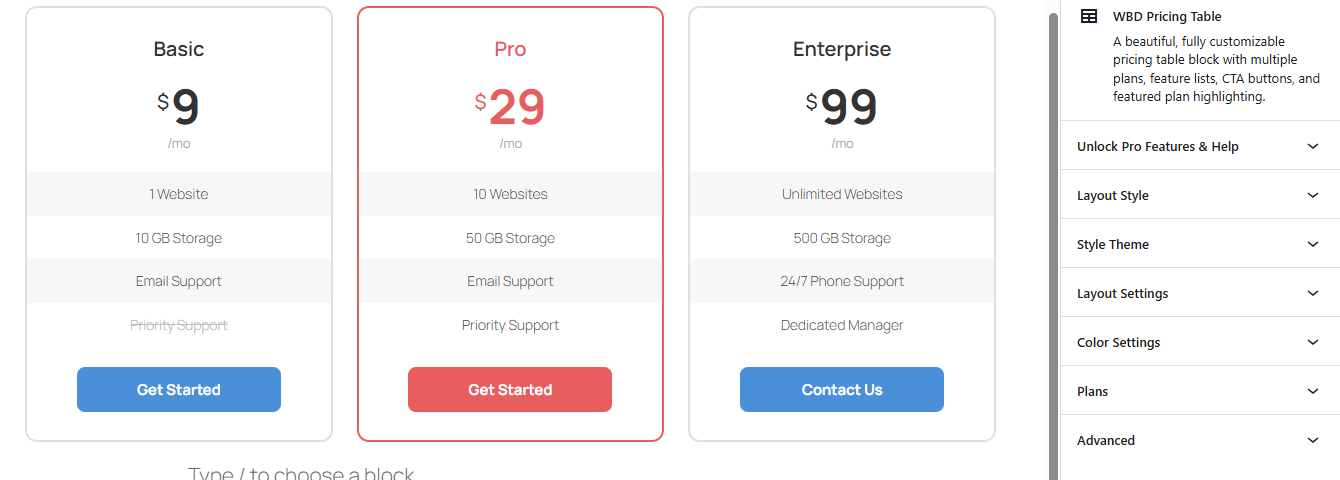
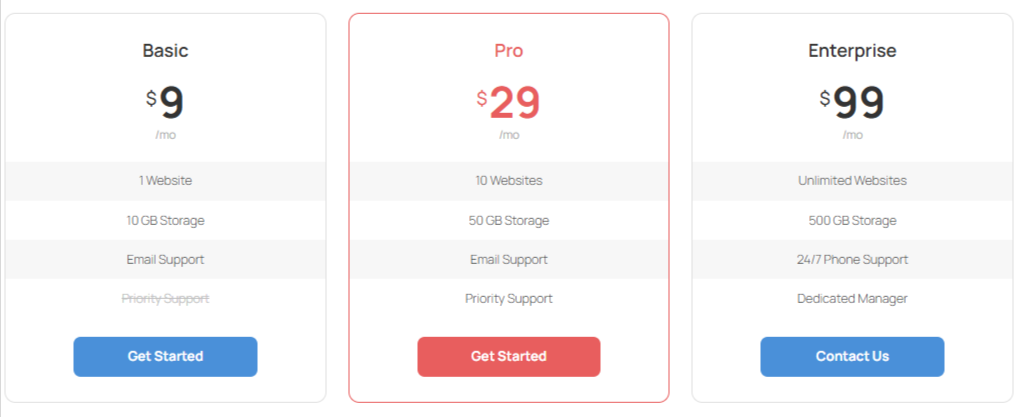
Display your pricing plans, compare available options, highlight recommended plans, and organize product or service features using a customizable pricing table block.
Whether you run a SaaS business, digital agency, startup, freelance service, software website, or online store, WBD Pricing Tables helps you present pricing information in a clear and organized layout without writing custom code.
🚀 Perfect for freelancers, agencies, SaaS, startups, and WooCommerce websites.The plugin provides dedicated Pricing Table functionality and a Comparison Pricing Table block for presenting plans, products, or features in an easy-to-understand format.
Create pricing tables with:
- Pricing plan names, prices, currency symbols, and billing periods.
- Descriptions and feature lists for each plan.
- Call-to-action buttons with custom text and links.
- Featured or recommended plan styling.
- Customizable colors and available layout settings.
- Responsive pricing layouts for different screen sizes.
The plugin also includes a Comparison Pricing Table block for presenting differences between plans, products, services, or features.
✅ Free Features
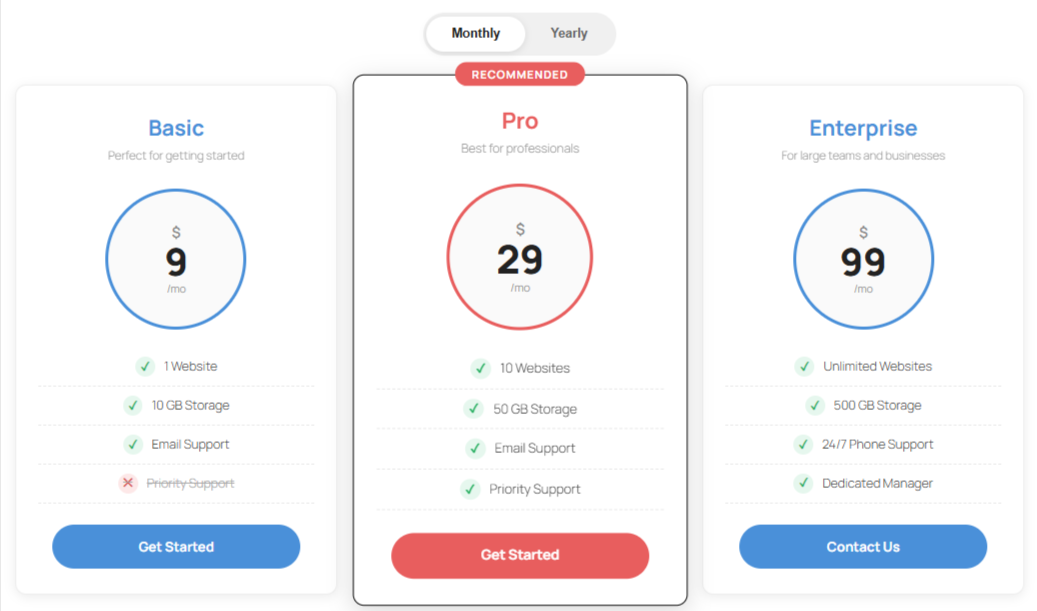
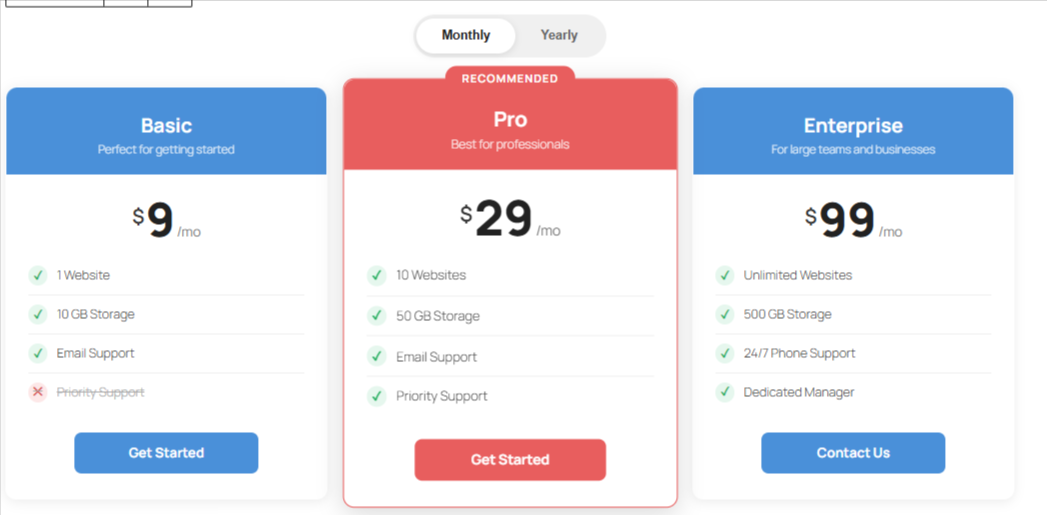
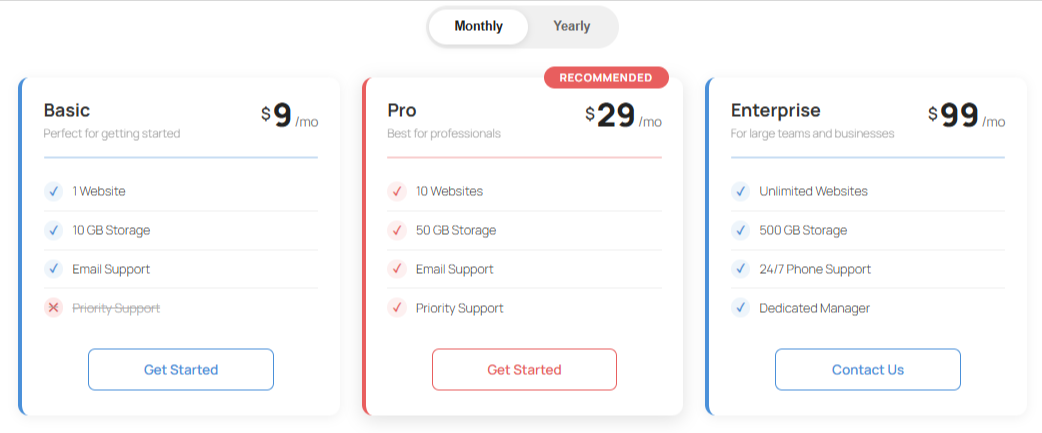
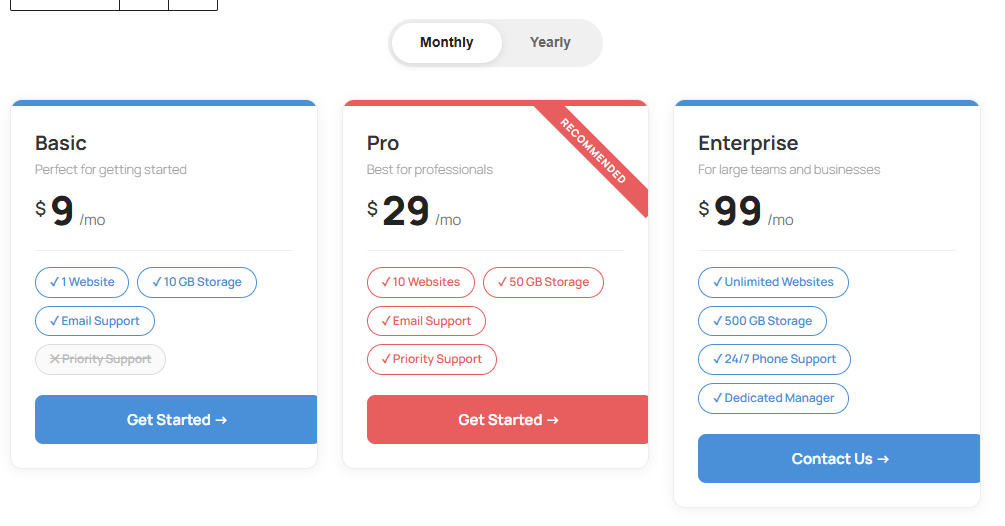
Free Templates – Add up to 3 pricing plans displayed side by side in a responsive grid.
Customizable Plan Details — Set plan name, price, currency symbol, billing period, and description for each plan.
Feature Lists — Add unlimited features per plan with optional checkmark or cross icons to indicate included/excluded features.
Call-to-Action Buttons — Customize button text and URL for each plan with option to open links in a new tab.
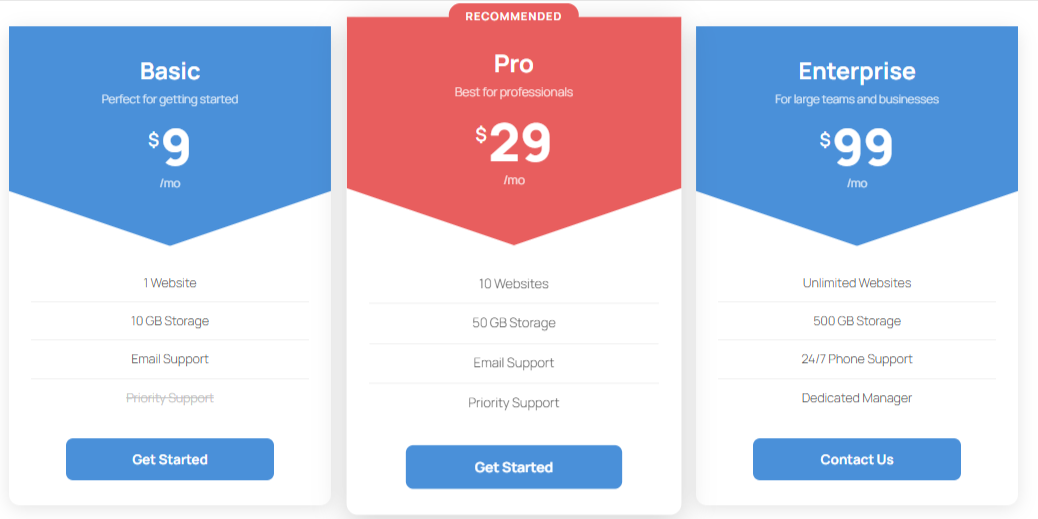
Featured/Recommended Plan — Highlight a plan as “recommended” with a badge and visual emphasis.
Color Customization — Choose header background color, header text color, button color, button text color, and featured plan accent color.
Layout Options — Choose between 1 to 4 columns layout.
Responsive Design — Plans stack gracefully on smaller screens.
Live Preview — See all changes in real time within the editor.
⚡ Pro Version Features
If you need even more features, styling options, or premium support, you can upgrade to the Pro version:
Five Premium Templates
Comparison pricing table block
Advanced Styling & Layout Controls
Priority Support — Dedicated help within 24 hours
Pricing Table and Comparison Blocks
A pricing table presents the price and details of each plan. A comparison table organizes differences between multiple options so visitors can evaluate features more easily.
Depending on your available features, use WBD Pricing Tables to present:
- Software plans and their included features.
- Monthly or annual service packages.
- Agency packages and deliverables.
- Subscription options.
- Product features and specifications.
- Different service levels.
Use descriptive plan names, consistent feature labels, and clear calls to action to make the information easier to understand.
Call-to-Action Buttons
Customize button text and destination URLs for actions such as Get Started, Buy Now, Contact Us, or Learn More. Available settings also allow links to open in a new tab.
Featured or Recommended Plan
Highlight a selected pricing plan with a badge and visual styling to make it stand out.
Why Choose This Pricing Table Block Plugin?
- Built specifically for Gutenberg (Block Editor)
- Lightweight and fast loading (better SEO performance)
- Fully responsive pricing table design
- No shortcode required – 100% block-based
- Clean UI inspired by modern SaaS pricing tables
Cas d'utilisation
WBD Pricing Tables can be used for:
- SaaS pricing pages
- Software pricing plans
- Service packages
- Agency pricing
- Subscription plans
- Prix des produits
- Product comparison tables
- Feature comparison sections
- WooCommerce product-related pricing sections
- Digital product websites
Comparison Pricing Table Block
Use the Comparison Pricing Table block to organize differences between products, plans, services, or features. A comparison table is useful when visitors need to evaluate several options before choosing one.
For example, you can compare:
- Software plans and their included features.
- Service packages and deliverables.
- Subscription options.
- Product features.
- Agency service tiers.
Use clear labels and consistent feature descriptions to make comparisons easier to understand.
Responsive Pricing Layouts
Pricing tables are designed to work across different screen sizes.
Use responsive pricing sections for:
- SaaS websites
- Sites Web de l'agence
- Service businesses
- Product websites
- Subscription websites
- WooCommerce websites
- Digital product websites
Lightweight and Performance-Conscious
WBD Pricing Tables focuses on pricing presentation and comparison functionality within Gutenberg.
A focused block-based workflow can help avoid introducing an additional page builder solely to create pricing tables. However, actual page speed depends on your hosting, theme, other plugins, assets, and page content.
For best results, use appropriately sized images elsewhere on the page, avoid unnecessary effects, and test your published page with a performance testing tool.
Accessibilité
Help visitors understand your pricing options by using:
- Clear plan names and pricing information.
- Descriptive call-to-action labels.
- Readable text and sufficient color contrast.
- Consistent feature descriptions.
- Layouts that remain usable at different screen sizes.
Review your published page with your active theme to check text readability, keyboard usability, link clarity, and responsive behavior.
SEO-Friendly Pricing Sections
WBD Pricing Tables helps you create structured and readable pricing sections using the WordPress Block Editor.
The plugin focuses on:
Clean frontend markup.
Responsive layouts.
Lightweight implementation.
Accessible interactive elements where applicable.
Mobile-friendly pricing sections.
Clear pricing and feature presentation.
The plugin does not replace an SEO plugin. Search engine rankings depend on your overall website content, technical SEO, performance, competition, backlinks, and other factors.
Développement
The uncompiled source code for this plugin is fully open-source and publicly accessible.
- Source Code Repository: https://github.com/wpbranddigital/wbd-pricing-table
- Source Folder: The human-readable and modifiable source files are included in the
/srcdirectory of the plugin.
Build tools and environment:
– Node.js & npm
– webpack
– @wordpress/scripts
To regenerate the compiled files from source:
1. Clone the repository or navigate to the plugin directory.
2. Run npm install to install dependencies.
3. Run npm run build to compile the production assets into the /build directory.
4. Run npm run start to start the development watcher.
Installation
- Log in to your WordPress admin dashboard.
- Go to Plugins → Add New.
- Search for WBD Pricing Tables.
- Click Install Now.
- Click Activate.
- Edit or create a page using the WordPress Block Editor.
- Click the + Block Inserter.
- Search for Pricing Table.
- Add the pricing table block to your page.
- Configure your plans, features, buttons, colors, and layout from the Block Inspector.
You can also install the plugin manually:
- Download the plugin ZIP file.
- Go to Plugins → Add New → Upload Plugin.
- Upload the plugin ZIP file.
- Click Install Now.
- Click Activate Plugin.
Journal de modifications
Add new Layout Style theme. Performance optimazation.
1.2.0
- New Two Premium Theme.
- Fixed Theme Style Problem
- Performance optimazation.
- Added new Comparison Pricing table block.
1.1.2
- Compliance update: Remove all Freemius premium feature gating and overlays. All built-in templates and layouts are now 100% free and functional.
- Remove auto-deactivation hook to prevent deactivating other plugins without consent.
- Document public repository source code and build steps in the readme.
- Bump version and tested up to tags.
1.1.1
- Fix conflict with Pro version.
- Fixed Theme Style Problem
1.1.0
- Add new Layout Style theme.
- Performance optimazation.
1.0.0
- Initial release with full pricing table functionality.
Captures d'écran
Pour les développeurs
Est-ce votre plugin ? Montrez les chiffres.
Ajoutez un badge en direct à votre site, docs ou github readme. Il se met à jour par lui-même - aucun compte n'est nécessaire.
Best WBD Pricing Tables alternatives
All comparison table plugins →





FAQ
WBD Pricing Tables: quick answers
Réponses directes, extraites des données en direct WordPress.org.
Source : WordPress.org
Is WBD Pricing Tables free?
Yes. WBD Pricing Tables is free to download and use from the official WordPress.org plugin directory.
Is WBD Pricing Tables safe to use in 2026?
WBD Pricing Tables is a solid plugin choice in 2026, with a few things worth checking first. It runs on 200+ sites, is rated 5/5 and was last updated 2 weeks ago, and scores 76/100 on our health check.
How many websites use WBD Pricing Tables?
WBD Pricing Tables is active on 200+ WordPress websites and has been downloaded 3,869 times since it launched in March 2026. It was downloaded 387 times in the last 30 days.
Does WBD Pricing Tables work with WordPress 7.1?
Yes. The developer has tested WBD Pricing Tables up to WordPress 7.1.5, the latest release. It requires WordPress 6.5 or newer.
What PHP version does WBD Pricing Tables need?
WBD Pricing Tables requires PHP 7.4 or higher. Most hosts run PHP 8.x today, so it works on any modern WordPress hosting.
When was WBD Pricing Tables last updated?
The latest version, 1.2.0, was released on November 8, 2026 (2 weeks ago).
Who makes WBD Pricing Tables?
WBD Pricing Tables is developed and maintained by wpbranddigital.
What are the best alternatives to WBD Pricing Tables?
The most popular alternatives to WBD Pricing Tables are Ninja Tables (70K+ installs), Pricing Table by Supsystic (10K+ installs) and Pricing Table WordPress Plu… (10K+ installs).
Propulsé par PageForge
Un modèle et une feuille de calcul. Une vraie page pour chaque recherche.
PageForge transforme chaque ligne d'un CSV en une page WordPress avec son propre titre, URL, SEO et schéma, construit sur la mise en page que vous Déjà conçu. Gratuit sur WordPress.org.
- CSV et XLSX, plus Google Sheets sur les professionnels et les entreprises
- Son propre titre, URL, SEO champs et schéma pour chaque page
- Fonctionne avec l'éditeur de blocs, Elementor, Divi et Avada
- Gratuit sur WordPress.org, pas de carte de crédit