


Watu Quiz
Creates exams, surveys, and quizzes with unlimited number of questions and answers. Mobile/touch - friendly.

Choix solide
Watu Quiz is a solid plugin choice in 2026, with a few things worth checking first. It runs on 3K+ sites, is rated 4.7/5 and was last updated 2 months ago, and scores 72/100 on our health check.
- Loved by users — 4.7/5 from 137 reviews
- Testé avec le dernier WordPress (7.1)
- Momentum — downloads up 19.4% vs the previous 30 days
Comment s'accumule-t-il ?
Côte à côte sur les installations, les mises à jour, les évaluations et le support



Téléchargements quotidiens
Les pics de téléchargement suivent généralement une nouvelle version - chaque site qui met à jour automatiquement compte comme un téléchargement.
Classements
Where Watu Quiz stands todayWordPress.org Classements de recherche
Position en direct dans la recherche de plugins, Top 100| Mot-clé | Position |
|---|---|
| exam | #4 |
| mobile | >100 |
| quiz | #18 |
| survey | #41 |
| test | #48 |
Adoption de version
Part de sites actifs par version.
Répartition des notes
★★★★★★★★★★ 4.7 from 137 reviews
About Watu Quiz
From the official readme · v3.4.9Description
This plugin is constantly maintained and improved since 12 years!
Create exams, surveys, and quizzes and display the result immediately after the user completes the questionnaire. You can assign grades and point levels for every grade in the exam / quiz. Then assign points to every answer to a question and Watu Quiz will figure out the grade based on the total number of points collected.
Watu Quiz is a light version of Watu PRO. Check it if you want to run fully featured exams with data exports, student logins, elaborate grading system, categories, reports, data analysis, etc.
Very quick and easy to start: Watu Quiz pre-fills a simple demo quiz with 3 questions when you install it.
This plugin is mobile / touch – friendly. The quizzes will work on mobile devices and phones.
Please go to Watu Quizzes in your dashboard to start creating quizzes, exams or surveys.
Traits
- Creates quizzes, surveys, tests, polls, questionnaires, and exams.
- Use shortcodes to embed quizzes in posts or pages or publish them automatically.
- Single-choice questions.
- Multiple-choice questions.
- Open-end questions (essays).
- Required questions.
- Survey questions (no correct / wrong state).
- Question categories & filter by category.
- Deactivate questions.
- Randomize questions.
- Pull random questions from a pool.
- Grades / personality types.
- Shows answers at the end of the quiz or immediately after selection.
- List of users who took the tests along with their results.
- Export results to a CSV file
- Import questions from a CSV file.
- Ajax-based loading of the quiz results. Optionally switch off to regular loading.
- Facebook and Twitter sharing of the quiz results.
- Mobile / touch – friendly user interface.
- Notify admin when someone takes a quiz.
- Send email to the quiz taker with their results.
- Schedule quizzes for a given date/time interval.
- You can connect to MailChimp using the Watu to MailChimp Bridge.
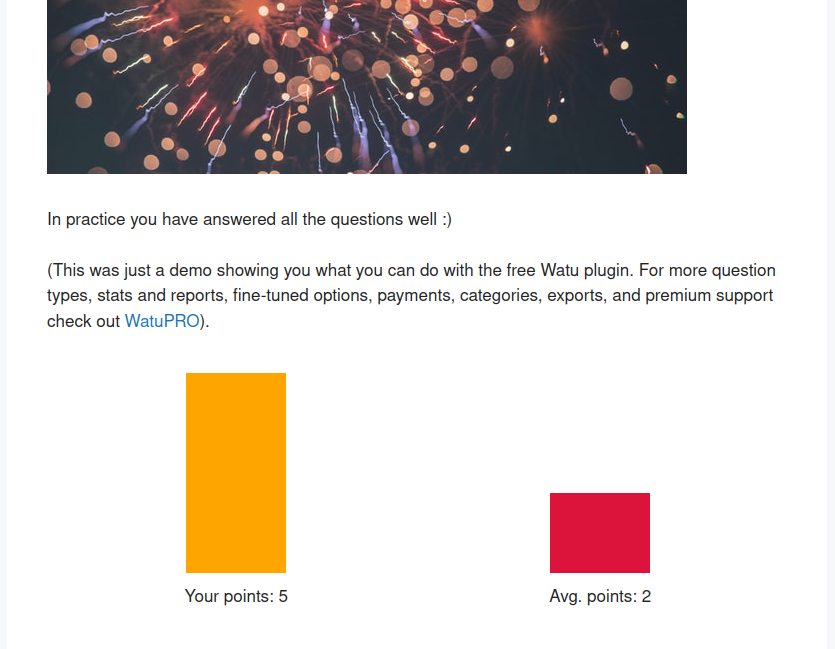
- A basic bar chart is available for showing user points vs. average points on a given quiz.
- GDPR compliance features: not storing IP addresses. Hooks a personal data eraser into the WordPress tools.
- Regularly supported and updated since 10 years.
- PHP 6, PHP 7, PHP 8 Compatible.
Attention WordPress Network (Multi Site) Users
When activating the plugin do it as blog admin and not as network admin.
Online Demo
Feel free to check the live demo here. It should answer most “pre-download” questions.
If you have more doubts just download the plugin and check out if it works for you. It’s free and takes a few seconds to install and activate.
Dépannage
When opening a support thread please provide URL (link) where we can see your problem.
A very common problem is not being able to submit the quiz, or the quiz does not displays at all. This is usually a fatal JavaScript error caused by other plugins or your them. If you are technical you can easily find the error yourself by checking the JavaScript error console in Chrome or Firefox. Disable the offending plugin and everything will start working normally.
Developers API
In order to allow other plugins to integrate better to Watu we have started working on developers API.
The following action calls are currently available:
= do_action(‘watu_exam_submitted’, $taking_id)
Called when exam is submitted, passes the attempt ID
= do_action(‘watu_exam_submitted_detailed’, $taking_id, $exam, $user_ID, $achieved, $g_id)
Same as above but passes also the full exam object, the user ID, points and grade ID
= do_action(‘watu_exam_saved’, $exam_id)
Called when you add or edit exam (after submitting the changes). Passes the changed exam ID.
Community Translations
- Persian (Farsi) translation provided by Reza: download zip with .po / .mo files
-
German translation provided by Peter Baumgartner is available here
-
The included Romanian translation is provided by Andrei Ciuculescu
-
Portuguese translation provided by José Costa
-
Spanish translation provided by Sebastian Cetrangolo / seeeba
-
Turkish translation provided by Muhammet AVCI
Installation
Cette section décrit comment installer le plugin et le faire fonctionner.
- Upload the entire folder
watuto the/wp-content/plugins/directory - Activez le plugin via le menu « Plugins » dans WordPress
- Go to “Watu Settings” to change the default settings (optional)
- Go to “Watu Quizzes” under “Tools” menu to create your exams, add questions, answers and grades. On the “manage questions” page of the created exam page, above the questions table you will see a green text. It shows you the code you need to enter in a post content where you want the exam to appear.
Journal de modifications
Changes in 3.4.2
- Added variable %%TOTAL-ENTRIES%% – The total number of users who submitted this quiz. Multiple entries of the same user are counted as individual entries.
- Fixed questions sorting issue
Changes in 3.4
- Added pagination and “per page” selector on the Manage Questions page.
- Removed default table borders from the basic chart table.
- Easier question reordering with drag and drop.
- Added question categories for better admin organization. You can filter by question category.
- Added option to schedule quizzes.
- Added option to limit the total (everyone’s) number of attempts on a quiz.
- Added variables %%TOTAL%% for the total number of questions given, and %%AVG-QPOINTS%% for the average number of points achieved on each question for the given quiz attempt.
- When the “live mode” of showing answers is selected, radio buttons checkboxes will become disabled after selecting the answer.
- Unset “autoload” on all options to improve site’s performance.
- Database improvements: added indexes for better performance and the tables will be created on the default DB engine and collation.
Changes in 3.3
- Added two more columns to the question import file: “Is required” and “Answer explanation”.
- Added filters on Manage Quizzes page to search quizzes.
- Added option to mark a question as a survey question. In this case it will not display correct / wrong checkmark at the end of the quiz. Also these questions will not be counted in correct/wrong/unanswered variables and not included in the percentage calculations.
- Fixed issues when questions contained new lines on the final screen.
- Handling of quotes in the message when sharing results on Facebook.
- Added personal data eraser and hooked to the WP tool.
- Replaced the rich text editor popup with a local instance to avoid JS errors on some installations.
- Added a new selectable quiz design: modern / buttons style. You can keep using the default one too.
- Added 2,3,4,5 columns style for the answers of single-choice and multiple-choice questions.
- Added default “no ajax” setting for new quizzes.
- Added parameters for ordering, sorting, and limit to the [watu-takings] shortcode. Documented how to hide columns. This way it can be used to create a basic leaderboard.
Changes in 3.2
- Added hook for third-party integrations right before outputting the final screen
- Fixed forced CSS rule to keep radios and checkboxes on the same line with the answer
- Added variable %%USER-NAME%% to show the logged in user name on final screen and email contents
- Added function to mass delete selected results on a quiz.
- The %%PERCENTAGE%% variable can be used to show the % correctly answered questions at the end of the quiz.
- Added option to deactivate questions. These will not be shown in the quiz and not counted but you will be able to re-activate them any time.
- Added options to use your own Twitter and Facebook social sharing buttons.
- The submit button on Ajax quizzes changes to “Please wait” to clearly show the data is processing.
- Added loading indicator for Ajax quizzes
- Added option to set email subject for the automated emails that go with the submitted quizzes.
- Email address included in exports when available.
- Added pagination on Manage Quizzes page.
Changes in 3.1
- Added buttons to Save & Reuse the current question (and Save & Add blank) to make adding multiple questions easier, especially when they have similar structure
- Added function to import questions from CSV file
- Added filters for question type, ID, and question contents on the Manage Questions page
- The plugin no longer stores IP addresses (GDPR compliance)
- Added option to mass delete questions
- Added rich text editor on answers to questions
- Removed the obsolete FB share dialog which did not work well and used the new SD kit
- Added option to mass update questions (currently change required status)
- Added option to switch off auto-scroll when user goes from page to page in the quiz. It is useful on some page designs.
Changes in 3.0
- The plugin will now count empty (unanswered) questions separately from wrongly answered. The variable %%EMPTY%% can be used at the Final screen to display the number of unanswered questions.
- Column “% correct” added to the takings page + information on the number of correctly answered, wrongly answered, and unanswered questions.
- The export file now includes information about % correct answers, num correct, num wrong, and num unanswered questions.
- Added parameters to the [watu-takings] shortcode that allow you to hide taker’s email and the columns for points and percent correct answers.
- Added option to select CSV delimiter and quotes around text fields in the CSV
- Added option to sort quizzes by name or number of questions.
- Improved integration with Namaste! LMS: you can restrict access to tests if they are required by lessons until the assigned lessons have been read.
- Improved integration with Namaste! LMS: you can now filter quiz results based on user’s course enrollment.
- Made the admin pages responsive to allow managing the quizzes in phones and other mobile devices
- Applied wp_login_url and wp_registration_url hooks for better integration with quizzes that enhance the login/registration process.
Captures d'écran



Pour les développeurs
Est-ce votre plugin ? Montrez les chiffres.
Ajoutez un badge en direct à votre site, docs ou github readme. Il se met à jour par lui-même - aucun compte n'est nécessaire.
Best Watu Quiz alternatives
All exam plugins →




FAQ
Watu Quiz: quick answers
Réponses directes, extraites des données en direct WordPress.org.
Source : WordPress.org
Is Watu Quiz free?
Yes. Watu Quiz is free to download and use from the official WordPress.org plugin directory.
Is Watu Quiz safe to use in 2026?
Watu Quiz is a solid plugin choice in 2026, with a few things worth checking first. It runs on 3K+ sites, is rated 4.7/5 and was last updated 2 months ago, and scores 72/100 on our health check.
How many websites use Watu Quiz?
Watu Quiz is active on 3K+ WordPress websites and has been downloaded 429,857 times since it launched in October 2011. It was downloaded 1,613 times in the last 30 days.
Does Watu Quiz work with WordPress 7.1?
Yes. The developer has tested Watu Quiz up to WordPress 7.1.5, the latest release. It requires WordPress 6.0 or newer.
What PHP version does Watu Quiz need?
Watu Quiz requires PHP 8.0 or higher. Most hosts run PHP 8.x today, so it works on any modern WordPress hosting.
When was Watu Quiz last updated?
The latest version, 3.4.9, was released on September 22, 2026 (2 months ago).
Who makes Watu Quiz?
Watu Quiz is developed and maintained by Bob.
What are the best alternatives to Watu Quiz?
The most popular alternatives to Watu Quiz are Quiz and Survey Master (QSM) (30K+ installs), Quiz Maker by AYS (20K+ installs) and HD Quiz (6K+ installs).
Propulsé par PageForge
Un modèle et une feuille de calcul. Une vraie page pour chaque recherche.
PageForge transforme chaque ligne d'un CSV en une page WordPress avec son propre titre, URL, SEO et schéma, construit sur la mise en page que vous Déjà conçu. Gratuit sur WordPress.org.
- CSV et XLSX, plus Google Sheets sur les professionnels et les entreprises
- Son propre titre, URL, SEO champs et schéma pour chaque page
- Fonctionne avec l'éditeur de blocs, Elementor, Divi et Avada
- Gratuit sur WordPress.org, pas de carte de crédit