


Adobe Fonts (formerly Typekit) for WordPress
Integrate the Adobe Fonts service into your WordPress website or blog to use a range of over 25,000 high-quality fonts.

Utiliser avec prudence
Adobe Fonts (formerly Typekit)… works, but test it on a staging site before relying on it in 2026. It runs on 10K+ sites, is rated 4.9/5 and was last updated 2 years ago, and scores 42/100 on our health check.
- Prouvé à grande échelle sur plus de 10 000 sites actifs
- Momentum — downloads up 45.5% vs the previous 30 days
- No update in 2 years
- Only tested up to WordPress 6.6 (latest is 7.1)
Comment s'accumule-t-il ?
Côte à côte sur les installations, les mises à jour, les évaluations et le support


Téléchargements quotidiens
Les pics de téléchargement suivent généralement une nouvelle version - chaque site qui met à jour automatiquement compte comme un téléchargement.
Classements
Where Adobe Fonts (formerly Typek… stands todayWordPress.org Classements de recherche
Position en direct dans la recherche de plugins, Top 100| Mot-clé | Position |
|---|---|
| adobe | #23 |
| design | >100 |
| font | >100 |
| fonts | >100 |
| typekit | #8 |
Adoption de version
Part de sites actifs par version.
Répartition des notes
★★★★★★★★★★ 4.9 from 7 reviews
About Adobe Fonts (formerly Typekit) for Word…
From the official readme · v1.10.1Description
Embed and use Adobe Fonts (https://fonts.adobe.com) in your WordPress website without having to edit your theme!
Adobe Fonts offers a service that allows you to select from a range of over 25,000 high-quality fonts for your WordPress website. The fonts are applied using the font-face standard, so they are standards compliant, fully licensed, and accessible.
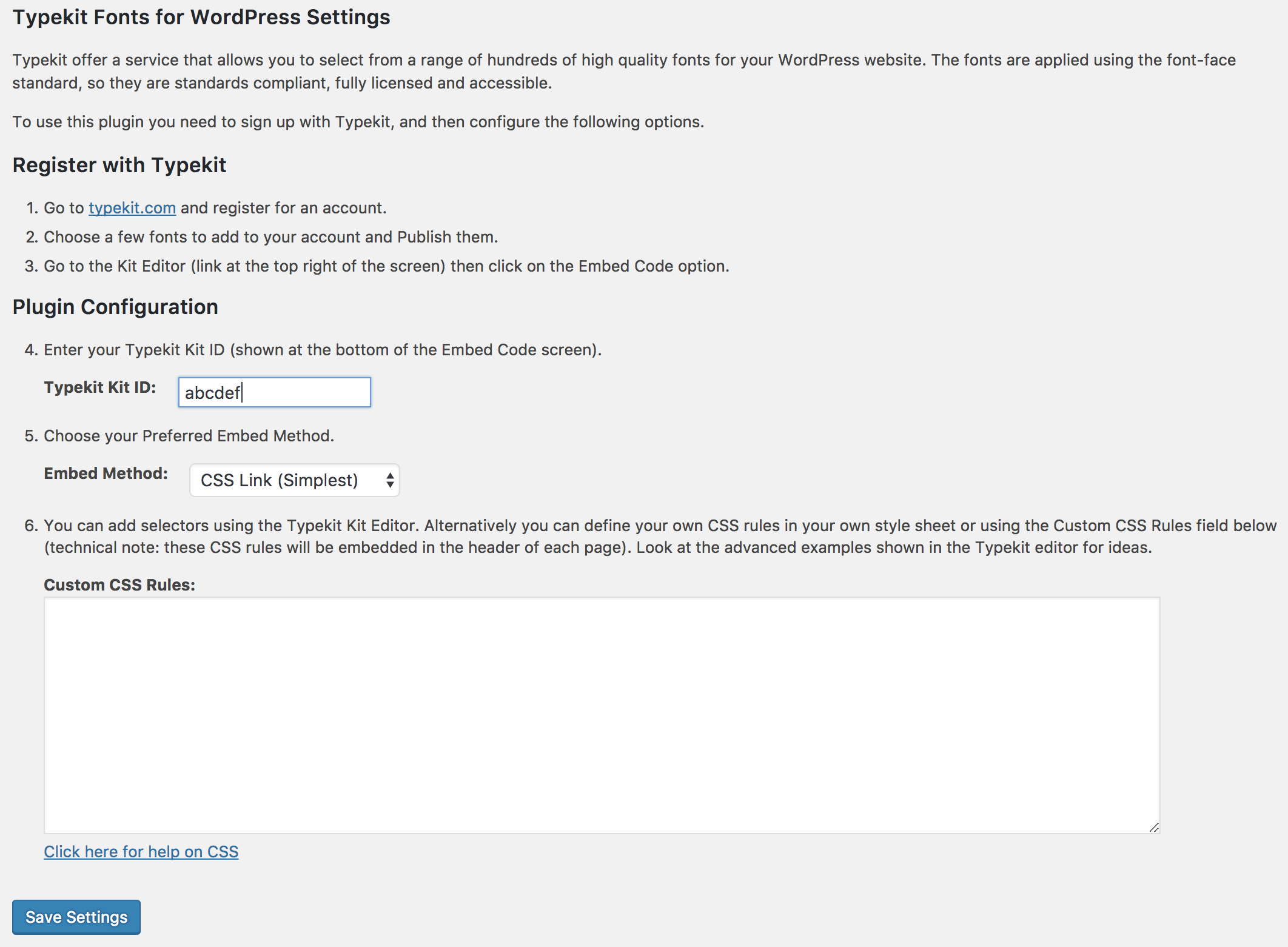
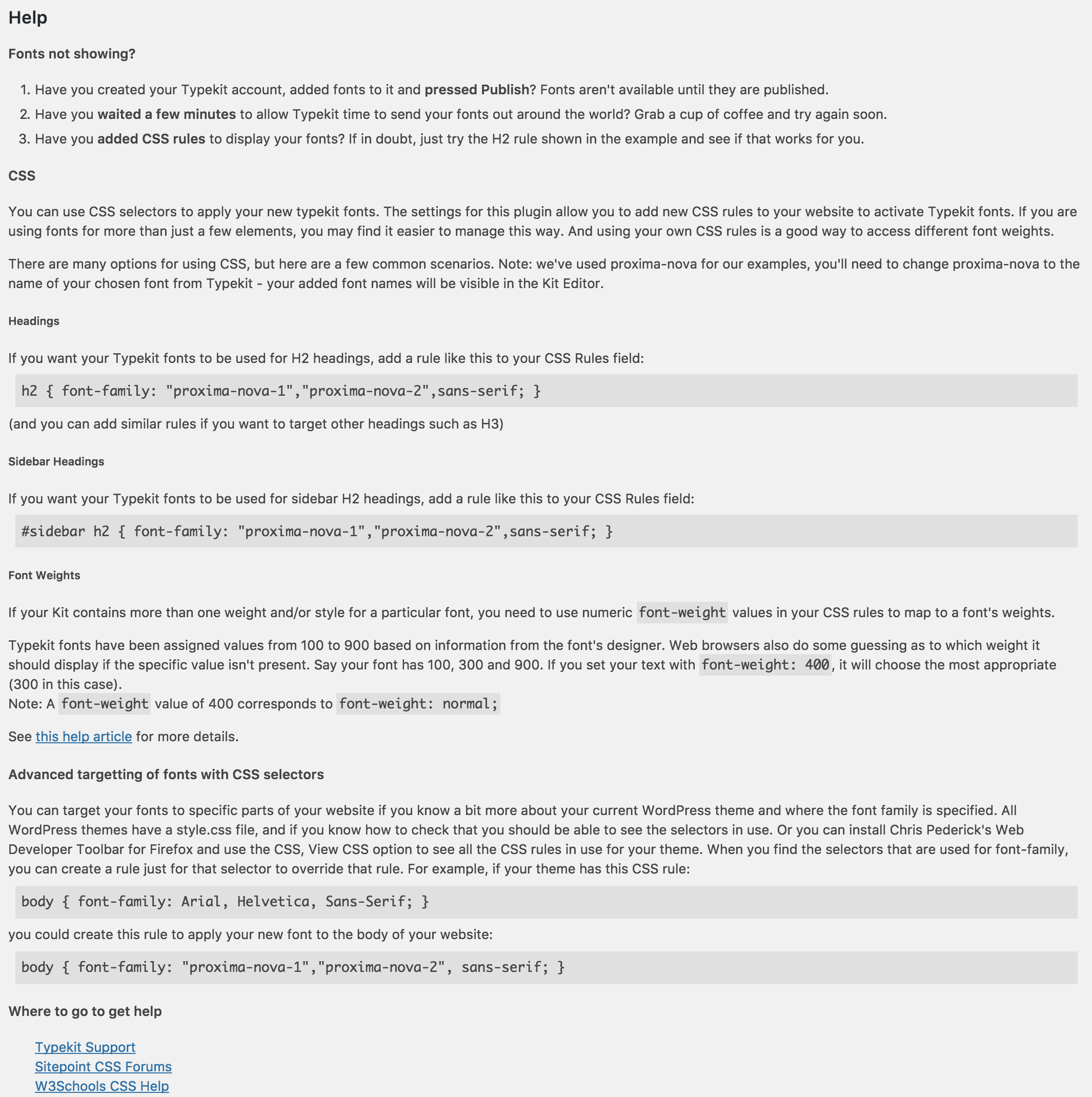
To use this plugin, you need to sign up with Adobe Fonts, install this plugin, and then either configure some Adobe Fonts selectors or define your own CSS rules. Adobe Fonts selectors provide a quick and easy way to get fonts enabled on your site. Using your own CSS rules (as explained in Adobe Fonts’ Advanced tips) gives you more control and lets you access additional attributes such as font-weight. This plugin allows you to create your own CSS rules that use Adobe Fonts without the need to edit/upload CSS style sheets.
Detailed instructions are available on the plugin’s settings page.
This plugin by default uses Adobe Fonts’ CSS embed code (https://blog.typekit.com/2017/11/16/new-on-typekit-load-web-fonts-with-css/). However, if you prefer, you can use the asynchronous JavaScript embed.
Compatible with WordPress Multisite.
Available Languages
- Japanese – 日本語 (ja)
Other Languages
If you would like to translate this plugin into another language, please visit the translate.wordpress.org site (https://translate.wordpress.org/projects/wp-plugins/typekit-fonts-for-wordpress). Thank you!
Installation
Installation of this plugin is simple:
- Download the plugin files and copy them to your Plugins directory.
- Activate the plugin through the ‘Plugins’ menu in WordPress.
- Go to the WordPress Dashboard, and use “Settings”, “Adobe Fonts” to enter your Web Projects ID and embed method.
- If you want to set up some CSS selectors like the examples shown in the Advanced link, enter your CSS rules in the plugin settings as well.
Journal de modifications
1.10.0
- Marked as compatible with WordPress 6.6.
1.10.0
- Renamed to “Adobe Fonts (formerly Typekit) for WordPress.”
- Updated the help/description to reflect the differences between Adobe Fonts and Typekit.
- Marked as compatible with WordPress 6.5.
1.9.0
- Added support for Typekit’s new CSS embed method.
- Added support for Typekit’s improved Advanced JavaScript embed code.
- Simplified settings screen (just enter your Kit ID rather than your full embed code).
- WordPress 4.9 compatibility.
1.8.4
- Added support for Typekit’s synchronous tracking code by setting async to false. Useful for avoiding FOUT.
- WordPress 4.8 compatibility.
1.8.3
- WordPress 4.7 compatibility.
- Added “Settings” link on plugins screen.
1.8.2
- WordPress 4.6 compatibility.
- Improved handling of the HTTP response when verifying a Typekit Kit URL.
Captures d'écran
Pour les développeurs
Est-ce votre plugin ? Montrez les chiffres.
Ajoutez un badge en direct à votre site, docs ou github readme. Il se met à jour par lui-même - aucun compte n'est nécessaire.
Best Adobe Fonts (formerly Typekit… alternatives
All adobe plugins →


FAQ
Adobe Fonts (formerly Typekit) for…: quick answers
Réponses directes, extraites des données en direct WordPress.org.
Source : WordPress.org
Is Adobe Fonts (formerly Typekit)… free?
Yes. Adobe Fonts (formerly Typekit)… is free to download and use from the official WordPress.org plugin directory.
Is Adobe Fonts (formerly Typekit)… safe to use in 2026?
Adobe Fonts (formerly Typekit)… works, but test it on a staging site before relying on it in 2026. It runs on 10K+ sites, is rated 4.9/5 and was last updated 2 years ago, and scores 42/100 on our health check.
How many websites use Adobe Fonts (formerly Typekit)…?
Adobe Fonts (formerly Typekit)… is active on 10K+ WordPress websites and has been downloaded 333,231 times since it launched in November 2009. It was downloaded 876 times in the last 30 days.
Does Adobe Fonts (formerly Typekit)… work with WordPress 7.1?
Adobe Fonts (formerly Typekit)… is officially tested up to WordPress 6.6.12, while the latest release is 7.1.5. It may still work, but try it on a staging site first.
When was Adobe Fonts (formerly Typekit)… last updated?
The latest version, 1.10.1, was released on July 17, 2024 (2 years ago).
Who makes Adobe Fonts (formerly Typekit)…?
Adobe Fonts (formerly Typekit)… is developed and maintained by Tectalic.
What are the best alternatives to Adobe Fonts (formerly Typekit)…?
The most popular alternatives to Adobe Fonts (formerly Typekit)… are DataPocket (200+ installs), Flash Media Playback (10+ installs) and Digital Publishing Tools fo… (10+ installs).
Propulsé par PageForge
Un modèle et une feuille de calcul. Une vraie page pour chaque recherche.
PageForge transforme chaque ligne d'un CSV en une page WordPress avec son propre titre, URL, SEO et schéma, construit sur la mise en page que vous Déjà conçu. Gratuit sur WordPress.org.
- CSV et XLSX, plus Google Sheets sur les professionnels et les entreprises
- Son propre titre, URL, SEO champs et schéma pour chaque page
- Fonctionne avec l'éditeur de blocs, Elementor, Divi et Avada
- Gratuit sur WordPress.org, pas de carte de crédit