


TI WooCommerce Wishlist
Boost your sales with a free WooCommerce Wishlist feature. Let your customers save and share their favorite products!

Safe pick
Yes — TI WooCommerce Wishlist is a safe, well-maintained plugin to use in 2026. It runs on 100K+ sites, is rated 4.7/5 and was last updated 2 weeks ago, and scores 82/100 on our health check.
- Proven at scale on 100K+ active sites
- Loved by users — 4.7/5 from 504 reviews
- Actively developed — last update 2 weeks ago
- Tested with the latest WordPress (7.1)
- Momentum — downloads up 124.7% vs the previous 30 days
- Slow support — only 14% of recent threads resolved
How does it stack up?
Side-by-side on installs, updates, ratings & support



Daily downloads
Download spikes usually follow a new release — each site that auto-updates counts as a download.
Rankings
Where TI WooCommerce Wishlist stands todayWordPress.org search rankings
Live position in the plugin search, top 100| Keyword | Position |
|---|---|
| ecommerce | #65 |
| shop | #29 |
| Wishlist | #1 |
| woocommerce | #39 |
| woocommerce wishlist | #1 |
Version adoption
Share of active sites per release.
Rating breakdown
★★★★★★★★★★ 4.7 from 504 reviews
About TI WooCommerce Wishlist
From the official readme · v2.14.2Description
Increase Sales and Conversions
Boost your WooCommerce sales with the TI WooCommerce Wishlist plugin. This powerful tool allows your customers to save their favorite products for later, increasing the likelihood of return visits and purchases. The wishlist feature is easy to use and can encourage customers to buy more products than they initially planned. Plus, the ability to share wishlists can attract new potential customers and increase your site’s visibility.
Basic Features
- Setup Wizard
- Select the Wishlist page or set it under the WooCommerce My Account section
- Storewide stats for each product on the “Add to Wishlist” button
- Wishlist products counter
- Position of “Add to Wishlist” button on the product page and catalog
- Shortcode for the “Add to Wishlist” button to place it anywhere on the page
- Predefined icons for the “Add to Wishlist” button
- Upload your custom “Add to Wishlist” button icon
- Default custom product fields support and extended integrations with other plugins
- Redirect to the wishlist page after adding items to the wishlist
- Customizable wishlist table columns
- Automatically remove the product from the wishlist after adding it to the cart
- Share wishlist on social channels (Facebook, Twitter, Pinterest, Google+, WhatsApp, email)
- Fully customizable appearance
- Custom CSS styles
- Translation-ready
- Multilingual-ready with WPML or Polylang plugins
- Over 50 integrations with other plugins
- Fast AJAX interaction for all frontend events
- Cache-friendly
- REST API
Premium Features
Upgrade to the TI WooCommerce Wishlist Premium version for even more powerful marketing tools!
🔹 Multi-wishlists per user
🔹 Wishlist privacy settings
🔹 Wishlist products sorting by drag & drop
🔹 Wishlist total price
🔹 Products quantity
🔹 Product analytics for admin
🔹 Promotional emails
🔹 Ask for an estimate feature
🔹 Following the wishlist feature
🔹 Advanced settings almost for all basic features
🔹 Additional shortcodes and widgets
🔹 Premium predefined styles skin
🔗 Check the difference between free and premium versions of the most powerful Wishlist solution for WooCommerce.
COMPATIBILITY WITH MOST USED PLUGINS/ADDONS
We understand that our plugin is not the only one you’ll use for your WooCommerce store and that it’s important for different plugins to work well with each other. That’s why we’ve ensured compatibility with the most used WooCommerce add-ons: WooCommerce Bookings, WooCommerce Subscriptions, WooCommerce Composite Products, WooCommerce Product Bundles, WooCommerce Mix and Match, WooCommerce Gravity Forms Product Add-Ons, WooCommerce Gift Cards, WooCommerce TM Extra Product Options, and WooCommerce Product Add-ons.
It’s also essential for any WordPress website to use cache plugins, so we’ve made sure that our WooCommerce Wishlist works well with popular caching plugins such as WP Rocket, WP Super Cache, and W3 Total Cache.
Add to Wishlist button
You can customize the Add to Wishlist button settings to make it work best for your website. Make it a link or a button, choose from predefined icons or upload your own. Select a predefined button position or place it wherever you want using the shortcode.
Customizable Wishlist table
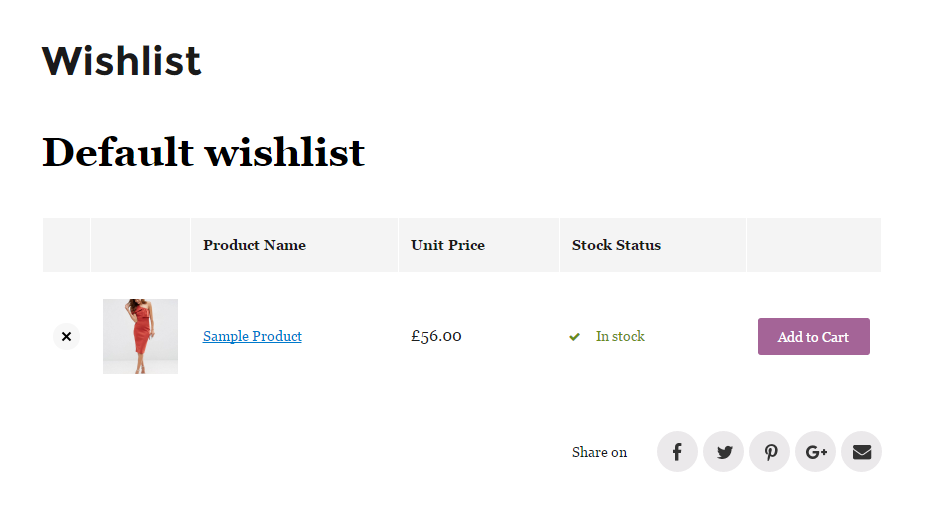
You can show or hide any column in the Wishlist table on the Wishlist page. This allows you to decide what information to show and what to omit. Make your Wishlist page as informative or simple as you want.
Make it fit your website perfectly
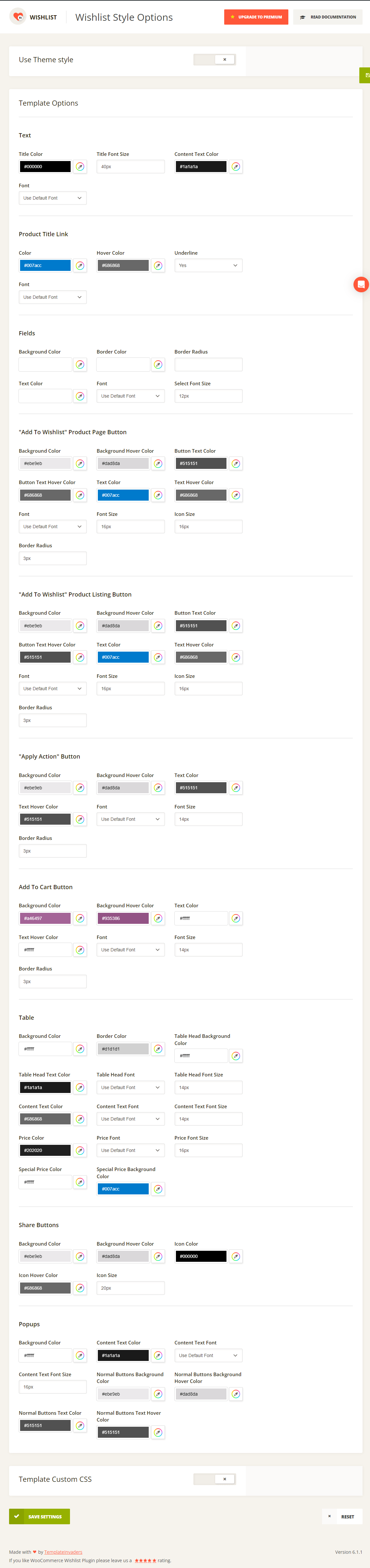
TI WooCommerce Wishlist comes with over 60 appearance options such as colors, font size, and borders, allowing you to tailor it to your website’s design. And if that’s not enough, you can add your custom CSS styles directly in the admin panel.
Translation Ready
TI WooCommerce Wishlist is translation-ready, making it easy to translate into any language. You can use the poEdit tool, Loco Translate, WP Multilang, or WPML to translate the plugin.
Responsive
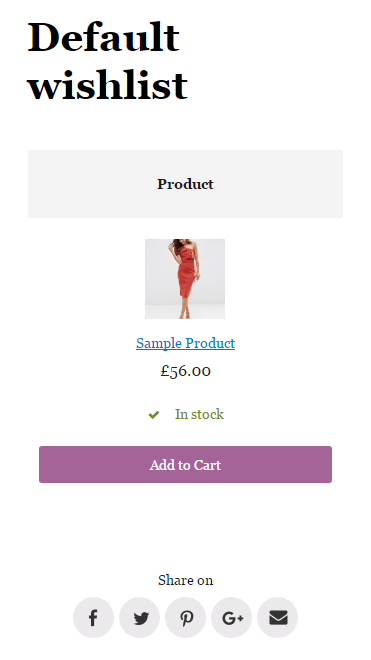
We understand the importance of responsive websites for online stores. That’s why we made sure that TI WooCommerce Wishlist looks and works perfectly on any device and that the layouts are user-friendly. You can check out the screenshots or preview to see for yourself.
GDPR Ready
TI WooCommerce Wishlist is GDPR ready, as it does not collect any personal data from website visitors. This makes the plugin compliant with GDPR regulations.
Translations
If you want to add a new language to TI WooCommerce Wishlist, you can contribute through translate.wordpress.org.
Suggestions
If you’re excited about TI WooCommerce Wishlist and want to contribute, you can get involved in our GitHub repository.
Documentation
You can find the full documentation for TI WooCommerce Wishlist here.
Installation
There are several ways to install TI WooCommerce Wishlist:
1. From the WordPress admin panel:
- Go to “Plugins” > “Add New” and search for “TI WooCommerce Wishlist.”
- Click the “Install Now” button for the “TI WooCommerce Wishlist” plugin.
- After the installation is complete, click the “Activate” link (Plugins > Installed Plugins).
2. Install manually using the FTP method.
- Download the plugin.
- Upload the plugin folder into the /wp-content/plugins directory of your WordPress installation using your favorite FTP client.
- Navigate to the “Plugins” > “Installed Plugins” section in your dashboard and activate the plugin.
3. Install manually from the WordPress admin panel
- Download the plugin.
- Go to “Plugins” > “Add New” and press the “Upload Plugin” button.
- Browse the plugin archive and click “Install Now.”
- After the installation is complete, click the “Activate” link (Plugins > Installed Plugins).
Changelog
Fixed: Latest vulnerabilities patched
2.14.2
Release Date – 4 November 2026
- Updated: Compatibility with WordPress 7.1.4 and WooCommerce 11.2.1
- Fixed: Database update recovery, concurrent migrations and repair of required indexes without losing saved wishlist data
- Fixed: Repeated database update notices after failed character set conversion
- Improved: Database migration diagnostics and controlled retries
- Updated: Integration with AutomateWoo plugin
- Updated: Integration with LiteSpeed Cache plugin
- Updated: Integration with ShopEngine plugin
- Updated: Integration with WP Fastest Cache plugin
- Updated: Integration with YITH WooCommerce Product Add-Ons plugin
2.14.1
Release Date – 2 November 2026
- Security: Improved guest action protection and access checks for saved product configurations
- Security: Hardened saved bundle configurations and access to bundled products
- Fixed: Database upgrades, legacy table recovery and preservation of fractional quantities
- Fixed: Repeated setup wizard redirects after incomplete database installation
- Fixed: Initial wishlist counter display and background synchronization with fewer startup requests
- Fixed: Wishlist-to-cart operations, automatic removal and guest wishlist transfers
- Fixed: Partial bulk actions, Undo and purchase tracking
- Fixed: Wishlist buttons, selected variations and synchronization after AJAX requests
- Fixed: Saved product options, uploaded file previews, addon pricing and tax display
- Fixed: Internal metadata appearing in WooCommerce order details
- Fixed: Settings imports and wishlist cleanup on multisite installations
- Updated: Integration with Gravity Forms Product Add-Ons plugin
- Updated: Integration with WooCommerce Subscriptions plugin
- Updated: Integration with WooCommerce Product Bundles plugin
- Updated: Integration with WPC Product Bundles plugin
- Updated: Integration with YITH WooCommerce Product Bundles plugin
- Updated: Integration with WooCommerce Bookings plugin
- Updated: Integration with WooCommerce Composite Products plugin
- Updated: Integration with WooCommerce Mix and Match Products plugin
- Updated: Integration with WooCommerce TM Extra Product Options plugin
- Updated: Integration with YITH WooCommerce Product Add-Ons plugin
- Updated: Integration with PPOM for WooCommerce plugin
- Updated: Integration with WooCommerce Product Add-Ons Ultimate plugin
- Updated: Integration with WooCommerce Custom Fields plugin
- Updated: Integration with Extra Product Options for WooCommerce plugin
- Updated: Integration with Advanced Product Fields and Advanced Product Fields Pro and Extended plugins
- Updated: Integration with WooCommerce Product Add-Ons plugin
- Updated: Integration with Woo Custom Product Addons plugin
- Updated: Integration with WC Fields Factory plugin
- Updated: Integration with Hide Price & Add to Cart Button plugin
- Updated: Integration with WPML Multilingual CMS plugin
- Updated: Integration with AutomateWoo plugin
- Updated: Compatibility with Flatsome theme
2.14.0
Release Date – 22 October 2026
- Updated: Compatibility with WordPress 7.1.3 and WooCommerce 11.2.1
- Security: Strengthened wishlist ownership checks, product access restrictions and REST API permissions
- Security: Protected public wishlist actions and access to saved product configurations
- Fixed: Guest-to-account wishlist transfers, concurrent updates and duplicate product entries
- Fixed: AJAX 404 errors when refreshing a wishlist before the first product is added
- Fixed: Unnecessary creation of empty default wishlists and scheduled cleanup of expired empty guest defaults
- Fixed: Excessive database queries for product statistics on storefront and admin requests
- Fixed: Unnecessary cart validation when loading wishlists and refreshing wishlist data
- Fixed: Login redirects affecting the cart and checkout when no wishlist page is assigned
- Fixed: Selected variations and product attributes when adding wishlist items to the cart
- Fixed: Automatic removal of parent variable products after choosing a variation on the product page
- Fixed: Legacy wishlist migration, emoji support and recovery after incomplete database upgrades
- Fixed: Saved product configurations, uploaded files and zero-valued custom product options
- Fixed: Fractional quantities, stock validation, backorders and automatic removal of wishlist items
- Fixed: Purchase tracking and wishlist attribution during checkout
- Fixed: Wishlist buttons, dialogs, counters and multiple wishlist views on the same page
- Fixed: Keyboard navigation, screen reader labels and recovery after failed AJAX requests
- Fixed: Wishlist names, special characters, pagination links and front page routing
- Fixed: Settings import validation, error reporting, wishlist routes and support chat preferences
- Updated: Integration with Advanced Product Fields (Product Addons) for WooCommerce plugin
- Updated: Integration with Advanced Product Fields Pro and Extended plugin: saved selections, formatted prices, option adjustments and transfer to cart
- Updated: Integration with WooCommerce Product Add-Ons plugin
- Updated: Integration with Woo Custom Product Addons plugin
- Updated: Integration with WooCommerce Product Add-Ons Ultimate plugin
- Updated: Integration with WC Fields Factory plugin
- Updated: Integration with Spam protection, Anti-Spam, FireWall by CleanTalk plugin
- Updated: Integration with LiteSpeed Cache plugin
- Updated: Integration with PW WooCommerce Gift Cards plugin
- Updated: Integration with YITH WooCommerce Product Add-Ons plugin
- Updated: Integration with YITH WooCommerce Product Bundles plugin
- Updated: Integration with Extra Product Options For WooCommerce | Custom Product Addons and Fields plugin
- Updated: Integration with WooCommerce Gravity Forms Product Add-Ons plugin
- Updated: Integration with WooCommerce Product Bundles plugin
- Updated: Integration with WPC Product Bundles for WooCommerce plugin
- Updated: Integration with WooCommerce Composite Products plugin
- Updated: Integration with WooCommerce Mix and Match Products plugin
- Updated: Integration with WooCommerce Bookings plugin
- Updated: Integration with WooCommerce Square plugin
- Updated: Integration with Product Quantity for WooCommerce plugin
- Updated: Integration with WooCommerce Advanced Quantity plugin
- Updated: Integration with VAD Product Design plugin
- Updated: Integration with WPML Multilingual CMS plugin
- Updated: Compatibility with Flatsome theme
- Updated: Integration with WP Rocket plugin
- Updated: Integration with Comet Cache plugin
- Updated: Integration with AutomateWoo plugin
- Updated: Integration with myCred – Points Management System For Gamification, Ranks, Badges, and Loyalty Rewards Program plugin
2.13.0
Release Date – 12 October 2026
- Added: Support for WordPress 7.1.x
- Added: Support for WooCommerce 11.2.x
- Security: Enforced private wishlist access checks across frontend, AJAX and cart actions
- Security: Protected guest wishlist ownership with signed cookies and stronger share keys for new wishlists
- Fixed: Early translation loading by deferring wishlist translations to the WordPress init hook
- Fixed: PHP filter_var_array() warnings caused by invalid numeric filter definitions
- Fixed: ShopEngine wishlist buttons missing from product loops after rendering a wishlist
- Fixed: Missing product option details when WP Armour has no configured honeypot field
- Fixed: PHP warnings on pages without a product in the ELEX WooCommerce Catalog Mode integration
- Fixed: Deprecated API usage in the Product Quantity for WooCommerce integration
- Fixed: PPOM wishlist-to-cart errors when product options are already decoded
- Fixed: Percentage-based add-on prices in YITH WooCommerce Product Add-Ons wishlist item details
- Fixed: Technical CleanTalk anti-spam fields appearing in wishlist item details
- Updated: Integration with Advanced Product Fields (Product Addons) for WooCommerce plugin
- Updated: Integration with Spam protection, Anti-Spam, FireWall by CleanTalk plugin
- Updated: Integration with GTM4WP – A Google Tag Manager (GTM) plugin for WordPress plugin
- Updated: Integration with ELEX WooCommerce Catalog Mode plugin
- Updated: Integration with WP Armour – Honeypot Anti Spam plugin
- Updated: Integration with LiteSpeed Cache plugin
- Updated: Integration with myCred – Points Management System For Gamification, Ranks, Badges, and Loyalty Rewards Program plugin
- Updated: Integration with Product Quantity for WooCommerce plugin
- Updated: Integration with PW WooCommerce Gift Cards plugin
- Updated: Integration with ShopEngine plugin
- Updated: Integration with Product Options and Price Calculation Formulas for WooCommerce – Uni CPO plugin
- Updated: Integration with WC Fields Factory plugin
- Updated: Integration with Woo Custom Product Addons plugin
- Updated: Integration with Extra Product Options For WooCommerce | Custom Product Addons and Fields plugin
- Updated: Integration with Payment Plugins Braintree For WooCommerce plugin
- Updated: Integration with WPC Product Bundles for WooCommerce plugin
- Updated: Integration with WooCommerce Gravity Forms Product Add-Ons plugin
- Updated: Integration with WooCommerce Multilingual plugin
- Updated: Integration with PPOM – Product Addons & Custom Fields for WooCommerce plugin
- Updated: Integration with WooCommerce Square plugin
- Updated: Integration with WP Fastest Cache plugin
- Updated: Integration with WP Multilang – Translation and Multilingual Plugin plugin
- Updated: Integration with WPC Variations Radio Buttons for WooCommerce plugin
- Updated: Integration with YITH WooCommerce Product Add-Ons plugin
- Updated: Integration with YITH WooCommerce Product Bundles plugin
- Updated: Integration with YITH WooCommerce Quick View plugin
2.12.1
Release Date – 4 September 2026
- Security: Protected private wishlist data from unauthorized REST API access
- Fixed: JavaScript error when marking wishlist products without cached data
- Fixed: Bulk selection checkbox not reflecting individual wishlist item selections
2.12.0
Release Date – 25 June 2026
- Added: Support for WordPress 7.0.x
- Added: Support for WooCommerce 10.8.x
- Fixed: Various PHP compatibility warnings for PHP 7.4-8.4
- Updated: Integration with Woo Custom Product Addons plugin
- Updated: Integration with LiteSpeed Cache plugin
- Updated: Integration with ShopEngine plugin
- Updated: Integration with Comet Cache plugin
- Updated: Integration with Product Quantity for WooCommerce plugin
- Updated: Integration with Check Pincode/Zipcode for Shipping WooCommerce plugin
- Updated: Integration with Gift Cards For WooCommerce plugin
- Updated: Integration with iOne360 Configurator plugin
- Updated: Integration with AutomateWoo plugin
- Updated: Integration with Quick Buy Now Button for WooCommerce plugin
- Updated: Integration with WooCommerce Show Single Variations by Iconic plugin
- Updated: Integration with WooCommerce Product Add-Ons Ultimate plugin
- Updated: Integration with WPML Multilingual CMS plugin
- Updated: Integration with Woocommerce Variations Table – Grid plugin
- Updated: Integration with Booking & Appointment Plugin for WooCommerce plugin
- Updated: Integration with WooCommerce Bookings plugin
- Updated: Integration with WooCommerce Composite Products plugin
- Updated: Integration with WooCommerce Fast Cart plugin
- Updated: Integration with WooCommerce Mix and Match Products plugin
- Updated: Integration with WooCommerce Product Add-Ons plugin
- Updated: Integration with WooCommerce Product Bundles plugin
- Updated: Integration with WooCommerce Product Table plugin
- Updated: Integration with WooCommerce Square plugin
- Updated: Integration with WooCommerce Waitlist plugin
- Updated: Integration with WP Grid Builder plugin
- Updated: Integration with WP Rocket plugin
Screenshots





For developers
Is this your plugin? Show off the numbers.
Add a live badge to your site, docs or GitHub README. It updates on its own — no account needed.
Best TI WooCommerce Wishlist alternatives
All ecommerce plugins →





FAQ
TI WooCommerce Wishlist: quick answers
Straight answers, pulled from live WordPress.org data.
Source: WordPress.org
Is TI WooCommerce Wishlist free?
Yes. TI WooCommerce Wishlist is free to download and use from the official WordPress.org plugin directory. The developer also sells premium add-ons or a Pro version with extra features.
Is TI WooCommerce Wishlist safe to use in 2026?
Yes — TI WooCommerce Wishlist is a safe, well-maintained plugin to use in 2026. It runs on 100K+ sites, is rated 4.7/5 and was last updated 2 weeks ago, and scores 82/100 on our health check.
How many websites use TI WooCommerce Wishlist?
TI WooCommerce Wishlist is active on 100K+ WordPress websites and has been downloaded 6,530,249 times since it launched in September 2016. It was downloaded 122,845 times in the last 30 days.
Does TI WooCommerce Wishlist work with WordPress 7.1?
Yes. The developer has tested TI WooCommerce Wishlist up to WordPress 7.1.5, the latest release. It requires WordPress 6.1 or newer.
What PHP version does TI WooCommerce Wishlist need?
TI WooCommerce Wishlist requires PHP 7.4 or higher. Most hosts run PHP 8.x today, so it works on any modern WordPress hosting.
When was TI WooCommerce Wishlist last updated?
The latest version, 2.14.2, was released on November 4, 2026 (2 weeks ago).
Who makes TI WooCommerce Wishlist?
TI WooCommerce Wishlist is developed and maintained by templateinvaders.
What are the best alternatives to TI WooCommerce Wishlist?
The most popular alternatives to TI WooCommerce Wishlist are WooCommerce (7M+ installs), Popup Builder & Popup Maker… (1M+ installs) and WooCommerce PayPal Payments (800K+ installs).
Powered by PageForge
One template and a spreadsheet. A real page for every search.
PageForge turns each row of a CSV into a WordPress page with its own title, URL, SEO fields and schema, built on the layout you already designed. Free on WordPress.org.
- CSV and XLSX, plus Google Sheets on Professional and Enterprise
- Its own title, URL, SEO fields and schema for every page
- Works with the block editor, Elementor, Divi and Avada
- Free on WordPress.org, no credit card