


WP Taxonomy Manager – CSV Import, Export & Bulk Term Tools
Manage taxonomies and terms with CSV import/export, bulk editing, safe delete with undo, history, quality audit, redirects, and user transfers.

Choix solide
WP Taxonomy Manager is a solid plugin choice in 2026, with a few things worth checking first. It runs on 1K+ sites, is rated 5/5 and was last updated 21 hours ago, and scores 77/100 on our health check.
- Développé activement — Dernière mise à jour il y a 21 heures
- Testé avec le dernier WordPress (7.1)
- Momentum — downloads up 44.8% vs the previous 30 days
- Très peu de critiques jusqu'à présent
Comment s'accumule-t-il ?
Côte à côte sur les installations, les mises à jour, les évaluations et le support



Téléchargements quotidiens
Les pics de téléchargement suivent généralement une nouvelle version - chaque site qui met à jour automatiquement compte comme un téléchargement.
Classements
Where WP Taxonomy Manager stands todayWordPress.org Classements de recherche
Position en direct dans la recherche de plugins, Top 100| Mot-clé | Position |
|---|---|
| bulk import | #17 |
| csv export | #10 |
| CSV Import | #10 |
| custom taxonomy | #32 |
| taxonomie | #17 |
Adoption de version
Part de sites actifs par version.
Répartition des notes
★★★★★ ★★★★★ 5 sur 3 avis
About WP Taxonomy Manager
From the official readme · v2.5.0Description
WP Taxonomy Manager brings taxonomy setup, term maintenance, and CSV transfers into one WordPress admin workspace. Work with categories, tags, WooCommerce product taxonomies, and custom taxonomies that your account can manage. Optional add-ons, such as Post Order and Auto Links & Term Cloud, are switched on from the Add-ons screen and stay hidden until you do.
Video tutorial
See how to import and export WordPress categories and tags from CSV:
Website and documentation
- Live website: wp-taxonomy-manager.com – see the features, screenshots, and latest updates.
- Documentation: Setup and feature guides for every screen, including CSV import and export.
- Pro plans: Compare plans and pricing for the Pro tools listed below.
Fonctions gratuites
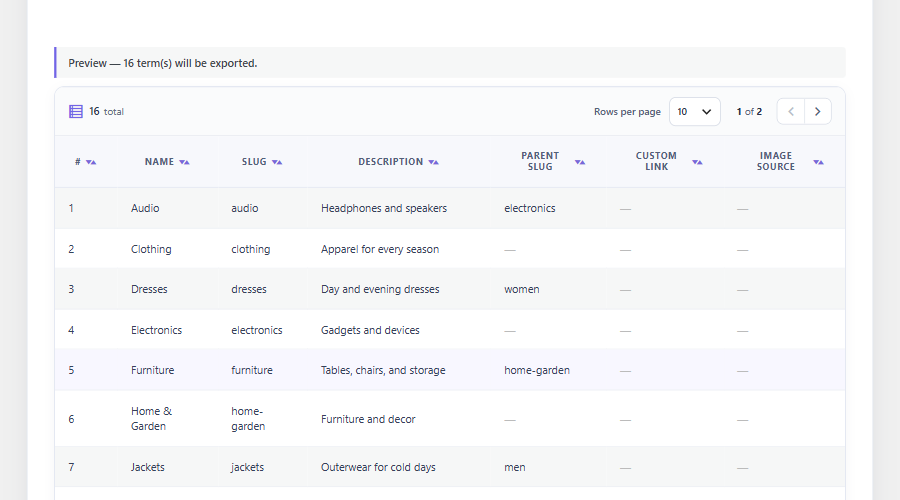
- CSV term export – Download term names, slugs, descriptions, parent slugs, and custom links from a selected taxonomy.
- Export preview – Review the selected terms in the admin before downloading a file.
- Export filters – Narrow exports by empty state, name, parent, or term count.
- CSV term import – Create new terms from CSV and skip existing names or slugs. Parent rows are created before their children wherever they appear in the file, and equal names can be imported under different parents.
- Spreadsheet-friendly CSV – Comma, semicolon, and tab-separated files are detected automatically, and UTF-16 or Windows-1252 files saved by Excel are converted to UTF-8.
- Term paths – Describe a hierarchy in one column, such as “Clothing > Men > Shirts”; missing parent terms are created.
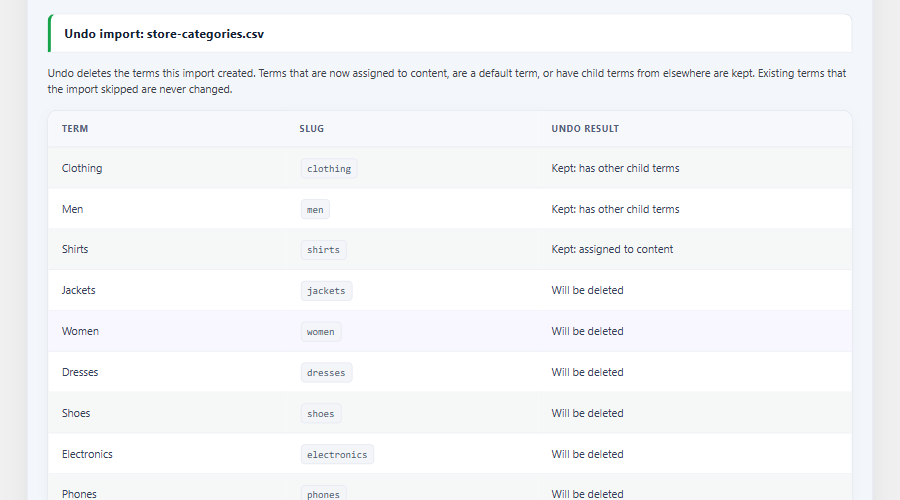
- Import undo – Review the last five CSV imports and undo one. Undo previews every term first and keeps terms that are now in use.
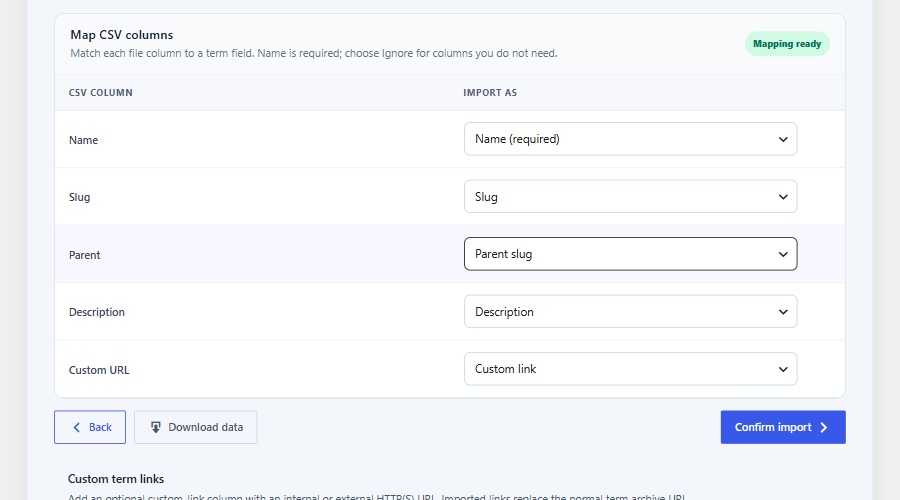
- Visual column mapping – Match source CSV columns to import fields and ignore columns you do not need.
- Custom taxonomy builder – Register hierarchical or non-hierarchical taxonomies and attach them to selected post types without code.
- Term creation – Add terms from the plugin workspace, including an AJAX form for quick creation.
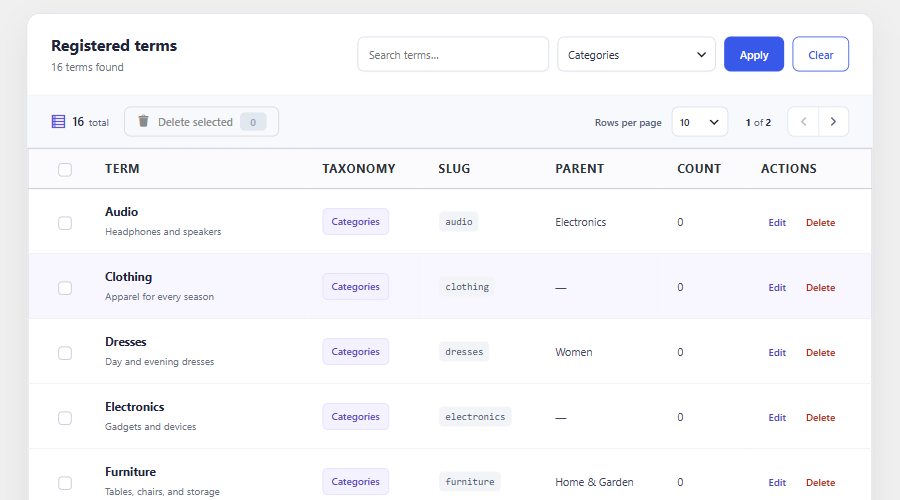
- All Terms workspace – Browse, edit, and delete terms from one admin area, with bulk deletion for selected terms.
- Inline mass editor – Search and page through terms, then update names and slugs in place.
- Custom term links – Point a term to an internal or external HTTP(S) URL through the term form or a CSV column.
- Term redirects – Record same-site archive URL changes and redirect old 404 URLs to the current term URL. Merged terms also redirect to the surviving term; admins can review and remove rules. Requires path-based permalinks.
- Unused term cleanup – Preview terms with no content relationships or children, delete up to 50 selected terms after confirmation, and restore them from cleanup history with new IDs.
- Demo term generator – Create sample terms for development or content planning.
- Keyword auto tagging – Assign existing taxonomy terms to published posts when configured keywords match.
- User CSV transfer – Export users by role, then import new accounts or update existing users’ profile details. Exports include password hashes and should be stored securely.
- Post Order add-on – Switch it on in Add-ons to order the posts of a category: type an order number, rename titles in place, or move posts to the Trash. The post editor’s Order field fills in the next number for the chosen category. Show the result with the
[taxocsie_ordered_posts]shortcode or the Ordered Posts block. Drag and drop is Pro. - Data Manager overview – Illustrated cards explain export, import, bulk edit, term ordering, and user transfers before you pick a task.
- Dashboard and settings – View term and activity counts, recent CSV imports, and a getting-started checklist with a sample CSV, and adjust the plugin’s available options.
- Review before delete, with restore – Deleting a term opens an impact review first (items using it, child terms, the archive URL that stops working). Nothing is deleted until you confirm, and a deleted term can be restored from its snapshot.
- Slug change review – See the old and new archive URLs, clashes and redirects before a slug change is saved.
- History with undo – One list of term edits, bulk edits, moves, deletes, restores, merges and cleanups, with filters, a CSV download, and undo for edits and moves.
- Header search – Press
/or use the search button in the plugin header to find pages, settings, Data Manager actions and terms. - Quality Audit add-on – A read-only health check per taxonomy for duplicate names, broken hierarchy, unused and very large terms and more, with instant filters, a sortable table and ignore. Off by default; switch it on in Add-ons.
- Auto Links & Term Cloud add-on – Off by default; switch it on in Add-ons. Set it up in four guided steps (Link words, Term cloud, Related posts, Check & results) with Back and Next and a Save button in one footer. Related posts and several sets of settings are Pro.
- Auto Links: link words – Turn words in posts into links to their category, tag or custom term, or to keyword and URL pairs you choose. Links are added when a post is shown; post content is never rewritten. A five-step wizard groups the options (terms, content types, matching, limits, link behaviour, safe areas) and ends with a review you can edit step by step. Supports whole-word or word-beginning matching (useful for Bengali and other inflected languages), links per post and per target, minimum posts per term, new tab, nofollow, a CSS class and hover text, and links in excerpts, titles and chosen custom fields. Keep text unlinked by heading, HTML element, CSS class or ID, block or shortcode. Each post can always or never link, each term can be kept out, and terms can have extra keywords (on the term screen or in an
auto_link_keywordsCSV column). - Auto Links: term cloud – Show your most used terms with the
[taxocsie_term_cloud]shortcode, the Term Cloud block or a classic widget. A builder on the page lets you pick the taxonomy, cloud or list, order, size, colours and counts, shows a live preview, and gives you the shortcode with a Copy button. Tick “Only terms of the current post” (or addcurrent_post="1") to show just the terms the post being read has. - Auto Links: check & results – See which links a post would get without changing anything, and optionally count clicks on the links (no visitor data is stored).
CSV fields
The Free term CSV needs a ‘name’ or ‘term_path’ field and supports ‘slug’, ‘description’, ‘parent_slug’, and ‘custom_link’. A parent slug can match an existing term or another row in the same file. Import accepts .csv or .txt files with CSV content.
Pro features
Pro features require an eligible license or trial.
- Advanced CSV Import – Preview row-level errors and warnings, check hierarchy, and choose create-only, update-only, or combined imports. Apply prepared rows in bounded background batches, resume paused jobs, and download row-level error reports.
- Import presets – Save per-user column mappings and choose which mapped fields may update existing terms.
- XLSX and JSON transfers – Import and export taxonomy terms in Excel and JSON formats.
- Term images – Add or replace Media Library images on term screens, import images from public URLs, include image URLs in CSV exports, and display images with a shortcode or the Term Image block.
- Term ordering – Order siblings within each parent group, browse large groups 100 terms at a time, and save in bounded batches. Optionally apply that order to frontend term queries that use WordPress’s default sort; explicit query sorts are preserved. Drag a term onto a sibling or a breadcrumb to move it under another parent; the old URLs get redirects.
- Duplicate term management – Find normalized-name duplicates and read-only similar-spelling or initials suggestions, inspect merge impact, merge with confirmation, and restore from the audit history. Successful merges can also create a redirect from the removed term’s old archive URL.
- Scheduled remote CSV sync – Import a bounded remote CSV on a schedule with optional Basic or Bearer authentication and a recent-run log; requires Action Scheduler.
- Custom term fields – Define text, color, image, select, and URL fields and display saved values with a shortcode or the Term Field block.
- Post Order drag and drop – Drag posts into place, sort a whole category in one click (A-Z, Z-A, newest, oldest, reverse), and undo the last change.
- Bulk Assign add-on – Select many posts and add, remove, or replace their terms in one step, with undo for one hour.
- Term Meta Transfer – Preview, export, and import registered scalar metadata for existing terms. Supported ACF taxonomy fields require active ACF and the ACF Term Fields add-on.
- Term Maintenance – Preview bulk term-field changes or copy and move terms between compatible taxonomies, with bounded batches and a conflict-aware restore window.
- AI auto tagging – Suggest existing taxonomy terms through any configured WordPress AI Client text provider. Requires WordPress 7.0 or later and a provider API key; WooCommerce is not required.
- Quality Audit rules and report – Naming rules (longest name, capitalization, forbidden characters, required description and fields), a CSV report, and an optional weekly email with issue counts only.
- Site Compare add-on – Download a taxonomy manifest on each site, upload the other site’s file, and see missing, extra, renamed and moved terms. Read-only; the sites never connect.
- Multilingual QA add-on – A read-only check of translated terms in WPML or Polylang: terms with no language, missing translations, mismatched parents, and differing descriptions or fields. Filter by severity, issue type or search, and page through the results.
- Auto Links: related posts – Suggest posts that share the most terms, automatically after the content of chosen post types, or with the
[taxocsie_related_posts]shortcode or the Related Posts block. Choose the heading, number of posts, taxonomies to match, featured image, date and excerpt length. - Auto Links: several sets – Keep more than one set of Auto Links settings, each with its own terms, content types and limits. Free includes one default set.
- Linked terms – Link a term to other terms in the same taxonomy on its edit screen. When the term is added to a post, the linked terms are added too (A to B to C follows the chain). Links work one way, and removing a term never removes the ones it added.
- WooCommerce term visuals – Show brand logos and global attribute color or image swatches when WooCommerce is active.
Who can use it?
WP Taxonomy Manager is useful for site administrators moving term data between sites, content teams maintaining large term libraries, developers creating taxonomies, and WooCommerce stores organizing product terms.
Services externes
WP Taxonomy Manager connects to the services below. Nothing is sent until an administrator takes the action described.
WP Taxonomy Manager support (wp-taxonomy-manager.com)
When an administrator sends the Ask a question form, the plugin sends the name, reply email, topic, and question to https://wp-taxonomy-manager.com/wp-json/wtmp-support/v1/message so the team can reply by email. If Include site details stays checked, it also sends the site address, the WordPress, PHP, and plugin versions, the Free or Pro plan, and the site language. Privacy policy.
WP Taxonomy Manager email updates (wp-taxonomy-manager.com and SendFox)
Only after an administrator clicks Yes, subscribe me in the updates notice, the plugin sends that administrator’s email and the site address to https://wp-taxonomy-manager.com/wp-json/wtmp-updates/v1/subscribe, which adds the email to the WP Taxonomy Manager list in SendFox. Privacy policy, SendFox privacy policy.
Freemius (licensing)
License activation, Pro updates, and the optional account connection invitation use the Freemius SDK. Freemius terms, Freemius privacy policy.
AI provider (Pro AI suggestions)
Only when Pro AI suggestions are turned on, up to 6,000 characters from the post and up to 100 existing term names are sent to the text provider configured in the WordPress AI Client on your site. The provider’s own terms and privacy policy apply.
Installation
- Upload the plugin folder to
/wp-content/plugins/or install via Plugins → Add New - Activate through the Plugins screen
- Open WP Taxonomy in the left admin menu
Journal de modifications
Adds the free Auto Links & Term Cloud add-on (off by default): link words in posts to your terms and show a term cloud, set up in four guided steps. Pro adds related posts and several sets of settings. Post content is never rewritten.
2.5.0 – 19/11/2026
- Added: Auto Links & Term Cloud add-on (free, off by default). Turns words in posts into links to their category, tag or custom term, or to keyword and URL pairs you choose. Links are added when a post is shown; post content is never rewritten. Existing links, code, buttons, captions and form fields are never changed.
- Added: Auto Links matching for whole words or word beginnings (for Bengali and other inflected languages), limits per post and per target, minimum posts per term, shortest term name, letter case, new tab, nofollow, an extra CSS class, hover text, and links in excerpts, titles and chosen custom fields.
- Added: Keep text unlinked by heading, HTML element, CSS class or ID, block or shortcode. Each post can follow the settings, always link or never link, and each term can be kept out.
- Added: Extra keywords per term (synonyms, plurals, another language) on the term screen and in an
auto_link_keywordsCSV column. - Added (Pro): Several sets of Auto Links settings, each with its own terms, content types and limits. Text one set links is not linked again by the next. The free plugin keeps one default set.
- Added: Check & results shows which links a post would get without changing anything, and optional click counts list the most clicked links (no visitor data, IP addresses or cookies).
- Added: Term Cloud with the
[taxocsie_term_cloud]shortcode, the Term Cloud block and a classic widget: cloud or list, colour gradient, size scale, counts, minimum posts, include or leave out terms, top-level or child terms, post type and last-days filters, and your saved term order. - Added: Term Cloud option “Only terms of the current post” (
current_post="1", a block toggle and a widget checkbox) shows just the terms the post being read has. It still honours the term limit, minimum posts, include and leave-out options, and prints nothing outside a post. - Added (Pro): Linked terms. Link a term to other terms in its taxonomy on the term screen; adding the term to a post adds the linked terms too, following chains such as A to B to C. Links work one way and removing a term never removes the terms it added.
- Added: Term Cloud builder in the admin: pick the options, see a live preview, and copy the matching shortcode with one click.
- Added (Pro): Related posts by shared terms, automatically after the content of chosen post types, or with the
[taxocsie_related_posts]shortcode or the Related Posts block, with heading, number of posts, taxonomies to match, featured image, date and excerpt. - Improved: Auto Links is set up in four steps (Link words, Term cloud, Related posts, Check & results). Every step shares one heading, a step bar that shows which features are on, and one footer with Back, the step’s Save button and Next. Leaving a step with unsaved changes asks first.
- Improved: The Link words wizard has Back and Next above the steps, options grouped under clear titles (Terms, Your own keywords, Content types, Word matching, Limits, Link behaviour, Safe areas) with advanced options in collapsible groups, and a review grouped by step with an Edit button for each.
- Improved: Related Posts settings use a main switch, pill buttons for content types and taxonomies (no slugs to type), help text under each field, and a primary Save button.
- Improved: Add-on cards show a coloured icon for each add-on, and the Auvrenth Studio cards show each product’s own icon.
- Improved: Documentation links on the add-on cards open the matching page on wp-taxonomy-manager.com (Duplicate Terms, Remote CSV Sync, WooCommerce Brands & Swatches, Post Order, and the Add-ons page for ACF Term Fields). Before, they pointed to sections of the docs index that do not exist.
- Fixed: If the site returns an error page while an add-on is switched on or off (for example a PHP error in another plugin), the card now says the site had an error instead of showing “Unexpected token ‘<‘ … is not valid JSON”. A network failure has its own message, and the switch stays as it was.
- Fixed: Hovering a link in a sidebar menu group (such as Auto Links) no longer shows a tall bar over the group’s tree lines.
- Fixed: On phones the Auto Links footer stays at the end of the page instead of covering the screen.
- Notes: Related posts, the Term Cloud and links follow your page cache, so a cached page shows the old links until the cache is cleared. Keywords per term are not carried by Pro Advanced Import, XLSX/JSON or Term Meta Transfer.
2.4.0 – 14/11/2026
- Added: Deleting a term, or several at once, opens a review first. It shows how many posts, products and other items use the term, which items would be left without a term, what happens to child terms, which archive URL stops working, and example items. Nothing is deleted until you confirm; terms with content or child terms also need DELETE typed. The default term is protected.
- Added: Before a term is deleted, a snapshot is saved (the term, its fields, up to 1,000 assigned items and up to 200 child terms). “Restore this term” brings it back with a new ID, puts the items and child terms back where they still exist, and refuses safely if its slug is taken or its parent is gone. The latest 20 snapshots are kept.
- Added: Changing a term’s slug in All Terms shows the old and new archive URLs, child term URLs, slug clashes and any redirect before you save. Name and description edits still save at once.
- Added: The bulk term editor checks slug clashes (including two rows with the same slug) and asks to confirm URL changes before saving.
- Added (Pro): Dragging a term under another parent shows what happens to its URL and asks first.
- Added: “Recent term changes” under All Terms records who deleted, restored, edited, bulk edited, moved or merged terms, cleaned up unused terms or undid an import, with a Show all option.
- Added: A search button in the plugin header (also the / key) finds pages, settings, Data Manager actions and terms.
- Added: Create Term is listed under All Terms in the sidebar menu, as in the header.
- Added (Pro): A Shortcode column on Term Fields shows each field’s
[taxocsie_term_field]shortcode and copies it with one click. - Improved: Settings are grouped into colour-coded category cards (Dry import preview, Admin interface, Term links and Remote CSV Sync); the custom term link option has its own category. Saved values and option names are unchanged.
- Improved (Pro): The Bulk Assign panel has action cards, a searchable term list with chips, and a live summary such as “Add 2 terms to 5 posts” before you apply.
- Improved: The Term Fields table has borders on every row and column and fits its card at 1440 px.
- Improved: On phones the plugin header’s Help and search buttons sit below the tabs instead of under the WordPress admin bar.
- Added: A History page lists every term edit, bulk edit, move, delete, restore, merge, cleanup and import undo, with filters by action, taxonomy and term name, and a CSV download. The newest 200 entries are kept.
- Added: Edits, bulk edits and moves can be undone from History. Undo only runs if nothing has changed those terms since; otherwise nothing is written and you are told what changed. A bulk edit is undone as a whole or not at all.
- Added: The delete review names the child terms and shows which plugin each saved term field likely belongs to (for example ACF or Rank Math).
- Added: Quality Audit add-on (free, off by default). A read-only health check per taxonomy: duplicate names, broken hierarchy, content types that do not support the taxonomy, numbered slugs, extra spaces, unused and very large terms. Issues can be ignored. A “Term fields inventory” tab lists every saved term field, its likely source and whether Term Meta Transfer can carry it.
- Added (Pro): Quality Audit naming rules (longest name, capitalization, forbidden characters, allowed names, required description and term fields), a CSV report, and an optional weekly email with issue counts (never term names).
- Improved: The Quality Audit page has summary tiles (open, high, medium, low), instant filters without a page load (search, issue type, severity by clicking a tile, open or ignored), a sortable table with rows per page, Edit term and tool links on each issue, and an Ignore button that works without a reload and can be undone. The filters are kept in the address, so a filtered view can be shared. Term fields has a search, a source filter and a “would be left behind” filter, and Rules is split into cards with a list of active rules.
- Improved: The shared data tables can now be filtered, show their own sort values, and offer custom rows-per-page lists. Existing tables behave as before.
- Added (Pro): Site Compare add-on (off by default). Download a taxonomy manifest on each site, upload the other site’s file, and see missing, extra, renamed and moved terms plus description and field differences. Read-only; the sites never connect and nothing is changed on either.
- Added (Pro): Multilingual QA add-on (off by default). A read-only check of translated terms in WPML or Polylang: terms with no language, missing translations, mismatched parents and differing descriptions or fields.
- Improved: History, Quality Audit, Site Compare and Multilingual QA tables turn into labelled cards on phones, so nothing scrolls sideways. An undone move shows the parent names instead of IDs.
- Improved: The sidebar menu and the plugin header now follow one order by feature priority: Dashboard, All Terms (Create Term, Demo Generator, Auto Tagging, Term Fields), Data Manager, Register Taxonomy, Term Tools, Post Tools, More, then Add-ons, Settings and Account. Demo Generator now sits under All Terms in the sidebar.
- Improved: The plugin header stays visible under the WordPress admin bar while you scroll, and looks the same on every plugin page.
- Improved (Pro): Multilingual QA uses the same toolbar, table and pager as All Terms, with filters for severity, issue type and search, a total count, and 5, 10, 20 or 50 rows per page (10 by default).
- Improved: Quality Audit and Term fields tables show 10 rows per page by default (10, 25, 50 or 100 to choose from).
- Improved: The Demo Generator stats table has borders on every row and column.
- Improved: Added translator comments and documented the remaining Plugin Check exceptions.
- Notes: Undo in History works for edits made after this update; older entries stay record-only, as do bulk edits of more than 25 terms and descriptions over 2,000 characters. Merges, unused-term cleanups and imports are still undone on their own pages. Site Compare does not migrate or sync anything.
- Notes: Edits made on the native WordPress term screen are not reviewed or recorded. Terms with more than 1,000 items or 200 child terms are deleted without a snapshot, and the review says so. Moving a term or renaming a parent does not need a redirect, because WordPress finds a term by its own slug; a redirect is saved only when a term’s own slug changes.
2.3.0 – 06/11/2026
- Added: Post Order add-on (free, off by default). Type an order number for the posts of a category, rename titles in place, and move posts to the Trash. The Order field in the post editor fills in the next number for the chosen category.
- Added: The
[taxocsie_ordered_posts]shortcode and an Ordered Posts block list a category in its saved order. - Added (Pro): Drag and drop, quick sort (A-Z, Z-A, newest, oldest, reverse), and undo in Post Order.
- Added (Pro): Bulk Assign add-on (off by default) to add, remove, or replace terms on many posts, with undo for one hour.
- Added (Pro): Drag a term onto a sibling or a breadcrumb in Term Ordering to move it under another parent.
- Added (Pro): Term Image and Term Field blocks.
- Added: A getting-started checklist and a sample CSV download on the Dashboard.
- Added: An illustrated overview of what the Data Manager can do, shown before you choose a task.
- Added: A new “Post Tools” group in the plugin navigation.
- Improved: Renaming or moving a parent term now also records redirects for its child terms (up to 200 per change).
- Improved: The Pro offer banner appears only on the Dashboard and Add-ons screens, only to Free sites, and can be closed.
- Improved: Pro upgrade and documentation links open in a new tab, and the documentation link points to wp-taxonomy-manager.com/docs/.
- Improved: The Data Manager step headings are easier to see, and steps 1 and 2 are equal width.
- Improved: The translation template is refreshed, and block editor text is ready for translation.
- Improved: Code follows the WordPress coding standards in the files added or changed in this release.
2.2.0 – 20/10/2026
- Added: CSV import detects comma, semicolon, and tab separators, and converts UTF-16 and Windows-1252 files to UTF-8.
- Added: A term_path (or category_path) column, such as “Clothing > Men > Shirts”, creates missing parent terms.
- Added: Recent CSV imports with a previewed undo that keeps terms now in use, default terms, and terms with other children.
- Added: Search on the Add-ons page.
- Added: An “Ask a question” button on every plugin screen that sends a question to the WP Taxonomy Manager team, with optional site details.
- Improved: The readme lists the external services the plugin connects to and what each receives.
- Improved: Parent rows are created before their children wherever they appear in a CSV, so name-sorted exports keep their hierarchy on re-import.
- Improved: Equal term names can be imported under different parents.
- Improved: Redesigned Dashboard with term totals, grouped quick actions, recent imports, and a responsive layout.
- Improved: Sidebar submenu groups align and size correctly on mobile.
- Improved: Every plugin screen has the same, wider spacing on both sides, on desktop and mobile.
- Fixed: The Data Manager “Choose an action” step no longer overflows its card on tablets and phones.
- Fixed (Pro): Excel and JSON term exports failed with an “export request is invalid” error because the download link was HTML-escaped.
- Fixed: Term names and descriptions containing “&” were exported, previewed, and edited as “&”. Pro Advanced Import now also matches such names to existing terms.
2.1.3 – 12/10/2026
- Improved: Place Data Manager steps 1 and 2 side by side on wide screens, with a compact layout that stacks on smaller screens.
- Improved: Reduce excess spacing in the export panel so choices and actions stay closer together.
2.1.2 – 12/10/2026
- Improved (Pro): Browse and reorder direct siblings within a parent group, with page controls, keyboard-friendly move buttons, and bounded batch saves instead of a 500-term limit.
- Improved (Pro): Frontend custom ordering applies when a term query omits orderby; explicitly requested sorting remains intact.
Captures d'écran

Pour les développeurs
Est-ce votre plugin ? Montrez les chiffres.
Ajoutez un badge en direct à votre site, docs ou github readme. Il se met à jour par lui-même - aucun compte n'est nécessaire.
Best WP Taxonomy Manager alternatives
All bulk import plugins →




FAQ
WP Taxonomy Manager: quick answers
Réponses directes, extraites des données en direct WordPress.org.
Source : WordPress.org
Is WP Taxonomy Manager free?
Yes. WP Taxonomy Manager is free to download and use from the official WordPress.org plugin directory.
Is WP Taxonomy Manager safe to use in 2026?
WP Taxonomy Manager is a solid plugin choice in 2026, with a few things worth checking first. It runs on 1K+ sites, is rated 5/5 and was last updated 21 hours ago, and scores 77/100 on our health check.
How many websites use WP Taxonomy Manager?
WP Taxonomy Manager is active on 1K+ WordPress websites and has been downloaded 14,250 times since it launched in August 2025. It was downloaded 3,854 times in the last 30 days.
Does WP Taxonomy Manager work with WordPress 7.1?
Yes. The developer has tested WP Taxonomy Manager up to WordPress 7.1.5, the latest release. It requires WordPress 6.0 or newer.
What PHP version does WP Taxonomy Manager need?
WP Taxonomy Manager requires PHP 8.0 or higher. Most hosts run PHP 8.x today, so it works on any modern WordPress hosting.
When was WP Taxonomy Manager last updated?
The latest version, 2.5.0, was released on November 19, 2026 (21 hours ago).
Who makes WP Taxonomy Manager?
WP Taxonomy Manager is developed and maintained by Md.Rakib Hossen.
What are the best alternatives to WP Taxonomy Manager?
The most popular alternatives to WP Taxonomy Manager are Import and export users and… (70K+ installs), Sage Auto Upload Images (40+ installs) and EasySecure Bulk Product Imp… (10+ installs).
Propulsé par PageForge
Un modèle et une feuille de calcul. Une vraie page pour chaque recherche.
PageForge transforme chaque ligne d'un CSV en une page WordPress avec son propre titre, URL, SEO et schéma, construit sur la mise en page que vous Déjà conçu. Gratuit sur WordPress.org.
- CSV et XLSX, plus Google Sheets sur les professionnels et les entreprises
- Son propre titre, URL, SEO champs et schéma pour chaque page
- Fonctionne avec l'éditeur de blocs, Elementor, Divi et Avada
- Gratuit sur WordPress.org, pas de carte de crédit