


SyncNet Patch Radar
Shows only the really critical vulnerabilities in widely used products – searchable, shareable and as RSS feeds. Data from BSI, CISA, CVE.org and NVD.

Choix solide
SyncNet Patch Radar is a solid plugin choice in 2026, with a few things worth checking first. Was last updated 1 day ago, and scores 64/100 on our health check.
- Développé activement — Dernière mise à jour il y a 1 jour
- Testé avec le dernier WordPress (7.1)
- Petite base d'utilisateurs (<10 installations actives)
- Très peu de critiques jusqu'à présent
Comment s'accumule-t-il ?
Côte à côte sur les installations, les mises à jour, les évaluations et le support


Téléchargements quotidiens
Les pics de téléchargement suivent généralement une nouvelle version - chaque site qui met à jour automatiquement compte comme un téléchargement.
Classements
Where SyncNet Patch Radar stands todayWordPress.org Classements de recherche
Position en direct dans la recherche de plugins, Top 100| Mot-clé | Position |
|---|---|
| cve | #64 |
| patch | #49 |
| rss | >100 |
| la sécurité | >100 |
| vulnérabilités | >100 |
About SyncNet Patch Radar
From the official readme · v2.0.16Description
SyncNet Patch Radar collects security alerts automatically and shows only what really matters: critical vulnerabilities in widely used products such as Windows, Exchange, NetScaler, FortiGate, Cisco, VMware, Java, Chrome or PHP.
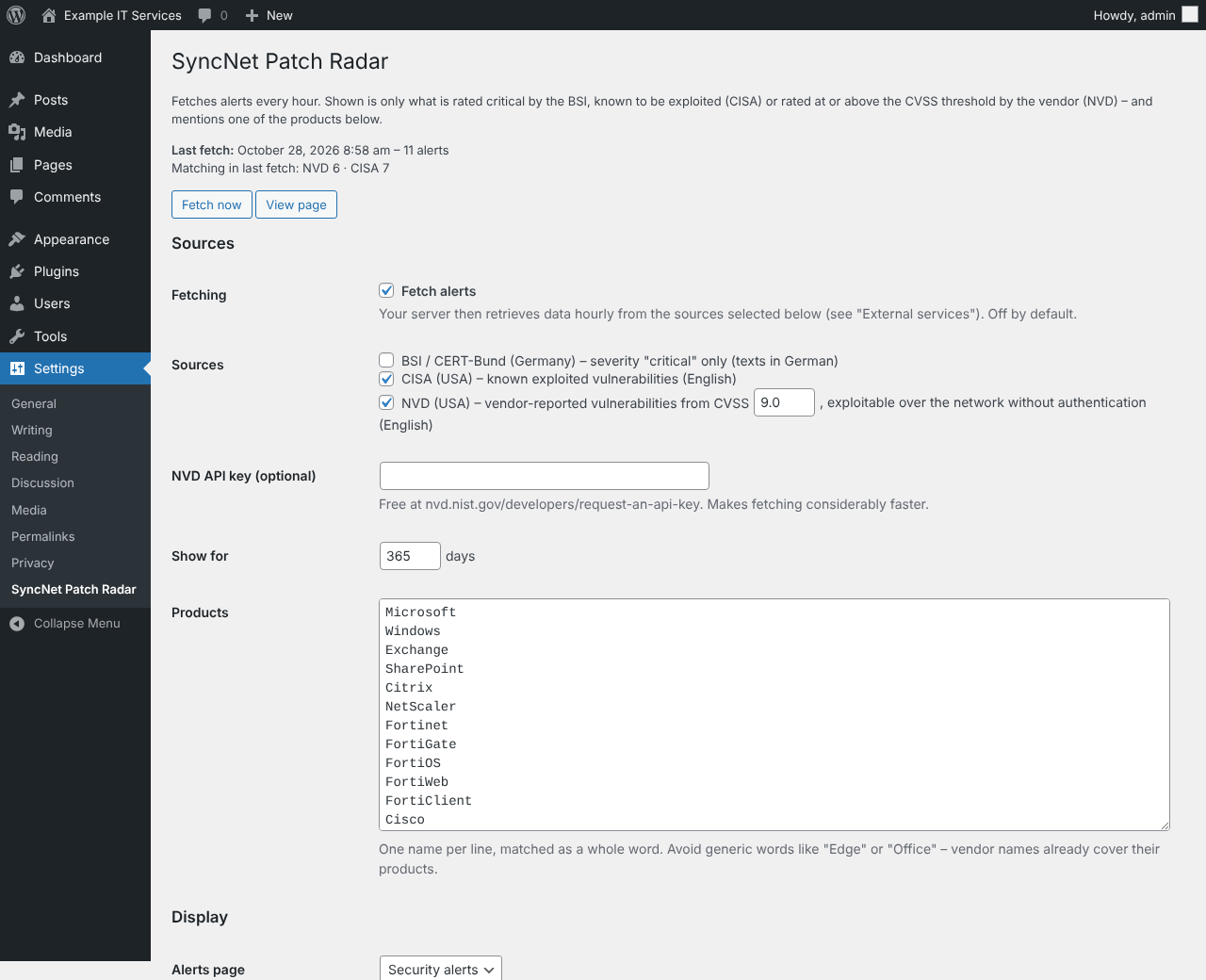
An alert is shown when it
- is rated critical by the German Federal Office for Information Security (BSI / CERT-Bund), or
- is listed by the US agency CISA as actively exploited (Known Exploited Vulnerabilities), or
- is rated CVSS 9.0 or higher (adjustable), exploitable over the network without authentication, and was reported by the vendor itself (NVD),
and concerns one of the products in your list (fully editable).
Traits
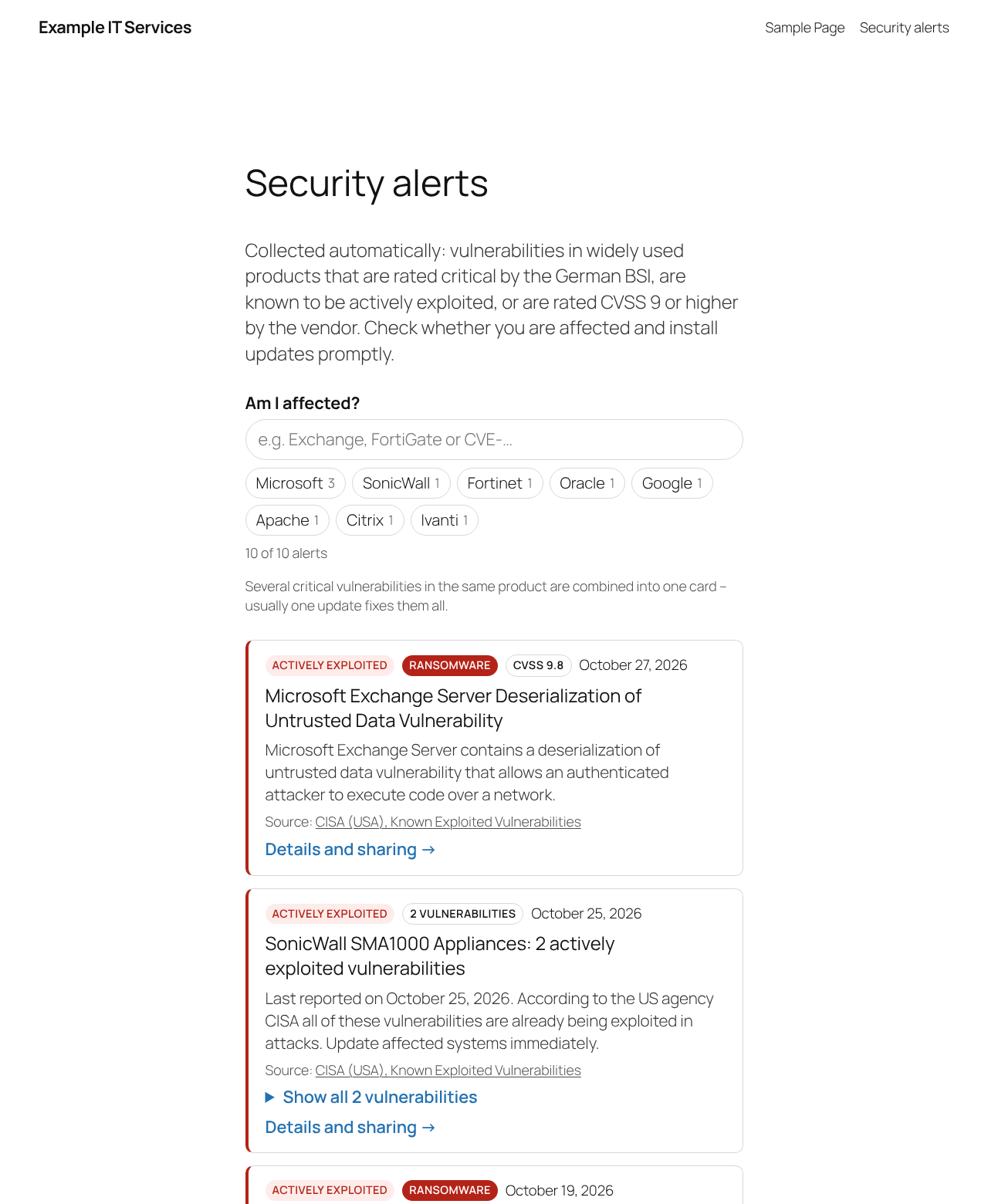
- Clean list with search (“Am I affected?”) and vendor filters
- Several critical vulnerabilities in the same product are combined into one card (“Google Chrome: 12 critical vulnerabilities”) – one update usually fixes them all
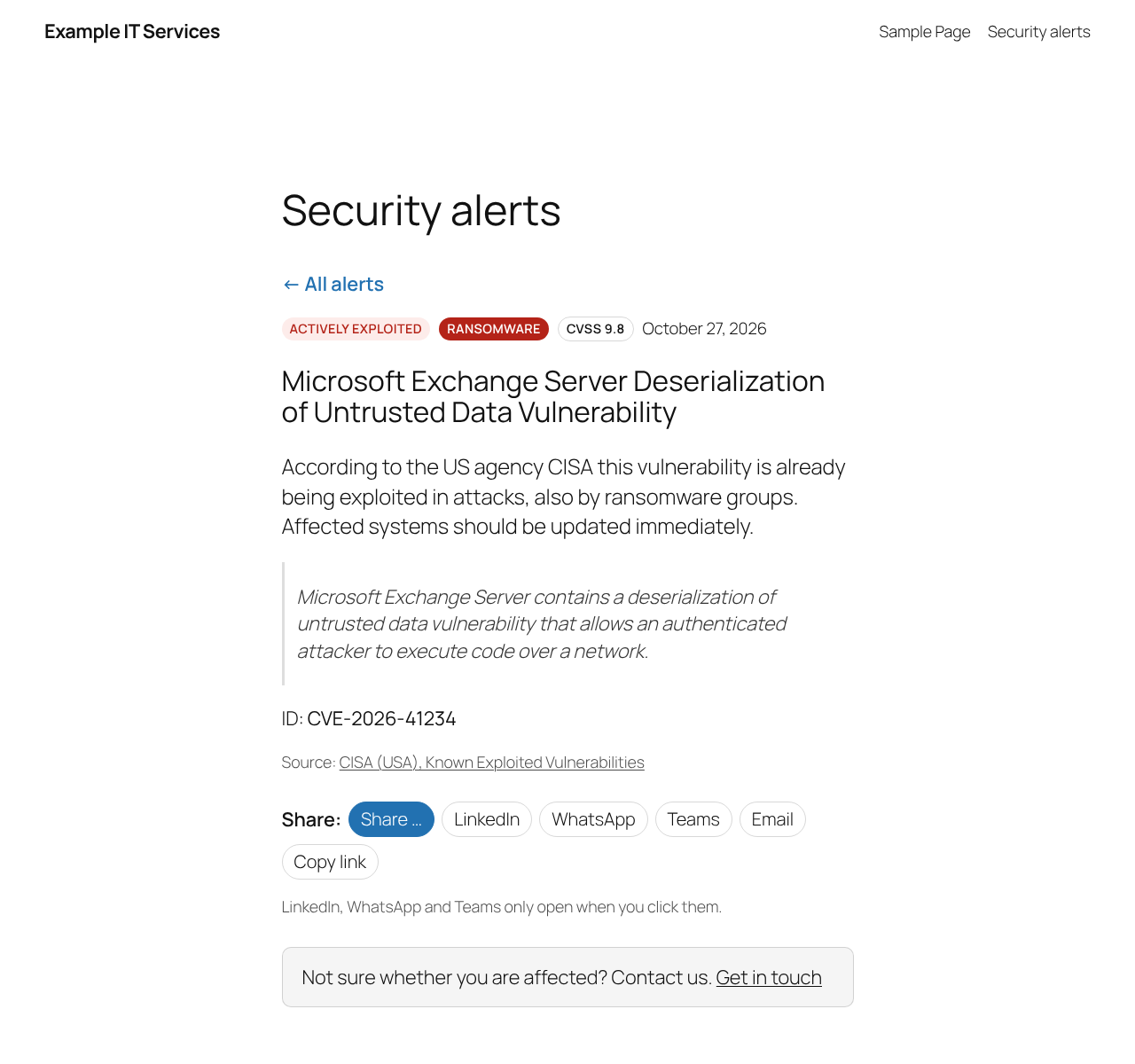
- Every alert and product group has its own page to share (LinkedIn, WhatsApp, Teams, email, copy link, native share on phones) – shared links always point to your site
- RSS feed for all alerts and one feed per vendor
- You choose where the subscription box and the share buttons appear: above, below or both
- Source and link to the original record on every card
- Optional small red dot on your menu item for the alerts page while a fresh, actively exploited vulnerability is listed (off by default)
- Optional one-line “latest critical alert” for your front page and a compact box for any page
- Optional call to action (“Not sure whether you are affected? Contact us”)
- Check tool in the settings: enter a CVE ID and see which condition is met
- No tracking, no cookies, no external scripts or fonts – visitors never connect to third parties
- Nothing is fetched until you switch fetching on in the settings
- Traduction prêt
Shortcodes
[syncnet_patch_radar]– the list (a draft page with it is created on activation)[syncnet_patch_radar_latest]– one discreet line with the newest alert[syncnet_patch_radar_box count="3"]– compact cards with a link to the list
Désistement
The list is compiled automatically from public sources. It is no substitute for your own vulnerability management and comes without any guarantee of completeness or correctness.
Services externes
This plugin relies on the following third-party services. Nothing is sent on activation. Your server only connects to them after an administrator has ticked “Fetch alerts” in Settings → SyncNet Patch Radar and saved; it can be switched off there at any time.
Vulnerability data (retrieved by your server)
Once fetching is switched on, your server downloads public vulnerability data hourly via WP-Cron, after saving the settings and when you click “Fetch now” – only from the sources you have selected. The requests contain no data about your visitors, users or site; the user agent only names the plugin and its version. Requests to the NVD contain your NVD API key if you have entered one.
- BSI / CERT-Bund Warn- und Informationsdienst (WID), Federal Office for Information Security, Germany. Used to show security advisories rated “critical”. Endpoints:
https://wid.cert-bund.de/content/public/securityAdvisory/rssand, for each critical advisory once per version, its public CSAF document underhttps://wid.cert-bund.de/.well-known/csaf/white/(CVE numbers, fixed versions, vendor advisory) – only if the BSI source is selected. Service: https://wid.cert-bund.de/ – Privacy policy: https://www.bsi.bund.de/EN/Service/Datenschutz/datenschutz_node.html - CISA Known Exploited Vulnerabilities Catalog, Cybersecurity and Infrastructure Security Agency, USA. Used to show vulnerabilities known to be exploited. Endpoint:
https://www.cisa.gov/sites/default/files/feeds/known_exploited_vulnerabilities.json(only if the CISA source is selected). Privacy policy: https://www.cisa.gov/privacy-policy - CVE List (CVE Program / CVE.org), release files on GitHub, USA. Used to show critical vulnerabilities reported by the vendor itself (description, CVSS score, vendor advisory). Your server downloads one ZIP file per day (and the current day’s file hourly) from
https://github.com/CVEProject/cvelistV5/releases/download/and evaluates it locally (only if the CVE list / NVD source is selected; needs the PHP ZipArchive extension, otherwise the NVD is used instead). Terms of use: https://www.cve.org/Legal/TermsOfUse – GitHub privacy statement: https://docs.github.com/site-policy/privacy-policies/github-general-privacy-statement - NIST National Vulnerability Database (NVD) API 2.0, USA. Used for vulnerabilities the NVD itself has rated critical (and for vendor reports if the CVE list cannot be used), and by the CVE check tool on the settings page (only when you click “Check”). Endpoint:
https://services.nvd.nist.gov/rest/json/cves/2.0(only if the NVD source is selected). Terms of use: https://nvd.nist.gov/developers/terms-of-use – Privacy policy: https://www.nist.gov/privacy-policy
This product uses data from the NVD API but is not endorsed or certified by the NVD.
Share buttons (opened by the visitor)
Alert pages show share buttons. They are plain links; nothing is loaded from these services when the page is displayed. Only when a visitor clicks a button does their browser open the respective service, sending the title and address of the alert page so it can be shared:
- LinkedIn (LinkedIn Corporation / LinkedIn Ireland) –
https://www.linkedin.com/sharing/share-offsite/. User agreement: https://www.linkedin.com/legal/user-agreement – Privacy policy: https://www.linkedin.com/legal/privacy-policy - WhatsApp (WhatsApp LLC / WhatsApp Ireland) –
https://api.whatsapp.com/send. Terms of service: https://www.whatsapp.com/legal/terms-of-service – Privacy policy: https://www.whatsapp.com/legal/privacy-policy - Microsoft Teams (Microsoft Corporation) –
https://teams.microsoft.com/share. Services agreement: https://www.microsoft.com/servicesagreement – Privacy statement: https://privacy.microsoft.com/privacystatement
E-mail and “copy link” use the visitor’s own mail program and clipboard; no service is contacted.
Installation
- Install and activate the plugin. A draft page “Security alerts” with the shortcode
[syncnet_patch_radar]is created. Nothing is fetched yet and the plugin never adds menu items itself. - Go to Settings → SyncNet Patch Radar, choose sources, CVSS threshold and product list, tick Fetch alerts and save. The first fetch starts.
- Rename and publish the page when you are ready.
- Optional but recommended: request a free NVD API key and enter it – fetching becomes much faster.
- Recommended: set up a real cron job calling
https://your-site.example/wp-cron.php?doing_wp_cronevery hour, so fetching runs reliably even with page caching.
The first NVD load covers the last 30 days and runs in several passes (progress is shown in the settings).
Journal de modifications
Removed alerts are no longer offered to search engines.
2.0.16
- Alert pages that no longer exist are now also marked noindex, in addition to the 404 status.
2.0.15
- Badges explain themselves: hovering over, tapping or tabbing to a badge (e.g. “actively exploited”, “Ransomware”, “updated”, CVSS) shows a short explanation – for actively exploited vulnerabilities including the date they were added to the CISA list.
2.0.14
- The same vulnerability no longer appears twice: if a BSI advisory already names all CVEs of a CISA or NVD entry from the same vendor, only the BSI card is shown – with the “Ransomware” badge and the link to the CISA list where they apply. This also applies to the RSS feed and the latest-alert line.
2.0.13
- The extra note below the hits line from 2.0.11 is removed again – the page stays calmer. The setting “Show for … days” now explains what it does.
- The hits line (“… of … alerts · Last updated”) now sits closer to the list than to the filters.
2.0.12
- New setting “Heading above the search”: replace “Am I affected?” with your own text, or hide it with a single hyphen.
2.0.11
- With “Show only actively exploited vulnerabilities at first”, a short note below the hits line says so, with a link to all alerts.
Captures d'écran
Pour les développeurs
Est-ce votre plugin ? Montrez les chiffres.
Ajoutez un badge en direct à votre site, docs ou github readme. Il se met à jour par lui-même - aucun compte n'est nécessaire.
Best SyncNet Patch Radar alternatives
All cve plugins →


FAQ
SyncNet Patch Radar: quick answers
Réponses directes, extraites des données en direct WordPress.org.
Source : WordPress.org
Is SyncNet Patch Radar free?
Yes. SyncNet Patch Radar is free to download and use from the official WordPress.org plugin directory.
Is SyncNet Patch Radar safe to use in 2026?
SyncNet Patch Radar is a solid plugin choice in 2026, with a few things worth checking first. Was last updated 1 day ago, and scores 64/100 on our health check.
How many websites use SyncNet Patch Radar?
SyncNet Patch Radar is active on <10 WordPress websites and has been downloaded 965 times since it launched in November 2026. It was downloaded 975 times in the last 30 days.
Does SyncNet Patch Radar work with WordPress 7.1?
Yes. The developer has tested SyncNet Patch Radar up to WordPress 7.1.5, the latest release. It requires WordPress 6.4 or newer.
What PHP version does SyncNet Patch Radar need?
SyncNet Patch Radar requires PHP 8.0 or higher. Most hosts run PHP 8.x today, so it works on any modern WordPress hosting.
When was SyncNet Patch Radar last updated?
The latest version, 2.0.16, was released on November 28, 2026 (1 day ago).
Who makes SyncNet Patch Radar?
SyncNet Patch Radar is developed and maintained by syncnetolivergiesbert.
What are the best alternatives to SyncNet Patch Radar?
The most popular alternatives to SyncNet Patch Radar are HT Security (100+ installs), HackIndex Ladon (<10 installs) and phpwarden (<10 installs).
Propulsé par PageForge
Un modèle et une feuille de calcul. Une vraie page pour chaque recherche.
PageForge transforme chaque ligne d'un CSV en une page WordPress avec son propre titre, URL, SEO et schéma, construit sur la mise en page que vous Déjà conçu. Gratuit sur WordPress.org.
- CSV et XLSX, plus Google Sheets sur les professionnels et les entreprises
- Son propre titre, URL, SEO champs et schéma pour chaque page
- Fonctionne avec l'éditeur de blocs, Elementor, Divi et Avada
- Gratuit sur WordPress.org, pas de carte de crédit