


Stowaway – Offload Media to Amazon S3 & CloudFront
Offload your Media Library to Amazon S3 and serve it through Amazon CloudFront. Free, AWS-only, with no license key and no paid tier.

Choix solide
Stowaway is a solid plugin choice in 2026, with a few things worth checking first. Is rated 5/5 and was last updated 4 weeks ago, and scores 71/100 on our health check.
- Développé activement — Dernière mise à jour il y a 4 semaines
- Testé avec le dernier WordPress (7.1)
- Petite base d'utilisateurs (<10 installations actives)
- Très peu de critiques jusqu'à présent
Comment s'accumule-t-il ?
Côte à côte sur les installations, les mises à jour, les évaluations et le support



Téléchargements quotidiens
Les pics de téléchargement suivent généralement une nouvelle version - chaque site qui met à jour automatiquement compte comme un téléchargement.
Classements
Where Stowaway stands todayWordPress.org Classements de recherche
Position en direct dans la recherche de plugins, Top 100| Mot-clé | Position |
|---|---|
| CDN | >100 |
| cloudfront | #34 |
| médias | >100 |
| offload | #48 |
| s3 | >100 |
Répartition des notes
★★★★★ ★★★★★ 5 sur 1 avis
About Stowaway
À partir du Lisez-moi officiel · v1.0.2Description
Stowaway copies your uploads to your own Amazon S3 bucket and serves them to
visitors through Amazon CloudFront (or straight from S3). Your server stops
serving images, your pages load media from a CDN close to each visitor, and
nothing about how you use the Media Library changes.
It does one thing, AWS, and does not try to support every storage provider.
Every feature is free: there is no “Pro” version.
Ce qu'il fait
- Offloads every upload, and every size WordPress makes of it, as soon as it is uploaded. Edited and regenerated images go up too.
- Serves media from CloudFront or S3: attachment URLs, responsive
srcsetimages, images in post content and page-builder shortcodes, and Yoast SEO’s share images and schema. - Catches images anywhere on the page for themes and page builders that print them outside the post content, such as Divi’s background images (WordPress 6.9 or later).
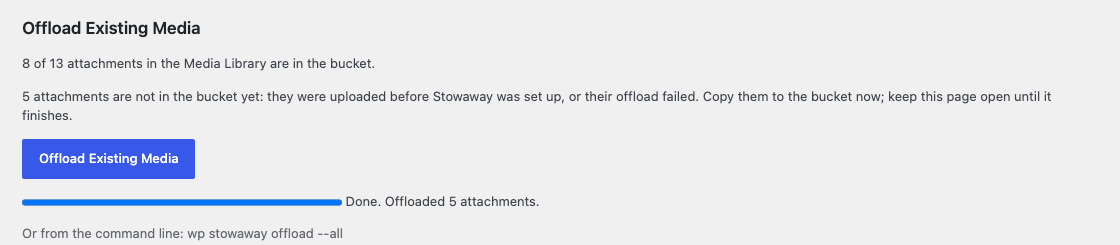
- Offloads your existing library in the background of one admin page, with a progress bar, or with
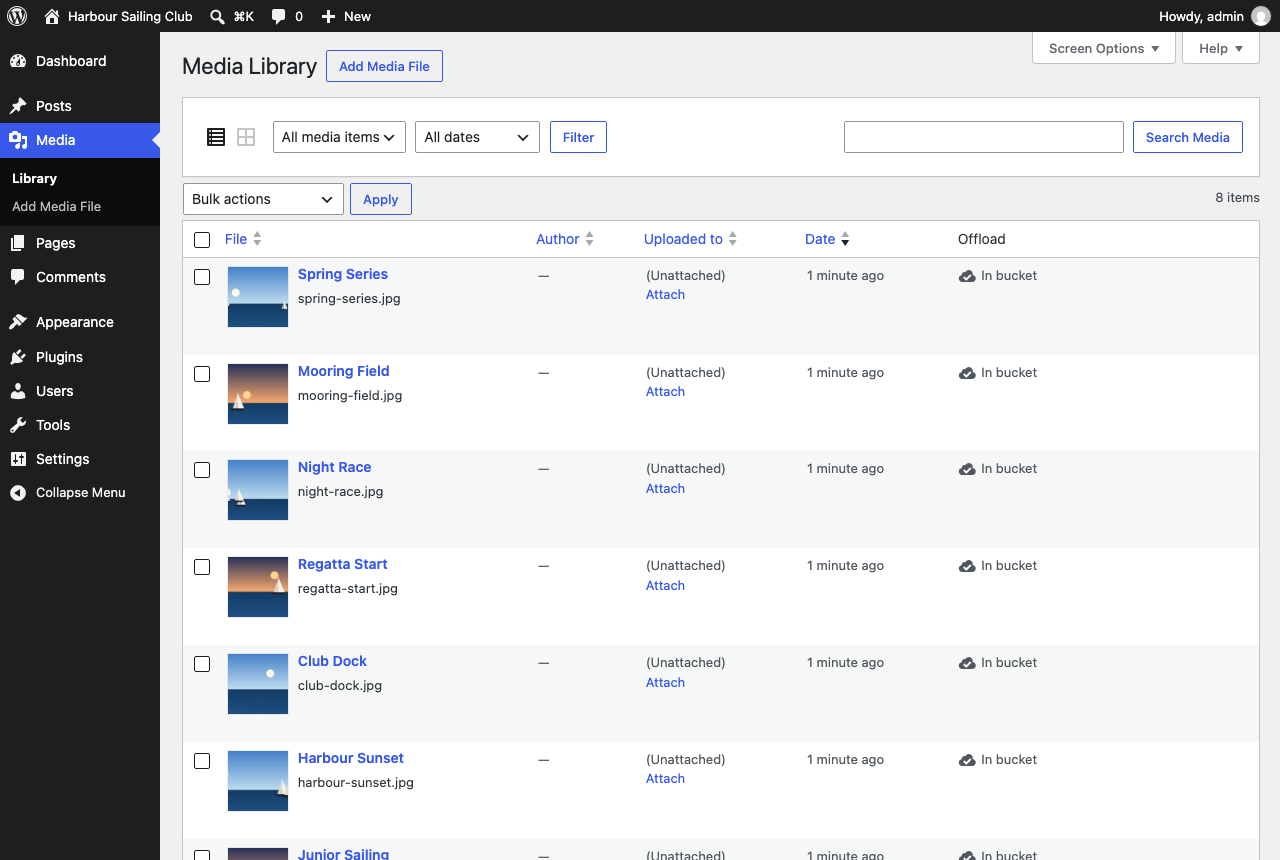
wp stowaway offload --all. - Shows each file’s status in the Media Library, with “Offload now” and an “Offload to S3” bulk action.
- Deletes files from the bucket when you delete them from the Media Library.
- Keeps your database clean: posts keep their local media URLs, so turning delivery off, or removing the plugin, never breaks a page.
- Keeps local copies on your server as a safety net, or removes them to save disk space: your choice.
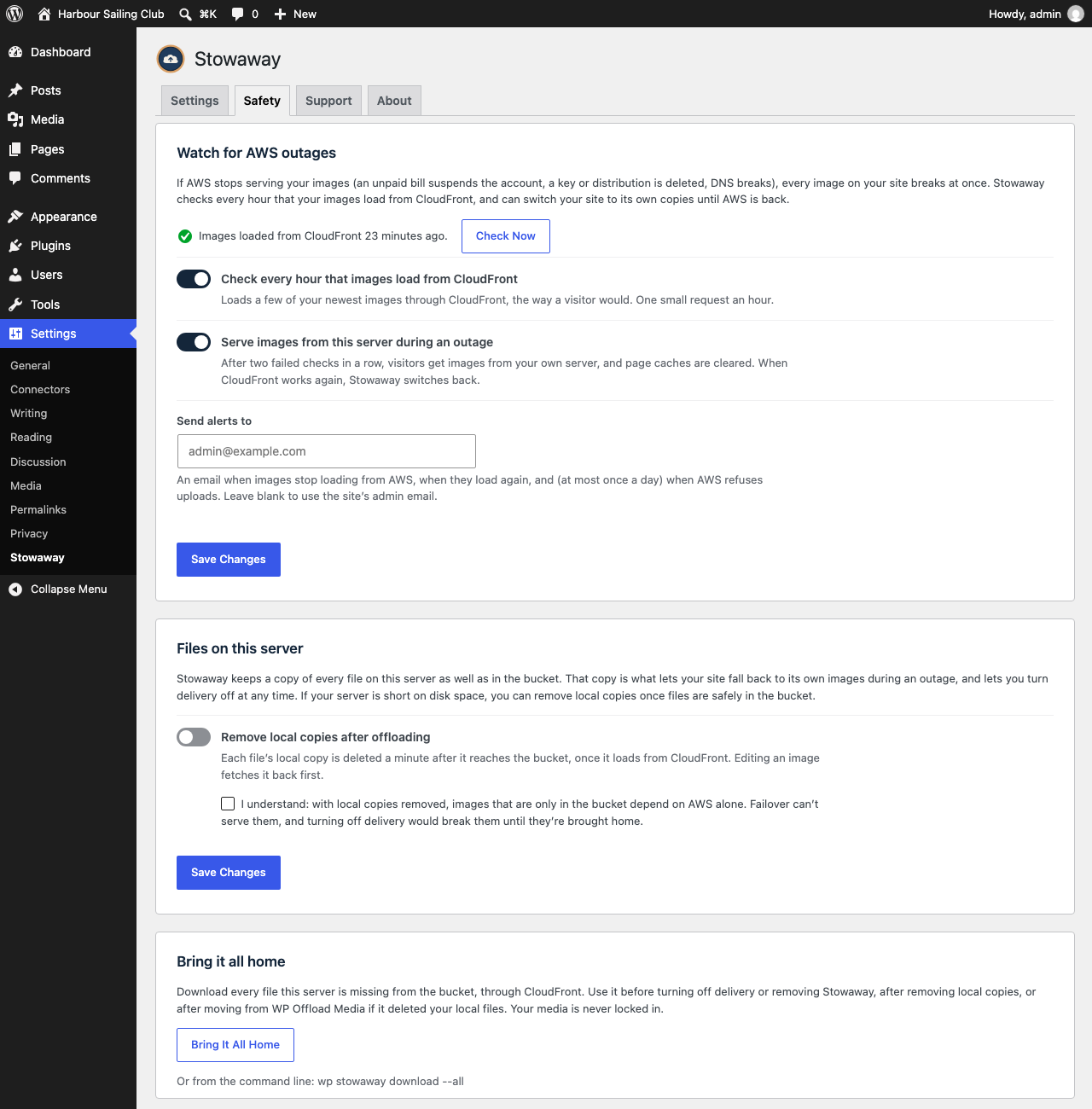
- Survives AWS outages: checks every hour that your images load from CloudFront. If AWS stops serving them (a suspended account, a deleted distribution, broken DNS), your site switches to its own copies, clears page caches and emails you, then switches back when AWS returns.
- Never locks you in: “Bring it all home” downloads every file back from the bucket, whenever you want.
Set up in three steps
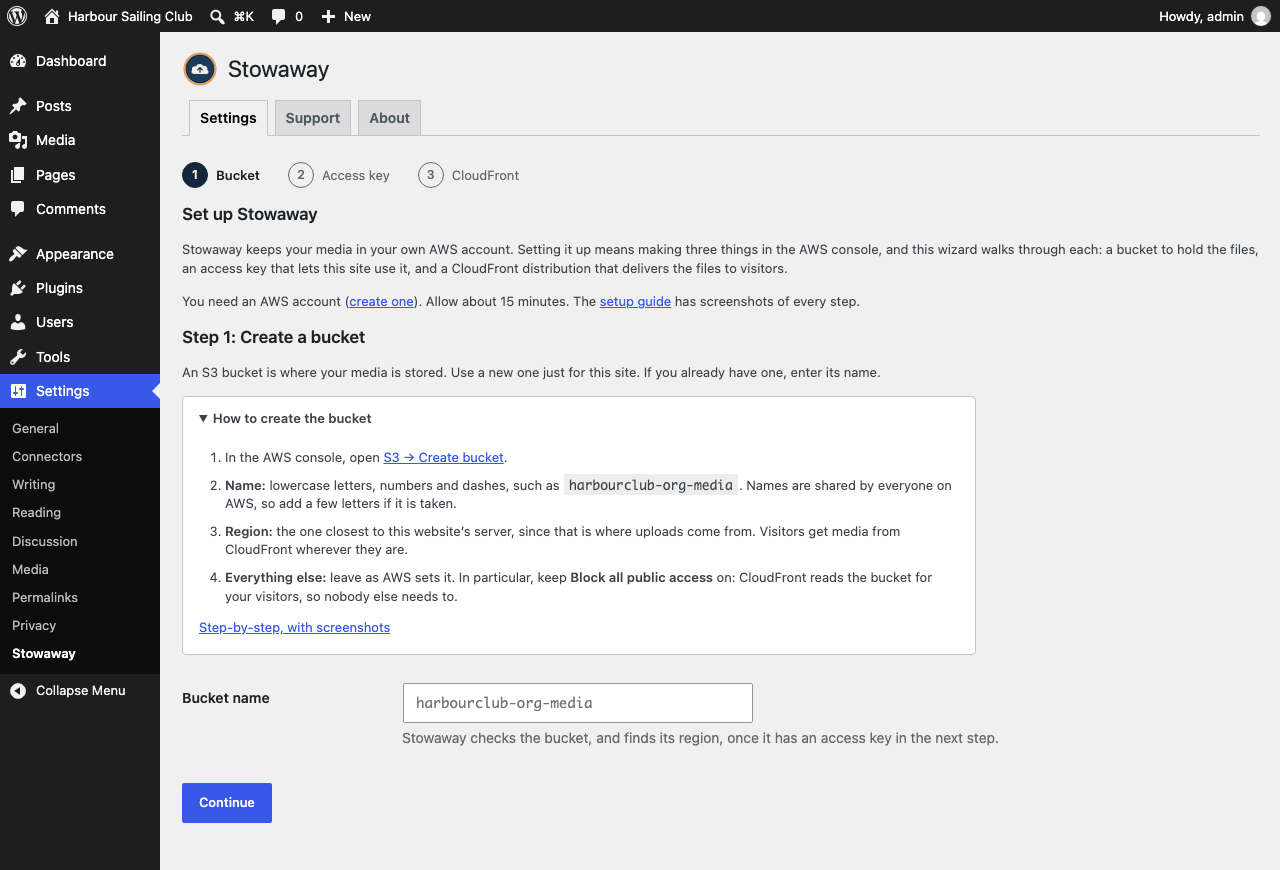
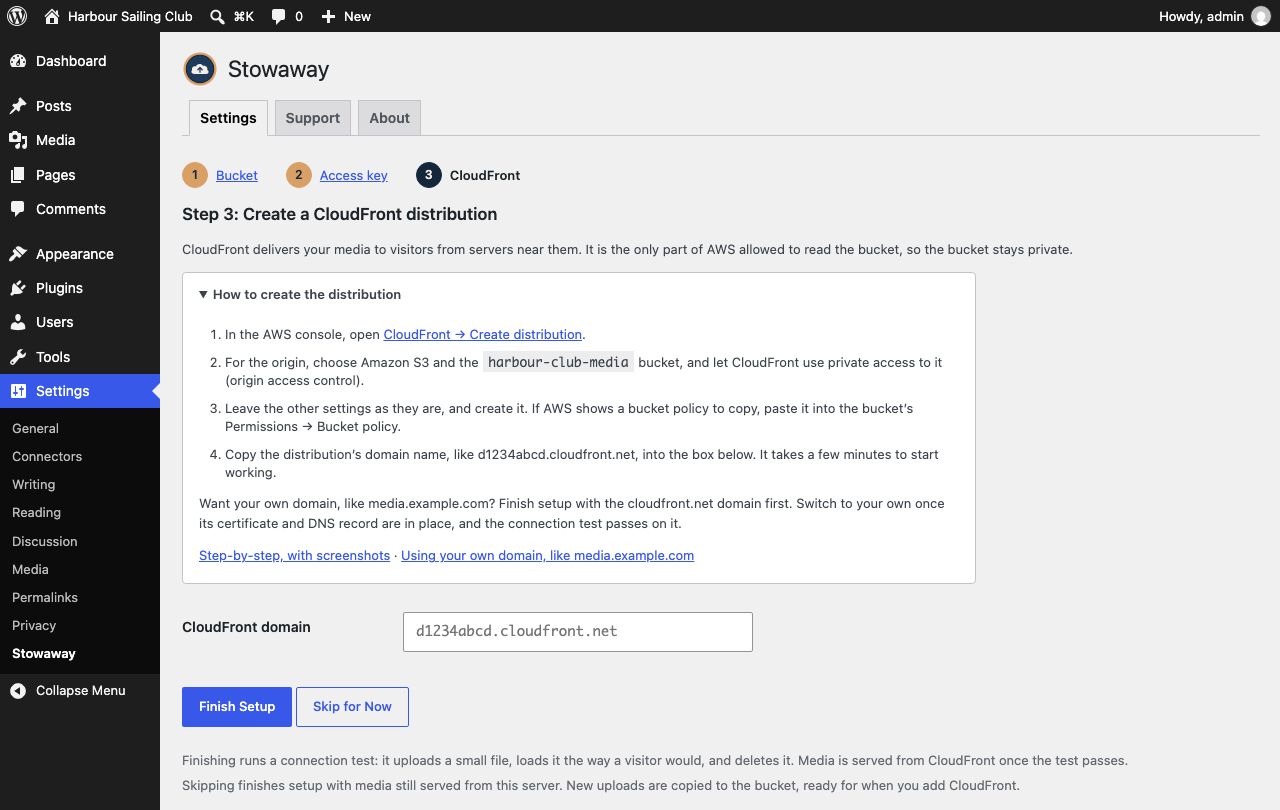
A setup wizard walks you through it, starting from an empty AWS account. Each step explains what to make in the AWS console and links to a full guide with screenshots:
- Bucket: create one with the settings that matter, and give Stowaway its name.
- Access key: an AWS user just for your site, with a policy that lets it use that one bucket and nothing else. Stowaway checks the key with AWS, finds the bucket’s region, and makes sure the key can use it. Keys can live in
wp-config.phpinstead of the database. - CloudFront: put a distribution in front of the bucket and paste its domain. Or skip it for now: media keeps being served from your server, and new uploads are copied to the bucket for when you’re ready.
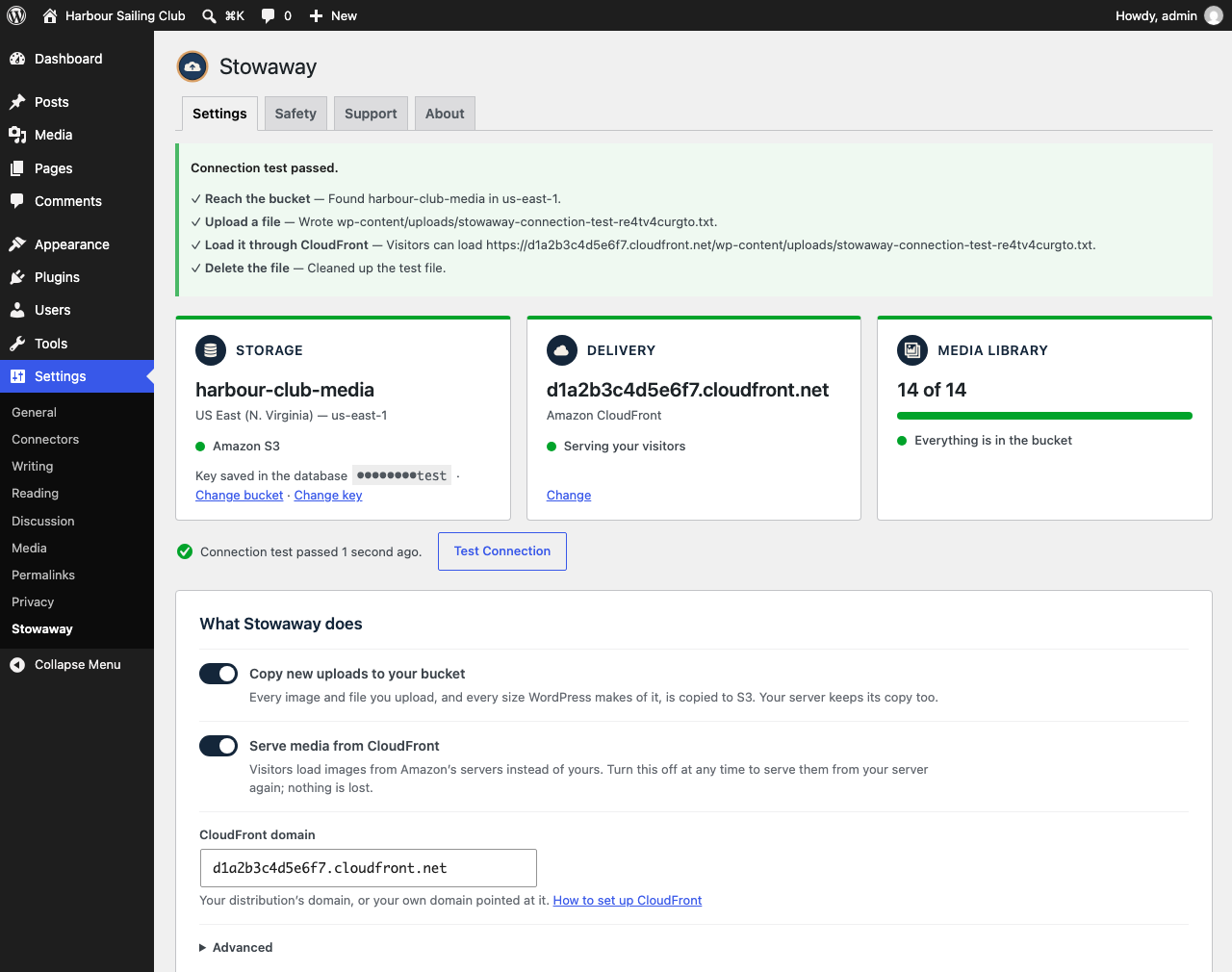
Finishing runs a connection test that walks the whole path a real upload takes: it reaches the bucket, uploads a small file, loads it the way a visitor’s browser would, and deletes it.
Coming from WP Offload Media?
Stowaway reads the settings and offload records WP Offload Media (Lite or Pro) left in your database, so media you offloaded with it keeps its exact URLs, with nothing uploaded again. It even uses the access keys already in your wp-config.php until you replace them.
Deactivate WP Offload Media, then choose Import from WP Offload Media on Settings → Stowaway.
Some WP Offload Media setups make every file public and let CloudFront read them as an anonymous visitor. Stowaway’s uploads are private, so on those setups CloudFront also needs Origin Access Control, or new uploads won’t load. The connection test tells you if that’s the case, and what to change in CloudFront. Media you already offloaded keeps working either way.
WP-CLI
wp stowaway status: what is configured, and how much is offloaded.wp stowaway offload --all: offload everything not yet in the bucket (orwp stowaway offload 12 34for specific attachments).wp stowaway import-wpom: import from WP Offload Media.wp stowaway download --all: bring every missing file back from the bucket.wp stowaway remove-local --all: remove local copies that are safely in the bucket (with Remove local copies on).wp stowaway health: check now that images load from CloudFront.
Services externes
Stowaway connects your site to Amazon Web Services (AWS), which you choose and pay for with your own AWS account. Nothing is sent anywhere until you enter your AWS access keys.
Amazon S3 (the S3 API at s3.<region>.amazonaws.com) stores your media. Your site sends it:
- each file you upload to the Media Library, every size WordPress makes of it, and the file’s name and folder, when the file is offloaded;
- requests to delete those files when you delete them in WordPress;
- requests to list your buckets and look up a bucket’s region, when you set up or change the bucket;
- a small test file, uploaded and deleted again, when you run the connection test.
Requests are signed with your access keys; the secret key itself is never sent.
Amazon CloudFront (your distribution’s domain, if you set one up) delivers the media to visitors. Their browsers load images and files from it, so CloudFront receives what any web server does: their IP address, browser details, and the address of the file. Your site itself also requests files from it:
- one test file, when you run the connection test;
- a few of your images once an hour, while outage monitoring is on (it is by default, and can be turned off on the Safety tab);
- files your server is missing, when you use “Bring it all home” or edit an image whose local copy was removed.
Outage and upload alerts are sent by your own site’s email, to the address you choose; they don’t go through any other service.
AWS’s terms and privacy policy: AWS Service Terms, AWS Privacy Notice.
Stowaway sends nothing to its author, and has no tracking or analytics.
Installation
- Install and activate Stowaway from Plugins → Add New.
- Go to Settings → Stowaway and follow the setup wizard.
- To copy media you uploaded before installing Stowaway, use Offload Existing Media on the same screen.
You need an AWS account. The wizard walks you through creating the bucket, the access key and the CloudFront distribution; the full guide, with screenshots, is at bsidesolution.com/stowaway/docs.
To keep your access keys out of the database (and out of database backups), add them to wp-config.php instead:
define( 'STOWAWAY_ACCESS_KEY_ID', 'your-access-key-id' );
define( 'STOWAWAY_SECRET_ACCESS_KEY', 'your-secret-access-key' );
Journal de modifications
1.0.2
- Connection test: when CloudFront refuses Stowaway’s test file but media imported from WP Offload Media loads, it says why. WP Offload Media made each file public, so the distribution needs Origin Access Control for Stowaway’s private uploads.
1.0.1
- The readme and the Support tab now call the “Catch images anywhere on the page” setting by its name on the settings screen, and say it needs WordPress 6.9.
- System report labels now match the settings screen.
1.0.0
- First release on WordPress.org.
- Setup wizard for an empty AWS account: bucket, an access key limited to that bucket, then CloudFront, each linked to a guide with screenshots.
- Offloads new uploads, edits and regenerated sizes; deletes from the bucket with the attachment.
- Serves media from CloudFront or S3, including srcset, post content, Yoast SEO share images and schema, and an optional whole-page mode for page builders.
- Divi: saving a page with an offloaded image no longer reports a failed save; Divi finds attachments behind CDN URLs.
- Safety: uploads never overwrite an object already in the bucket, and deleting an attachment leaves files another attachment still uses.
- Safety: on a staging copy or clone of the site, uploads and deletes pause until confirmed.
- Safety tab: hourly outage monitoring, automatic failover to local copies with page caches cleared, and email alerts.
- Optional removal of local copies to save disk space; images being edited are fetched back first.
- Bring it all home: download every missing file back from the bucket, from the Safety tab or
wp stowaway download --all. - A clearer settings screen: status cards for storage, delivery and the Media Library, and plain-language switches.
- Security: access keys are stored apart from the other settings, outside WordPress’s autoloaded options; the IAM policy no longer needs s3:GetObject; data imported from WP Offload Media is validated.
- Offload existing media in the background, with a progress bar; Media Library status column, “Offload now” and bulk action.
- Import from WP Offload Media, keeping existing URLs.
- WP-CLI commands: status, offload, import-wpom.
- Support tab with a system report to copy into a support request; About tab.
Captures d'écran

Pour les développeurs
Est-ce votre plugin ? Montrez les chiffres.
Ajoutez un badge en direct à votre site, docs ou github readme. Il se met à jour par lui-même - aucun compte n'est nécessaire.
Best Stowaway alternatives
Tous les plugins CDN →




FAQ
Stowaway: quick answers
Réponses directes, extraites des données en direct WordPress.org.
Source : WordPress.org
Is Stowaway free?
Yes. Stowaway is free to download and use from the official WordPress.org plugin directory.
Is Stowaway safe to use in 2026?
Stowaway is a solid plugin choice in 2026, with a few things worth checking first. Is rated 5/5 and was last updated 4 weeks ago, and scores 71/100 on our health check.
How many websites use Stowaway?
Stowaway is active on <10 WordPress websites and has been downloaded 612 times since it launched in October 2026. It was downloaded 614 times in the last 30 days.
Does Stowaway work with WordPress 7.1?
Yes. The developer has tested Stowaway up to WordPress 7.1.5, the latest release. It requires WordPress 6.2 or newer.
What PHP version does Stowaway need?
Stowaway requires PHP 7.4 or higher. Most hosts run PHP 8.x today, so it works on any modern WordPress hosting.
When was Stowaway last updated?
The latest version, 1.0.2, was released on November 2, 2026 (4 weeks ago).
Who makes Stowaway?
Stowaway is developed and maintained by bsidesolution.
What are the best alternatives to Stowaway?
The most popular alternatives to Stowaway are W3 Total Cache (800K+ installs), SpeedyCache (500K+ installs) and Breeze Cache (300K+ installs).
Propulsé par PageForge
Un modèle et une feuille de calcul. Une vraie page pour chaque recherche.
PageForge transforme chaque ligne d'un CSV en une page WordPress avec son propre titre, URL, SEO et schéma, construit sur la mise en page que vous Déjà conçu. Gratuit sur WordPress.org.
- CSV et XLSX, plus Google Sheets sur les professionnels et les entreprises
- Son propre titre, URL, SEO champs et schéma pour chaque page
- Fonctionne avec l'éditeur de blocs, Elementor, Divi et Avada
- Gratuit sur WordPress.org, pas de carte de crédit