

Sticky Chat Widget – Floating Chat Icons, Contact Form, Call, Click to Chat, Email & Message Buttons
Social chat buttons with WhatsApp, Messenger, WeChat, Telegram, Instagram, TikTok, Zalo & more — plus SMS, Call button, Contact form, and 20+ icons.

Choix
Yes — Sticky Chat Widget is a safe, well-maintained plugin to use in 2026. It runs on 10K+ sites, is rated 5/5 and was last updated 3 months ago, and scores 85/100 on our health check.
- Prouvé à grande échelle sur plus de 10 000 sites actifs
- Loved by users — 5/5 from 39 reviews
Comment s'accumule-t-il ?
Côte à côte sur les installations, les mises à jour, les évaluations et le support



Téléchargements quotidiens
Les pics de téléchargement suivent généralement une nouvelle version - chaque site qui met à jour automatiquement compte comme un téléchargement.
Classements
Where Sticky Chat Widget stands todayWordPress.org Classements de recherche
Position en direct dans la recherche de plugins, Top 100| Mot-clé | Position |
|---|---|
| Bouton de discussion | #13 |
| chat widget | #3 |
| Formulaire de contact | >100 |
| Messagerie Facebook | #10 |
| whatsapp widget | #8 |
Adoption de version
Part de sites actifs par version.
Répartition des notes
★★★★★★★★★★ 5 from 39 reviews
About Sticky Chat Widget
À partir du Lisez-moi officiel · v1.4.4Description
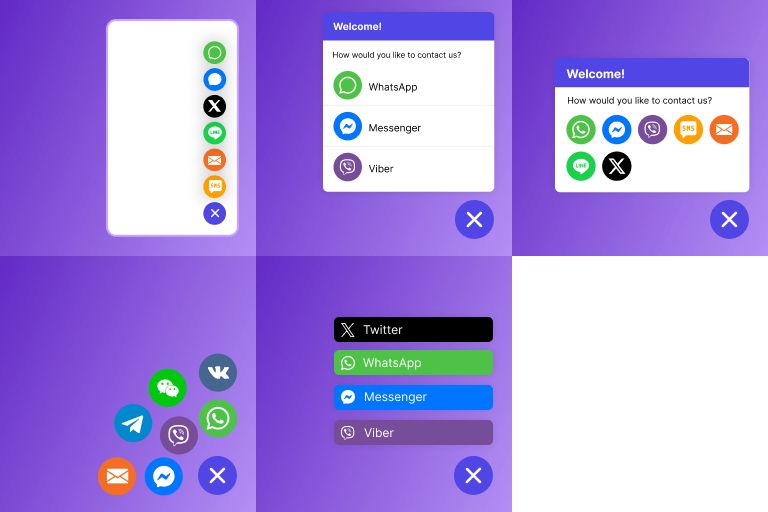
Engage your website visitors in seconds with Sticky Chat Widget. Add floating social chat buttons and contact options including WhatsApp, Messenger, Telegram, Instagram, LinkedIn, Twitter, Skype, WeChat, Viber, SMS, Email, Call Button, and more. Fully customizable and mobile-friendly, it helps businesses, blogs, and stores boost leads and customer satisfaction.
The most effective Click to Chat and Call to Action buttons for website
- Easy Setup & Configuration – Install the plugin and add chat buttons within minutes, no coding required.
- Customizable Design – Change colors, icons, size, and position to match your website branding.
- Multi-Channel Support – Connect with visitors via 20+ platforms including chat apps, email, SMS, and call buttons.
- Lead Generation & Engagement – Get direct calls, messages, and inquiries that boost conversions.
- Improved Customer Experience – Make it simple for visitors to contact you, increasing trust and satisfaction.
Want to connect with your customers in just a few seconds?
Sticky Chat Widget makes it easy for your visitors to reach you instantly through their favorite messaging apps like Facebook, Instagram, Telegram, and more.
Searching for the best chat plugin for WordPress? Your search ends here with Sticky Chat Widget. This powerful plugin supports 20+ platforms including WhatsApp, Facebook Messenger, Viber, Line, Email, Telegram, VKontakte, SMS, WeChat, Skype, Snapchat, LinkedIn, Twitter, Instagram, Waze, and even custom links. With support for almost every popular app, your customers can contact you directly using the channels they already have installed. Sticky Chat Widget is available in both Free and Pro versions.
Why Choose Sticky Chat Widget?
-
More Flexible than Live Chat: Unlike traditional live chat, which locks users into one channel and requires them to stay on your site, Sticky Chat Widget lets visitors connect via the apps they already use daily — Facebook, Instagram, Twitter, and more. They can message you anytime, even after leaving your website.
-
One-Click Chat: Give your users the freedom to choose how they reach you. Add only the chat platforms where you’re active, so you can stay available without overwhelming your visitors. With a single click, they can start a conversation instantly.
-
Share Your Location: Running a physical store? Platforms like Waze make it easy to share your location, guide customers directly to your shop, and convert visits into sales.
-
Business Hours Control (Pro): Set specific days and times when chat icons are displayed on your site. Perfect for businesses that want to show availability only during working hours — included in the Pro version.
Want to unlock the full power of our plugin and engage better with your website visitors? Check out our Pro Plans.
Connect via 25+ Popular Channels
Sticky Chat Widget seamlessly integrates with a wide range of social and communication platforms, giving your visitors multiple ways to reach you. Supported channels include:
- Facebook Messenger
- Viber
- Ligne
- Telegram
- VKontakte
- SMS
- Phone Call
- Skype
- Snapchat
- Gazouillement
- Mou
- Waze
- Google Cartes
- Signal
- TikTok
- Contact Form
- Discord
- Équipes de Microsoft
- Zalo
- Custom Link
Démo en direct
Want to see Sticky Chat Widget in action?
Check out the Live Demo on Ginger’s demo site.
Sticky Chat Widget – What’s Included in the Free Plan?
With the free version of Sticky Chat Widget, you’ll enjoy powerful features to get started right away:
1. Unlimited Channels – Add as many chat buttons as you need for different platforms or support topics.
2. Flexible Position & Size – Place the widget on the left or right, adjust size, and fit it seamlessly into your site design.
3. Custom Colors & Fonts – Match widget colors, hover text, and fonts with your website branding.
4. Engaging Animations & Effects – Choose from fade, slide, spin, pulse, bounce, and more to grab attention.
5. Contact Form – Allow visitors to reach you even outside chat apps with a simple built-in form.
6. Smart Triggers – Show the widget on scroll, after a delay, or when users try to exit.
7. Pending Message Badge – Display notification icons to nudge visitors into starting a chat.
8. Dedicated WhatsApp Widget – Connect directly with users via WhatsApp.
9. Icon Modes – Display channels vertically or horizontally.
10. Device Control – Show or hide channels separately on desktop or mobile.
11. Custom Links – Add links to specific pages or resources inside the widget.
Sticky Chat Widget – What’s Included in the PRO Plan?
The PRO version includes everything from the Free Plan, plus powerful advanced features:
1. Custom Icons & Images – Upload your own icons or images for a branded, professional look.
2. Precise Positioning – Fine-tune the widget’s placement anywhere on your site.
3. Developer Controls – Add custom IDs or classes for advanced styling and CSS tweaks.
4. Page Targeting – Show the widget only on selected pages for tailored engagement.
5. Day & Time Rules – Display chat icons only during business hours or custom schedules.
6. Date Scheduling – Plan widget visibility for campaigns, promotions, or events.
7. Country Targeting – Personalize chat visibility based on visitor location.
8. Google Analytics Integration – Track widget usage and measure engagement insights.
9. Custom Contact Form Fields – Collect detailed info with fields like text, dropdowns, file upload, and more.
10. Lead Integrations – Sync leads with Mailchimp, Mailjet, and other email marketing tools.
11. Email Forwarding – Receive contact form submissions directly in your inbox.
12. Autoresponder – Send instant automated replies to set response expectations.
Upgrade to Pro for just $25/year and unlock all premium features of Sticky Chat Widget. Give your website visitors the fastest and easiest way to connect with you — and boost your leads, support, and sales.
How does each channel work?
- WhatsApp: Connect instantly with users through the world’s most popular messaging app, enabling fast conversations and customer support.
- Facebook Messenger: Engage directly with your audience on Facebook using Messenger for real-time communication and assistance.
- Viber: Allow users to chat and call you for free via Viber, enhancing accessibility and interaction.
- Line: Provide support through Line with free calls, messages, and multimedia sharing features.
- Email: Let visitors reach you via traditional email, offering a familiar and professional communication method.
- Telegram: Offer secure, fast, and private messaging for users who prefer Telegram.
- VKontakte: Reach audiences in Eastern Europe by integrating with VKontakte, a widely used social network.
- SMS: Enable direct text messaging for simple, quick, and convenient communication.
- Phone Call: Give users the option to call you directly for immediate voice support.
- WeChat: Tap into WeChat’s massive user base in China, providing chat and multimedia messaging.
- Skype: Offer voice calls, video calls, chat, and file sharing with Skype integration.
- Snapchat: Engage visually with users through Snapchat’s multimedia messaging and story features.
- LinkedIn: Connect with professionals on LinkedIn for business-related inquiries and support.
- Twitter: Provide fast support on Twitter, responding via direct messages or public tweets.
- Slack: Cater to teams and businesses by integrating with Slack for seamless collaboration and support.
- Instagram: Communicate visually with users on Instagram via direct messages and comments.
- Waze: Share your store location on Waze, making it easy for customers to navigate directly to you.
- Google Maps: Enhance accessibility by allowing visitors to find and contact you via Google Maps.
- Signal: Offer private and secure communication through Signal, ideal for users focused on privacy.
- TikTok: Use TikTok to engage with users through short-form video content and direct messaging.
- Contact Form: Provide a customizable contact form for inquiries, feedback, and support requests.
- Discord: Build community engagement with real-time chat and support on Discord.
- Microsoft Teams: Connect with business clients and teams through Microsoft Teams integration.
- Zalo: Engage with users in Vietnam using Zalo, a popular local chat and social networking platform.
Sticky Chat Widget is GDPR Compliant
Sticky Chat Widget is designed with privacy at its core. Along with being a powerful communication tool, it ensures user data is protected and handled responsibly.
- No Data Storage: The plugin does not store or process any visitor data on your servers.
- Direct to Social Channels: Users are redirected to platforms like WhatsApp, Messenger, and Telegram — all communication happens there, not inside your site.
- Contact Form Privacy: Only the information users voluntarily provide (name, email, custom fields) is collected, and you control how it is handled.
- GDPR Standards: Fully aligned with the General Data Protection Regulation (GDPR), ensuring the highest level of data protection.
By taking a privacy-first approach, Sticky Chat Widget lets you engage with your visitors in real time while respecting and protecting their personal data.
Installation
- Download, install, and activate the Sticky Chat Widget plugin from the WordPress dashboard (Plugins > Add New > Search for “Sticky Chat Widget”) or upload it manually.
- Go to Sticky Chat Widget > Add new in your WordPress admin panel.
- Select at least one chat channel, customize your widget (position, colors, effects, etc.), and click Save Changes.
- That’s it! The Sticky Chat Widget will now appear on your website, ready for visitors to connect with you.
Journal de modifications
1.4.4
- UI Bug fixed
- On hover text bug fixed.
1.4.3
- Contact form bug fixed
1.4.2
- Header menu bug fixed.
1.4.1
- Change the page title to draw attention to the chat buttons (Pro).
- Blur background on widget open (Pro).
1.4.0
Contact form bug fixed
1.3.9
- Removed Skype Channel
- Custom classes for handling open/hide Sticky Chat Widget, Contact Form
Captures d'écran


Pour les développeurs
Est-ce votre plugin ? Montrez les chiffres.
Ajoutez un badge en direct à votre site, docs ou github readme. Il se met à jour par lui-même - aucun compte n'est nécessaire.
Best Sticky Chat Widget alternatives
All chat button plugins →



FAQ
Sticky Chat Widget: quick answers
Réponses directes, extraites des données en direct WordPress.org.
Source : WordPress.org
Is Sticky Chat Widget free?
Yes. Sticky Chat Widget is free to download and use from the official WordPress.org plugin directory.
Is Sticky Chat Widget safe to use in 2026?
Yes — Sticky Chat Widget is a safe, well-maintained plugin to use in 2026. It runs on 10K+ sites, is rated 5/5 and was last updated 3 months ago, and scores 85/100 on our health check.
How many websites use Sticky Chat Widget?
Sticky Chat Widget is active on 10K+ WordPress websites and has been downloaded 114,900 times since it launched in March 2020. It was downloaded 2,193 times in the last 30 days.
Does Sticky Chat Widget work with WordPress 7.1?
Sticky Chat Widget is officially tested up to WordPress 7.0.9, while the latest release is 7.1.5. It may still work, but try it on a staging site first.
What PHP version does Sticky Chat Widget need?
Sticky Chat Widget requires PHP 5.4 or higher. Most hosts run PHP 8.x today, so it works on any modern WordPress hosting.
When was Sticky Chat Widget last updated?
The latest version, 1.4.4, was released on August 31, 2026 (3 months ago).
Who makes Sticky Chat Widget?
Sticky Chat Widget is developed and maintained by gingerplugins.
What are the best alternatives to Sticky Chat Widget?
The most popular alternatives to Sticky Chat Widget are Floating Chat Widget: Conta… (300K+ installs), Chat Button & Custom ChatGP… (20K+ installs) and Lead Generation Contact Wid… (10K+ installs).
Propulsé par PageForge
Un modèle et une feuille de calcul. Une vraie page pour chaque recherche.
PageForge transforme chaque ligne d'un CSV en une page WordPress avec son propre titre, URL, SEO et schéma, construit sur la mise en page que vous Déjà conçu. Gratuit sur WordPress.org.
- CSV et XLSX, plus Google Sheets sur les professionnels et les entreprises
- Son propre titre, URL, SEO champs et schéma pour chaque page
- Fonctionne avec l'éditeur de blocs, Elementor, Divi et Avada
- Gratuit sur WordPress.org, pas de carte de crédit