


SQL Buddy – La gestion de la base de données est facilitée
Votre solution unique pour une gestion de base de données WordPress facile

Utiliser avec prudence
SQL Buddy works, but test it on a staging site before relying on it in 2026. It runs on 4K+ sites, is rated 5/5 and was last updated 1 year ago, and scores 44/100 on our health check.
- Momentum — downloads up 22.7% vs the previous 30 days
- Pas de mise à jour depuis plus d'un an
- Uniquement testé jusqu'à WordPress 6,4 (le dernier est de 7,1)
Comment s'accumule-t-il ?
Côte à côte sur les installations, les mises à jour, les évaluations et le support



Téléchargements quotidiens
Les pics de téléchargement suivent généralement une nouvelle version - chaque site qui met à jour automatiquement compte comme un téléchargement.
Classements
Where SQL Buddy stands todayWordPress.org Classements de recherche
Position en direct dans la recherche de plugins, Top 100| Mot-clé | Position |
|---|---|
| base de données | >100 |
| Database Browser | #49 |
| database management | #46 |
| database queries | #80 |
| sql | #14 |
Adoption de version
Part de sites actifs par version.
Répartition des notes
★★★★★ ★★★★★ 5 sur 14 avis
About SQL Buddy
À partir du Lisez-moi officiel · v1.0.0Description
⚠️ WARNING
SQL Buddy is no longer actively maintained.
This software is still free to use under the license provided, but users should be aware that it is not currently maintained. No additional releases, including security releases, will be made available.
Your one-stop solution for WordPress database management. Edit your table data with a clean and straightforward user interface.
SQL Buddy is a WordPress plugin that makes it easy to manage your database table contents right from your WordPress dashboard.
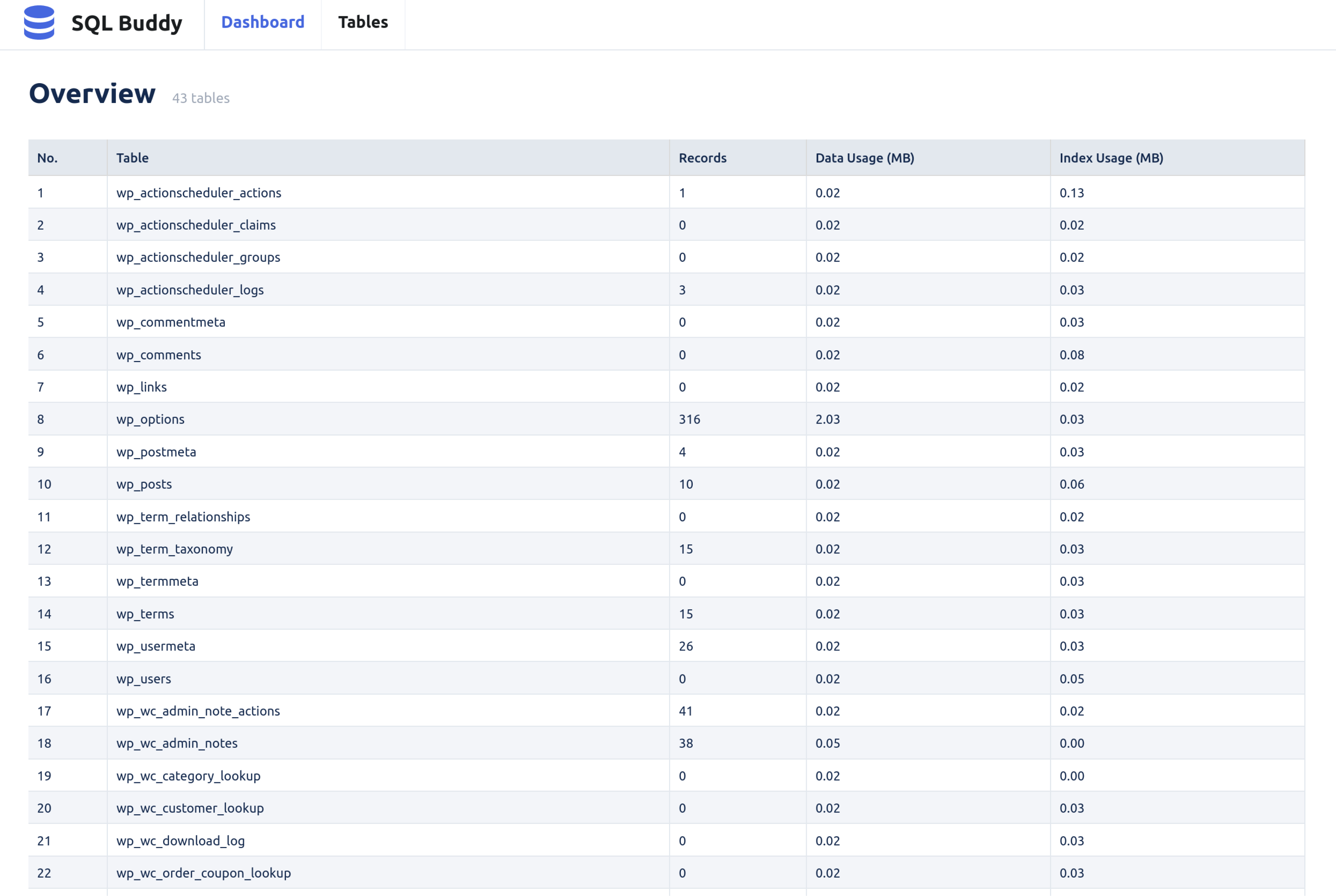
The Dashboard screen gives you a detailed overview of all your WordPress tables, along with useful data like the number of records, and the size of the table.
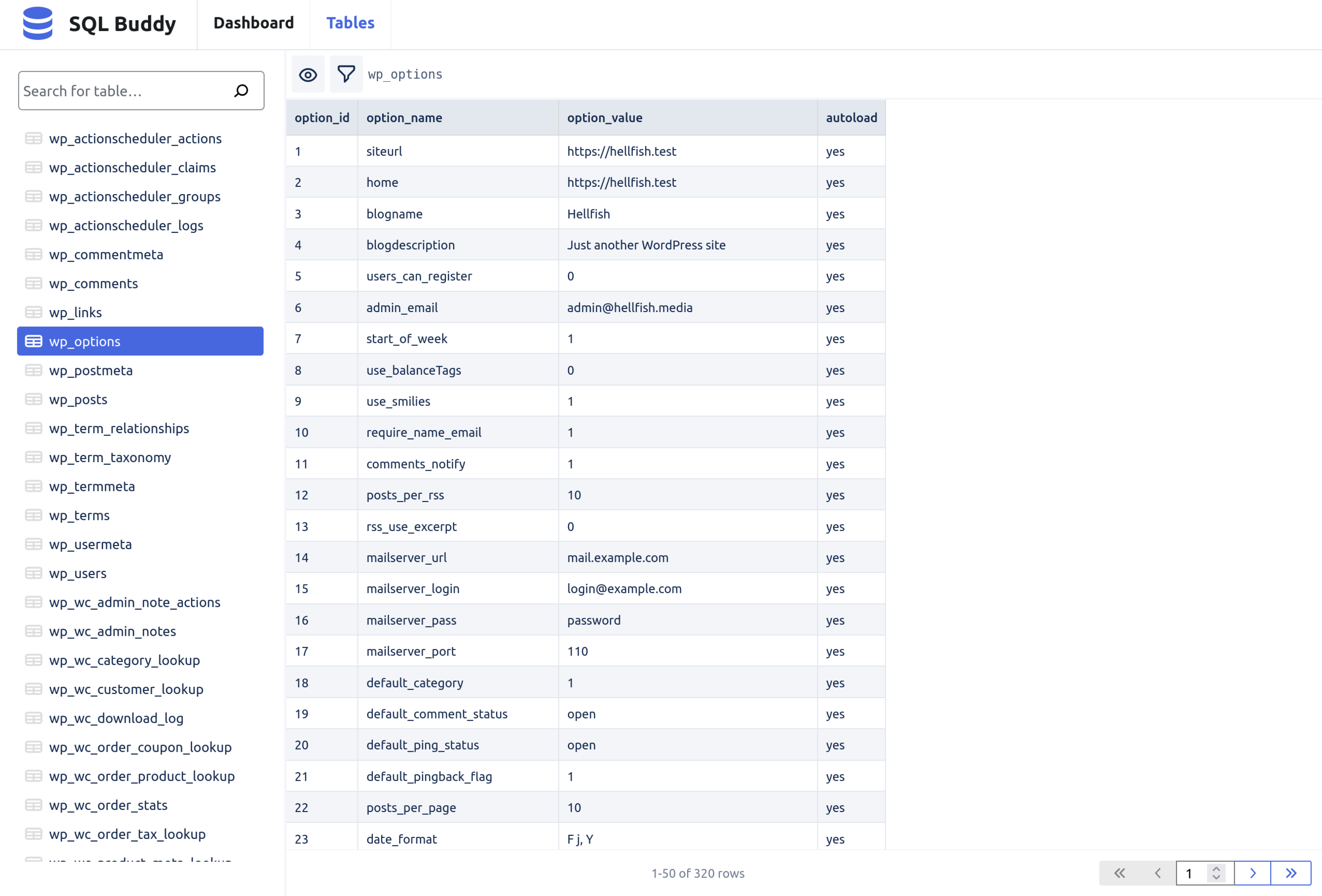
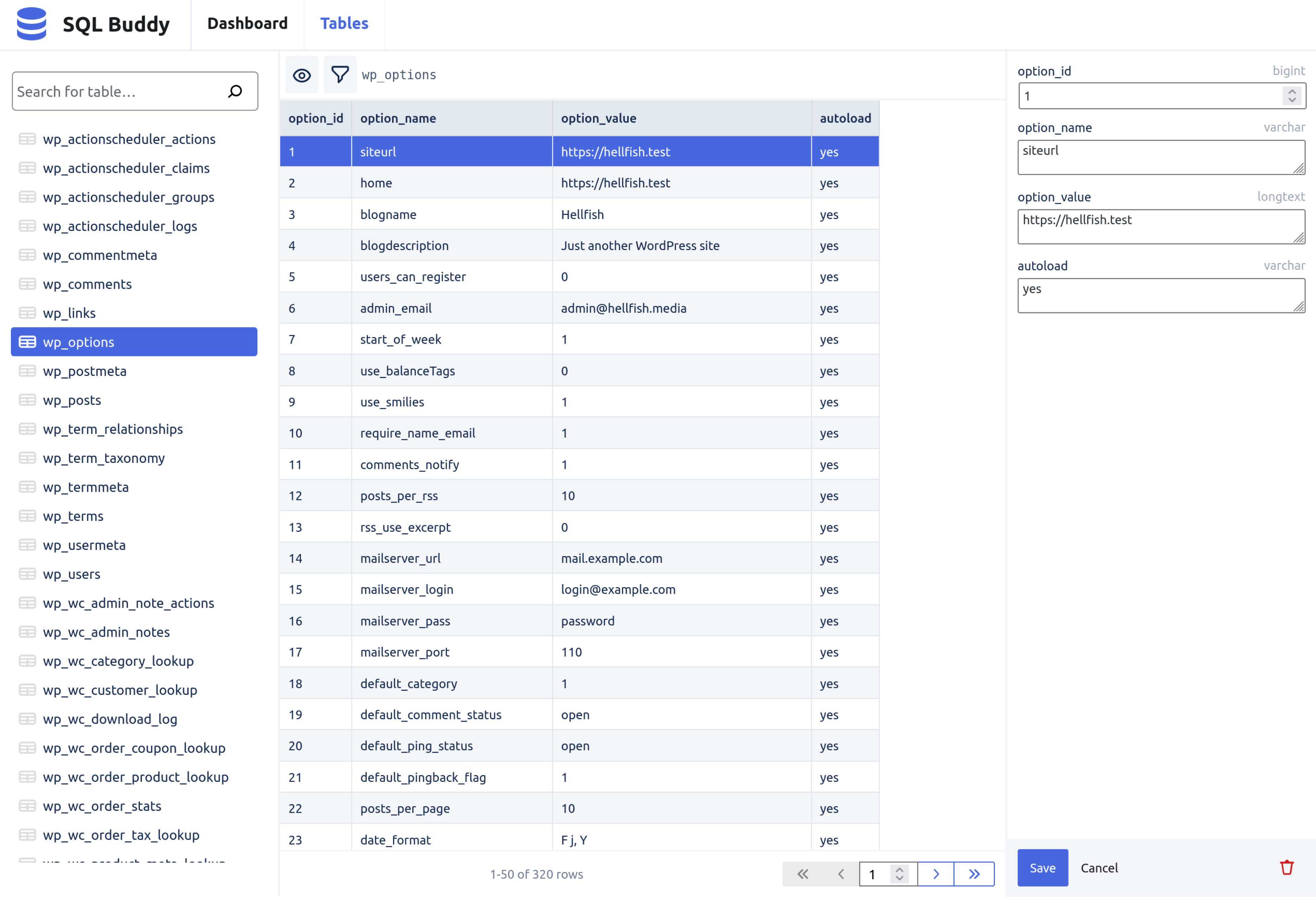
The Tables screen allows you to search for a specific table, or view the table rows. Clicking on a row presents options to edit and save the column values, or delete the row. You are also able to control which table columns to display, as well as options to filter the table data.
Each screen has pagination controls for navigating through a large number of tables or rows.
Traits
- View a list of all your database tables, including details like number of records, data usage, and index usage per table.
- Navigate through table records quickly, or search for specific tables by name.
- Filter table records using custom query conditions
- Choose which table columns to display on a per-table basis
- View the full contents of a single table record with one click.
- Easily edit the record contents or delete a table record
Why Use a Database Management Plugin?
While not common, there are often situations where you might need to make changes to your WordPress database. Perhaps you’ve moved from a staging environment to live, and you need to update your site URL, or you need to clean up some data left behind by a deleted plugin. Whatever the reason, a solid solution for browsing and editing your WordPress database is a vital tool in any site owner’s belt.
You could use the database management tool your web host provides, which is typically based on PHPMyAdmin, but the user interface is clumsy and not all that intuitive. You could try an application like Navicat, SQLyog, or TablePlus, but these require you to know your database access credentials.
SQL Buddy is the WordPress plugin that gives you the ability to manage your database directly from your WordPress dashboard, without needing to worry about database credentials, installing third-party applications, or navigating a confusing user interface.
Built by WordPress Database Experts
We’re Delicious Brains, the team behind WP Migrate DB and WP Migrate DB Pro. For the last 15 years, we’ve helped WordPress developers migrate their database, site files and themes, and plugins between multiple different environments. We pride ourselves on being WordPress database experts, so you don’t have to be.
SQL Buddy is everything we require from a WordPress database management plugin. A beautiful, intuitive interface, coupled with straightforward yet powerful features.
Installation
À partir de votre tableau de bord WordPress
- Visit Plugins > Ajouter un nouveau
- Search for “SQL Buddy”
- Install and Activate SQL Buddy from your Plugins page
- Click on SQL Buddy in the “Tools” menu item, to manage your database
Journal de modifications
1.0.0
Communiqué initial
Captures d'écran
Pour les développeurs
Est-ce votre plugin ? Montrez les chiffres.
Ajoutez un badge en direct à votre site, docs ou github readme. Il se met à jour par lui-même - aucun compte n'est nécessaire.
Best SQL Buddy alternatives
Tous les plugins de base de données →





FAQ
SQL Buddy: quick answers
Réponses directes, extraites des données en direct WordPress.org.
Source : WordPress.org
Is SQL Buddy free?
Yes. SQL Buddy is free to download and use from the official WordPress.org plugin directory.
Is SQL Buddy safe to use in 2026?
SQL Buddy works, but test it on a staging site before relying on it in 2026. It runs on 4K+ sites, is rated 5/5 and was last updated 1 year ago, and scores 44/100 on our health check.
How many websites use SQL Buddy?
SQL Buddy is active on 4K+ WordPress websites and has been downloaded 54,124 times since it launched in January 2022. It was downloaded 1,840 times in the last 30 days.
Does SQL Buddy work with WordPress 7.1?
SQL Buddy is officially tested up to WordPress 6.4.15, while the latest release is 7.1.5. It may still work, but try it on a staging site first.
What PHP version does SQL Buddy need?
SQL Buddy requires PHP 5.6 or higher. Most hosts run PHP 8.x today, so it works on any modern WordPress hosting.
When was SQL Buddy last updated?
The latest version, 1.0.0, was released on June 16, 2025 (1 year ago).
Who makes SQL Buddy?
SQL Buddy is developed and maintained by WP Engine.
What are the best alternatives to SQL Buddy?
The most popular alternatives to SQL Buddy are Search Regex (100K+ installs), WP-Sweep (100K+ installs) and Advanced Database Cleaner (100K+ installs).
Propulsé par PageForge
Un modèle et une feuille de calcul. Une vraie page pour chaque recherche.
PageForge transforme chaque ligne d'un CSV en une page WordPress avec son propre titre, URL, SEO et schéma, construit sur la mise en page que vous Déjà conçu. Gratuit sur WordPress.org.
- CSV et XLSX, plus Google Sheets sur les professionnels et les entreprises
- Son propre titre, URL, SEO champs et schéma pour chaque page
- Fonctionne avec l'éditeur de blocs, Elementor, Divi et Avada
- Gratuit sur WordPress.org, pas de carte de crédit