


Spliteezy – A/B Split Tests Made Easy
Backend A/B testing for WordPress. Variant assignment happens server-side — no flicker, no JavaScript redirects, no duplicate URLs.

Utiliser avec prudence
Spliteezy works, but test it on a staging site before relying on it in 2026. Was last updated 4 months ago, and scores 49/100 on our health check.
- Petite base d'utilisateurs (<10 installations actives)
- Très peu de critiques jusqu'à présent
Comment s'accumule-t-il ?
Côte à côte sur les installations, les mises à jour, les évaluations et le support



Téléchargements quotidiens
Les pics de téléchargement suivent généralement une nouvelle version - chaque site qui met à jour automatiquement compte comme un téléchargement.
Classements
Where Spliteezy stands todayWordPress.org Classements de recherche
Position en direct dans la recherche de plugins, Top 100| Mot-clé | Position |
|---|---|
| a b testing | >100 |
| conversion optimization | >100 |
| CRO | #35 |
| experiments | #98 |
| split testing | >100 |
About Spliteezy – A/B Split Tests Made Easy
From the official readme · v0.10.2Description
Spliteezy picks the variant on the server before the page loads — so visitors never see a flash of the wrong content, and every variant lives at the same URL.
Most A/B testing tools swap content using JavaScript after the page has already started rendering. That causes a brief “flash” of the original before the variant snaps in. Others create separate URLs for each variant, which introduces duplicate content risks and leaves behind 404s when a test ends.
Spliteezy works differently:
- Server-side assignment — the variant is chosen in PHP, before
wp_head, so the correct version is served from the very first byte. - Same URL for every variant — no duplicate pages, no SEO risk, no broken links when a test ends.
- No flicker — visitors always see exactly one version of the page.
- Any page builder — variants are real WordPress posts, editable with Gutenberg, Elementor, Divi, Bricks, or the Classic Editor.
- Built for caching — choose how tests and your page cache work together: exclude tested pages from cache, keep one cached copy per variant, or embed variants in a single cacheable page. Affected pages are purged automatically when tests change.
- Lightweight tracker — a small vanilla JS file (no framework, no jQuery) tracks page views, clicks, scroll depth, time on page, form submissions, and video plays. Events are proxied through WordPress admin-ajax so the API key never touches the browser, and it’s stored encrypted in your WordPress database.
Goal types
- Page reached — fire a conversion when a visitor lands on a specific URL pattern.
- Click — track clicks on any CSS selector or specific URLs on the page.
- Scroll depth — fire at 25%, 50%, 75%, or 100% scroll milestones.
- Time on page — fire at 10s, 30s, or 60s milestones.
- Element view — fire when a specific element scrolls into the viewport (IntersectionObserver).
- Form submission — track any form (Contact Form 7, WPForms, Gravity Forms, native HTML).
- Video play — track first play of YouTube, Vimeo, or HTML5 video.
- External event — fire a conversion from GA4, GTM, Meta Pixel, or any custom JavaScript via
window.Spliteezy.trackEvent().
Vues
Spliteezy is a hosted service. A free plan is available with no credit card required. See spliteezy.com/pricing for current plan details.
Code source
The plugin admin dashboard (assets/js/dashboard.js) is compiled from a React/Vite source project. The full source is available at https://github.com/linebloc/spliteezy-plugin under the same GPL-2.0-or-later license.
Services externes
This plugin connects to the Spliteezy hosted service at https://spliteezy.com to provide its core functionality. By using this plugin you are agreeing to the Spliteezy Terms of Service and Privacy Policy.
When the plugin contacts spliteezy.com:
- When you click “Connect to Spliteezy” in the plugin settings: your browser is sent to spliteezy.com to authorize the connection, and the plugin then exchanges a short-lived one-time code server-to-server for the website API key. The key itself never travels through your browser. Your website’s domain and Site Title are sent so the website can be registered under a friendly name in your account.
- On the first frontend page load after the transient expires (every ~5 minutes per website), to fetch the active test manifest.
- When a visitor triggers a tracked event (page view, click, scroll, etc.), to record analytics. Events are batched and sent through WordPress admin-ajax — the API key never reaches the browser.
- When you click “Test connection” in the plugin settings.
- When you create, update, pause, or delete a test from the WordPress admin.
- When the Spliteezy app pushes a cache-invalidation signal (e.g. after a test change).
Data transmitted to spliteezy.com:
- An anonymous visitor ID (a random token stored in a first-party cookie — not linked to any personal identity).
- The current page URL.
- Test and variant identifiers.
- Behavioral events: page view, goal page reached, click, scroll depth, time on page, element view, form submission, video play.
No IP addresses, names, email addresses, or other personally identifying information are transmitted from the plugin to the Spliteezy API.
When a test includes a Video Play goal, the plugin also loads third-party scripts conditionally:
- YouTube IFrame API —
https://www.youtube.com/iframe_api— loaded only when a YouTube iframe is present on the page and a video-play goal is active. - Vimeo Player SDK —
https://player.vimeo.com/api/player.js— loaded only when a Vimeo iframe is present on the page and a video-play goal is active.
These scripts are subject to YouTube’s (Terms / Privacy Policy) and Vimeo’s (Terms / Privacy Policy) respectively.
Politique de confidentialité
Cookies
When a visitor arrives on a page with an active A/B test, Spliteezy sets a first-party cookie named spliteezy_vid containing a random anonymous visitor ID. This cookie:
- Uses
SameSite=Laxand is set asSecureon HTTPS websites. - Is readable by the plugin’s own front-end script, so cache-friendly delivery modes keep assignments stable.
- Expires after 1 year.
- Contains no personally identifying information.
The cookie is used solely to assign the same visitor to the same variant on repeat visits (stable assignment).
In the “Cache per variant” delivery mode, one additional first-party cookie per active test (named eezy_v_ followed by the test ID, scoped to the tested page’s path) remembers the visitor’s assigned variant. It contains only a variant number, follows the same SameSite/Secure rules, and expires after 1 year.
Data sent to spliteezy.com
The following data is sent to the Spliteezy API (https://spliteezy.com):
- The anonymous
spliteezy_vidvisitor ID. - The URL of the current page.
- The active test ID and the assigned variant ID.
- Behavioral events: page view, goal-page reached, click, scroll depth, time on page, element in viewport, form submission, video play.
No IP addresses, names, email addresses, or other personally identifying information are included in these transmissions.
Responsibility of website owners
If your visitors are located in the EU or other regions governed by privacy regulations (GDPR, ePrivacy, CCPA, LGPD, etc.) you are responsible for disclosing this data collection in your website’s Privacy Policy and, where applicable, obtaining visitor consent before Spliteezy runs.
Spliteezy does not provide a built-in consent mechanism — use a consent management tool to conditionally load the plugin based on visitor consent if required.
Installation
- In your WordPress admin, go to Plugins → Add New, search for “Spliteezy”, and click Install Now, then Activate.
- Go to Spliteezy → Settings and click Connect to Spliteezy.
- Log in to your Spliteezy account (or create a free one) and click Connect on the authorization screen. You’ll be sent back to WordPress with everything set up.
To create your first test, go to Spliteezy → A/B Tests → New Test, select the page or post you want to test, and duplicate it as a variant. Edit the variant with any page builder, then activate the test.
Journal de modifications
0.10.2
- Version initiale.
Captures d'écran
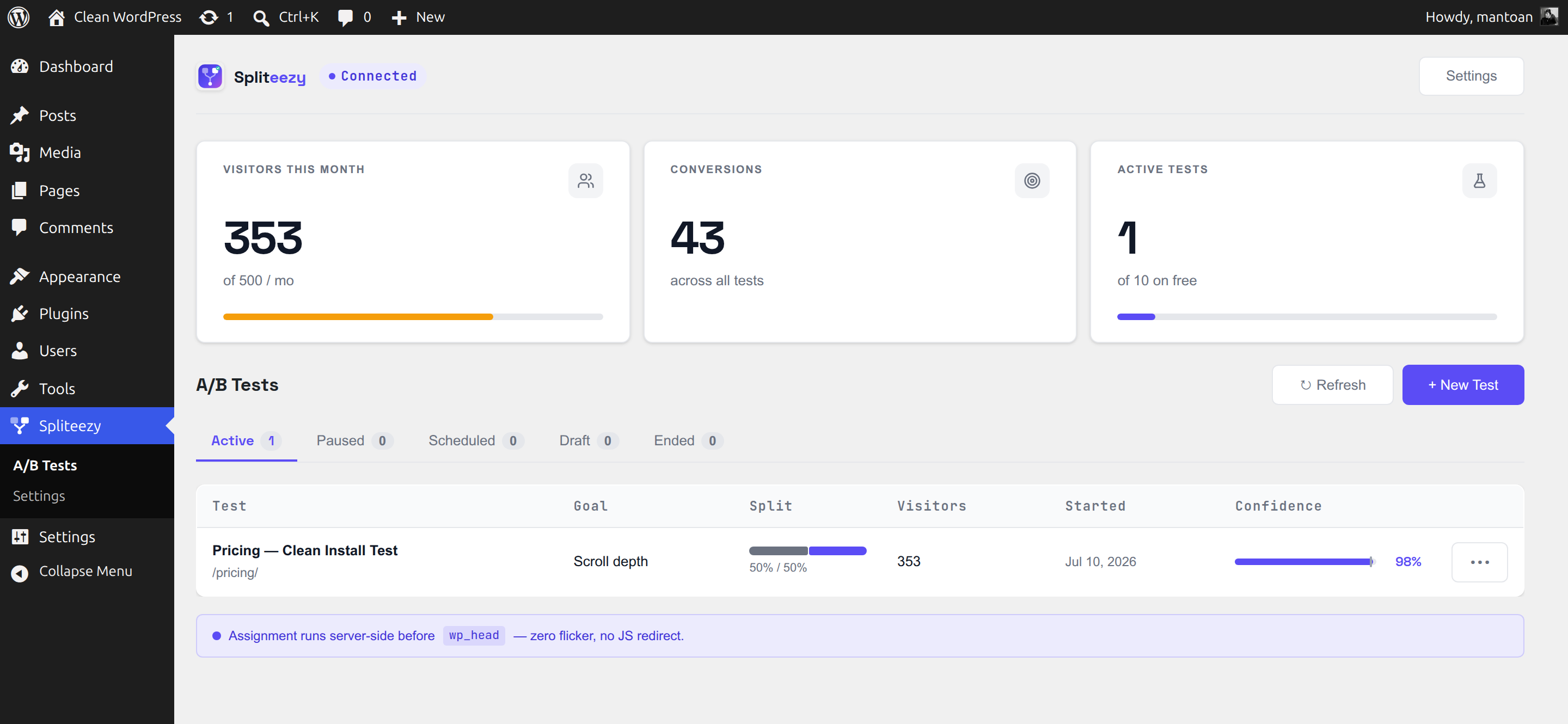
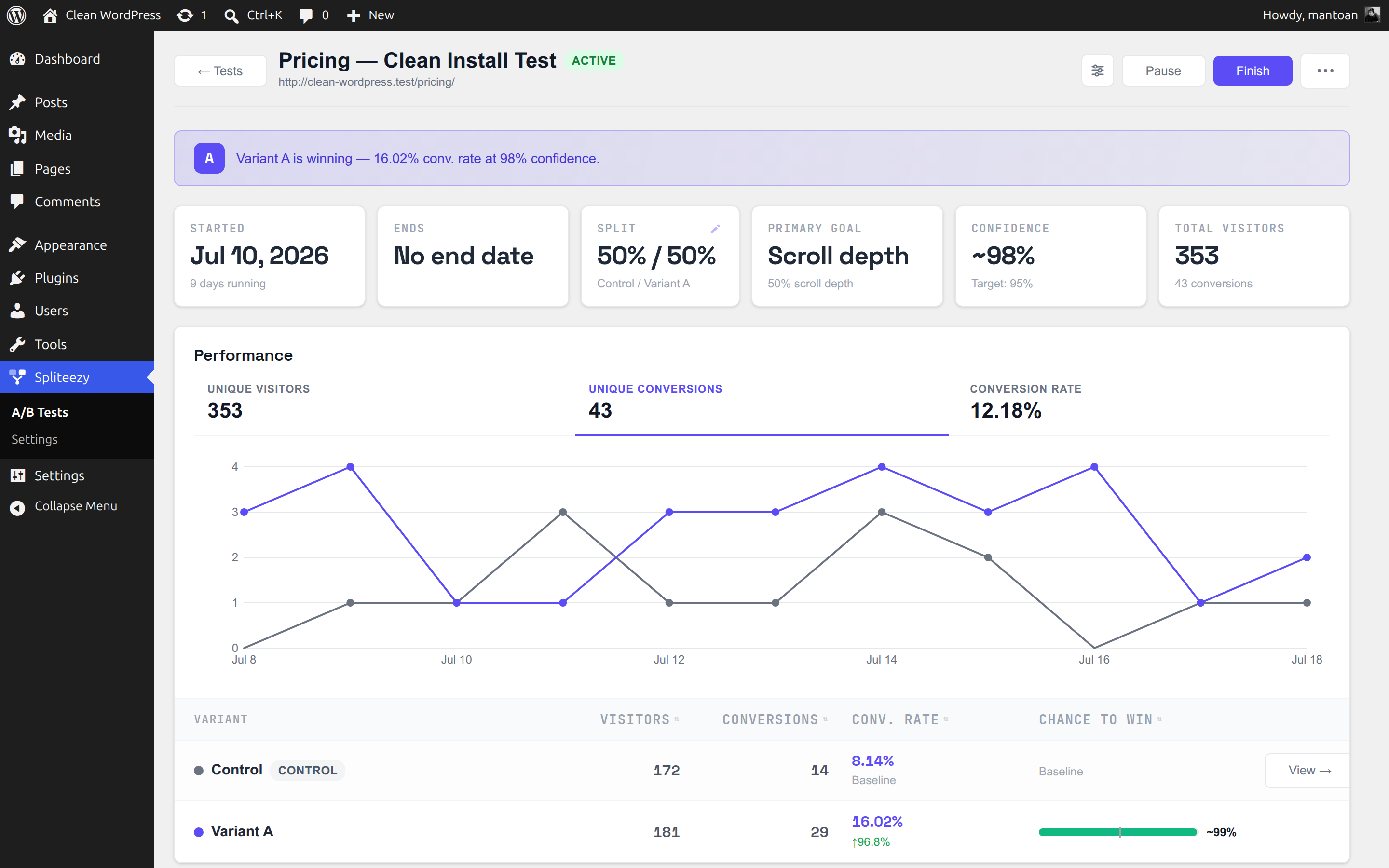
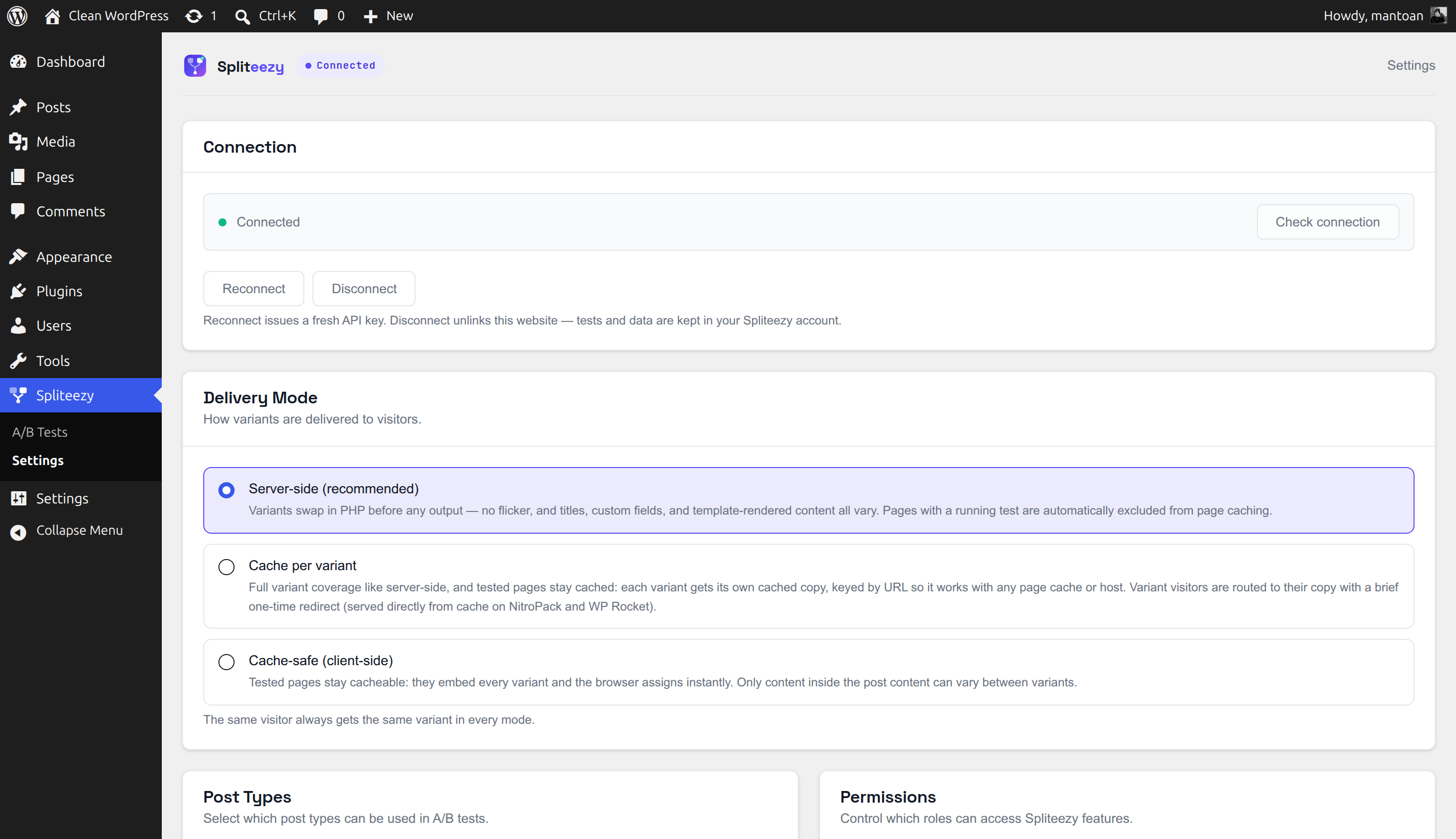
Pour les développeurs
Est-ce votre plugin ? Montrez les chiffres.
Ajoutez un badge en direct à votre site, docs ou github readme. Il se met à jour par lui-même - aucun compte n'est nécessaire.
Best Spliteezy alternatives
All a b testing plugins →



FAQ
Spliteezy: quick answers
Réponses directes, extraites des données en direct WordPress.org.
Source : WordPress.org
Is Spliteezy free?
Yes. Spliteezy is free to download and use from the official WordPress.org plugin directory.
Is Spliteezy safe to use in 2026?
Spliteezy works, but test it on a staging site before relying on it in 2026. Was last updated 4 months ago, and scores 49/100 on our health check.
How many websites use Spliteezy?
Spliteezy is active on <10 WordPress websites and has been downloaded 303 times since it launched in July 2026. It was downloaded 80 times in the last 30 days.
Does Spliteezy work with WordPress 7.1?
Spliteezy is officially tested up to WordPress 7.0.9, while the latest release is 7.1.5. It may still work, but try it on a staging site first.
What PHP version does Spliteezy need?
Spliteezy requires PHP 7.4 or higher. Most hosts run PHP 8.x today, so it works on any modern WordPress hosting.
When was Spliteezy last updated?
The latest version, 0.10.2, was released on July 20, 2026 (4 months ago).
Who makes Spliteezy?
Spliteezy is developed and maintained by Linebloc.
What are the best alternatives to Spliteezy?
The most popular alternatives to Spliteezy are Unbounce Landing Pages (10K+ installs), If-So Dynamic Content (7K+ installs) and Nelio A/B Testing (4K+ installs).
Propulsé par PageForge
Un modèle et une feuille de calcul. Une vraie page pour chaque recherche.
PageForge transforme chaque ligne d'un CSV en une page WordPress avec son propre titre, URL, SEO et schéma, construit sur la mise en page que vous Déjà conçu. Gratuit sur WordPress.org.
- CSV et XLSX, plus Google Sheets sur les professionnels et les entreprises
- Son propre titre, URL, SEO champs et schéma pour chaque page
- Fonctionne avec l'éditeur de blocs, Elementor, Divi et Avada
- Gratuit sur WordPress.org, pas de carte de crédit