


SiteOrigin CSS
Powerful, simple CSS editing for WordPress. Visual controls & real-time previews for effortless site customization.

Choix
Yes — SiteOrigin CSS is a safe, well-maintained plugin to use in 2026. It runs on 100K+ sites, is rated 4.9/5 and was last updated 3 weeks ago, and scores 92/100 on our health check.
- Prouvé à grande échelle sur plus de 100 000 sites actifs
- Loved by users — 4.9/5 from 153 reviews
- Développé activement — Dernière mise à jour il y a 3 semaines
- Testé avec le dernier WordPress (7.1)
Comment s'accumule-t-il ?
Côte à côte sur les installations, les mises à jour, les évaluations et le support



Téléchargements quotidiens
Les pics de téléchargement suivent généralement une nouvelle version - chaque site qui met à jour automatiquement compte comme un téléchargement.
Classements
Where SiteOrigin CSS stands todayWordPress.org Classements de recherche
Position en direct dans la recherche de plugins, Top 100| Mot-clé | Position |
|---|---|
| css editor | #4 |
| live editing | #7 |
| theme editor | #34 |
| visual css | #2 |
| website styling | #6 |
Adoption de version
Part de sites actifs par version.
Répartition des notes
★★★★★★★★★★ 4.9 from 153 reviews
About SiteOrigin CSS
From the official readme · v1.6.10Description
SiteOrigin CSS is the intuitive and powerful CSS editor designed to empower your WordPress site customization. Enjoy a seamless editing experience with real-time visual controls, making it easy to tweak your site’s look and feel instantly. Whether you’re a beginner or an advanced developer, SiteOrigin CSS has you covered.
For beginners, our user-friendly visual controls and live previews eliminate the guesswork from CSS editing. See your changes as you make them, ensuring your site looks exactly as you envision. For advanced users, we offer robust code autocompletion, speeding up your workflow and making CSS writing faster and more efficient than ever before. Take full control of your site’s design with SiteOrigin CSS and bring your creative vision to life.
Inspector
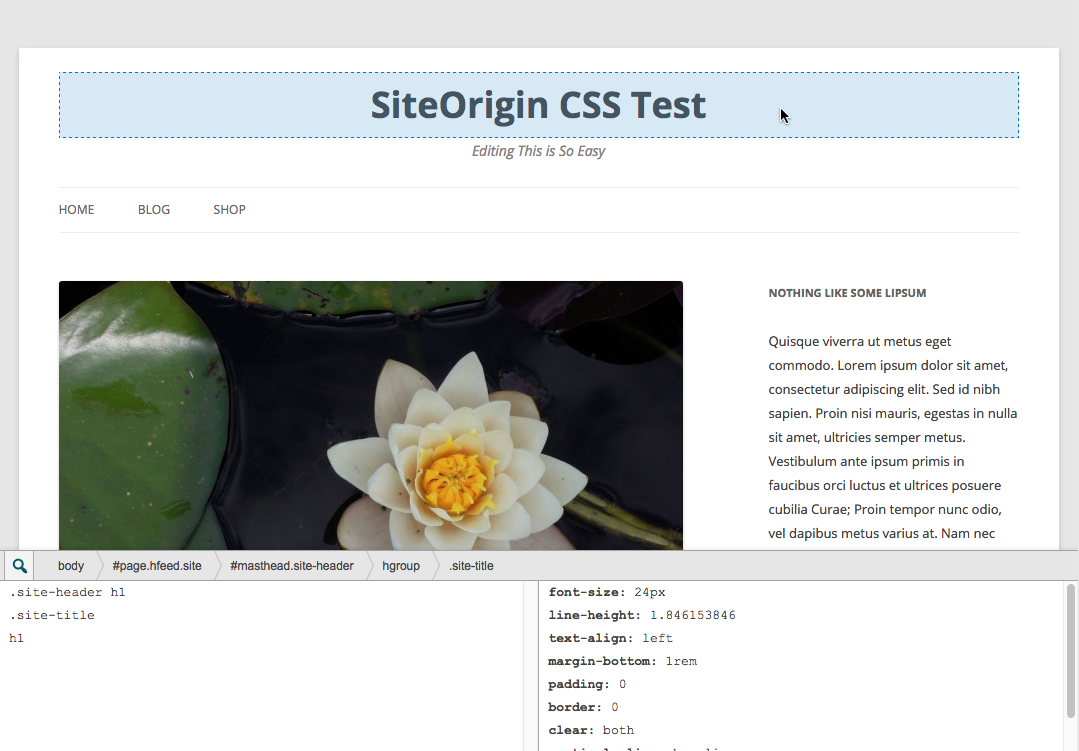
The hardest part of editing your site’s design using CSS is usually finding the correct selector to use. The powerful inspector that comes with SiteOrigin CSS makes this easy. While viewing a full preview of your site, just click on an element, and it’ll help you identify the best selector to use to target that element.
The inspector will help you even if you have no idea what a CSS selector is.
Visual Editor
Don’t like playing around with code? No problem. SiteOrigin CSS has a set of simple controls that make it easy to choose colors, styles, and measurements. Combined with the inspector, you’ll be able to make changes in just a few clicks.
CSS Editor
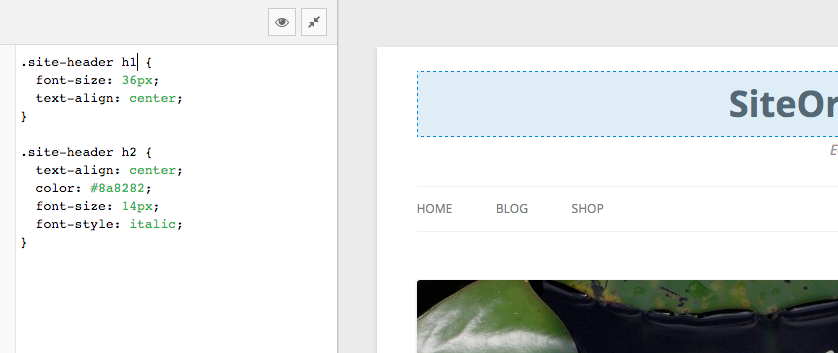
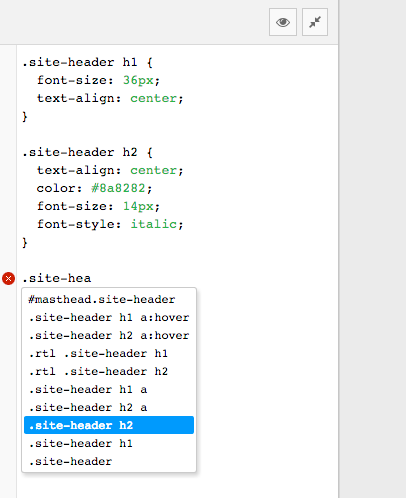
SiteOrigin CSS has a powerful CSS editor, the likes of which you’d usually only expect from high-end IDEs. It has autocompletion for both CSS selectors and attributes. It also features very useful CSS linting to help you identify issues in your code before you publish your changes.
It’s Free
We’re committed to keeping SiteOrigin CSS free. You can install it on as many sites as you like without ever worrying about licensing. All future updates and upgrades will be free, and we even offer free support over on our friendly support forums.
Works With Any Theme
There’s an ever-growing collection of awesome WordPress themes, and now with SiteOrigin CSS, you can edit every single one of them to your heart’s content. No matter what theme you’re using, SiteOrigin CSS will work perfectly.
Actively Developed
We’re actively developing SiteOrigin CSS. Keep track of what’s happening over on GitHub.
Documentation
Documentation is available on SiteOrigin.
Soutien
Free support is available on the SiteOrigin support forums.
SiteOrigin Premium
SiteOrigin Premium enhances SiteOrigin CSS with a Google Web Font Selector. Choose from hundreds of beautiful web fonts right in the visual editor.
SiteOrigin Premium includes access to our professional email support service, perfect for those times when you need fast and effective technical support. We’re standing by to assist you in any way we can.
Installation
- Upload and install SiteOrigin CSS in the same way you’d install any other plugin.
- Read the usage documentation on SiteOrigin.
Journal de modifications
1.6.10 – 11 November 2026
- Inspector: Improved selector matching and output handling.
- Editor: Improved live preview output handling.
1.6.9 – 07 November 2026
- Visual Editor: Measurement fields now start in their configured default unit instead of always using pixels.
- Visual Editor: Changing the editor theme now applies the selected theme.
- Visual Editor: Background Size now offers only the valid keywords: auto, cover and contain.
- Visual Editor: Editing a color field no longer erases a color value the picker can’t display, such as a named color.
- Visual Editor: The selector dropdown now shows special characters as text and selects the correct rule.
- Inspector: Lists every declaration of a matching rule, including rules that contain comments.
- Inspector: Menu item class selectors are only offered when they are valid, and only once each.
- Inspector: Removed the duplicate colon from the “Navigate To:” label.
- Editor: The leave-page warning now clears after a toolbar save once the CSS write is confirmed.
- Editor: The preview highlight now works in the default editor, and the Visual and Expanded modes load when syntax highlighting is turned off in your user profile.
- Editor: Shows a notice when the editor runs without syntax highlighting.
- Removed the non-functional CSS snippets browser.
- Raised the minimum WordPress version to 6.0.
1.6.8 – 09 October 2026
- Inspector: Improved output handling for links and selectors.
1.6.7 – 05 October 2026
- Visual Editor: Clearing a field now removes only that property. Previously, it also removed the properties after it in the same rule.
- Visual Editor: The Font Family Google Font teaser now respects the
siteorigin_premium_upgrade_teaserfilter. - Updated Tested up to tag.
1.6.6 – 21 May 2026
- Fixed admin field heights and toolbar button layout for WordPress 7.0 form control changes.
1.6.5 – 06 December 2025
- Updated Tested up to tag.
Captures d'écran

Pour les développeurs
Est-ce votre plugin ? Montrez les chiffres.
Ajoutez un badge en direct à votre site, docs ou github readme. Il se met à jour par lui-même - aucun compte n'est nécessaire.
Best SiteOrigin CSS alternatives
All css editor plugins →

FAQ
SiteOrigin CSS: quick answers
Réponses directes, extraites des données en direct WordPress.org.
Source : WordPress.org
Is SiteOrigin CSS free?
Yes. SiteOrigin CSS is free to download and use from the official WordPress.org plugin directory.
Is SiteOrigin CSS safe to use in 2026?
Yes — SiteOrigin CSS is a safe, well-maintained plugin to use in 2026. It runs on 100K+ sites, is rated 4.9/5 and was last updated 3 weeks ago, and scores 92/100 on our health check.
How many websites use SiteOrigin CSS?
SiteOrigin CSS is active on 100K+ WordPress websites and has been downloaded 6,376,157 times since it launched in June 2015. It was downloaded 151,758 times in the last 30 days.
Does SiteOrigin CSS work with WordPress 7.1?
Yes. The developer has tested SiteOrigin CSS up to WordPress 7.1.5, the latest release. It requires WordPress 6.0 or newer.
What PHP version does SiteOrigin CSS need?
SiteOrigin CSS requires PHP 7.0.0 or higher. Most hosts run PHP 8.x today, so it works on any modern WordPress hosting.
When was SiteOrigin CSS last updated?
The latest version, 1.6.10, was released on November 11, 2026 (3 weeks ago).
Who makes SiteOrigin CSS?
SiteOrigin CSS is developed and maintained by Greg - SiteOrigin.
What are the best alternatives to SiteOrigin CSS?
The most popular alternatives to SiteOrigin CSS are Visual CSS Style Editor (30K+ installs), Blocks CSS: CSS Editor for… (4K+ installs) and SCSS WP Editor (800+ installs).
Propulsé par PageForge
Un modèle et une feuille de calcul. Une vraie page pour chaque recherche.
PageForge transforme chaque ligne d'un CSV en une page WordPress avec son propre titre, URL, SEO et schéma, construit sur la mise en page que vous Déjà conçu. Gratuit sur WordPress.org.
- CSV et XLSX, plus Google Sheets sur les professionnels et les entreprises
- Son propre titre, URL, SEO champs et schéma pour chaque page
- Fonctionne avec l'éditeur de blocs, Elementor, Divi et Avada
- Gratuit sur WordPress.org, pas de carte de crédit