


Instantané
Save and restore named WordPress development snapshots of the database and uploads from the admin bar or WP-CLI.

Choix solide
SnapShots is a solid plugin choice in 2026, with a few things worth checking first. It runs on 30+ sites, is rated 3.7/5 and was last updated 1 month ago, and scores 66/100 on our health check.
- Testé avec le dernier WordPress (7.1)
- Petite base d'utilisateurs (30+ installations actives)
- Très peu de critiques jusqu'à présent
Comment s'accumule-t-il ?
Côte à côte sur les installations, les mises à jour, les évaluations et le support



Téléchargements quotidiens
Les pics de téléchargement suivent généralement une nouvelle version - chaque site qui met à jour automatiquement compte comme un téléchargement.
Classements
Where SnapShots stands todayWordPress.org Classements de recherche
Position en direct dans la recherche de plugins, Top 100| Mot-clé | Position |
|---|---|
| base de données | >100 |
| development | >100 |
| restore | >100 |
| snapshots | #2 |
| WP-CLI | >100 |
Adoption de version
Part de sites actifs par version.
Répartition des notes
★★★★★★★★★★ 3.7 from 3 reviews
About SnapShots
À partir du Lisezmoi officiel · v3.0.0Description
SnapShots saves the current state of a WordPress development site so you can restore it in one click. Each snapshot can include the database and the uploads folder. Create, search, restore, and delete snapshots from the admin bar, from Tools → Snapshots, or with WP-CLI.
Use it while you build and test on a local or development site. A restore replaces the current database and, when files were saved, the uploads directory. Plugins, themes, and WordPress core stay as they are. Snapshots are stored on the same server. This is not an off-site backup.
Create and restore a snapshot
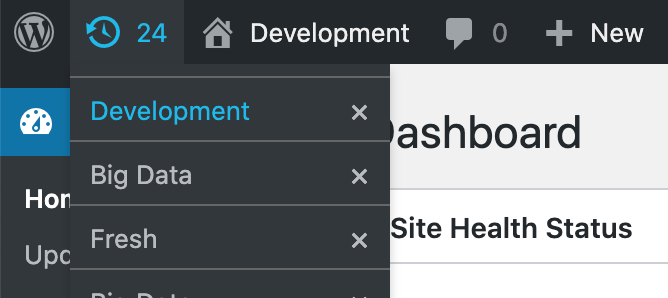
- Name each snapshot from the admin bar. The prompt suggests the current snapshot name, or the site title when none is current.
- Search the admin bar list by name. Press Ctrl+S to open the menu and focus search. Press Enter to restore the first match.
- Store the current admin URL and return there after restore, including URL fragments.
- Stay logged in as the same user after a restore started from the admin screen.
- Keep a limited number of copies of the same name. Two copies are kept by default; older ones are removed.
- Confirm before a restore or delete.
Tools screen and settings
Tools → Snapshots lists every snapshot with its name, created time, last used time, and saved location. Select several rows and delete them together.
Settings → Snapshots controls where snapshots are saved, how many copies to keep, whether uploads and the return URL are included, which database tables to leave out, and whether the list is sorted by last used or by created date. The Plugins screen and the admin bar both link to that settings page.
A PHP constant in wp-config.php overrides the matching setting. Each option can also be changed with the snapshots_{option} filter, for example snapshots_max_shots.
What a snapshot includes
- A database export (
dump.sql) of the site tables, except tables you exclude. - The uploads directory as
data.zip, when Save Files is enabled. It is enabled by default. - A manifest with the name, created time, last used time, and the optional return URL.
On restore, tables that use this site’s database prefix and are not in the snapshot are dropped. If the home URL inside the snapshot differs from the current home URL, WP-CLI runs a search-replace to the current URL.
Zip files are written with PHP’s ZipArchive class, or with PclZip when ZipArchive is unavailable.
WP-CLI
SnapShots adds a wp snapshot command. From the shell:
wp snapshot backup "Before the experiment" --files
wp snapshot restore before-the-experiment
wp snapshot list
wp snapshot delete before-the-experiment

backup accepts `--files` to include uploads, `--location=<path>` to store a return URL such as `wp-admin/plugins.php`, and `--exclude_tables=<tables>` as a comma-separated list.

restore and `delete` accept the snapshot name, its slug, or a folder id such as `before-the-experiment_1587039434`. When you pass a name, the latest copy of that name is used.
Settings reference
These options are on Settings → Snapshots. The matching constant in wp-config.php overrides the saved value.
- Snapshots folder (
SNAPSHOTS_FOLDER):wp-content/.snapshots - CLI allow root (
SNAPSHOTS_CLI_ALLOW_ROOT): false - Max shots (
SNAPSHOTS_MAX_SHOTS): 2 - PHP path (
SNAPSHOTS_PHP_PATH): empty, so the server PATH is used - Save files (
SNAPSHOTS_SAVE_FILES): true - Save location (
SNAPSHOTS_SAVE_LOCATION): true - Exclude tables (
SNAPSHOTS_EXCLUDE_TABLES): empty -
List order (
SNAPSHOTS_LIST_ORDER):last_used(orcreated)SNAPSHOTS_PHP_PATH is a directory. Do not include the
phpbinary in that path.SNAPSHOTS_CLI_PATH is also a directory, and it is not a field on the settings screen. Set it in
wp-config.phpto the folder that contains thewpbinary. Do not includewpitself.define( ‘SNAPSHOTS_CLI_PATH’, ‘/usr/local/bin’ );
define( ‘SNAPSHOTS_PHP_PATH’, ‘/usr/local/bin’ );
define( ‘SNAPSHOTS_FOLDER’, WP_CONTENT_DIR . ‘/.snapshots’ );
define( ‘SNAPSHOTS_MAX_SHOTS’, 2 );
define( ‘SNAPSHOTS_LIST_ORDER’, ‘last_used’ );add_filter( ‘snapshots_max_shots’, function ( $value ) {
return 5;
} );
Installation
- Install WP-CLI 2.2 or newer and make sure PHP can run external programs with
exec. - Upload the
snapshotsfolder to/wp-content/plugins/, or install the plugin from the Plugins screen. - Activate SnapShots. Activation stops with an error when
exec, PHP, or WP-CLI is missing. - In
wp-config.php, setSNAPSHOTS_CLI_PATHto the directory that contains thewpbinary. - In the admin bar, choose “Click here to create your first Snapshot!” and give it a name.
- Restore that snapshot from the admin bar or from Tools → Snapshots, then confirm.
- A restore drops database tables with this site’s prefix that are not in the snapshot, and replaces the uploads folder when the snapshot includes files.
Journal de modifications
3.0.0
- fixed: command injection through unescaped snapshot names and locations in the create, restore, and delete actions
- fixed: create, restore, and delete links now require a valid nonce, blocking cross-site request forgery
- fixed: the return location after creating a snapshot stays on this site without doubling subdirectory paths
- fixed: snapshot storage folders now contain
.htaccessandindex.phpfiles so database dumps are not downloadable from the web on Apache - fixed: install steps use the folder name
snapshots - fixed: missing PHP, WP-CLI, or exec shows a notice instead of a full-screen error
- added: Tools → Snapshots to restore and delete snapshots, including more than one at a time
- added: Settings → Snapshots for the folder, copy limit, uploads, return URL, excluded tables, and sort order
- added: settings links on the Plugins screen and in the admin bar
- changed: snapshots are sorted by last use, and the Tools list shows that time
2.8.2
- changed: no change to creating, restoring, or deleting snapshots
2.8.1
- fixed: a failed command shows which command failed
- added:
SNAPSHOTS_PHP_PATHwhen thephpbinary is not on PATH
2.8.0
- fixed: the page you return to after restore keeps its #fragment
- changed: the current snapshot name is stored in the database, not in the browser
- changed: tested with PHP 8.3
2.7.0
- fixed: errors from the
wpcommand are included in the output - added: Ctrl+S opens the snapshot menu, and typing focuses the search field
- changed: tested with WordPress 6.1
2.6.0
- fixed: snapshots whose names include numbers show in the list
- added: a search box in the admin bar menu
Captures d'écran
Pour les développeurs
Est-ce votre plugin ? Montrez les chiffres.
Ajoutez un badge en direct à votre site, docs ou github readme. Il se met à jour par lui-même - aucun compte n'est nécessaire.
Best SnapShots alternatives
Tous les plugins de base de données →





FAQ
SnapShots: quick answers
Réponses directes, extraites des données en direct WordPress.org.
Source : WordPress.org
Is SnapShots free?
Yes. SnapShots is free to download and use from the official WordPress.org plugin directory.
Is SnapShots safe to use in 2026?
SnapShots is a solid plugin choice in 2026, with a few things worth checking first. It runs on 30+ sites, is rated 3.7/5 and was last updated 1 month ago, and scores 66/100 on our health check.
How many websites use SnapShots?
SnapShots is active on 30+ WordPress websites and has been downloaded 6,161 times since it launched in May 2020. It was downloaded 172 times in the last 30 days.
Does SnapShots work with WordPress 7.1?
Yes. The developer has tested SnapShots up to WordPress 7.1.5, the latest release. It requires WordPress 6.6 or newer.
What PHP version does SnapShots need?
SnapShots requires PHP 7.4 or higher. Most hosts run PHP 8.x today, so it works on any modern WordPress hosting.
When was SnapShots last updated?
The latest version, 3.0.0, was released on October 17, 2026 (1 month ago).
Who makes SnapShots?
SnapShots is developed and maintained by EverPress.
What are the best alternatives to SnapShots?
The most popular alternatives to SnapShots are Search Regex (100K+ installs), WP-Sweep (100K+ installs) and Advanced Database Cleaner (100K+ installs).
Propulsé par PageForge
Un modèle et une feuille de calcul. Une vraie page pour chaque recherche.
PageForge transforme chaque ligne d'un CSV en une page WordPress avec son propre titre, URL, SEO et schéma, construit sur la mise en page que vous Déjà conçu. Gratuit sur WordPress.org.
- CSV et XLSX, plus Google Sheets sur les professionnels et les entreprises
- Son propre titre, URL, SEO champs et schéma pour chaque page
- Fonctionne avec l'éditeur de blocs, Elementor, Divi et Avada
- Gratuit sur WordPress.org, pas de carte de crédit