

SmartCloud AI-Kit – Chatbot and Semantic Search
Help visitors find answers in your content with a chatbot and semantic search. Pro connects to your own AI backend.

Choix solide
SmartCloud AI-Kit is a solid plugin choice in 2026, with a few things worth checking first. It runs on 10+ sites and was last updated 3 days ago, and scores 66/100 on our health check.
- Développé activement — Dernière mise à jour il y a 3 jours
- Testé avec le dernier WordPress (7.1)
- Petite base d'utilisateurs (plus de 10 installations actives)
- Très peu de critiques jusqu'à présent
- Nécessite PHP 8.1 ou plus récent
Comment s'accumule-t-il ?
Côte à côte sur les installations, les mises à jour, les évaluations et le support


Téléchargements quotidiens
Les pics de téléchargement suivent généralement une nouvelle version - chaque site qui met à jour automatiquement compte comme un téléchargement.
Classements
Where SmartCloud AI-Kit stands todayWordPress.org Classements de recherche
Position en direct dans la recherche de plugins, Top 100| Mot-clé | Position |
|---|---|
| IA | >100 |
| chatbot | >100 |
| knowledge base | >100 |
| semantic search | #44 |
| Summarizer | #23 |
Adoption de version
Part de sites actifs par version.
About SmartCloud AI-Kit
From the official readme · v1.7.14Description
Help visitors get answers from your WordPress content, documentation and connected services. AI-Kit combines a site-wide chatbot with an embeddable DocSearch component, supported by a shared knowledge base and a backend you control.
Answers for your visitors
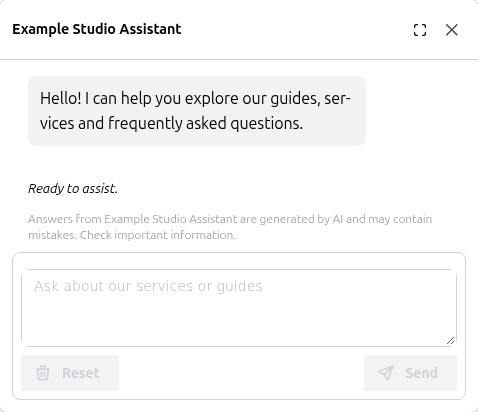
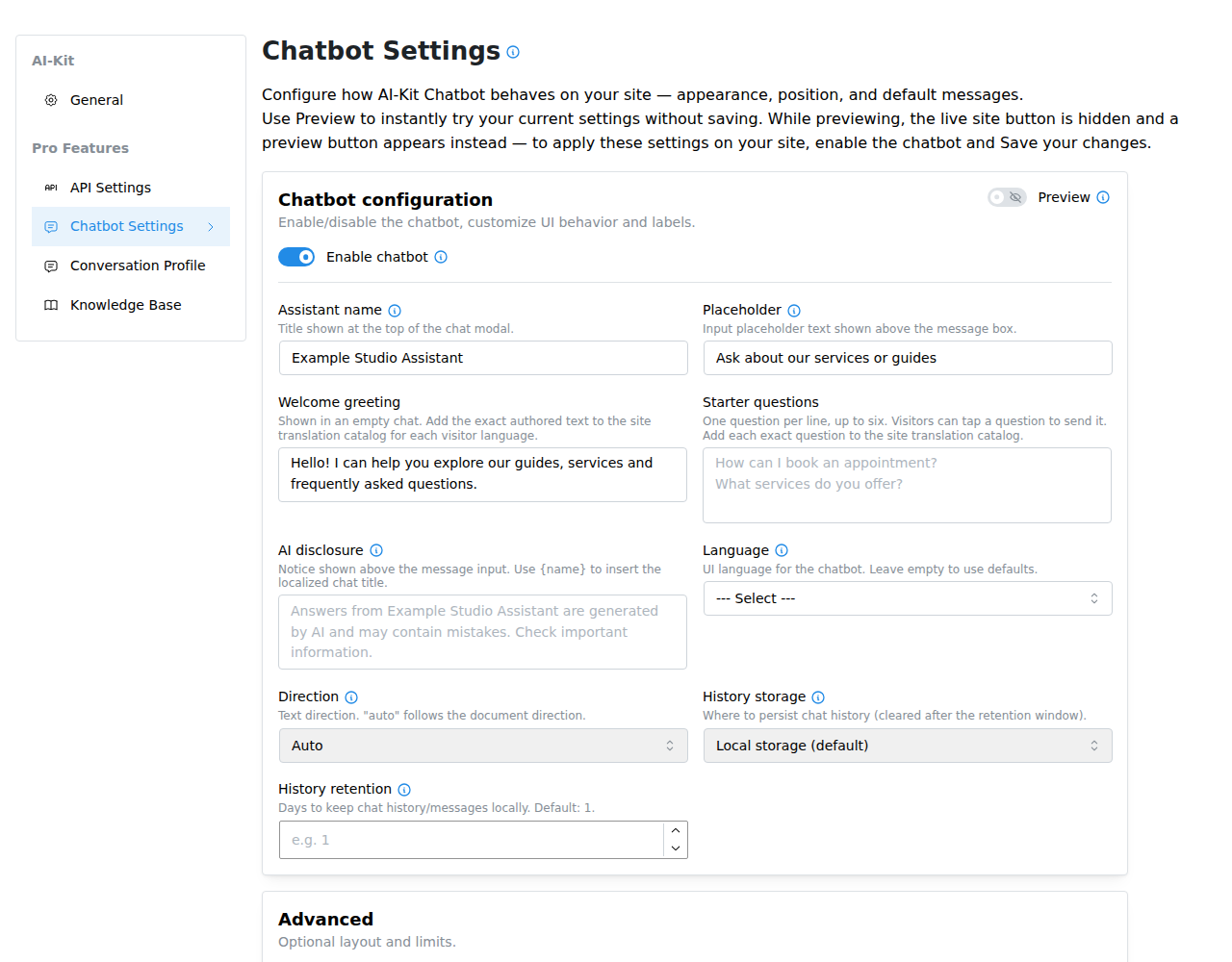
* Site-wide chatbot (Pro): Add an assistant that visitors can open from any page. Configure its appearance, role, tone, topics and response guidance.
* DocSearch (Pro): Place semantic search in a page or other Gutenberg block area. Show a concise AI summary above a broad set of relevant knowledge sources. DocSearch applies category and tag filters only when the visitor explicitly selects them; it does not silently narrow the search with model-inferred taxonomy filters.
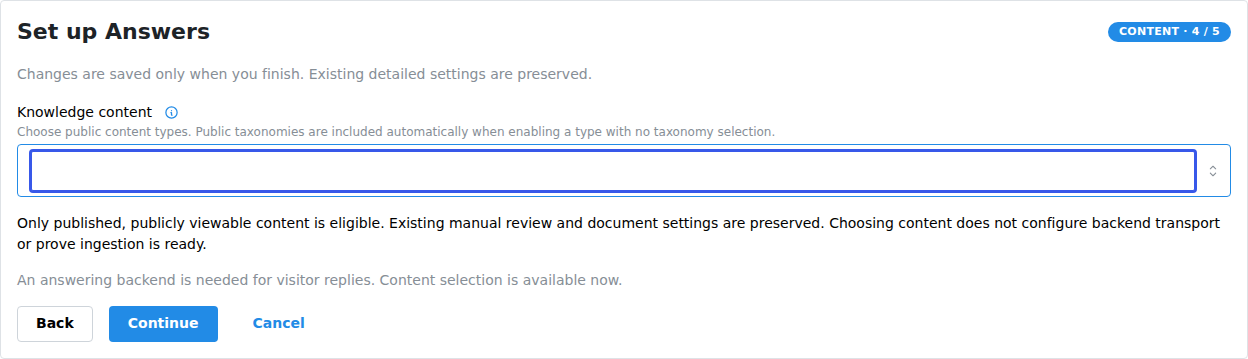
* Knowledge content: Select public posts, pages and supported public custom post types. Configure approval policies and inspect synchronization and backend ingestion separately.
* Connected information (Pro): Extend chatbot answers with shop or service data through administrator-approved, read-only REST and MCP tools. Optional Shopify shipping quotes use a separate, visibly confirmed step that may create a cart but cannot order or pay. Enable web grounding for selected, allowed HTTPS sources when current information is needed. These integrations require compatible endpoints and backend configuration; installing the plugin does not connect them automatically.
* Response controls (Pro): Set evidence and citation requirements, topic boundaries and behavior when evidence is missing. Review answers against your actual content and use cases.
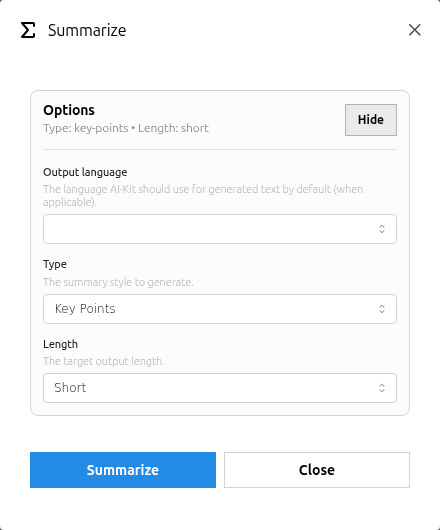
* Page summaries (Pro): Give visitors a convenient way to summarize longer content with the AI-Kit Feature block or shortcode.
Setup that explains what is ready
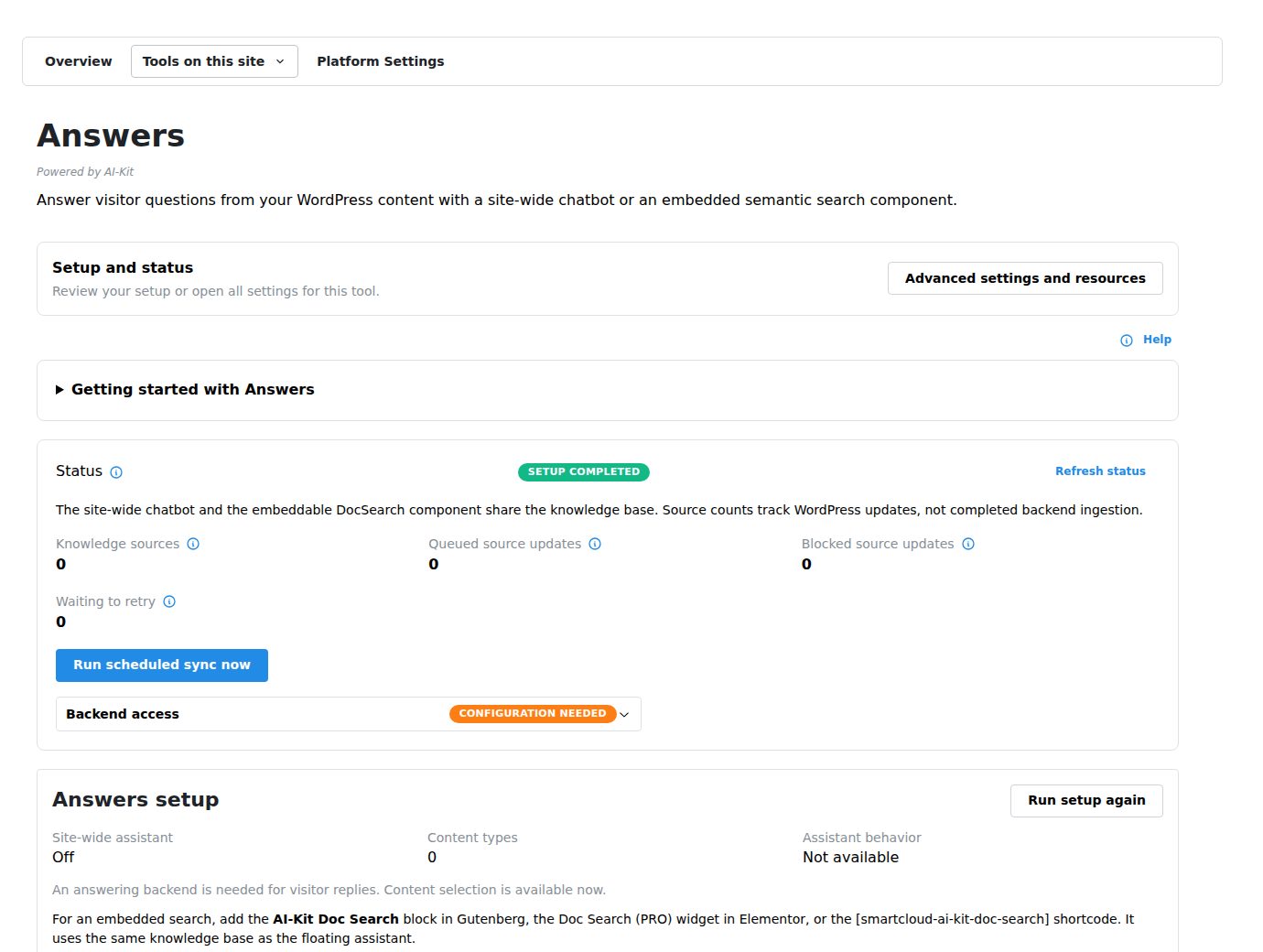
Open SmartCloud → Answers for guided setup, source status and backend-access guidance. The wizard saves its choices when you finish, and can be reopened with existing values. Detailed settings remain available on the same product page.
A connected WP Suite site, a Pro subscription and a configured, compatible AI-Kit backend are required for visitor chat and DocSearch. The backend is typically deployed into your own AWS account. A WP Suite site connection alone does not deploy that backend or grant access to its protected administration APIs.
Additional tools for authors
Free editor and Media Library tools use supported Chrome on-device AI when available: generate image and post metadata, draft text, and rewrite, translate or proofread selected content. Browser and device support determine which local tools are available. Pro can provide backend processing for supported tools. These authoring tools complement the visitor-facing Answers experience.
WordPress integration
* Gutenberg blocks and shortcodes for visitor search and AI features.
* Shared translation overrides under SmartCloud → Platform Settings → Translations and frontend language/direction controls.
* JavaScript APIs for developers integrating the supported features into their own interfaces.
AI-Kit is part of WP Suite by Smart Cloud Solutions, Inc. WordPress remains your content and editing system; optional connected services provide the AI backend and integrations.
Documentation: WP Suite – Docs
This plugin is not affiliated with or endorsed by Google, Amazon Web Services, or the WordPress Foundation. All trademarks are property of their respective owners.
Free and Premium Usage Notice
Free: Use supported on-device editor and Media Library tools without a WP Suite account, subscription or AI backend. You can also choose knowledge-source policies in WordPress; selecting content does not by itself deliver documents to a backend or enable visitor answers.
Pro: An active subscription on the connected WP Suite site enables the paid runtime for the chatbot, DocSearch, frontend AI Feature block/shortcodes and backend processing. Visitor answers and search additionally require a compatible, configured backend with accessible, indexed knowledge content. Chatbot REST/MCP tools and web grounding require their own explicit configuration.
Backend services normally run in your AWS account. AWS usage and any external service charges are separate. Authentication and permissions depend on the configured backend. For protected administration APIs, sign in to the site’s configured Cognito pool with the required role, or use the Gatey WordPress login integration. WP Suite workspace sign-in and a WordPress administrator session do not automatically authorize that backend.
Machine-readable resources
- AI plugin manifest: https://wpsuite.io/.well-known/ai-plugin.json
- OpenAPI spec: https://wpsuite.io/.well-known/openapi.yaml
Services externes
This plugin may integrate with the following external services, depending on configuration:
-
Google reCAPTCHA v3
- What it is & what it’s used for:
Client-side bot detection. If enabled, AI-Kit can request reCAPTCHA tokens in the browser to protect certain interactions. - What data is sent & when:
The browser may contact Google to retrieve a reCAPTCHA token (client-side). - Configuration in WordPress:
Enter your reCAPTCHA site key in SmartCloud → Platform Settings → reCAPTCHA. - Links:
- About reCAPTCHA: https://www.google.com/recaptcha/about/
- Google Terms: https://policies.google.com/terms
- Google Privacy: https://policies.google.com/privacy
- What it is & what it’s used for:
-
Customer-configured AI backend endpoint (Pro only)
- What it is & what it’s used for:
An API endpoint you configure for visitor chat, semantic search, knowledge synchronization and backend AI processing. - What data is sent & when:
Chat messages, search queries, text and/or image-related inputs required for the requested feature. Knowledge Sync sends approved source content, metadata and site-specific synchronization information from WordPress. Conversation settings and approved tool arguments are sent when those features are used. - Where it goes:
Requests are sent to the API URL you provide — typically an AWS API deployed to your own AWS account (e.g., via the “wpsuite-ai-kit” SAR template). - How it’s called:
HTTPS requests from the browser for interactive features, and signed server-side HTTPS requests from WordPress for Knowledge Sync. Configured REST/MCP tools and web grounding make backend-to-service requests to administrator-approved destinations; review those services and their privacy terms before enabling them. Enabled display templates may load approved source image URLs directly in the visitor’s browser, disclosing the visitor’s IP address to that image host; images use no-referrer requests. Opening a navigation link visits its configured destination and does not execute a purchase or booking.
- What it is & what it’s used for:
-
WP Suite platform connection (optional; site/workspace linking & shared features)
- When it applies:
When you use WP Admin → SmartCloud → Connect your Site to WP Suite to link this WordPress site to a WP Suite workspace, or to switch/disconnect later. - What it’s used for:
Storing and retrieving Pro feature configuration (e.g., API/chatbot/feature settings) and enabling an admin-side preview experience so you can try Pro features in WP Admin before enabling them on the live site. - What data may be sent:
Minimal account/session data required for authentication, and minimal site/workspace linking data required to associate a WordPress site with a workspace (e.g., site/workspace identifiers and the site’s URL/domain). - Where it goes / how it’s called:
Secure HTTPS requests from the browser to WPSuite.io services (e.g. wpsuite.io and api.wpsuite.io). - Links:
- WPSuite.io Privacy Policy: https://wpsuite.io/privacy-policy
- WPSuite.io Terms of Use: https://wpsuite.io/terms-of-use
- When it applies:
-
Amazon Cognito (optional; authentication for WP Suite Hub and/or protected APIs)
- When it applies:
- When using the WP Suite Hub, users authenticate (sign in / sign up) before creating/selecting a workspace and linking a site.
- If a plugin is configured to access protected endpoints that rely on Cognito, authentication/token flows may also be used for those requests.
- What it’s used for:
User authentication and token-based authorization for subsequent API calls (e.g., to WPSuite.io APIs). - Links:
- AWS Service Terms: https://aws.amazon.com/service-terms/
- AWS Privacy: https://aws.amazon.com/privacy/
- When it applies:
-
Stripe (optional; subscription/purchase flow)
- When it applies: Only when the user opens the optional WP Suite subscription / purchase flow in the shared admin component.
- What it’s used for: Displaying hosted pricing/subscription UI for optional paid features.
- What data may be sent: Browser/session data required by Stripe to render the hosted purchase UI and process the purchase flow.
- Links:
- Terms: https://stripe.com/legal/consumer
- Privacy: https://stripe.com/privacy
-
Shopify (optional; administrator-configured catalog and shipping quotes, Pro only)
- What it is & what it is used for:
Read products, supported options, prices and available inventory from the configured merchant. Shipping quotes are separately enabled and require visible visitor confirmation; that action may create a Shopify cart solely to read shipping estimates. It does not order or pay. - What data is sent & when:
Catalog queries, filters and market context are sent during product searches. Only after the visitor submits the shipping-quote form are the displayed product variants, quantities and supplied delivery address sent through the configured backend to the configured Shopify store. Private Storefront authentication can also require forwarding the trusted visitor IP address. Do not put an address in the ordinary chat message. - Storage and limitations:
Structured address inputs are not added to model prompts, visible chat history or browser conversation storage. The backend processes confirmed inputs privately and retains a private cart reference for bounded quote retries; Shopify may retain the resulting cart and address according to the merchant’s configuration and applicable policies. General card brands or wallets do not prove checkout eligibility; missing delivery dates or payment options remain unknown. - Configuration and links:
Review the exact merchant domain, Shopify app permissions, runtime credential reference and quote setting in advanced conversation-profile Tools. Installing the plugin does not install an app, grant Shopify permissions or activate a connection.- Terms: https://www.shopify.com/legal/terms
- Privacy: https://www.shopify.com/legal/privacy
- Also review the configured merchant’s terms and privacy policy.
- What it is & what it is used for:
Trademark Notice
Google Chrome and reCAPTCHA are trademarks of Google LLC.
Amazon Web Services, AWS, Amazon Cognito, and Amazon Bedrock are trademarks of Amazon.com, Inc. or its affiliates.
AI-Kit is an independent project and is not affiliated with, sponsored by, or endorsed by Google, Amazon Web Services, or the WordPress Foundation.
Source & Build
Public (free) source code:
All code that ships in the public (free) version of AI-Kit is available here: https://github.com/smartcloudsol/ai-kit
Build & distribution:
AI-Kit is shipped to WordPress.org as a pre-built distribution. Build steps and developer notes are maintained in the GitHub repository documentation.
Shared WP Suite admin and localization:
The bundled WP Suite Hub admin originates from the wpsuite-admin/ module in https://github.com/smartcloudsol/smartcloud-wpsuite and is packaged under smartcloud-wpsuite/. It owns the site-wide custom translation catalog used by Gatey, AI-Kit, and Flow, alongside shared workspace linking, licence validation, and subscription management.
Pro-only features (source availability):
AI-Kit Pro includes additional functionality such as the chatbot, DocSearch, backend processing, and the frontend Feature block/shortcode experience. The code that enables these paid-only features is distributed to Pro users but is not published in the public repository.
Installation
- Upload the plugin ZIP or install it from the WordPress plugin repository.
- Activate it through Plugins in WordPress.
- Open SmartCloud → Answers and follow the setup steps to select your knowledge content.
- For visitor answers, connect the site to WP Suite with Pro, deploy/configure a compatible backend, and complete any required backend sign-in. Review the backend-access guidance on the Answers page.
- Enable and configure the site-wide chatbot, or add the AI-Kit Doc Search block to a page. Synchronize and index approved knowledge content, then test visitor questions and source links.
- For free authoring tools, open Gutenberg or Media → Library in a supported browser.
Journal de modifications
Updates the shared WP Suite Hub for more reliable passkey MFA status and preserves existing authenticator preferences.
1.7.14
- Use the backend configuration from a linked cloud deployment and keep WordPress settings saves scoped to the active connection.
- Highlight pending deployment recommendations in the WP Suite overview and Tools menu.
1.7.13
- Update the shared WP Suite Hub with WordPress asset enqueueing and translatable validation messages.
1.7.12
- Update the shared WP Suite Hub to 2.7.14 for passkey MFA compatibility.
1.7.11
- Reduce shared authentication and configuration scripts loaded by the frontend.
- Support indexing protected Commerce articles under their configured knowledge access policy. Update the shared WP Suite Hub.
1.7.9
- Updates the shared WP Suite Hub for more reliable passkey MFA status and preserves existing authenticator preferences.
1.7.8
- Update the shared WP Suite Hub for authentication compatibility across installed WP Suite plugins.
Captures d'écran



Pour les développeurs
Est-ce votre plugin ? Montrez les chiffres.
Ajoutez un badge en direct à votre site, docs ou github readme. Il se met à jour par lui-même - aucun compte n'est nécessaire.
Best SmartCloud AI-Kit alternatives
Tous les plugins d'IA →





FAQ
SmartCloud AI-Kit: quick answers
Réponses directes, extraites des données en direct WordPress.org.
Source : WordPress.org
Is SmartCloud AI-Kit free?
Yes. SmartCloud AI-Kit is free to download and use from the official WordPress.org plugin directory.
Is SmartCloud AI-Kit safe to use in 2026?
SmartCloud AI-Kit is a solid plugin choice in 2026, with a few things worth checking first. It runs on 10+ sites and was last updated 3 days ago, and scores 66/100 on our health check.
How many websites use SmartCloud AI-Kit?
SmartCloud AI-Kit is active on 10+ WordPress websites and has been downloaded 5,635 times since it launched in February 2026. It was downloaded 1,178 times in the last 30 days.
Does SmartCloud AI-Kit work with WordPress 7.1?
Yes. The developer has tested SmartCloud AI-Kit up to WordPress 7.1.5, the latest release. It requires WordPress 6.9 or newer.
What PHP version does SmartCloud AI-Kit need?
SmartCloud AI-Kit requires PHP 8.1 or higher. Most hosts run PHP 8.x today, so it works on any modern WordPress hosting.
When was SmartCloud AI-Kit last updated?
The latest version, 1.7.14, was released on November 27, 2026 (3 days ago).
Who makes SmartCloud AI-Kit?
SmartCloud AI-Kit is developed and maintained by Smart Cloud Solutions Inc..
What are the best alternatives to SmartCloud AI-Kit?
The most popular alternatives to SmartCloud AI-Kit are Elementor Agent Ready Websi… (10M+ installs), Jetpack (3M+ installs) and All in One SEO (2M+ installs).
Propulsé par PageForge
Un modèle et une feuille de calcul. Une vraie page pour chaque recherche.
PageForge transforme chaque ligne d'un CSV en une page WordPress avec son propre titre, URL, SEO et schéma, construit sur la mise en page que vous Déjà conçu. Gratuit sur WordPress.org.
- CSV et XLSX, plus Google Sheets sur les professionnels et les entreprises
- Son propre titre, URL, SEO champs et schéma pour chaque page
- Fonctionne avec l'éditeur de blocs, Elementor, Divi et Avada
- Gratuit sur WordPress.org, pas de carte de crédit