


Smart Auto Upload Images – Import External Images
Automatically import external images into your Media Library on save. Review recent imports and restore original URLs from import history.

Choix
Yes — Smart Auto Upload Images is a safe, well-maintained plugin to use in 2026. It runs on 5K+ sites, is rated 4.3/5 and was last updated 4 weeks ago, and scores 85/100 on our health check.
- Développé activement — Dernière mise à jour il y a 4 semaines
- Testé avec le dernier WordPress (7.1)
- Momentum — downloads up 224.3% vs the previous 30 days
Comment s'accumule-t-il ?
Côte à côte sur les installations, les mises à jour, les évaluations et le supportTéléchargements quotidiens
Les pics de téléchargement suivent généralement une nouvelle version - chaque site qui met à jour automatiquement compte comme un téléchargement.
Classements
Where Smart Auto Upload Images stands todayWordPress.org Classements de recherche
Position en direct dans la recherche de plugins, Top 100| Mot-clé | Position |
|---|---|
| auto-upload | #2 |
| external images | #1 |
| import images | #7 |
| media library | >100 |
| référencement | >100 |
Adoption de version
Part de sites actifs par version.
Répartition des notes
★★★★★★★★★★ 4.3 from 6 reviews
About Smart Auto Upload Images
From the official readme · v1.3.0Description
Smart Auto Upload Images imports external images from your post content into the WordPress Media Library when you save or update a post. It replaces the original image URLs with local URLs, helping you keep a copy of the images your content depends on.
Automatic image imports
- Detects external image URLs in
imgtags, includingsrcandsrcset. - Imports supported images into the Media Library and updates matching URLs in post content.
- Works with the Classic Editor, image markup in block content, and custom post types.
- Supports external featured image imports from the post editor or REST API.
Settings for your workflow
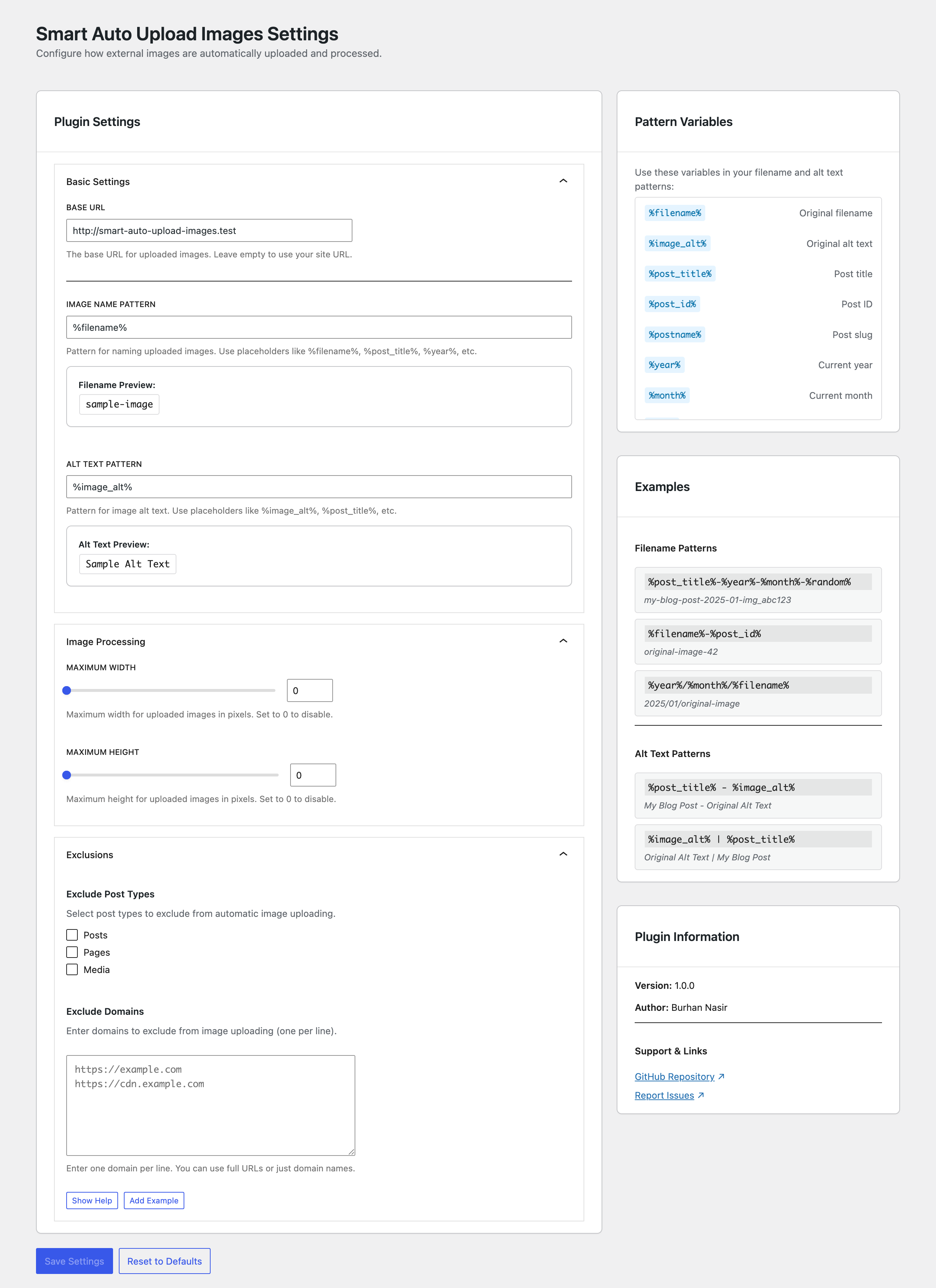
- Customize imported filenames and image alt text with pattern variables.
- Set maximum image width and height.
- Exclude specific post types or external domains.
- Set a custom base URL for imported image links.
- Reuse an existing image when the generated filename and downloaded file contents match.
Import history and recovery — new in 1.3.0
Open Settings → Smart Auto Upload Images → History to review recent successful post-content imports. Each entry shows the post, import time, image count, and original and imported URLs.
Select Restore original URLs to replace imported URLs that are still present in that post. Recovery preserves other post edits and keeps imported files in the Media Library.
- History starts with imports made after updating to 1.3.0; older imports are not added retroactively.
- The plugin stores up to 500 import events per site and displays the latest 50 that you can edit.
- Recovery applies to recorded URL replacements in post content. It does not restore alt text or featured images, or act as a full post backup.
- If different original URLs share one imported image URL, recovery is blocked to avoid restoring the wrong source.
- Recovered external URLs may be imported again when the post is saved normally. Exclude their domain or post type if you want them to remain external.
- Administrators can access history and must have permission to edit a post before recovering it.
The Settings and History tabs have separate URLs, so you can bookmark a tab and use browser Back and Forward.
Filename and alt text patterns
Use variables such as:
%filename%— original filename without its extension.%image_alt%and%image_title%— original image attributes.%post_title%and%post_name%— post title and slug.%year%,%month%,%day%, and%today_date%— current UTC date values.%post_date%— post date.%timestamp%and%random%— timestamp or generated identifier.
For example, use %post_name%-%filename% for filenames or %image_alt% - %post_title% for alt text. The settings sidebar lists available variables.
Exclude external domains
In Settings → Smart Auto Upload Images → Settings, open Exclusions and enter one hostname or URL per line, such as cdn.example.com or https://cdn.example.com. Hostnames match without case sensitivity; add subdomains separately when needed.
Compatibility and limits
Images must be publicly accessible and pass WordPress URL and file validation. Importing many or large images can increase post save time and consume disk space. Maximum dimensions control resizing, not download size.
Page builders are supported when they store image markup in post content. Images stored only in custom fields, CSS backgrounds, or other separate builder data are not guaranteed to be imported. There is no dedicated bulk import screen; existing content is processed when its posts are saved.
Only import images you have permission to use. The plugin contacts the image hosts referenced in your content to download files.
Installation
- Install and activate Smart Auto Upload Images from Plugins → Add New, or upload the plugin ZIP using Upload Plugin.
- Open Settings → Smart Auto Upload Images and configure the Settings tab.
- Save a post containing an external image and check the Media Library for the imported file.
- Open the History tab to review the import or restore its original URLs.
Requires WordPress 6.2 or later and PHP 8.0 or later. Your server must be able to download public images and write to the WordPress uploads directory.
Journal de modifications
Adds import history and URL recovery, separate Settings and History tabs, and safer image-download redirects. History starts with new imports after updating.
1.3.0 – 2026-10-25
Added:
- Added recent import history with post details, timestamps, image counts, and original and imported URLs.
- Added recovery of original post-content image URLs while retaining imported Media Library files.
- Added separate Settings and History tabs with bookmarkable URLs and browser Back/Forward navigation.
- Added regression tests for history, recovery, permissions, and safe image downloads.
Fixed:
- Preserve edited image URLs during recovery and reject ambiguous shared-URL mappings.
- Apply alt-text patterns on first import without changing unrelated images.
- Use the site URL when Base URL is blank and accept bare hostnames in domain exclusions.
- Preserve complete source URLs and backslashes while processing saved post content.
- Clear displayed exclusions after resetting settings and preserve keyboard focus when switching tabs.
1.2.4 – 2026-08-17
Added:
- Added WordPress 7.1 support.
1.2.3 – 2026-01-31
Fixed:
- Fixed SSRF vulnerability. Thanks Patchstack for reporting it!
1.2.2 – 2026-01-10
Added:
- Added WordPress 6.9 support.
Fixed:
- Fixed post type exclusion.
- Fixed deprecated warnings on the settings page.
1.2.1 – 2025-11-01
Fixed:
- Fixed a security issue. Thanks Wordfence for reporting it!
1.2.0 – 2025-09-28
Added:
- Added featured image import from external URL – set featured images using remote image URLs
- Introduced
smart_aui_validate_image_urlfilter hook for developers to customize image URL validation logic
Fixed:
- Improved duplicate detection system – automatically reuses existing images in media library instead of importing duplicates
- Fixed undefined index PHP warning when processing images without complete metadata
- Enhanced image validation with better error handling and logging
Captures d'écran
Pour les développeurs
Est-ce votre plugin ? Montrez les chiffres.
Ajoutez un badge en direct à votre site, docs ou github readme. Il se met à jour par lui-même - aucun compte n'est nécessaire.
Best Smart Auto Upload Images alternatives
All auto-upload plugins →| Rang | Plugin | Installations actives |
|---|---|---|
| 2 |
 Stinoment Auto Image Uploader
Paste content with external images and they are uploaded to your Media Library… |
<10 |
FAQ
Smart Auto Upload Images: quick answers
Réponses directes, extraites des données en direct WordPress.org.
Source : WordPress.org
Is Smart Auto Upload Images free?
Yes. Smart Auto Upload Images is free to download and use from the official WordPress.org plugin directory.
Is Smart Auto Upload Images safe to use in 2026?
Yes — Smart Auto Upload Images is a safe, well-maintained plugin to use in 2026. It runs on 5K+ sites, is rated 4.3/5 and was last updated 4 weeks ago, and scores 85/100 on our health check.
How many websites use Smart Auto Upload Images?
Smart Auto Upload Images is active on 5K+ WordPress websites and has been downloaded 27,627 times since it launched in August 2025. It was downloaded 4,310 times in the last 30 days.
Does Smart Auto Upload Images work with WordPress 7.1?
Yes. The developer has tested Smart Auto Upload Images up to WordPress 7.1.5, the latest release. It requires WordPress 6.2 or newer.
What PHP version does Smart Auto Upload Images need?
Smart Auto Upload Images requires PHP 8.0 or higher. Most hosts run PHP 8.x today, so it works on any modern WordPress hosting.
When was Smart Auto Upload Images last updated?
The latest version, 1.3.0, was released on October 26, 2026 (4 weeks ago).
Who makes Smart Auto Upload Images?
Smart Auto Upload Images is developed and maintained by Burhan Nasir.
What are the best alternatives to Smart Auto Upload Images?
The most popular alternatives to Smart Auto Upload Images are Stinoment Auto Image Upload… (<10 installs).
Propulsé par PageForge
Un modèle et une feuille de calcul. Une vraie page pour chaque recherche.
PageForge transforme chaque ligne d'un CSV en une page WordPress avec son propre titre, URL, SEO et schéma, construit sur la mise en page que vous Déjà conçu. Gratuit sur WordPress.org.
- CSV et XLSX, plus Google Sheets sur les professionnels et les entreprises
- Son propre titre, URL, SEO champs et schéma pour chaque page
- Fonctionne avec l'éditeur de blocs, Elementor, Divi et Avada
- Gratuit sur WordPress.org, pas de carte de crédit