


Icônes personnalisées Skyboot pour Elementor – Elementor Bibliothèque d'icônes – 14300+ icônes
Skyboot Custom Icons for Elementor expands your Elementor icons library with custom icons, perfect for website owners who use the Elementor plugin.

Choix
Yes — Skyboot Custom Icons for Elemen… is a safe, well-maintained plugin to use in 2026. It runs on 200K+ sites, is rated 5/5 and was last updated 3 months ago, and scores 81/100 on our health check.
- Prouvé à grande échelle sur plus de 200 000 sites actifs
- Loved by users — 5/5 from 22 reviews
Comment s'accumule-t-il ?
Côte à côte sur les installations, les mises à jour, les évaluations et le support


Téléchargements quotidiens
Les pics de téléchargement suivent généralement une nouvelle version - chaque site qui met à jour automatiquement compte comme un téléchargement.
Classements
Where Skyboot Custom Icons for El… stands todayWordPress.org Classements de recherche
Position en direct dans la recherche de plugins, Top 100| Mot-clé | Position |
|---|---|
| custom icons | #1 |
| élémentorateur | #11 |
| elementor icons | #2 |
| icon fonts | #2 |
| icons | #1 |
Adoption de version
Part de sites actifs par version.
Répartition des notes
★★★★★★★★★★ 5 from 22 reviews
About Skyboot Custom Icons for Elementor
From the official readme · v1.2.0Description
Skyboot custom icons for Elementor is a fantastic custom Elementor icons plugin for the Elementor page builder. If you’re looking to add custom icons to your site this is the perfect Elementor custom icons plugin for the website owners. Beautiful icons that can create a unique look for a website, the SkyBoot custom icons Elementor plugin is definitely worth the download. Increase Elementor icons library using the plugin. it’s a perfect Elementor custom icons plugin for Elementor based website owners.
This plugin offers a large number of icons ( more than 14300+ ) that will delightfully change the look of your website. Increase your Builtin Elementor icons library with the plugin. you can use icons anywhere on your website for fully free. We just extended the original Elementor icon library which is why it’s so easy to use. You can change the size, and color of the icon from the edit screen.
👉 Click for Live Demo
👉 Our Website: https://skybootstrap.com
👉 Our Blog: Click Here
👉 Our SaaS Product: 🔥 TLinky – The #1 Link Management Platform. TLinky’s Core Solutions: URL Shortener, QR Code Generator, & Link In Bio Builder.
👉 Subscribe Our YouTube Channel: Subscribe Now
👉 Like Facebbok Page: Like Now
👉 Love this plugin? Support our work by buying me a coffee! Your support keeps us motivated to create and improve. Thank you!
Most of the popular brand icons are available in every icon package like Google icons, YouTube icons, Instagram icons, Whatsapp icons, Facebook icons, Twitter icons, Linkedin icons, tiktok icon, and much more. There are huge numbers of social media icons included in the plugin. All are free icons in the plugin like website icons, maps icons, camera icons, UI icons, and other icons in one place.
What’s icons pack are included in the custom Elementor icons plugin:
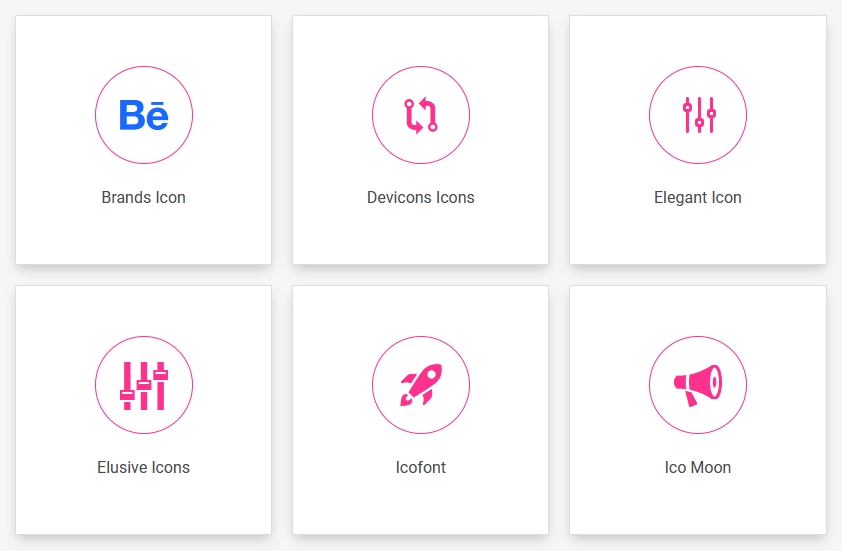
✅ Brands icons (934)
✅ Devicons Icons (191)
✅ Elegant Icon (360)
✅ Elusive Icons (303)
✅ Icofont (2400+) including 300+ Duotone icons
✅ Ico Moon / icomoon (491)
✅ Iconic Icons (172)
✅ Ion icons / ionicons (696)
✅ Line Awesome (2004)
✅ Line Icon (511)
✅ Linear icons (170)
✅ Material Design Icons / material icons (5346)
✅ Simple Line Icon (189)
✅ Themify Icon (351)
✅ Open Iconic (22)
Features of custom Elementor icons plugin:
✅ 14,300+ Custom Elementor Icons.
✅ Individual ON/OFF switch.
✅ 15 icon font packs included.
✅ Easy to use.
✅ Use icons anywhere on your website.
✅ Extend Elementor icon library.
✅ Fast loading.
How do I use custom icons with Elementor?
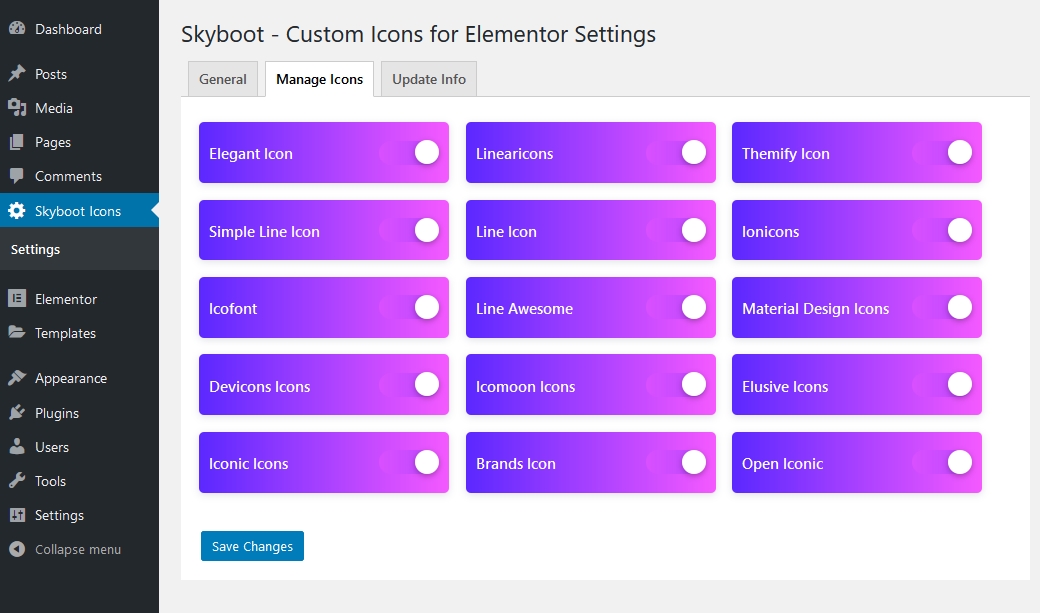
After installing the plugin you will get the option to manage individual icon packs separately so you will get the ON/OFF switch from the settings panel for each icon pack.
Just follow these 4 easy steps:
1. Download the plugin and install it.
2. Activate the plugin and go to the plugin settings.
3. Choose the icon packs you want to enable or disable from the settings panel.
4. Go to Elementor default Icon option.
How to install the Elementor custom icons plugin using FTP?
👉 First Download the plugin.
👉 Unzip the Downloaded zip file.
👉 Login FTP account using Filezilla or an alternative application.
👉 Browse the folder “/wp-content/plugins/”
👉 Upload the unzip plugin folder.
👉 Go go plugin menu from your dashboard and activate the plugin.
👉 Now you will see a new admin menu for the setting panel.
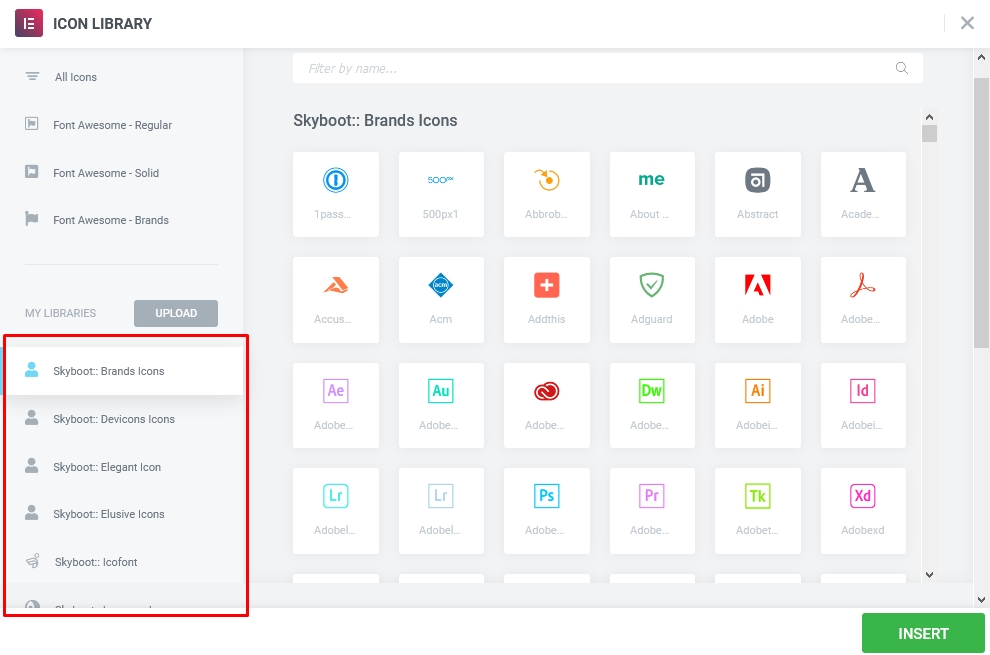
👉 You will get all icons in Elementor’s built-in icon library
How do i use custom Elementor icons?
The benefit of using the Elementor icons list plugin?
The Skyboot custom icons for the Elementor plugin are easy to use with any Elementor supported theme and plugin in the market. Custom icons are a great way to make your site stand out. If you already use the Elementor page builder, you can use the Skyboot custom Elementor icon plugin. It is an essential Elementor plugin for any Elementor site builder.
The Skyboot custom icon can help to give your site a unique look. The plugin development team is constantly making improvements, and these improvements are free for all Elementor users.
What is Elementor?
Elementor is a WordPress visual page builder plugin. It allows users to build pages in a drag-and-drop interface. It’s one of the most popular WordPress page builder plugin on the market, with over 10+ million active installs. One of the downsides to Elementor is the limited number of icons it comes with. Elementor comes with only font awesome icons. In order to grow your Elementor icons library, you can use this plugin to use a large numbers of icons to make your website more beautiful, it will improve your website’s visually attractively.
How to use custom icons in Elementor?
In order to increase your Elementor icons library, you can use this plugin called Skyboot custom icons for Elementor to add more than 14300+ icons to your Elementor based website. Before you use Skyboot, you’ll need to download the plugin and install it. The plugin is compatible with the latest version of Elementor. After you have downloaded and installed the plugin, you’ll be able to access the Elementor icon list.
The library is filled with thousands of icons that you can use to customize your website. This plugin can help you increase your Elementor icon library by adding many new icons to your website.
This gives you a bigger icon library for Elementor. Icon libraries are an essential part of any website design. There are many ways to go about building a library of icons, but one of the most popular is to use Elementor.
Are any social icons are available in this plugin?
Yes, Because social media icons for any website are a great way to drive traffic to your social media page from your website. that’s why you need to use beautiful social media icons on your website to attract your website visitors. If you are looking to quickly display social icons for your website, try this Elementor social icons plugin. This plugin has 14 different icons package, so you can use it to show social media icons in just a few seconds.
Skyboot is incredibly simple to use with the Elementor interface, and it’s compatible with any theme and plugin. We have added more than 14300+ custom icons for the Elementor website builder in one plugin, including Facebook icons, Instagram icon, Twitter icon, LinkedIn icon, Pinterest icon, YouTube icon, gallery icon,discord icons, email icons,custom icons, google map icons and many more. Every icone comes on many different veriation. All font icons free to use.
Why would I need to increase the Elementor Icons List?
Increasing the Elementor Icons List provides you with a wider range of design options, allows for specific icon requirements, and helps you stay current with evolving design trends and user preferences.
Can I customize the appearance of the icons in the Elementor Icon Set?
Yes, you can customize the appearance of the icons in the Elementor Icon Set. Elementor provides various customization options, allowing you to modify the size, color, style, and other visual aspects of the icons to align them with your website’s design and branding.
📢 If you are an Icon author feel free to contact us help.ukthemes [at] gmail.com. We will add your icon pack to this plugin.
☂️ Please note: This plugin requires any version of the Elementor Page Builder to be installed and active. Install Elementor Plugin
👉 Liked Skyboot Custom Icons for Elementor – Elementor Icons library?
❤️ Rate us on WordPress
🧡 == Elementor Image Gallery Plugin ( Masonry Gallery, Elementor Gallery With Captions, Elementor Portfolio Gallery Widget, Filterable Gallery ) ==
The Elementor gallery plugins are powerful widgets for showcasing your images. These gallery plugins are packed with powerful features, such as image filters, captions, featured and random options, and much more.
This Elementor plugin lets you create galleries with a gallery widget and a portfolio gallery widget. You can also add captions to images with different styles.
Journal de modifications
1.2.0 (Date: 11-08-2026)
- Tweak: Redesigned the plugin settings page for a cleaner user experience.
- Fix: Resolved an issue where IcoFont Duotone icons were not rendering correctly in the Elementor editor preview.
- Fix: Fixed a CSS conflict with default Elementor icon alignment for Duotone icons.
- Fix: Prevented CSS file from loading twice when multiple IcoFont variations are used on the same page.
- Update: Corrected the icon count description for the IcoFont library.
- Tested WordPress Version 7.0
- Compatible: Compatibility check with latest version of Elementor
1.1.1 (Date: 02-07-2026)
- Tested WordPress Version 7.0
- Compatible: Compatibility check with latest version of Elementor
- Added devshaddam as contributor
1.1.0 (Date: 25-06-2025)
- Added: 300+ Icofont Duotone New Icons
- Compatible: Compatibility check with latest version of Elementor
- Improved: Code structure for maintainability and increase performance .
- Fix: Some minor issues fixed.
1.0.9 (Date: 28-04-2025)
- Compatible with WordPress 6.8
- Compatible with latest version of Elementor
1.0.8 (Date: 02-03-2024)
- Compatible with WordPress 6.4
- Compatible with latest version of Elementor
1.0.7 (Date: 25-08-2023)
- Compatible with WordPress 6.3
- Compatible with latest version of Elementor
Captures d'écran
Pour les développeurs
Est-ce votre plugin ? Montrez les chiffres.
Ajoutez un badge en direct à votre site, docs ou github readme. Il se met à jour par lui-même - aucun compte n'est nécessaire.
Best Skyboot Custom Icons for Elem… alternatives
All custom icons plugins →

FAQ
Skyboot Custom Icons for Elementor: quick answers
Réponses directes, extraites des données en direct WordPress.org.
Source : WordPress.org
Is Skyboot Custom Icons for Elemen… free?
Yes. Skyboot Custom Icons for Elemen… is free to download and use from the official WordPress.org plugin directory.
Is Skyboot Custom Icons for Elemen… safe to use in 2026?
Yes — Skyboot Custom Icons for Elemen… is a safe, well-maintained plugin to use in 2026. It runs on 200K+ sites, is rated 5/5 and was last updated 3 months ago, and scores 81/100 on our health check.
How many websites use Skyboot Custom Icons for Elemen…?
Skyboot Custom Icons for Elemen… is active on 200K+ WordPress websites and has been downloaded 1,130,605 times since it launched in June 2020. It was downloaded 20,913 times in the last 30 days.
Does Skyboot Custom Icons for Elemen… work with WordPress 7.1?
Skyboot Custom Icons for Elemen… is officially tested up to WordPress 7.0.9, while the latest release is 7.1.5. It may still work, but try it on a staging site first.
What PHP version does Skyboot Custom Icons for Elemen… need?
Skyboot Custom Icons for Elemen… requires PHP 7.4 or higher. Most hosts run PHP 8.x today, so it works on any modern WordPress hosting.
When was Skyboot Custom Icons for Elemen… last updated?
The latest version, 1.2.0, was released on August 11, 2026 (3 months ago).
Who makes Skyboot Custom Icons for Elemen…?
Skyboot Custom Icons for Elemen… is developed and maintained by SkyBootstrap.
What are the best alternatives to Skyboot Custom Icons for Elemen…?
The most popular alternatives to Skyboot Custom Icons for Elemen… are Custom Icons for Elementor… (10K+ installs), Payment Gateway Icons For W… (1K+ installs) and Dicode Icons Pack (500+ installs).
Propulsé par PageForge
Un modèle et une feuille de calcul. Une vraie page pour chaque recherche.
PageForge transforme chaque ligne d'un CSV en une page WordPress avec son propre titre, URL, SEO et schéma, construit sur la mise en page que vous Déjà conçu. Gratuit sur WordPress.org.
- CSV et XLSX, plus Google Sheets sur les professionnels et les entreprises
- Son propre titre, URL, SEO champs et schéma pour chaque page
- Fonctionne avec l'éditeur de blocs, Elementor, Divi et Avada
- Gratuit sur WordPress.org, pas de carte de crédit