


Skybee Booking for Calendly – Booking Block, Popup & Elementor Widget
Add Calendly to WordPress with a block, shortcode or Elementor widget: on the page, as a popup or a floating button. No code, no API key.

Choix solide
Skybee Booking for Calendly is a solid plugin choice in 2026, with a few things worth checking first. Is rated 5/5 and was last updated 1 month ago, and scores 67/100 on our health check.
- Testé avec le dernier WordPress (7.1)
- Petite base d'utilisateurs (<10 installations actives)
- Très peu de critiques jusqu'à présent
Comment s'accumule-t-il ?
Côte à côte sur les installations, les mises à jour, les évaluations et le support



Téléchargements quotidiens
Les pics de téléchargement suivent généralement une nouvelle version - chaque site qui met à jour automatiquement compte comme un téléchargement.
Classements
Where Skybee Booking for Calendly stands todayWordPress.org Classements de recherche
Position en direct dans la recherche de plugins, Top 100| Mot-clé | Position |
|---|---|
| réservation | >100 |
| Calendly | #14 |
| élémentorateur | >100 |
| embed | >100 |
| popup | >100 |
Répartition des notes
★★★★★ ★★★★★ 5 sur 1 avis
About Skybee Booking for Calendly
À partir du Lisez-moi officiel · v1.0.2Description
Calendly Plugin for WordPress
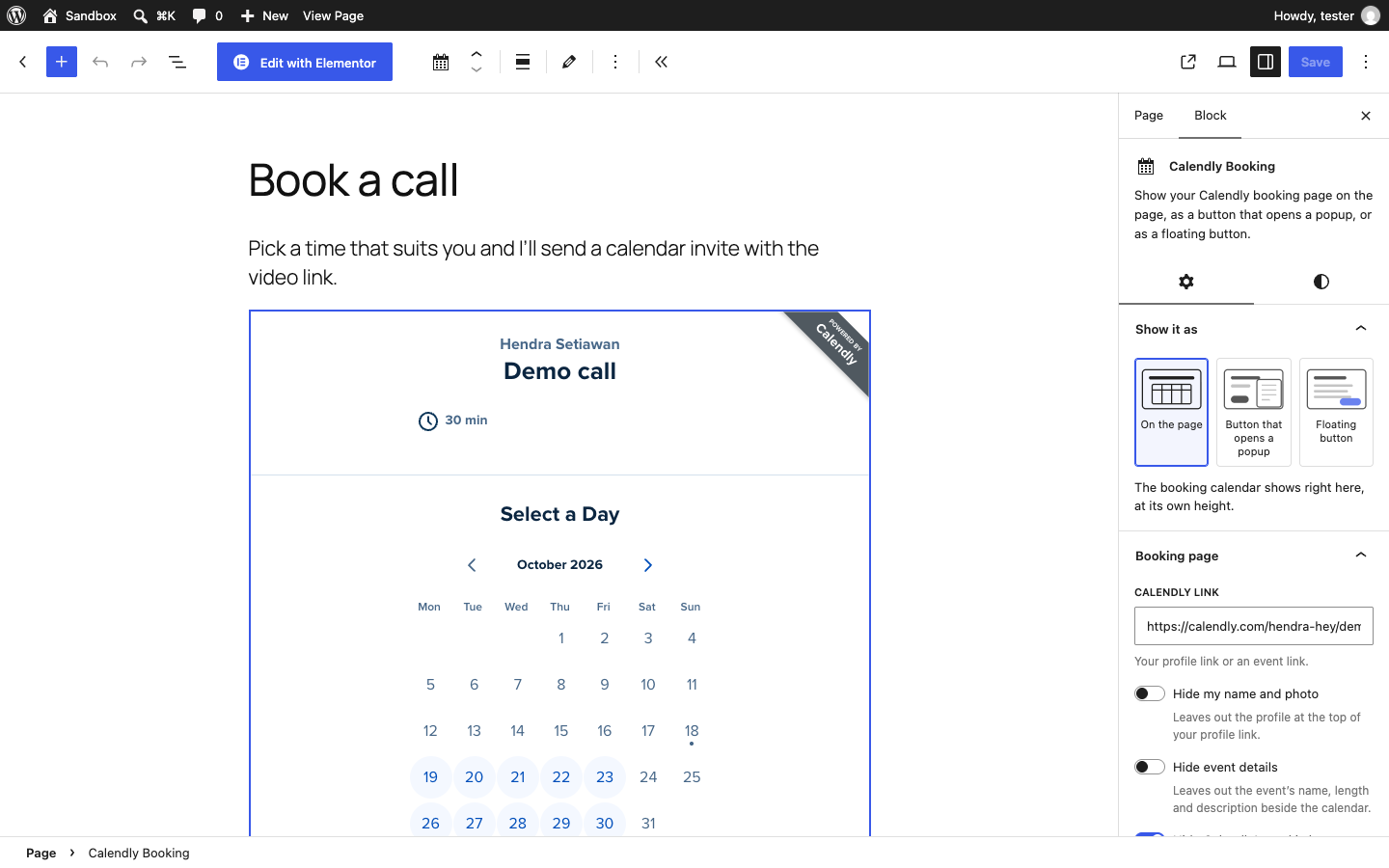
Skybee Booking for Calendly adds your Calendly booking page to WordPress without editing HTML or connecting an API key. In the WordPress editor, add the Calendly Booking block, paste your Calendly link and click Show booking page. The real booking calendar appears in the editor. Then pick how to show it: on the page, as a button that opens a popup, or as a floating button.
The plugin gives you a Calendly Booking block that shows the real booking calendar in the editor, a Calendly Booking widget for Elementor, and a [calendly_booking] shortcode for the classic editor, widgets, Divi, Bricks and other page builders. Choose how to show it with three pictures: on the page, a button that opens a popup, or a floating button in the corner of the page.
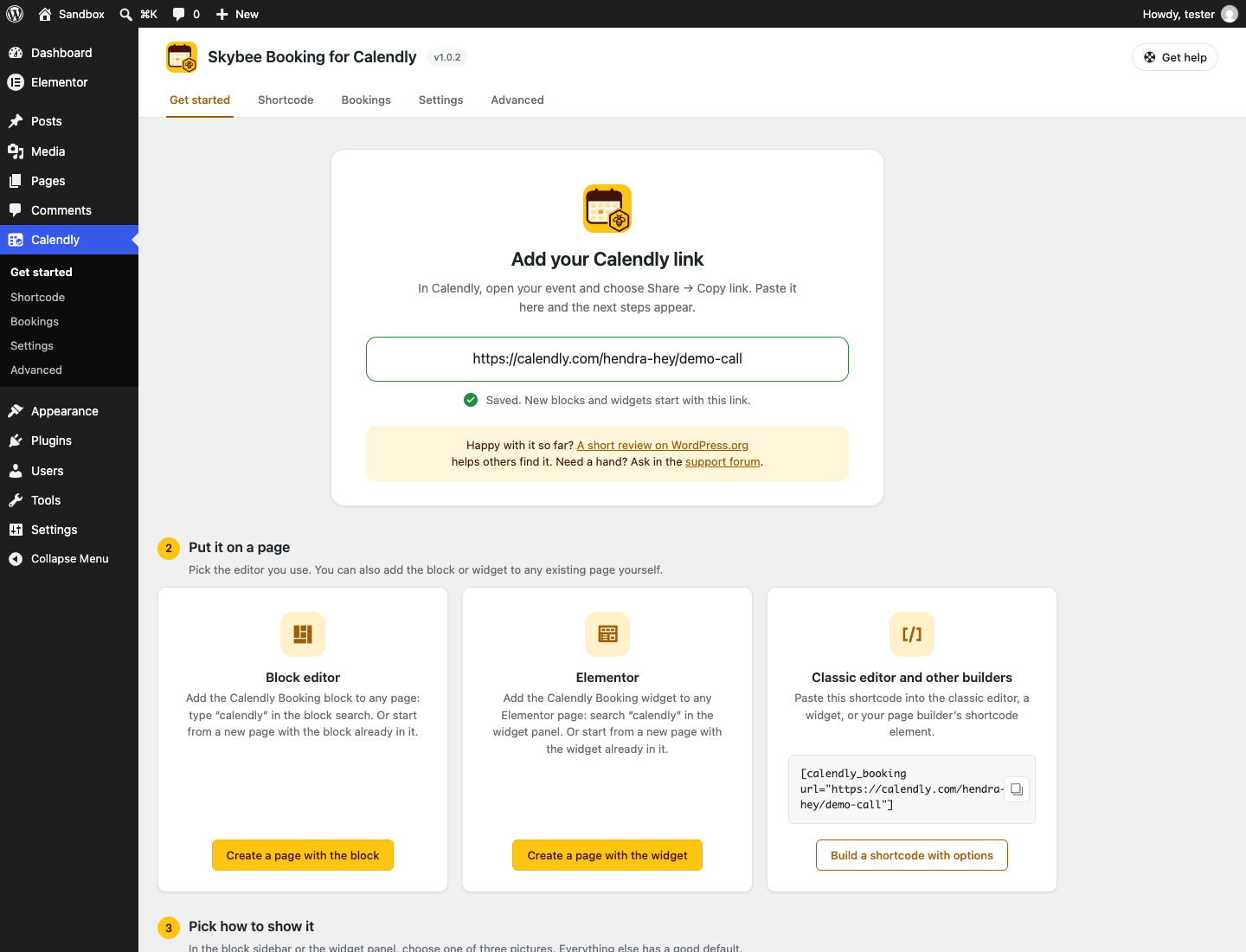
After activation, a Get started page saves your Calendly link once, so every new block and widget starts with it, and creates a page with the block or the Elementor widget already in place.
Made for coaches, consultants, therapists, tutors, freelancers and small businesses whose website exists to get a call booked.
How to add Calendly to WordPress
- Install and activate Skybee Booking for Calendly: go to Plugins → Add New, search for “Skybee” and click Install Now, then Activate.
- In Calendly, open your event and choose Share → Copy link. Your profile link works too.
- In the WordPress editor, add the Calendly Booking block. Type “calendly” in the block search to find it.
- Paste the link and click Show booking page. The calendar appears in the editor.
- In the block sidebar, pick On the page, Button that opens a popup or Floating button, adjust the options, and publish.
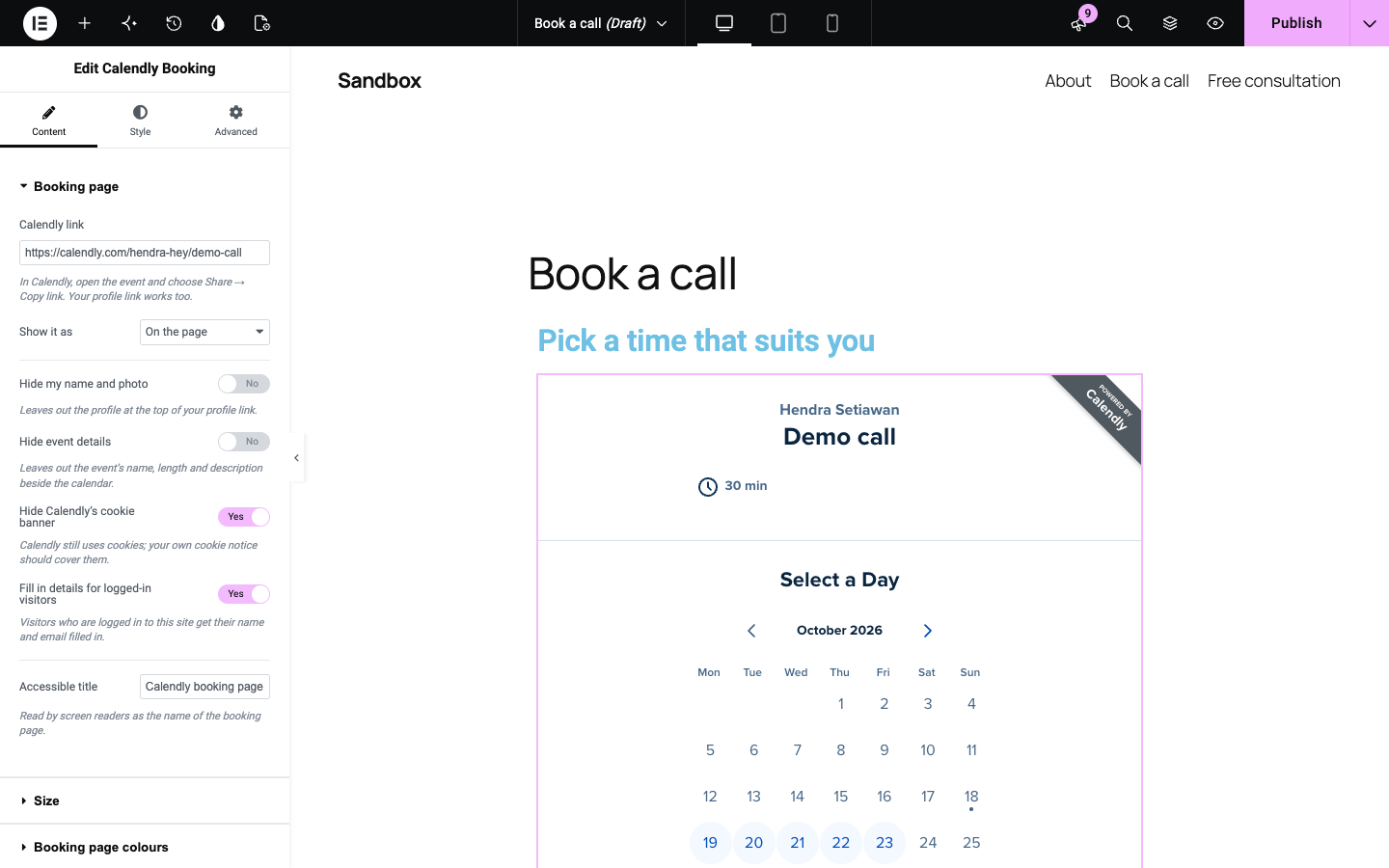
Using Elementor? Add the Calendly Booking widget, paste the link and pick how to show it.
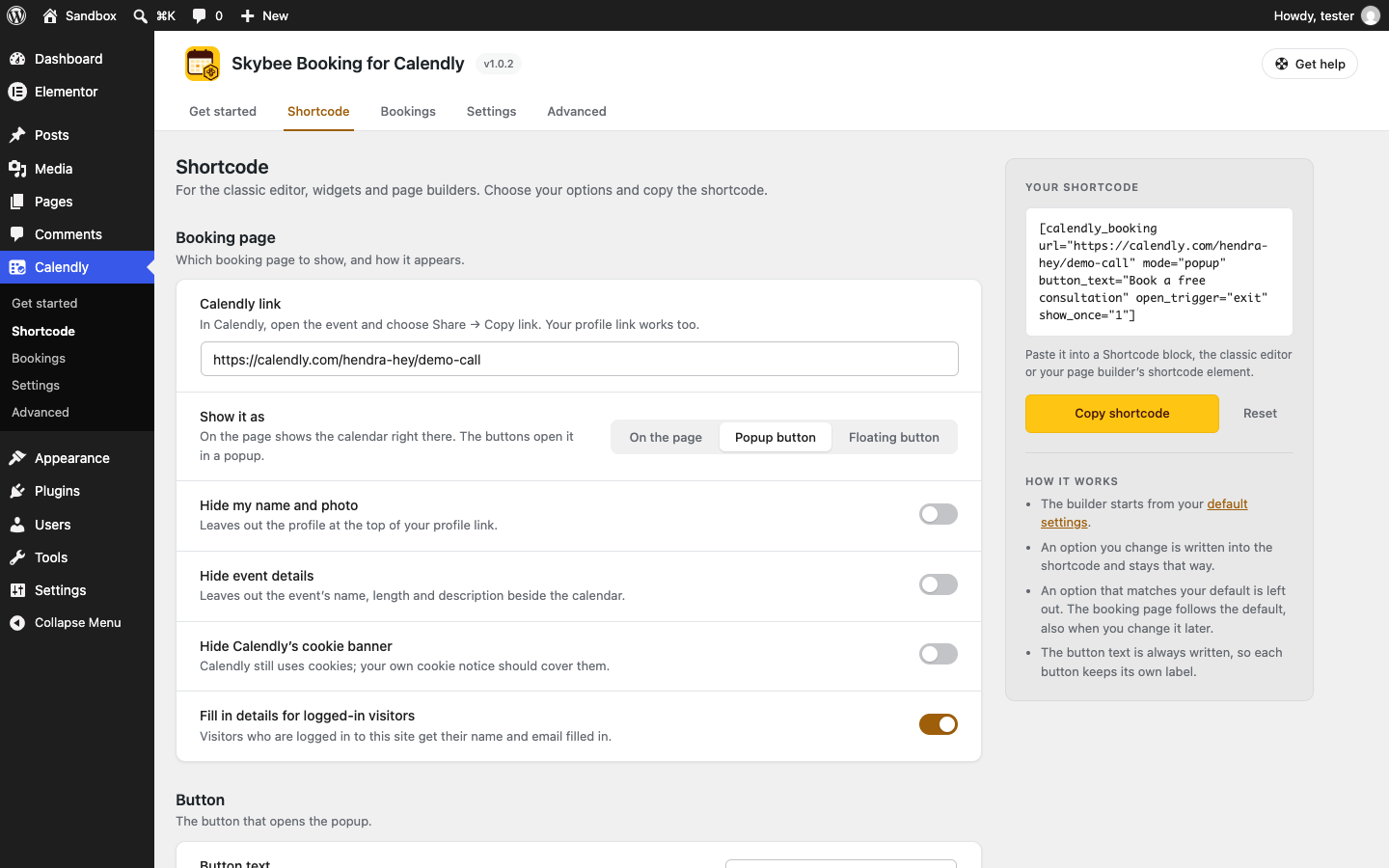
Using the classic editor or another page builder? Paste the shortcode instead: [calendly_booking url="https://calendly.com/your-name/30min"]. Go to Calendly → Shortcode to build one with your options and copy it.
Calendly’s embed code or this plugin?
You don’t need a plugin to add Calendly to WordPress. In Calendly, choose Share → Add to website, copy the code and paste it into a Custom HTML block (or Elementor’s HTML widget). That works well for one booking page that rarely changes.
Use this plugin instead if you want to:
- See the booking calendar while you edit, instead of an empty HTML box.
- Change the layout, button text, colours or hidden details from the sidebar, without editing code.
- Let Authors and Contributors add booking pages. WordPress removes scripts saved by users who aren’t allowed to add unfiltered HTML, so Calendly’s code disappears when they save. The block works for every user who can edit the page.
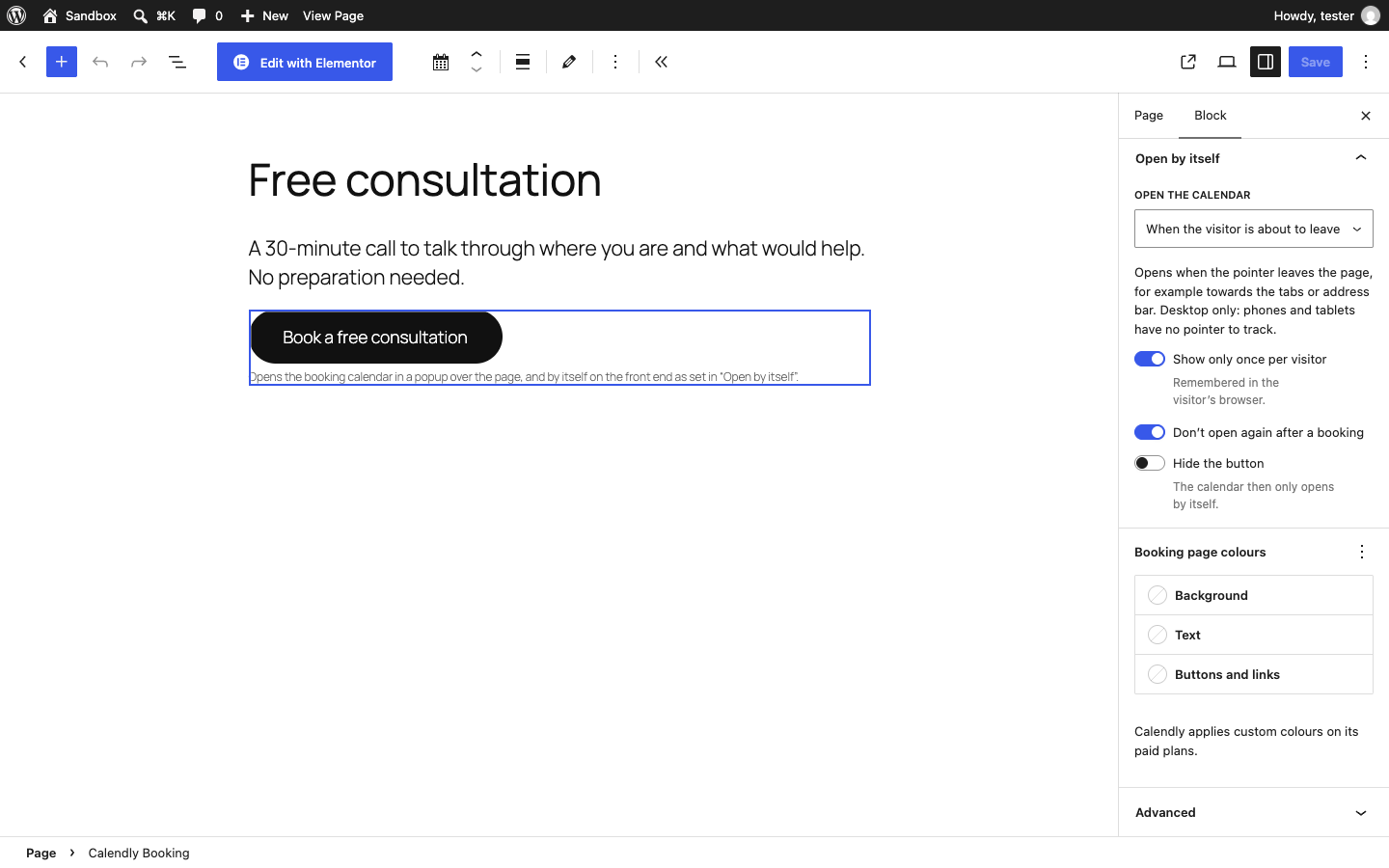
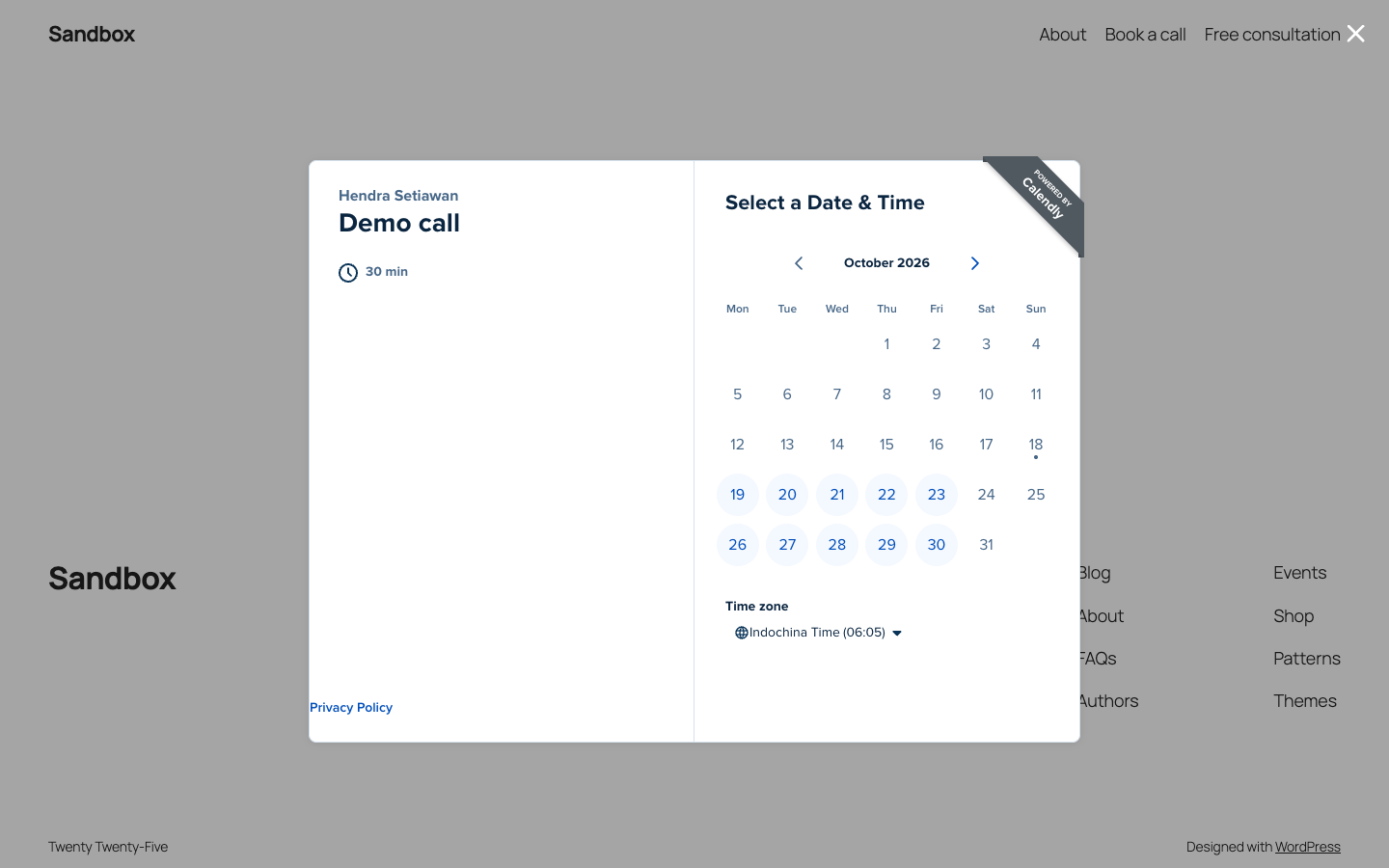
- Open the popup by itself after a delay, when the visitor is about to leave, or after scrolling, and only once per visitor.
- Fill in the name and email of visitors who are logged in to your site.
- Send booking events to Google Analytics, Google Tag Manager or Meta Pixel, send visitors to a thank-you page, or keep campaign tags (UTM) from the page a visitor landed on.
- Load nothing from Calendly until the visitor clicks, for cookie consent and page speed.
Traits
- Paste any Calendly link: an event link or your profile link, with or without extras. Pasted embed code works too.
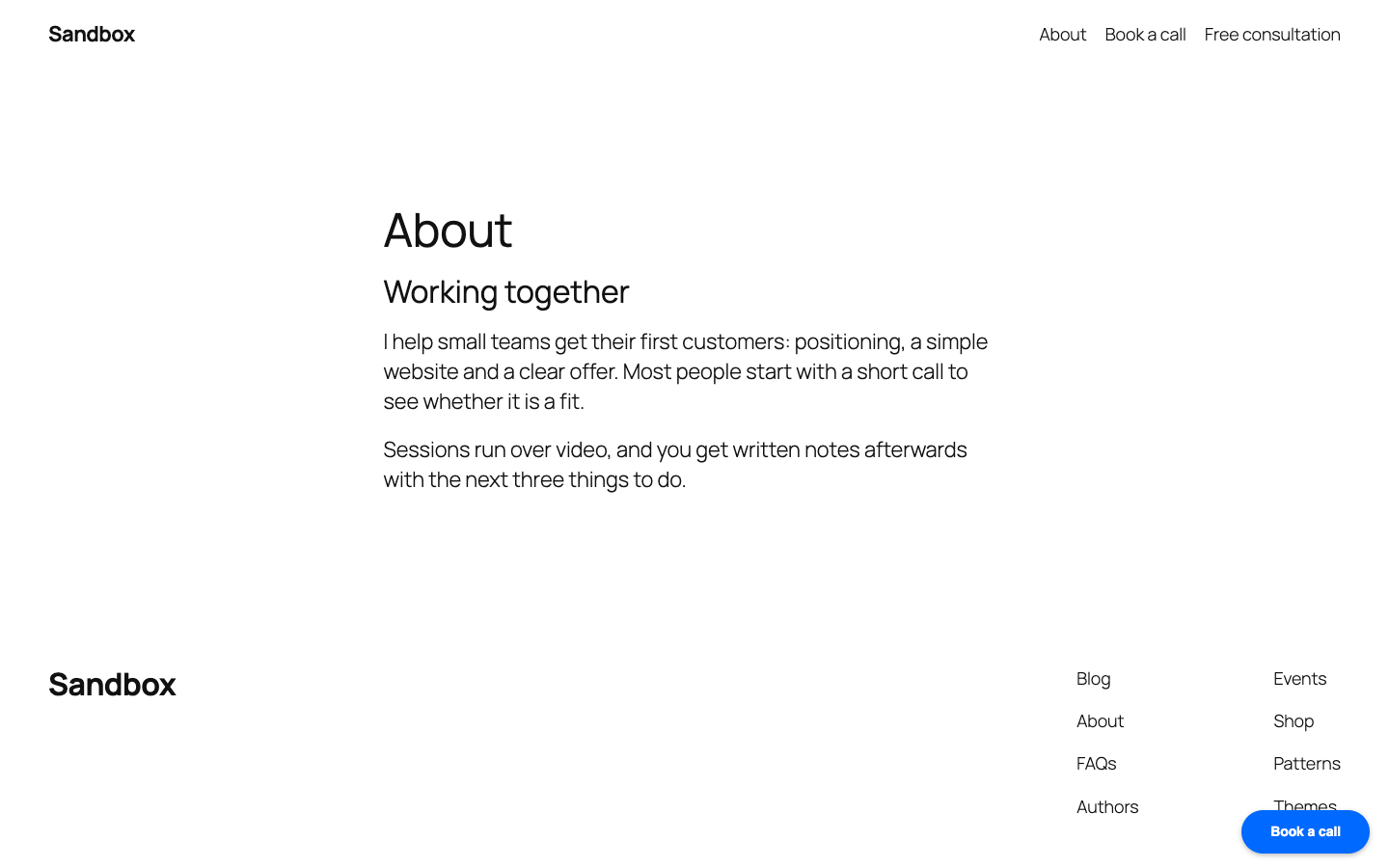
- Three ways to show it: on the page, a button that opens a popup, or a floating button that stays in the corner while the visitor scrolls.
- The calendar on the page grows to its own height, so there is no inner scroll bar. Several booking pages on one page each keep their own height.
- Plain-word options: hide your name and photo, hide the event details, hide Calendly’s cookie banner, width and position, button text and style.
- Colours for the booking page (background, text, buttons and links), applied by Calendly on its paid plans.
- Fill in the name and email of visitors who are logged in to your site.
- Popups that open by themselves: after a delay, when the visitor is about to leave (exit intent) or after scrolling part of the page. Show them once per visitor, not again after a booking, and with or without a button.
- An Elementor widget with the same options, plus a Style tab for the popup button and the floating button.
- A shortcode builder: choose your options under Calendly → Shortcode and copy the finished shortcode.
- Optional booking tracking: send a booking event to the Google Analytics, Google Tag Manager and Meta Pixel tags already on your site.
- Optional thank-you page: send visitors to a page of your choice after they book.
- Optional campaign tags: keep
utm_sourceand the other campaign tags for the visit, so a booking on a later page still shows the campaign in Calendly. - Optional “Load booking page on click”: nothing is requested from Calendly until the visitor clicks, which helps with cookie consent and page speed.
- Optional AI assistant support: lets Claude, ChatGPT and other assistants add your booking page through WordPress Abilities (WordPress 6.9+).
- Calendly’s script loads only on pages where a booking page is shown. The plugin stores no booking data and needs no Calendly API key.
- A Get started page that saves your link once and creates a page with the block or widget for you. A settings page with defaults for new booking pages, under its own Calendly menu. No dashboard notices.
Shortcode
[calendly_booking url="https://calendly.com/your-name/30min" mode="popup" button_text="Book a call"]
See the FAQ for the full list of attributes.
Services externes
This plugin shows booking pages from Calendly (calendly.com), a third-party scheduling service. It does not work without it.
On every page where a booking page is shown, the plugin loads Calendly’s embed script from https://assets.calendly.com/assets/external/widget.js and its stylesheet from https://assets.calendly.com/assets/external/widget.css, and shows the booking page from https://calendly.com/{your-link} in an iframe or a popup. Calendly’s script sends your site’s domain to Calendly with the booking page request. Anything a visitor enters or books is sent to Calendly, not to your WordPress site. Calendly sets its own cookies and shows its own cookie banner inside the booking page; the plugin can hide that banner, but Calendly still uses cookies, so your own cookie notice should cover them.
If Fill in details for logged-in visitors is on (the default), the name and email of a visitor who is logged in to your WordPress site are passed to Calendly so the booking form is filled in for them. Nothing is passed for visitors who are not logged in.
The plugin does not require a Calendly API key and does not contact Calendly from the WordPress admin, except to show the live booking page in the block editor and in Elementor’s editor.
In the WordPress admin, the plugin contacts Tally (tally.so), a form service, only if you click Request this feature on the Calendly → Bookings page. That opens a short feedback form hosted on Tally (https://tally.so/r/2jE9QA) and loads Tally’s embed script (https://tally.so/widgets/embed.js) at that moment. The form sends what you choose or type, plus the plugin’s version number. Tally’s terms and privacy policy: https://tally.so/help/terms-and-privacy.
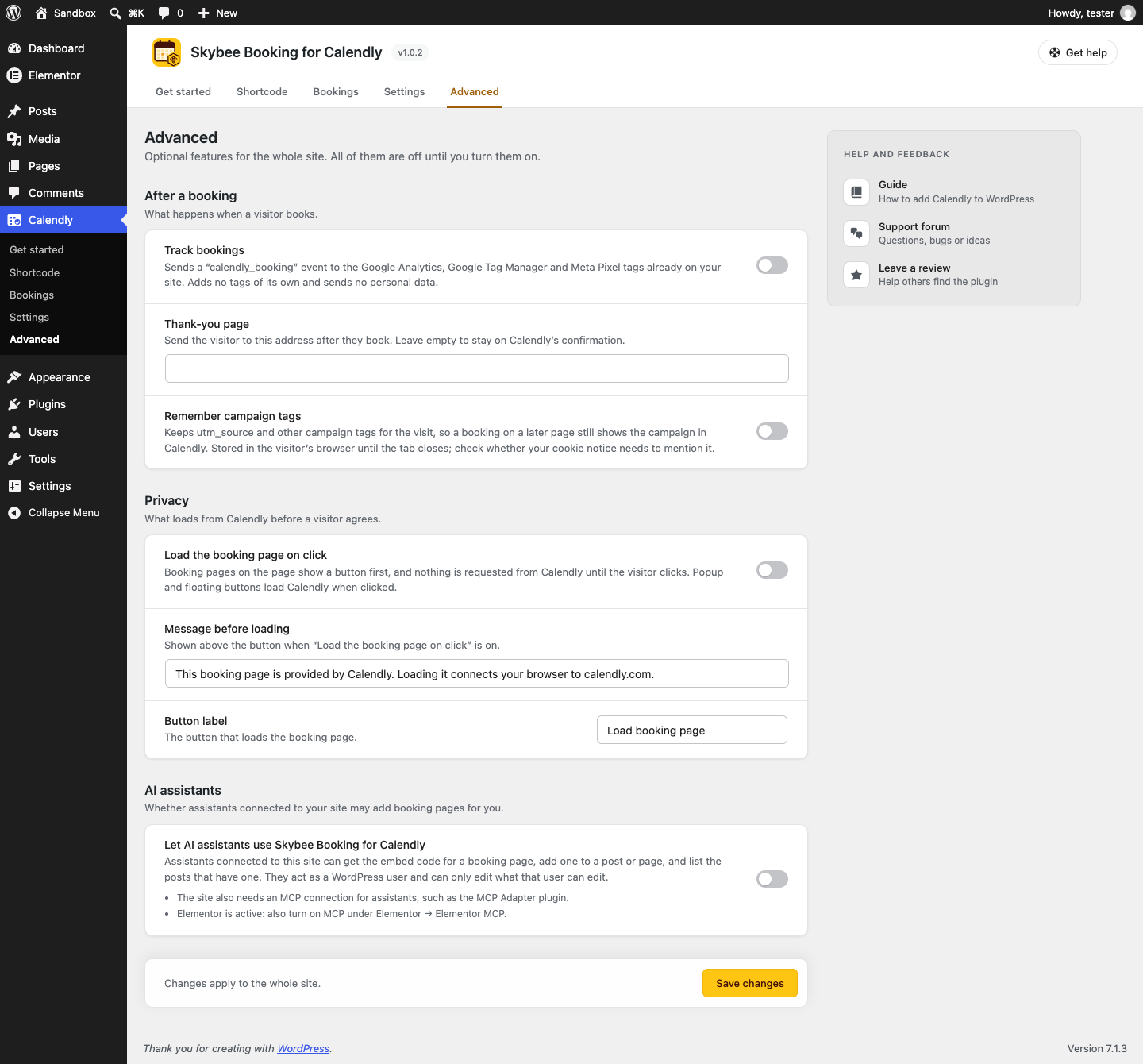
Optional features, all off by default (Calendly → Advanced):
- Track bookings. When Calendly reports a completed booking, the plugin sends a
calendly_bookingevent to the Google Analytics (gtag), Google Tag Manager (dataLayer) and Meta Pixel (fbq) tags already on your page. The event carries no booking details and no personal data. The plugin adds no analytics tags of its own; what your own tags send, and to whom, is governed by those services. - Thank-you page. After a completed booking, the visitor is sent to the page you choose on your own site.
- Remember campaign tags.
utm_*parameters in the page address are kept in the visitor’s browser (sessionStorage, until the tab closes) and passed to Calendly with booking pages on later pages. To catch them on the page the visitor lands on, a few lines of inline JavaScript are added to every page of the site while this option is on. - Load the booking page on click. Booking pages on the page show a placeholder, and nothing is requested from Calendly until the visitor clicks. The choice is remembered in the visitor’s browser for the visit (
sessionStorage).
Popups set to “Show only once per visitor” or “Don’t open again after a booking” are remembered in the visitor’s browser (localStorage).
Calendly’s terms: https://calendly.com/legal/customer-terms-conditions
Calendly’s privacy notice: https://calendly.com/legal/privacy-notice
Installation
- Upload the plugin folder to
/wp-content/plugins/or install it from the Plugins screen. - Activate the plugin. The Get started page opens: paste your Calendly link and it saves itself, then create a page with the block or the Elementor widget in one click.
- Or add the Calendly Booking block to any post or page (or the Calendly Booking widget in Elementor) and paste your Calendly link, or use the
[calendly_booking url="..."]shortcode. - Optionally set defaults under Calendly → Settings.
Journal de modifications
1.0.2
- New Calendly → Bookings page: where your bookings are, and a quick way to tell us which bookings features you would use in WordPress.
- The first time you publish a page with a booking page, the editor (block editor or Elementor) asks once whether you’d leave a review.
1.0.1
- Get started: a link to the support forum while you set up, and a review link once your Calendly link is saved.
1.0.0
- Initial release: Calendly Booking block, Elementor widget and
[calendly_booking]shortcode; on the page, popup button and floating button; popups that open by themselves; a Get started page and a shortcode builder; booking tracking, thank-you page, campaign tags, load on click and AI assistant support under Calendly → Advanced.
Captures d'écran

Pour les développeurs
Est-ce votre plugin ? Montrez les chiffres.
Ajoutez un badge en direct à votre site, docs ou github readme. Il se met à jour par lui-même - aucun compte n'est nécessaire.
Best Skybee Booking for Calendly alternatives
All booking plugins →




FAQ
Skybee Booking for Calendly: quick answers
Réponses directes, extraites des données en direct WordPress.org.
Source : WordPress.org
Is Skybee Booking for Calendly free?
Yes. Skybee Booking for Calendly is free to download and use from the official WordPress.org plugin directory.
Is Skybee Booking for Calendly safe to use in 2026?
Skybee Booking for Calendly is a solid plugin choice in 2026, with a few things worth checking first. Is rated 5/5 and was last updated 1 month ago, and scores 67/100 on our health check.
How many websites use Skybee Booking for Calendly?
Skybee Booking for Calendly is active on <10 WordPress websites and has been downloaded 325 times since it launched in October 2026. It was downloaded 122 times in the last 30 days.
Does Skybee Booking for Calendly work with WordPress 7.1?
Yes. The developer has tested Skybee Booking for Calendly up to WordPress 7.1.5, the latest release. It requires WordPress 6.6 or newer.
What PHP version does Skybee Booking for Calendly need?
Skybee Booking for Calendly requires PHP 7.4 or higher. Most hosts run PHP 8.x today, so it works on any modern WordPress hosting.
When was Skybee Booking for Calendly last updated?
The latest version, 1.0.2, was released on October 24, 2026 (1 month ago).
Who makes Skybee Booking for Calendly?
Skybee Booking for Calendly is developed and maintained by Hendra Setiawan.
What are the best alternatives to Skybee Booking for Calendly?
The most popular alternatives to Skybee Booking for Calendly are Booking for Appointments an… (90K+ installs), Online Scheduling and Appoi… (60K+ installs) and Simply Schedule Appointments (50K+ installs).
Propulsé par PageForge
Un modèle et une feuille de calcul. Une vraie page pour chaque recherche.
PageForge transforme chaque ligne d'un CSV en une page WordPress avec son propre titre, URL, SEO et schéma, construit sur la mise en page que vous Déjà conçu. Gratuit sur WordPress.org.
- CSV et XLSX, plus Google Sheets sur les professionnels et les entreprises
- Son propre titre, URL, SEO champs et schéma pour chaque page
- Fonctionne avec l'éditeur de blocs, Elementor, Divi et Avada
- Gratuit sur WordPress.org, pas de carte de crédit