


Shortcode Directives
Say, you find a comment that should be hidden or deleted on your site. Usually, you click on the Edit link of the comment and manage it back-end.

Envisager une alternative
Shortcode Directives shows warning signs in 2026 — compare the alternatives below before installing. Was last updated 7 years ago, and scores 21/100 on our health check.
- Petite base d'utilisateurs (<10 installations actives)
- Très peu de critiques jusqu'à présent
- Pas de mise à jour dans 6 ans
- Uniquement testé jusqu'à WordPress 5,3 (le dernier est de 7,1)
Comment s'accumule-t-il ?
Côte à côte sur les installations, les mises à jour, les évaluations et le support


Téléchargements quotidiens
Les pics de téléchargement suivent généralement une nouvelle version - chaque site qui met à jour automatiquement compte comme un téléchargement.
Classements
Where Shortcode Directives stands todayWordPress.org Classements de recherche
Position en direct dans la recherche de plugins, Top 100| Mot-clé | Position |
|---|---|
| command | >100 |
| commands | >100 |
| les commentaires | >100 |
| des postes | >100 |
| shortcode | >100 |
About Shortcode Directives
À partir du Lisez-moi officiel · v1.0.0Description
Quickly manage posts/comments in front-end with command-like-shortcodes
Say, you find a comment that should be hidden or deleted on your site. Usually, you click on the Edit link of the comment and manage it back-end.
What if you could delete/hide it by commenting on it?
This plugin lets you manage posts and comments with command-like-shortcodes.
In this case, you reply to the comment you want to hide by typing [$comment hold].
Bulk actions on certain posts/comments
If you want to bulk-delte comments that belong to a certain post, comment on the post by typing [$comment delete].
If you have a hierarchical post type and want to add the same tag to all direct children of a certain post plus the post itself, then comment on the post by typing [$tag mytag --to="siblings,self"].
Like this, a bit complex operations can be achived with the shortcode directives.
Commencer
To experience what this plugin does, follow these steps.
1. After activating the plugin, pick a test post which has been published already.
2. Go to the page of the post in front-end.
3. Submit a comment to the post with the shortcode [$post_status private].
Now it should be hidden for normal site visitors.
- To revert the change, submit a comment to the post with the shortcode
[$post_status publish].
It should be visible to normal site visitors.
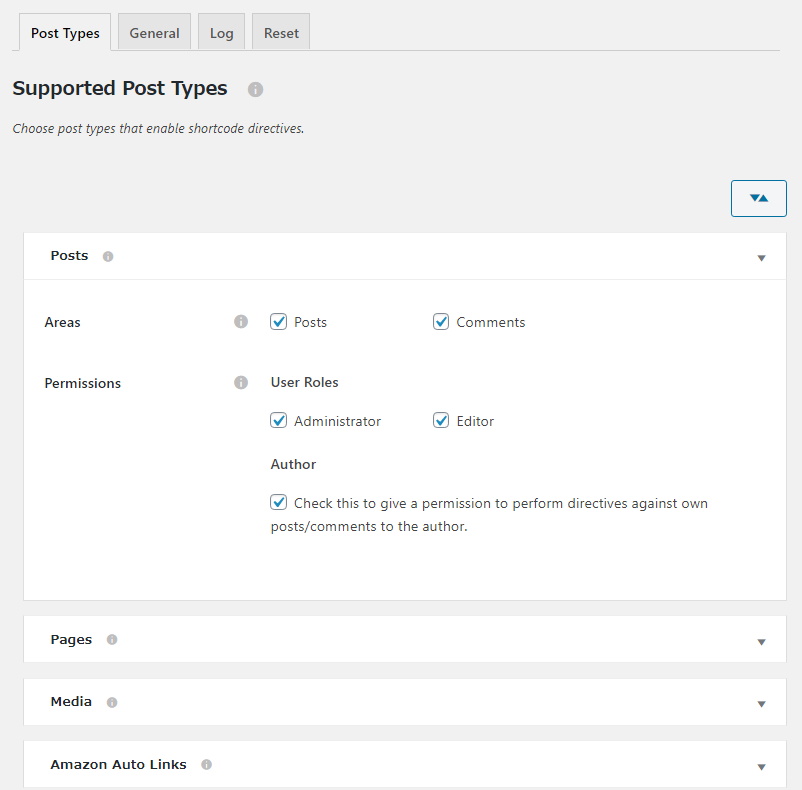
By default, the plugin enables the features for the buil-in post and page post types. If you like to support different post types, go to Dashboard -> Tools -> Shortcode Directives. There, you can pick which post types to have the ability of shortcode directives.
For usage details, please see the Other Notes seciton.
You should have grapsed the idea of how this plugin works by now. Hope you find it useful!
Supported Languages
- Anglais
Usage
$post_status
Sets a specified post status.
Format
[$post_status {status}]
Examples
Changes the post status to pending.
[$post_status pending]
Changes the post status to draft.
[$post_status draft]
Option: –to
Specifies which post to apply the directive operation. This --to option is avialble for all the directives except $comment. Use children, siblings, and descendants for builk actions.
– self (default): the comment/post iteself. When a comment with a directive is submitted to a post, that post will be the subject post and it is considered the one denoted by the option value, self.
– parent: the parent post of the subject post.
– {post ID}: the post ID.
– children: the direct child posts of the subjec post if the post type supports the hierarchical option.
– siblings: the sibling posts of the subject post in hierarchical relationships if the post type supports the hierarchical option.
– decendants: all the decendants which belong to the subject post if the post type supports the hierarchical option.
This moves all the descendant posts to trash.
[$post_status trash --to=descendants]
$post_parent
Sets a post parent ID.
Format
[$post_parent {post ID}]
Sets a post parent of a post ID of 1451.
[$post_parent 1451]
This removes a post parent.
[$post_parent 0]
Option: –to
The same option values are supported described in the $post_status section above.
$post_column
Sets a value with a specified post column name to an existent post column.
Format
[$post_column --column={colum name} {value}]
[$post_column --column={colum name} --value="some value"]
Setting the value 3 to the menu_order column.
[$post_column column=menu_order 3]
When a value must have a white space, use the --value option.
[$post_column --column=post_title --value="This is a title"]
Option: –to
The same option values are supported described in the $post_status section above.
$post_meta
Sets a post meta value.
Format
[$post_meta {key} {value}]
[$post_meta {key1}="{some value1}" {key2}="{some value2}" {key3}="{some value3}"...]
This sets the post meta value bar to the _foo meta key.
[$post_meta _foo bar]
For values containing white-spaces and multiple key-value pairs, use the attribute style format.
[$post_meta _question="Why did the chicken cross the road?" _answer="To get to the other side"]
To delete meta keys, use the --action option by passing delete. This deletes the _question and _answer meta keys and their values from the database.
[$post_meta _question _answer --action="delete"]
Note: the --to and --action option names are reserved by the plugin so you cannot specify them with the option name like [$post_meta --action="my value" --to="another value"].
If you have to set them, use the command-line style format introduced above.
[$post_meta --action "Some value here."]
[$post_meta --to "Another value here."]
Option: –to
The same option values are supported described in the $post_status section above.
$taxonomy
Sets taxonomy terms with a specified taxonomy slug.
Format
[$taxonomy --slug={taxonomy slug} {term1} {term2} {term3}...]
This adds the Apple, Banana, Apple Pie terms of the post_tag taxonomy to the post.
[$taxonomy --slug=post_tag Apple Banana "Apple Pie"]
Option: –action
– add (default) : adds the specified terms
– remove : removes the specified terms
– remove_all/remove_all : removes all the associated terms
– delete : deletes the specified terms from the database if they are assigned to the post
– delete_all/delete-all : deletes all the associated terms from the database
This removes the Apple, Banana, Apple Pie terms of the post_tag taxonomy from the post.
[$taxonomy --slug=post_tag Apple Banana "Apple Pie" --action=remove]
This deletes the Apple, Banana, Apple Pie terms of the post_tag taxonomy from the database if they are assigned to the post.
[$taxonomy --slug=post_tag Apple Banana "Apple Pie" --action=delete]
This removes all the assigned terms of the post_tag taxonomy from the post.
[$taxonomy --slug=post_tag --action=remove_all]
This deletes all the assigned terms of the post_tag taxonomy from the database.
[$taxonomy --slug=post_tag --action=delete_all]
Option: –to
The same option values are supported described in the $post_status section above.
$tag
Sets non-hierarchical taxonomy terms.
Format
[$tag {tag1} {tag2} {tag3}...]
When the $tag directive is given, the plugin searches for a non-hierarchical taxonomy associated with the post type of the post and sets the given terms to the post. If a non-hierarchical taxonomy is not found, no action will be taken. If you have multiple non-hierarchical taxonomies for a particular post type which supports shortcode directives, use the $taxonomy directive. See the $taxonomy section above.
This adds the Apple, Banana, Apple Pie tags to the post.
[$tag Apple Banana "Apple Pie"]
Option: –action
The same action values with the $taxonomy directive are supported.
This removes the Apple, Banana, Apple Pie tags from the post.
[$tag --action=remove Apple Banana "Apple Pie"]
This deletes the Apple, Banana, Apple Pie terms from the database if they are assigned to the post.
[$tag --action=delete Apple Banana "Apple Pie"]
This removes all the tags associated with the post.
[$tag --action=remove_all]
This deletes all the tags associated with the post from the database.
[$tag --action=delete_all]
Option: –to
The same option values are supported described in the $post_status section above.
$category
Sets hierarchical taxonomy terms.
Format
[$category {category1} {category2} {category3}...]
When the $category directive is given, the plugin searches for a hierarchical taxonomy associated with the post type of the post and sets the given terms to the post. If a hierarchical taxonomy is not found, no action will be taken. If you have multiple hierarchical taxonomies for a particular post type which supports shortcode directives, use the $taxonomy directive. See the $taxonomy section above.
This adds the Apple, Banana, Apple Pie categories to the post.
[$category Apple Banana "Apple Pie"]
This removes the Apple, Banana, Apple Pie categories from the post.
[$category Apple Banana "Apple Pie" --action=remove]
This deletes the Apple, Banana, Apple Pie categories from the database if they are assigned to the post.
[$category --action=delete Apple Banana "Apple Pie"]
This removes all the categories associated with the post.
[$category --action=remove_all]
This deletes all the categories associated with the post from the database.
[$category --action=delete_all]
Option: –action
The same action values with the $taxonomy directive are supported.
Option: –to
The same option values are supported described in the $post_status section above.
$comment
Performs certain actions againt a replying comment. If commented on a post, the action applied to all the comments which belong to the post. So be careful not to do that when you want to do someting on a single comment.
Format
[$comment {sub-command}]
Sub-commands
– delete|remove: deletes the comment
– hold|disapprove: changes the comment status to hold.
– trash: moves the comment to trash
– spam: mark the commet as spam
– convert: converts the comment to a child post.
Replying to an existent comment with the following deletes the comment.
[$comment delete]
For hierarchical post types, the convert sub-command can help bulk-convert comments in to posts.
Commenting on a post (not an existent comment) converts all the comments belonging to the post into posts by keeping the hirarchical relationships.
[$comment convert]
Installation
- Upload
shortcode-directives.phpand other files compressed in the zip folder to the/wp-content/plugins/directory. - Activez le plugin via le menu "plugins" dans WordPress.
- Go to Dashboard -> Tools -> Shortcode Directives.
- Configure the options by enabling post types to support.
Captures d'écran

Pour les développeurs
Est-ce votre plugin ? Montrez les chiffres.
Ajoutez un badge en direct à votre site, docs ou github readme. Il se met à jour par lui-même - aucun compte n'est nécessaire.
Best Shortcode Directives alternatives
All command plugins →
FAQ
Shortcode Directives: quick answers
Réponses directes, extraites des données en direct WordPress.org.
Source : WordPress.org
Is Shortcode Directives free?
Yes. Shortcode Directives is free to download and use from the official WordPress.org plugin directory.
Is Shortcode Directives safe to use in 2026?
Shortcode Directives shows warning signs in 2026 — compare the alternatives below before installing. Was last updated 7 years ago, and scores 21/100 on our health check.
How many websites use Shortcode Directives?
Shortcode Directives is active on <10 WordPress websites and has been downloaded 1,293 times since it launched in January 2020. It was downloaded 37 times in the last 30 days.
Does Shortcode Directives work with WordPress 7.1?
Shortcode Directives is officially tested up to WordPress 5.3.28, while the latest release is 7.1.5. It may still work, but try it on a staging site first.
What PHP version does Shortcode Directives need?
Shortcode Directives requires PHP 5.2.4 or higher. Most hosts run PHP 8.x today, so it works on any modern WordPress hosting.
When was Shortcode Directives last updated?
The latest version, 1.0.0, was released on January 9, 2020 (7 years ago).
Who makes Shortcode Directives?
Shortcode Directives is developed and maintained by miunosoft.
What are the best alternatives to Shortcode Directives?
The most popular alternatives to Shortcode Directives are WPTerm (4K+ installs), Dashboard Commander (800+ installs) and SimTerm (20+ installs).
Propulsé par PageForge
Un modèle et une feuille de calcul. Une vraie page pour chaque recherche.
PageForge transforme chaque ligne d'un CSV en une page WordPress avec son propre titre, URL, SEO et schéma, construit sur la mise en page que vous Déjà conçu. Gratuit sur WordPress.org.
- CSV et XLSX, plus Google Sheets sur les professionnels et les entreprises
- Son propre titre, URL, SEO champs et schéma pour chaque page
- Fonctionne avec l'éditeur de blocs, Elementor, Divi et Avada
- Gratuit sur WordPress.org, pas de carte de crédit