


Secure Copy Content Protection and Content Locking
Copy Protection plugin is activated it disables the right click, copy paste, content selection and copy shortcut keys

Choix
Yes — Secure Copy Content Protection… is a safe, well-maintained plugin to use in 2026. It runs on 20K+ sites, is rated 4.3/5 and was last updated 6 days ago, and scores 91/100 on our health check.
- Prouvé à grande échelle sur plus de 20 000 sites actifs
- Actively developed — last update 6 days ago
- Testé avec le dernier WordPress (7.1)
- Momentum — downloads up 19.8% vs the previous 30 days
Comment s'accumule-t-il ?
Côte à côte sur les installations, les mises à jour, les évaluations et le support


Téléchargements quotidiens
Les pics de téléchargement suivent généralement une nouvelle version - chaque site qui met à jour automatiquement compte comme un téléchargement.
Classements
Where Secure Copy Content Protect… stands todayWordPress.org Classements de recherche
Position en direct dans la recherche de plugins, Top 100| Mot-clé | Position |
|---|---|
| content copy protection | #2 |
| content-protection | #2 |
| copy protection | #2 |
| copyright | #22 |
| disable right click | #14 |
Adoption de version
Part de sites actifs par version.
Répartition des notes
★★★★★★★★★★ 4.3 from 62 reviews
About Secure Copy Content Protection and Cont…
From the official readme · v5.3.4Description
WordPress Copy Content Protection
- WordPress Content Protection plugin pricing
- Secure Copy Content Protection Free Demo
- Secure Copy Content Protection Pro Demo
- Secure Copy Content Protection Documentation
WordPress Copy Protection plugin is aimed at protecting web content from being plagiarized.
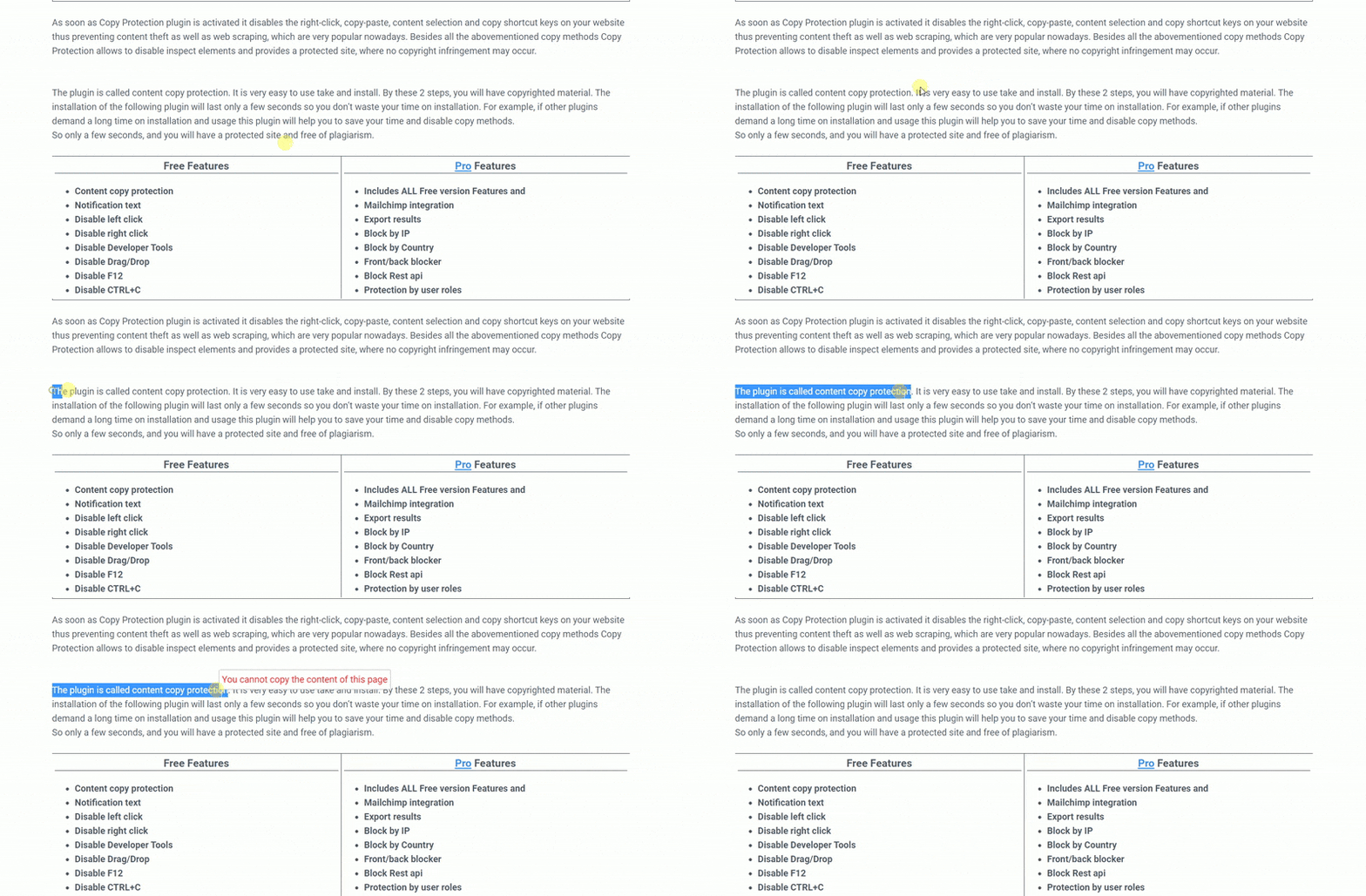
As soon as Copy Protection plugin is activated it disables the right click, copy paste, content selection and copy shortcut keys on your website thus preventing content theft as well as web scraping, which are very popular nowadays. Besides all the abovementioned copy methods Copy Protection allows to disable inspect elements and provides a protected site, where no copyright infringement may occur.
Demos
Secure your website content in easy steps – you just need to download and install the plugin from your WordPress dashboard. Thanks to its beginner-friendly interface, you can easily enable copy protection and be ready against copy attacks.
Note, that this plugin protects content both on PC and mobile devices. Very easy and quick to use, this plugin will prevent plagiarism on your websites and preserve your unique and individual approaches. Moreover, you can make money by selling your copyright and getting revenue from your content.
What function does the plugin have? By choosing post type you will have a function on the page to protect content selection. So the plugin prevents copy. In any case, if you use the plugin you cannot see copy paste in your site. This is an anti-copy plugin. And the one weapon for content protection is the plugin.
Traits
- Content copy protection
- Notification text
- Disable left click
- Disable right click
- Disable Developer Tools
- Disable Drag/Drop
- Disable F3
- Disable F6
- Disable F9
- Disable F12
- Disable CTRL+C
- Disable CTRL+V
- Disable CTRL+X
- Disable CTRL+S
- Disable CTRL+A
- Disable CTRL+U
- Disable CTRL+F
- Disable CTRL+P
- Disable CTRL+H
- Disable CTRL+L
- Disable CTRL+K
- Disable CTRL+O
- Disable ALT+D
- Style settings
- Block content with password
- Subscribe to view content
- Mailchimp integration
- Export results (CSV, XLSX, JSON)
PRO Features
- Includes ALL Free version Features and
- Block by IP, IP address blocking
- Block by Country, Geo-blocking
- Front/back blocker
- Block Rest api
- Protection by user roles
- Protection by post/post type
- Paid content via PayPal (PayPal paywall)
- Watermark images
- More on the way …
SEO
- From the point of view of SEO, it is worth saying goodbye to copy and paste. The plugin will ensure the copyright sign. Your copyright text will be in safe from content theft. It will disable all kinds of copy paste from your site. By installing this plugin you will start to say “stop copy” from your content. In another word, it is called anti-copy paste.
- We know that Google doesn’t like a copy. It wants unique and no copy text. And for example, if your domain is a new one and the ones who have an old domain copy from you, because of them you may appear on the blacklist of Google. To avoid such situation install the plugin and will have a copyright intellectual property. Consequently, this will bring the right Google page rank for your site.
How disable right click on a website? You just need to install a plugin.
Protection
- In the part of protection here comes a watermark, but nowadays modern thieves can easily erase it. That is why you should turn off no right click and drag and drop and again you will have a copy-protected text and image.
- We approve that it is trustworthy. For instance, if the client sees the same content in another site he may think that the plagiarism is yours. But it is a big infringement of copyright which you can protect. Here again, comes for the help the plugin which will avoid theft of copyright. Use copyright symbols in the plugin and there will not be an outflow of information.
- The next vital question is: Can a website be copyrighted and the answer will be No. You will not meet any infringement with the plugin. There is a law of international copyright and plugin will be like a confirmation of that law.
- The plugin can help to protect your personal files. Such as personal information. For instance, if you are a blogger, journalist or you work in the sphere of film, sport and in any field that wants personal information protection in that case the plugin is just for you. You just disable copy shortcut keys, disable inspect elements and your personal information will not be in hands of thieves. Which is really very disgusting. So that is why you just install the plugin in a few seconds and will have a copyrighted blog.
So the main reason why to choose the plugin. It is easy to use, easy to install and ensures your fire protection. To protect your personal information and avoid any kinds of plagiarism or web scraping, just install the plugin. And it is vital to repeat that you will get a copyright infringement protection. And this plugin will be the patent for your personal information. If there exists the law of infringement protection then without any doubt this plugin is the confirmation of that law.
PRO | DEMO | DOCUMENTATION
Block content with a password: (Content Locker)
This field is designed to protect parts of your content. Restrict content with a password by using a simple shortcode. You can create multiple shortcodes and write a password for each. Then you just need to copy the shortcode, go to posts/pages and edit an already created post or add a new one. Put your content between the parts of the shortcode, in the place where is written “Content” ([ays_block id=’1′] Content [/ays_block]).
-
Shortcode – a new shortcode is created automatically after pressing “Add new” button.
-
Password – write the password that a user has to fill in to be able to see the content. The number in the orange square shows the number of users who entered the password to see the content.
-
Only for – choose a user role and enable a certain user to see the content without entering the password. The number in the orange square shows the number of times the content was viewed by a user role.
-
Schedule – there is a possibility to show the restricted content for a certain period of time and after that it will be disappeared from the page.
Subscribe to view: (Gated Content)
This field enables you to hide the content of any part of your post and show only when the user writes his/her email address.
Each time when a new user arrives at your website, scrolls down and comes across the hidden content,
it will require the email address to continue reading.
Do you want to know your website visitors? This feature will perfectly fulfill your need. It is an amazing tool for gathering leads.
It will allow you to implement a customer-centric strategy on your website by segmenting and remarketing your leads.
Moreover, its attention-capturing appearance will also help to increase user engagement and arouse curiosity.
Operation Systems
- Windows
- Linux
- Mac
- Android
- IOS
Browsers
- Google Chrome
- Mozilla Firefox
- Opera
- Internet Explorer
- Safari
Blocked Shortcuts
- Google Chrome – CTRL+SHIFT+I | CTRL+SHIFT+J | CTRL+C | F12 | CTRL+SHIFT+U
- Mozilla Firefox – CTRL+SHIFT+I | CTRL+SHIFT+J | CTRL+C | F12 | CTRL+SHIFT+U | F7 | F5
- Opera – CTRL+SHIFT+I | CTRL+SHIFT+J | CTRL+C | CTRL+SHIFT+E |
- Internet Explorer – F12 | CTRL+SHIFT+U | CTRL+C | F12+CTRL
- Safari – Cmd+Opt+I | Cmd+Opt+J | Cmd+Opt+C | Cmd+Opt+U
It’s your chance to protect your content with our powerful Copy Protection plugin.
New Chart Builder plugin: Create static and dynamic charts for your WordPress website using our WordPress Chart plugin. Transfer your data into charts easily.
Don’t forget, in case of any problems or upcoming questions feel free to contact us via e-mail at info@ays-pro.com or via FREE SUPPORT FORUM.
Other plugins from Ays Pro Team
- Quiz Maker for creating advanced quizzes and exams easily and quickly.
- Survey Maker for collecting data and analyze it.
- Fox LMS for building, organizing, and sharing online courses from your WordPress site.
- Poll Maker for creating powerful and interactive polls.
- Popup Box, an easy way to create eye-catching and engaging popups.
- Chartify to build both static and dynamic charts, graphs and diagrams.
- Easy Form to create various forms for your website.
- AI ChatBot to generate high-quality content for your blog, and finding the answer to any questions in seconds.
- Personal Dictionary to create and organize their vocabulary lists, study and memorize the words.
- FAQ Builder to display Frequently Asked Questions on your website with a beautiful accordion.
- Image Slider give the aility to grab your audience’s attention with amazing and entertaining slideshows.
- Random Posts and Pages Widget for creating internal links and encouraging visitor engagement on your website.
- Popup Like box to promote your Facebook page and add number of Likes.
- Advanced Related Posts allows you to show a related posts list on your website after a post or via a widget.
- Photo Gallery for displaying responsive image gallery with awesome layout options.
- Portfolio Responsive Gallery to showcase beautiful image galleries on your WordPress websites.
Installation
There are two ways to install Secure Copy Content Protection: the easy way, when you install Secure Copy Content Protection from your WordPress dashboard, and the not so easy way, when you install it from WordPress.org.
- 1.1 The easiest way to enjoy Secure Copy Content Protection:
- 1.1.1 Login to your WordPress dashboard
- 1.1.2 Go to Plugins
- 1.1.3 Add New
- 1.1.4 Search for Secure Copy Content Protection
- 1.1.5 Click to install
- 1.2 The second way:
- 1.2.1Download the zip file from https://wordpress.org/plugins/secure-copy-content-protection/
- 1.2.2 Go to Plugins
- 1.2.3 Add New
- 1.2.4 Upload plugin
- 1.2.5 Choose file secure-copy-content-protection.zip
-
1.2.6 Click to install
-
1.3 In order to install the Secure Copy Content Protection from WordPress.org you must unzip the archive and copy the secure-copy-content-protection folder into your plugins folder (\wp-content\plugins).
After one ofthis steps you can activate the plugin from the Plugins menu.
Once activated configure any options as desired and you can enjoy our Secure Copy Content Protection.
Journal de modifications
5.3.4 ( Nov 13, 2026 )
- Improved: Made some changes to the admin dashboard
5.3.3 ( Nov 03, 2026 )
- Added: Container border radius option for Subscribe to view box on the general settings
5.3.2 ( Oct 23, 2026 )
- Improved: Made some changes to the admin dashboard
5.3.1 ( Oct 20, 2026 )
- Improved: Some changes on the admin dashboard
- Tested: Compatible up to WordPress 7.1.3
5.3.0 ( Oct 06, 2026 )
- Added: Tooltip word spacing option in the Styles tab
5.2.9 ( Sep 29, 2026 )
- Tested: Compatible up to WordPress 7.1.2
- Fixed: Improved validation of the User IP Address message variable
Captures d'écran


Pour les développeurs
Est-ce votre plugin ? Montrez les chiffres.
Ajoutez un badge en direct à votre site, docs ou github readme. Il se met à jour par lui-même - aucun compte n'est nécessaire.
Best Secure Copy Content Protectio… alternatives
All content copy protection plugins →




FAQ
Secure Copy Content Protection and…: quick answers
Réponses directes, extraites des données en direct WordPress.org.
Source : WordPress.org
Is Secure Copy Content Protection… free?
Yes. Secure Copy Content Protection… is free to download and use from the official WordPress.org plugin directory. The developer also sells premium add-ons or a Pro version with extra features.
Is Secure Copy Content Protection… safe to use in 2026?
Yes — Secure Copy Content Protection… is a safe, well-maintained plugin to use in 2026. It runs on 20K+ sites, is rated 4.3/5 and was last updated 6 days ago, and scores 91/100 on our health check.
How many websites use Secure Copy Content Protection…?
Secure Copy Content Protection… is active on 20K+ WordPress websites and has been downloaded 3,071,784 times since it launched in October 2018. It was downloaded 42,796 times in the last 30 days.
Does Secure Copy Content Protection… work with WordPress 7.1?
Yes. The developer has tested Secure Copy Content Protection… up to WordPress 7.1.5, the latest release. It requires WordPress 4.0 or newer.
When was Secure Copy Content Protection… last updated?
The latest version, 5.3.4, was released on November 13, 2026 (6 days ago).
Who makes Secure Copy Content Protection…?
Secure Copy Content Protection… is developed and maintained by Ays Pro.
What are the best alternatives to Secure Copy Content Protection…?
The most popular alternatives to Secure Copy Content Protection… are WP Content Copy Protection… (100K+ installs), WP Content Copy Protection… (5K+ installs) and WP Protect Content (1K+ installs).
Propulsé par PageForge
Un modèle et une feuille de calcul. Une vraie page pour chaque recherche.
PageForge transforme chaque ligne d'un CSV en une page WordPress avec son propre titre, URL, SEO et schéma, construit sur la mise en page que vous Déjà conçu. Gratuit sur WordPress.org.
- CSV et XLSX, plus Google Sheets sur les professionnels et les entreprises
- Son propre titre, URL, SEO champs et schéma pour chaque page
- Fonctionne avec l'éditeur de blocs, Elementor, Divi et Avada
- Gratuit sur WordPress.org, pas de carte de crédit