


Rocketship SEO
Rocketship SEO is a comprehensive WordPress SEO plugin that combines traditional SEO optimization with cutting-edge AI technology. Using OpenAI’s GPT models or Google Gemini, it automatically generates optimized meta…

Choix solide
Rocketship SEO is a solid plugin choice in 2026, with a few things worth checking first. It runs on 10+ sites, is rated 5/5 and was last updated 2 weeks ago, and scores 78/100 on our health check.
- Développé activement — Dernière mise à jour il y a 2 semaines
- Testé avec le dernier WordPress (7.1)
- Petite base d'utilisateurs (plus de 10 installations actives)
Comment s'accumule-t-il ?
Côte à côte sur les installations, les mises à jour, les évaluations et le support



Téléchargements quotidiens
Les pics de téléchargement suivent généralement une nouvelle version - chaque site qui met à jour automatiquement compte comme un téléchargement.
Classements
Where Rocketship SEO stands todayWordPress.org Classements de recherche
Position en direct dans la recherche de plugins, Top 100| Mot-clé | Position |
|---|---|
| ai seo | >100 |
| Balises méta | >100 |
| Marquage de schéma | >100 |
| référencement | >100 |
| xml sitemap | >100 |
Adoption de version
Part de sites actifs par version.
Répartition des notes
★★★★★ ★★★★★ 5 sur 5 avis
About Rocketship SEO
From the official readme · v1.0.80Description
Rocketship SEO is a comprehensive WordPress SEO plugin that combines traditional SEO optimization with cutting-edge AI technology. Using OpenAI’s GPT models or Google Gemini, it automatically generates optimized meta titles, descriptions, and provides intelligent SEO recommendations to boost your site’s search engine visibility.
🚀 AI-Powered Features
- AI Meta Title Generation: Generate compelling, SEO-optimized titles using GPT models
- AI Meta Description Creation: Create engaging descriptions that improve click-through rates
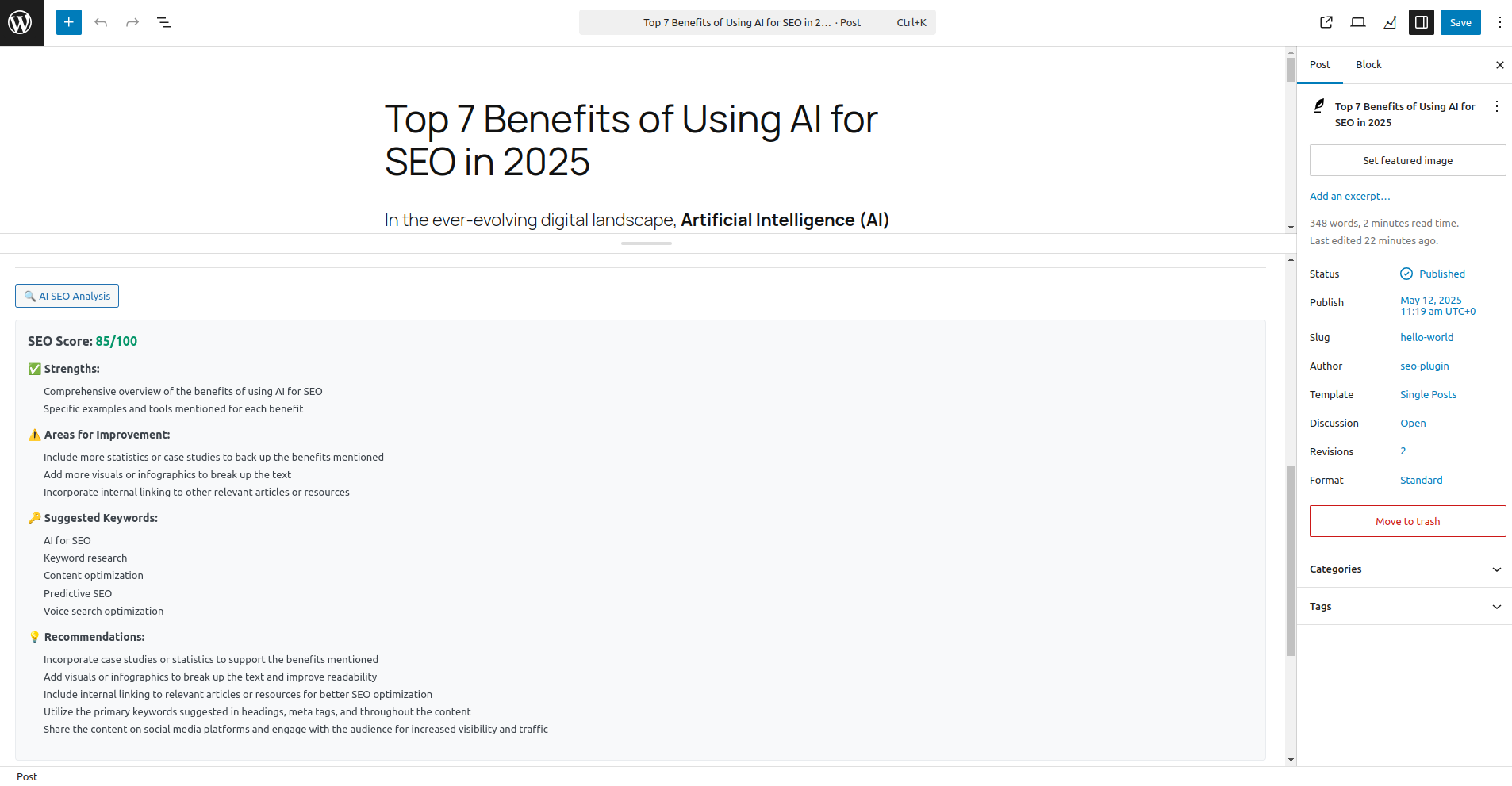
- AI Content Analysis: Get detailed SEO analysis with scoring and actionable recommendations
- Advanced AI Strategy Tools: GPT-5 powered SEO strategy, content gap analysis, and E-A-T analysis
- AI Keyword Research: Advanced keyword research with semantic analysis and competition insights
- Bulk AI Suggestions: Generate suggestions for multiple posts at once with easy apply/skip options
- Smart SEO Scoring: AI analyzes your content and provides improvement suggestions
- Multiple AI Models: Choose from OpenAI (GPT-4o-mini, GPT-4o, GPT-5, o1-preview, o1-mini) or Google Gemini (Gemini 1.5 Pro, Gemini 1.5 Flash)
📋 Media Audits — Cut Image SEO Workload
Stop fixing images one at a time. Media Audits gives you a full-library dashboard so you can find gaps, bulk-generate metadata, and export or import changes in minutes instead of hours.
- Audit Dashboard: See every image’s alt text, title, caption, description, and filename status in one searchable table
- Bulk AI Generation: Generate missing metadata for selected images—or every image matching your filters—using your existing OpenAI or Gemini API keys
- Smart Brand Context: Save a business-specific prompt template so AI suggestions match your tone, services, and keywords
- One-Click “Generate Prompt According to Business”: Auto-fills your brand context from site content so you don’t have to write prompts from scratch
- Safe File Renaming: AI-suggested SEO-friendly filenames with extension preserved and conflict handling built in
- CSV Export & Import: Download your full media audit, edit offline, or re-import AI results for batch updates
- Dual Access: Open from Media → Media Audits or Rocketship SEO → 📋 Media Audits
Perfect for sites with large media libraries, accessibility compliance, and teams who want image SEO done without opening every attachment in the library.
📊 Traditional SEO Features
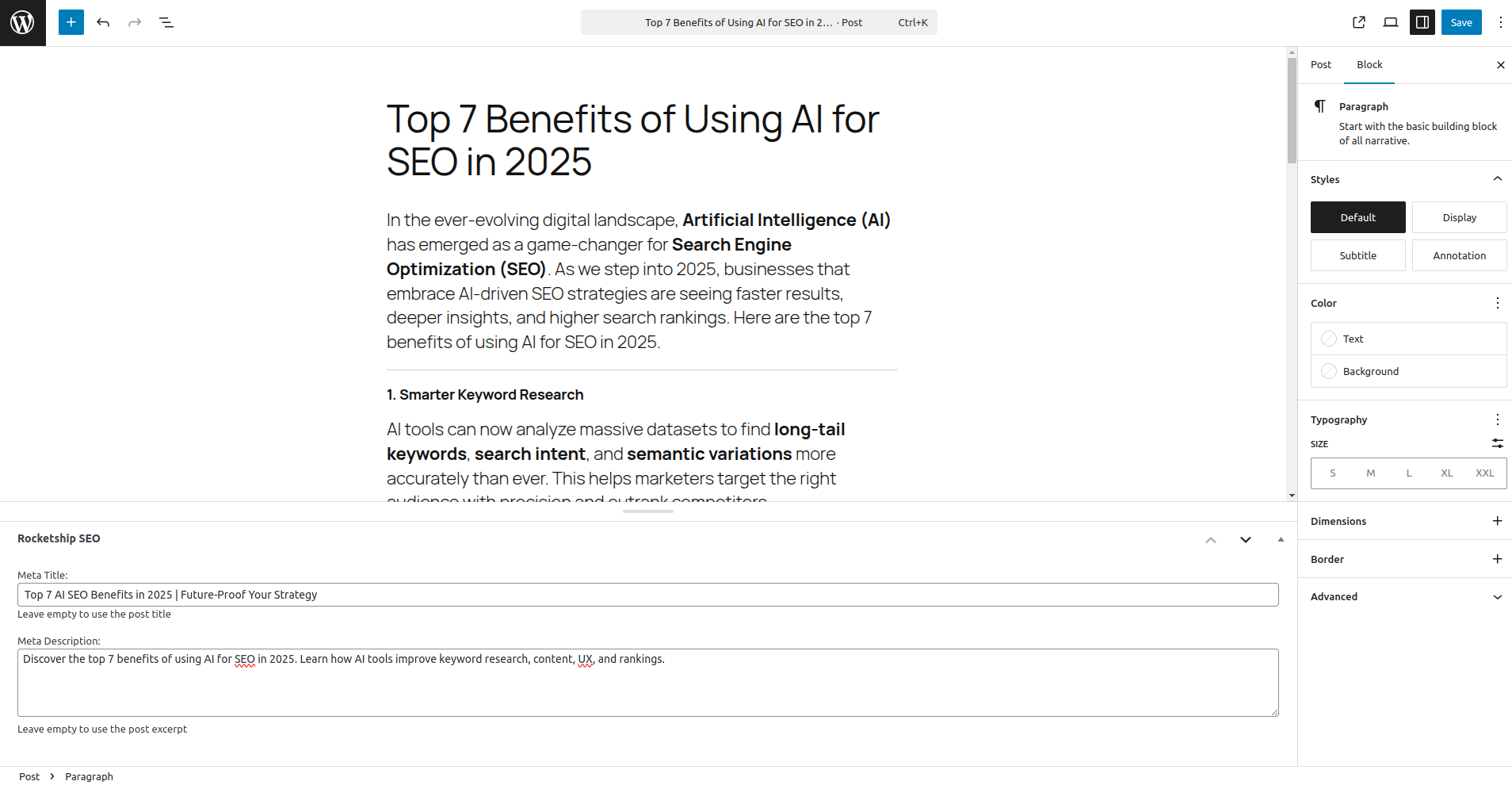
- Custom Meta Fields: Set custom meta titles and descriptions for posts and pages
- XML Sitemap Generation: Automatically generate dynamic, search engine-friendly sitemaps
- Visual Sitemap Generator: Interactive site navigation at /sitemap with multiple view modes
- Schema Markup: JSON-LD structured data for articles, websites, organizations, and more
- Open Graph Tags: Optimize content for Facebook, LinkedIn, and other social platforms
- Twitter Cards: Enhanced Twitter sharing with proper meta tags
- File Rules Editor: Professional .htaccess and robots.txt editor with backup system
- AI Image Redirect: Protect images from direct access, hotlinking, and unauthorized downloads
- Bot Redirection System: Control bot access with User-Agent detection and custom redirects
- Google Analytics Integration: View GA4 traffic data, pageviews, sessions, and user metrics directly in WordPress
- Per-Page Analytics: See analytics data for individual posts/pages in the editor metabox
- Google Reviews OAuth: Fetch ALL your Google Business Profile reviews (not limited to 5)
- Dual Authentication: Choose between API Key (simple, 5 reviews) or OAuth (unlimited reviews)
- Gutenberg Integration: Dedicated sidebar panel with real-time preview
- Classic Editor Support: Full compatibility with WordPress classic editor
🎯 Key Features
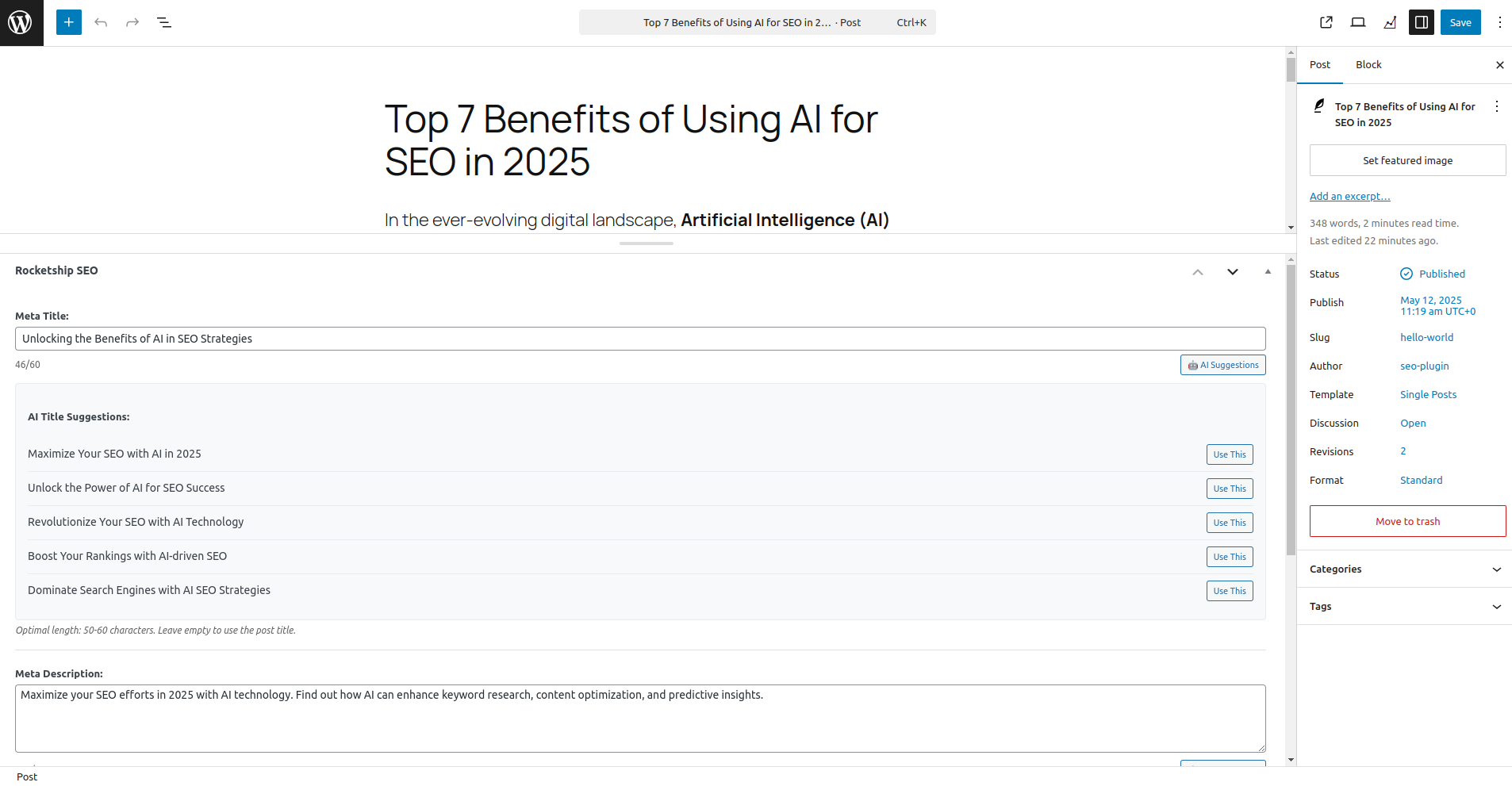
- Live Preview: See how your meta tags will appear in Google search results
- Character Counting: Visual indicators for optimal title and description lengths
- Smart Fallbacks: Automatically uses post title and excerpt when custom fields are empty
- Google Analytics Dashboard: View traffic data, top pages, and traffic sources without leaving WordPress
- Per-Content Analytics: See pageviews, sessions, and trends for each post/page in the editor
- Compatibility System: Advanced detection and conflict prevention with other SEO plugins
- Granular Override Control: Choose which SEO features to enable when other plugins are present
- Sitemap Management: Individual post/page exclusion options
- Breadcrumb Schema: Automatic breadcrumb structured data
- Robots.txt Integration: Sitemap URLs automatically added to robots.txt
- Multi-language Ready: Full internationalization support
- Performance Optimized: Efficient caching and minimal database queries
🤖 How AI Features Work
- Setup: Choose your AI provider (OpenAI or Google Gemini) and configure your API key in Rocketship SEO settings
- Choose Model: Select from OpenAI models (GPT-4o-mini, GPT-5, o1-preview) or Gemini models (Gemini 1.5 Pro, Flash)
- Generate: Click AI suggestion buttons while editing posts/pages
- Analyze: Use AI content analysis to get SEO improvement recommendations
- Advanced Tools: Access GPT-5 optimized SEO strategy, content gap analysis, and E-A-T analysis
- Bulk Process: Use AI Tools page to generate suggestions for multiple posts
- Optimize: Apply AI suggestions with one click or customize as needed
💡 Perfect For
- Content creators who want AI-powered SEO optimization
- Website owners looking to improve search rankings
- Agencies managing multiple WordPress sites
- Developers who need comprehensive SEO solutions
- Anyone wanting to save time on SEO optimization
Comment utiliser
Basic SEO Setup
- Enable Features: Go to Rocketship SEO > General Settings and enable desired features
- Configure Sitemaps: Visit Rocketship SEO > XML Sitemap to enable sitemap generation
- Set Organization Info: Add your organization name and logo for schema markup
- Configure Social Media: Add Twitter handle and default Open Graph image
Using AI Features
For Individual Posts/Pages:
1. Edit any post or page
2. Find the Rocketship SEO panel (sidebar in Gutenberg, meta box in Classic Editor)
3. Click “🤖 AI Suggestions” button next to title or description fields
4. Review generated suggestions and click “Use This” for your preferred option
5. Click “🔍 AI SEO Analysis” for detailed content analysis and recommendations
For Bulk Operations:
1. Go to Rocketship SEO > AI Tools (appears when AI is enabled)
2. Select posts you want to optimize or use filters (category, date range, etc.)
3. Choose “Generate Titles” or “Generate Descriptions”
4. Review suggestions and apply or skip for each post
5. Use “Apply All” for bulk operations
Content Analysis
- Open the AI SEO Analysis panel while editing content
- Review your SEO score (0-100)
- Check “Strengths” section for what’s working well
- Follow “Improvements” suggestions for better optimization
- Use “Suggested Keywords” to enhance your content
- Implement “Recommendations” for maximum SEO impact
Using Google Analytics
Initial Setup:
1. Go to Rocketship SEO > Google Analytics
2. Click “Connect with Google” and authorize access
3. Select your GA4 property from the dropdown
4. View your traffic data immediately!
Dashboard Features:
* Overview Tab: Pageviews, sessions, users, bounce rate
* Top Pages Tab: Most visited content with metrics
* Traffic Sources Tab: Source/medium breakdown
* Date Range Selector: 7, 30, 90, or 365 days
Per-Post Analytics:
1. Edit any post or page
2. Find the “Google Analytics” metabox in the sidebar/below content
3. View pageviews, sessions, and users for that specific page
4. See 7-day trend chart for quick performance insights
XML Sitemap Features
- Main Index: Access at
yoursite.com/sitemap_index.xml - Post Sitemap:
yoursite.com/post-sitemap.xml - Page Sitemap:
yoursite.com/page-sitemap.xml - Exclude Pages: Use checkbox in editor to exclude specific content
- Submit to Search Engines: Only submit the main sitemap index URL
Installation
Installation automatique
- Go to Plugins > Add New in your WordPress admin
- Search for “Rocketship SEO”
- Click Install Now and then Activate
- Go to Rocketship SEO in admin sidebar to configure settings
Installation manuelle
- Download the plugin zip file
- Upload to
/wp-content/plugins/directory - Extract the files
- Activate through the ‘Plugins’ menu in WordPress
- Configure settings in Rocketship SEO admin panel
AI Setup (Optional but Recommended)
- Get an API key from OpenAI (https://platform.openai.com/api-keys) or Google AI Studio (https://aistudio.google.com/app/apikey)
- Go to Rocketship SEO > General Settings
- Scroll to “AI-Powered SEO Recommendations” section
- Enter your API key and choose your preferred AI model
- Enable AI recommendations
- Start using AI features in post/page editors
Journal de modifications
✅ COMPATIBILITY UPDATE: Fully compatible with all supported WordPress versions (5.0 up to the latest 7.1) and PHP versions (7.0 up to the latest PHP 8.x). Fixes PHP/WordPress notices on newer versions, sitemap and redirect fixes, and security hardening. Recommended for all users.
1.0.80
✅ **COMPATIBILITY**: Fully compatible with WordPress 5.0 through the latest WordPress 7.1, and with PHP 7.0 through the latest PHP 8.x releases
🐛 **FIX**: No more "translation loading was triggered too early" notice on WordPress 6.7 and newer
🐛 **FIX**: Removed "wpdb::prepare was called incorrectly" notices in the Redirect Manager and Bot Detector
🗺️ **FIX**: Legacy rocketship-sitemap.xml now redirects correctly to sitemap_index.xml, and sitemaps no longer get a trailing-slash redirect
🔁 **FIX**: Redirects table is now created on activation, so redirects work immediately (including WP-CLI activation)
⚙️ **FIX**: Activation no longer fails on hosts with an unlimited PHP memory limit (-1)
🔒 **SECURITY**: Hardened nonce checks on AJAX requests
📊 **FIX**: Bot Detector charts no longer error when redrawn on the dashboard
1.0.79
🔒 **SECURITY**: PHP2Shell security updates
1.0.78
🛡️ **NEW FEATURE**: AI Agent & Scraper Protection — find it under Rocketship SEO → 🛡️ AI Agent Protection. Detects automated browsers, AI crawlers and content scrapers, gives every visit a 0–100 risk score from several clues, and decides whether to allow, monitor, challenge or temporarily block it
⚠️ **NEW**: "AI Agent Activity Detected" warning screen with a "Verify I am human" button — served by the server (not just a JavaScript overlay), so protected content is never sent until the visitor passes. Heading, message, button text, colour and contact link are all customisable, with an admin-only preview
🤖 **NEW**: Detects AI browser agents such as Claude in Chrome (by the on-screen indicator it adds to pages it controls) and browsers driven by Playwright, Puppeteer and Selenium (navigator.webdriver), using a tiny deferred script that sends nothing for normal visitors
🕷️ **NEW**: Scraping protection — per-visitor rate limits, sustained-crawl and page-by-page pagination detection, and REST API scraping limits. Visitors are identified by IP + browser + language, so people sharing an office or mobile network are not penalised together
🔍 **SEO SAFE**: Real Googlebot and Bingbot are verified (reverse DNS plus Google's and Bing's published IP ranges) and always allowed; fake "Googlebot" requests are caught. Other verified search engines can be allowed too
🧠 **NEW**: Separate rules for AI training crawlers (GPTBot, ClaudeBot, CCBot…), AI search crawlers (OAI-SearchBot, PerplexityBot…) and user-directed AI agents (ChatGPT-User, Claude-User…) — allow, allow and log, or block each group. OpenAI and Perplexity bots are verified against their published IP lists
👀 **SAFE START**: Off by default, and starts in Monitor-only mode when enabled — see exactly who would be challenged or blocked before anything is enforced. Conservative, Balanced and Strict sensitivity presets (or custom thresholds), and a single weak clue never shows the warning screen
📊 **NEW**: Activity dashboard with suspicious-request totals, crawler categories, top detection reasons, risk scores, actions taken, and a filterable, paginated log with reference IDs that match the warning screen
🧰 **NEW**: Tools tab with a Request Tester (see how any User-Agent and IP would be scored) and one-click "Clear all temporary blocks" for quick recovery
❓ **NEW**: "How it works" guide — a step-by-step pop-up with a visitor-journey flow diagram, the four outcomes, a setup checklist and plain-language tips, showing your site's own thresholds and setup status
☁️ **OPTIONAL**: Cloudflare integration — sync a WAF rule that blocks or challenges AI crawler categories at the edge, and add Cloudflare Turnstile to the verification challenge. API credentials can be kept in wp-config.php and are never shown again after saving
🔒 **PRIVACY & SAFETY**: No IP addresses stored by default (keyed hashes instead; optional truncated IPs), logs auto-delete after 14 days with a row cap, wp-admin, login, cron, feeds, robots.txt and sitemaps are never blocked, logged-in team members are never challenged, proxy headers are only trusted from Cloudflare or configured proxies, and every visitor and search engine sees the same content (no cloaking)
⚡ **CACHE FRIENDLY**: Challenge and block responses are never cached (LiteSpeed, WP Rocket, WP Super Cache, W3TC and CDNs), normal pages stay fully cacheable, and the plugin's assets refresh automatically after updates
🐛 **FIX**: Google Preferred Source Button added with the `[preferred_source_button]` shortcode or block could appear empty when another plugin or a block theme removed Google's script — the button now always loads its script and asks LiteSpeed, WP Rocket and Cloudflare Rocket Loader not to delay it
1.0.76
🎨 **REDESIGNED**: Floating Content Series panel has a cleaner, more professional look — a small "SERIES" label above the series title, crisp line icons for collapse and close, soft rounded corners and shadow, and a gentle fade-in — so it blends in with modern themes instead of looking like a pop-up
📜 **IMPROVED**: No more visible scrollbar inside the floating panel — longer series still scroll smoothly with the mouse wheel or touch, and scrolling the panel no longer scrolls the page behind it
📋 **IMPROVED**: Articles in the floating panel are now shown as clean, full-width rows with muted part numbers and a hover highlight — easier for readers to scan and tap, which helps them move on to the next article in the series and keeps them on your site longer
🖼️ **IMPROVED**: The series image is shorter inside the floating panel, so more of the article list is visible at a glance
📱 **IMPROVED**: On phones the floating panel becomes a full-width sheet with rounded inner corners that stays out of the way of your content
♿ **ACCESSIBILITY**: Removed the decorative emoji from the panel header and respects the visitor's "reduce motion" setting
1.0.75
📚 **NEW FEATURE**: Content Series — group related posts and pages into ordered (Part 1, Part 2, …) or unordered series from Rocketship SEO → Content Series, with drag-and-drop ordering, an optional pillar page, and post/page search
🔗 **NEW**: Every article in a series automatically gets a styled, responsive Series box with crawlable permalink links to the other articles (top / middle / bottom / manual placement); top placement sits below the Table of Contents and bottom placement sits above the Preferred Source button
🧱 **NEW**: `[rocketship_series]` shortcode and "Rocketship Content Series" Gutenberg block for manual placement — a box already in the content is never inserted twice
🎨 **NEW**: Per-series styling (background color, border color, border style) and a display limit (2 / 5 / 10 / all other articles) with a live preview in the editor
🛡️ **NEW**: A post or page can belong to only one series — enforced in the UI, on save, and with a database UNIQUE key
🧩 **NEW**: Structured data — the existing Article/WebPage JSON-LD now includes `isPartOf` → `CreativeWorkSeries` (and `position` for ordered series); new `rocketship_seo_singular_schema` filter
🎯 **NEW**: `[rocketship_series id="3"]` and a series dropdown in the block — show any series on any page (Auto-detect stays the default); pasting the shortcode into the editor converts it to the block
📍 **NEW**: "Also display on" — assign a series box to extra pages/posts that are not part of the series (e.g. landing pages)
🧭 **NEW**: More placements — left/right alignment inside the content, floating collapsible panels in any screen corner (full-width bar on phones), and a "Rocketship Content Series" sidebar widget for classic themes
1.0.74
🎯 **NEW**: Center alignment option added to "Add to Blog Post" position control for the Preferred Source Button — choose Left, Center, or Right
📋 **REFINED**: Copy button on the Preferred Source Button instructions page is now scoped to the shortcode example only, keeping the code reference rows clean
🧱 **CONSISTENT**: Center alignment matches the Gutenberg block's existing Left/Center/Right alignment support for a unified experience across shortcode, block, and auto-inserted blog post placement
Captures d'écran


Pour les développeurs
Est-ce votre plugin ? Montrez les chiffres.
Ajoutez un badge en direct à votre site, docs ou github readme. Il se met à jour par lui-même - aucun compte n'est nécessaire.
Best Rocketship SEO alternatives
All ai seo plugins →





FAQ
Rocketship SEO: quick answers
Réponses directes, extraites des données en direct WordPress.org.
Source : WordPress.org
Is Rocketship SEO free?
Yes. Rocketship SEO is free to download and use from the official WordPress.org plugin directory.
Is Rocketship SEO safe to use in 2026?
Rocketship SEO is a solid plugin choice in 2026, with a few things worth checking first. It runs on 10+ sites, is rated 5/5 and was last updated 2 weeks ago, and scores 78/100 on our health check.
How many websites use Rocketship SEO?
Rocketship SEO is active on 10+ WordPress websites and has been downloaded 5,908 times since it launched in May 2025. It was downloaded 551 times in the last 30 days.
Does Rocketship SEO work with WordPress 7.1?
Yes. The developer has tested Rocketship SEO up to WordPress 7.1.5, the latest release. It requires WordPress 5.0 or newer.
What PHP version does Rocketship SEO need?
Rocketship SEO requires PHP 7.0 or higher. Most hosts run PHP 8.x today, so it works on any modern WordPress hosting.
When was Rocketship SEO last updated?
The latest version, 1.0.80, was released on November 13, 2026 (2 weeks ago).
Who makes Rocketship SEO?
Rocketship SEO is developed and maintained by joeyoungblood.
What are the best alternatives to Rocketship SEO?
The most popular alternatives to Rocketship SEO are SEOPress (300K+ installs), GetGenie (70K+ installs) and BeyondSEO (30K+ installs).
Propulsé par PageForge
Un modèle et une feuille de calcul. Une vraie page pour chaque recherche.
PageForge transforme chaque ligne d'un CSV en une page WordPress avec son propre titre, URL, SEO et schéma, construit sur la mise en page que vous Déjà conçu. Gratuit sur WordPress.org.
- CSV et XLSX, plus Google Sheets sur les professionnels et les entreprises
- Son propre titre, URL, SEO champs et schéma pour chaque page
- Fonctionne avec l'éditeur de blocs, Elementor, Divi et Avada
- Gratuit sur WordPress.org, pas de carte de crédit