


ReMenu
Reorganize the WordPress admin sidebar by drag-and-drop: reorder, rename, nest, promote, group into sections, collapse and hide menu items.

Choix solide
ReMenu is a solid plugin choice in 2026, with a few things worth checking first. It runs on 10+ sites and was last updated 4 days ago, and scores 66/100 on our health check.
- Développé activement — Dernière mise à jour il y a 4 jours
- Testé avec le dernier WordPress (7.1)
- Petite base d'utilisateurs (plus de 10 installations actives)
- Très peu de critiques jusqu'à présent
Comment s'accumule-t-il ?
Côte à côte sur les installations, les mises à jour, les évaluations et le support



Téléchargements quotidiens
Les pics de téléchargement suivent généralement une nouvelle version - chaque site qui met à jour automatiquement compte comme un téléchargement.
Classements
Where ReMenu stands todayWordPress.org Classements de recherche
Position en direct dans la recherche de plugins, Top 100| Mot-clé | Position |
|---|---|
| administrateur | >100 |
| admin menu | >100 |
| custom menu | >100 |
| tableau de bord | >100 |
| menu editor | >100 |
Adoption de version
Part de sites actifs par version.
About ReMenu
À partir du Lisezmoi officiel · v1.7.0Description
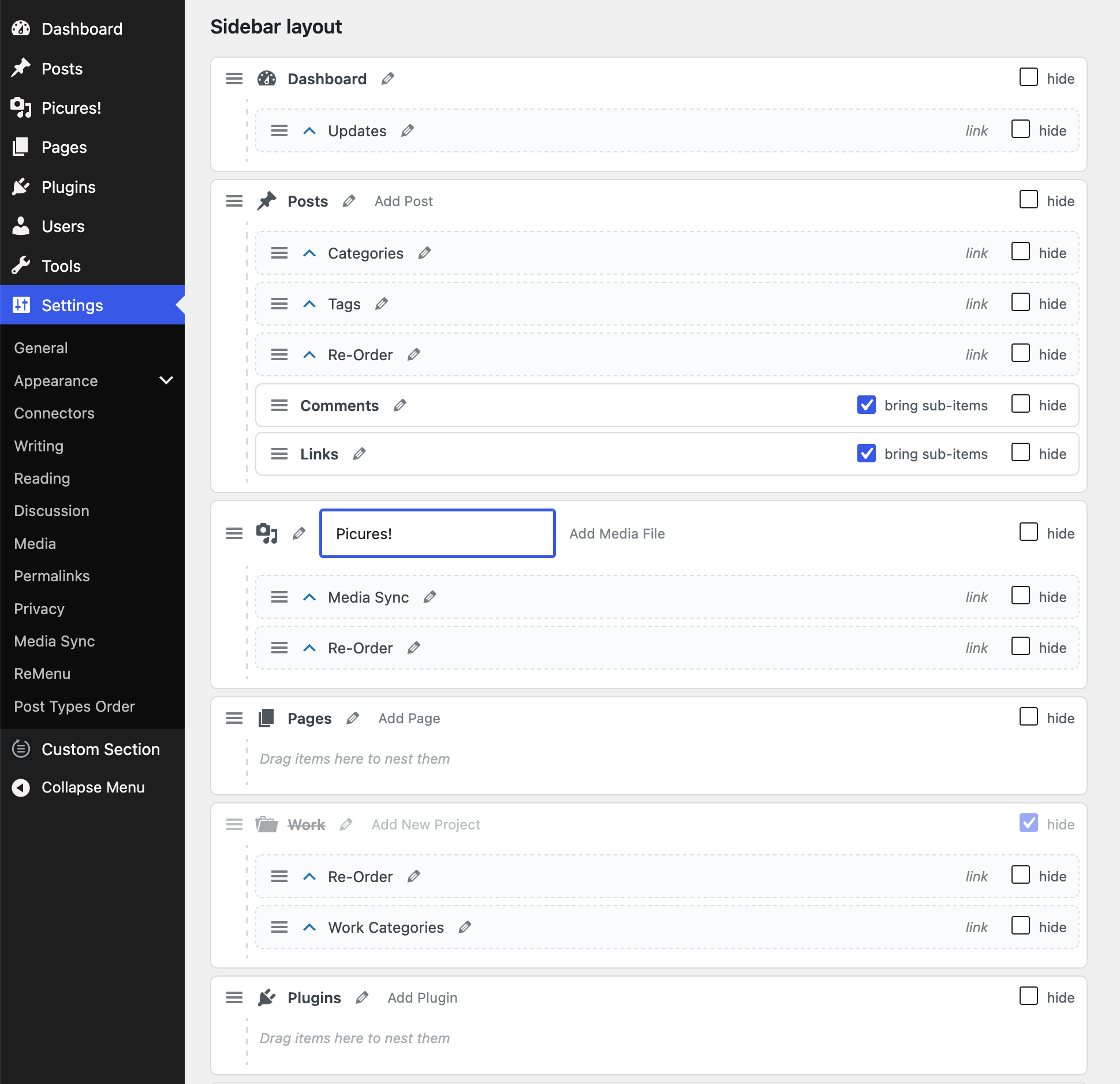
ReMenu gives you full drag-and-drop control over the WordPress admin sidebar. Tame a cluttered menu by putting the things you use most where you want them, grouping related screens together, collapsing the rest, and hiding what you never touch — all from one visual editor at Settings → ReMenu.
Nothing is written into WordPress permanently: ReMenu rearranges the menu as it renders, so deactivating the plugin instantly restores the original menu exactly as it was.
Ce que tu peux faire
- Reorder anything — drag top-level items and sub-pages into the order you want.
- Rename items — give any menu item or sub-item a custom label right in the editor; leave the field blank to keep its original name. Count badges (the Plugins update count, pending Comments, available Updates, and so on) are preserved on renamed items.
- Nest items — drop one item onto another to tuck it underneath. Tick “bring sub-items” to carry its sub-pages along (flattened to one level, since WordPress menus are only two levels deep).
- Promote or relocate sub-pages — pull a sub-page up to the top level, or move it under a different parent. This works for plugin screens and core pages like Writing, Reading, Discussion, Permalinks, Categories and Tags.
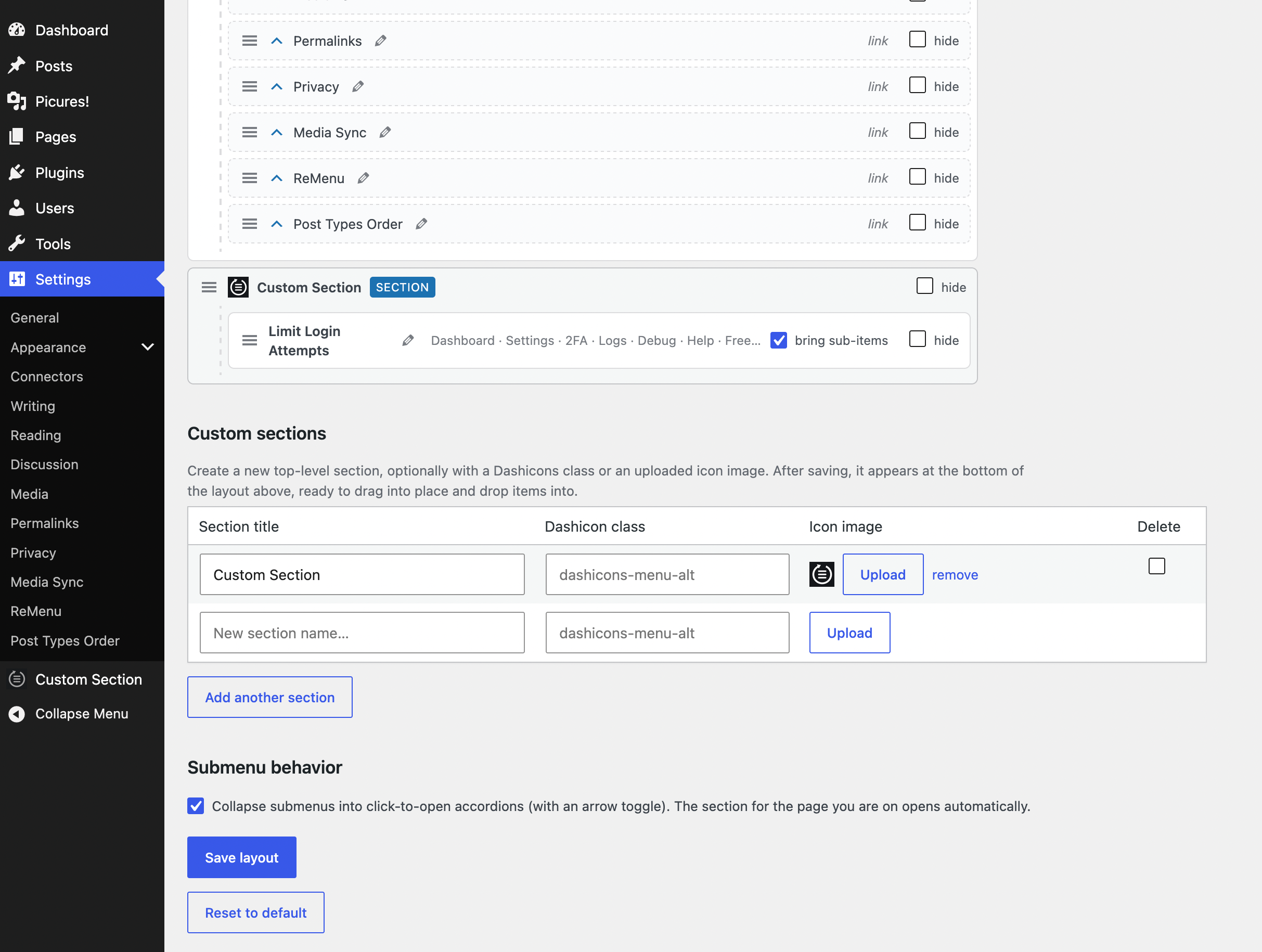
- Build custom sections — create your own top-level groups and give each one a Dashicon class or an uploaded icon image, then drag items into them.
- Collapse submenus into accordions — turn long submenus into click-to-open sections with an arrow toggle. The section for the page you’re on opens automatically, and brought-in groups get their own independent toggle.
- Hide items entirely — tick “hide” on any row to remove it from the live menu. Hidden items stay in the editor so you can bring them back anytime.
Built to behave
- No third-party JavaScript libraries — the drag-and-drop editor and the menu enhancements are plain, dependency-free code.
- No external requests and no tracking.
- Only users who can manage options (administrators) can change the layout, and saving is nonce-protected.
- Highlighting of the current screen is preserved even after you move or promote a page.
Installation
- Upload the
remenufolder to the/wp-content/plugins/directory, or install the plugin through Plugins → Add New in your dashboard. - Activate the plugin through the Plugins screen.
- Go to Settings → ReMenu and arrange your admin menu by dragging items, creating sections, and ticking the options you want.
- Click Save layout. Reload any admin page to see the result.
To revert everything, either click Reset to default on the settings screen or deactivate the plugin.
Journal de modifications
Adds optional per-item renaming (with count badges preserved) and fixes loading of moved or hidden plugin sub-pages.
1.7.0
- New: rename a menu item or sub-item inline — click the pencil next to its label in the editor, type a new name, and press Enter. Clear the field to restore the original. Notification/count badges are preserved on renamed items.
- Fix: saving now updates the sidebar on the same reload instead of requiring a second refresh, and refreshing the settings page no longer re-submits the form.
1.6.1
- Internal: admin CSS and JavaScript are now loaded with wp_enqueue_style()/wp_enqueue_script() and wp_add_inline_style()/wp_add_inline_script() instead of being printed inline. No functional changes.
1.6.0
- New: rename any menu item or sub-item — type a custom label in the editor, or leave it blank to keep the default. Update/notification count badges (Plugins, Updates, Comments, …) are preserved on renamed items.
- Fix: a moved, nested, flattened, or hidden plugin sub-page (for example Contact Form 7’s Integration screen) could fail to open with “Sorry, you are not allowed to access this page” or “Cannot load …”. ReMenu now re-binds such a page’s render callback to its new location so it loads correctly. Capability checks are unchanged — this never grants access a user didn’t already have.
1.5.6
- Communiqué public initial.
- Drag-and-drop reordering of top-level items and sub-pages.
- Nest items under others, with optional “bring sub-items” flattening.
- Promote or relocate sub-pages, including core settings pages.
- Custom sections with Dashicon classes or uploaded icon images.
- Collapsible submenu accordions, including independent per-group toggles.
- Hide any menu item from the live menu while keeping it in the editor.
Captures d'écran
Pour les développeurs
Est-ce votre plugin ? Montrez les chiffres.
Ajoutez un badge en direct à votre site, docs ou github readme. Il se met à jour par lui-même - aucun compte n'est nécessaire.
Best ReMenu alternatives
Tous les plugins d'administrateur →




FAQ
ReMenu: quick answers
Réponses directes, extraites des données en direct WordPress.org.
Source : WordPress.org
Is ReMenu free?
Yes. ReMenu is free to download and use from the official WordPress.org plugin directory.
Is ReMenu safe to use in 2026?
ReMenu is a solid plugin choice in 2026, with a few things worth checking first. It runs on 10+ sites and was last updated 4 days ago, and scores 66/100 on our health check.
How many websites use ReMenu?
ReMenu is active on 10+ WordPress websites and has been downloaded 385 times since it launched in June 2026. It was downloaded 100 times in the last 30 days.
Does ReMenu work with WordPress 7.1?
Yes. The developer has tested ReMenu up to WordPress 7.2, the latest release. It requires WordPress 6.0 or newer.
What PHP version does ReMenu need?
ReMenu requires PHP 7.2 or higher. Most hosts run PHP 8.x today, so it works on any modern WordPress hosting.
When was ReMenu last updated?
The latest version, 1.7.0, was released on November 25, 2026 (4 days ago).
Who makes ReMenu?
ReMenu is developed and maintained by Jess.
What are the best alternatives to ReMenu?
The most popular alternatives to ReMenu are Loginizer (1M+ installs), Redux Framework (800K+ installs) and Admin Menu Editor (300K+ installs).
Propulsé par PageForge
Un modèle et une feuille de calcul. Une vraie page pour chaque recherche.
PageForge transforme chaque ligne d'un CSV en une page WordPress avec son propre titre, URL, SEO et schéma, construit sur la mise en page que vous Déjà conçu. Gratuit sur WordPress.org.
- CSV et XLSX, plus Google Sheets sur les professionnels et les entreprises
- Son propre titre, URL, SEO champs et schéma pour chaque page
- Fonctionne avec l'éditeur de blocs, Elementor, Divi et Avada
- Gratuit sur WordPress.org, pas de carte de crédit