


Quick debug.log Viewer
Quick debug.log Viewer lets you quickly inspect your site’s debug.log file without leaving the WordPress dashboard. Now with a floating action button (FAB) and modal for frontend viewing, searching, and filtering! The…

Envisager une alternative
Quick debug.log Viewer shows warning signs in 2026 — compare the alternatives below before installing. It runs on 20+ sites and was last updated 1 year ago, and scores 33/100 on our health check.
- Petite base d'utilisateurs (20+ installations actives)
- Très peu de critiques jusqu'à présent
- Pas de mise à jour depuis plus d'un an
- Uniquement testé jusqu'à WordPress 6,8 (le dernier est de 7,1)
Comment s'accumule-t-il ?
Côte à côte sur les installations, les mises à jour, les évaluations et le support



Téléchargements quotidiens
Les pics de téléchargement suivent généralement une nouvelle version - chaque site qui met à jour automatiquement compte comme un téléchargement.
Classements
Where Quick debug.log Viewer stands todayWordPress.org Classements de recherche
Position en direct dans la recherche de plugins, Top 100| Mot-clé | Position |
|---|---|
| administrateur | >100 |
| debug | >100 |
| error log | >100 |
| logging | >100 |
| troubleshooting | >100 |
Adoption de version
Part de sites actifs par version.
About Quick debug.log Viewer
À partir du Lisez-moi officiel · v1.2.2Description
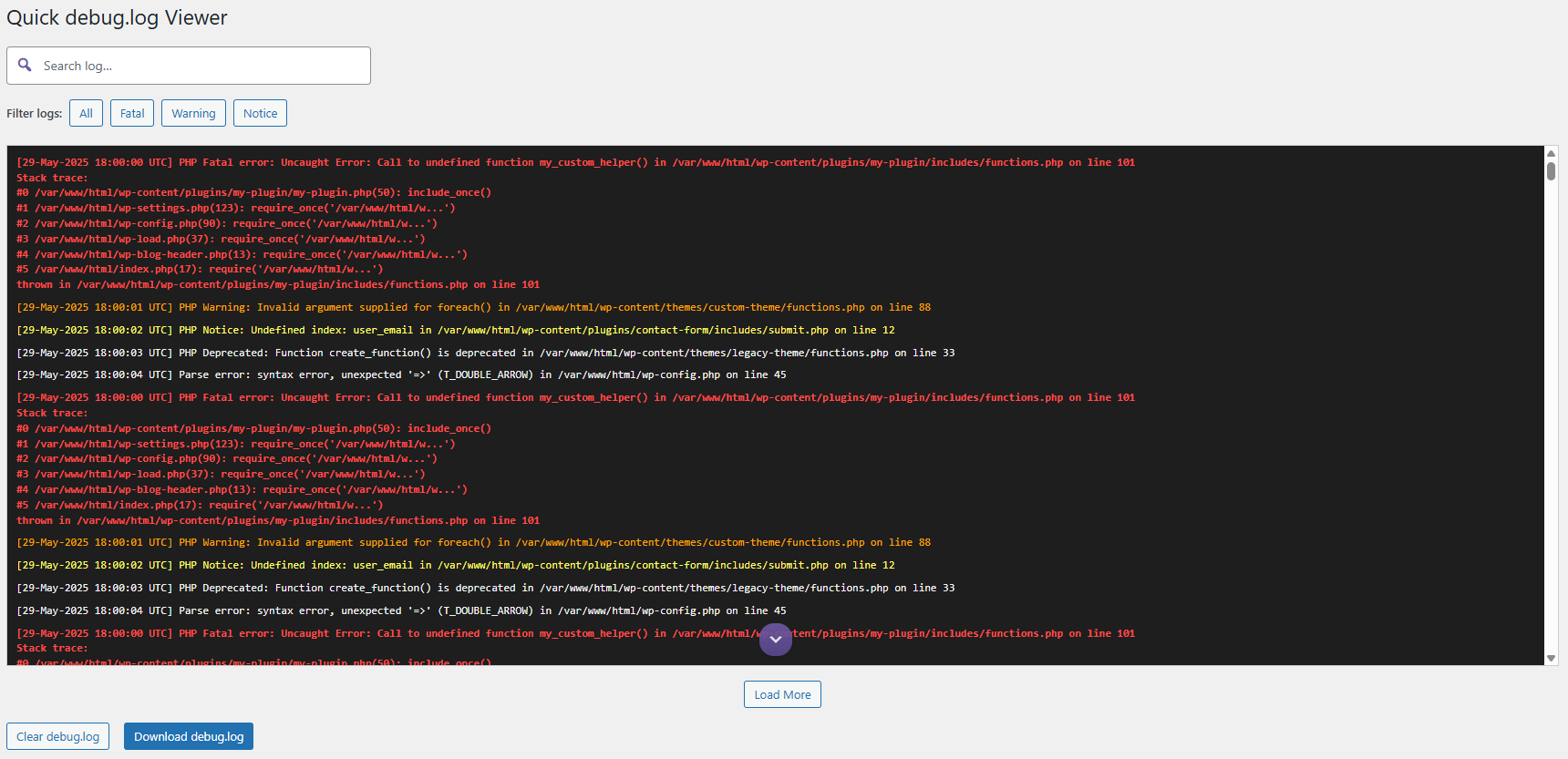
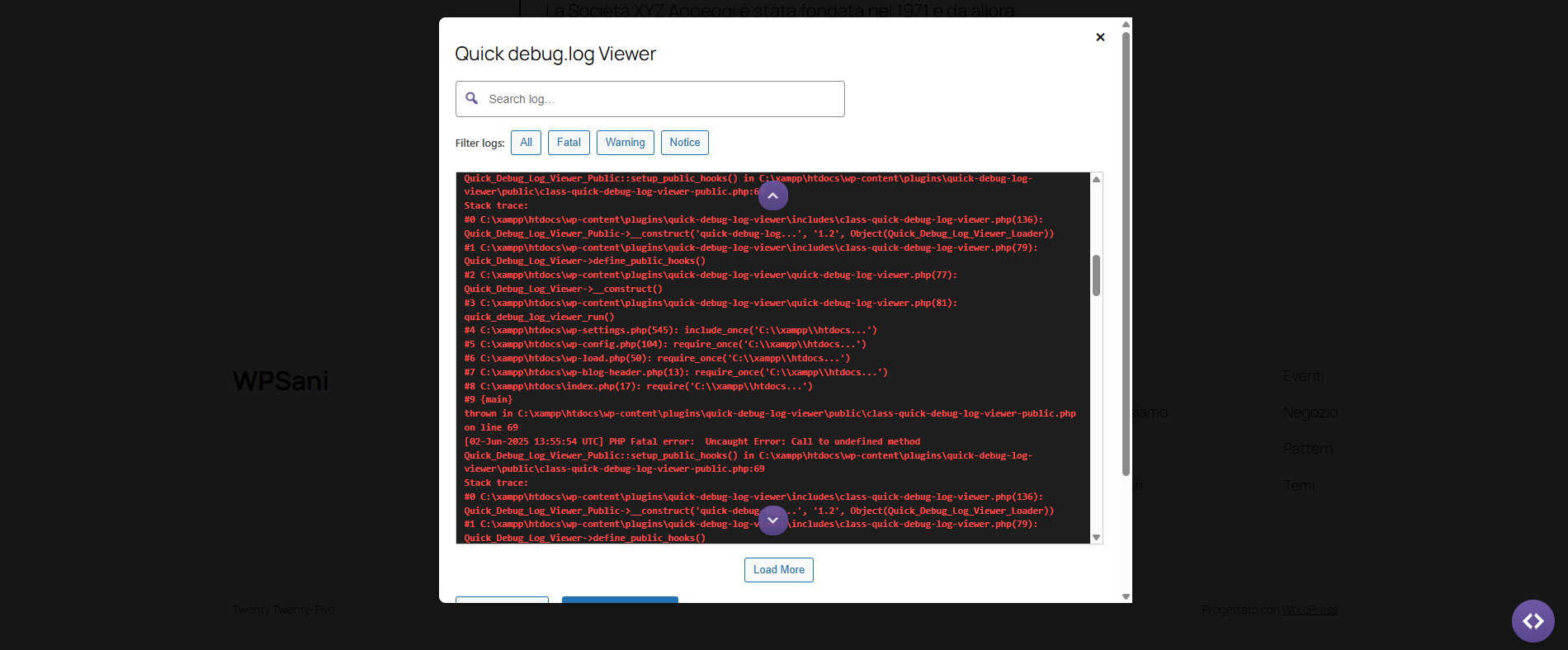
Quick debug.log Viewer lets you quickly inspect your site’s debug.log file without leaving the WordPress dashboard. Now with a floating action button (FAB) and modal for frontend viewing, searching, and filtering!
The FAB is now draggable and its position is remembered — with a right-click option to reset.
- Instantly view, scroll, search, and filter your
debug.logcontents - 🔍 Search and browse logs even from the frontend with a floating action button (FAB) and modal
- Filter logs by type: Fatal, Warning, Notice — or show all
- Clear the log with a single click (now via AJAX)
- Download the log for backups or support
- Load large logs in chunks with the Load More button
- Secure HTML output with escaping to prevent session theft
- Stack traces are shown in single blocks for better readability
- Works even if
WP_DEBUGis off — as long as the file exists
Ideal for developers, site managers, and anyone needing to troubleshoot WordPress issues fast.
👉 Learn more and download from: https://wpsani.store/downloads/quick-debug-log-viewer-free/
Installation
- Upload the plugin to
/wp-content/plugins/quick-debug-log-viewer, or install it directly via the WordPress plugin screen. - Activez le plugin via l'écran "Plugins" dans WordPress.
- Go to Tools → Quick debug.log Viewer to see your site’s debug log.
Journal de modifications
You can now drag the frontend FAB and reset its position with a right-click — more control, same simplicity.
1.2.2
- The frontend floating action button (FAB) is now draggable — place it wherever you want on screen.
- The FAB’s position is saved and restored between visits.
- Added a right-click menu on the FAB to reset its position to default.
- UI polish: added an indicator (
⋮) to show users that the FAB has options. - Prevented the modal from opening if the FAB is dragged instead of clicked.
1.2.1
- Updated plugin description to reflect new frontend features and recent improvements.
1.2.0
- Introduced a floating action button (FAB) and modal on the frontend, allowing you to view, search, and filter the debug.log even while browsing your site.
- Refactored the internal logic into a dedicated
Log_Readerclass to centralize the parsing and block detection across frontend and backend. - Added a
Formatterclass to dynamically assign CSS classes based on error types (fatal, warning, notice, etc). - Replaced the legacy log-clear form with an AJAX-powered log clearing, improving user experience and UI consistency.
- Disabled “Load More” while performing an active search, to prevent inconsistent results.
- Removed deprecated
Errors_Registerclass. - Polished the admin and frontend UI for improved readability and consistency.
1.0.4
- Improved regex for better parsing of multi-line log entries and stack traces
- Added escaping of log output with
esc_html()for enhanced security - Implemented “Load More” button to progressively fetch large logs in 30-block chunks
- Optimized AJAX search to work on the last 300 blocks only
- Improved stability when viewing very large debug.log files
- Refined UI to support dynamic block loading and consistent scroll buttons
1.0.3
- Added AJAX-powered search to filter debug.log entries by keyword in real-time
- Moved scroll buttons inside the log viewer for better UX on long logs
1.0.2
- Added sticky scroll-to-top and scroll-to-bottom buttons inside the log viewer
- Added filter controls to view only Fatal errors, Warnings, Notices, or all logs
- Styled UI controls to match the WPSani brand (compact, modern, accessible)
- Improved usability and readability for long debug logs
Captures d'écran

Pour les développeurs
Est-ce votre plugin ? Montrez les chiffres.
Ajoutez un badge en direct à votre site, docs ou github readme. Il se met à jour par lui-même - aucun compte n'est nécessaire.
Best Quick debug.log Viewer alternatives
Tous les plugins d'administrateur →




FAQ
Quick debug.log Viewer: quick answers
Réponses directes, extraites des données en direct WordPress.org.
Source : WordPress.org
Is Quick debug.log Viewer free?
Yes. Quick debug.log Viewer is free to download and use from the official WordPress.org plugin directory.
Is Quick debug.log Viewer safe to use in 2026?
Quick debug.log Viewer shows warning signs in 2026 — compare the alternatives below before installing. It runs on 20+ sites and was last updated 1 year ago, and scores 33/100 on our health check.
How many websites use Quick debug.log Viewer?
Quick debug.log Viewer is active on 20+ WordPress websites and has been downloaded 993 times since it launched in May 2025. It was downloaded 81 times in the last 30 days.
Does Quick debug.log Viewer work with WordPress 7.1?
Quick debug.log Viewer is officially tested up to WordPress 6.8.13, while the latest release is 7.1.5. It may still work, but try it on a staging site first.
What PHP version does Quick debug.log Viewer need?
Quick debug.log Viewer requires PHP 7.0 or higher. Most hosts run PHP 8.x today, so it works on any modern WordPress hosting.
When was Quick debug.log Viewer last updated?
The latest version, 1.2.2, was released on June 5, 2025 (1 year ago).
Who makes Quick debug.log Viewer?
Quick debug.log Viewer is developed and maintained by WPSani.
What are the best alternatives to Quick debug.log Viewer?
The most popular alternatives to Quick debug.log Viewer are Loginizer (1M+ installs), Redux Framework (800K+ installs) and Admin Menu Editor (300K+ installs).
Propulsé par PageForge
Un modèle et une feuille de calcul. Une vraie page pour chaque recherche.
PageForge transforme chaque ligne d'un CSV en une page WordPress avec son propre titre, URL, SEO et schéma, construit sur la mise en page que vous Déjà conçu. Gratuit sur WordPress.org.
- CSV et XLSX, plus Google Sheets sur les professionnels et les entreprises
- Son propre titre, URL, SEO champs et schéma pour chaque page
- Fonctionne avec l'éditeur de blocs, Elementor, Divi et Avada
- Gratuit sur WordPress.org, pas de carte de crédit