


PowerPack Lite pour le constructeur de castors
PowerPack Lite for Beaver Builder extends Beaver Builder with custom options, unique modules and templates.

Choix
Yes — PowerPack Lite for Beaver Build… is a safe, well-maintained plugin to use in 2026. It runs on 6K+ sites, is rated 5/5 and was last updated 3 days ago, and scores 89/100 on our health check.
- Loved by users — 5/5 from 243 reviews
- Développé activement — Dernière mise à jour il y a 3 jours
- Testé avec le dernier WordPress (7.1)
- Momentum — downloads up 56.4% vs the previous 30 days
Comment s'accumule-t-il ?
Côte à côte sur les installations, les mises à jour, les évaluations et le support


Téléchargements quotidiens
Les pics de téléchargement suivent généralement une nouvelle version - chaque site qui met à jour automatiquement compte comme un téléchargement.
Classements
Where PowerPack Lite for Beaver B… stands todayWordPress.org Classements de recherche
Position en direct dans la recherche de plugins, Top 100| Mot-clé | Position |
|---|---|
| beaver addons | #3 |
| constructeur de castors | #4 |
| beaver builder add ons | #1 |
| Addon de constructeur de castors | #2 |
| beaver builder free | #3 |
Adoption de version
Part de sites actifs par version.
Répartition des notes
★★★★★★★★★★ 5 from 243 reviews
About PowerPack Lite for Beaver Builder
From the official readme · v1.3.3Description
PowerPack Lite for Beaver Builder extends Beaver Builder with custom options, unique modules and templates.
PowerPack Addons for Beaver Builder
PowerPack Beaver Builder Addon is built by IdeaBox Creations. It extends the functionality of Beaver Builder with its custom, creative and unique modules.
There are 50+ easy to use, drag & drop modules, 350+ design elements, sections, row templates, and page templates that will speed up your website development process. You will be able to build professional websites without writing code.
It’s also packed with lead generation modules like Call to action buttons, Popup creator, Banner creator, and much more. With PowerPack Addon for Beaver Builder, you can build stunning websites in a few hours with zero coding.
Head over to PowerPack for Beaver Builder website to explore addon.
Learn From Extensive Documentation
We have Extensive Documentation which includes all types of docs that support users to understand PowerPack Addons for Beaver Builder better.
Join our Facebook Group
We have an active Facebook Group where we keep posting updates and also help our users with any questions they may have. We are sure, you will love the group, you can showcase the websites that you build or come, say “Hello” to us! Beaver Addons Facebook Group.
Follow us on Twitter
Want to know more about us? Follow us on Twitter for more updates and information.
PowerPack Addons for Beaver Builder Lite – Features
- Row Separators: A creative module that allows you to add fancy row separators to your Beaver Builder site and make it look more spectacular and appealing. You can use Tilt, Big Triangle, Triangle Left, Triangle Right, Small Triangle to add nice section breaks on your site.
- Info Box: A fantastic content module that can be used to create beautiful content blocks with icon, heading, description, and call-to-action button/link.
- Info List: A simple content module that allows you to display content in a vertical or horizontal list format.
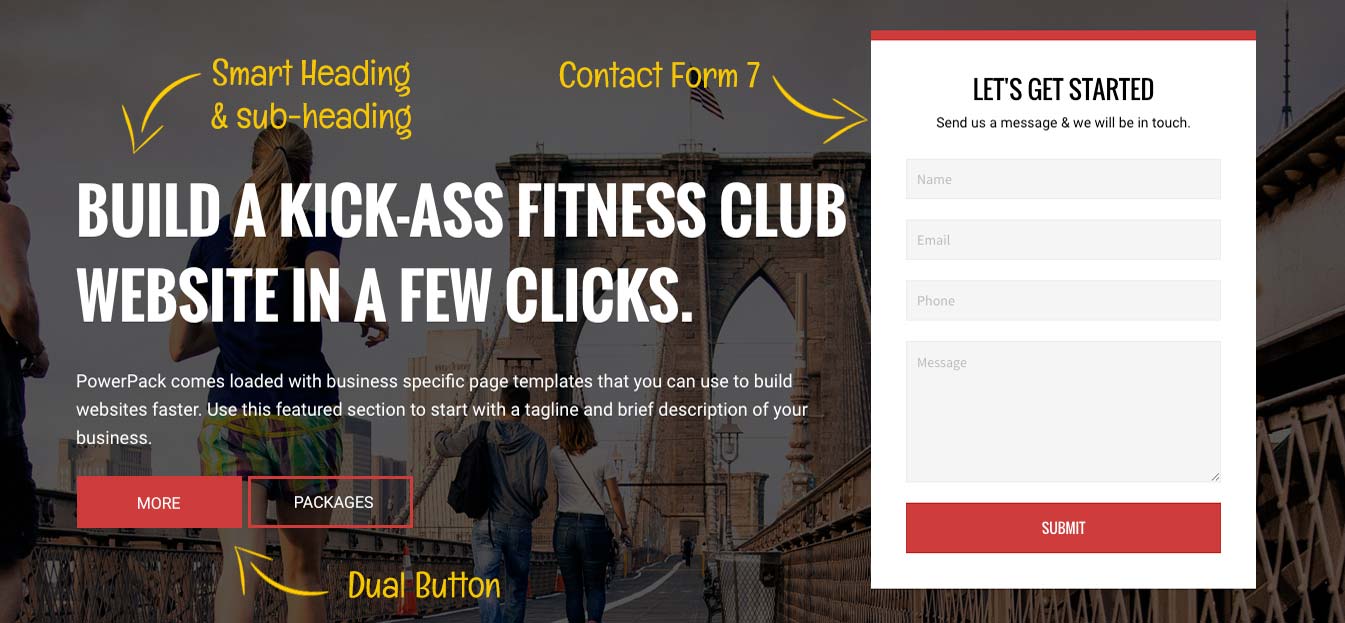
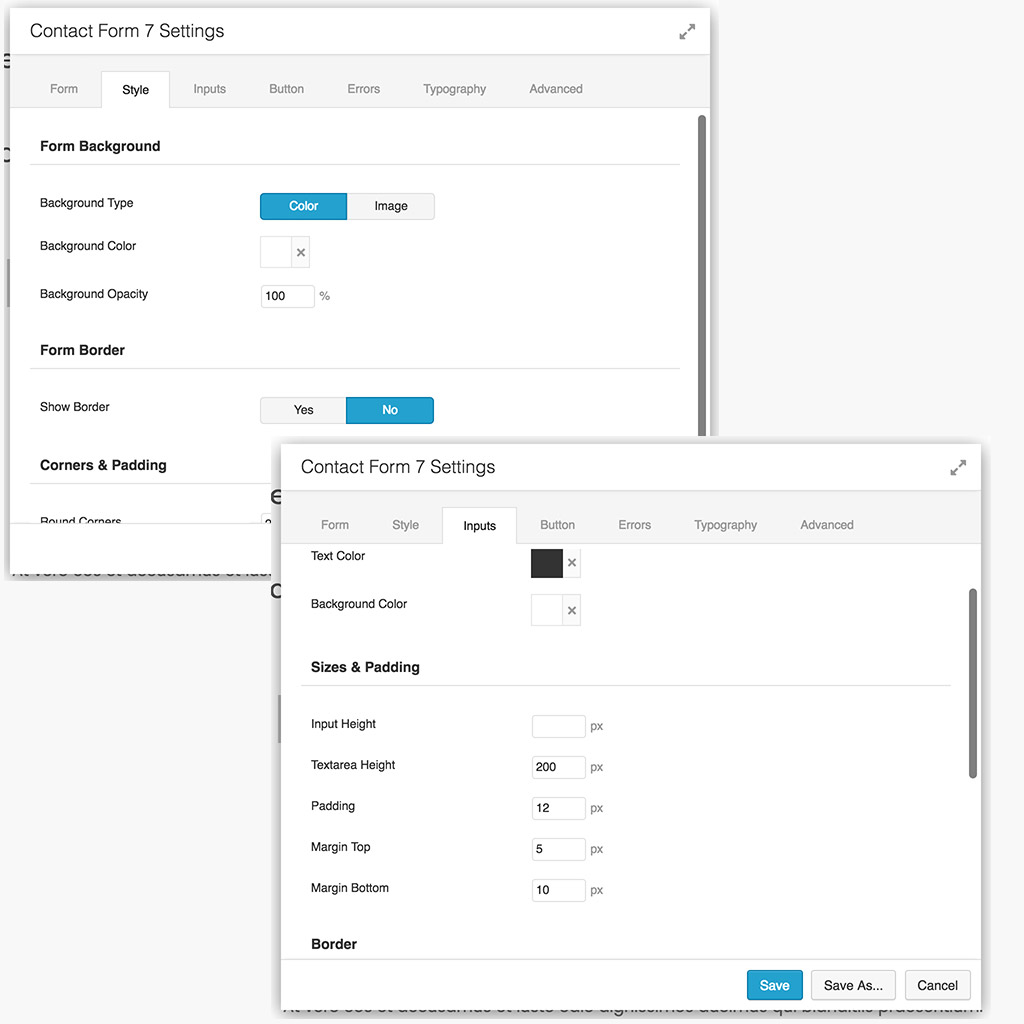
- Contact Form 7 Module: Style your CF7 forms from the front end with easy to use design options. No custom code required.
- Dual Button: A smart button module that lets you create a beautiful call-to-action dual buttons.
- Heading: A smart Heading module that allows you to Write and Create attention-grabbing headlines on the page.
- Icon / Number List: A fantastic content module that allows you to create list items with over 2000 font icons or numbers for bullet points.
- Fancy Heading: Sayonara to old boring heading! With the Fancy heading module, you can create a stylish and impressive heading for your website pages.
- Business Hours: You can use this to display opening and closing hours with various styling options.
- Facebook Modules: A creative module that increases user engagement on your site and gets more followers.
- Twitter Modules: A Module to display your Twitter feed, Tweet buttons, Twitter embedded grid and timeline.
- Divider: This module lets you add line, icon, image divider/separators between modules, rows.
Visit PowerPack Beaver Builder addon Homepage to explore our easy-to-use custom modules.
SEE, WHAT OUR USERS HAVE GOT TO SAY ABOUT POWERPACK FOR BEAVER BUILDER
Here are some testimonials from our Happy Customers and Beaver Builder experts
“PowerPack is a fantastic add-on for Beaver Builder. It is full of value and is backed by a team who really care about their product. I think PowerPack should be part of every Beaver Builder’s toolkit.” – Dynamik Beaver
“I would totally recommend PowerPack for Beaver Builder to anyone and everyone. It gets used on all the websites I build, for both myself and for clients. It’s one of the very best addons for Beaver Builder and it really enhances it. I use the paid version and it’s totally worth purchasing, plus it supports the developers.Their customer service is also absolutely brilliant. Really quick, very helpful and polite. Keep up the good work.” – itsrobsaville
“I find PowerPack incredibly useful and at an equally incredible price. The templates and modules are exceptionally well thought out. If you do find an issue, its addressed without fuss or muss by Puneet and his team. And support is equally amazing. Whenever I have had a question, its always answered with a practical and timely answer – and given that everyone’s busy these days I really appreciate that sort of effort is taken.” – IT4Worship
PowerPack Addons for Beaver Builder Pro – Features
All the modules mentioned above come in a packet of 50+ creatively designed modules that makes your website building experience more creative & effortless.
- Image Hotspot: With Image Hotspot module, you can display feature of the product, create virtual tours, display information easily and interactively.
- Image Scroll: This module allows you to display your images with numerous transition effects and provides you a creative way to showcase images on your website.
- Image Comparison: Demonstrate the power of your product or services by displaying before and after slider with image box comparison module.
- Advanced Menu: Create beautiful and highly customizable menu for your Beaver Builder website.
- Filterable Gallery: Create a beautiful gallery with filters and overlay effects.
- Photo Gallery: Create beautiful photo galleries with the Photo Gallery module.
- Image Carousel: Image Carousel module lets you add magnificent carousel effects to images on your web pages.
- Content Grid: A powerful content grid module that allows you to create compelling and flexible post grids.
- Content Tiles: Create effective magazine-style layouts to make your web page look awesome.
- Team: A content module that allows you to introduce your team of experts.
- Info Box: A fantastic content module that can be used to create beautiful content blocks with icon, heading, description, and call-to-actionbutton/link.
- Info List: A simple content module that allows you to display content in a vertical or horizontal list format.
- Countdown Timer: Use this module to create urgency on your site or set up a “Coming Soon” page.
- Post Timeline: Post Timeline module allows you to add interactive timelines on your website pages.
- Button: Create stylish call-to-action buttons with Smart Button module.
- Dual Button: A smart button module that lets you create a beautiful call-to-action dual buttons.
- Heading: A smart Heading module that allows you to Write and Create attention-grabbing headlines on the page.
- Dual Style Heading: Create heading with various styles, separators, and description. You can create dual color and dual font heading.
- Image: Allows you to showcase images in a beautiful layout.
- Testimonials: Create a testimonial slider and carousel with a few clicks. You can select from pre-defined 5 styles and customize the look and feel.
- Advanced Tabs: A content module that allows you to preset and custom styling to create beautiful tabbed content for your beaver builder site.
- Advanced Accordion: An advanced content module that lets you create accordions with custom styling options.
- Image Panels: Create impressive accordions of images with custom styling option.
- Restaurant Menu: Create a stunning menu for restaurants, cafes, bar, eateries, or list any business services.
- Timeline: Create an impressive timeline for your website pages.
- Pricing Table: A useful content module that allows you to list your packages with different style options.
- Business Hours: You can use this to display opening and closing hours with various styling options.
- Table: Create a table with custom data using various styling and sorting options.
- Icon / Number List: A fantastic content module that allows you to create list items with over 2000 font icons or numbers for bullet points.
- Animated Headlines: A creative module that allows you to add impressive and stylish headings to your website.
- One Page Navigation: Create beautiful one page websites using this module.
- 3D Slider: Create a beautiful 3D slider for your portfolio or gallery.
- Highlight Box: A creative module that lets you highlight the contents of the box with amazing effects.
- Smart Banner: Create fancy adverts or information blocks with call to action.
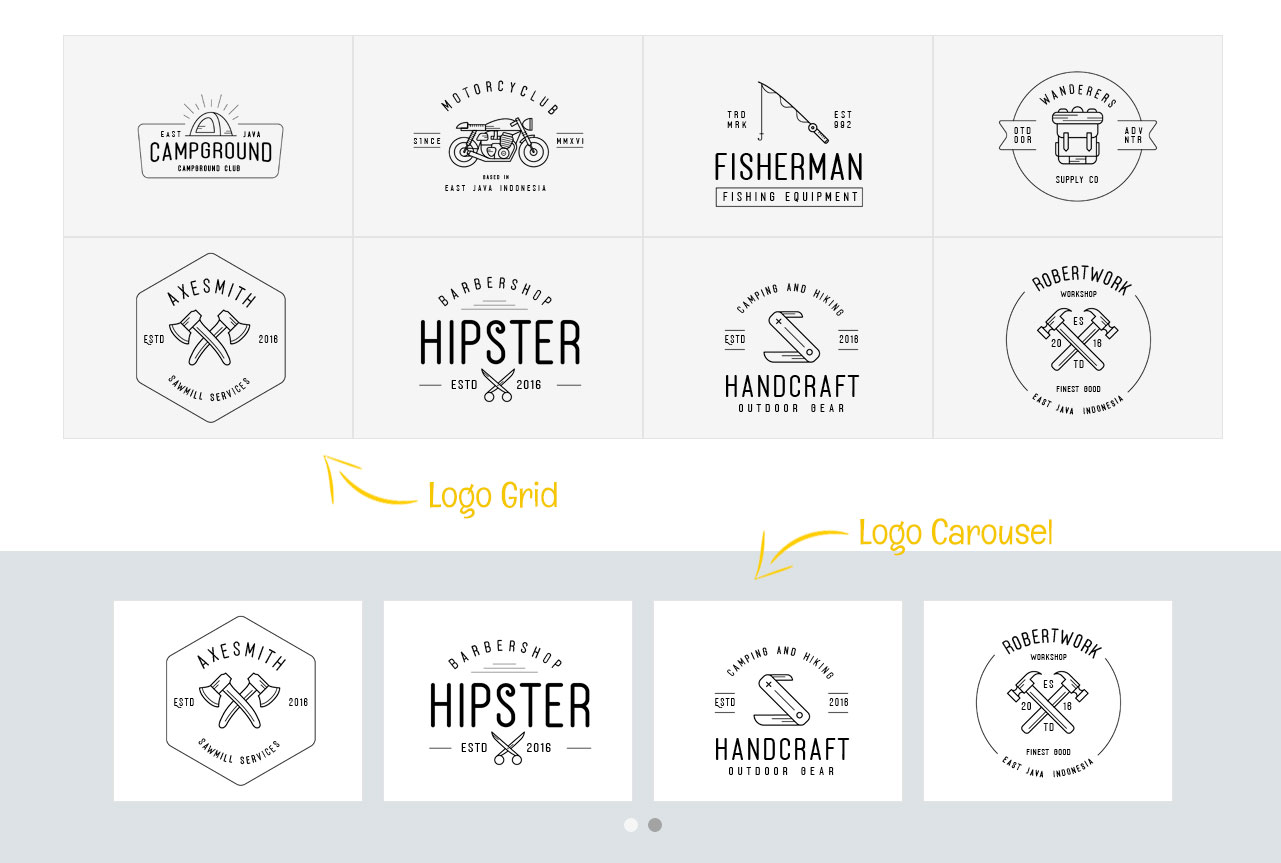
- Logo Carousel: Create a grid or carousel to flaunt your client or partner logos
- Hover Cards: A creative module that allows you to show your content with style and hover effects.
- Flip Box: Add dual side content on information boxes with flip animations.
- Fancy Heading: A creative module that allows you to create beautiful headings with built-in presets.
- Divider: As the name suggests, this module allows you to create a stylish break to your content with fancy dividers.
- Instagram Feed: A creative module that allows you to display Instagram photos from Instagram accounts.
- Facebook Modules: A creative module that increases user engagement on your site and gets more followers.
- Twitter Modules: A Module to display your Twitter feed, Tweet buttons, Twitter embedded grid and timeline.
- Modal Popup Box: Create custom content, image, video, form, template popup boxes with various trigger options – auto-load, on-click, and exit intent.
- Alert Box: With this, you can add simple notification and alert boxes to grab the user’s attention.
- Announcement Bar: A beneficial lead generation module that lets you display the latest announcements, offers, discounts, or any information
- Subscribe Form: Add attractive opt-in / subscribe forms that work with all popular mailing services.
- Forms : PowerPack’s Form Styler Modules for Beaver Builder lets you take complete control of styling the forms.
Supports Gravity Forms, Ninja Forms, Formidable Forms, WPForms & Caldera Forms. - Search Form: Create stunning Search Forms with Beaver Builder.
- Login Form: Create impressive login pages using the Beaver Builder
- Devices: Add device frames to your pages for beautifully showcasing your web designs or portfolio to your clients.
- FAQ with Schema Markup: Create, Organize & Display your FAQs with Schema Markup
- How-to with Schema Markup: Create & Display How-to Guides, Tutorials, and walk-throughs.
- Category Grid: Display Category or Custom Taxonomy on any page in a grid or carousel style with a custom feature image.
- Sitemap: Allows you to create a sitemap page for your websites that give visitors a complete overview of the site.
- Breadcrumbs: Allows you to create a hierarchical representation of the navigation links.
- MORE
A few words from our Happy Clients
Really enjoying the added features that PowerPack adds, and very impressed with the support! Thank you! – Erin Flynn
They are always quick to help even when the problem is due to another plugin.- feedsy
It really adds very good things to beaver builder, unique items like modals, and many creative modules, i rarely use them (sometime i use pieces of the,), but templates are very good too. Best of all is support, needed for dev help a pair of times and both of them he helped me fast- afvni24
Template Library with Page and Section Templates
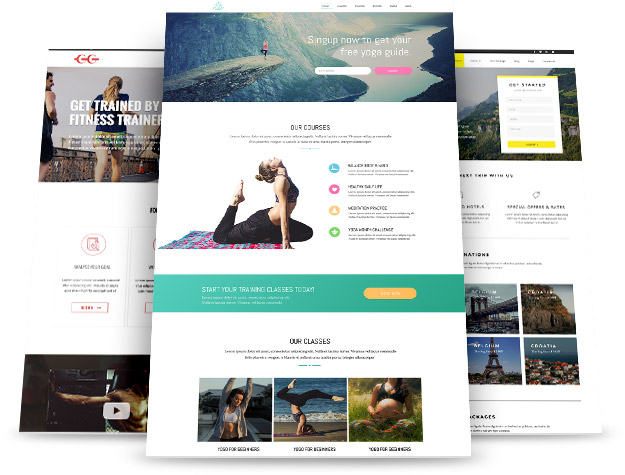
The template library is the exciting feature of PowerPack Addon. You can choose from 350+ Professionally designed page templates library.
These full page and section templates are a great way to build sites and landing pages. PowerPack users love these templates.
Check out Beaver Builder Templates.
Top Features of PowerPack Beaver Builder Addon
-
Maintenance Mode & Coming Soon Page
The Maintenance mode and Coming soon is an innovative feature of the PowerPack Addon. This feature allows you to create impressive coming soon or maintenance mode page design. Unlike other WordPress Maintenance Mode plugins, with PowerPack, you get all the features and design flexibility offered by Beaver Builder to create a custom page. -
Header Footer Builder
Header Footer Builder is another exciting feature of PowerPack. You can use this feature to build a custom Header & Footer for your website. This is the best option for those who want a single Header & Footer layout across the site. -
White Label Branding
Self-branding is extremely important when you are working for third-party clients. Hence white label feature allows you to hide the actual identity of the plugins and name it to yourself or your clients. You can hide all the identities of plugins from the website and convert it to your brand and create a compelling and professional website. -
Professional Support
PowerPack for Beaver Builder comes with professional customer support. Our team of experts is always at your service, and attempt to fix all your queries at the earliest. -
50+ Modules
- 350+ Templates
- Row Background Effects
- Fast Loading
- Valid Markup
- SEO Friendly
- Completely Mobile Responsive
- Traduction prêt
Other Beaver Builder Plugins
-
WooCommerce Modules for Beaver Builder: Build beautiful WooCommerce websites with WooPack.
-
Child Theme Generator: Child Theme Generator is an advanced tool that lets you create as many child themes as you need.
-
Dashboard Welcome for Beaver Builder: This feature allows you to customize the WordPress welcome screen, that means you can brand the Dashboard for you and your clients.
Installation
-
Install PowerPack Lite either via the WordPress plugin directory or by uploading the files to your server at wp-content/plugins.
-
Activate PowerPack Lite
Journal de modifications
Added Breadcrumbs module
1.3.3 – November 12, 2026
- Security: Dual Button – Improved sanitization for button effect classes
1.3.2 – October 15, 2026
- Enhancement: Updated compatibility with WordPress 7.1.x
- Security: Potential XSS fix in the PowerPack admin settings
1.3.1 – December 7, 2024
- Enhancement: Info Box – Added more units for the button custom width
- Enhancement: Info Box – Added explicit width and height attribute to image tag
- Enhancement: Info List – Added explicit width and height attribute to image tag
- Fix: Info Box – Button icon size was not working for dashicons
- Fix: Smart Heading – Link nofollow was not working
- Fix: Dual Buttons – Vertical spacing issue when buttons are stacked
- Fix: Dual Buttons – Alignment issue in some cases
- Security: Potential XSS fix in the PowerPack admin settings
1.3.0.5 – June 24, 2024
- Security: Added more sanitization and escaping to prevent any potential XSS
1.3.0.4 – June 20, 2024
- Corrections de sécurité
1.3.0.3 – June 18, 2024
- Fix: Beaver Builder 2.8.x compatibility fixes
Captures d'écran



Pour les développeurs
Est-ce votre plugin ? Montrez les chiffres.
Ajoutez un badge en direct à votre site, docs ou github readme. Il se met à jour par lui-même - aucun compte n'est nécessaire.
Best PowerPack Lite for Beaver Bui… alternatives
All beaver addons plugins →FAQ
PowerPack Lite for Beaver Builder: quick answers
Réponses directes, extraites des données en direct WordPress.org.
Source : WordPress.org
Is PowerPack Lite for Beaver Build… free?
Yes. PowerPack Lite for Beaver Build… is free to download and use from the official WordPress.org plugin directory.
Is PowerPack Lite for Beaver Build… safe to use in 2026?
Yes — PowerPack Lite for Beaver Build… is a safe, well-maintained plugin to use in 2026. It runs on 6K+ sites, is rated 5/5 and was last updated 3 days ago, and scores 89/100 on our health check.
How many websites use PowerPack Lite for Beaver Build…?
PowerPack Lite for Beaver Build… is active on 6K+ WordPress websites and has been downloaded 253,037 times since it launched in September 2016. It was downloaded 7,465 times in the last 30 days.
Does PowerPack Lite for Beaver Build… work with WordPress 7.1?
Yes. The developer has tested PowerPack Lite for Beaver Build… up to WordPress 7.1.5, the latest release. It requires WordPress 4.6 or newer.
What PHP version does PowerPack Lite for Beaver Build… need?
PowerPack Lite for Beaver Build… requires PHP 7.4 or higher. Most hosts run PHP 8.x today, so it works on any modern WordPress hosting.
When was PowerPack Lite for Beaver Build… last updated?
The latest version, 1.3.3, was released on November 17, 2026 (3 days ago).
Who makes PowerPack Lite for Beaver Build…?
PowerPack Lite for Beaver Build… is developed and maintained by IdeaBox Creations.
What are the best alternatives to PowerPack Lite for Beaver Build…?
The most popular alternatives to PowerPack Lite for Beaver Build… are Xpro Addons For Beaver Buil… (700+ installs), Image Carousel Addon for Be… (200+ installs) and Bridge Addons for Beaver Bu… (50+ installs).
Propulsé par PageForge
Un modèle et une feuille de calcul. Une vraie page pour chaque recherche.
PageForge transforme chaque ligne d'un CSV en une page WordPress avec son propre titre, URL, SEO et schéma, construit sur la mise en page que vous Déjà conçu. Gratuit sur WordPress.org.
- CSV et XLSX, plus Google Sheets sur les professionnels et les entreprises
- Son propre titre, URL, SEO champs et schéma pour chaque page
- Fonctionne avec l'éditeur de blocs, Elementor, Divi et Avada
- Gratuit sur WordPress.org, pas de carte de crédit